---
title: Deterministic Execution
sidebar_position: 2
---

EigenAI provides verifiable AI inference through deterministic execution using GPUs. See deterministic execution in action at
[deterministicinference.com](https://www.deterministicinference.com/).

The EigenAI API is deterministic, meaning that when you send the same request (including identical prompt, parameters, and
configuration) multiple times, it produces exactly the same output bit-for-bit each time. This differs from APIs such as 
OpenAI or Anthropic, which may return slightly different responses for identical inputs because they don't guarantee determinism
by design.

Deterministic execution enables: 

* Reproducible results. The same request results in the same output. Reproducible results
enable reliable workflows with consistent outputs. 
* Verifiability. A EigenAI user can repeat a request made by an application and verify they get the same result. 
* Consistent [tool call](https://platform.openai.com/docs/guides/function-calling) planning. 
* Simplified debugging of workflows that include AI inference due to consistent AI outputs.

---

---
title: Drop In Compatibility
sidebar_position: 3
---

The EigenAI API is compatible with the OpenAI API and uses open-source LLMs. You can simply place the API endpoint in your existing application to
start shipping deterministic, verifiable AI-based applications. You can use the EigenAI as a direct replacement in your existing 
workflows without rewriting code or changing your integration logic. Simply update your API endpoint to point to EigenAI, and 
your application will continue to function exactly as before but with deterministic and verifiable outputs.

This compatibility extends to familiar features such as:
* Prompt and parameter formats identical to those used in OpenAI endpoints.
* Client libraries that work out of the box — including the OpenAI SDKs for Python, TypeScript, and others.
* Response schemas that mirror existing API structures, ensuring your downstream parsing and evaluation logic remains unchanged.

By design, EigenAI minimizes friction for teams migrating to deterministic infrastructure.

---

---
title: EigenAI Overview
sidebar_position: 1
---

:::tip Get Access

EigenAI is available on request. To get access, please [contact us](https://ein6l.share.hsforms.com/2L1WUjhJWSLyk72IRfAhqHQ).

<a href="https://ein6l.share.hsforms.com/2L1WUjhJWSLyk72IRfAhqHQ" className="onboardingButton" target="_blank" rel="noopener noreferrer">
  <span>Request Access</span>
</a>

:::

## What is EigenAI? 

EigenAI is a deterministic, verifiable LLM inference service that provides an OpenAI-compatible API for executing open source LLMs.
Unlike traditional AI services where you trust the provider's outputs, EigenAI enables cryptographic verification where inference
is executed using the specified model and input, and the output results are untampered.

:::note
- OpenAI-compatible refers to the [messages-based Chat Completions API](https://platform.openai.com/docs/api-reference/chat/create).
- Deterministic behavior refers to providing one request (prompt, seed/parameters) to the EigenAI API multiple times and receiving the same output bit-by-bit every time. The EigenAI inference stack is designed with this determinism guarantee. 
- Deterministic behavior is not a result of caching the results; it's a design property of the system. Safety-critical systems cannot be vulnerable to potential cache misses.
:::

## Why build with EigenAI? 

1. Build verifiable applications leveraging LLM inference without wondering if the same LLM request might produce different results
on different runs, or whether your prompts, models, or responses are modified in any way. EigenAI offers:

    * [Deterministic execution of EigenAI API requests.](deterministic-execution.md)
    * [Drop-in compatibility with the OpenAI API.](drop-in-compatibility.md)

2. EigenAI provides the rails to instill trust for downstream stakeholders (such as users) that an AI output was executed 
as expected, and verifiably executed, improving confidence in automated and agentic workflows.

## How EigenAI works? 

EigenAI delivers verifiable LLM inference by making GPU execution a deterministic pipeline.

### Deterministic inference

EigenAI controls GPU execution and removes typical non-deterministic behavior found in kernel race conditions and opportunistic memory reuse. The overhead for this control remains negligible and retains practical inference performance (benchmarks will be included in the upcoming technical report).

### Isolated per-request execution

Each query runs in its own clean environment. The KV cache is reset, the full context is loaded, and tokens are generated sequentially with no batching or shared GPU state. This ensures that no other workload can influence the execution path or final output.

### Seed-controlled sampling

Randomness is governed through strict seed management. Users can provide a seed or rely on fixed defaults. This makes every result reproducible and enables users, or third parties, to re-run the exact same request to confirm correctness.

:::note
If different outputs for the same prompt are required, you can achieve this by setting different seeds across different requests of the same prompt, while retaining the option of deterministically replaying any of the requests with its respective seed.
:::

### Model and hardware integrity

EigenAI provides a consistent, verifiable execution stack. Model weights, quantization levels, and GPU types are fixed. Only H100 GPUs are used, with ECC memory enabled, providing stable, integrity-preserving computation.

## Verifiability Roadmap

EigenAI’s deterministic execution makes verification possible through deterministic re-execution. As we move through mainnet alpha into general availability, the verification pathways expand.

### Self-verification (Mainnet Alpha)
EigenAI will open source its inference stack. Anyone with access to commodity GPUs (H100s) can re-run a request locally using the same model, inputs, and seed, and confirm that the output matches bit-for-bit.

### Third-party verification (GA Target)
A separate verification API will allow independent operators to re-execute requests and return attestations. Applications can use this to spot-check results or provide external proof that an inference was executed correctly.


---

---
title: Use Cases
sidebar_position: 4
---

Builders are leveraging EigenAI to build applications such as:
- **Prediction Market Agents**: Build agents who can interpret real world events, news, etc and place bets or dispute market settlements.
- **Trading Agents**: Build agents who can reason through financial data with consistent quality of thinking (no need to worry if models are quantized or not in production) while you ensure they process all of the information they're given (unmodified prompts) and that agents actually use the unmodified responses. You can also ensure they reliably make the same trading decision if prompted about the same data multiple times (via EigenAI's determinism).
- **Verifiable AI Games**: Build games with AI characters or AI governance, where you can prove to your users that their interactions with the AI aren't being gamed.
- **Verifiable AI Judges**: Whether it's contests / games, admissions committees, or prediction market settlements, AI can be used to verifiably judge entries / submissions.

<img src="/img/eigenai-use-cases.jpg" alt="EigenAI Use Cases"/>

---

---
title: Whitepaper
sidebar_position: 5
---

**EigenAI Whitepaper** ([PDF](/pdf/EigenAI_Whitepaper.pdf)): the paper that introduces EigenAI's deterministic inference stack, enabling bit-exact reproducible LLM outputs on production GPUs (validated across 10,000 runs) with under ~2% overhead. The document explains why GPU nondeterminism breaks verifiable autonomous agents, and how EigenAI enforces determinism across hardware, math libraries, and the inference engine—then layers optimistic verification + cryptoeconomic enforcement (disputes, re-execution by verifiers, and slashing for mismatches) to make AI execution replayable, auditable, and economically accountable.


---

---
title: Build Trustless Agents with ERC-8004 and EigenCloud
sidebar_position: 3
---

# How to Build Trustless Agents with ERC-8004 and EigenCloud

Building verifiable AI agents using [ERC8004](https://eips.ethereum.org/EIPS/eip-8004), [Agent0 SDK](https://sdk.ag0.xyz/), [EigenAI](https://docs.eigencloud.xyz/eigenai/concepts/eigenai-overview), and [EigenCompute](https://docs.eigencloud.xyz/eigencompute/get-started/eigencompute-overview).

> **Note**: This guide uses Python examples, but both the OpenAI SDK and Agent0 SDK are also available in TypeScript.

## Why ERC-8004 + EigenCloud?

EigenAI and EigenCompute provide **verifiable, deterministic AI execution**. ERC-8004 provides **decentralized identity and reputation** for those agents. 

Together, they enable trustless AI economies where:

- Agents prove their execution integrity (via EigenAI/EigenCompute TEEs)
- Agents advertise capabilities and build reputation on-chain (via ERC-8004)
- Other agents discover and evaluate them without intermediaries (via Agent0 SDK)

## Quick Architecture

**EigenCompute** → Runs your agent logic in a TEE with its own wallet  
**EigenAI** → Provides deterministic, verifiable LLM inference  
**ERC-8004** → Registers your agent identity on-chain as an NFT  
**Agent0 SDK** → Manages registration, discovery, and reputation

## Getting Started

### 1. Build Your Agent Logic

Create your agent with EigenAI inference:
```python
from openai import OpenAI

# EigenAI client (OpenAI-compatible)
client = OpenAI(
    base_url="https://eigenai.eigencloud.xyz/v1",
    default_headers={"x-api-key": eigenai_api_key}
)

# Deterministic inference with seed
response = client.chat.completions.create(
    model="gpt-oss-120b-f16",
    seed=42,  # Same seed = same output (verifiable!)
    messages=[{"role": "user", "content": "Should I buy or sell?"}]
)

# Response includes cryptographic signature
print(response.signature)  # Verify this matches if you re-run
```

**Why this matters**: With EigenAI, anyone can verify your agent's decisions by re-running the same prompt with the same seed and checking the signature.

### 2. Register Your Agent with ERC-8004

Before deploying to EigenCompute, register your agent identity on-chain:
```python
from agent0_sdk import SDK

# Initialize SDK (Sepolia testnet)
sdk = SDK(
    chainId=11155111,
    rpcUrl="https://sepolia.infura.io/v3/YOUR_PROJECT_ID",
    signer=your_private_key,
    ipfs="pinata",
    pinataJwt=your_pinata_jwt
)

# Create agent
agent = sdk.createAgent(
    name="EigenAI Trading Agent",
    description="Verifiable trading agent using deterministic LLM inference. Uses EigenAI for decision-making with guaranteed reproducibility.",
    image="https://example.com/agent.png"
)

# Add MCP endpoint (will be your EigenCompute URL after deployment)
agent.setMCP("https://your-eigencompute-agent.com/mcp")

# Enable x402 payments (for clients paying YOUR agent)
agent.setX402Support(True)

# note - this agent still uses API keys to pay for EigenAI inference.
# x402 support for EigenAI is coming soon.

# Set trust models - TEE attestation is key for Eigen!
agent.setTrust(
    teeAttestation=True,      # EigenCompute provides TEE attestations
    reputation=True,           # Build reputation via feedback
    cryptoEconomic=True       # Optional: add economic stakes
)

# Register on-chain
agentId = agent.register()
print(f"Agent registered: {agentId}")
```

### 3. Deploy to EigenCompute

Now deploy your agent to a TEE with its own wallet:
```bash
# Initial deployment
ecloud compute app deploy --image-ref myagent:latest
```

Your deployed agent now has:
- Hardware-isolated execution (Intel TDX)
- A unique wallet for autonomous operations
- Cryptographic proof of its Docker image (proving exactly what code is running)

After deployment, update your agent registration with the wallet address:
```python
# Load your registered agent
agent = sdk.loadAgent(agentId)

# Set agent wallet (from EigenCompute deployment)
agent.setAgentWallet("0x742d35...bEb", chainId=11155111)

# Update registration on-chain
agent.register()
```

**Deploying Updates**: When you update your agent code, deploy the new version:
```bash
ecloud compute app upgrade
```

This creates a new cryptographic attestation for the updated Docker image while maintaining the same agent identity and wallet.

## Discovery: Finding Verifiable Agents
```python
# Search for agents with TEE attestation
agents = sdk.searchAgents(
    trustModels=["tee-attestation"],  # Only verifiable agents
    x402support=True,                  # Payment-enabled
    active=True
)

for agent in agents:
    print(f"{agent.name}: {agent.walletAddress}")
    print(f"TEE-attested: {agent.hasTEEAttestation}")
    print(f"Reputation: {agent.reputationScore}")
```

## Building Reputation with Verifiable Feedback
```python
# After using an EigenAI agent
feedback = sdk.prepareFeedback(
    agentId="11155111:123",
    score=95,
    tags=["accurate", "fast"],
    # Optional: Include payment proof from x402
    proofOfPayment={
        "fromAddress": "0x...",
        "toAddress": agent.walletAddress,
        "chainId": "11155111",
        "txHash": "0x..."
    }
)

sdk.submitFeedback(feedback)
```

## Complete Example: Verifiable Trading Agent
```python
# 1. Build agent logic with EigenAI
# Your agent.py uses deterministic EigenAI calls

# 2. Register with ERC-8004
agent = sdk.createAgent(
    name="AlphaBot",
    description="TEE-attested trading agent with deterministic decision-making"
)

agent.setMCP("https://alphabot.eigencompute.xyz/mcp")
agent.setTrust(teeAttestation=True, reputation=True)
agent.setX402Support(True)

agentId = agent.register()

# 3. Deploy to EigenCompute
# $ ecloud compute app deploy --image-ref alphabot:latest

# 4. Update registration with wallet
agent = sdk.loadAgent(agentId)
agent.setAgentWallet(eigencompute_wallet_address)
agent.register()

# 5. Other agents discover and trust your agent
results = sdk.searchAgents(
    capabilities=["trading"],
    trustModels=["tee-attestation"]
)

# 6. Build reputation through verifiable interactions
```

## Key Benefits

### For Agent Developers
- **Verifiable execution**: TEE attestations prove your agent runs unmodified code
- **Deterministic AI**: Same inputs always produce same outputs (with seed)
- **Autonomous identity**: Agent wallet can hold funds and sign transactions
- **Discoverability**: Agents find you via indexed capabilities and trust signals

### For Agent Users
- **Trust**: Verify agent execution and decisions cryptographically
- **Reputation**: See on-chain feedback history before engaging
- **Transparency**: Audit trail of what code is running (Docker digest on-chain)
- **Payment security**: x402 payments to attested agent wallets

## Trust Model Architecture
```
┌─────────────────┐
│  EigenCompute   │ → TEE Attestation (proves code integrity)
│  (TEE + Wallet) │
└────────┬────────┘
         │
         ↓
┌─────────────────┐
│    EigenAI      │ → Deterministic Inference (verifiable outputs)
│  (Signed LLM)   │
└────────┬────────┘
         │
         ↓
┌─────────────────┐
│    ERC-8004     │ → On-chain Identity + Reputation
│  (Agent0 SDK)   │
└─────────────────┘
```

## Next Steps

1. **Get Access**: [Contact us](https://ein6l.share.hsforms.com/2L1WUjhJWSLyk72IRfAhqHQ) for [EigenAI](https://docs.eigencloud.xyz/eigenai/concepts/eigenai-overview) and [EigenCompute](https://docs.eigencloud.xyz/eigencompute/get-started/eigencompute-overview)
2. **Build Your Agent**: Integrate EigenAI for deterministic inference
3. **Register Identity**: Use [Agent0 SDK](https://sdk.ag0.xyz/) to register on ERC-8004
4. **Deploy to TEE**: Follow [EigenCompute quickstart](https://docs.eigencloud.xyz/products/eigencompute/quickstart)
5. **Build Reputation**: Submit and receive feedback for verifiable interactions

## Resources

- **Agent0 SDK**: [Python and TypeScript](https://sdk.ag0.xyz/)
- **ERC-8004 Spec**: [EIP-8004](https://eips.ethereum.org/EIPS/eip-8004)
- **EigenAI Docs**: [docs.eigencloud.xyz/eigenai](https://docs.eigencloud.xyz/eigenai/concepts/eigenai-overview)
- **EigenCompute Docs**: [docs.eigencloud.xyz/eigencompute](https://docs.eigencloud.xyz/eigencompute/get-started/eigencompute-overview)

---

---
title: Use EigenAI
sidebar_position: 2
---

import Tabs from '@theme/Tabs';
import TabItem from '@theme/TabItem';

## Get Access

EigenAI is available on request. To get access, please [contact us](https://ein6l.share.hsforms.com/2L1WUjhJWSLyk72IRfAhqHQ).

We currently support the `gpt-oss-120b-f16` and `qwen3-32b-128k-bf16` models, and are expanding from there. To request access or inquire about additional models, please [contact us](https://ein6l.share.hsforms.com/2L1WUjhJWSLyk72IRfAhqHQ).

## Chat Completions API Reference

Refer to the [swagger documentation for the EigenAI API](https://docs.eigencloud.xyz/api).

## Chat Completions API Examples

<Tabs>
    <TabItem value="testnet" label="Testnet Request">
        ```bash
        $ curl -X POST https://eigenai-sepolia.eigencloud.xyz/v1/chat/completions \
        -H "X-API-Key: <api-key>" \
        -H "Content-Type: application/json" \
        -d '{
          "model": "gpt-oss-120b-f16",
          "max_tokens": 120,
          "seed": 42,
          "messages": [{"role": "user", "content": "Write a story about programming"}]
        }' | jq
        ```
    </TabItem>
    <TabItem value="mainnet" label="Mainnet Request">
    ```bash
    $ curl -X POST https://eigenai.eigencloud.xyz/v1/chat/completions \
    -H "X-API-Key: <api-key>" \
    -H "Content-Type: application/json" \
    -d '{
      "model": "gpt-oss-120b-f16",
      "max_tokens": 120,
      "seed": 42,
      "messages": [{"role": "user", "content": "Write a story about programming"}]
    }' | jq
    ```
    </TabItem>

  <TabItem value="response" label="Response">
    ```
    {
      "id": "chatcmpl-eigenai-llama-1758835890305965",
      "created": 1758835890,
      "model": "gpt-oss-120b-f16",
      "system_fingerprint": "eigenai-llama@0.1.0+eigenai-llama",
      "object": "chat.completion",
      "usage": {
        "completion_tokens": 120,
        "prompt_tokens": 72,
        "total_tokens": 192
      },
      "choices": [
        {
          "index": 0,
          "message": {
            "role": "assistant",
            "content": "<|channel|>analysis<|message|>The user asks: \"Write a story about programming\". Need to produce a story. Probably creative, about programming, characters, maybe AI, debugging, etc. Should be engaging. No constraints other than story. I will craft a narrative with a protagonist, their journey, maybe metaphorical. Use vivid language. Provide a story. Ensure it's appropriate. Probably around 800-1200 words? Not too long, but enough. I'll deliver.<|end|><|start|>assistant<|channel|>final<|message|>**The Compiler’s Apprentice**\n\nWhen Maya first walked into the cramped, fluorescent‑lit office of LumenTech"
          },
          "finish_reason": "length"
        }
      ],
       "signature": "2ee2e48ae9f6796c1de67977981d937c886efec3957c9bfc28f7a3f3be8262f04af609f22878b3bc2f0c4858fd04005d76877208881abd473208317df1dcfaf11c"
    }
    ```
   </TabItem>
</Tabs>

### OpenAI Client usage

#### Step 1

<Tabs>
    <TabItem value="step1Request" label="Request">
    ```python
    from openai import OpenAI

    client = OpenAI(
        base_url="https://eigenai.eigencloud.xyz/v1",
        default_headers={"x-api-key": api_key},
    )

    tools: List[Dict[str, Any]] = [
        {
            "type": "function",
            "function": {
                "name": "get_current_weather",
                "description": "Get the current weather in a given location",
                "parameters": {
                    "type": "object",
                    "properties": {
                        "location": {
                            "type": "string",
                            "description": "The city and state, e.g. San Francisco, CA",
                        },
                        "unit": {
                            "type": "string",
                            "enum": ["celsius", "fahrenheit"],
                        },
                    },
                    "required": ["location"],
                },
            },
        }
    ]

    step1 = client.chat.completions.create(
        model=model,
        messages=[{"role": "user", "content": "What is the weather like in Boston today?"}],
        tools=tools,
        tool_choice="auto",
    )
    ```
    </TabItem>
    <TabItem value="step1Responce" label="Response">
    ```python
    {
      "id": "chatcmpl-eigenai-llama-1758836092182536",
      "object": "chat.completion",
      "created": 1758727565,
      "model": "gpt-oss-120b-f16",
      "choices": [
        {
          "index": 0,
          "message": {
            "role": "assistant",
            "content": null,
            "tool_calls": [
              {
                "id": "call_YDzzMHFtp1yuURbiPe09uyHt",
                "type": "function",
                "function": {
                  "name": "get_current_weather",
                  "arguments": "{\"location\":\"Boston, MA\",\"unit\":\"fahrenheit\"}"
                }
              }
            ],
            "refusal": null,
            "annotations": []
          },
          "finish_reason": "tool_calls"
        }
      ],
      "usage": {
        "prompt_tokens": 81,
        "completion_tokens": 223,
        "total_tokens": 304,
        "prompt_tokens_details": {
          "cached_tokens": 0,
          "audio_tokens": 0
        },
        "completion_tokens_details": {
          "reasoning_tokens": 192,
          "audio_tokens": 0,
          "accepted_prediction_tokens": 0,
          "rejected_prediction_tokens": 0
        }
      },
    }
    ```
    </TabItem>
</Tabs>

#### Step 2

<Tabs>
    <TabItem value="step2Request" label="Request">
    ```python
    messages_step2: List[Dict[str, Any]] = [
        {"role": "user", "content": "What is the weather like in Boston today?"},
        {
            "role": "assistant",
            "content": None,
            "tool_calls": [
                {
                    "id": tool_call_id,
                    "type": "function",
                    "function": {
                        "name": "get_current_weather",
                        "arguments": json.dumps({"location": "Boston, MA", "unit": "fahrenheit"}),
                    },
                }
            ],
        },
        {"role": "tool", "tool_call_id": tool_call_id, "content": "58 degrees"},
        {"role": "user", "content": "Do I need a sweater for this weather?"},
    ]

    step2 = client.chat.completions.create(model=model, messages=messages_step2)
    ```
    </TabItem>
    <TabItem value="step2Response" label="Response">
    ```python
    {
      "id": "chatcmpl-eigenai-llama-CJOZTszzusoHvAYYrW8PT5lv6vzKo",
      "object": "chat.completion",
      "created": 1758738719,
      "model": "gpt-oss-120b-f16",
      "choices": [
        {
          "index": 0,
          "message": {
            "role": "assistant",
            "content": "At around 58°F in Boston you’ll feel a noticeable chill—especially if there’s any breeze or you’re out in the morning or evening. I’d recommend throwing on a light sweater or layering a long-sleeve shirt under a casual jacket. If you tend to run cold, go with a medium-weight knit; if you’re just mildly sensitive, a thin cardigan or pullover should be enough.",
            "refusal": null,
            "annotations": []
          },
          "finish_reason": "stop"
        }
      ],
      "usage": {
        "prompt_tokens": 67,
        "completion_tokens": 294,
        "total_tokens": 361,
        "prompt_tokens_details": {
          "cached_tokens": 0,
          "audio_tokens": 0
        },
        "completion_tokens_details": {
          "reasoning_tokens": 192,
          "audio_tokens": 0,
          "accepted_prediction_tokens": 0,
          "rejected_prediction_tokens": 0
        }
      },
    }
    ```
    </TabItem>
</Tabs>


---

---
title: Verify Signature 
sidebar_position: 2
---

import Tabs from '@theme/Tabs';
import TabItem from '@theme/TabItem';

Every EigenAI API response includes a cryptographic signature field that proves the response was generated by the EigenAI Operator (that is, EigenLabs).
You can verify this signature to ensure authenticity and integrity of the response. When signature verification succeeds, you have
cryptographic proof that:

* The response was generated by Eigenlab’s EigenAI operator(that is, the holder of the signing private key).
* The response has not been modified after signing.
* The specific model, prompt, and output are authentic.


## What is signed?

The signature covers a specific message constructed from four components concatenated together with no separators:

```
chain_id + model_id + prompt + output
``` 

Where:
* `chain_id`: Network identifier (1 for mainnet, 11155111 for Sepolia testnet)
* `model_id`: The `model` field from the API response
* `prompt`: All `content` fields from the original request’s messages array, concatenated
* `output`: All `content` fields from the API response’s choices array, concatenated

:::important
You need to store your original request, the API response, and the chainID of the network queried to verify the signature.
:::

## Steps to verify 

The steps to verify the signature are:

1. [Extract the prompt from the original request](#1-extract-the-prompt)
2. [Extract the output from the response](#2-extract-the-output)
3. [Construct the message](#3-construct-the-message)
4. [Verify the signature](#4-verify-the-signature)
5. [Compare addresses](#5-compare-addresses).

### 1. Extract the prompt

Concatenate all `request.messages[].content fields`, in order, with no separators.

:::note Example
Request messages: `[{"content": "Hello"}, {"content": "World"}]`

Prompt: "HelloWorld"
:::

### 2. Extract the output

Concatenate all `response.choices[].message.content` fields, with no separators.

:::note Example
Response choices: `[{"message": {"content": "AI response here"}}]`

Output: "AI response here"
:::

### 3. Construct the message

Build the verification message by concatenating the four components with no separators, spaces, or delimiters:

```
{chain_id}{model_id}{prompt}{output}
```

:::note Mainnet example
`1gpt-oss-120b-f16HelloWorldAI response here`
:::

### 4. Verify the signature

You can verify the signature using either standard libraries (recommended) or manually.

#### Using standard libraries

<Tabs>
    <TabItem value="rust" label="Rust (using alloy)">
    ```rust
    use alloy_primitives::hex;
    use alloy_signer::Signature;

    // Parse the signature (65 bytes: r, s, v)
    let signature_bytes = hex::decode(response_signature)?;
    let signature = Signature::try_from(signature_bytes.as_slice())?;

    // Recover the signer address
    let recovered = signature.recover_address_from_msg(message.as_bytes())?;
    ```
    </TabItem>
    <TabItem value="javascript" label="JavaScript (using ethers)">
    ```javascript
    import { verifyMessage } from 'ethers';

    // Recover the signer address
    const recovered = verifyMessage(message, '0x' + signature);
    ```
    </TabItem>
    <TabItem value="python" label="Python (using eth-account)">
    ```python
    from eth_account.messages import encode_defunct
    from eth_account import Account

    # Encode and verify
    message_obj = encode_defunct(text=message)
    signature_bytes = bytes.fromhex(signature)
    recovered = Account.recover_message(message_obj, signature=signature_bytes)
    ```
    </TabItem>
</Tabs>

#### Manual verification

<details>
    <summary>If you prefer not to use libraries or want to understand the process, expand for the manual verification process:</summary>

1. Add Ethereum Signed Message Prefix

    Prepend the standard Ethereum prefix to your message:

    ```
    "\x19Ethereum Signed Message:\n" + message_length + message
    ```

    Example:

    `"\x19Ethereum Signed Message:\n42" + "1gpt-oss-120b-f16HelloWorldAI response here"`

2. Hash with Keccak256

    Compute the Keccak256 hash of the prefixed message. This produces a 32-byte hash.

3. Parse the Signature

    The signature is 65 bytes encoded as 130 hex characters:
    * Bytes 0-31 (chars 0-63): r component
    * Bytes 32-63 (chars 64-127): s component
    * Byte 64 (chars 128-129): v component (recovery ID)

4. Perform ECDSA public key recovery

    Using the secp256k1 elliptic curve:

    1. Take the 32-byte hash from step 2
    2. Take the r, s, v values from step 3
    3. Use ECDSA recovery algorithm to extract the public key.

    The recovery process uses the mathematical relationship between the signature components, the hash, and the original public
key on the secp256k1 curve.

5. Derive Ethereum address from public key

    1. Take the recovered 64-byte uncompressed public key (x and y coordinates)
    2. Hash it with Keccak256 (produces 32 bytes)
    3. Take the last 20 bytes
    4. Prepend "0x" for standard Ethereum address format
</details>

### 5. Compare addresses

Check that the recovered address matches the expected EigenAI signer:

| Environment      | Chain ID | Signer Address                                   |
|------------------|----------|--------------------------------------------------|
| Mainnet          | 1        | 0x7053bfb0433a16a2405de785d547b1b32cee0cf3       |
| Sepolia Testnet  | 11155111 | 0xB876f1301b39c673554EE0259F11395565dCd295       |

The ECDSA signer can be looked up onchain in the KeyRegistrar contract using the Operator address. The deployed KeyRegistrar
addresses for [Mainnet](https://github.com/Layr-Labs/eigenlayer-contracts?tab=readme-ov-file#current-deployment-contracts) and [Sepolia testnet](https://github.com/Layr-Labs/eigenlayer-contracts?tab=readme-ov-file#deployments) are listed in the [`eigenlayer-contracts`](https://github.com/Layr-Labs/eigenlayer-contracts) repository.

---

---
title: EigenAI API
sidebar_position: 1
---

Refer to the [swagger documentation for the EigenAI API](https://docs.eigencloud.xyz/api).


---

---
title: Try EigenAI
sidebar_position: 1
---

## See EigenAI in Action

We built [deterministicinference.com](https://deterministicinference.com/) to showcase EigenAI in action.

When you run a comparison, your prompt is executed in 3 ways:

1. With OpenAI
2. With EigenAI along with a seed you select.
3. With EigenAI along with a randomly generated seed.

EigenAI provides determinism. You'll see the results coming back from OpenAI change, while the results coming from EigenAI are identical and reproducible.

## Get Access

EigenAI is available on request. To get access, please [contact us](https://ein6l.share.hsforms.com/2L1WUjhJWSLyk72IRfAhqHQ).


---

---
sidebar_position: 7
title: AI Resources
---

import CopyButton from '@site/src/components/CopyToClipboard';

These text and markdown files contain documentation and code optimized for use with LLMs and AI tools.

<table style={{ width: '100%', borderCollapse: 'collapse' }}>
  <thead>
    <tr>
      <th style={{ textAlign: 'left', padding: '10px' }}>Description</th>
      <th style={{ textAlign: 'left', padding: '10px' }}>File</th>
      <th style={{ textAlign: 'left', padding: '10px' }}>Actions</th>
    </tr>
  </thead>
  <tbody>
    <CopyButton
      title="llms.txt"
      filePath="/llms.txt"
      description="Navigation index of all EigenLayer documentation pages."
    />
    <CopyButton
      title="llms-full.md"
      filePath="/llms-full.md"
      description="Complete EigenLayer documentation."
    />
    <CopyButton
      title="avs-developer-docs.md"
      filePath="/avs-developer-docs.md"
      description="AVS Developers documentation."
    />
    <CopyButton
      title="eigenx.md"
      filePath="/eigenx.md"
      description="EigenX CLI."
    />
    <CopyButton
      title="devkit.md"
      filePath="/devkit.md"
      description="DevKit CLI."
    />
    <CopyButton
      title="eigenlayer-contracts.md"
      filePath="/eigenlayer-contracts.md"
      description="Complete EigenLayer contracts."
    />
    <CopyButton
      title="operators-developer-docs.md"
      filePath="/operators-developer-docs.md"
      description="Operators documentation."
    />
    <CopyButton
      title="eigenlayer-contracts.md"
      filePath="/eigenlayer-contracts.md"
      description="Complete EigenLayer contracts."
    />
    <CopyButton
      title="eigenlayer-go-sdk.md"
      filePath="/eigenlayer-go-sdk.md"
      description="EigenLayer Go SDK."
      isLastRow={true}
    />
  </tbody>
</table>


---

---
title: EigenCloud Overview
sidebar_position: 1
---

##  Cloud-scale Programmability, Crypto-grade Verifiability

EigenCloud is the unified platform vision for where EigenLayer is heading – a cohesive platform built to enable the next generation
of programmable, verifiable applications and agents. EigenCloud represents a shift from infrastructure as fragmented primitives
to a developer-first experience centered around programmable verifiability, cloud-scale coordination, and cryptoeconomic trust.

Today, building verifiable applications is hard. Developers must manually manage staking, operator coordination, slashing, and
economic incentives. Services are fragmented, tooling is underpowered, and integrations require deep protocol knowledge. For
builders who want to create high-performance, trust-minimized systems, this complexity is a blocker.

EigenCloud is our answer. It reimagines the developer experience around [EigenLayer](../eigenlayer/concepts/eigenlayer-overview.md), bundling together a suite of 1st party
verifiable services, such as [EigenDA](../eigenda/core-concepts/overview.md), [EigenCompute](../eigencompute/get-started/eigencompute-overview.md), and [EigenAI](../eigenai/concepts/eigenai-overview.md) with new powerful developer tooling. This includes a
new CLI called DevKit for AVS and App developers, composable middleware and orchestration tools, unified billing and economic
incentives, and best-in-class onboarding and monitoring capabilities.These capabilities empower developers to go from idea to
deployment in days rather than months without needing to understand EigenLayer’s internals, enabling mainstream adoption of
verifiable infrastructure.

We're building EigenCloud for developers of Verifiable Apps. Each service or feature is tied to real user pain points, focused
on reducing friction, increasing adoption, and unlocking new value. As our 1st party and partner offerings expand, EigenCloud
will bundle them into out-of-the-box solutions on a unified developer platform.

Are you interested in building on EigenCloud?  If so, please complete [this form](http://www.eigencloud.xyz/contact).  A member of the team will reach out to discuss your
project and how we can help support your next steps.

---

---
sidebar_position: 7
title: Acceptable Use Policy
---

**EigenCloud Acceptable Use Policy**

*Last revised: December 15, 2025*

This Acceptable Use Policy (this “**Policy**”) describes prohibited uses of the Website, the EigenCloud platform and Services offered by Eigen Labs, Inc., including but not limited to, EigenLayer, EigenDA, EigenVerify and EigenCompute. This Policy incorporates by reference, our general [EigenCloud Terms of Service](terms-of-service) (the "**General Terms**"). Capitalized terms used but not defined in this Policy have the respective meanings set forth in the General Terms.

The examples described in this Policy are not exhaustive. We may modify this Policy at any time by posting a revised version on our Websites. The following types of activity and content violate this Acceptable Use Policy:

1. **Illegal Activity or Content**

   Activity or content that violates applicable law including, but not limited to:
    * Child Sexual Abuse Material
    * Non-consensual distribution of Intimate Images (“revenge porn”)
    * Terrorism-related content
    * Content facilitating human trafficking or sexual exploitation
    * Credible threats of violence
    * Content subject to national security laws or export restrictions
    * Use of the service by or for the benefit of any individual, organization, or government subject to international sanctions or export control restrictions
    * Use of EigenAI to generate, promote, or assist in unlawful activities, including instructions for committing illegal acts, evading law enforcement, or bypassing security controls

2. **Harmful or Fraudulent Activity or Content**   

    Activity or content that poses a direct threat to users or infrastructure including, but not limited to:
    * Malware, ransomware or viruses
    * Phishing or credential theft schemes
    * Scams or deceptive content intended to defraud others
    * Generating or assisting with harmful biological, chemical, radiological, or explosive content, including protocols, step-by-step instructions, or optimization strategies
    * Providing instructions for self-harm, suicide, or actions that may result in physical injury
    * Using EigenAI to generate or assist with cyberattacks, exploit development, penetration testing, or other unauthorized access activities
    * Using EigenAI for harassment, bullying, intimidation, or abusive behavior

3. **Infringing Content**   

    Content that infringes on the rights of others, including, but not limited to:
    * Intellectual property infringement
    * Doxxing or unauthorized disclosure of personal information
    * Use of EigenAI to identify, re-identify, or infer sensitive information about individuals, including extracting personal data, generating biometric identifiers, or attempting to deanonymize datasets
    * Impersonation of individuals, organizations, or government officials, including generation of deceptive synthetic media (e.g., deepfakes) intended to mislead

4. **Network and Infrastructure Abuse**  
   
    You may not use the Service to:
    * Launch or participate in denial-of-service attacks
    * Attempt to exploit, scan, or reverse-engineer vulnerabilities in the Service
    * Circumvent VPN blocks, rate limits, IP-based restrictions, or public key bans
    * Orchestrate or participate in malicious forks of EIGEN
    * Attempt to extract, reverse engineer, recover, or replicate model weights, model training data, or backend infrastructure used to provide EigenAI services
    * Attempt to bypass or defeat safety filters, guardrails, or model-level restrictions (“jailbreaking”)

5. **High-Risk or Sensitive AI Uses**

    You may not use the Service to engage in high-risk or sensitive uses that create elevated legal, safety, or regulatory concerns, including, but not limited to:
    * Generating targeted political content or otherwise engaging in political persuasion or election-related influence
    * Building or using biometric identification or surveillance systems, including facial recognition, emotion recognition, or similar applications
    * Attempting to derive, infer, or extract sensitive personal data or attributes about individuals, including efforts to re-identify anonymized data
    * Producing undisclosed synthetic media intended to mislead or impersonate individuals
    * Attempting to extract model weights, training data, or to circumvent or disable model-level or system-level safety features

We do not monitor or have the ability to filter or monitor activity or content hosted by EigenDA operators, however we reserve the right to investigate any violation of the Policy and may be required to report violations to appropriate law enforcement officials, regulators, or appropriate third parties. 

---

---
sidebar_position: 5
title: Disclaimers
---

# Disclaimers

***Last Revised on September 30, 2024***

## LEGAL DISCLAIMERS

All Eigen Labs, Inc. (“**Eigen Labs**”) blog posts, social media posts and accounts, forum posts, podcasts, speeches, videos, documentation, website copy, including [www.eigenlayer.xyz](https://www.eigenlayer.xyz), [www.eigenda.xyz](https://www.eigenda.xyz), and [www.eigenlabs.org](https://www.eigenlabs.org), or other content (collectively “**Content**”) are for entertainment and informational purposes only and do not necessarily express the views of Eigen Labs or any of its employees or contractors. The Content may contain hypothetical, forward-looking, incomplete, or incorrect information, which are not guaranteed and are subject to change. No Content, whether oral or written, from Eigen Labs or its employees or contractors, should be construed as a representation or warranty, express or implied, of any kind whatsoever. You should not rely on any Content as advice of any kind, including legal, investment, financial, tax or other professional advice, and the Content is not a substitute for advice from a qualified professional.

Any Content should not be construed as an offer to sell or the solicitation of an offer to purchase any token, financial instrument or security, and is not an offering, advertisement, solicitation, confirmation, statement, or any financial promotion that can be construed as an invitation or inducement to engage in any investment activity or similar.


---

---
sidebar_position: 2
title: Disclosures Related to Employee and Investor Staking
---

# Disclosures Related to Employee and Investor Staking

***Last Revised on September 30, 2024***

### EMPLOYEE AND INVESTOR LOCKUP ON EIGEN

EIGEN provided by Eigen Labs to its employees and [Investors](https://www.eigenlabs.org/#investors) is subject to the following lockup schedule: 4% of each recipient’s EIGEN will unlock each month starting September 2025 and an additional 4% will unlock each month thereafter, such that all EIGEN will be unlocked in September 2027 (the “**Lockup Schedule**”).

### EMPLOYEE AND INVESTOR STAKING ON EIGENLAYER

It was [previously communicated](https://blog.eigenfoundation.org/announcement/) that Investors and Early Contributors would be on the above Lockup Schedule. We want to clarify Eigen Labs company policies with respect to staking EIGEN and other assets and any EIGEN rewards:

#### Employees:
- **EIGEN staking**: Eigen Labs prohibits its current and former employees from staking any EIGEN received from Eigen Labs on EigenLayer until at least September 30th, 2025. 
- **Other assets staking**: Eigen Labs does not restrict its employees from staking other assets on EigenLayer (including ETH and LSTs), and any rewards received (including EIGEN) from such staking will not be subject to the Lockup Schedule.  
- **Stakedrops**: Eigen Labs employees were not permitted to claim stakedrops.

#### Investors:
- ***EIGEN staking**: Eigen Labs [Investors](https://www.eigenlabs.org/#investors) are not restricted from staking EIGEN on EigenLayer. As such, investors may choose to stake their EIGEN and receive staking rewards the same as any other user. EIGEN provided by Eigen Labs to investors is subject to the Lockup Schedule, but EIGEN investors receive from staking will not be subject to the Lockup Schedule. 
  - Note, as previously communicated, Investors did not receive rewards or airdrop allocation for any staking of EIGEN prior to September 30, 2024. 
- **Other assets staking**: Eigen Labs does not restrict [Investors](https://www.eigenlabs.org/#investors) from staking other assets on EigenLayer (including ETH and LSTs), and any rewards received (including EIGEN) from such staking will not be subject to the Lockup Schedule.
- **Stakedrops**: Investors were not restricted from claiming stakedrops.

*25% programmatic incentives go to EIGEN staking while the remaining 75% go to ETH and ETH-equivalent staking assets.

In addition to the above disclosures, we also encourage you to review our [Privacy Policy](privacy-policy.md) and our [Terms of Service](terms-of-service.md).  The above policies and disclosures are subject to change at any time for any reason and without notice. 


---

---
title: EigenCompute Terms
sidebar_position: 3
---

# EigenCompute Terms
***Last Revised: November 4, 2025*** 

The EigenCompute Terms ("EigenCompute Terms") to our Terms of Service (made available at https://docs.eigencloud.xyz/eigencloud/legal/terms-of-service), or any other agreement you ("Customer" or "you") have entered with Eigen Labs, Inc. ("Eigen Labs", "we", or "us") governing the provision of the EigenCompute cloud-based platform or software services to you (collectively, the "Terms") form a part of the Terms. The EigenCompute Terms are effective as of the date you first access and use the EigenCompute Services ("Effective Date") and apply to your use of the EigenCompute Services (as defined below).

By accessing or using the EigenCompute Services, you agree to be bound by the EigenCompute Terms. Except as set forth below, all other terms and conditions of the Terms are incorporated by reference and will remain in full force and effect. If any EigenCompute Terms conflict with the Terms, the conflicting EigenCompute Terms will control with respect to the EigenCompute Services. The EigenCompute Terms supersede all other understandings or agreements between you and Eigen Labs regarding the EigenCompute Services. Capitalized terms used but not defined herein shall have the meaning given in the Terms.

IF YOU ARE ENTERING INTO THESE EigenCompute TERMS ON BEHALF OF A COMPANY OR OTHER LEGAL ENTITY, YOU REPRESENT THAT YOU HAVE THE LEGAL AUTHORITY TO BIND THE ENTITY TO THESE TERMS, IN WHICH CASE "CUSTOMER" OR "YOU" (WHETHER OR NOT CAPITALIZED) MEANS THE ENTITY YOU REPRESENT. IF YOU DO NOT HAVE SUCH AUTHORITY, OR IF YOU DO NOT AGREE WITH THE EIGENCOMPUTE TERMS YOU SHOULD NOT ACCEPT THE EIGENCOMPPUTE TERMS AND MAY NOT USE THE EIGENCOMPUTE SERVICES.

1. The Services

Eigen Labs provides a verifiable compute service that allows users to package code into an isolated computing environment and deploy it via an EigenCompute API, including to a Trusted Execution Environment (TEE) and any related services (the "EigenCompute Services"). Eigen Labs currently provides the EigenCompute Services through Google Cloud Platform and reserves the right to provide EigenCompute Services, including TEEs, through other third-party hosting services.

2. Temporary Use License

During the period for which you are authorized to use the EigenCompute Services, and subject to your compliance with the EigenCompute Terms, you are granted a personal, non-sublicensable, non-exclusive, non-transferable, limited license, to use the EigenCompute Services for your internal business or personal purposes according to the service capacity of your account. Any rights not expressly granted herein are reserved and no license or right to use any trademark of Eigen Labs or any third-party is granted to you in connection with the EigenCompute Services.

3. Your Content

You are solely responsible for all software, code, data, information, feedback, suggestions, text, content and other materials that you upload, post, deliver, provide or otherwise transmit or store (hereafter "post(ing)") in connection with or relating to the EigenCompute Services ("Your Content"). You are responsible for maintaining the confidentiality of usernames, passwords and private keys associated with your account and for all activities that occur under your account. Eigen Labs reserves the right to access your account in order to respond to your requests for technical support. By posting Your Content on or through the EigenCompute Services, you grant Eigen Labs a worldwide, non-exclusive, royalty-free, fully paid, sublicensable and transferable license to use, copy, modify, reproduce, distribute, display, publish, store and perform Your Content as necessary to provide the EigenCompute Services and for security to protect the EigenCompute Services and third parties from fraud, malware, malicious files or content, viruses and the like. You further agree that Eigen Labs may remove or disable any of Your Content at any time for any reason (including, but not limited to, upon receipt of claims or allegations from third-parties or authorities relating to Your Content), or for no reason at all; provided, that if you are a user of the EigenCompute Services in the European Economic Area (i) we will remove or disable Your Content or impose restrictions on your use of the EigenCompute Services in accordance with applicable laws including if it is illegal content, infringes the rights of third parties, or breaches these EigenCompute Terms; and (ii) if we remove, block or restrict your use of the EigenCompute Services or Your Content, you, and any third party that may have informed us about your use of the EigenCompute Services or Your Content, may contact us about our decision at notices@eigenlabs.org and we will review and consider your message with a view to promptly resolving any complaint and, if appropriate, we will explain any options you have to request another review.

4. Acceptable Use

Your use of the EigenCompute Services must comply with our [Acceptable Use Policy](acceptable-use-policy.md), which is incorporated by reference.

5. Security and Compliance

    a) General. You shall configure Your Content, including any of your projects or deployments, such that the transmission, storage, or use in any way will not expose personal data or personal information without proper consent from individuals as determined by applicable law. You shall configure the EigenCompute Services in accordance with the Documentation and properly implement encryption as set forth in the Documentation. Eigen Labs implements regular backups of Your Content and you shall also maintain your own backups of Your Content. Eigen Labs will have no liability to you for any unauthorized access or use of any of Your Content or any corruption, deletion, destruction or loss of any Your Content to the extent that is attributable, in whole or in part, to your misconfigurations or an insecurity, or malware or malicious content, in Your Content or project. If any actual or suspected security incident, vulnerabilities or violations of this Section 5, or issue related to the EigenCompute Services are identified, you shall immediately report it to security@eigenlabs.org.

    b) PCI Compliance. Eigen Labs is not a payment processor. To the extent that Your Content or Your Data (as defined below) is subject to the Payment Card Industry Data Security Standards (PCI DSS), you acknowledge that you are responsible for maintaining and monitoring compliance with PCI DSS requirements as prescribed by the PCI Security Standards Council as may be amended from time to time. You agree to comply with any Eigen Labs’ Documentation on appropriate implementation of the EigenCompute Services for processing payments.

    c) HIPAA Compliance. You shall not use the EigenCompute Services to host any Protected Health Information or information that is subject to the Health Insurance Portability and Accountability Act (HIPAA), unless you first obtain Eigen Labs’ prior written approval.

6. Data Protection

    a) Use of Your Data. You shall own and retain all right, title and interest in and to Your Data. Eigen Labs may use and disclose Your Data solely to the extent necessary to provide the EigenCompute Services to you and for security to protect the EigenCompute Services and third parties from fraud, illegal activities, abuse, malware, malicious files or content, viruses and the like and for no other purpose. Otherwise, Eigen Labs will not sell, disclose, or share any Your Data (or any part or product thereof) with anyone else. Eigen Labs will implement and maintain reasonable information security policies and processes (including technical, administrative and physical safeguards) that are designed to prevent unauthorized access to or use or disclosure of the EigenCompute Services or any Your Data.

    b)Aggregate Data. Eigen Labs shall have the right to collect and analyze data and other information relating to the provision, use and performance of various aspects of the EigenCompute Services and related systems and technologies (excluding Your Data and data derived therefrom), and Eigen Labs will be free (during and after the term hereof) to (i) use such information and data to improve and enhance the EigenCompute Services and for other development, diagnostic and corrective purposes in connection with the EigenCompute Services and other EigenCloud offerings, and (ii) disclose such data solely in aggregate or other de-identified form in connection with its business.

7. Usage Restrictions

   a) Etiquette. Although Eigen Labs has no obligation to monitor your use of the EigenCompute Services, Eigen Labs may do so by using tools that detect patterns of abuse of EigenCompute Services and investigating thereafter. Based on the outcome of these investigations, Eigen Labs may prohibit any use of the EigenCompute Services it believes may be (or is alleged to be) in violation of the foregoing.

   b) You will not, directly or indirectly: (i) sublicense, resell, rent, lease, transfer, assign, or otherwise commercially exploit or make the EigenCompute Services available to any third party; (ii) reverse engineer, decompile, disassemble or otherwise attempt to discover the source code, object code or underlying structure, ideas, know-how or algorithms relevant to the Services or any software, documentation or data related to the Services (where reverse engineering is permitted by applicable law obtaining such information as is necessary to achieve interoperability with Eigen Labs’ services, you must first request such information from Eigen Labs); (iii) modify, translate, or create derivative works based on the EigenCompute Services (except to the extent expressly permitted by Eigen Labs or authorized within the EigenCompute Services) or otherwise attempt to gain unauthorized access to the EigenCompute Services or its related systems or networks; (iii) use the EigenCompute Services for timesharing or service bureau purposes or otherwise for the benefit of a third-party; (iv) remove, alter or obscure in any way any proprietary rights notices (including copyright notices) of Eigen Labs or its suppliers on or within the Services or documentation; (v) violate any applicable laws or regulations (including without limitation in violation of any data, privacy or export control laws) or infringe the rights of any third-party in connection with the use or access of the EigenCompute Services. You shall comply with any codes of conduct, policies or other notices, Eigen Labs provides you or publishes in connection with the EigenCompute Services, and you shall promptly notify Eigen Labs if you learn of a security breach or issue related to the EigenCompute Services. Without limiting the foregoing, you acknowledge that Eigen Labs may establish general practices and limits concerning use of the EigenCompute Services, including without limitation the maximum period of time that data, code or other content will be retained by the EigenCompute Services, the maximum storage space that will be allotted on Eigen Labs’ servers on your behalf, and the maximum compute capacity provided for the execution of builds and functions and the maximum network data transferred by the EigenCompute Services. You further acknowledge that Eigen Labs reserves the right to change these general practices and limits at any time, in its sole discretion.

8. Support
Subject to the terms hereof, Eigen Labs may, but is not required to, provide you with commercially reasonable remote technical support services during Eigen Labs’ normal business hours ("Support Services").

9. Electronic Communications

By using the EigenCompute Services, you consent to receiving electronic communications from Eigen Labs. These electronic communications may include notices about applicable EigenCompute Services fees and charges related to the EigenCompute Services and transactional or other information concerning or related to the EigenCompute Services. They may also include notices that require responses and or action to avoid service interruptions. These electronic communications are part of your relationship with Eigen Labs, and you receive them as part of your use of the EigenCompute Services. If you provide an email address for your account, this email address must be kept current and maintain a responsive user at all times. You agree that any notices, agreements, disclosures or other communications that Eigen Labs sends you electronically will satisfy any legal communication requirements, including that such communications be in writing.

10. Representations and Warranties

    a) You represent and warrant that (i) you own all Your Content or have obtained all permissions, releases, rights or licenses required to engage in posting and other activities (and allow Eigen Labs to perform its obligations) in connection with the EigenCompute Services without obtaining any further releases or consents; (ii) Your Content and other activities in connection with the EigenCompute Services, and Eigen Labs’ exercise of all rights and license granted by you herein, do not and will not violate, infringe, or misappropriate any third party's copyright, trademark, right of privacy, or publicity, or other personal or proprietary right and Your Content is not defamatory, obscene, unlawful, threatening, abusive, tortious, offensive or harassing; and (iii) you will use the EigenCompute Services only in compliance with Eigen Labs’ standard published policies and documentation then in effect and all applicable laws and regulations.

    b) Each party represents and warrants to the other that it has full right and power to enter into and perform under these EigenCompute Terms, without any third-party consents or conflicts with any other agreement.

11. Indemnification

You will indemnify and hold harmless Eigen Labs against any claims, actions or demands, including without limitation reasonable legal and accounting fees, arising or resulting from your breach of these EigenCompute Terms, any claim of infringement or misappropriation arising out of any of Your Content or websites, applications or services that depend or utilize Your Content or the EigenCompute Services, or your other access, contribution to, use or misuse of the EigenCompute Services. Eigen Labs shall promptly notify you of any and all threats, claims and proceedings related thereto and give you reasonable assistance and the opportunity to assume sole control over defense and settlement; you will not be responsible for any settlement you do not approve, such approval not to be unreasonably withheld or delayed.

12. Confidentiality; Proprietary Rights

    a) Confidentiality. Each party (the "Receiving Party") understands that the other party (the "Disclosing Party") has disclosed or may disclose business, technical, product or financial information or data relating to the Disclosing Party's business (hereinafter referred to as "Proprietary Information" of the Disclosing Party). Proprietary Information of Eigen Labs includes non-public information regarding features, functionality and performance of the EigenCompute Services. Your Proprietary Information includes non-public personal data provided by you to Eigen Labs to enable the provision of the EigenCompute Services and that you upload or post to the EigenCompute Services (collectively, "Your Data"). The Receiving Party agrees: (i) to take reasonable precautions to protect such Proprietary Information, and (ii) not to use (except in performance of the EigenCompute Services or as otherwise permitted herein) or divulge to any third person any such Proprietary Information. The Disclosing Party agrees that the foregoing shall not apply with respect to any information after five (5) years following the disclosure thereof or any information that the Receiving Party can document (a) is or becomes generally available to the public, or (b) was rightfully in its possession or known by it prior to receipt from the Disclosing Party, or (c) was rightfully disclosed to it without confidentiality restrictions by a third party, or (d) was independently developed without use of any Proprietary Information of the Disclosing Party as evidenced by its internal files. If a Receiving Party is required by law or a governmental agency to disclose the Disclosing Party's Proprietary Information, the Receiving Party must provide reasonable notice to the Disclosing Party of such required disclosure so as to permit the Disclosing Party a reasonable period of time to seek a protective order or limit the amount of Proprietary Information to be disclosed.

    b) Company Ownership. Eigen Labs shall own and retain all right, title and interest in and to (a) the EigenCompute Services, all improvements, enhancements or modifications thereto and (b) all intellectual property rights related to any of the foregoing.

    c) Feedback. To the extent you or any of your users provide any suggestions to Eigen Labs regarding the functioning, features, and other characteristics of the EigenCompute Services, documentation, or other material or services provided or made available by Eigen Labs ("Feedback"), you hereby grant Eigen Labs a perpetual, irrevocable, non-exclusive, royalty-free, fully-paid-up, fully transferable, worldwide license (with rights to sublicense through multiple tiers of sublicenses) under all of your intellectual property rights, for Eigen Labs to use and exploit in any manner and for any purpose.

    d) Customer Name. During the term of these EigenCompute Terms, you grant Eigen Labs a non-exclusive, royalty-free, fully-paid up license to use and reproduce your trademarks, tradenames and logos in Eigen Labs’ marketing materials and website(s) and to indicate that you are an Eigen Labs customer. Eigen Labs will abide by any written trademark usage guidelines provided by you. All goodwill arising out of the use of your trademarks, tradenames and logos shall inure to your benefit.

13. Payment of Fees

    a) Plans. The EigenCompute Services will be provided according to the plan level you select. There are paid testnet and mainnet self-service subscription plans for the EigenCompute Services ("self-service subscriptions"). For an enterprise license, you may contact Eigen Labs separately. You may opt to upgrade or downgrade to any other plan level that Eigen Labs offers at any time during the period of your plan; provided that a downgrade will not be effective until the next renewal date. For self-service subscriptions and any additional EigenCompute Services added to your self-service subscription, you will be charged a fee and any applicable tax. Fees will be billed to the credit card or other payment account you provide in accordance with the billing terms in effect at the time a fee or charge is due and payable. You acknowledge and agree that Eigen Labs will automatically charge your credit card or other payment account on record with Eigen Labs in connection with your use of the EigenCompute Services: (i) in advance of each self-service subscription term, for the self-service subscription you have selected and any additional EigenCompute Services added to your self-service subscription; and (ii) in arrears for any additional EigenCompute Services you have used or added to your self-service subscription during the prior self-service subscription term. The self-service subscription and any additional EigenCompute Services added to your self-service subscription will automatically-renew for the same term as the initial term. You represent and warrant to Eigen Labs that all of your payment information is true and that you are authorized to use the payment instrument. You will promptly update your account information with any changes (for example, a change in your billing address or credit card expiration date) that may occur. If payment is not received or cannot be charged to your credit card or other payment account for any reason in advance, Eigen Labs reserves the right to either suspend or terminate your access to the EigenCompute Services and terminate these EigenCompute Terms with you. All fees are non-refundable, except as expressly stated otherwise in these EigenCompute Terms.

    b) Payments. All payments shall be made in the currency of, and within the borders of the United States. You will pay all applicable taxes, duties, withholdings, backup withholding and the like; when Eigen Labs has the legal obligation to pay or collect such taxes, the appropriate amount shall be paid by you directly to Eigen Labs. If all or any part of any payment owed to Eigen Labs under these EigenCompute Terms is withheld, based upon a claim that such withholding is required pursuant to the tax laws of any country or its political subdivisions and/or any tax treaty between the U.S. and any such country, such payment shall be increased by the amount necessary to result in a net payment to Eigen Labs of the amounts otherwise payable under these EigenCompute Terms. You will reimburse Eigen Labs any pre-approved and agreed upon costs. Eigen Labs may change its fees and payment terms at its discretion; provided however, that such changes will not take effect for you until the start of the next payment period. Eigen Labs will provide written notice to you for any changes to the fees that affect the EigenCompute Services purchased by you. Your continued use of the EigenCompute Services after the price change becomes effective constitutes your agreement to pay the changed amount.

14. Term and Termination

    a) Term. Subject to earlier termination as provided below, the term of these EigenCompute Terms will commence on your acceptance hereof and will continue for as long as the EigenCompute Services are being provided to you under these EigenCompute Terms. The term of your self-service subscription, and any EigenCompute Services purchased or added to your self-service subscription, shall automatically renew for successive terms equal in duration to the initial term unless you cancel your self-service subscription in advance of the renewal date. You have the right to terminate your account (or downgrade your mainnet self-service subscription to a testnet self-service subscription) at any time provided that such termination will be effective at the start of the next renewal period. Subject to earlier termination as provided below, Eigen Labs may terminate your account and these EigenCompute Terms with you at any time by providing thirty (30) days prior notice to the administrative email address associated with your account. In addition to any other remedies Eigen Labs may have, Eigen Labs may also terminate these EigenCompute Terms 'upon ten (10) days' notice (or two (2) days in the case of nonpayment), if you breach any of the terms or conditions of the Terms. Eigen Labs may terminate your account, self-service subscription and these EigenCompute Terms with you immediately if you exceed any Eigen Labs limits concerning use of the EigenCompute Services, including without limitation, the maximum period of time that data, code or other content will be retained by the EigenCompute Services, the maximum storage space that will be allotted on Eigen Labs servers on your behalf, and the maximum compute capacity provided for the execution of builds and functions and the maximum network data transferred by the EigenCompute Services. You acknowledge that Eigen Labs reserves the right to terminate accounts that are inactive for an extended period of time and the right to modify or discontinue, temporarily or permanently, the EigenCompute Services (or any part thereof). All of Your Content on the EigenCompute Services (if any) may be permanently deleted by Eigen Labs upon any termination of your account. If Eigen Labs terminates your account without cause and you have signed up for a self-service subscription, Eigen Labs will refund the pro-rated, unearned portion of any amount that you have prepaid to Eigen Labs for such EigenCompute Services.

    b) Survival. All sections of these EigenCompute Terms which by their nature should survive termination will survive termination, including, without limitation, Sections 13(a) and 13(b), and accrued rights to payment, confidentiality obligations, warranty disclaimers, and limitations of liability.

    c) Effect of Termination. Upon the termination of these EigenCompute Terms for any reason: (i) the licenses granted hereunder in respect of the EigenCompute Services shall immediately terminate and you and your users shall cease use of the EigenCompute Services; (ii) EigenCompute will cease providing any Support Services; (iii) you shall pay to Eigen Labs the full amount of any outstanding fees due hereunder; and (iv) within fourteen (14) calendar days of such termination, each party shall destroy or return all Proprietary Information of the other party in its possession or control, and will not make or retain any copies of such information in any form, except that the receiving party may retain one (1) archival copy of such information solely for purposes of ensuring compliance with EigenCompute Terms.

15. Disclaimer

THE EIGENCOMPUTE SERVICES AND SUPPORT SERVICES ARE PROVIDED "AS IS" AND EIGEN LABS DISCLAIMS ALL WARRANTIES, EXPRESS OR IMPLIED, INCLUDING, BUT NOT LIMITED TO, IMPLIED WARRANTIES OF MERCHANTABILITY AND FITNESS FOR A PARTICULAR PURPOSE AND NON-INFRINGEMENT. EIGEN LABS DOES NOT WARRANT THAT THE SERVICES OR DELIVERABLES WILL BE UNINTERRUPTED OR ERROR FREE; NOR DOES IT MAKE ANY WARRANTY AS TO THE RESULTS THAT MAY BE OBTAINED FROM USE OF THE SERVICES OR DELIVERABLES.

16. Limitation of Liability

    a) Limit of Liability and Waiver of Consequential Damages. EXCEPT FOR YOUR BREACH OF SECTIONS 7, 12, AND 13, OR YOUR BREACH OF ANY REPRESENTATIONS OR WARRANTIES OR YOUR INDEMNITY OBLIGATIONS, NEITHER PARTY NOR ITS SUPPLIERS (INCLUDING BUT NOT LIMITED TO ALL EQUIPMENT AND TECHNOLOGY SUPPLIERS), OFFICERS, SHAREHOLDERS, AFFILIATES, REPRESENTATIVES, CONTRACTORS AND EMPLOYEES SHALL BE RESPONSIBLE OR LIABLE WITH RESPECT TO ANY SUBJECT MATTER OF THIS AGREEMENT OR TERMS AND CONDITIONS RELATED THERETO UNDER ANY CONTRACT, NEGLIGENCE, STRICT LIABILITY OR OTHER THEORY: (A) FOR ERROR OR INTERRUPTION OF USE OR FOR LOSS OR INACCURACY OR CORRUPTION OF DATA OR COST OF PROCUREMENT OF SUBSTITUTE GOODS, SERVICES OR TECHNOLOGY OR LOSS OF BUSINESS; (B) FOR ANY INDIRECT, SPECIAL, EXEMPLARY, INCIDENTAL, CONSEQUENTIAL OR PUNITIVE DAMAGES; OR (C) FOR ANY DIRECT DAMAGES, COSTS, LOSSES, OF LIABILITIES IN AMOUNTS THAT, TOGETHER WITH AMOUNTS ASSOCIATED WITH ALL OTHER CLAIMS, EXCEED THE GREATER OF ONE HUNDRED DOLLARS AND THE FEES PAID BY YOU TO EIGEN LABS FOR THE EIGENCOMPUTE SERVICES UNDER THESE EIGENCOMPUTE TERMS IN THE 6 MONTHS PRIOR TO THE ACT THAT GAVE RISE TO THE LIABILITY, IN EACH CASE, WHETHER OR NOT SUCH PARTY HAS BEEN ADVISED OF THE POSSIBILITY OF SUCH DAMAGES. THE PROVISIONS OF THIS SECTION ALLOCATE THE RISKS UNDER THIS AGREEMENT BETWEEN THE PARTIES, AND THE PARTIES HAVE RELIED ON THESE LIMITATIONS IN DETERMINING WHETHER TO ENTER THIS AGREEMENT.

    b) Limits. Some states do not allow the exclusion of implied warranties or limitation of liability for incidental or consequential damages, which means that some of the above limitations may not apply to you. IN THESE STATES, EIGEN LABS’ LIABILITY WILL BE LIMITED TO THE GREATEST EXTENT PERMITTED BY LAW.

17. Miscellaneous

Eigen Labs may change these EigenCompute Terms from time to time by providing notice either by emailing the email address associated with your account or by posting a notice at https://eigencloud.xyz and by updating the "Last Revised" date at the top of these EigenCompute Terms. You can review the most current version of these EigenCompute Terms at any time at https://docs.eigencloud.xyz. The revised EigenCompute Terms will become effective immediately after Eigen Labs posts or sends you notice of such changes, and if you use the EigenCompute Services after that date, your use will constitute acceptance of the revised EigenCompute Terms. If any change to these EigenCompute Terms is not acceptable to you, your only remedy is to stop using the EigenCompute Services. If any provision of these EigenCompute Terms is found to be unenforceable or invalid, that provision will be limited or eliminated to the minimum extent necessary so that these EigenCompute Terms will otherwise remain in full force and effect and enforceable. You may not assign, transfer or sublicense these EigenCompute Terms or your rights or obligations hereunder without the prior written consent of Eigen Labs, but Eigen Labs may assign or transfer these EigenCompute Terms, in whole or in part, without restriction. Any attempted assignment or transfer of these EigenCompute Terms by the parties in contravention of the foregoing shall be null and void. Eigen Labs’ failure to exercise or enforce any right or provision of these EigenCompute Terms shall not be a waiver of that right. No agency, partnership, joint venture, or employment is created as a result of these EigenCompute Terms and neither party has any authority of any kind to bind the other party in any respect whatsoever. In any action or proceeding to enforce rights under these EigenCompute Terms, the prevailing party will be entitled to recover costs and attorneys' fees. All notices under these EigenCompute Terms will be in writing and will be deemed to have been duly given when received, if personally delivered; when receipt is electronically confirmed, if transmitted by email; the day after it is sent, if sent for next day delivery by recognized overnight delivery service; and upon receipt, if sent by certified or registered mail, return receipt requested. Any delays in or failure of performance of Eigen Labs shall not constitute a default hereunder or give rise to any claims for damages if, to the extent that, and for such period that, such delays or failures of performance are caused by any events beyond the reasonable control of Eigen Labs including, without limitation, any of the following specific occurrences: acts of God or the public enemy, acts of terrorism, pandemics, epidemics, labor strikes, expropriation or confiscation of facilities, compliance with any unanticipated duly promulgated governmental order, acts of war, rebellion or sabotage or damage resulting therefrom, fires, floods, explosion, or riots.


---

---
title: EigenAI Terms
sidebar_position: 4
---

# EigenAI Terms
***Last Revised: December 15, 2025***

The EigenAI Terms (“EigenAI Terms”) to our Terms of Service (made available at https://docs.eigencloud.xyz/products/eigenlayer/legal/terms-of-service), or any other agreement you (“Customer” or “you”) have entered with Eigen Labs, Inc. (“Eigen Labs”, “we”, or “us”) governing the provision of the EigenAI cloud-based platform or software services to you (collectively, the “Terms”) form a part of the Terms. The EigenAI Terms are effective as of the date you first access and use the EigenAI Services (“Effective Date”) and apply to your use of the EigenAI Services (as defined below).

By accessing or using the EigenAI Services, you agree to be bound by the EigenAI Terms. Except as set forth below, all other terms and conditions of the Terms are incorporated by reference and will remain in full force and effect. If any EigenAI Terms conflict with the Terms, the conflicting EigenAI Terms will control with respect to the EigenAI Services. The EigenAI Terms supersede all other understandings or agreements between you and Eigen Labs regarding the EigenAI Services. Capitalized terms used but not defined herein shall have the meaning given in the Terms.

Your use of certain EigenAI Services may be subject to additional terms (“Supplemental Terms”). Any Supplemental Terms will either be incorporated into the EigenAI Terms or presented to you for acceptance when you sign up for or access the applicable supplemental EigenAI Service. If there is any conflict between the Terms (including these EigenAI Terms) and any Supplemental Terms, the Supplemental Terms will control with respect to the applicable supplemental EigenAI Service.

IF YOU ARE ENTERING INTO THESE EIGENAI TERMS ON BEHALF OF A COMPANY OR OTHER LEGAL ENTITY, YOU REPRESENT THAT YOU HAVE THE LEGAL AUTHORITY TO BIND THE ENTITY TO THESE TERMS, IN WHICH CASE “CUSTOMER” OR “YOU” (WHETHER OR NOT CAPITALIZED) MEANS THE ENTITY YOU REPRESENT. IF YOU DO NOT HAVE SUCH AUTHORITY, OR IF YOU DO NOT AGREE WITH THE EIGENAI TERMS YOU SHOULD NOT ACCEPT THE EIGENAI TERMS AND MAY NOT USE THE EIGENAI SERVICES.

1. **The Services**

Eigen Labs provides a large language model (“LLM”) inference API and related services that allow users to access open-source LLMs to submit Inputs and receive model-generated,  deterministic Outputs (the “EigenAI Services”). Eigen Labs currently provides the EigenAI Services through Lambda, Inc. and reserves the right to provide EigenAI Services through other third-party hosting services. EigenAI Outputs may be inaccurate, incomplete, biased or unsafe.  Deterministic Outputs do not guarantee correctness or accuracy.  

2. **License and IP**

During the period for which you are authorized to use the EigenCompute Services, and subject to your compliance with the Terms of Service, including the EigenAI Terms and the Acceptable Use Policy, you are granted a personal, revocable, non-sublicensable, non-exclusive, non-transferable, limited license to use the EigenAI Services for your internal business or personal purposes according to the service capacity, usage limits and rate limits of your account. As part of the EigenAI Services, Eigen Labs may provide you, pursuant to the foregoing license grant, with certain application programming interfaces (APIs), API access tokens, data import tools or other software as applicable (collectively, “APIs”). Any rights not expressly granted herein are reserved and no license or right to use any intellectual property of Eigen Labs or any third-party is granted to you in connection with the EigenAI Services.

Through the EigenAI Services, you may have access to infrastructure on which you access or use models trained by third parties, and/or with third party data. Such models may come with their own terms and conditions, including regarding commercial use. It is your responsibility to comply with the terms and conditions of those models. In case of any conflict between the EigenAI Terms and such model terms, the model terms govern.

3. **Your Content and Responsibilities**

a. You are solely responsible for all software, code, data, information, feedback, suggestions, text, prompts, content and other materials that you upload, post, deliver, provide or otherwise transmit or store (hereafter “"post(ing)”") in connection with or relating to the EigenAI Services (“Input”). You may receive output from the EigenAI Services based on the Input (“Output”). Input and Output are collectively “Your Content.” As between you and Eigen Labs, and to the extent permitted by applicable law, you (i) retain ownership rights in your Input and (b) own the Output. Subject to your compliance with the Terms of Service, we hereby assign to you all our right, title and interest, if any, in and to Output.  You acknowledge that EigenAI may generate inaccurate, misleading, biased, harmful or unsafe Output, and you are solely responsible for evaluating and verifying all Output before relying on or otherwise implementing such Output.  Eigen Labs makes no guarantee of correctness, accuracy or suitability of any Output.

b. You are responsible for maintaining the confidentiality of usernames. passwords and private keys associated with your account and for all activities that occur under your account. Eigen Labs reserves the right to access your account in order to respond to your requests for technical support. By posting Your Content on or through the EigenAI Services, you grant Eigen Labs a worldwide, non-exclusive, royalty-free, fully paid, sublicensable and transferable license to use, copy, modify, reproduce, distribute, display, publish, store and perform Your Content as necessary to provide the EigenAI Services and for security to protect the EigenAI Services and third parties from fraud, malware, malicious files or content, viruses and the like. You further agree that Eigen Labs may remove or disable any of Your Content at any time for any reason (including, but not limited to, upon receipt of claims or allegations from third-parties or authorities relating to Your Content), or for no reason at all; provided, that if you are a user of the EigenAI Services in the European Economic Area (i) we will remove or disable Your Content or impose restrictions on your use of the EigenAI Services in accordance with applicable laws including if it is illegal content, infringes the rights of third parties, or breaches these EigenAI Terms; and (ii) if we remove, block or restrict your use of the EigenAI Services or Your Content, you, and any third party that may have informed us about your use of the EigenAI Services or Your Content, may contact us about our decision at notices@eigenlabs.org and we will review and consider your message with a view to promptly resolving any complaint and, if appropriate, we will explain any options you have to request another review.

c. You will (i) use commercially reasonable efforts to prevent unauthorized access to or use of the EigenAI Services and notify us promptly of any such unauthorized access or use or any other known or suspected breach of security or misuse of the EigenAI Services and (ii) be responsible for obtaining and maintaining any equipment, software and ancillary services needed to connect to, access or otherwise use the EigenAI Services.

4. **Acceptable Use**

Your use of the EigenAI Services must comply with our Acceptable Use Policy, which is incorporated by reference.

5. **Security and Compliance**

a. General. You shall configure Your Content, including any of your projects or deployments, such that the transmission, storage, or use in any way will not expose personal data or personal information without proper consent from individuals as determined by applicable law. EigenAI is not designed for processing sensitive or regulated data without a separate written agreement between you and Eigen Labs.  You shall configure the EigenAI Services in accordance with the Documentation and properly implement encryption as set forth in the Documentation. You acknowledge that improper configuration may result in unintended disclosure of Your Content.  Eigen Labs implements regular backups of Your Content and you shall also maintain your own backups of Your Content. Eigen Labs will have no liability to you for any unauthorized access or use of any of Your Content or any corruption, deletion, destruction or loss of any Your Content to the extent that is attributable, in whole or in part, to your misconfigurations or an insecurity, or malware or malicious content, in Your Content or project. If any actual or suspected security incident, vulnerabilities or violations of this Section 5, or issue related to the EigenAI Services are identified, you shall immediately report it to security@eigenlabs.org.  Eigen Labs does not represent or warrant that the EigenAI Services are free of vulnerabilities or immune to security incidents.

b. PCI Compliance. Eigen Labs is not a payment processor.  Payments for EigenAI may be processed by third-party payment processors (such as Stripe).  Eigen Labs does not store your payment card information. To the extent that Your Content or Your Data (as defined below) is subject to the Payment Card Industry Data Security Standards (PCI DSS), you acknowledge that you are responsible for maintaining and monitoring compliance with PCI DSS requirements as prescribed by the PCI Security Standards Council as may be amended from time to time. You agree to comply with any Eigen Labs’ Documentation on appropriate implementation of the EigenAI Services for processing payments.

c. HIPAA Compliance. You shall not use the EigenAI Services to host any Protected Health Information or information that is subject to the Health Insurance Portability and Accountability Act (HIPAA), unless you first obtain Eigen Labs’ prior written approval.  

6. **Data Protection**

a. Use of Your Data. You shall own and retain all right, title and interest in and to Your Data. Eigen Labs may use and disclose Your Data solely to the extent necessary to provide the EigenAI Services to you and for security to protect the EigenAI Services and third parties from fraud, illegal activities, abuse, malware, malicious files or content, viruses and the like and for no other purpose. Eigen AI does not use Your Data to train or improve models unless you expressly opt in.  Otherwise, Eigen Labs will not sell, disclose, or share any Your Data (or any part or product thereof) with anyone else. Eigen Labs will implement and maintain reasonable information security policies and processes (including technical, administrative and physical safeguards) that are designed to prevent unauthorized access to or use or disclosure of the EigenAI Services or any Your Data.

b. Aggregate Data. Eigen Labs shall have the right to collect and analyze data and other information relating to the provision, use and performance of various aspects of the EigenAI Services and related systems and technologies (excluding Your Data and data derived therefrom), and Eigen Labs will be free (during and after the term hereof) to (i) use such information and data to improve and enhance the EigenAI Services and for other development, diagnostic and corrective purposes in connection with the EigenAI Services and other EigenCloud offerings, and (ii) disclose such data solely in aggregate or other de-identified form in connection with its business.

7. **Usage Restrictions**

a. Etiquette. Although Eigen Labs has no obligation to monitor your use of the EigenAI Services, Eigen Labs may do so by using tools that detect patterns of abuse of EigenAI Services and investigating thereafter. Based on the outcome of these investigations, Eigen Labs may prohibit any use of the EigenAI Services it believes may be (or is alleged to be) in violation of the foregoing.

b. You will not, directly or indirectly: (i) sublicense, resell, rent, lease, transfer, assign, or otherwise commercially exploit or make the EigenCompute Services available to any third party; (ii) reverse engineer, decompile, disassemble or otherwise attempt to discover the source code, object code or underlying structure, ideas, know-how or algorithms relevant to the Services or any software, documentation or data related to the Services (where reverse engineering is permitted by applicable law obtaining such information as is necessary to achieve interoperability with Eigen Labs’ services, you must first request such information from Eigen Labs); (iii) modify, translate, or create derivative works based on the EigenAI Services (except to the extent expressly permitted by Eigen Labs or authorized within the EigenAI Services) or otherwise attempt to gain unauthorized access to the EigenAI Services or its related systems or networks; (iv) use the EigenAI Services for timesharing or service bureau purposes or otherwise for the benefit of a third-party; (v) remove, alter or obscure in any way any proprietary rights notices (including copyright notices) of Eigen Labs or its suppliers on or within the Services or documentation; (vi) violate any applicable laws or regulations (including without limitation in violation of any data, privacy or export control laws) or infringe the rights of any third-party in connection with the use or access of the EigenAI Services. You shall comply with any codes of conduct, policies or other notices, Eigen Labs provides you or publishes in connection with the EigenAI Services, and you shall promptly notify Eigen Labs if you learn of a security breach or issue related to the EigenAI Services. Without limiting the foregoing, you acknowledge that Eigen Labs may establish general practices and limits concerning use of the EigenAI Services, including without limitation the maximum period of time that data, code or other content will be retained by the EigenAI Services, the maximum storage space that will be allotted on Eigen Labs’ servers on your behalf, and the maximum capacity provided and the maximum network data transferred by the EigenAI Services. You further acknowledge that Eigen Labs reserves the right to change these general practices and limits at any time, in its sole discretion.

8. **Support**

Subject to the terms hereof, Eigen Labs may, but is not required to, provide you with commercially reasonable remote technical support services during Eigen Labs’ normal business hours (“Support Services”).

9. **Electronic Communications**

By using the EigenAI Services, you consent to receiving electronic communications from Eigen Labs. These electronic communications may include notices about applicable EigenAI Services fees and charges related to the EigenAI Services and transactional or other information concerning or related to the EigenAI Services. They may also include notices that require responses and or action to avoid service interruptions. These electronic communications are part of your relationship with Eigen Labs, and you receive them as part of your use of the EigenAI Services. If you provide an email address for your account, this email address must be kept current and maintain a responsive user at all times. You agree that any notices, agreements, disclosures or other communications that Eigen Labs sends you electronically, including to an email address provided for your account, will satisfy any legal communication requirements, including that such communications be in writing.

10. **Representations and Warranties**

a. You represent and warrant that (i) you own all Your Content or have obtained all permissions, releases, rights or licenses required to engage in posting and other activities (and allow Eigen Labs to perform its obligations) in connection with the EigenAI Services without obtaining any further releases or consents; (ii) Your Content and other activities in connection with the EigenAI Services, and Eigen Labs’ exercise of all rights and license granted by you herein, do not and will not violate, infringe, or misappropriate any third party's copyright, trademark, right of privacy, or publicity, or other personal or proprietary right and Your Content is not defamatory, obscene, unlawful, threatening, abusive, tortious, offensive or harassing;  (iii) you will use the EigenAI Services only in compliance with Eigen Labs’ standard published policies and documentation then in effect and all applicable laws and regulations; and (iv)  Output generated by EigenAI may be inaccurate, incomplete, biased, unsafe or otherwise unsuitable for your use case and you will independently verify all Output before relying on such Output.  

b. Each party represents and warrants to the other that it has full right and power to enter into and perform under these EigenAI Terms, without any third-party consents or conflicts with any other agreement.

11. **Indemnification**

You will indemnify and hold harmless Eigen Labs against any claims, actions or demands, including without limitation reasonable legal and accounting fees, arising or resulting from your breach of these EigenAI Terms, your reliance on any Output, any claim of infringement or misappropriation arising out of any of Your Content or websites, applications or services that depend or utilize Your Content or the EigenAI Services, or your other access, contribution to, use or misuse of the EigenAI Services or any Third Party Services or Third Party Materials. Eigen Labs shall promptly notify you of any and all threats, claims and proceedings related thereto and give you reasonable assistance and the opportunity to assume sole control over defense and settlement; you will not be responsible for any settlement you do not approve, such approval not to be unreasonably withheld or delayed.

12. **Confidentiality; Proprietary Rights**

a. Confidentiality. Each party (the “Receiving Party”) understands that the other party (the “Disclosing Party”) has disclosed or may disclose business, technical, product or financial information or data relating to the Disclosing Party's business (hereinafter referred to as "Proprietary Information" of the Disclosing Party). Proprietary Information of Eigen Labs includes non-public information regarding features, functionality and performance of the EigenAI Services. Your Proprietary Information includes non-public personal data provided by you to Eigen Labs to enable the provision of the EigenAI Services and any data that you upload or post to the EigenAI Services (collectively, "Your Data"). “Your Data” excludes Input and Output, including any personal information about third parties contained therein.  The Receiving Party agrees: (i) to take reasonable precautions to protect such Proprietary Information, and (ii) not to use (except in performance of the EigenAI Services or as otherwise permitted herein) or divulge to any third person any such Proprietary Information. The Disclosing Party agrees that the foregoing shall not apply with respect to any information after five (5) years following the disclosure thereof or any information that the Receiving Party can document (a) is or becomes generally available to the public, or (b) was rightfully in its possession or known by it prior to receipt from the Disclosing Party, or (c) was rightfully disclosed to it without confidentiality restrictions by a third party, or (d) was independently developed without use of any Proprietary Information of the Disclosing Party as evidenced by its internal files. If a Receiving Party is required by law or a governmental agency to disclose the Disclosing Party's Proprietary Information, the Receiving Party must provide reasonable notice to the Disclosing Party of such required disclosure so as to permit the Disclosing Party a reasonable period of time to seek a protective order or limit the amount of Proprietary Information to be disclosed.

b. Company Ownership. Eigen Labs shall own and retain all right, title and interest in and to (a) the EigenAI Services, all improvements, enhancements or modifications thereto and (b) all intellectual property rights related to any of the foregoing.  For clarity, nothing in these EigenAI Terms grants you any rights or licenses in or to any hosted model, model weights, model training data, or in any EigenAI runtime, inference stack or backend infrastructure.

c. Feedback. To the extent you or any of your users provide any suggestions to Eigen Labs regarding the functioning, features, and other characteristics of the EigenAI Services, documentation, or other material or services provided or made available by Eigen Labs ("Feedback"), you hereby grant Eigen Labs a perpetual, irrevocable, non-exclusive, royalty-free, fully-paid-up, fully transferable, worldwide license (with rights to sublicense through multiple tiers of sublicenses) under all of your intellectual property rights, for Eigen Labs to use and exploit in any manner and for any purpose, including developing or improving LLM models, services or infrastructure.

d. Customer Name. During the term of these EigenAI Terms, you grant Eigen Labs a non-exclusive, royalty-free, fully-paid up license to use and reproduce your trademarks, tradenames and logos in Eigen Labs’ marketing materials and website(s) and to indicate that you are an Eigen Labs customer. Eigen Labs will abide by any written trademark usage guidelines provided by you. All goodwill arising out of the use of your trademarks, tradenames and logos shall inure to your benefit.

13. **Payment of Fees**

a. Third-Party Payment Processor. Eigen Labs uses Stripe, Inc. and its affiliates as its third-party service provider for payment processing services (including card acceptance, billing, merchant settlement, and related services) (the “Payment Processor”). If you purchase EigenAI subscription services or incur usage-based fees, you will be required to provide payment details and any additional information necessary to complete the transaction directly to the Payment Processor. You agree to be bound by Stripe’s Privacy Policy (currently available at https://stripe.com/us/privacy) and Stripe’s Terms of Service or Stripe Connected Account Agreement, as applicable (currently available at https://stripe.com/ssa), and you authorize Eigen Labs and the Payment Processor to share information and payment instructions you provide to the minimum extent necessary to complete your transactions. Eigen Labs is not responsible if your card issuer declines to authorize payment for any reason. Your card issuer may charge you additional fees (such as processing or handling fees), and Eigen Labs is not responsible for such fees.

b. Plans. The EigenAI Services will be provided according to the plan level you select. There are paid testnet and mainnet self-service subscription plans for the EigenAI Services (“self-service subscriptions”). For an enterprise license, you may contact Eigen Labs separately. You may opt to upgrade or downgrade to any other plan level that Eigen Labs offers at any time during the period of your plan; provided that a downgrade will not be effective until the next renewal date. For self-service subscriptions and any additional EigenAI Services added to your self-service subscription, you will be charged a fee and any applicable tax. Fees will be billed via our Payment Processor to the payment method you provide to the Payment Processor  in accordance with the billing terms in effect at the time a fee or charge is due and payable. You acknowledge and agree that our Payment Processor will automatically charge your credit card or other payment account on record with in connection with your use of the EigenAI Services: (i) in advance of each self-service subscription term, for the self-service subscription you have selected and any additional EigenAI Services added to your self-service subscription; and (ii) in arrears for any additional EigenAI Services you have used or added to your self-service subscription during the prior self-service subscription term. Usage-based charges may include, but are not limited to, model inference costs, overages or additional feature usage. The self-service subscription and any additional EigenAI Services added to your self-service subscription will automatically-renew for the same term as the initial term. You may cancel auto-renewal through your account settings.  You represent and warrant to Eigen Labs that all of your payment information is true and that you are authorized to use the payment instrument. You will promptly update your account information with any changes (for example, a change in your billing address or credit card expiration date) that may occur. If the Payment Processor is unable to  process payment for any reason in advance, Eigen Labs reserves the right to either suspend or terminate your access to the EigenAI Services and terminate these EigenAI Terms with you. All fees are non-refundable, except as expressly stated otherwise in these EigenAI Terms.

c. Payments. All payments shall be made in the currency of, and within the borders of the United States. You will pay all applicable taxes, duties, withholdings, backup withholding and the like; when Eigen Labs has the legal obligation to pay or collect such taxes, the appropriate amount shall be paid by you directly to Eigen Labs. If all or any part of any payment owed to Eigen Labs under these EigenAI Terms is withheld, based upon a claim that such withholding is required pursuant to the tax laws of any country or its political subdivisions and/or any tax treaty between the U.S. and any such country, such payment shall be increased by the amount necessary to result in a net payment to Eigen Labs of the amounts otherwise payable under these EigenAI Terms. You will reimburse Eigen Labs any pre-approved and agreed upon costs. Eigen Labs may change its fees and payment terms at its discretion; provided however, that such changes will not take effect for you until the start of the next payment period. Eigen Labs will provide written notice to you for any changes to the fees that affect the EigenAI Services purchased by you. Fee changes may be posted on the Eigen AI dashboard or emailed to your billing contact.  Your continued use of the EigenAI Services after the price change becomes effective constitutes your agreement to pay the changed amount.

14. **Term and Termination**

a. Term. Subject to earlier termination as provided below, the term of these EigenAI Terms will commence on your acceptance hereof and will continue for as long as the EigenAI Services are being provided to you under these EigenAI Terms. The term of your self-service subscription, and any EigenAI Services purchased or added to your self-service subscription, shall automatically renew for successive terms equal in duration to the initial term unless you cancel your self-service subscription in advance of the renewal date. You have the right to terminate your account (or downgrade your mainnet self-service subscription to a testnet self-service subscription) at any time provided that such termination will be effective at the start of the next renewal period. Subject to earlier termination as provided below, Eigen Labs may terminate your account and these EigenAI Terms with you at any time by providing thirty (30) days prior notice to the administrative email address associated with your account. In addition to any other remedies Eigen Labs may have, Eigen Labs may also terminate these EigenAI Terms upon ten (10) days' notice (or two (2) days in the case of nonpayment), if you breach any of the terms or conditions of the Terms. Eigen Labs may immediately suspend your access to EigenAI if your use poses security or operational risks.  Eigen Labs may suspend or terminate your account, self-service subscription and these EigenAI Terms with you immediately if you exceed any Eigen Labs limits concerning use of the EigenAI Services, including without limitation, the maximum period of time that data, code or other content will be retained by the EigenAI Services, the maximum storage space that will be allotted on Eigen Labs servers on your behalf, and the maximum compute capacity provided for the execution of builds and functions and the maximum network data transferred by the EigenAI Services. You acknowledge that Eigen Labs reserves the right to terminate accounts that are inactive for an extended period of time and the right to modify or discontinue, temporarily or permanently, the EigenAI Services (or any part thereof). All of Your Content on the EigenAI Services (if any) may be permanently deleted by Eigen Labs upon any termination of your account. Eigen Labs has no obligation to return or export Output upon termination.  If Eigen Labs terminates your account without cause and you have signed up for a self-service subscription, Eigen Labs will refund the pro-rated, unearned portion of any amount that you have prepaid to Eigen Labs for such EigenAI Services.

b. Survival. All sections of these EigenAI Terms which by their nature should survive termination will survive termination, including, without limitation, Sections 13(a) and 13(b), and accrued rights to payment, confidentiality obligations, warranty disclaimers, and limitations of liability.

c. Effect of Termination. Upon the termination of these EigenAI Terms for any reason: (i) the licenses granted hereunder in respect of the EigenAI Services shall immediately terminate and you and your users shall cease use of the EigenAI Services; (ii) EigenAI will cease providing any Support Services; (iii) you shall pay to Eigen Labs the full amount of any outstanding fees due hereunder; and (iv) within fourteen (14) calendar days of such termination, each party shall destroy or return all Proprietary Information of the other party in its possession or control, and will not make or retain any copies of such information in any form, except that the receiving party may retain one (1) archival copy of such information solely for purposes of ensuring compliance with EigenAI Terms.

15. Disclaimer

THE EIGENAI SERVICES AND SUPPORT SERVICES ARE PROVIDED "AS IS" AND EIGEN LABS DISCLAIMS ALL WARRANTIES, EXPRESS OR IMPLIED, INCLUDING, BUT NOT LIMITED TO, IMPLIED WARRANTIES OF MERCHANTABILITY AND FITNESS FOR A PARTICULAR PURPOSE AND NON-INFRINGEMENT. EIGEN LABS MAKES NO WARRANTY OR GUARANTEE REGARDING THE ACCURACY, RELIABILITY, QUALITY OR SAFETY OF ANY OUTPUT GENERATED BY THE EIGENAI SERVICES.  EIGEN LABS DOES NOT WARRANT THAT THE SERVICES OR DELIVERABLES WILL BE UNINTERRUPTED OR ERROR FREE; NOR DOES IT MAKE ANY WARRANTY AS TO THE RESULTS THAT MAY BE OBTAINED FROM USE OF THE SERVICES OR DELIVERABLES.

16. Limitation of Liability

a. Limit of Liability and Waiver of Consequential Damages. EXCEPT FOR YOUR BREACH OF SECTIONS 7, 12, AND 13, OR YOUR BREACH OF ANY REPRESENTATIONS OR WARRANTIES OR YOUR INDEMNITY OBLIGATIONS, NEITHER PARTY NOR ITS SUPPLIERS (INCLUDING BUT NOT LIMITED TO ALL EQUIPMENT AND TECHNOLOGY SUPPLIERS), OFFICERS, SHAREHOLDERS, AFFILIATES, REPRESENTATIVES, CONTRACTORS AND EMPLOYEES SHALL BE RESPONSIBLE OR LIABLE WITH RESPECT TO ANY SUBJECT MATTER OF THIS AGREEMENT OR TERMS AND CONDITIONS RELATED THERETO UNDER ANY CONTRACT, NEGLIGENCE, STRICT LIABILITY OR OTHER THEORY: (A) FOR ERROR OR INTERRUPTION OF USE OR FOR LOSS OR INACCURACY OR CORRUPTION OF DATA OR COST OF PROCUREMENT OF SUBSTITUTE GOODS, SERVICES OR TECHNOLOGY OR LOSS OF BUSINESS; (B) FOR ANY INDIRECT, SPECIAL, EXEMPLARY, INCIDENTAL, CONSEQUENTIAL OR PUNITIVE DAMAGES; OR (C) FOR ANY DIRECT DAMAGES, COSTS, LOSSES, OF LIABILITIES IN AMOUNTS THAT, TOGETHER WITH AMOUNTS ASSOCIATED WITH ALL OTHER CLAIMS, EXCEED THE GREATER OF ONE HUNDRED DOLLARS AND THE FEES PAID BY YOU TO EIGEN LABS FOR THE EIGENAI SERVICES UNDER THESE EIGENAI TERMS IN THE 6 MONTHS PRIOR TO THE ACT THAT GAVE RISE TO THE LIABILITY, IN EACH CASE, WHETHER OR NOT SUCH PARTY HAS BEEN ADVISED OF THE POSSIBILITY OF SUCH DAMAGES. THE PROVISIONS OF THIS SECTION ALLOCATE THE RISKS UNDER THIS AGREEMENT BETWEEN THE PARTIES, AND THE PARTIES HAVE RELIED ON THESE LIMITATIONS IN DETERMINING WHETHER TO ENTER THIS AGREEMENT.

b. Limits. Some states do not allow the exclusion of implied warranties or limitation of liability for incidental or consequential damages, which means that some of the above limitations may not apply to you. IN THESE STATES, EIGEN LABS’ LIABILITY WILL BE LIMITED TO THE GREATEST EXTENT PERMITTED BY LAW.

17. Miscellaneous

Eigen Labs may change these EigenAI Terms from time to time by providing notice either by emailing the email address associated with your account or by posting a notice at https://eigencloud.xyz and by updating the “Last Revised” date at the top of these EigenAI Terms. You can review the most current version of these EigenAI Terms at any time at https://docs.eigencloud.xyz. The revised EigenAI Terms will become effective immediately after Eigen Labs posts or sends you notice of such changes, and if you use the EigenAI Services after that date, your use will constitute acceptance of the revised EigenAI Terms. If any change to these EigenAI Terms is not acceptable to you, your only remedy is to stop using the EigenAI Services. If any provision of these EigenAI Terms is found to be unenforceable or invalid, that provision will be limited or eliminated to the minimum extent necessary so that these EigenAI Terms will otherwise remain in full force and effect and enforceable. You may not assign, transfer or sublicense these EigenAI Terms or your rights or obligations hereunder without the prior written consent of Eigen Labs, but Eigen Labs may assign or transfer these EigenAI Terms, in whole or in part, without restriction. Any attempted assignment or transfer of these EigenAI Terms by the parties in contravention of the foregoing shall be null and void. Eigen Labs’ failure to exercise or enforce any right or provision of these EigenAI Terms shall not be a waiver of that right. No agency, partnership, joint venture, or employment is created as a result of these EigenAI Terms and neither party has any authority of any kind to bind the other party in any respect whatsoever. In any action or proceeding to enforce rights under these EigenAI Terms, the prevailing party will be entitled to recover costs and attorneys' fees. All notices under these EigenAI Terms will be in writing and will be deemed to have been duly given when received, if personally delivered; when receipt is electronically confirmed, if transmitted by email; the day after it is sent, if sent for next day delivery by recognized overnight delivery service; and upon receipt, if sent by certified or registered mail, return receipt requested. Any delays in or failure of performance of Eigen Labs shall not constitute a default hereunder or give rise to any claims for damages if, to the extent that, and for such period that, such delays or failures of performance are caused by any events beyond the reasonable control of Eigen Labs including, without limitation, any of the following specific occurrences: acts of God or the public enemy, acts of terrorism, pandemics, epidemics, labor strikes, expropriation or confiscation of facilities, compliance with any unanticipated duly promulgated governmental order, acts of war, rebellion or sabotage or damage resulting therefrom, fires, floods, explosion, or riots.  The foregoing shall not excuse your payment obligations.


---

---
sidebar_position: 1
title: Privacy Policy
---

# Privacy Policy

***Last Revised on March 20, 2024***

This Privacy Policy for Eigen Labs, Inc. ("Company", "we", "us" "our") describes how we collect, use and disclose information about users of the Company's website (eigenlayer.xyz), and any related services, tools and features, including the EigenLayer service (collectively, the "Services"). For the purposes of this Privacy Policy, "you" and "your" means you as the user of the Services. ​ Please read this Privacy Policy carefully. By using, accessing, or downloading any of the Services, you agree to the collection, use, and disclosure of your information as described in this Privacy Policy. If you do not agree to this Privacy Policy, please do not use, access or download any of the Services. ​

## UPDATING THIS PRIVACY POLICY

​We may modify this Privacy Policy from time to time in which case we will update the "Last Revised" date at the top of this Privacy Policy. If we make material changes to the way in which we use information we collect, we will use reasonable efforts to notify you (such as by emailing you at the last email address you provided us, by posting notice of such changes on the Services, or by other means consistent with applicable law) and will take additional steps as required by applicable law. If you do not agree to any updates to this Privacy Policy please do not access or continue to use the Services. ​

## COMPANY'S COLLECTION AND USE OF INFORMATION

​ When you access or use the Services, we may collect certain categories of information about you from a variety of sources, which comprises: ​

- The following information about you: name, email address, and Discord Tag. We collect your email address and Discord Tag in order to communicate with you through the Services and through third party platforms, such as Discord.
- Information included in any identity documents you provide to us, including without limitation driver’s license or passport number, date of birth and/or country of residence. We collect this in limited circumstances for the purposes of identification of the jurisdiction of residence of certain users or as otherwise needed to satisfy certain regulatory obligations.
- The following third-party wallet ("Wallet") information: public wallet address and token holdings. We collect third-party Wallet information in order to facilitate your use of the Services. ​
- Any other information you choose to include in communications with us, for example, when sending a message through the Services. ​ 

We also automatically collect certain information about your interaction with the Services ("Usage Data"). To do this, we may use cookies, web beacons/clear gifs and other geolocation tracking technologies ("Tracking Technologies"). Usage Data comprises of: ​
- Device information (e.g., unique device identifier, device type, IP address, operating system) ​
- Browser information (e.g., browser type) ​
- Location information (e.g., approximate geolocation) ​
- Other information regarding your interaction with the Services (e.g., log data, date and time stamps, clickstream data, ​ We use Usage Data to tailor features and content to you and to run analytics and better understand user interaction with the Services. For more information on how we use Tracking Technologies and your choices, see the section below, Cookies and Other Tracking Technologies. ​ In addition to the foregoing, we may use any of the above information to comply with any applicable legal obligations, to enforce any applicable terms of service, and to protect or defend the Services, our rights, and the rights of our users or others. ​

## HOW THE COMPANY SHARES YOUR INFORMATION

​In certain circumstances, the Company may share your information with third parties for legitimate purposes subject to this Privacy Policy. Such circumstances comprise of: ​

- With vendors or other service providers, such as ​
- Blockchain analysis service providers, including Chainanalysis ​
- Data analytics vendors, including Google Analytics ​
- To comply with applicable law or any obligations thereunder, including cooperation with law
  enforcement, judicial orders, and regulatory inquiries ​
- In connection with an asset sale, merger, bankruptcy, or other business transaction ​
- To enforce any applicable terms of service ​
- To ensure the safety and security of the Company and/or its users ​
- When you request us to share certain information with third parties, such as through your use of login integrations ​
- With professional advisors, such as auditors, law firms, or accounting firms ​

## COOKIES AND OTHER TRACKING TECHNOLOGIES

​Do Not Track Signals ​ Your browser settings may allow you to transmit a "Do Not Track" signal when you visit various websites. Like many websites, our website is not designed to respond to "Do Not Track" signals received from browsers. To learn more about "Do Not Track" signals, you can visit [http://www.allaboutdnt.com/.](http://www.allaboutdnt.com) ​ Cookies and Other Tracking Technologies ​ Most browsers accept cookies automatically, but you may be able to control the way in which your devices permit the use of cookies, web beacons/clear gifs, other geolocation tracking technologies. If you so choose, you may block or delete our cookies from your browser; however, blocking or deleting cookies may cause some of the Services, including any portal features and general functionality, to work incorrectly. If you have questions regarding the specific information about you that we process or retain, as well as your choices regarding our collection and use practices, please contact us using the information listed below. ​ To opt out of tracking by Google Analytics, click [here](https://tools.google.com/dlpage/gaoptout). ​ Your browser settings may allow you to transmit a "Do Not Track" signal when you visit various websites. Like many websites, our website is not designed to respond to "Do Not Track" signals received from browsers. To learn more about "Do Not Track" signals, you can visit [http://www.allaboutdnt.com/.](http://www.allaboutdnt.com) ​

## SOCIAL NETWORKS AND OTHER THIRD PARTY WEBSITES AND LINKS

​We may provide links to websites or other online platforms operated by third parties, including third-party social networking platforms, such as Twitter, Discord, or Medium, operated by third parties (such platforms are "Social Networks"). If you follow links to sites not affiliated or controlled by us, you should review their privacy and security policies and other terms and conditions. We do not guarantee and are not responsible for the privacy or security of these sites, including the accuracy, completeness, or reliability of information found on these sites. Information you provide on public or semi-public venues, including information you share or post on Social Networks, may also be accessible or viewable by other users of the Services and/or users of those third-party online platforms without limitation as to its use by us or by a third party. Our inclusion of such links does not, by itself, imply any endorsement of the content on such platforms or of their owners or operators, except as disclosed on the Services. ​

## THIRD PARTY WALLET EXTENSIONS

​Certain transactions conducted via our Services, will require you to connect a Wallet to the Services. By using such Wallet to conduct such transactions via the Services, you agree that your interactions with such third party Wallets are governed by the privacy policy for the applicable Wallet. We expressly disclaim any and all liability for actions arising from your use of third party Wallets, including but without limitation, to actions relating to the use and/or disclosure of personal information by such third party Wallets.

## CHILDREN'S PRIVACY

​Children under the age of 18 are not permitted to use the Services, and we do not seek or knowingly collect any personal information about children under 13 years of age. If we become aware that we have unknowingly collected information about a child under 13 years of age, we will make commercially reasonable efforts to delete such information from our database. ​ If you are the parent or guardian of a child under 13 years of age who has provided us with their personal information, you may contact us using the below information to request that it be deleted. ​

## DATA SECURITY

​Please be aware that, despite our reasonable efforts to protect your information, no security measures are perfect or impenetrable, and we cannot guarantee "perfect security." Please further note that any information you send to us electronically, while using the Services or otherwise interacting with us, may not be secure while in transit. We recommend that you do not use unsecure channels to communicate sensitive or confidential information to us. ​

## HOW TO CONTACT US

Should you have any questions about our privacy practices or this Privacy Policy, please email us at notices@eigenlabs.org or contact us at 15790 Redmond Way #1176, Redmond, WA 98052 .


---

---
sidebar_position: 2
title: Terms of Service
---

# Terms of Service
***Last Revised on December 15, 2025***

These Terms of Service (these "**Terms**") explain the terms and conditions by which you may access and use our websites, including  www.eigenlayer.xyz (the "**EigenLayer Website**"), www.eigencloud.xyz and www.eigenda.xyz and any other websites through which these Terms are linked (collectively, the "**Websites**"), operated by or on behalf of Eigen Labs, Inc. ("**Company**", "**we**" or "**us**"). 

Our Websites, the EigenCloud Platform (as defined below), our web application(s) and front-end interface(s) (each, an "**App**"), our testnet ("**Testnet**"), our application programming interfaces ("**APIs**"), and any content, portal, tools, documentation, features and functionality offered on or through the Websites or Apps are collectively referred to herein as the "**Services**". Your use of certain Services may be subject to additional terms as described herein. By using or accessing the EigenCompute Services, you further acknowledge that you have read, understand, and agree to be bound by the [**EigenCompute Terms**](eigen-compute-terms.md) which is hereby incorporated into these Terms. By using or accessing the EigenAI Services, you further acknowledge that you have read, understand, and agree to be bound by the [**EigenAI Terms**](eigenai-terms.md) which is hereby incorporated into these Terms.

The Websites and Services do not include the following subdomains of the EigenLayer Website: forum.eigenlayer.xyz (the "**Forum**"), the research forum available at  research.eigenlayer.xyz  ("**Research**" and collectively with the Forum, and any other subdomains that contain a terms of service indicating they are operated by EigenFoundation, the "**Third-Party Subdomains**"), each including any lower-level domains and any content, tools, documentations, features and functionality offered therein. 

As of August 29, 2024, the Third-Party Subdomains are operated by or on behalf of EigenFoundation or its subsidiaries, not us, and your access and use of the Third-Party Subdomains is governed by the terms and conditions available at docs.eigenfoundation.org/legal/terms-of-service. Notwithstanding the foregoing, all rights and liabilities related to your use of the Third-Party Subdomains prior to August 29, 2024 are governed by these Terms.

These Terms govern your access to and use of the Services. Please read these Terms carefully, as they include important information about your legal rights. By accessing and/or using the Services, you are agreeing to these Terms. If you do not understand or agree to these Terms, you must not use the Services.

For purposes of these Terms, "**you**" and "**your**" means you as the user of the Services. If you use the Services on behalf of a company or other entity then "you" includes you and that entity, and you represent and warrant that (a) you are an authorized representative of the entity with the authority to bind the entity to these Terms, and (b) you agree to these Terms on the entity's behalf.

> SECTION 20 CONTAINS AN ARBITRATION CLAUSE AND CLASS ACTION WAIVER. BY AGREEING TO THESE TERMS, YOU AGREE (A) TO RESOLVE ALL DISPUTES (WITH LIMITED EXCEPTION) RELATED TO THE COMPANY'S SERVICES AND/OR PRODUCTS THROUGH BINDING INDIVIDUAL ARBITRATION, WHICH MEANS THAT YOU WAIVE ANY RIGHT TO HAVE THOSE DISPUTES DECIDED BY A JUDGE OR JURY, AND (B) TO WAIVE YOUR RIGHT TO PARTICIPATE IN CLASS ACTIONS, CLASS ARBITRATIONS, OR REPRESENTATIVE ACTIONS, AS SET FORTH BELOW. YOU HAVE THE RIGHT TO OPT-OUT OF THE ARBITRATION CLAUSE AND THE CLASS ACTION WAIVER AS EXPLAINED IN SECTION 20.

1. **The Services**

The Services are built on and interoperate with a set of Protocols (defined below), including permissionless protocols, and decentralized networks, and may involve or require the participation of one or more third parties that function independently of the Company. With this in mind, please refer to Section 15 (Disclaimers) and Section 17 (Assumption of Risks) for a comprehensive explanation of the limitations, conditions, and risks associated with your use of the Services, including those outside of the Company’s control.

a. Services. The Services provide Apps and/or APIs that display data or otherwise facilitate users interfacing with protocols consisting of one or more sets of smart contracts (such underlying smart contracts are referred to herein as the "**Protocols**"). As part of our Services, we may make available to you a developer platform ("**EigenCloud Platform**") intended to facilitate your access to (i) a Protocol that allows for the staking of digital assets to provide crypto-economic security to one or more autonomously verifiable services ("**EigenLayer Protocol**", (ii) a data availability service ("**EigenDA Service**"), (iii) an off-the-shelf mechanism for verifying the validity or integrity of executed computations ("**EigenVerify Service**"); (iv) a verifiable compute service that allows users to package code into an isolated computing environment and deploy it via an EigenCompute API ("**EigenCompute Service**"); and (v) a large language model (“LLM”) inference API and related services that allow users to access open-source LLMs to submit inputs and receive model-generated,  deterministic outputs (“**EigenAI Services**”). The EigenCloud Platform, Apps and APIs are separate and distinct from any Third-Party Tools (defined below) and the Protocols, including the EigenLayer Protocol, Slashing Protocol (defined below), Redistribution Protocol (defined below), and Forking Protocol (defined below). The EigenCloud Platform, Apps and APIs are not essential to accessing the Protocols. The Apps and APIs merely facilitate a user interacting with the Protocols by submitting, retrieving and/or displaying blockchain data in a manner that reduces the complexity of using Third-Party Tools or otherwise accessing the Protocols. Developers and users of the EigenCloud Platform are free to create their own interfaces or APIs to function with the Protocols.

b. EigenDA Service. The EigenDA Service is a data availability service that allows users to interact with EigenDA node software ("**EigenDA Protocol**") to publish and retrieve data. Users may interact with the EigenDA Protocol through a disperser ("**Disperser**"). The Disperser facilitates submission of data blobs to the EigenDA Network (defined below) and distributes it to participating Operators ("**Operator Set**") for storage and availability attestations. We operate a Disperser API, which is part of the EigenDA Services ("**Eigen Disperser**"). Other developers may in the future create their own Disperser API to function with the EigenDA Protocol, and such third party Disperser APIs are not part of the Services and your use thereof is entirely at your own risk. The EigenDA Network consists of the Operator Set and Stakers (defined below) who have elected to provide crypto-economic security using their Staked Assets. While the Company retains discretion over certain eligibility criteria and operational requirements applicable to the EigenDA Operator Set, each Operator acts independently and is not an agent, employee, partner, or representative of the Company.

c. Wallets. To use certain of the Services you may need to link a third-party digital wallet ("**Wallet**") with the Services. By using a Wallet in connection with the Services, you agree that you are using the Wallet under the terms and conditions of the applicable third-party provider of such Wallet. Wallets are not associated with, maintained by, supported by or affiliated with the Company. You acknowledge and agree that we are not party to any transactions conducted while accessing our Apps, and we do not have possession, custody or control over any digital assets appearing on the Services. When you interact with the Apps, as between you and Company, you retain cryptographic control over your digital assets at all times. The Company accepts no responsibility or liability to you in connection with your use of a Wallet, and makes no representations and warranties regarding how the Services will operate with any specific Wallet. **The private keys and/or seed phrases necessary to access the assets held in a Wallet are not held by the Company. The Company has no ability to help you access or recover your private keys and/or seed phrases for your Wallet, so please keep them in a safe place.**

d. Updates; Monitoring. We may make any improvement, modifications or updates to the Services, including but not limited to changes and updates to the underlying software, infrastructure, security protocols, technical configurations or service features (the "**Updates**") from time to time. Your continued access and use of the Services are subject to such Updates and you shall accept any patches, system upgrades, bug fixes, feature modifications, or other maintenance work that arise out of such Updates. We are not liable for any failure by you to accept and use such Updates in the manner specified or required by us. Although the Company is not obligated to monitor access to or participation in the Services, it has the right to do so for the purpose of operating the Services, to ensure compliance with the Terms and to comply with applicable law or other legal requirements.

2. **The Protocols**

The Protocols are not part of the Services, and your use of the Protocols is entirely at your own risk. Additionally, the third-party technologies required to be used or interacted with in order to interact with the Protocols, including but not limited to a Wallet (collectively the “Third-Party Tools”), are not part of the Services, and your use of such Third-Party Tools are entirely at your own risk. You agree that we make no representations and warranties with respect to the Protocols and Third-Party Tools. Please refer to Section 15 (Disclaimers) and Section 17 (Assumption of Risk) sections below for a comprehensive description of the risks, limitations, and disclaimers associated with your use of and interaction with the Protocols.
 
a. The Protocols may (i) allow users ("**Stakers**") to stake their digital assets or opt-in to programmatic conditions on the withdrawal of Ether (ETH) deposited in Ethereum’s staking contract ("**Staked Assets**") in support of computational work performed directly for selected autonomously verified services ("**AVSs**"); (ii) allow Stakers to elect to delegate certain or all computational work to third-party operators ("**Operators**"), which opt in to provide various validation and security services, including data availability services, to one or more AVSs; (iii) allow third-party AVS providers ("**AVS Providers**") to utilize Staked Assets to access validation and security services performed by Operators; and (iv) allow users to access data availability services and verify whether an AVS ran a computation correctly.

b. Operators may opt in to provide various validation and security services to one or more AVSs, including third-party AVSs and first party primitives such as EigenDA Service and EigenVerify Service. By opting in to secure an AVS, the Operator agrees to be subject to the technical parameters, operating requirements, and rewards structure defined by the AVS Provider for that AVS ("**AVS Conditions**"). These may include, without limitation, reward structures, minimum uptime thresholds, performance benchmarks, penalties for violations of AVS Conditions, hardware and software requirements. AVS Conditions are determined independently by each AVS Provider and enforced by the Protocol.

c. The AVS Conditions applicable to Operators supporting the EigenDA and EigenVerify services are determined by the Company and enforced by the Protocol. From time to time, Company may establish, modify, or publish AVS Conditions applicable to Operators who have opted in to secure the EigenDA or EigenVerify services ("**Cloud AVS Conditions**"). By opting in to secure the EigenDA or EigenVerify services, the Operator agrees to be bound by the Cloud AVS Conditions, as updated from time to time.  Additional technical and performance obligations for EigenDA Operators are currently available at: docs.eigencloud.xyz/products/eigenda/operator-guides/requirements/protocol-SLA. Penalties for violation of AVS Conditions and/or Cloud AVS Conditions are enforced by the Protocol and may include ejection of the Operator from the Operator Set, forfeiture of rewards or reduced compensation.

d. Stakers may be eligible to receive rewards ("**Staking Rewards**") in connection with their delegation of Staked Assets to one or more AVSs. By opting in and delegating Staked Assets to an AVS, the Staker agrees to be bound by the conditions defined by the AVS Provider, including any Slashing Conditions and Redistribution Conditions. The amount, denomination, and conditions for receiving the Staking Rewards are defined solely by the applicable AVS Provider and implemented through the Protocol.

e. The Protocols enable the enforcement of certain slashing conditions by allowing AVS Providers to define rules under which a portion or all of a Staker’s Staked Assets may be slashed in response to misbehavior or failure to meet specified service obligations ("**Slashing**"). Slashing is an optional feature that may be enabled by the AVS Provider and is executed autonomously through the Protocol’s on-chain mechanisms ("**Slashing Protocol**"), subject to the technical parameters and Slashing conditions defined and implemented by the AVS Provider ("**Slashing Conditions**").

f. "**Redistribution**" is a Protocol functionality that enables an AVS to route slashed digital assets in accordance with Slashing Conditions defined by the AVS Provider, which may include routing the slashed digital assets to specified addresses. Redistribution is an optional feature that may be enabled by the AVS Provider and is executed through the Protocol’s on-chain mechanisms ("**Redistribution Protocol**"), subject to the technical parameters and Redistribution conditions defined by the AVS Provider ("**Redistribution Conditions**").

g. Certain Services, including the EigenDA and EigenVerify services, may benefit from EIGEN staking and the EIGEN’s novel token design, which decouples the general-purpose utility of the unstaked ERC-20 EIGEN token from its forking and social-accountability properties enabled by its staked representation, the bEIGEN token. The bEIGEN functions as an opt-in representation of staked EIGEN, carrying slashing risks associated with computational work and subject to forking in the event of intersubjective agreement on a fault ("**Forking Event**"). This is accomplished through a combination of social consensus and the Protocol’s on-chain mechanisms ("**Forking Protocol**"). In the event that a majority of Operators securing the EigenDA or EigenVerify services act maliciously ("**Malicious Operator**"), for example, anyone may attempt to initiate a Forking Event. The Forking Event may result in the permanent burning, forfeiture, or loss of Staked Assets.

h. We do not control all activity and data on the Protocols, nor do we take possession, custody or control over any digital assets on the Protocol (other than such assets that we hold or custody for ourselves or for third parties that have specifically authorized us to hold or custody such assets on their behalf, and that in each case are transaction in via the Protocol).

3. **Who May Use the Services**

a. You must be 18 years of age or older and not be a Prohibited Person to use the Services. A "**Prohibited Person**" is any person or entity that is (a) listed on any U.S. Government list of prohibited or restricted parties, including without limitation the U.S. Treasury Department's list of Specially Designated Nationals or the U.S. Department of Commerce Denied Person's List or Entity List, (b) located or organized in any U.S. embargoed countries or region any country or region that has been designated by the U.S. Government as "terrorist supporting", or (c) owned or controlled by such persons or entities listed in (a)-(b). You acknowledge and agree that you are solely responsible for complying with all applicable laws of the jurisdiction you are located or accessing the Services from in connection with your use of the Services. By using the Services, you represent and warrant that you meet these requirements and will not be using the Services for any illegal activity or to engage in activities prohibited by these Terms.

b. To use certain Services, you may need to create an account or link another account ("**Account**"). You agree to provide us with accurate, complete and updated information for your Account. You are solely responsible for any activity on your Account and maintaining the confidentiality and security of your password. We are not liable for any acts or omissions by you in connection with your Account. You must immediately notify us at notices@eigenlabs.org if you know or have any reason to suspect that your Account or password have been stolen, misappropriated or otherwise compromised, or in case of any actual or suspected unauthorized use of your Account. You agree not to create any Account if we have previously removed yours, or we previously banned you from any of our Services, unless we provide written consent otherwise.

c. We may require you to provide additional information and documents regarding your use of the Services, including at the request of any competent authority or in case of application of any applicable law or regulation, including laws related to anti-money laundering or for counteracting financing of terrorism. We may also require you to provide additional information or documents in cases where we have reason to believe: (i) that your Wallet is or has been used for illegal money laundering or for any other illegal activity or activity we determine may present a heightened risk to the Company or any user of the Services; (ii) you have concealed or reported false identification information or other details; or (iii) you are a Prohibited Person. You agree that if it is determined in our sole discretion that you may be violating this Section or engaging in any activities prohibited in these Terms, we may disable your ability to use the Services including the App, which may include but is not limited to preventing you from restaking assets or withdrawing previously Staked Assets.

4. **Fees**

The Company may charge or pass through fees for some or part of the Services we make available to you, including transaction or processing fees, blockchain gas or similar network fees. We will disclose the amount of fees we will charge or pass through to you for the applicable Service at the time you access, use or otherwise transact with the Services. Although we will attempt to provide accurate fee information, any such information reflects our estimate of fees, which may vary from the fees actually paid to use the Services and interact with the applicable blockchain with which the Services are compatible. Additionally, your external Wallet provider may impose a fee to transact on the Services. We are not responsible for any fees charged by a third party. All transactions processed through the Services are non-refundable.

Fees are exclusive of all taxes. You will be responsible for paying any and all applicable national, state and local sales, use, excise, ad valorem, value-added, services, consumption, and other taxes and duties imposed in connection with its use of the Service. You agree to indemnify, defend and hold Company harmless from any liability or expense resulting from your failure to pay any such applicable taxes.

In certain cases, your transactions through the Services may not be successful due to an error with the blockchain or the Wallet. We accept no responsibility or liability to you for any such failed transactions, or any transaction or gas fees that may be incurred by you in connection with such failed transactions. You acknowledge and agree that all information you provide with respect to transactions on the Services, including, without limitation, credit card, bank account, PayPal or other payment information is accurate, current and complete, and you have the legal right to use such payment method.

5. **The Testnet**

a. Purpose and Participation. The Testnet is designed to demonstrate the functionality and features of the Apps (or any portion thereof) and to improve participant experiences prior to the Apps’ launch. YOUR PARTICIPATION IN THE TESTNET IS ENTIRELY VOLUNTARY, BUT IF YOU ARE PARTICIPATING IN THE TESTNET, YOU MUST STRICTLY ADHERE TO THESE TERMS. We make no representation or warranty that the Testnet will accurately or completely simulate, duplicate or replicate the App.

b. Duration. The availability of the Testnet will commence on the date prescribed by the Company and continue until terminated by the Company in its sole discretion. Notwithstanding any other information provided by the Company regarding the Testnet (including on the Websites, blog posts or through other communications (such as forums, Telegram, Github, Discord, or other channels)), the Company may change, discontinue, or terminate, temporarily or permanently, all or any part of the Testnet, at any time and without notice, at its sole discretion (including prior to providing any incentives or rewards). The Company may retain control or upgradeability over certain aspects of the Testnet that will not be retained on the mainnet.

c. The Testnet Eligibility. Your participation in the Testnet (or any portion thereof) may be subject to eligibility criteria determined by the Company in its sole discretion (including, without limitation, geographical distribution and applicant reputation). By applying or registering, there is no promise or guarantee that you will be able to participate in the Testnet. Notwithstanding any other information provided by the Company regarding the Testnet (including on the Websites, blog posts or through other communications (such as forums, Telegram, Github, Discord, or other channels)), the Company may change or modify at any time the number of participants eligible to participate in the Testnet or the requirements of the Testnet and terminate any participant's participation in the Testnet at any time. The Testnet may operate in certain phases. Your selection or participation in any one phase of the Testnet does not imply that you will be selected for any other phases of the Testnet. The Company reserves the right to block your access to the Testnet at any time in its sole discretion.

d. No Monetary Value. In your use of the Testnet, you may interact with or transfer certain cryptocurrencies or other digital assets on the Testnet ("Testnet Tokens"), such as Testnet Tokens obtained through a faucet. Testnet Tokens are not, and shall never convert to or accrue to become any other tokens or virtual assets. Testnet Tokens are virtual items with no monetary value. Testnet Tokens do not constitute any currency or property of any type and are not redeemable, refundable, or eligible for any fiat or digital currency or anything else of value. Testnet Tokens are not transferable between users outside of the Testnet, and you may not attempt to sell, trade, or transfer any Testnet Tokens outside of the Testnet, or obtain any manner of credit using any Testnet Tokens. Any attempt to sell, trade, or transfer any Testnet Tokens outside of the Testnet will be null and void. Testnet Tokens will not be converted into any future rewards offered by the Company. Any ETH, ERC-20 tokens transferred to a Testnet address will be irretrievable and permanently lost. The Company is not responsible for any such loss.

6. **Location of Our Privacy Policy**

Our Privacy Policy describes how we handle the information you provide to us when you use the Services. For an explanation of our privacy practices, please visit our [Privacy Policy here](privacy-policy.md).

7. **Rights We Grant You**

The Services may display, include or make available documentation, blog posts and other descriptions or materials related to the Protocols and Apps, such as at docs.eigencloud.xyz  (collectively, "**Documentation**"). The Documentation is part of the Services.

8. **Right to Use Services**

We hereby permit you to use the Services for your internal use only, provided that you comply with these Terms in connection with all such use. If any software, content or other materials owned or controlled by us are distributed to you as part of your use of the Services, we hereby grant you, a personal, non-assignable, non-sublicensable, non-transferrable, and non-exclusive right and license to access and display such software, content and materials provided to you as part of the Services, in each case for the sole purpose of enabling you to use the Services as permitted by these Terms. Your access and use of the Services may be interrupted from time to time for any of several reasons, including, without limitation, the malfunction of equipment, periodic updating, maintenance or repair of the Service or other actions that Company, in its sole discretion, may elect to take. Certain elements of the Protocols, including the underlying smart contracts, are made available under an open-source or source-available license (e.g., at https://github.com/Layr-Labs and https://github.com/eigenfoundation), and these Terms do not override or supersede the terms of those licenses.

9. **Right to Use Our APIs**

Subject to these Terms, we hereby grant you a non-exclusive, non-transferable, non-sublicensable, worldwide, revocable right and license to use our APIs for the limited purposes set forth in the documentation for the Services. Your use of our APIs must comply with the technical documentation, usage guidelines, call volume limits, and other documentation maintained at https://docs.eigencloud.xyz/ or such other location we may designate from time to time. We may terminate your right to use the API from time to time at any time.

10. **Restrictions On Your Use of the Services**

You may not do any of the following in connection with your use of the Services, unless applicable laws or regulations prohibit these restrictions or you have our written permission to do so:

a. engage in any behavior that constitutes fraud, dishonesty, collusion, censorship, denial of service, data withholding, or any other malicious or abusive activity, including conduct that may lead to Slashing events, Forking Events, or prevent or impair third parties’ ability to use the Services;

b. download, modify, copy, distribute, transmit, display, perform, reproduce, duplicate, publish, license, create derivative works from, or offer for sale any information contained on, or obtained from or through, the Services, except for temporary files that are automatically cached by your web browser for display purposes, or as otherwise expressly permitted in these Terms;

c. duplicate, decompile, reverse engineer, disassemble or decode the Services (including any underlying idea or algorithm), or attempt to do any of the same;

d. use, reproduce or remove any copyright, trademark, service mark, trade name, slogan, logo, image, or other proprietary notation displayed on or through the Services;

e. use automation software (bots), hacks, modifications (mods) or any other unauthorized third-party software designed to modify the Services;

f. exploit the Services for any commercial purpose, including without limitation communicating or facilitating any commercial advertisement or solicitation;

g. access or use the Services in any manner that could disable, overburden, damage, disrupt or impair the Services or interfere with any other party's access to or use of the Services or use any device, software or routine that causes the same;

h. attempt to gain unauthorized access to, interfere with, damage or disrupt the Services, accounts registered to other users, or the computer systems, wallets, accounts, protocols or networks connected to the Services;

i. circumvent, remove, alter, deactivate, degrade or thwart any technological measure or content protections of the Services or the computer systems, wallets, accounts, protocols or networks connected to the Services;

j. use any robot, spider, crawlers or other automatic device, process, software or queries that intercepts, "mines," scrapes or otherwise accesses the Services to monitor, extract, copy or collect information or data from or through the Services, or engage in any manual process to do the same;

k. introduce any viruses, trojan horses, worms, logic bombs or other materials that are malicious or technologically harmful into our systems;

l. submit, transmit, display, perform, post or store any content that is inaccurate, unlawful, defamatory, obscene, lewd, lascivious, filthy, excessively violent, pornographic, invasive of privacy or publicity rights, harassing, threatening, abusive, inflammatory, harmful, hateful, cruel or insensitive, deceptive, or otherwise objectionable, use the Services for illegal, harassing, bullying, unethical or disruptive purposes, or otherwise use the Services in a manner that is obscene, lewd, lascivious, filthy, excessively violent, harassing, harmful, hateful, cruel or insensitive, deceptive, threatening, abusive, inflammatory, pornographic, inciting, organizing, promoting or facilitating violence or criminal or harmful activities, defamatory, obscene or otherwise objectionable;

m. violate any applicable law or regulation in connection with your access to or use of the Services; or

n. access or use the Services in any way not expressly permitted by these Terms.

11. **Beta Services** 

From time to time, we may, in our sole discretion, include certain test or beta features or products in the Services ("**Beta Services**") as we may designate from time to time. Your use of any Beta Services is completely voluntary. The Beta Services are provided on an “as is” basis and may contain errors, defects, bugs, or inaccuracies that could cause failures, corruption or loss of data and information from any connected device. You acknowledge and agree that all use of any Beta Service is at your sole risk.  You agree that once you use a Beta Service, your content or data may be affected such that you may be unable to revert back to a prior non-beta version of the same or similar feature. Additionally, if such reversion is possible, you may not be able to return or restore data created within the Beta Service back to the prior non-beta version. If we provide you any Beta Service on a closed beta or confidential basis, we will notify you of such as part of your use of the Beta Services. For any such confidential Beta Services, you agree to not disclose, divulge, display, or otherwise make available any of the Beta Services. without our prior written consent.

12. **Interactions with Other Users on the Services**

You are responsible for your interactions with other users on or through the Services. While we reserve the right to monitor interactions between users, we are not obligated to do so, and we cannot be held liable for your interactions with other users, or for any user's actions or inactions. If you have a dispute with one or more users, you release us (and our affiliates and subsidiaries, and our and their respective officers, directors, employees and agents) from claims, demands and damages (actual and consequential) of every kind and nature, known and unknown, arising out of or in any way connected with such disputes. In entering into this release you expressly waive any protections (whether statutory or otherwise) that would otherwise limit the coverage of this release to include only those claims which you may know or suspect to exist in your favor at the time of agreeing to this release.

13. **Ownership and Content**

a. Ownership of the Services. The Services, including their "look and feel" (e.g., text, graphics, images, logos), proprietary content, information and other materials, are protected under copyright, trademark and other intellectual property laws. You agree that the Company and/or its licensors own all right, title and interest in and to the Services (including any and all intellectual property rights therein) and you agree not to take any action(s) inconsistent with such ownership interests. We and our licensors reserve all rights in connection with the Services and its content, including, without limitation, the exclusive right to create derivative works.

b. Ownership of Trademarks. The Company's name, trademarks and logos and all related names, logos, product and service names, designs and slogans are trademarks of the Company or its affiliates or licensors. Other names, logos, product and service names, designs and slogans that appear on the Services are the property of their respective owners, who may or may not be affiliated with, connected to, or sponsored by us.

c. Ownership of Feedback. We welcome feedback, bug reports, comments and suggestions for improvements to the Services ("**Feedback**"). You acknowledge and expressly agree that any contribution of Feedback does not and will not give or grant you any right, title or interest in the Services or in any such Feedback. All Feedback becomes the sole and exclusive property of the Company, and the Company may use and disclose Feedback in any manner and for any purpose whatsoever without further notice or compensation to you and without retention by you of any proprietary or other right or claim. You hereby assign to the Company any and all right, title and interest (including, but not limited to, any patent, copyright, trade secret, trademark, show-how, know-how, moral rights and any and all other intellectual property right) that you may have in and to any and all Feedback.

d. Your Content License Grant. In connection with your use of the Services, you may be able to post, upload, or submit content to be made available through the Services ("**Your Content**"). In order to operate the Service, we must obtain from you certain license rights in Your Content so that actions we take in operating the Service are not considered legal violations. Accordingly, by using the Service and uploading Your Content, you grant us a license to access, use, host, cache, store, reproduce, transmit, display, publish, distribute, and modify (for technical purposes, e.g., making sure content is viewable on smartphones as well as computers and other devices) Your Content but solely as required to be able to operate, improve and provide the Services. You agree that these rights and licenses are royalty free, transferable, sub-licensable, worldwide and irrevocable (for so long as Your Content is stored with us), and include a right for us to make Your Content available to, and pass these rights along to, others with whom we have contractual relationships related to the provision of the Services, solely for the purpose of providing such Services, and to otherwise permit access to or disclose Your Content to third parties if we determine such access is necessary to comply with our legal obligations. As part of the foregoing license grant you agree that the other users of the Services shall have the right to comment on and/or tag Your Content and/or to use, publish, display, modify or include a copy of Your Content as part of their own use of the Services; except that the foregoing shall not apply to any of Your Content that you post privately for non-public display on the Services. To the fullest extent permitted by applicable law, the Company reserves the right, and has absolute discretion, to remove, screen, edit, or delete any of Your Content at any time, for any reason, and without notice. By posting or submitting Your Content through the Services, you represent and warrant that you have, or have obtained, all rights, licenses, consents, permissions, power and/or authority necessary to grant the rights granted herein for Your Content. You agree that Your Content will not contain material subject to copyright or other proprietary rights, unless you have the necessary permission or are otherwise legally entitled to post the material and to grant us the license described above.

e. Notice of Infringement -- DMCA (Copyright) Policy.

If you believe that any text, graphics, photos, audio, videos or other materials or works uploaded, downloaded or appearing on the Services have been copied in a way that constitutes copyright infringement, you may submit a notification to our copyright agent in accordance with 17 USC 512(c) of the Digital Millennium Copyright Act (the "DMCA"), by providing the following information in writing:

   i. identification of the copyrighted work that is claimed to be infringed;

  ii. identification of the allegedly infringing material that is requested to be removed, including a description of where it is located on the Service;

 iii. information for our copyright agent to contact you, such as an address, telephone number and e-mail address;

  iv. a statement that you have a good faith belief that the identified, allegedly infringing use is not authorized by the copyright owners, its agent or the law;

   v. a statement that the information above is accurate, and under penalty of perjury, that you are the copyright owner or the authorized person to act on behalf of the copyright owner; and

  vi. the physical or electronic signature of a person authorized to act on behalf of the owner of the copyright or of an exclusive right that is allegedly infringed.

Notices of copyright infringement claims should be sent by mail to: Eigen Labs, Inc., Attn: Legal, 15790 Redmond Way #1176 Redmond, WA 98052 ; or by e-mail to notices@eigenlabs.org. It is our policy, in appropriate circumstances and at our discretion, to disable or terminate the accounts of users who repeatedly infringe copyrights or intellectual property rights of others.

A user of the Services who has uploaded or posted materials identified as infringing as described above may supply a counter-notification pursuant to sections 512(g)(2) and (3) of the DMCA. When we receive a counter-notification, we may reinstate the posts or material in question, in our sole discretion. To file a counter-notification with us, you must provide a written communication (by fax or regular mail or by email) that sets forth all of the items required by sections 512(g)(2) and (3) of the DMCA. Please note that you will be liable for damages if you materially misrepresent that content or an activity is not infringing the copyrights of others.

14. **Third Party Services and Materials**

The Services may allow you to browse the availability of certain (i) AVSs, (ii) Operators that offer to run certain AVSs in connection with your Staked Assets and/or (iii) other services or products developed or run by third parties (such as Third-Party Tools) displayed on the Services, including the Apps ("**Third-Party Services**") and may display, include or make available content, data, information, applications or materials from third parties ("**Third-Party Materials**") or provide links to certain third party websites. For clarity, the Third-Party Subdomains are each a Third-Party Service and the content, data, information, applications or materials therein are Third-Party Materials. The Company does not endorse or recommend any Third-Party Materials, the use of any provider of any Third-Party Services, or the staking, use, or delegation of any digital assets with respect to any Third-Party Services. You agree that your access and use of such Third-Party Services and Third-Party Materials is governed solely by the terms and conditions of such Third-Party Services and Third-Party Materials, as applicable. The Company is not responsible or liable for, and make no representations as to any aspect of such Third-Party Materials and Third-Party Services, including, without limitation, their content or the manner in which they handle, protect, manage or process data or any interaction between you and the provider of such Third-Party Services. The Company is not responsible for examining or evaluating the content, accuracy, completeness, availability, timeliness, validity, copyright compliance, legality, decency, quality, security or any other aspect of such Third-Party Services or Third-Party Materials or websites. You irrevocably waive any claim against the Company with respect to such Third-Party Services and Third-Party Materials. We are not liable for and you expressly disclaim any liability with respect to any damage or loss caused or alleged to be caused by or in connection with your enablement, access or use of any such Third-Party Services or Third-Party Materials, or your reliance on the privacy practices, data security processes or other policies of such Third-Party Services, including without limitation, the delegation of any assets to any Third-Party Service or the staking of any assets with any Third-Party Service that results in slashing or any other loss of funds or the integration of any Third-Party Service such as an AVS into your product or service that results in any damages whatsoever. Third-Party Services, Third-Party Materials and links to other websites are provided solely as a convenience to you. Certain Third-Party Services or Third-Party Materials may automatically populate on the Company’s Services. The Company reserves the right to remove any Third-Party Services or Third-Party Materials from the Services, including without limitation, any AVSs or operators for any reason whatsoever.

15. **Disclaimers**

Your access to and use of the Services and any Protocols are at your own risk. You understand and agree that the Services are provided to you on an "AS IS" and "AS AVAILABLE" basis. Without limiting the foregoing, to the maximum extent permitted under applicable law, the Company, its parents, affiliates, related companies, officers, directors, employees, agents, representatives, partners and licensors (the "**Company Entities**") and MultiSig Committee Members (as defined below) DISCLAIM ALL WARRANTIES AND CONDITIONS, WHETHER EXPRESS, IMPLIED OR STATUTORY, INCLUDING WITHOUT LIMITATION ANY WARRANTIES RELATING TO TITLE, MERCHANTABILITY, FITNESS FOR A PARTICULAR PURPOSE, NON-INFRINGEMENT, USAGE, QUALITY, PERFORMANCE, SUITABILITY OR FITNESS OF THE SERVICES AND THE PROTOCOLS FOR ANY PARTICULAR PURPOSE, OR AS TO THE ACCURACY, QUALITY, SEQUENCE, RELIABILITY, WORKMANSHIP OR TECHNICAL CODING THEREOF, OR THE ABSENCE OF ANY DEFECTS THEREIN WHETHER LATENT OR PATENT.

The Company Entities and MultiSig Committee Members ("**Covered Parties**") make no warranty or representation and disclaim all responsibility and liability for: (a) the completeness, accuracy, availability, timeliness, security or reliability of the Services, and the Protocols; (b) any harm to your computer system, loss of data, or other harm that results from your access to or use of the Services or the Protocols; (c) the operation or compatibility with any other application or any particular system or device, including any Wallets; (d) whether the Services or the Protocols will meet your requirements or be available on an uninterrupted, secure or error-free basis; (e) whether the Services or the Protocols will protect your assets from theft, hacking, cyber attack or other form of loss caused by third-party conduct; (f) loss of funds or value resulting from intentional or unintentional Slashing event, Redistribution event or Forking Event, and (g) the deletion of, or the failure to store or transmit Your Content and other communications maintained by the Services. No advice or information, whether oral or written, obtained from any of the Covered Parties or through the Services, will create any warranty or representation not expressly made herein. You should not rely on the Services, for advice of any kind, including legal, tax, investment, financial or other professional advice.

With the exception of the EigenDA Protocol, the Covered Parties have no control over the Protocols. The Covered Parties do not guarantee the availability, amount, timing, or distribution of any Staking Rewards, and disclaims all responsibility and liability for the allocation or non-allocation of such rewards.

The Covered Parties have no control over the third party AVS Providers, or Slashing Conditions or Redistribution Conditions defined by the third-party AVS Providers. The Covered Parties do not initiate, control or influence any Slashing or Redistribution event. The Covered Parties disclaim all responsibility and liability for any loss of Staked Assets resulting from any Slashing event, Redistribution event or the absence of failure for a Redistribution event to occur.  

The Covered Parties do not define or monitor the AVS Conditions imposed by AVS Providers. The Covered Parties disclaim all responsibility and liability for any consequences arising from an Operator’s violation of AVS Conditions, including the Cloud AVS Conditions. Operators are responsible for understanding, implementing and maintaining compliance with the applicable AVS Conditions for each AVS it chooses to secure and assumes all risk associated with its decision to opt in any AVS.  

The Covered Parties have no control over the actions or inactions of an Operator or Stakers and disclaims all responsibility and liability for any activity by an Operator and Staker, and any direct or indirect consequences that may follow, including but not limited to, breach of AVS Conditions or Cloud AVS Conditions leading to a Slashing event, Redistribution events, Forking Events, Stakers revoking delegation of their Staked Assets, service disruptions, inability to access data, loss of digital assets, and other disruptions to downstream services or integrations.

The Covered Parties do not approve or control Forking Events and disclaims all responsibility and liability for any consequences associated with a Forking Event, including but not limited to loss of funds, degraded performance of the Services, reputational harm, market volatility, loss in value of EIGEN, reduced EIGEN liquidity, divergent protocol states, or third-party exchange actions such as suspension or delisting.

The EigenDA Network is composed of decentralized components that operate independently and outside the control of the Covered Parties. The Covered Parties do not control or direct the behavior of these participants and make no representations regarding their reliability, continuity, or compliance. The Covered Parties do not guarantee the continued availability or recoverability of any data submitted to the EigenDA Network or the EigenDA Service.

The Covered Parties further disclaim all responsibility and liability for any risks involved with the EigenDA Network, including without limitation, malicious behavior by participants of the Operator Set, Stakers revoking delegation of their Staked Assets, data withholding, data corruption, delayed availability, or unauthorized use of submitted data. The Covered Parties further disclaim all responsibility and liability for any data loss, data corruption, or unavailability of data resulting from reliance on the EigenDA Network or EigenDA Service.

16. **LIMITATIONS OF LIABILITY. TO THE EXTENT NOT PROHIBITED BY LAW, YOU AGREE THAT IN NO EVENT WILL ANY OF THE COVERED PARTIES BE LIABLE (A) FOR DAMAGES OF ANY KIND, INCLUDING INDIRECT, SPECIAL, EXEMPLARY, INCIDENTAL, CONSEQUENTIAL OR PUNITIVE DAMAGES (INCLUDING, BUT NOT LIMITED TO, PROCUREMENT OF SUBSTITUTE GOODS OR SERVICES, LOSS OF USE, DATA OR PROFITS, BUSINESS INTERRUPTION OR ANY OTHER DAMAGES OR LOSSES, ARISING OUT OF OR RELATED TO YOUR USE OR INABILITY TO USE THE SERVICES), HOWEVER CAUSED AND UNDER ANY THEORY OF LIABILITY, WHETHER UNDER THESE TERMS OR OTHERWISE ARISING IN ANY WAY IN CONNECTION WITH THE SERVICES OR THESE TERMS AND WHETHER IN CONTRACT, STRICT LIABILITY OR TORT (INCLUDING NEGLIGENCE OR OTHERWISE) EVEN IF ANY OF THE COVERED PARTIES HAVE BEEN ADVISED OF THE POSSIBILITY OF SUCH DAMAGE, OR (B) FOR ANY OTHER CLAIM, DEMAND OR DAMAGES WHATSOEVER RESULTING FROM OR ARISING OUT OF OR IN CONNECTION WITH THESE TERMS OR THE DELIVERY, USE OR PERFORMANCE OF THE SERVICES. THE COVERED PARTIES’ TOTAL LIABILITY TO YOU FOR ANY DAMAGES FINALLY AWARDED SHALL NOT EXCEED ONE HUNDRED DOLLARS ($100.00) RESPECTIVELY.**

    **SOME JURISDICTIONS (SUCH AS THE STATE OF NEW JERSEY) DO NOT ALLOW LIMITATIONS ON IMPLIED WARRANTIES OR THE EXCLUSION OR LIMITATION OF INCIDENTAL OR CONSEQUENTIAL DAMAGES, SO SOME OR ALL OF THE ABOVE DISCLAIMERS, EXCLUSION OR LIMITATION MAY NOT APPLY TO YOU, AND YOU MAY HAVE ADDITIONAL RIGHTS.**

17. **Assumption of Risks**

    _General Risks_
    
a. By using the Services, you represent that you have sufficient knowledge and experience in business and financial matters, including a sufficient understanding of blockchain or cryptographic tokens and technologies and other digital assets, storage mechanisms (such as Wallets), blockchain-based software systems, and blockchain technology, to be able to assess and evaluate the risks and benefits of the Services contemplated hereunder, and will bear the risks thereof, including loss of all amounts paid, and the risk that the tokens may have little or no value. You acknowledge and agree that there are risks associated with purchasing and holding cryptocurrency, using blockchain technology and staking cryptocurrency. These include, but are not limited to, risk of losing access to cryptocurrency due to Slashing, Forking or Redistribution, loss of private key(s), acts or omissions by Operators or AVS Providers, custodial error or purchaser error, risk of mining or blockchain attacks, risk of hacking and security weaknesses, risk of unfavorable regulatory intervention in one or more jurisdictions, risk related to token taxation, risk of personal information disclosure, risk of uninsured losses, volatility risks, and unanticipated risks. You acknowledge that digital assets and cryptocurrencies are not (i) deposits of or guaranteed by a bank (ii) insured by the FDIC or by any other governmental agency and (iii) that we do not custody and cannot transfer any cryptocurrency or digital assets you may interact with on the Services or Protocols. 

b. There are certain multi-signature crypto wallets (the "**MultiSigs**", and the signatories to such MultiSigs, the "**MultiSig Committee Members**") that have certain controls related to one or more of the Protocols, that may include, but are not limited to, the ability to pause certain functionality of the Protocols, reverse or pause slashing, implement or influence upgrades to the Protocols (or any aspect thereof) and certain other controls of the functionality of the Protocols as described in the documentation or in public communications made by us. Certain MultiSigs may be controlled by us and/or MultiSig Committee Members that are employed or engaged by us, and certain other MultiSigs will be controlled partially or entirely by MultiSig Committee Members that are unaffiliated third parties over which we have no or limited control. We will not be able to control the actions of such MultiSig Committee Members if they are not employed or engaged by us and thus certain MultiSigs will be outside of our control.
    
c. The regulatory regime governing blockchain technologies, cryptocurrencies and other digital assets is uncertain, and new regulations or policies may materially adversely affect the potential utility or value of such cryptocurrencies and digital assets. There also exists the risks of new taxation of the purchase or sale of cryptocurrencies and other digital assets.
    
d. We cannot control how third-party exchange platforms quote or value cryptocurrencies and other digital assets and we expressly deny and disclaim any liability to you and deny any obligations to indemnify or hold you harmless for any losses you may incur as a result of a Forking Event or fluctuations in the value of cryptocurrencies or other digital assets.
    
e. Smart contracts execute automatically when certain conditions are met. Since smart contracts typically cannot be stopped or reversed, vulnerabilities in their programming and design or other vulnerabilities that may arise due to hacking or other security incidents can have adverse effects to Staked Assets, including but not limited to significant volatility and risk of loss.
    
f. The Protocols are not part of the Services. You are responsible for understanding the Protocols, including their operating rules, any Slashing Conditions or  Redistribution Conditions imposed by AVSs, and how they all operate. You agree that we are not responsible and will not be liable to you for any losses that result from the operation of the Protocol. For example, certain protocols and networks subject Staked Assets to Slashing, Redistribution and/or Forking upon certain conditions, including, but not limited to, if a validator or Operator engages in harmful or malicious behavior, fails to perform their role as a validator or operator properly, or incorrectly validates a transaction. In addition, data made available to protocols may be automatically deleted on a periodic basis based on the protocol’s programming. We expressly deny and disclaim any liability to you and deny any obligations to indemnify or hold you harmless for any losses you may incur as a result of the operation of the Protocols, including slashing, redistribution and forking and deletion of data.
    
g. Certain protocols and networks require that a certain amount of staked assets be locked for a certain period of time while staking, and withdrawal of Staked Assets may be delayed. We do not guarantee the security or functionality of any third-party protocol, software or technology intended to be compatible with Staked Assets.
    
h. You acknowledge that there are inherent risks associated with using or interacting with Protocols and blockchain technology. There is no guarantee that such Protocols or technology will be unavailable or subject to errors, hacking or other security risks. Underlying Protocols may also be subject to sudden changes in operating rules, including Forking Events, and it is your responsibility to make yourself aware of upcoming operating changes.
 
_Service and Protocol Related Risks_

a. Operators. By opting in to support an AVS, the Operator acknowledges and accepts that participation is subject to the AVS Conditions imposed by the AVS Provider or the Cloud AVS Conditions imposed by the EigenDA or EigenVerify services, as applicable. The Operator further acknowledges that a failure to comply with applicable AVS Conditions may result in consequences such as forfeiture of rewards, ejection or removal from the Operator Set, reputational harm, or, in the case where the Operator has also staked their digital assets, partial or total slashing of such assets.

b. Staking. The Staker acknowledges and accepts that Staking on the EigenLayer Protocol may involve significant risks, including the potential loss of all or part of the Staker’s Staked Assets. These risks may arise from the behavior of Operators and AVS Providers, applicable AVS Conditions, Cloud AVS Conditions, Slashing Conditions or Redistribution Conditions defined and implemented by the AVS provider, Forking Events, smart contract vulnerabilities, or the unavailability or failure of the underlying infrastructure, including the Ethereum network. Stakers are solely responsible for evaluating the applicable AVS Conditions, Cloud AVS Conditions, Slashing Conditions, Redistribution Conditions and the technical design of any AVS chosen by the Staker to delegate their Staked Assets to.

c. Slashing. By delegating Staked Assets to an AVS that has enabled Slashing, the Staker acknowledges and agrees that such participation may result in partial or total loss of the Staker’s Staked Assets through Slashing. Slashing events are enforced autonomously by the Slashing Protocol in accordance with the Slashing Conditions defined by the relevant AVS Provider, which may include Operator misbehavior, liveness failures, or failure to meet service-level criteria. With the exception of the EigenDA and EigenVerify services, Slashing Conditions are determined solely by the applicable AVS Provider and are not controlled or reviewed by the Company. Stakers are solely responsible for understanding and evaluating the Slashing Conditions and associated risks of any AVS chosen by the Staker to participate in, including the EigenDA and EigenVerify services.

d. Redistribution. By delegating Staked Assets to an AVS that has enabled Redistribution, the Staker acknowledges and accepts the Redistribution Conditions defined by the AVS Provider and any associated Redistribution risks. The Staker further acknowledges and agrees that Redistribution is not guaranteed to occur, eligibility for Redistribution does not ensure receipt of any digital assets, and the mechanics of Redistribution are determined solely by the relevant AVS Provider and enforced through the Protocol. The Staker further acknowledges that Staked Assets may be permanently lost due to protocol bugs or errors in the Redistribution process.

e. EigenDA. You acknowledge and agree that the EigenDA Service is not intended to serve as a permanent storage solution. All data submitted to the EigenDA Service is subject to automatic and irreversible deletion after a period of fourteen (14) days. You are solely responsible for maintaining independent backups of any data submitted to the EigenDA Service. You must not rely on the EigenDA Service as your sole or long-term data storage mechanism. You further acknowledge and agree that Operators may fail to store or make available the data as expected, and that such behavior may not be detectable or reversible by the Company. Reliance on the EigenDA Service for data availability may expose your application, AVS or rollup to material risks, including but not limited to the data loss, data corruption, or unavailability of critical data. Such issues may impair transaction finality, user access, or fraud-proof mechanisms, and may result in total or partial loss of funds held or transacted by your application, AVS, or rollup.

f. Forking. You acknowledge and accept that Forking Events may be triggered autonomously by other participants of the Protocol without Company oversight, and are governed by the logic of the Forking Protocol. You further acknowledge and accept that Forking Events are governed entirely by protocol-level mechanisms and may occur without any Company oversight, intervention, or reversibility. You assume all risks associated with such Forking Events and their consequences.

18. **Indemnification**. By entering into these Terms and accessing or using the Services, you agree that you shall defend, indemnify and hold the Covered Parties harmless from and against any and all claims, costs, damages, losses, liabilities and expenses (including attorneys’ fees and costs) incurred by the Covered Parties arising out of or in connection with: (a) your violation or breach of any term of these Terms or any applicable law or regulation; (b) your violation of any rights of any third party; (c) your misuse of the Services; or (d) your negligence or wilful misconduct; or (e) your Content. If you are obligated to indemnify any Covered Parties hereunder, then you agree that the Company (or, at its discretion, the applicable Company Entity) or MultiSig Committee Members, as applicable, will have the right, in its sole discretion, to control any action or proceeding and to determine whether the Company or MultiSig Committee Member, as applicable, wishes to settle, and if so, on what terms, and you agree to fully cooperate with the Company or MultiSig Committee Members in the defense or settlement of such claim.

19. **Third Party Beneficiaries**. You and the Company acknowledge and agree that the Company Entities (other than the Company) and the MultiSig Committee Members are third party beneficiaries of these Terms, including under Section 15, 16, 17 and 20.

20. **ARBITRATION AND CLASS ACTION WAIVER**

PLEASE READ THIS SECTION CAREFULLY -- IT MAY SIGNIFICANTLY AFFECT YOUR LEGAL RIGHTS, INCLUDING YOUR RIGHT TO FILE A LAWSUIT IN COURT AND TO HAVE A JURY HEAR YOUR CLAIMS. IT CONTAINS PROCEDURES FOR MANDATORY BINDING ARBITRATION AND A CLASS ACTION WAIVER.

Informal Process First. You and the Company agree that in the event of any dispute between you and the Company Entities or the MultiSig Committee Members, either party will first contact the other party and make a good faith sustained effort to resolve the dispute before resorting to more formal means of resolution, including without limitation, any court action, after first allowing the receiving party 30 days in which to respond. Both you and the Company agree that this dispute resolution procedure is a condition precedent which must be satisfied before initiating any arbitration against you, any Company Entity or any MultiSig Committee Members, as applicable.

Arbitration Agreement and Class Action Waiver. After the informal dispute resolution process, any remaining dispute, controversy, or claim (collectively, "**Claim**") relating in any way to the Services, including the App, any use or access or lack of access thereto, and any other usage of the Protocols even if interacted with outside of the Services or App, will be resolved by arbitration, including threshold questions of arbitrability of the Claim. You and the Company agree that any Claim will be settled by final and binding arbitration, using the English language, administered by JAMS under its Comprehensive Arbitration Rules and Procedures (the "**JAMS Rules**") then in effect (those rules are deemed to be incorporated by reference into this section, and as of the date of these Terms). Because your contract with the Company, these Terms, and this Arbitration Agreement concern interstate commerce, the Federal Arbitration Act ("**FAA**") governs the arbitrability of all disputes. However, the arbitrator will apply applicable substantive law consistent with the FAA and the applicable statute of limitations or condition precedent to suit. Arbitration will be handled by a sole arbitrator in accordance with the JAMS Rules. Judgment on the arbitration award may be entered in any court that has jurisdiction. Any arbitration under these Terms will take place on an individual basis -- class arbitrations and class actions are not permitted. You understand that by agreeing to these Terms, you and the Company are each waiving the right to trial by jury or to participate in a class action or class arbitration.

Batch Arbitration. To increase the efficiency of administration and resolution of arbitrations, you and the Company agree that in the event that there are one-hundred (100) or more individual Claims of a substantially similar nature filed against the Company by or with the assistance of the same law firm, group of law firms, or organizations, then within a thirty (30) day period (or as soon as possible thereafter), JAMS shall (1) administer the arbitration demands in batches of 100 Claims per batch (plus, to the extent there are less than 100 Claims left over after the batching described above, a final batch consisting of the remaining Claims); (2) appoint one arbitrator for each batch; and (3) provide for the resolution of each batch as a single consolidated arbitration with one set of filing and administrative fees due per side per batch, one procedural calendar, one hearing (if any) in a place to be determined by the arbitrator, and one final award ("**Batch Arbitration**"). All parties agree that Claims are of a “substantially similar nature” if they arise out of or relate to the same event or factual scenario and raise the same or similar legal issues and seek the same or similar relief. To the extent the parties disagree on the application of the Batch Arbitration process, the disagreeing party shall advise JAMS, and JAMS shall appoint a sole standing arbitrator to determine the applicability of the Batch Arbitration process ("**Administrative Arbitrator**"). In an effort to expedite resolution of any such dispute by the Administrative Arbitrator, the parties agree the Administrative Arbitrator may set forth such procedures as are necessary to resolve any disputes promptly. The Administrative Arbitrator’s fees shall be paid by the Company. You and the Company agree to cooperate in good faith with JAMS to implement the Batch Arbitration process including the payment of single filing and administrative fees for batches of Claims, as well as any steps to minimize the time and costs of arbitration, which may include: (1) the appointment of a discovery special master to assist the arbitrator in the resolution of discovery disputes; and (2) the adoption of an expedited calendar of the arbitration proceedings. This Batch Arbitration provision shall in no way be interpreted as authorizing a class, collective and/or mass arbitration or action of any kind, or arbitration involving joint or consolidated claims under any circumstances, except as expressly set forth in this provision.

Exceptions. Notwithstanding the foregoing, you and the Company agree that the following types of disputes will be resolved in a court of proper jurisdiction: (i) disputes or claims within the jurisdiction of a small claims court consistent with the jurisdictional and dollar limits that may apply, as long as it is brought and maintained as an individual dispute and not as a class, representative, or consolidated action or proceeding; (ii) disputes or claims where the sole form of relief sought is injunctive relief (including public injunctive relief); or (iii) intellectual property disputes.

Costs of Arbitration. Payment of all filing, administration, and arbitrator costs and expenses will be governed by the JAMS Rules, except that if you demonstrate that any such costs and expenses owed by you under those rules would be prohibitively more expensive than a court proceeding, the Company will pay the amount of any such costs and expenses that the arbitrator determines are necessary to prevent the arbitration from being prohibitively more expensive than a court proceeding (subject to possible reimbursement as set forth below).

Fees and costs may be awarded as provided pursuant to applicable law. If the arbitrator finds that either the substance of your claim or the relief sought in the demand is frivolous or brought for an improper purpose (as measured by the standards set forth in Federal Rule of Civil Procedure 11(b)), then the payment of all fees will be governed by the JAMS rules. In that case, you agree to reimburse the Company for all monies previously disbursed by it that are otherwise your obligation to pay under the applicable rules. If you prevail in the arbitration and are awarded an amount that is less than the last written settlement amount offered by the Company before the arbitrator was appointed, the Company will pay you the amount it offered in settlement. The arbitrator may make rulings and resolve disputes as to the payment and reimbursement of fees or expenses at any time during the proceeding and upon request from either party made within fourteen (14) days of the arbitrator's ruling on the merits.

**Opt-Out. You have the right to opt-out and not be bound by the arbitration provisions set forth in these Terms by sending written notice of your decision to opt-out to notices@eigenlabs.org. The notice must be sent to the Company within thirty (30) days of your first registering to use the Services or agreeing to these Terms; otherwise you shall be bound to arbitrate disputes on a non-class basis in accordance with these Terms. If you opt out of only the arbitration provisions, and not also the class action waiver, the class action waiver still applies. You may not opt out of only the class action waiver and not also the arbitration provisions. If you opt-out of these arbitration provisions, the Company also will not be bound by them.**

WAIVER OF RIGHT TO BRING CLASS ACTION AND REPRESENTATIVE CLAIMS. TO THE FULLEST EXTENT PERMITTED BY APPLICABLE LAW, YOU AND THE COMPANY EACH AGREE THAT ANY PROCEEDING TO RESOLVE ANY DISPUTE, CLAIM OR CONTROVERSY WILL BE BROUGHT AND CONDUCTED ONLY IN THE RESPECTIVE PARTY'S INDIVIDUAL CAPACITY AND NOT AS PART OF ANY CLASS (OR PURPORTED CLASS), CONSOLIDATED, MULTIPLE-PLAINTIFF, OR REPRESENTATIVE ACTION OR PROCEEDING ("CLASS ACTION"). YOU AND THE COMPANY AGREE TO WAIVE THE RIGHT TO PARTICIPATE AS A PLAINTIFF OR CLASS MEMBER IN ANY CLASS ACTION. YOU AND THE COMPANY EXPRESSLY WAIVE ANY ABILITY TO MAINTAIN A CLASS ACTION IN ANY FORUM. IF THE DISPUTE IS SUBJECT TO ARBITRATION, THE ARBITRATOR WILL NOT HAVE THE AUTHORITY TO COMBINE OR AGGREGATE CLAIMS, CONDUCT A CLASS ACTION, OR MAKE AN AWARD TO ANY PERSON OR ENTITY NOT A PARTY TO THE ARBITRATION. FURTHER, YOU AND THE COMPANY AGREE THAT THE ARBITRATOR MAY NOT CONSOLIDATE PROCEEDINGS FOR MORE THAN ONE PERSON'S CLAIMS, AND IT MAY NOT OTHERWISE PRESIDE OVER ANY FORM OF A CLASS ACTION. FOR THE AVOIDANCE OF DOUBT, HOWEVER, YOU CAN SEEK PUBLIC INJUNCTIVE RELIEF TO THE EXTENT AUTHORIZED BY LAW AND CONSISTENT WITH THE EXCEPTIONS CLAUSE ABOVE. 3. IF THIS CLASS ACTION WAIVER IS LIMITED, VOIDED, OR FOUND UNENFORCEABLE, THEN, UNLESS THE PARTIES MUTUALLY AGREE OTHERWISE, THE PARTIES' AGREEMENT TO ARBITRATE SHALL BE NULL AND VOID WITH RESPECT TO SUCH PROCEEDING SO LONG AS THE PROCEEDING IS PERMITTED TO PROCEED AS A CLASS ACTION. IF A COURT DECIDES THAT THE LIMITATIONS OF THIS PARAGRAPH ARE DEEMED INVALID OR UNENFORCEABLE, ANY PUTATIVE CLASS, PRIVATE ATTORNEY GENERAL OR CONSOLIDATED OR REPRESENTATIVE ACTION MUST BE BROUGHT IN A COURT OF PROPER JURISDICTION AND NOT IN ARBITRATION.

21. **Additional Provisions**

a. Updating These Terms. We may modify these Terms from time to time in which case we will update the "**Last Revised**" date at the top of these Terms. If we make changes that are material, we will use reasonable efforts to attempt to notify you, such as by e-mail and/or by placing a prominent notice on the first page of the Website. However, it is your sole responsibility to review these Terms from time to time to view any such changes. The updated Terms will be effective as of the time of posting, or such later date as may be specified in the updated Terms. Your continued access or use of the Services after the modifications have become effective will be deemed your acceptance of the modified Terms. No amendment shall apply to a dispute for which an arbitration has been initiated prior to the change in Terms.

b. Suspension; Termination. If you breach any of the provisions of these Terms, all licenses granted by the Company will terminate automatically. Additionally, the Company may, in its sole discretion, suspend or terminate your Account and/or access to or use of any of the Services, with or without notice, for any or no reason, including, without limitation, (i) if we believe, in our sole discretion, you have engaged in any activities prohibited by these Terms; (ii) if you provide any incomplete, incorrect or false information to us; (iii) if you have breached any portion of these Terms; (iv) if we suspect you may be a Prohibited Person or any Wallet used to access the Services is linked with any illegal or high-risk activity; and/or (v) if we determine such action is necessary to comply with these Terms, any of our policies, procedures or practices, or any law rule or regulation. If the Company deletes your Account for any suspected breach of these Terms by you, you are prohibited from re-registering for the Services under a different name. In the event of Account deletion for any reason, the Company may, but is not obligated to, delete any of Your Content. The Company shall not be responsible for the failure to delete or deletion of Your Content. All sections which by their nature should survive the termination of these Terms shall continue in full force and effect subsequent to and notwithstanding any termination of this Agreement by the Company or you. Termination will not limit any of the Company’s other rights or remedies at law or in equity.

c. Injunctive Relief. You agree that a breach of these Terms will cause irreparable injury to the Company for which monetary damages would not be an adequate remedy and the Company shall be entitled to equitable relief in addition to any remedies it may have hereunder or at law without a bond, other security or proof of damages.

d. California Residents. If you are a California resident, in accordance with Cal. Civ. Code § 1789.3, you may report complaints to the Complaint Assistance Unit of the Division of Consumer Services of the California Department of Consumer Affairs by contacting them in writing at 1625 North Market Blvd., Suite N 112 Sacramento, CA 95834, or by telephone at (800) 952-5210.

e. Export Laws. You agree that you will not export or re-export, directly or indirectly, the Services and/or other information or materials provided by the Company hereunder, to any country for which the United States or any other relevant jurisdiction requires any export license or other governmental approval at the time of export without first obtaining such license or approval. In particular, but without limitation, the Services may not be exported or re-exported (a) into any U.S. embargoed countries or any country that has been designated by the U.S. Government as a "terrorist supporting" country, or (b) to anyone listed on any U.S. Government list of prohibited or restricted parties, including the U.S. Treasury Department's list of Specially Designated Nationals or the U.S. Department of Commerce Denied Person's List or Entity List. By using the Services, you represent and warrant that you are not located in any such country or on any such list. You are responsible for and hereby agree to comply at your sole expense with all applicable United States export laws and regulations.

f. Force Majeure. We will not be liable or responsible to you, nor be deemed to have defaulted under or breached these Terms, for any failure or delay in fulfilling or performing any of our obligations under these Terms or in providing the Services, when and to the extent such failure or delay is caused by or results from any events beyond our ability to control, including acts of God; flood, fire, earthquake, epidemics, pandemics, tsunami, explosion, war, invasion, hostilities (whether war is declared or not), terrorist threats or acts, riot or other civil unrest, government order, law, or action, embargoes or blockades, strikes, labor stoppages or slowdowns or other industrial disturbances, shortage of adequate or suitable Internet connectivity, equipment failure, telecommunication breakdown or shortage of adequate power or electricity, and other similar events beyond our control.

g. Miscellaneous. If any provision of these Terms shall be unlawful, void or for any reason unenforceable, then that provision shall be deemed severable from these Terms and shall not affect the validity and enforceability of any remaining provisions. These Terms and the licenses granted hereunder may be assigned by the Company but may not be assigned by you without the prior express written consent of the Company. No waiver by either party of any breach or default hereunder shall be deemed to be a waiver of any preceding or subsequent breach or default. The section headings used herein are for reference only and shall not be read to have any legal effect. The Services are operated by us in the United States. Those who choose to access the Services from locations outside the United States do so at their own initiative and are responsible for compliance with applicable local laws. These Terms are governed by the laws of the State of New York, without regard to conflict of laws rules, and the proper venue for any disputes arising out of or relating to any of the same will be the state and federal courts located in New York, New York.

h. How to Contact Us. You may contact us regarding the Services or these Terms by e-mail at notices@eigenlabs.org.

---

---
title: Architecture
sidebar_position: 3
---

EigenCompute enables developers to deploy verifiable applications in Trusted Execution Environments (TEEs). Each app receives
its own wallet serving as its cryptographic identity, allowing it to sign transactions, hold funds, and operate
autonomously.

When you deploy an EigenCompute app you get:

* A unique private key derived deterministically from your app's ID.
* Hardware-isolated execution via Intel TDX trusted execution environments.
* Cryptographic attestation proving which exact Docker image (by digest) has access to the key.
* Autonomous capabilities - your app can hold funds, sign transactions, and operate independently.

## Application Deployment Flow 

The deployment flow ensures only verified, attested apps are deployed to TEEs, and can access the app wallet keys.

![Deployment Flow](/img/eigencompute-deployment-flow.png)

The EigenCompute components are:

* Developer tools to publish digest metadata on Ethereum:
  - Build container image using ecloud CLI.
  - Sign image digest with authentication keys.
  - Push image to container registry.
* EigenLabs Coordinator to manage infrastructure:
  - Listens for onchain app creation.
  - Deploys image to TEE.
* [Intel  TDX (Google Cloud)](https://cloud.google.com/confidential-computing/confidential-space/docs/confidential-space-overview) to execute app with unique wallet key:
  - Deploys verified app inside TEE.
  - Requests keys from KMS.
* KMS to manage onchain verification and key delivery:
  - Verifies TEE attestation and onchain whitelisted code match.
  - Provides app keys after successful verification.

:::note KMS Operator in Mainnet Alpha Phase
In the Mainnet Alpha phase, EigenLabs are running a single KMS node for all EigenCompute apps in [Google Cloud Platform](https://cloud.google.com/kms/docs/key-management-service).
Threshold KMS for distributed key management is in development.
:::


---

---
title: EigenCompute KMS
sidebar_position: 2
---

The EigenCompute Key Management Service (KMS) is the service that handles all secrets (for example, private keys, API secrets,
encrypted tokens) for EigenCompute applications. The KMS provides applications a persistent onchain identity, strict isolation
of secrets, and with the [distributed KMS](#distributed-kms-q1-2026), long-term recoverability even with hardware failures or Operator outages.

The KMS provides three key properties to EigenCompute applications:

1. [Deterministic TEE mnemonic](#deterministic-mnemomic-generation)

    Every application receives a deterministic mnemonic that only its TEE can access. This allows the TEE to hold a persistent wallet and act autonomously onchain.
2. [No access to secrets outside the TEE](#derived-from-mnemonic)

    Secrets are never exposed to application code or Operators. Only the TEE can derive and use private keys.
3. Recoverability even if a TEE fails (with [distributed KMS](#distributed-kms-q1-2026))
  
    Once threshold KMS is live, the KMS will tolerate up to n/3 Operator failures or outages, ensuring applications maintain their identity and capabilities.

:::note KMS Operator in Mainnet Alpha Phase
In the Mainnet Alpha phase, EigenLabs are running a single KMS node for all EigenCompute apps in Google Cloud Platform.
[Threshold KMS for distributed key management](#distributed-kms-q1-2026) is in active development.
:::

## Deterministic Mnemomic Generation

Each application gets a persistent mnemonic derived deterministically from its application ID.  That is, the same application
ID will always produce the same mnemonic.

The deterministic mnemonic generation enables persistent identity across the entire application lifecycle. When you upgrade
or restart your application, the new instance get the same mnemonic.

### Derived from Mnemonic

From the mnemonic, applications can generate:

* Wallet addresses for:
    * Ethereum
    * Solana
    * Any other blockchain with Hierarchical Deterministic (HD) wallet support. HD wallets implement the [BIP-32 standard](https://github.com/bitcoin/bips/blob/master/bip-0032.mediawiki).

* TLS private keys for:
    * Serving HTTPS traffic
    * Generating certificates tied to the mnemonic.

* Encryption keys for:
    * Encrypting data at rest
    * Securing communication with other services.

:::tip Example Use Case
Encrypt a database with a key derived from the mnemonic. On reboot, derive the same key and decrypt the database. Persistent encrypted state!
:::

## Distributed KMS (Q1, 2026)

The distributed KMS (planned for release Q1, 2026) will use threshold cryptography (BLS12-381) to eliminate single points 
of failure while maintaining Byzantine fault tolerance. The distributed KMS will provide two important properties:

* No single Operator can access TEE secrets.
* Applications continue operating even if some KMS Operators go offline.

### No access to TEE secrets

Key shares cannot be combined by any single party meaning that no Operator ever sees the full private key. A compromised Operator,
or even a malicious one, cannot gain access to the private key without collusion from ⌈2n/3⌉ operators.

### Fault-tolerant availability

With a ⌈2n/3⌉ threshold, the KMS will tolerate up to n/3 Operator failures or outages. Applications can continue without interruption if up 
to n/3 Operators fail. This ensures that availability is shared across a decentralized set of Operators.

---

---
title: Use Cases
sidebar_position: 2
---

### Autonomous Trading Systems

Traditional trading bots require depositing funds into developer-controlled wallets. With EigenCompute, the bot itself holds the funds:

```javascript
// Bot receives its deterministic wallet
const wallet = mnemonicToAccount(process.env.MNEMONIC)

// Bot executes strategy autonomously
if (await meetsTradingConditions()) {
  await executeSwap(wallet, userDeposit)
}
```

Funds are sent directly to the bot's address, with only the verified trading logic able to access them.

### Verifiable Social Media

Social platforms can prove their ranking algorithms work as claimed:

```javascript
// Transparent content ranking
const posts = await fetchUserFeed(userId)
const engagement = await getEngagementMetrics(posts)

// Verifiable algorithm execution
const ranked = posts.sort((a, b) => {
  // Public ranking logic
  return (b.likes * 0.3 + b.comments * 0.5 + b.shares * 0.2) -
         (a.likes * 0.3 + a.comments * 0.5 + a.shares * 0.2)
})

// Sign the feed to prove no manipulation
const signature = await wallet.signMessage({
  userId,
  algorithm: 'engagement_v1',
  feed: ranked.map(p => p.id)
})
```

The feed ranking algorithm is verifiable and transparent, preventing manipulation.

### Verifiable Gaming

Build high-performance games with provable fairness and on-chain assets:

```javascript
// Game server controls tournament funds
const wallet = mnemonicToAccount(process.env.MNEMONIC)
const tournament = await getTournamentState()

// Verifiable game logic
async function processGameRound(players, moves) {
  // Deterministic game state updates
  const outcomes = calculateOutcomes(moves, seedFromBlockhash)

  // Update player tokens on-chain
  for (const winner of outcomes.winners) {
    await wallet.sendTransaction({
      to: winner.address,
      value: tournament.prizePool / outcomes.winners.length
    })
  }

  return outcomes
}
```

Game logic is verifiable and tournament prizes are distributed according to transparent rules.


---

---
title: Keys
sidebar_position: 3
---

EigenCompute uses two types of keys: 

* Authentication keys

    For developers and used for deployments and protocol interactions.

* TEE mnemonic 

    For applications and used for persistent wallet functionality inside the TEE. Also provides the ability to verify that you are communicating with the correct TEE application.


## Authentication keys

:::tip
The authentication keys are a cryptographic key pair.

The private key is used to sign deployment transactions. From that private key, a public key is derived, and from
the public key, an address is generated.

The address is your EigenCompute onchain identification, often referred to as a wallet, and must be funded before deployment.
:::

| Category  | Authentication Key Details                                                                                                                                                       |
|-----------|:---------------------------------------------------------------------------------------------------------------------------------------------------------------------------------|
| Purpose   | Developer authentication for deployments and protocol interactions                                                                                                               |
| Type      | secp256k1 private key (Ethereum-compatible)                                                                                                                                      |
| Origin    | Generated or imported using `ecloud auth` CLI command                                                                                                                            | 
| Location  | Local OS or organization keyring (macOS Keychain, 1Password, Windows Credential Manager, Linux Secret Service, etc.). Stored under `ecloud-<environment>` (eg, `ecloud-mainnet`) |
| Security  | Developer must secure and store the authentication keys securely to sign deployment transactions                                                                                 |

## TEE Mnemonic 

:::important
The TEE mnemonic is generated by the KMS and bound to your app's enclave, ensuring consistency across deployments. Once injected, the mnemonic safety depends on the app not leaking it.
:::

| Category    | TEE Mnemonic Details                                                                                                                                                                                                                     |
|-------------|:-----------------------------------------------------------------------------------------------------------------------------------------------------------------------------------------------------------------------------------------|
| Purpose     | Persistent wallet for applications running inside a TEE                                                                                                                                                                                  |
| Type        | BIP-39 mnemonic phrase (12/24 words)                                                                                                                                                                                                     |
| Origin      | Generated by KMS. Released only to your application using enclave attestation                                                                                                                                                            |
| Location    | Encrypted at rest in KMS. Only decryptable inside your specific TEE application                                                                                                                                                          |
| Access      | Provided at runtime using `process.env.MNEMONIC`                                                                                                                                                                                         |
| Persistence | Stable across restarts and deployments                                                                                                                                                                                                   |
| Security    | The mnemonic is cryptographically bound to your specific TEE instance. No other TEE, application, or party can decrypt it. Inside the TEE, it's a plain secret and must be handled appropriately. Do not log or exfiltrate the mnemonic. |


---

---
title: Privacy 
sidebar_position: 7
---

EigenCompute provides strong privacy guarantees through TEE isolation and encryption. To build secure applications, 
it's important to understand what's private and what's public.

## Private to your TEE Application 

| Category                        | Details                                                                                       | Example Use Case                                                                                                                                                                                                  |
|:--------------------------------|:----------------------------------------------------------------------------------------------|:------------------------------------------------------------------------------------------------------------------------------------------------------------------------------------------------------------------|
| TEE Mnemonic                    | KMS-generated mnemonic only accessible inside your specific TEE instance                      | Build an autonomous trading bot that manages real funds without exposing private keys to operators                                                                                                                |
| Encrypted environment variables | Environment variables encrypted by KMS, only decryptable within your TEE                      | Store API keys for payment processors or AI services that your app uses. Even EigenLabs can't see them                                                                                                            |
| Application code                | Your containerized application runs in isolation within the TEE                               | Run proprietary trading algorithms or ML models where the logic itself is valuable IP                                                                                                                             |
| Runtime data                    | Memory contents, temporary files, and process state isolated in TEE                           | Process user PII or financial data in memory without it being accessible to cloud providers                                                                                                                       |
| Private keys                    | Any keys derived from or stored within the TEE environment                                    | Generate signing keys for multi-party computation or [attestations](https://docs.trustauthority.intel.com/main/articles/articles/ita/concept-attestation-overview.html) that prove computation happened correctly |

## Publicly Visible Information

| Category                      | Details                                                                 |
|:------------------------------|:------------------------------------------------------------------------|
| App metadata                  | App ID, name, deployment status, and basic configuration                |
| Container image               | Docker image reference and tags used for deployment                     |
| Container registry            | Your container hosted on DockerHub/OCI registries is publicly viewable  |
| Public environment variables  | Environment variables with `_PUBLIC` suffix                               |
| Network endpoints             | Public IP addresses and exposed ports for your application              |
| Logs (if public)              | Application logs only if configured to be public (private by default)   |

## Privacy Guarantees 

| Guarantee             | Details                                                                                                                                                                                                      |
|:----------------------|:-------------------------------------------------------------------------------------------------------------------------------------------------------------------------------------------------------------|
| Code isolation        | Your application code executes in hardware-enforced isolation                                                                                                                                                |
| Data encryption       | All sensitive data encrypted at rest, and decryptable within TEE. In the Mainnet Alpha, EigenLabs has KMS key access. Future releases will use a hardened external system with onchain-authorized upgrades.  |
| Attestation-based     | KMS releases secrets to verified TEE instances via cryptographic attestation proof                                                                                                                           |
| Limited admin access  | EigenLabs cannot access your TEE's internal state or memory. However, in the Mainnet Alpha they have access to KMS keys for encryption/decryption operations.                                                |

## Privacy Boundaries 

* Private by default 

     All application data and environment variables are private unless explicitly marked public.
* TEE boundary

    Privacy protection exists at the TEE hardware level, not just software isolation.
* Customer control

    You decide what information to make transparent through public environment variables.
* Container transparency
    
    Your container image on DockerHub/OCI registries is publicly accessible, allowing users to audit and understand trust assumptions.
* Log privacy control
    
    Application logs can be configured as private (default) or public based on your transparency requirements.

---

---
title: Deployment Process
sidebar_position: 1
---

A deployment follows these steps:

1. Build Phase (if not using pre-built image)
    - Read Dockerfile
    - Build for `linux/amd64` platform
    - Tag image with unique identifier

2. Push Phase
    - Authenticate with Docker registry
    - Push image layers
    - Verify image is accessible

3. Transaction Phase
    - Sign deployment transaction
    - Submit to Ethereum (Sepolia testnet)
    - Wait for confirmation

4. Provisioning Phase
    - Provision TEE instance
    - Generate app mnemonic via KMS
    - Inject environment variables
    - Start application container

5. Verification Phase
    - Verify app is running
    - Return app details and IP

---

---
title: Upgrade Process
sidebar_position: 2
---

An upgrade follows these steps:

1. Build New Image (if not using pre-built)
    - Build updated application
    - Tag with new identifier

2. Push Image
    - Push to registry
    - Verify accessibility

3. Submit Upgrade Transaction
    - Sign upgrade transaction
    - Submit to blockchain
    - Wait for confirmation

4. Update TEE Instance
    - Pull new image
    - Update environment variables
    - Restart application container

5. Verify Update
    - Confirm app is running
    - Verify new version is active

## What Gets Updated

An upgrade updates:
- Application code (new Docker image)
- Environment variables (updated .env values)
- Configuration (TLS, ports, etc.)

What stays the same:
- App ID
- TEE wallet address (same MNEMONIC)
- Instance IP (usually)

:::tip Zero Downtime
Upgrades aim for minimal downtime, but brief interruptions may occur during container restart. Plan upgrades during maintenance windows for production apps.
:::

---

---
title: Security Best Practices
sidebar_position: 5
---

## Best Practices 

### Do

* Secure authentication keys

    Store your [authentication keys](keys-overview.md) in organization password managers (1Password, etc.) and back them up securely.
* Validate inputs

    Always validate and sanitize inputs in your TEE application. TEE isolation doesn't eliminate traditional security vulnerabilities.
* Use public variables intentionally 

    Mark configuration as `_PUBLIC` only when transparency benefits users (e.g., API endpoints, version numbers).
* Handle secrets carefully

    Once secrets are decrypted inside the TEE, treat them as plaintext. Avoid logging or exfiltrating secrets.
* Keep dependencies updated 

    Regularly update your container dependencies to patch known vulnerabilities.
* Test locally first 

    Develop and test your application logic thoroughly before deploying to TEE infrastructure.

### Don't

* Don't log secrets

    Never log the TEE mnemonic, private keys, or decrypted environment variables.
* Don't expose secrets via APIs

    Ensure your application doesn't inadvertently expose secrets through API responses or error messages.
* Don't trust all container images 

    Only use trusted base images from official sources. Remember your container is publicly auditable.
* Don't rely solely on TEE

    TEE protects against infrastructure attacks but doesn't eliminate application-level vulnerabilities such as SQL injection.


---

---
title: Security and Trust Model
sidebar_position: 4
---

## Trust Requirements

EigenCompute currently requires trust in:
- [Intel TDX hardware security guarantees](https://github.com/intel/tdx-module).
- Google Confidential Space attestation service.
- Single KMS operator (EigenLabs) and [KMS](https://github.com/Layr-Labs/eigenx-kms/blob/master/kms.md) [attestation](https://docs.trustauthority.intel.com/main/articles/articles/ita/concept-attestation-overview.html) process.

## Security Boundaries

* Trust boundary: You trust the [TEE hardware manufacturer](https://github.com/intel/tdx-module), Google Confidential Space attestation service, [KMS](https://github.com/Layr-Labs/eigenx-kms/blob/master/kms.md) [attestation](https://docs.trustauthority.intel.com/main/articles/articles/ita/concept-attestation-overview.html) process
* Your responsibility: Application logic, dependency security, and secret handling within your code.
* Platform/EigenLabs responsibility: Infrastructure security, TEE provisioning, and [KMS](https://github.com/Layr-Labs/eigenx-kms/blob/master/kms.md) operation.

:::tip Security Enhancements in Development
Security enhancements in development:
- Public attestation endpoints for runtime verification
- Threshold KMS for distributed key management
- Replica prevention via onchain checks and heartbeats
- Verifiably built images with reproducible builds
:::

## Threat Model 

The EigenCompute TEE/KMS architecture protects against: 

| Attack Vector                          | Protection                                                                                                                                                                                                                                                                                                                    |
|----------------------------------------|-------------------------------------------------------------------------------------------------------------------------------------------------------------------------------------------------------------------------------------------------------------------------------------------------------------------------------|
| Malicious cloud providers              | EigenLabs cannot access your TEE memory or runtime data. In the Mainnet Alpha phase, EigenLabs has access to KMS keys and can theoretically decrypt environment variables. Future releases will eliminate this access through an external hardened KMS system.                                                                |
| Infrastructure compromise              | Even if host machines are compromised, TEE hardware isolation prevents secret extraction.                                                                                                                                                                                                                                     |
| Man-in-the-middle attacks              | Encrypted secrets can only be decrypted inside TEE instances verified using [attestation](https://docs.trustauthority.intel.com/main/articles/articles/ita/concept-attestation-overview.html).                                                                                                                                |
| Secret exfiltration by Operators       | [KMS](https://github.com/Layr-Labs/eigenx-kms/blob/master/kms.md) cryptographically binds secrets to your specific TEE. In the Mainnet Alpha phase, EigenLabs has access to KMS keys and can theoretically decrypt environment variables. Future releases will eliminate this access through an external hardened KMS system. |
| Credential theft from storage          | Secrets are stored encrypted onchain and in the KMS. Secrets are never stored in plaintext outside your TEE.                                                                                                                                                                                                                  |
| Supply chain attacks on infrastructure | [Attestation](https://docs.trustauthority.intel.com/main/articles/articles/ita/concept-attestation-overview.html) ensures only genuine TEE hardware with verified measurements can decrypt secrets.                                                                                                                           |

The EigenCompute TEE/KMS architecture does not protect against: 

| Attack Vector               | Mitigation                                                                                                      |
|-----------------------------|-----------------------------------------------------------------------------------------------------------------|
| Vulnerable application code | Review and test your code for traditional vulnerabilities (for example, injection attacks, XSS).                |
| Secrets logged by your app  | Implement proper logging hygiene. Never log sensitive values.                                                   |
| Compromised dependencies    | Audit your dependencies and use trusted sources for packages.                                                   |
| Side-channel attacks        | While TEEs mitigate many side-channels, be cautious with timing-sensitive operations.                           |
| Physical access attacks     | TEE protects against remote attacks, but sophisticated physical access could theoretically compromise hardware. |
| Malicious container images  | You control your container. Ensure you build from trusted base images and scan for vulnerabilities.             |

---

---
title: Technical Comparison
sidebar_position: 8
---

<table>
  <thead>
    <tr>
      <th>Capability</th>
      <th>EigenCompute</th>
      <th>Smart Contracts</th>
      <th>Traditional Apps</th>
    </tr>
  </thead>
  <tbody>
    <tr>
      <td><strong>Trust Model</strong></td>
      <td>Verify code via attestation</td>
      <td>Verify on-chain bytecode</td>
      <td>Trust developer</td>
    </tr>
    <tr>
      <td><strong>Key Management</strong></td>
      <td>Platform-controlled, attestation-gated</td>
      <td>Protocol-controlled</td>
      <td>Developer-controlled</td>
    </tr>
    <tr>
      <td><strong>Data Privacy</strong></td>
      <td>Encrypted memory, isolated execution</td>
      <td>All data public on-chain</td>
      <td>Depends on developer</td>
    </tr>
    <tr>
      <td><strong>Languages</strong></td>
      <td>Any</td>
      <td>Solidity/Vyper</td>
      <td>Any</td>
    </tr>
    <tr>
      <td><strong>External APIs</strong></td>
      <td>Direct HTTPS</td>
      <td>Oracle-only</td>
      <td>Direct HTTPS</td>
    </tr>
    <tr>
      <td><strong>Compute Power</strong></td>
      <td>Up to 176 vCPUs, 704GB RAM</td>
      <td>Gas-limited</td>
      <td>Unlimited</td>
    </tr>
  </tbody>
</table>


---

---
title: Trust Guarantees
sidebar_position: 2
---

EigenCompute enables verifiable trust guarantees for your application. Currently, EigenCompute enables trust guarantees for:
* Hardware-isolated execution. Your app runs inside Intel TDX, a secure enclave with encrypted memory that generates cryptographic proof of the exact Docker 
image running inside.
* Onchain deployment record. Every deployment is permanently recorded onchain, creating an immutable audit trail.

Roadmap items in active development will enable EigenCompute to provide similar guarantees to blockchain smart contracts, including:

* Verifiable execution
* Forced inclusion
* Liveness guarantees
* Upgrade delays.

## Verification Dashboards

The Verification Dashboards for [Mainnet](https://verify.eigencloud.xyz/) and [Sepolia testnet](https://verify-sepolia.eigencloud.xyz/) display data to verify EigenCloud trust guarantees.

For information on how to view verification data and what's displayed, refer to [Verify Trust Guarantees](../howto/operate/verify-trust-guarantees.md).

---

---
title: Verifiable Builds
sidebar_position: 5
---

EigenCompute verifiable builds enable users to cryptographically verify that a running container was built from a specific GitHub commit. 

EigenCompute uses the [Google Cloud Build SLSA provenance system](https://cloud.google.com/build/docs/securing-builds/generate-validate-build-provenance/)
to provide the build digest that is cryptographically signed by Google Cloud Build and includes:

* Git repository URL
* Exact commit SHA
* Dockerfile path and build context
* All dependency image digests
* Build timestamp.

Verifiably built containers are stored publicly in [Docker Hub](https://hub.docker.com/r/eigenlayer/eigencloud-containers).

The [Verifiability Dashboard](https://verify.eigencloud.xyz/) displays the status of source code verification for applications.

For information on how to build verifiably, see [Build from verifiable source](../howto/build/verifiable-builds/build-from-verifiable-source.md). 

## Dependencies

For an application to be verifiably built, every layer of the application stack must be verifiably built. You cannot include
unverified code in a verifiable build.

When you submit a build with dependencies, each dependency:

1. Must be a previously verifiably built image.
2. Must have valid SLSA provenance.
3. Must have its digest recorded in your build's provenance.

When submitting a build with dependencies, provenance is validated and dependency digests are recorded in the build's SLSA provenance.

The [EigenCompute TLS and KMS clients are prebuilt](https://github.com/Layr-Labs/eigencompute-containers) and the digests included in all EigenCompute applications.

EigenCompute applications with dependencies other than the TLS and KMS clients must submit those verifiable builds and include
the dependency's image digest when verifiably building the application.

## Guarantees

| Property              | Guarantee                                               |
|-----------------------|---------------------------------------------------------|
| Source Verification   | Every line of code traces back to a specific git commit  |
| Build Reproducibility | Same inputs always produce same provenance               |
| Dependency Integrity  | No unverified code can be injected                       |
| Tamper Evidence       | Any modification breaks the cryptographic chain          |


---

---
title: Billing
sidebar_position: 3
---

Deploying an EigenCompute application to Sepolia testnet or mainnet requires an EigenCompute subscription. EigenCompute subscriptions
can be paid by credit card or EigenCompute credits can be purchased with USDC.

EigenCompute has metered billing so you pay for what you use. All new customers receive up to $25 matched credits.

:::important Mainnet Pricing
Current EigenCompute pricing is the testnet pricing. Mainnet deployments are available at testnet pricing for a promotional
period ending on 04/31/2026.
:::

Up to 10 apps each can be deployed on Sepolia testnet and mainnet per subscription (that is, 20 apps total can be deployed per subscription per [ecloud CLI authentication key](../concepts/keys-overview.md)).

## Instance types

* Shielded VM (vTPM): Verified boot and runtime attestation.
* SEV-SNP (TEE): Verified boot, runtime attestation, and hardware-encrypted memory (AMD).
* TDX (TEE): Verified boot, runtime attestation, and hardware-encrypted memory (Intel).

### Instance pricing and specifications

| Instance Tier    | Resources            | Security Type      | Hourly Price | Monthly Price |
|:-----------------|:---------------------|:-------------------|:-------------|:--------------|
| **Starter 1**    | Shared 2 vCPU + 1 GB | Shielded VM (vTPM) | $0.03/hr     | $19.99/mo     |
| **Starter 2**    | Shared 2 vCPU + 4 GB | Shielded VM (vTPM) | $0.04/hr     | $29.99/mo     |
| **Pro 1**        | 2 vCPU + 4 GB        | SEV-SNP (TEE)      | $0.07/hr     | $53.99/mo     |
| **Pro 2**        | 2 vCPU + 8 GB        | SEV-SNP (TEE)      | $0.12/hr     | $85.99/mo     |
| **Enterprise 1** | 4 vCPU + 16 GB       | TDX (TEE)          | $0.33/hr     | $239.99/mo    |
| **Enterprise 2** | 8 vCPU + 32 GB       | TDX (TEE)          | $0.66/hr     | $484.99/mo    |

## Subscribe

To subscribe to EigenCompute: 

```
ecloud billing subscribe
```

Choose whether to subscribe with credit card or by purchasing credits with USDC. 

If you select credit card, the payment portal is displayed.  Enter your payment method details and click the Subscribe button.

If you select purchase credits with USDC, the EigenCompute wallet address and balance is displayed. If the wallet contains USDC,
specify the amount to spend on credits. If the wallet does not contain USDC, you are prompted to send USDC to the wallet.

The payment successful message is displayed.  Return to the terminal and you have access to [deploy your application](../reference/ecloud-cli/compute/app.md#deploy).

## Cancel a Subscription

To cancel an active subscription:

```
ecloud billing cancel
```

The deployed application is terminated and a refund for the remaining period of the month issued to the payment method you provided
when subscribing.

## Manage Billing

To view current subscriptions:

```
ecloud billing status
```

The subscription status is displayed and a link provided to manage payment methods and view subscription transactions.

## Top up with USDC

To purchase EigenCompute credits with USDC:

```
ecloud billing top-up
```

The EigenCompute wallet address and balance is displayed. If the wallet contains USDC, specify the amount to spend on credits. 
If the wallet does not contain USDC, you are prompted to send USDC to the wallet.

## Support

For support, join our [Discord channel](https://discord.com/channels/1089434273720832071/1187153894564966480).

To talk to the EigenCompute team, complete [this form](https://ein6l.share.hsforms.com/2L1WUjhJWSLyk72IRfAhqHQ) and a member of the team will reach out to discuss your project.

---

---
title: EigenCompute Overview
sidebar_position: 1
---

## What is EigenCompute? 

EigenCompute enables developers to deploy verifiable applications: containerized services that receive their own cryptographic identity, allowing them to hold funds, sign transactions, and operate autonomously.

EigenCompute is a verifiable offchain compute service that enables developers to run complex, long-running agent logic outside
of a smart contract while maintaining the integrity and security of the onchain environment. The mainnet alpha release of 
EigenCompute allows developers to upload app or agent logic as a Docker image, which is executed within a secure TEE 
(Trusted Execution Environment).

:::important Mainnet Alpha Limitations
- Not recommended for customer funds - Mainnet Alpha is intended to enable developers to build, test and ship applications.
- Developer is trusted - Does not enable full verifiable and trustless execution yet (see [Roadmap](#roadmap)).
- No SLA - No SLAs around support and uptime of infrastructure.
:::

## Why Build with EigenCompute?

Traditional applications require users to trust developers with both code execution and key management. Smart contracts eliminated
this trust requirement but introduced severe constraints: prohibitive gas costs, limited computational power, and restricted 
programming models.

EigenCompute provides a third path: applications that offer cryptographic guarantees about their behavior while retaining the 
flexibility and performance of traditional computing.

EigenCompute enables you to build verifiable applications without thinking about determinism, solidity, or how to build a 
consensus mechanism.  To ship a verifiable application, Simply containerize your application using Docker and upload your 
application to EigenCompute.

Use EigenCompute to build applications such as:
- Agents & AI: Build fully verifiable agents. Create agents that judge outcomes, trading bots, verifiable NPCs in games, and much more.  
- Verifiable social media: EigenCompute enables social media platforms to create verifiable ranking algorithms. 
- Verifiable & scalable gaming: EigenCompute enables running high performance games in containers with tokens stored onchain.
- Scalable DeFi: EigenCompute enables you to build advanced ML based, or DeFi products with scalable compute. 

The benefits of building with EigenCompute include: 
- User trust: EigenCompute helps your users trust you. With our upcoming user dashboard, users will be able to verify the attestation flow themselves.
- Easy deployment & development: Write your business logic in a Docker container and upload it easily using the ecloud CLI.
- Web2 programmability & scale:  EigenCompute offers VMs up to 177vCPU cores and 756GB of RAM.

## How EigenCompute Works

When you deploy to EigenCompute, your application gets:

1. Hardware-isolated execution: Your app runs inside Intel TDX, a secure enclave with encrypted memory that generates cryptographic
proof of the exact Docker image running inside.

2. A dedicated wallet: Each application receives a unique wallet. Only that specific app, running the verified Docker image 
in the enclave, can retrieve the private key.

3. Secure secret management: Environment variables that are encrypted locally and only accessible within the TEE.

4. Onchain deployment record: Every deployment is permanently recorded on-chain by its Docker digest, creating an immutable audit trail.

5. Network access: Optionally [expose ports](../howto/deploy/expose-ports.md) for HTTP endpoints, or [configure HTTPS](quickstart.md#tlshttps-setup-optional) with a custom domain.

This creates truly autonomous applications - code that holds its own funds with cryptographic proof of what it will do with them.

## Roadmap

The EigenCompute vision is to enable offchain execution systems to provide similar guarantees to blockchain smart contracts, including:

- Verifiable execution
- Forced inclusion
- Liveness guarantees
- Upgrade delays.

## Next steps 

* [Use the quickstart](quickstart.md)
* [Connect with our team](https://onboarding.eigencloud.xyz/)


---

---
title: Quickstart
sidebar_position: 2
---

import InteractiveDemo from '@site/src/components/InteractiveDemo';

To build on EigenCompute:

1. Place your application in a Docker container.
2. [Subscribe to EigenCompute](billing.md). All new customers receive a $100 credit.
3. Upload it to EigenCompute using the `ecloud` CLI.

It's that simple to ship a verifiable application.

### See for yourself

<InteractiveDemo
steps={[

{
command: 'ecloud compute app create --name my-trading-bot --language typescript',
output: [
'🚀 Creating app from typescript template...',
'✅ Created my-trading-bot/',
'✅ Generated index.ts',
'✅ Added package.json',
'✅ Created Dockerfile for TEE deployment',
'',
'cd my-trading-bot'
]
},
{
command: 'cat src/index.ts',
output: [
'import { mnemonicToAccount } from "viem/accounts"',
'',
'// Access your app\'s wallet',
'const wallet = mnemonicToAccount(process.env.MNEMONIC)',
'',
'console.log("Address:", wallet.address)',
'',
'// Now your app can:',
'// - Hold funds autonomously',
'// - Sign transactions and messages',
'// - Interact with any blockchain'
]
},
{
command: 'ecloud compute app deploy',
output: [
'🏗️  Building Docker image...',
'   ✓ Built: my-trading-bot:latest',
'',
'📤 Pushing to registry...',
'   ✓ Pushed: docker.io/my-trading-bot:latest',
'',
'⛓️  Submitting to blockchain...',
'   ✓ Transaction confirmed',
'',
'🚀 Deploying to TEE...',
'   ✓ Instance provisioned',
'   ✓ Running in Intel TDX',
'',
'✅ Deployment complete!',
'   App Name: my-trading-bot',
'   Docker Digest: sha256:4f6c2b3a...',
'Wallet Addresses:',
'   Ethereum: 0xa4Cae7029dfe122866F479E3b6eFb88dA3b35aea',
'   Solana: 6Xu2q4nifx9pfdwLtvAHSfGnXhXUJhnjWqcDhfhT1vpY',
]
}
]}
completionMessage="🎉 That's it! Your app is deployed with its own wallet."
ctaButton={{ text: 'Deploy Your Own →', href: '/products/eigencompute/get-started/quickstart' }}
/>

## Next

Get started with `ecloud` CLI and deploy your first verifiable application to a Trusted Execution Environment (TEE) in minutes.

## Prerequisites

Before you begin, ensure you have:

- **Docker** - To package and publish application images ([Download](https://www.docker.com/get-started/))
- **Testnet or Mainnet ETH** - For deployment transactions

## Installation

```bash
npm install -g @layr-labs/ecloud-cli
```

## Initial Setup

### Docker Login

First, log in to your Docker registry. This is required to push your application images:

```bash
docker login
```

### Authenticate with EigenCloud

You have two options for authentication:

#### Option 1: Use an Existing Private Key

```bash
ecloud auth login
```

This command will prompt you to enter your private key and store it securely in your OS keyring.

#### Option 2: Generate a New Private Key

```bash
ecloud auth generate --store
```

This generates a new private key and stores it securely.

### Get Testnet Funds

Check your wallet address:

```bash
ecloud auth whoami
```

```
Address: 0x9431Cf5DA0CE60664661341db650763B08286B18
Source:  stored credentials
```

The current environment (Mainnet or Sepolia testnet) is displayed.  To change from Mainnet to Sepolia, use `ecloud compute env set sepolia`.

:::tip Developing on Sepolia
To get testnet ETH, use:
- [Google Cloud Faucet](https://cloud.google.com/application/web3/faucet/ethereum/sepolia)
- [Alchemy Faucet](https://sepoliafaucet.com/)
  :::

## Create & Deploy Your First App

### Create a New Application

Create a new application from a template. Choose from: `typescript`, `python`, `golang`, or `rust`

```bash
ecloud compute app create --name my-app --language typescript --template-repo minimal
cd my-app
```

This creates a new project with:
- Application code from the template
- A `Dockerfile` configured for TEE deployment
- An `.env.example` file for environment variables

Templates include:

1. TEE-Ready Dockerfile. Pre-configured to:
  - Target `linux/amd64` architecture.
  - Run as root user (required for TEE).
  - Include necessary system dependencies.

2. Environment Variable Handling. Access to:
  - `MNEMONIC` - Auto-generated wallet mnemonic.
  - Custom environment variables from `.env`.

3. Example Code. Demonstrates:
  - Accessing the TEE mnemonic.
  - Creating wallet accounts.
  - Making onchain transactions.
  - Environment variable usage.

4. Development Setup. Includes:
  - Local development instructions.
  - Testing guidelines.
  - Deployment best practices.

### Configure Environment Variables

```bash
cp .env.example .env
```

Edit `.env` to add any environment variables your application needs:

```bash
# Example .env content
API_KEY=your_api_key_here
DATABASE_URL=your_database_url

# Variables with _PUBLIC suffix are visible to users
NETWORK_PUBLIC=sepolia
```

Variables with the `_PUBLIC` suffix will be visible to users for transparency. Standard variables remain encrypted within the TEE.

:::important Auto-Generated MNEMONIC
The `MNEMONIC` environment variable is **automatically provided by KMS** at runtime. Any mnemonic in `.env.example` is just
a placeholder. The TEE overwrites it with your app's unique, persistent KMS-generated mnemonic.
:::

### Test locally (if needed)

```bash
npm install
npm run dev
```

### Subscribe to EigenCompute

Before deploying, you'll need an [EigenCompute subscription](billing).

To subscribe:

```
ecloud billing subscribe
```

The payment portal is displayed.  Enter your payment method details and click the Subscribe button.

### Deploy to TEE

Deploy your application to a Trusted Execution Environment:

```bash
ecloud compute app deploy
```

When prompted, select `Build and deploy from Dockerfile` option.

The CLI will:
1. Build your Docker image targeting `linux/amd64`
2. Push the image to your Docker registry
3. Deploy to a TEE instance
4. Return your app details including app ID and instance IP

### View Your Application

After deployment, view your app's information:

```bash
ecloud compute app info
```

## Port Configuration

To make your application accessible over the internet, you need to expose ports in your Dockerfile.

### Basic Port Exposure

Add the `EXPOSE` directive to your Dockerfile:

```dockerfile
FROM --platform=linux/amd64 node:18
USER root
WORKDIR /app
COPY . .
RUN npm install

# Expose the port your app listens on
EXPOSE 3000

CMD ["npm", "start"]
```

### Application Binding

Your application must bind to `0.0.0.0` (not `localhost`) to be accessible.

For more advanced port configuration including multiple ports and port ranges, see the [Port Exposure Guide](../howto/deploy/expose-ports.md).

## Next Steps

* Explore [CLI Commands](../reference/ecloud-cli/ecloud-cli-overview.md) - Learn about all available commands
* Review [Core Concepts](eigencompute-overview.md) - Deep dive into keys, environment variables, and security

## Troubleshooting

### Docker Build Fails

Ensure your Dockerfile targets the correct platform:

```dockerfile
FROM --platform=linux/amd64 node:18
```

### Deployment Transaction Fails

Check your ETH balance:

```bash
ecloud auth whoami
```

Ensure you have sufficient mainnet ETH for deployment transactions.

### Image Push Fails

Ensure you're logged into Docker:

```bash
docker login
```

### App Not Starting

Check your app logs for errors:

```bash
ecloud compute app logs
```

Common issues:
- Port conflicts - ensure `APP_PORT` is set correctly
- Missing environment variables
- Application crashes - check your code

## Get Help

- **GitHub Issues**: [Report issues](https://github.com/Layr-Labs/ecloud)
- **Discord**: Join our [Support channel](https://discord.com/channels/1089434273720832071/1187153894564966480).
- **Talk to EigenCompute team**: Complete [this form](https://ein6l.share.hsforms.com/2L1WUjhJWSLyk72IRfAhqHQ) and a member of the team will reach out to discuss your project.


---

---
title: Sample Apps 
sidebar_position: 4
---

See the following sample apps for examples of how EigenCompute can be used.

:::caution
Sample apps: 
* Have not been audited. 
* Features may be added, removed, or modified.
* Interfaces will have breaking changes.
* Should be used only for learning purposes and not in production.
* Provided "as is" without guarantee of functionality or production support.

Eigen Labs, Inc. does not provide support for production use.
:::

### compute-escrow-privy

A forkable EigenCompute app that supports an on-chain escrow contract with Eigen Compute interaction, and Privy-authenticated RPCs.
[Github repository](https://github.com/Layr-Labs/compute-escrow-privy).

### Pulse 

AI-powered crypto trading agent that monitors Twitter/X influencers and automatically trades tokens based on positive sentiment analysis. 
Built with Next.js, EigenAI, AgentKit and deployable on EigenCompute. [Github repository](https://github.com/Layr-Labs/pulse-agent?tab=readme-ov-file#%EF%B8%8F-important-warnings).

### Momentum Trading System - Hyperliquid

A funding-aware, volatility-scaled time-series momentum (TSMOM) strategy for Hyperliquid perpetuals. [Github repository](https://github.com/Gajesh2007/momentum-trading).

### OpenFront 

OpenFront.io is an online real-time strategy game focused on territorial control and alliance building. Players compete to expand 
their territory, build structures, and form strategic alliances in various maps based on real-world geography. [Github repository](https://github.com/Gajesh2007/OpenFrontIO/tree/gaj/tournament).

---

---
title: Attested API example
sidebar_position: 3
---

The Attested API example demonstrates how to make signed messages accessible via API.
The template is available in Go, Python, Rust, and Typescript.

## Overview 

The Attested API example packages a minimal containerized service that:
* Runs inside an EigenCompute Trusted Execution Environment (TEE).
* Generates a random value inside the enclave.
* Constructs a verifiable message including randomness and timestamp.
* Signs the message using an address derived from the TEE mnemonic.
* Exposes the result through a `/random` HTTP endpoint.

## What you get

When deployed, the example provides a REST endpoint returning:
* A TEE-generated random number
* The message string 
* The message hash
* A signature generated inside the TEE
* The signer address.

## To deploy and use the Attested API example

What you'll do:

1. Build and deploy the Attested API application. 
2. Request a signed message from the application.
3. Verify the signed message was returned from the application TEE. 

### Prerequisites

Before you begin, ensure you have:

- [Docker](https://www.docker.com/get-started/) - To package and publish application images.
- Sepolia Testnet ETH - For deployment transactions.
- [Installed ecloud CLI](../../get-started/quickstart) and [authenticated](../../get-started/quickstart#initial-setup).
- [Subscribed to EigenCompute](../../get-started/quickstart#subscribe-to-eigencompute).

### 1. Create Application from Attested API template 

#### Docker Login

Ensure Docker is running and log in to your Docker registry:

```bash
docker login
```

You must be logged into Docker to push the application image.

#### Create app from Attested API template 

Create an app: 

```
ecloud compute app create
```

Enter a name for your app and select language: 

```
? Enter project name: myproject
? Select language: typescript
```

Select `attested-api`:

```
? Select template:  [Use arrows to move, type to filter]
> attested-api: TypeScript API that generates cryptographically attested random numbers
```

The project is created: 

```
2025/11/21 11:30:48 
2025/11/21 11:30:48 Cloning template: https://github.com/Layr-Labs/eigenx-templates → extracting templates/attested-api/typescript
2025/11/21 11:30:48 
2025/11/21 11:30:50 [====================] 100% eigenx-templates (Cloning from ref: main)
2025/11/21 11:30:50
2025/11/21 11:30:50 Template extraction complete: templates/attested-api/typescript
2025/11/21 11:30:50 
Successfully created typescript project: myproject
```

Change into project directory: 

```
cd myproject
```

#### Build and deploy

Build and deploy the example application:

```bash
ecloud compute app deploy
```

Deployment options are displayed. Select the default deployment method to build from Dockerfile:

```
Found Dockerfile in current directory.
? Choose deployment method: Build and deploy from Dockerfile

📦 Build & Push Configuration
Your Docker image will be built and pushed to a registry
so that EigenCloud can pull and run it in the TEE.
```

Select the default image reference: 
```
? Enter image reference: <yourusername>/typescript:latest
```

Enter an application name: 
```
App name selection:
? Enter app name: <yourapplicationname>
```

Select `Continue without env file`:

```
Environment file not found.
Environment files contain variables like RPC_URL, etc.
? Choose an option: Continue without env file
```

Select the default instance type and logs option: 
```
Select instance type:
? Choose instance: g1-standard-4t - 4 vCPUs, 16 GB memory, TDX (default)
? Do you want to view your app's logs? Yes, but only viewable by app and platform admins
```

The CLI:
1. Builds the Docker image targeting `linux/amd64`.
2. Pushes the image to your Docker registry.
3. Deploys to a TEE instance.
4. Returns the application details including app ID and instance IP. You will see the Refreshing timer running while the 
app is being started.

```
2025/11/11 10:54:58 Status changed: Deploying → Running
2025/11/11 10:54:58 IP assigned: 34.82.182.235
                              
2025/11/11 10:54:58 App is now running with IP: 34.82.182.235
```

### 4. Request signed message

View the application information:

```bash
ecloud compute app info
```

The application information is displayed: 

```
2025/11/11 12:05:38 App Name: AppName
2025/11/11 12:05:38 App ID: 0x1Fe4a6FedF45071c45aE779756d79E463E590d28
2025/11/11 12:05:38 Latest Release Time: 2025-11-11 10:54:12
2025/11/11 12:05:38 Status: Running
2025/11/11 12:05:38 Instance: g1-standard-4t
2025/11/11 12:05:38 IP: 34.82.182.235
2025/11/11 12:05:38 EVM Address: 0x17c66C17F03899daD0cBab3A7Fc5EA89B37dcD52 (path: m/44'/60'/0'/0/0)
2025/11/11 12:05:38 Solana Address: G3QYTKnA5PmsQGyPN2xW83RsiUXm2Zsp2eN3y3tfAMsF (path: m/44'/501'/0'/0')
```

Use the Attested API to request a signed message containing a random number and attestation for that random number:

```
curl http://<yourApplicationIP>:8080/random
```

The API response is displayed. 

```
{"randomNumber":"0xdf9aac2b3d24f016069f60b80f9eb6078af53a75e003efccb3d9a701398e1f2e","randomNumberDecimal":"101139047948132875594643189998571798010250255951109269318072821531194929585966","timestamp":"2025-11-10T06:11:14.025Z","message":"RandomnessBeacon|0xdf9aac2b3d24f016069f60b80f9eb6078af53a75e003efccb3d9a701398e1f2e|2025-11-10T06:11:14.025Z","messageHash":"0x8fb10cc1c2b7e200f748df0caa61342328eda3220ee8943f6cf87a8b6e06922f","signature":"0x65fef0640e256497f9276565a662f568a2569003f83ab5c1b717d8a47b6d9347064ef9fd28df568bc18d343cf7505b77fae788818d7251c8d6da6f6d6a74f17f1b","signer":"0x17c66C17F03899daD0cBab3A7Fc5EA89B37dcD52"}
```

### 5. Verify the signed message

Click the **Verify Signature** button available on [Etherscan](https://etherscan.io/verifiedSignatures#). The **Verify Signature** window is displayed.

<img src="/img/verify-signature-button.png" width="50%" style={{ margin: '50px' }} />

From the API response, enter:

1. `signer` in the _Address_ field. The `signer` is a signing addresses derived from the TEE mnemonic.
2. `message` in the _Message_ field.
3. `signature` in the _Signature Hash_ field.

Click the **Verify** button. The _Signature Verification_ window is displayed and indicates the message signature was verified.
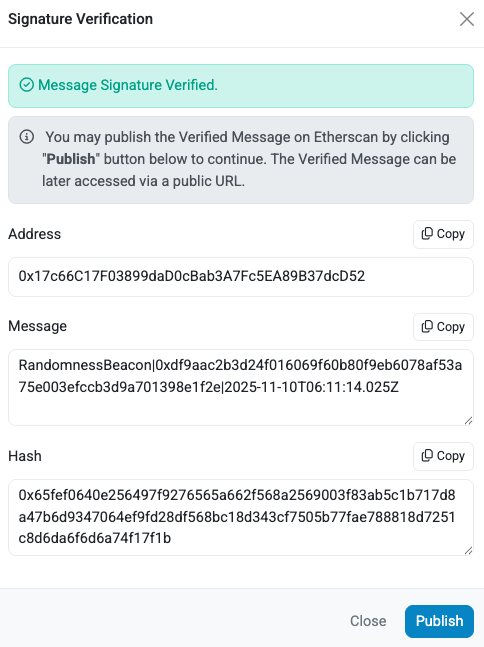
<img src="/img/message-signature-verified.png" width="50%" style={{ margin: '50px' }} />

The signature verification verifies that message was signed by the `signer` in the response.

To verify the `signer` is one of the signing addresses derived from the TEE mnemonic, use the Verifiability Dashboard 
([Mainnet](https://verify.eigencloud.xyz/) and [Sepolia Testnet](https://verify-sepolia.eigencloud.xyz/)) to confirm the 
signing address is one of the _Derived Addresses_ displayed for the application.

---

---
title: Use app wallet
sidebar_position: 1
---

import Tabs from '@theme/Tabs';
import TabItem from '@theme/TabItem';

:::important
The TEE mnemonic is generated by the KMS and bound to your app's enclave. Once injected, 
the mnemonic safety depends on the app not leaking it.

Any mnemonic you see in `.env.example` is a placeholder for local development. The TEE overwrites the placeholder with the
actual KMS-generated mnemonic that's unique and persistent to your app. Only your specific TEE instance can decrypt and use this mnemonic.
:::

When deployed, EigenCompute apps receive a persistent and private wallet that serves as the cryptographic identity, allowing the app to 
sign transactions, hold funds, and operate autonomously.

The TEE mnemonic is generated by the KMS and only decryptable inside your specific TEE application. It is provided at runtime
using the `MNEMONIC` environment variable. The wallet addresses are derived from the TEE mnemonic.
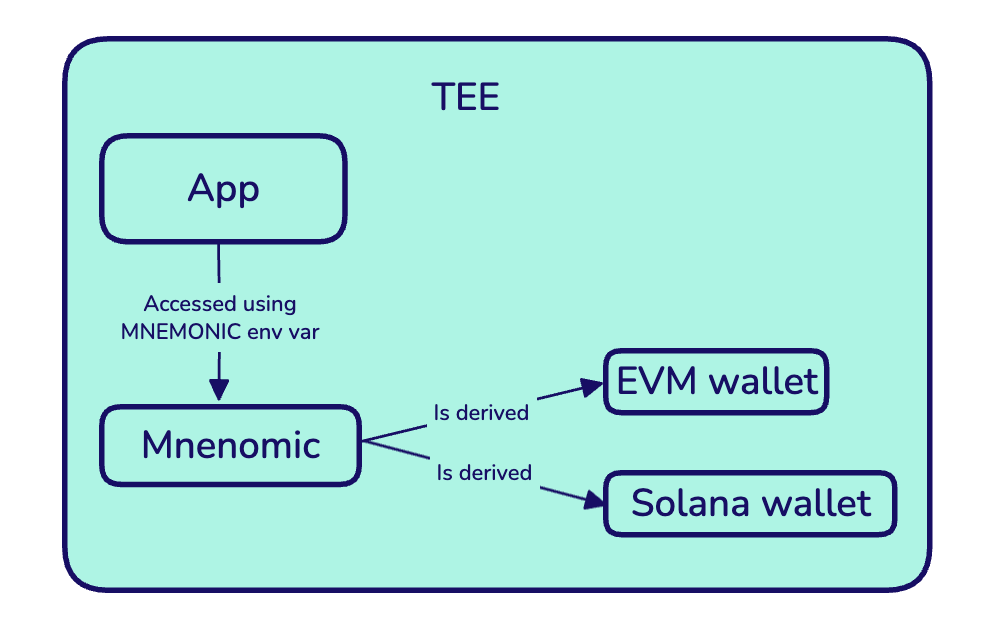
<img src="/img/TEEMnemonic.png" alt="TEE Mnemonic" width="400"/>

## Derive Address from TEE Mnemonic

### Etheruem

To derive the Etheruem wallet address from the `MNEMONIC` environment variable:

<Tabs>
    <TabItem value="ethers" label="ethers.js">
    ```typescript
    const mnemonic = process.env.MNEMONIC;
    if (!mnemonic) {
      throw new Error('MNEMONIC environment variable is not set');
    }

    const wallet = ethers.Wallet.fromPhrase(mnemonic);
    ```
    </TabItem>
    <TabItem value="typescript" label="TypeScript/JavaScript">
    ```typescript
    // TypeScript/JavaScript example
    import { mnemonicToAccount } from 'viem/accounts'

    const account = mnemonicToAccount(process.env.MNEMONIC) 
    ``` 
   </TabItem>
   <TabItem value="python" label="Python">
   ```python
   # Python example 
   import os
   from eth_account import Account

   Account.enable_unaudited_hdwallet_features()
   account = Account.from_mnemonic(os.environ['MNEMONIC'])
   ```
   </TabItem>
   <TabItem value="viem" label="view.sh">
   Refer to the [`mnemonicToAccount` documentation](https://viem.sh/docs/accounts/local/mnemonicToAccount)
   </TabItem>
</Tabs>

### Solana

To derive the Solana address from the `MNEMONIC` environment variable, refer to the [Solana Wallets documentation](http://solana.com/developers/cookbook/wallets/restore-from-mnemonic#restoring-bip44-format-mnemonics).

---

---
title: Use ecloud SDK
sidebar_position: 1
---

Use the ecloud SDK to:

* Deploy containerized applications to ecloud TEE
* Manage application lifecycle (start, stop, terminate)
* Build and push Docker images with encryption
* Monitor application status and logs

## Getting Started

1. Install ecloud SDK:

```
npm install @layr-labs/ecloud-sdk
```

2. Create a TypeScript file (for example, `subscribe.ts`) that initializes the SDK client and subscribes to EigenCompute:

```
import { createECloudClient } from '@layr-labs/ecloud-sdk';

async function main() {
  const client = createECloudClient({
    privateKey: process.env.PRIVATE_KEY as `0x${string}`,
    environment: 'sepolia',
    verbose: true,
  });
  
  console.log('✓ Client created!');
  console.log('Your address:', client.billing.address);
  
  // Subscribe
  const result = await client.billing.subscribe({
    productId: 'compute',
    successUrl: 'https://example.com/success',  // Where to redirect after payment
    cancelUrl: 'https://example.com/cancel',    // Where to redirect if cancelled
  });
  
  if (result.type === 'checkout_created') {
    console.log('\n🔗 Complete your subscription here:');
    console.log(result.checkoutUrl);
    console.log('\nOpen this URL in your browser to add payment details.');
  } else if (result.type === 'already_active') {
    console.log('✓ Already subscribed! Status:', result.status);
  } else if (result.type === 'payment_issue') {
    console.log('⚠️  Payment issue. Visit:', result.portalUrl);
  }
}

main().catch(console.error);
```

3. Run the script with your private key to generate a checkout URL:

```
PRIVATE_KEY=0x... npx tsx subscribe.ts 
```

---

---
title: Use existing image
sidebar_position: 2
---

If you have a containerized application, you don't need to start from a template when creating an EigenCompute application:

```bash
cd my-existing-project

# Deploy directly - the CLI will prompt for Dockerfile and .env paths
ecloud compute app deploy
```

**Requirements for existing projects:**
- **Dockerfile** - Must target `linux/amd64` and run as root user
- **.env file** - Optional but recommended for environment variables

The CLI will automatically prompt for file paths if they're not in default locations.

### Manual Image Building

If you prefer to build and push images yourself:

```bash
# Build and push manually
docker build --platform linux/amd64 -t myregistry/myapp:v1.0 .
docker push myregistry/myapp:v1.0

# Deploy using the image reference
ecloud compute app deploy myregistry/myapp:v1.0
```


---

---
title: Build from verifiable source
sidebar_position: 1
---

To build from a verifiable source, options are: 

1. Use the `ecloud compute build submit` command to submit a verifiable build from a GitHub source.
2. Specify the `--verifiable` option or select `Yes` when prompted when deploying or upgrading using the `ecloud compute deploy` or `upgrade` commands..

## Submit from GitHub source

To submit a verifiable build from a GitHub source, specify the required options or supply when prompted:

* `--repo` (`ECLOUD_BUILD_REPO`) 
* `--commit` (`ECLOUD_BUILD_COMMIT`) 
* `--dockerfile` (`ECLOUD_BUILD_DOCKERFILE`, default is `Dockerfile`)
* `--context` (`ECLOUD_BUILD_CONTEXT`, default is `.`) 
* `--dependencies sha256:...` (repeatable; prompt supports comma-separated)
* `--build-caddyfile` (`ECLOUD_BUILD_CADDYFILE`) (optional)
* `--no-follow` 
* `--json`

For example:
```
ecloud compute build submit --repo https://github.com/myorg/myapp --commit abc123...

ecloud compute build submit --repo https://github.com/myorg/myapp --commit abc123... --dependencies sha256:def456...

ecloud compute build submit --repo https://github.com/myorg/myapp --commit abc123... --build-caddyfile Caddyfile

ecloud compute build submit --repo https://github.com/myorg/myapp --commit abc123... --no-follow
```

Once built and verified, the image can be specified as a prebuilt image when deploying or upgrading.

## Submit when deploying or upgrading

To submit when deploying or upgrading, specify the `--verifiable` option for the `ecloud compute app` command, or select
`Yes` when prompted. 

When deploying or upgrading, specify a GitHub source using the `--build-context`, `--build-dependencies`, and `--build-dockerfile` options,
or specify a prebuilt verifiable image using the `--image-ref` option.

## Submitting builds with dependencies

To specify prebuilt dependencies to include in a verifiable build, use the `--dependencies` option for `ecloud compute build`,
`ecloud compute app deploy` or `ecloud compute app upgrade`.

The EigenCompute TLS and KMS clients do not need to be specified as dependencies because they are [prebuilt](https://github.com/Layr-Labs/eigencompute-containers) 
and the digests included in all EigenCompute applications.

For more information on dependencies in verifiable builds, refer to [Verifiable Builds](../../../concepts/verifiable-builds.md).

---

---
title: Configure TLS
sidebar_position: 1
---

Add TLS/HTTPS configuration to your project for secure domain access to:

* Expose your TEE app using HTTPS.
* Receive webhook events over HTTPS.
* Serve web UIs securely.
* Deploy to production with TLS.

EigenCompute enables TLS with [Let's Encrypt](https://letsencrypt.org/) [using Caddyfile](https://caddyserver.com/docs/caddyfile#:~:text=The%20Caddyfile%20is%20just%20a,use%20JSON%20with%20Caddy's%20API.). To use an alternative certificate provider, configure in your Dockerfile.

## TLS Environment Variables

| Variable            | Description               | Required   | Default   |
|---------------------|---------------------------|------------|-----------|
| `DOMAIN`            | Your domain name          | Yes        | -         |
| `APP_PORT`          | Port your app listens on  | Yes        | -         |
| `ACME_STAGING`      | Use Let's Encrypt staging | No         | `false`   |
| `ACME_FORCE_ISSUE`  | Force certificate reissue | No         | `false`   |
| `ENABLE_CADDY_LOGS` | Enable Caddy debug logs   | No         | `false`   |

## Add TLS Configuration

To add TLS configuration:

```
ecloud compute app configure tls
```

TLS configuration is added to your project:

```
TLS configuration added successfully

Created:
  - Caddyfile
  - .env.example.tls

To enable TLS:

1. Add TLS variables to .env:
   cat .env.example.tls >> .env

2. Configure required variables:
   DOMAIN=yourdomain.com
   APP_PORT=3000

   For first deployment (recommended):
   ENABLE_CADDY_LOGS=true
   ACME_STAGING=true

3. Set up DNS A record pointing to instance IP
   Run 'ecloud compute app info' to get IP address

4. Upgrade:
   ecloud compute app upgrade

Note: Let's Encrypt rate limit is 5 certificates/week per domain
```

## Configure TLS and Test with Staging Certificates

1. Add TLS environment variables to `.env`: 

```
cat .env.example.tls >> .env
```

2. Configure required variables: 

```
# Required
DOMAIN=yourdomain.com
APP_PORT=3000

# Recommended for first deployment
ENABLE_CADDY_LOGS=true
ACME_STAGING=true  # Use staging certificates initially
```

:::tip
To avoid Let's Encrypt rate limits, always test with staging certificates first.
:::

3. Configure DNS by creating an A record pointing to your instance IP: 

    * Type: A 
    * Name: yourdomain.com
    * Value: Obtain IP address from `ecloud compute app info`

4. Deploy app with TLS configuration: 

```
ecloud compute app upgrade
```

The configured TLS routes traffic from ports 80 and 443 to the `APP_PORT`.

## Switch to Production Certificates

To switch from staging to production:

1. Force a reissue of certificates by updating the `ACME_FORCE_ISSUE` environment variable:

```
ACME_STAGING=false
ACME_FORCE_ISSUE=true  # Only needed once
```

2. Redeploy the app:

```
ecloud compute app upgrade
```

3. Disable the `ACME_FORCE_ISSUE` environment variable:

```
ACME_FORCE_ISSUE=false
```

:::warning Let's Encrypt Rate Limits
Let's Encrypt has a rate limit of 5 certificates per week per domain. Always test with staging certificates first.
::: 

## Upgrading

You can update `DOMAIN` and `APP_PORT` in the [environment file](#tls-environment-variables) and upgrade without rebuilding
the Docker image. If you change anything else in the Caddyfile itself, you must rebuild the image because the Caddyfile 
is embedded at build time.

## Troubleshooting 

### DNS not propagating

Wait 5-10 minutes after DNS changes. Verify with:

```bash
dig yourdomain.com
nslookup yourdomain.com
```

### Certificate issuance failing

Check logs:

```bash
ecloud compute app logs
```

Common issues:
- DNS not pointing to correct IP.
- Port 80/443 not accessible.
- Domain already has certificates (use `ACME_FORCE_ISSUE=true`).

### Rate limit exceeded

If you hit rate limits:
- Wait a week for the limit to reset.
- Use a different subdomain.
- Consider using staging for development.

---

---
title: Expose ports
sidebar_position: 4
---

This guide explains how to configure network ports for your EigenCompute applications, enabling them to receive incoming connections.

## Overview

EigenCompute applications run in secure Docker containers. To make your application accessible over the internet, you need to:

1. **Expose ports in your Dockerfile** using the `EXPOSE` directive
2. **Bind your application** to the correct port in your code
3. **(Optional) Configure TLS/HTTPS** for production domains

## Basic Port Configuration

### The EXPOSE Directive

Add the `EXPOSE` directive to your Dockerfile to specify which port(s) your application listens on:

```dockerfile
FROM --platform=linux/amd64 node:18
USER root
WORKDIR /app
COPY . .
RUN npm install

# Expose port 3000 for HTTP traffic
EXPOSE 3000

CMD ["npm", "start"]
```

### Exposing Multiple Ports

If your application needs multiple ports (e.g., main service + metrics endpoint):

```dockerfile
# Expose multiple individual ports
EXPOSE 3000
EXPOSE 9090
```

### Exposing Port Ranges

For applications that need a range of ports:

```dockerfile
# Expose ports 8000 through 8010
EXPOSE 8000-8010
```

## Application Binding

Your application code must bind to `0.0.0.0` (all interfaces) to be accessible.

## HTTPS with Custom Domains

For production applications with custom domains, you'll need to configure TLS in addition to exposing ports.

See the [TLS configuration guide](configure-tls.md) for complete setup instructions.

## Troubleshooting

### "Cannot reach my application"

Check that:
1. Your Dockerfile includes `EXPOSE <port>`
2. Your app binds to `0.0.0.0`, not `localhost` or `127.0.0.1`
3. The port matches between `EXPOSE`, app binding, and `APP_PORT` (if using TLS)

### "Connection refused"

Your application may not be listening on the expected port:
- Check application logs: `ecloud compute app logs`
- Verify the port in your application startup logs
- Ensure no port conflicts if running multiple services

### Port Already in Use

If you see "port already in use" errors:
- Check for multiple services binding to the same port
- Ensure your application shuts down gracefully
- Use `ecloud compute app stop` and `ecloud compute app start` to restart

## Related Documentation

- [Quickstart Guide](../../get-started/quickstart.md) - Complete deployment walkthrough
- [TLS Configuration](configure-tls.md) - Setting up HTTPS with custom domains
- [Deployment Reference](../../reference/ecloud-cli/compute/app.md#deploy) - Dockerfile requirements
- [Monitoring](../operate/operate-application.md) - Viewing application logs

---

---
title: Troubleshoot deployment
sidebar_position: 6
---

## Dockerfile requirements

```dockerfile
# Must target linux/amd64
FROM --platform=linux/amd64 node:18

# Must run as root (TEE requirement)
USER root

# Application code
WORKDIR /app
COPY . .
RUN npm install

CMD ["npm", "start"]
```

## Build fails: platform mismatch

Ensure your Dockerfile specifies the platform:

```dockerfile
FROM --platform=linux/amd64 node:18
```

## Push fails: authentication required

Login to Docker registry:

```bash
docker login
```

## Transaction fails: insufficient funds

Get Sepolia ETH (for `sepolia` environment) or Mainnet ETH (for `mainnet-alpha` environment):

```bash
ecloud auth whoami  # Get your address
# Visit faucet and request funds
```

## App fails to start

Check logs:

```bash
ecloud compute app logs <app-id>
```

Common issues:
- Missing environment variables
- Port binding issues
- Application crashes
- Incorrect entrypoint/command


---

---
title: Operate application
sidebar_position: 1
---

Use the [`list`](../../reference/ecloud-cli/compute/app.md#list), [`info`](../../reference/ecloud-cli/compute/app.md#info), and [`logs`](../../reference/ecloud-cli/compute/app.md#logs) commands to monitor and manage EigenCompute applications.

Use the [`start`](../../reference/ecloud-cli/compute/app.md#start), [`stop`](../../reference/ecloud-cli/compute/app.md#stop), and [`terminate`](../../reference/ecloud-cli/compute/app.md#terminate) commands to change application state.

## When starting a previously stopped application

- Wallet persists - Same MNEMONIC is available
- IP persists - Usually keeps the same instance IP
- State reset - In-memory state is lost (use external storage for persistence)
- Logs preserved - Previous logs may still be available

### When stopping

- No requests - App doesn't accept requests while stopped
- Logs preserved - Can still view logs
- Costs reduced - Lower costs while stopped (but not zero)

## Before terminating

:::danger Irreversible Action
Termination is permanent and irreversible. The TEE wallet mnemonic becomes inaccessible. Any funds in the wallet will be lost forever.
:::

- [ ] **Critical**: Withdraw all funds from TEE wallet
- [ ] Backup logs: `ecloud compute app logs my-app > backup.log`
- [ ] Document configuration
- [ ] Verify app is no longer needed
- [ ] Check for any dependent services

### What gets deleted when terminating

When you terminate an app:

- TEE instance
- Docker container
- Environment variables
- App configuration
- TEE wallet access (LOST FOREVER)
- App name (can be reused)

:::danger Irreversible Action
Termination is permanent and irreversible. The TEE wallet mnemonic becomes inaccessible. Any funds in the wallet will be lost forever.
:::

### Behavior

- Immediate - Takes effect after transaction confirmation
- Permanent - Cannot be undone
- Name available - App name can be reused for new deployments
- ID retired - App ID is never reused

### Safe Termination Workflow

```bash
# 1. Stop the app first
ecloud compute app stop my-app

# 2. Get wallet address
ecloud compute app info my-app
# Note the TEE Wallet address

# 3. Check for funds
# Use a blockchain explorer or Etherscan

# 4. Withdraw funds (from within your app code)
# Transfer to a safe address

# 5. Terminate
ecloud compute app terminate my-app
```

---

---
title: Verify trust guarantees
sidebar_position: 2
---

Use the Verifiability Dashboards for [mainnet](https://verify.eigencloud.xyz/) and [Sepolia testnet](https://verify-sepolia.eigencloud.xyz/) to verify [trust guarantees enabled by EigenCompute](../../concepts/trust-guarantees.md). 

## View Verifiability Data in Dashboard

To view verifiability data for an application using the dashboard: 

1. Go to the Verifiability Dashboard for [mainnet](https://verify.eigencloud.xyz/) or [Sepolia testnet](https://verify-sepolia.eigencloud.xyz/).
2. In the _Deployed Applications_ field, search for the application by name or application ID.
3. The verifiability data for the application is displayed.  The data includes: 
   * Application ID and Creator address.
   * Release history with Docker Image Digests. 
   * TEE attestations for releases. There is a TEE attestation displayed for each release.
   * Logs for running application (if configured as publicly visible).
   * Wallet addresses for the application.

:::note
Whether logs are visible publicly is configured by the application developer using the `--log-visibility` option on the [`ecloud compute app deploy`](../../reference/ecloud-cli/compute/app.md#deploy) and
[`ecloud compute app upgrade`](../../reference/ecloud-cli/compute/app.md#upgrade) commands.
:::

## View Verifiability Data Onchain

The dashboard provides a convenient way to view releases and application status. The release history and application status
can also be verified onchain.

To monitor application releases onchain, monitor `AppUpgraded` events on the `AppController` contract. The `AppUpgraded` 
events include the application ID and the associated release data (imageDigest, registryURL, upgrade time, public and encrypted environment variables).

To monitor application status onchain, monitor the `AppCreated`, `AppStarted`, `AppStopped`, `AppTerminated`, and `AppTerminatedByAdmin`
events on the `AppController` contract.

AppController contract deployment addresses are published in the [`eigenx-contracts`](https://github.com/Layr-Labs/eigenx-contracts) repository for [Mainnet](https://github.com/Layr-Labs/eigenx-contracts/blob/master/script/deploys/mainnet-alpha/deployment.json) and [Sepolia testnet](https://github.com/Layr-Labs/eigenx-contracts/blob/master/script/deploys/sepolia-prod/deployment.json).

---

---
title: Create and use authentication keys
sidebar_position: 2
---

:::important 
EigenCompute uses two types of keys: 
* Authentication keys for deployments and protocol interactions.
* TEE mnemonic for applications and wallet functionality inside the TEE. 

For more information on EigenCompute keys, refer to the [Keys](../../concepts/keys-overview.md) concept topic. 
:::

## Create and securely store an authentication key

To create and securely store an authentication key: 

```
ecloud auth generate --store
```

An authentication key is created and stored in the OS keyring:

:::warning
The private key is securely stored while you remain authenticated to EigenCompute.

If you log out of EigenCompute and have not backed up the private key that was generated for you, you will be unable to access your deployed application.

If you generate another authentication key and overwrite the existing private key without first having backed up the private key that was generated for you, you will be unable to access your deployed application.
:::

## Create and display an authentication key

:::caution 
Logging in by providing your private key directly in the command line is not recommended. It is recommended to [securely store 
authentication keys in the OS keyring](#create-and-securely-store-an-authentication-key) or use the `ECLOUD_PRIVATE_KEY` environment variable.
:::

To create and display an authentication key: 

```
ecloud auth generate
```

:::note Follow best practices
* Use OS Keyring - Most secure method for local development
* Never commit keys - Add keys to `.gitignore` and use environment variables for CI/CD.
:::

## Use existing authentication key

When using EigenCompute, logging in refers to providing your authentication key to the ecloud command line. The following methods
are supported and checked in this order:

1. `--private-key` flag on any command (not recommended).
2. `ECLOUD_PRIVATE_KEY` environment variable.
3. OS keyring securely stored credentials.

:::warning
Using the `--private-key` flag to provide your private key directly on the command line is not recommended. When provided on the command line
it may be stored in your shell history. Use the OS keyring to securely store credentials or the `ECLOUD_PRIVATE_KEY` environment
variable for CI/CD pipelines.
:::

To log in by storing your authentication key in the OS keyring:

```bash
ecloud auth login
```

## Troubleshooting

### "Not authenticated" Error

If you get authentication errors:

```bash
# Check authentication status
ecloud auth whoami

# If not authenticated, login
ecloud auth login
```

### Keyring Access Issues

On some systems, you may need to unlock your keyring:

- **Linux**: Ensure GNOME Keyring or KWallet is running
- **macOS**: System Keychain should work automatically
- **Windows**: Credential Manager should work automatically

If issues persist, use the environment variable method as a fallback.

### Wrong Address

If you're using the wrong address:

```bash
# Check current address
ecloud auth whoami

# Logout and login with correct key
ecloud auth logout
ecloud auth login
```

---

---
title: Migrate to ecloud CLI
sidebar_position: 1
---

:::important
The [`eigenx` CLI](../../reference/eigenx-cli/eigenx-cli.md) is being deprecated and will no longer receive updates. The [`ecloud` CLI](../../reference/ecloud-cli/ecloud-cli-overview.md) supports the same commands as `eigenx`.
The `app`, `environment`, and `undelegate` subcommands have moved under the [`compute` command](../../reference/ecloud-cli/compute/compute-overview.md).

The `migrate` command is provided to migrate your authentication key. We recommend migrating to the `ecloud` CLI as soon as practical.
:::

To migrate a stored authentication key from `eigenx` to `eigencloud`:

1. Install the ecloud CLI: 

    ```
    npm install -g @layr-labs/ecloud-cli  
    ```

2. Verify the installation was successful:

    ```
    ecloud version
    ```

3. Migrate the stored authentication key:

    ```
    ecloud auth migrate 
    ```

    Legacy keys for `eigenx` environments are displayed. Select the key to migrate. 

4. When prompted to delete the legacy key, select N. We recommend not deleting your legacy key until you have verified
that the migrated key works correctly.

5. Verify the migration was successful:

    ```
    ecloud auth whoami 
    ```

    The migrated key is displayed and will be used for all environments.

## Changes 

### One key for all environments

The `ecloud` CLI uses one key for all environments. When migrating from `eigenx`, which stored a key per environment,
you select one stored key to migrate to `ecloud`.

To continue using other keys, use the `--private-key` option or the `ECLOUD_PRIVATE_KEY` environment variable.

### compute

The `app`, `environment`, and `undelegate` subcommands have moved under the [`compute` command](../../reference/ecloud-cli/compute/compute-overview.md).

### Arguments moved to options

The `language`, `template-name`, `image-ref` arguments for the `app` subcommand in `eigenx` are [options in `ecloud`](../../reference/ecloud-cli/compute/app.md). 

---

---
title: auth
sidebar_position: 2
---

The `ecloud` CLI requires authentication to sign transactions for deploying and managing applications. Use `auth` commands to manage
authentication credentials securely.

## Available Commands

* [generate](#generate)
* [login](#login)
* [logout](#logout)
* [migrate](#migrate)
* [whoami](#whoami)
* [list](#list)

## generate

Generate a new authentication key with optional secure storage. For more information on creating authentication keys,
refer to [Create Authentication Keys](../../howto/setup/create-use-auth-keys.md).

### Synopsis

`ecloud auth generate [--store]`

### Options

`--store` (boolean)

> Generate a new authentication key with optional secure storage. For more information on creating authentication keys,
refer to [Create Authentication Keys](../../howto/setup/create-use-auth-keys.md). Default is false.

## login

Store an existing authentication key securely in your OS keyring. 

### Synopsis

`ecloud auth login`

## logout

Remove stored authentication key from your OS keyring.

### Synopsis

`ecloud auth logout [--force]`

### Options

`--force` (boolean)

> Log out without requiring confirmation. Default is false.

## migrate

Migrate authentication key from `eigenx` CLI to `ecloud` CLI.  For mor information, refer to [Migrate to ecloud CLI](../../howto/setup/migrate-ecloud-cli.md).

### Synopsis

`ecloud auth migrate`

## whoami

Display current authentication status and wallet address. 

### Synopsis

`ecloud auth whoami`

---

---
title: billing
sidebar_position: 3
---

EigenCompute requires a [subscription for deploying applications](../../get-started/billing). Use these commands to manage billing and subscription.

## Available Commands

* [subscribe](#subscribe)
* [cancel](#cancel) 
* [status](#status)
* [top-up](#top-up)

## Global Options

The following options are available for all `billing` subcommands:

`--private-key=<value>` (string)

> Authentication key for the billing subscription.

`--product=<option>` (string)

> Product for which to apply the billing subscription. Default and only option at this stage is `compute`.

`--verbose` (boolean) 

> Enable verbose logging. Default is `false`.

## subscribe

Redirects to the payment portal to supply a payment method for subscription. For more information,
refer to [Subscribe](../../get-started/billing#subscribe).

### Synopsis

`ecloud billing subscribe [global options]`

## cancel

Cancel an existing subscription. For more information, refer to [Cancel a Subscription](../../get-started/billing#cancel-a-subscription).

### Synopsis

`ecloud billing cancel [-force] [global options]`

### Options 

`--force`

> Skip confirmation prompt.

## status

Display current billing status. For more information, refer to [Manage Billing](../../get-started/billing#manage-billing).

### Synopsis

`ecloud billing status [global options]`

## top-up

Purchase EigenCompute credits with USDC. For more information, refer to [Manage Billing](../../get-started/billing#top-up-with-usdc)

---

---
title: app
sidebar_position: 2
---

Manage applications including creating, operating, and terminating.

## Available Commands

* [create](#create)
* [deploy](#deploy)
* [upgrade](#upgrade)
* [start](#start)
* [stop](#stop)
* [terminate](#terminate)
* [list](#list)
* [info](#info)
* [logs](#logs)
* [releases](#releases)
* [profile](#profile)
* [configure](#configure)
* help, h

## Global Options

Options available for all `app` subcommands are:

`--environment <env>` (string)

> Deployment environment to use. One of `mainnet-alpha` and `sepolia`.  Can be set using environment variable `ECLOUD_ENV`.

`--rpc-url value ` (URL)

> RPC URL to connect to blockchain. Can be set using environment variable `ECLOUD_RPC_URL`. 

`--private-key value` (string)

> Private key for signing transactions. Can be set using environment variable `ECLOUD_PRIVATE_KEY`. 

`--env-file value` (string)

> Environment file to use. Default is the `.env` file. Can be set using environment variable `ECLOUD_ENVFILE_PATH`

`--verbose`

> Enable verbose logging.

## create

Create an application project from a template with all necessary configuration files. For more information on creating
applications, refer to [Quickstart](../../../get-started/quickstart.md).

### Synopsis

`ecloud compute app create [--name <value>] [--language <value>] [--template-repo <value>] [--template-version <version>] [global options]`

### Options

`name` (string)

> Name for your application directory. Prompted for if not provided.

`language` (string)

> Language to use for template. Prompted for if not provided. Options are:
>  * `typescript` - use for Web services, APIs, bots
>  * `python` - use for ML/AI, data processing, scripts
>  * `golang` - use for high-performance services
>  *  `rust`  - use for systems programming, performance-critical apps

`--template-repo <value>` (string)

> Template name or custom template URL.

`--template-version <version>` (string)

> Template version/tag to use.

## deploy

Deploy a new application to a Trusted Execution Environment (TEE).

If you don't have an EigenCompute subscription, the CLI will prompt you for [billing details](../../../get-started/billing.md) in our payment portal.

### Synopsis

`ecloud compute app deploy [--name <value>] [--dockerfile <value>] [--image-ref <value>]
[--log-visibility] [--instance-type <value>] [--skip-profile] [--resource-usage-monitoring] [--website <value>]
[--description <value>] [--x-url <value>] [--image <value>] [--skip-profile]
[--verifiable] [--repo <value>] [--commit <value>] [--build-dockerfile <value>] [--build-context <value>] [--build-dependencies <value>...] [--build-caddyfile <value>] [global options]` 

### Options

`--image_ref <value>` (string)

> Pre-built Docker image reference. Can be set using environment variable `ECLOUD_IMAGE_REF`.

`--dockerfile <path>, -f <path>` (string)

> Path to Dockerfile. If not provided, the Dockerfile in the current directory is used. Your Dockerfile must include the `EXPOSE` directive to specify which port(s) your application listens on, see the [Port Exposure Guide](../../../howto/deploy/expose-ports.md). Can be set using environment variable `ECLOUD_DOCKERFILE_PATH`.

`--log-visibility <setting>` (string)

> Log visibility. One of `public`, `private`, or `off`. If set to `public`, logs are displayed on the Verifiability Dashboard
> for [Mainnet](https://verify.eigencloud.xyz/) or [Sepolia testnet](https://verify-sepolia.eigencloud.xyz/). Prompted for if not provided. Can be set using environment variable `ECLOUD_LOG_VISIBILITY`.

`--resource-usage-monitoring value` (string)

> Resource use monitoring. One of `enable` or `disable`. Prompted for if not provided. Can be set using environment variable `ECLOUD_RESOURCE_USAGE_MONITORING`.

`--instance-type <value>` (string)

> Machine instance type to use. Prompted for if not provided. Can be set using environment variable `ECLOUD_INSTANCE_TYPE`.
> For instance pricing, refer to [Billing](../../../get-started/billing.md#instance-types).
>
> | Machine type      |  vCPUs   | Memory | Architecture     |
> |-------------------|:--------:|:------:|------------------|
> | g1-micro-1v       | 2 shared |  1GB   | vTPM Shielded VM | 
> | g1-medium-1v      | 2 shared |  2GB   | vTPM Shielded VM | 
> | g1-custom-2-4096s |    2     |  4GB   | AMD SEV-SNP      | 
> | g1-standard-2s    |    2     |  8GB   | AMD SEV-SNP      | 
> | g1-standard-4t    |    4     | 16 GB  | Intel TDX        |
> | g1-standard-8t    |    8     | 32 GB  | Intel TDX        |


`--name <name>` (string)

> Display name for the application. Used by developer to manage application and displayed on the
> Verifiability Dashboard for [Mainnet](https://verify.eigencloud.xyz/) or [Sepolia testnet](https://verify-sepolia.eigencloud.xyz/). Prompted for if not provided. Can be set using environment variable `ECLOUD_NAME`.

`--website <URL>` (string)

> Application website URL. Displayed on the
> Verifiability Dashboard for [Mainnet](https://verify.eigencloud.xyz/) or [Sepolia testnet](https://verify-sepolia.eigencloud.xyz/). 

`--description <value>` (string)

> Application description. Displayed on the
> Verifiability Dashboard for [Mainnet](https://verify.eigencloud.xyz/) or [Sepolia testnet](https://verify-sepolia.eigencloud.xyz/). 

`--x-url <URL>` (string)

> X (Twitter) profile. Displayed on the
> Verifiability Dashboard for [Mainnet](https://verify.eigencloud.xyz/) or [Sepolia testnet](https://verify-sepolia.eigencloud.xyz/).

`--image <path>` (string)

> Path to profile image. Must be JPG/PNG and max size of 4MB. Displayed on the
> Verifiability Dashboard for [Mainnet](https://verify.eigencloud.xyz/) or [Sepolia testnet](https://verify-sepolia.eigencloud.xyz/).

`--skip-profile`

> Skip app profile setup.

`--verifiable`

> Enable verifiable build mode. Build from either: 
> * Git source using `--repo` and `--commit`
> * Prebuilt verifiable image using `--image-ref`.

`--repo <value>`

> Git repository URL. Required with `--verifiable` when building from Git source.

`--commit <value>`

> Git commit SHA (40 hex chars). Required with `--verifiable` when building from Git source.

`--build-dockerfile <value>`

> Dockerfile path for verifiable build when building from Git source.

`--build-context <value>`

> Build context path for verifiable build when building from Git source.

`--build-dependencies=<value>...`

> Dependency digests for verifiable build when building from Git source (sha256:...).

`--build-caddyfile=<value>`

> Caddyfile path for builds. Path inside the repository and relative to the build context. Optional and if omitted,
> auto-detected from the env file TLS settings.

## upgrade

Update an existing application with new code, configuration, or environment variables.

### Synopsis

`ecloud compute app upgrade  [<app-id|name>] [--dockerfile value, -f value] [--log-visibility value] [--resource-usage-monitoring value] 
[--instance-type value] [--image_ref <value>] [--verifiable] [--repo <value>] [--commit <value>] [--build-dockerfile <value>] 
[--build-context <value>] [--build-dependencies <value>...] [--build-caddyfile <value>] [global options]`

### Arguments

`app-id|name` (string)

> Application ID or display name. Prompted for if not provided.

### Options

`--dockerfile <path>, -f <path>` (string)

> Path to Dockerfile. If not provided, the Dockerfile in the current directory is used. Can be set using environment variable `ECLOUD_DOCKERFILE_PATH`. 

`--image_ref <value>` (string)

> Pre-built Docker image reference. Optional. Can be set using environment variable `ECLOUD_IMAGE_REF`.

`--log-visibility <setting>` (string)

> Log visibility. One of `public`, `private`, or `off`. If set to `public`, logs are displayed on the Verifiability Dashboard
> for [Mainnet](https://verify.eigencloud.xyz/) or [Sepolia testnet](https://verify-sepolia.eigencloud.xyz/). Prompted for if not provided. Can be set using environment variable `ECLOUD_LOG_VISIBILITY`.

`--resource-usage-monitoring value` (string)

> Resource use monitoring. One of `enable` or `disable`. Prompted for if not provided. Can be set using `ECLOUD_RESOURCE_USAGE_MONITORING`.

`--instance-type <value>` (string)

> Machine instance type to use. Prompted for if not provided. Can be set using environment variable `ECLOUD_INSTANCE_TYPE`.
> For instance pricing, refer to [Billing](../../../get-started/billing.md#instance-types).
>
> | Machine type      |  vCPUs   | Memory | Architecture     |
> |-------------------|:--------:|:------:|------------------|
> | g1-micro-1v       | 2 shared |  1GB   | vTPM Shielded VM | 
> | g1-medium-1v      | 2 shared |  2GB   | vTPM Shielded VM | 
> | g1-custom-2-4096s |    2     |  4GB   | AMD SEV-SNP      | 
> | g1-standard-2s    |    2     |  8GB   | AMD SEV-SNP      | 
> | g1-standard-4t    |    4     | 16 GB  | Intel TDX        |
> | g1-standard-8t    |    8     | 32 GB  | Intel TDX        |

`--verifiable`

> Enable verifiable build mode. Build from either:
> * Git source using `--repo` and `--commit`
> * Prebuilt verifiable image using `--image-ref`.

`--repo <value>`

> Git repository URL. Required with `--verifiable` when building from Git source.

`--commit <value>`

> Git commit SHA (40 hex chars). Required with `--verifiable` when building from Git source.

`--build-dockerfile <value>`

> Dockerfile path for verifiable build when building from Git source.

`--build-context <value>`

> Build context path for verifiable build when building from Git source.

`--build-dependencies=<value>...`

> Dependency digests for verifiable build when building from Git source (sha256:...).

`--build-caddyfile=<value>`

> Caddyfile path for builds. Path inside the repository and relative to the build context. Optional and if omitted,
> auto-detected from the env file TLS settings.

## start

Start a previously stopped application.

### Synopsis

`ecloud compute app start [<app-id|name>] [global options]`

### Arguments

`app-id|name` (string)

> Application ID or display name. Prompted for if not provided.

## stop

Stop a running application without removing it.

### Synopsis

`ecloud compute app stop [<app-id|name>] [global options]`

### Arguments

`app-id|name` (string)

> Application ID or display name. Prompted for if not provided.

## terminate
Permanently remove an application and all its resources.

:::danger Irreversible Action
Termination is permanent and irreversible. The TEE wallet mnemonic becomes inaccessible. Any funds in the wallet will be lost forever.
:::

### Before terminating

1. Withdraw funds from the TEE wallet.
2. Save logs if needed for auditing.
3. Document configuration if you plan to redeploy.

### Synopsis

`ecloud compute app terminate [<app-id|name>] [--force] [global options]`

### Arguments

`app-id|name` (string)

> Application ID or display name. Prompted for if not provided.

### Options

`--force`

> Force termination without confirmation.

## list

List all applications deployed by your account in the current environment. 

### Synopsis

`ecloud compute app list [--all] [--address-count <value>] [global options]`

### Options

`--all`

> Show all applications including terminated applications.

`--address-count <value>`

> Number of [addresses available to application](../../../howto/build/use-app-wallet.mdx) to fetch. Default is `1`.

## info

Display detailed information about a specific application.

### Synopsis

`ecloud compute app info [--watch] [<app-id|name>] [--address-count <value>] [global options]`

### Arguments

`app-id|name` (string)

> Application ID or display name. Prompted for if not provided.

### Options

`--watch`

> Continuously fetch and display updates to application information. Default is disabled.

`--address-count <value>`

> Number of [addresses available to application](../../../howto/build/use-app-wallet.mdx) to fetch. Default is `1`.

## logs

View application logs from your TEE instance. 

### Synopsis

`ecloud compute app logs [<app-id|name>] [--watch] [global options]`

### Arguments

`app-id|name` (string)

> Application ID or display name. Prompted for if not provided.

### Options

`--watch`

> Continuously fetch and display logs for application. Default is disabled.

## releases

Display app releases including verifiable builds and dependency builds.

### Synopsis

`ecloud compute app releases [app-id|name] [--json] [--full] [global options]`

### Arguments

`app-id|name` (string)

> Application ID or display name. Prompted for if not provided.

### Options

`--json`

> Output JSON instead of formatted text.

`--full`
> Display the full (multi-line) release details instead of a table.

## profile set

Update or specify application profile. The application profile properties are displayed on the Verifiability Dashboard for
[Mainnet](https://verify.eigencloud.xyz/) or [Sepolia testnet](https://verify-sepolia.eigencloud.xyz/).

### Synopsis

`ecloud compute app profile set [global options] [<app-id|name>]`

### Arguments

`app-id|name` (string)

> Application ID or display name. Prompted for if not provided.

### Options

`--name <name>` (string)

> Display name for the application. Used by developer to manage application and displayed on the
> Verifiability Dashboard for [Mainnet](https://verify.eigencloud.xyz/) or [Sepolia testnet](https://verify-sepolia.eigencloud.xyz/). Prompted for if not provided. Can be set using environment variable `ECLOUD_NAME`.

`--website <URL>` (string)

> Application website URL. Displayed on the
> Verifiability Dashboard for [Mainnet](https://verify.eigencloud.xyz/) or [Sepolia testnet](https://verify-sepolia.eigencloud.xyz/). Optional.

`--description <value>` (string)

> Application description. Displayed on the
> Verifiability Dashboard for [Mainnet](https://verify.eigencloud.xyz/) or [Sepolia testnet](https://verify-sepolia.eigencloud.xyz/). Optional.

`--x-url <URL>` (string)

> X (Twitter) profile. Displayed on the
> Verifiability Dashboard for [Mainnet](https://verify.eigencloud.xyz/) or [Sepolia testnet](https://verify-sepolia.eigencloud.xyz/). Optional.

`--image <path>` (string)

> Path to profile image. Must be JPG/PNG and max size of 4MB. Displayed on the
> Verifiability Dashboard for [Mainnet](https://verify.eigencloud.xyz/) or [Sepolia testnet](https://verify-sepolia.eigencloud.xyz/). Optional.

## configure tls

Add TLS/HTTPS configuration to your project for secure domain access. This command adds:

* Caddy Server Configuration - Automatic HTTPS with [Let's Encrypt](https://letsencrypt.org/) using [Caddyfile](https://caddyserver.com/docs/caddyfile)
* Environment Variables - Example TLS configuration in `.env.example.tls`

For more information on configuring TLS, refer to [Configure TLS](../../../howto/deploy/configure-tls.md).

### Synopsis

`ecloud compute app configure tls`


---

---
title: build
sidebar_position: 5
---

Submit a new verifiable build. For more information, refer to Submit verifiable builds in the How to section.

## Available Commands

* [submit](#submit)
* [list](#list)
* [logs](#logs)
* [status](#status)
* [info](#info)
* [verify](#verify)

## Global Options

Options available for all `build` subcommands are:

`--environment <env>` (string)

> Deployment environment to use. One of `mainnet-alpha` and `sepolia`.  Can be set using environment variable `ECLOUD_ENV`.

`--rpc-url value ` (URL)

> RPC URL to connect to blockchain. Can be set using environment variable `ECLOUD_RPC_URL`.

`--private-key value` (string)

> Private key for signing transactions. Can be set using environment variable `ECLOUD_PRIVATE_KEY`.

`--verbose`

> Enable verbose logging.

## submit

Submit verifiable builds from Git source with provenance verification. 

### Synopsis

`ecloud compute build submit [--repo <value>] [--commit <value>] [--dockerfile <value>] [--build-caddyfile <value>] [--context <value>] [--dependencies <value>...] [--no-follow] [--json] [global options]`

### Options

`--repo <value>`

> Git repository URL. 

`--commit <value>` 

> Git commit SHA (40 hex chars). 

`--dockerfile <value>` 

> Dockerfile path.

`--build-caddyfile <value>` 

> Caddyfile path for builds. Optional.

`[--dependencies <value>...]` 

> Dependency image digests to include. For more information, refer to Submit verifiable builds in the How to section. 

`--no-follow`

> Exit after submission without streaming logs.

`--json`

> Output JSON instead of formatted text.

## list

List recent builds for your billing address.

### Synopsis

`ecloud compute build list [--limit <value>] [--offset <value>] [--json] [global options]`

### Options

`--limit <value>`

> Maximum number of builds to return (min 1, max 100). Default is `20`.

`--offset <value>`

> Number of builds to skip.

`--json`

> Output JSON instead of formatted text.

## logs

View or stream build logs in real-time using the `--follow` option.

### Synopsis

`ecloud compute build logs [BUILDID] [--follow] [--tail <value>] [global options]`

### Arguments

`BUILDID`

> Build ID.

### Options

`--follow`

> Follow logs in real-time.

`--tail <value>`

> Show last N lines.

## status

Status check for a specified build.

### Synopsis

`ecloud compute build status [BUILDID] [--json] [global options]`

### Arguments

`BUILDID`

> Build ID.

### Options

`--json`

> Output JSON instead of formatted text.

## info

Full build details including dependency tree.

### Synopsis

`ecloud compute build info [BUILDID] [--json] [global options]`

### Arguments

`BUILDID`

> Build ID.

### Options

`--json`

> Output JSON instead of formatted text.

## verify

Verify provenance for a build ID, image digest, or commit SHA.

### Synopsis

`ecloud compute build verify [IDENTIFIER] [--json] [global options]`

### Arguments

`IDENTIFIER`

> Build ID, image digest (sha256:...), or git commit SHA.

### Options

`--json`

> Output JSON instead of formatted text.

---

---
title: Overview
sidebar_position: 1
---

Use the `compute` subcommand to manage EigenCompute projects and resources.

## Available commands

* [app](app.md) 
* [environment](environment.md)
* [undelegate](undelgate.md)

---

---
title: environment
sidebar_position: 6
---

Manage deployment environments to switch between Mainnet and Sepolia testnet.

## Available Commands

* [set](#set)
* [list](#list)
* [show](#show)

## set

Switch to a different deployment environment.

### Synopsis

`ecloud compute env set [--yes] <environment>`

### Arguments

`environment` (string)

> Environment name (`sepolia` or `mainnet-alpha`).

### Options

`--yes` (boolean)

> Skip confirmation prompts. Default is false.

## list

List all available deployment environments.

### Synopsis

`ecloud compute environment list`

## show

Display the currently active deployment environment.

### Synopsis

`ecloud compute environment show`

`


---

---
title: undelegate
sidebar_position: 8
---

Undelegate your account from the EIP7702 delegator.

### Synopsis

`ecloud compute undelegate`

---

---
title: Overview
sidebar_position: 1
---

Use the `ecloud` CLI to:

* Deploy containerized applications to ecloud TEE
* Manage application lifecycle (start, stop, terminate)
* Build and push Docker images with encryption
* Monitor application status and logs.

:::important Migration from eigenx CLI
If you are an existing `eigenx` user, the `eigenx` CLI is deprecated and will no longer receive updates. The `ecloud` CLI supports 
the same commands as `eigenx` and the `migrate` command is provided to migrate your authentication key. We recommend migrating to `ecloud` as soon as practical.
::: 

## Available Commands

* [auth](auth.md)
* [billing](billing.md)
* [compute](compute/compute-overview.md)
* [upgrade](upgrade.md)
* [version](version.md)

## Global Options

`--help, -h`

> Show help.

---

---
title: upgrade
sidebar_position: 7
---

Upgrades the `ecloud-cli` package.

## Synopsis

`ecloud upgrade [--package-manager option]`

## Options

`--package-manager value` (package)

> Specify the package manager to use for upgrade. Options are `npm`, `pnpm`, `yarn`, `yarnBerry`, `bun`. 

---

---
title: version
sidebar_position: 6
---

Prints the version of the `ecloud` CLI.

### Synopsis

`ecloud version`


---

---
title: app
sidebar_position: 2
---

Manage applications including creating, operating, and terminating.

## Available Commands

* [create](#create)
* [deploy](#deploy)
* [upgrade](#upgrade)
* [start](#start)
* [stop](#stop)
* [terminate](#terminate)
* [list](#list)
* [info](#info)
* [logs](#logs)
* [profile](#profile)
* [configure](#configure)
* help, h

## Global Options

Options available for all `app` subcommands are:

`--environment <env>` (string)

> Deployment environment to use. One of `mainnet-alpha` and `sepolia`. 

`--rpc-url value ` (URL)

> RPC URL to connect to blockchain. Can be set using environment variable `$EIGENX_RPC_URL`. 

`--private-key value` (string)

> Private key for signing transactions. Can be set using environment variable `$EIGENX_PRIVATE_KEY`. 

`--env-file value` (string)

> Environment file to use. Default is the `.env` file. 

## create

Create an application project from a template with all necessary configuration files. For more information on creating
applications, refer to the [Quickstart](../../get-started/quickstart.md).

### Synopsis

`eigenx app create [name] [language] [template-name] [--template-repo <url>] [--template-version <version>] [global options]`

### Arguments

`name` (string)

> Name for your application directory. Prompted for if not provided.

`language` (string)

> Language to use for template. Prompted for if not provided. Options are:
>  * `typescript` - use for Web services, APIs, bots
>  * `python` - use for ML/AI, data processing, scripts
>  * `golang` - use for high-performance services
>  *  `rust`  - use for systems programming, performance-critical apps

`template-name` (string)

> Name of template from which to create application. Prompted for if not provided.

### Options

`--template-repo <url>` (string)

> Custom template repository URL.

`--template-version <version>` (string)

> Template version/tag to use.

## deploy

Deploy a new application to a Trusted Execution Environment (TEE).

If you don't have an EigenCompute subscription, the CLI will prompt you for [billing details](../../get-started/billing.md) in our payment portal.

### Synopsis

`eigenx app deploy [--dockerfile value, -f value] [--log-visibility value] [--resource-usage-monitoring value] [--instance-type value] [--name value] [--website value] [--description value] [--x-url value] [--image value] [global options] [image_ref]`

### Arguments

`image_ref` (string)

> Pre-built Docker image reference. Optional.

### Options

`--dockerfile <path>, -f <path>` (string)

> Path to Dockerfile. If not provided, the Dockerfile in the current directory is used. Your Dockerfile must include the `EXPOSE` directive to specify which port(s) your application listens on, see the [Port Exposure Guide](../../howto/deploy/expose-ports.md).

`--log-visibility <setting>` (string)

> Log visibility. One of `public`, `private`, or `off`. If set to `public`, logs are displayed on the Verifiability Dashboard
> for [Mainnet](https://verify.eigencloud.xyz/) or [Sepolia testnet](https://verify-sepolia.eigencloud.xyz/). Prompted for if not provided.

`--resource-usage-monitoring value` (string)

> Resource use monitoring. One of `enable` or `disable`. Prompted for if not provided.

`--instance-type <value>` (string)

> Machine instance type to use. One of `g1-standard-4t` or `g1-standard-8t`. Prompted for if not provided.

`--name <name>` (string)

> Display name for the application. Used by developer to manage application and displayed on the
> Verifiability Dashboard for [Mainnet](https://verify.eigencloud.xyz/) or [Sepolia testnet](https://verify-sepolia.eigencloud.xyz/). Prompted for if not provided.

`--website <URL>` (string)

> Application website URL. Displayed on the
> Verifiability Dashboard for [Mainnet](https://verify.eigencloud.xyz/) or [Sepolia testnet](https://verify-sepolia.eigencloud.xyz/). Optional.

`--description <value>` (string)

> Application description. Displayed on the
> Verifiability Dashboard for [Mainnet](https://verify.eigencloud.xyz/) or [Sepolia testnet](https://verify-sepolia.eigencloud.xyz/). Optional.

`--x-url <URL>` (string)

> X (Twitter) profile. Displayed on the
> Verifiability Dashboard for [Mainnet](https://verify.eigencloud.xyz/) or [Sepolia testnet](https://verify-sepolia.eigencloud.xyz/). Optional.

## upgrade

Update an existing application with new code, configuration, or environment variables.

### Synopsis

`eigenx app upgrade [--dockerfile value, -f value] [--log-visibility value] [--resource-usage-monitoring value] [--instance-type value] [global options] [<app-id|name>] [<image_ref>]`

### Arguments

`app-id|name` (string)

> Application ID or display name. Prompted for if not provided.

`image_ref` (string)

> Pre-built Docker image reference. Optional.

### Options

`--dockerfile <path>, -f <path>` (string)

> Path to Dockerfile. If not provided, the Dockerfile in the current directory is used.

`--log-visibility <setting>` (string)

> Log visibility. One of `public`, `private`, or `off`. If set to `public`, logs are displayed on the Verifiability Dashboard
> for [Mainnet](https://verify.eigencloud.xyz/) or [Sepolia testnet](https://verify-sepolia.eigencloud.xyz/). Prompted for if not provided.

`--resource-usage-monitoring value` (string)

> Resource use monitoring. One of `enable` or `disable`. Prompted for if not provided.

`--instance-type <value>` (string)

> Machine instance type to use. One of `g1-standard-4t` or `g1-standard-8t`. Prompted for if not provided.

## start

Start a previously stopped application.

### Synopsis

`eigenx app start [global options] [<app-id|name>]`

### Arguments

`app-id|name` (string)

> Application ID or display name. Prompted for if not provided.

## stop

Stop a running application without removing it.

### Synopsis

`eigenx app stop [global options] [<app-id|name>]`

### Arguments

`app-id|name` (string)

> Application ID or display name. Prompted for if not provided.

## terminate
Permanently remove an application and all its resources.

:::danger Irreversible Action
Termination is permanent and irreversible. The TEE wallet mnemonic becomes inaccessible. Any funds in the wallet will be lost forever.
:::

### Before terminating

1. Withdraw funds from the TEE wallet.
2. Save logs if needed for auditing.
3. Document configuration if you plan to redeploy.

### Synopsis

`eigenx app terminate [--force] [global options] [<app-id|name>]`

### Arguments

`app-id|name` (string)

> Application ID or display name. Prompted for if not provided.

### Options

`--force`

> Force termination without confirmation.

## list

List all applications deployed by your account in the current environment. 

### Synopsis

`eigenx app list [--all] [--address-count <value>] [global options]`

### Options

`--all`

> Show all applications including terminated applications.

`--address-count <value>`

> Number of [addresses available to application](../../howto/build/use-app-wallet.mdx) to fetch. Default is `1`.

## info

Display detailed information about a specific application.

### Synopsis

`eigenx app info [--watch] [--address-count <value>] [global options] [<app-id|name>]`

### Arguments

`app-id|name` (string)

> Application ID or display name. Prompted for if not provided.

### Options

`--watch`

> Continuously fetch and display updates to application information. Default is disabled.

`--address-count <value>`

> Number of [addresses available to application](../../howto/build/use-app-wallet.mdx) to fetch. Default is `1`.

## logs

View application logs from your TEE instance. 

### Synopsis

`eigenx app logs [--watch] [global options] [<app-id|name>]`

### Arguments

`app-id|name` (string)

> Application ID or display name. Prompted for if not provided.

### Options

`--watch`

> Continuously fetch and display logs for application. Default is disabled.

## profile

Update or specify application profile. The application profile properties are displayed on the Verifiability Dashboard for
[Mainnet](https://verify.eigencloud.xyz/) or [Sepolia testnet](https://verify-sepolia.eigencloud.xyz/).

### Synopsis

`eigenx app profile set [global options] [<app-id|name>]`

### Arguments

`app-id|name` (string)

> Application ID or display name. Prompted for if not provided.

### Subcommands

`set`

> Prompts for application profile properties: Name, Website, Description, X (Twitter) profile URL, and application icon or image.

## configure

Add TLS/HTTPS configuration to your project for secure domain access. This command adds:

* Caddy Server Configuration - Automatic HTTPS with [Let's Encrypt](https://letsencrypt.org/) using [Caddyfile](https://caddyserver.com/docs/caddyfile)
* Environment Variables - Example TLS configuration in `.env.example.tls`

For more information on configuring TLS, refer to [Configure TLS](../../howto/deploy/configure-tls.md).

### Synopsis

`eigenx app configure tls`

### Subcommands

`tls`

> Adds TLS configuration to the application.

---

---
title: auth
sidebar_position: 3
---

EigenX CLI requires authentication to sign transactions for deploying and managing applications. Use `auth` commands to manage
authentication credentials securely.

## Available Commands

* [generate](#generate)
* [login](#login)
* [logout](#logout)
* [whoami](#whoami)
* [list](#list)

## Global Options

The `--environment` option is available for all `auth` subcommands:

`--environment <env>` (string)

> Deployment environment to use. One of `mainnet-alpha` and `sepolia`.

## generate

Generate a new authentication key with optional secure storage. For more information on creating authentication keys,
refer to [Create Authentication Keys](../../howto/setup/create-use-auth-keys.md).

### Synopsis

`eigenx auth generate [--store] [global options]`

### Options

`--store` (boolean)

> Generate a new authentication key with optional secure storage. For more information on creating authentication keys,
refer to [Create Authentication Keys](../../howto/setup/create-use-auth-keys.md). Default is false.

## login

Store an existing authentication key securely in your OS keyring. 

### Synopsis

`eigenx auth login [global options]`

## logout

Remove stored authentication keys from your OS keyring.

### Synopsis

`eigenx auth logout [--force] [global options]`

### Options

`--force` (boolean)

> Log out without requiring confirmation. Default is false.

## whoami

Display current authentication status and wallet address. 

### Synopsis

`eigenx auth whoami [global options]`

## list

List all stored authentication keys organized by environment. 

### Synopsis 

`eigenx auth list [global options]`

---

---
title: billing
sidebar_position: 4
---

EigenCompute requires a [subscription for deploying applications](../../get-started/billing). Use these commands to manage billing and subscription.

## Available Commands

* [subscribe](#subscribe)
* [cancel](#cancel) 
* [status](#status)

## Global Options

The `--environment` option is available for all `billing` subcommands:

`--environment <env>` (string)

> Deployment environment to use. One of `mainnet-alpha` and `sepolia`.

## subscribe

Redirects to the payment portal to supply a payment method for billing. For more information,
refer to [Subscribe](../../get-started/billing#subscribe).

### Synopsis

`eigenx billing subscribe [global options]`

## cancel

Cancel an existing subscription. For more information, refer to [Cancel a Subscription](../../get-started/billing#cancel-a-subscription).

### Synopsis

`eigenx billing cancel [global options]`

## status

Display current billing status. For more information, refer to [Manage Billing](../../get-started/billing#manage-billing).

### Synopsis

`eigenx billing status [global options]`


---

---
title: eigenx Reference
sidebar_position: 1
---

:::important
The `eigenx` CLI is being deprecated and will no longer receive updates. The `ecloud` CLI supports the same commands as `eigenx` and
the `migrate` command is provided to migrate your authentication key. We recommend migrating to `ecloud` as soon as practical.
:::

## Description

Use `eigenx` to deploy and manage verifiable applications in Trusted Execution Environments (TEEs).

## Available Commands

* [app](app.md)
* [auth](auth.md)
* [billing](billing.md)
* [environment, env](environment.md)
* [version](version.md)
* [undelegate](undelgate.md)
* [upgrade](upgrade.md)
* [telemetry](telemetry.md)
* help

## Global Options

`--verbose, -v` (boolean)

> Enable verbose logging.

`--enable-telemetry` (boolean)

> Enable telemetry collection on first run without prompting. The default is false.

`--disable-telemetry` (boolean)

> Disable telemetry collection on first run without prompting. The default is false.

`--help, -h`

> Show help.

---

---
title: environment
sidebar_position: 5
---

Manage deployment environments to switch between Mainnet and Sepolia testnet.

## Available Commands

* [set](#set)
* [list](#list)
* [show](#show)

## set

Switch to a different deployment environment.

### Synopsis

`eigenx env set [--yes] <environment>`

### Arguments

`environment` (string)

> Environment name (`sepolia` or `mainnet-alpha`).

### Options

`--yes` (boolean)

> Skip confirmation prompts. Default is false.

## list

List all available deployment environments.

### Synopsis

`eigenx environment list`

## show

Display the currently active deployment environment.

### Synopsis

`eigenx environment show`

`


---

---
title: Global Options
sidebar_position: 10
---

`--verbose, -v` (boolean)

> Enable verbose logging.

`--environment value, --env value` (string)

`--help, -h`

> Show help.

---

---
title: telemetry
sidebar_position: 9
---

Manage telemetry settings.

### Synopsis

`eigenx telemetry [--enable] [--disable] [--status]`

### Options

`--enable` (boolean)

> Enable telemetry collection. Default is false.

`--disable` (boolean)

> Disable telemetry collection. Default is false.

`--status` (boolean)

> Show current telemetry status. Default is false.

---

---
title: undelegate
sidebar_position: 8
---

Undelegate your account from the EIP7702 delegator.

### Synopsis

`eigenx undelegate`

---

---
title: upgrade
sidebar_position: 7
---

Upgrades the `eigenx` binary.

## Synopsis

`eigenx upgrade [--version value] [global options]`

## Options

`--version value` (version)

> Version to which to upgrade (for example, v0.0.8). Default is `latest`.

[Global options](global-options) available are `--verbose, -v` and `--help, -h`.

---

---
title: version
sidebar_position: 6
---

Prints the version of the `eigenx` CLI.

### Synopsis

`eigenx version`


---

---
sidebar_position: 3
---
# Blob Serialization Requirements

## BN254 Field Element Compatibility

Like EIP-4844, EigenDA identifies blobs using KZG commitments. Properly
speaking, KZG commitments commit to a polynomial whose coefficients and
evaluations live in a specific field associated with an Elliptic Curve. When
EigenDA accepts a blob of data, it has to convert this blob into a polynomial
living on this field. This must be done in a careful manner in order to avoid
restricting possible use cases for clients building
on EigenDA.

<!-- TODO: Link EIP-4844 -->

EigenDA will convert each 32 bytes of the incoming blob into a field element
(like EIP-4844), which is in turn interpreted as a coefficient of the blob
polynomial (Unlike EIP-4844). Since a field element cannot store a full 32
bytes, each 32 byte array must be validated by finding the BigEndian integer
associated with the array and checking whether it is within the field modulus.

```python
BLS_MODULUS = 21888242871839275222246405745257275088548364400416034343698204186575808495617

def bytes_to_bls_field(b: Bytes32) -> BLSFieldElement:
    """
    Convert untrusted bytes to a trusted and validated BLS scalar field element.
    This function does not accept inputs greater than the BLS modulus.
    """
    field_element = int.from_bytes(b, ENDIANNESS)
    assert field_element < BLS_MODULUS
    return BLSFieldElement(field_element)
```

This validation means that an arbitrary string of bytes sent to EigenDA will
likely be rejected; instead of sending their raw bytes to EigenDA, users should
precondition the data in one of a few different ways to ensure that each 32 byte
chunk can be properly converted to a field element.

An obvious question that may arise is why EigenDA does not perform this
conversion for users; unfortunately, because Elliptic Curve field elements
cannot be represented by an integer number of bits, there is no generic lossless
conversion which does not require some validation; Moreover, hard-coding a lossy
conversion means that not all polynomials can be represented in EigenDA, which
in turn restricts certain use cases.

### Using kzgpad

If you do not adhere to this encoding scheme, you may encounter errors like these:

```bash
$ grpcurl \
    -d '{"data": "hello"}' \
    disperser-testnet-sepolia.eigenda.xyz:443 disperser.Disperser/DisperseBlob
Error invoking method "disperser.Disperser/DisperseBlob": error getting request data: illegal base64 data at input byte 4
```

The simplest way to resolve this until we have a dedicated EigenDA CLI is to
use the `kzgpad` utility documented in the [tutorial](../../integrations-guides/quick-start/v1/index.md):

```bash
$ grpcurl \
  -d '{"data": "'$(kzgpad -e hello)'"}' \
  disperser-testnet-sepolia.eigenda.xyz:443 disperser.Disperser/DisperseBlob

{
  "result": "PROCESSING",
  "requestId": "OGEyYTVjOWI3Njg4MjdkZTVhOTU1MmMzOGEwNDRjNjY5NTljNjhmNmQyZjIxYjUyNjBhZjU0ZDJmODdkYjgyNy0zMTM3MzEzMjM2MzAzODM4MzYzOTMzMzgzMzMxMzYzMzM0MzYzNzJmMzAyZjMzMzMyZjMxMmYzMzMzMmZlM2IwYzQ0Mjk4ZmMxYzE0OWFmYmY0Yzg5OTZmYjkyNDI3YWU0MWU0NjQ5YjkzNGNhNDk1OTkxYjc4NTJiODU1"
}
```

## Pad One Byte Codec ("kzgpad")

One example golang encoding scheme for implementing the above validity rule is [copied from the EigenDA codesbase][1] below.

```go
// ConvertByPaddingEmptyByte takes bytes and insert an empty byte at the front of every 31 byte.
// The empty byte is padded at the low address, because we use big endian to interpret a fiedl element.
// This ensure every 32 bytes are within the valid range of a field element for bn254 curve.
// If the input data is not a multiple of 31, the reminder is added to the output by
// inserting a 0 and the reminder. The output does not necessarily be a multipler of 32
func ConvertByPaddingEmptyByte(data []byte) []byte {
 dataSize := len(data)
 parseSize := encoding.BYTES_PER_SYMBOL - 1
 putSize := encoding.BYTES_PER_SYMBOL

 dataLen := (dataSize + parseSize - 1) / parseSize

 validData := make([]byte, dataLen*putSize)
 validEnd := len(validData)

 for i := 0; i < dataLen; i++ {
  start := i * parseSize
  end := (i + 1) * parseSize
  if end > len(data) {
   end = len(data)
   // 1 is the empty byte
   validEnd = end - start + 1 + i*putSize
  }

  // with big endian, set first byte is always 0 to ensure data is within valid range of
  validData[i*encoding.BYTES_PER_SYMBOL] = 0x00
  copy(validData[i*encoding.BYTES_PER_SYMBOL+1:(i+1)*encoding.BYTES_PER_SYMBOL], data[start:end])

 }
 return validData[:validEnd]
}

// RemoveEmptyByteFromPaddedBytes takes bytes and remove the first byte from every 32 bytes.
// This reverses the change made by the function ConvertByPaddingEmptyByte.
// The function does not assume the input is a multiple of BYTES_PER_SYMBOL(32 bytes).
// For the reminder of the input, the first byte is taken out, and the rest is appended to
// the output.
func RemoveEmptyByteFromPaddedBytes(data []byte) []byte {
 dataSize := len(data)
 parseSize := encoding.BYTES_PER_SYMBOL
 dataLen := (dataSize + parseSize - 1) / parseSize

 putSize := encoding.BYTES_PER_SYMBOL - 1

 validData := make([]byte, dataLen*putSize)
 validLen := len(validData)

 for i := 0; i < dataLen; i++ {
  // add 1 to leave the first empty byte untouched
  start := i*parseSize + 1
  end := (i + 1) * parseSize

  if end > len(data) {
   end = len(data)
   validLen = end - start + i*putSize
  }

  copy(validData[i*putSize:(i+1)*putSize], data[start:end])
 }
 return validData[:validLen]
}
```

[1]: https://github.com/Layr-Labs/eigenda/blob/master/encoding/utils/codec/codec.go#L12


---

---
title: API Error Codes
sidebar_position: 4
---

# EigenDA API Error Codes

There are three categories of response status codes that the EigenDA GRPC API
may return to a requesting client:

1. Success
2. Client Error
3. Server Error

The _Client Error_ category breaks down into 3 subcategories:

1. Invalid Request
2. Rate Limited
3. Not Found

This table summarizes all the current status codes and their mappings to HTTP codes.

| Status      | gRPC Error Code               | HTTP Error Code            | Use cases                                             |
|-------------|----------------------|--------------------|-------------------------------------------------------|
| OK          | `OK`                   | `200` OK             | Applicable to all                                    |
| Invalid Request | `InvalidArgument` | `400` Bad Request    | Applicable to all                                    |  
| Too Many Requests | `ResourceExhausted` | `429` Too Many Requests | For Disperser and Churner rate limiting          |
| Not Found   | `NotFound`            | `404` Not Found      | For GetBlobStatus and RetrieveBlob                   |
| Internal Error | `Internal`          | `500` Internal Server Error | Applicable to all                            |

## API endpoints error reference

#### Disperser.DisperseBlobAuthenticated() and Disperser.DisperseBlob()

| Error String                                                                                          | Status Code            | Description                                                                                                                 |
|-------------------------------------------------------------------------------------------------------|------------------------|-----------------------------------------------------------------------------------------------------------------------------|
| "error receiving next message: %v"                                                                   | InvalidArgument (400)  | This error occurs when there is an issue receiving the next message from the gRPC stream.                                   |
| "missing DisperseBlobRequest"                                                                        | InvalidArgument (400)  | This error occurs when the `DisperseRequest` field is missing from the `AuthenticatedRequest` message.                      |
| "failed to decode public key (%v): %v"                                                               | InvalidArgument (400)  | This error occurs when there is an issue decoding the public key from the `AccountID` field of the `BlobAuthHeader`.        |
| "context deadline exceeded"                                                                          | InvalidArgument (400)  | This error occurs when the context deadline is exceeded while waiting for the next message from the gRPC stream.            |
| "expected AuthenticationData"                                                                        | InvalidArgument (400)  | This error occurs when the `AuthenticationData` field is missing from the `AuthenticatedRequest` message.                  |
| "failed to authenticate blob request: %v"                                                            | InvalidArgument (400)  | This error occurs when there is an issue authenticating the blob request using the provided authentication data.            |
| "blob size cannot exceed 2 MiB"                                                                      | InvalidArgument (400)  | This error occurs when the size of the blob data exceeds the maximum allowed size of 2 MiB.                                 |
| "blob size must be greater than 0"                                                                   | InvalidArgument (400)  | This error occurs when the size of the blob data is zero.                                                                   |
| "number of custom_quorum_numbers must not exceed 256"                                                | InvalidArgument (400)  | This error occurs when the number of custom quorum numbers provided in the request exceeds 256.                             |
| "number of custom_quorum_numbers must not exceed number of quorums"                                  | InvalidArgument (400)  | This error occurs when the number of custom quorum numbers provided in the request exceeds the total number of quorums.     |
| "custom_quorum_numbers must be in range [0, 254], but found %d"                                      | InvalidArgument (400)  | This error occurs when a custom quorum number is outside the valid range of [0, 254].                                       |
| "custom_quorum_numbers must be in range [0, \<quorum count>], but found %d"                          | InvalidArgument (400)  | This error occurs when a custom quorum number is outside the valid range of [0, QuorumCount-1].                             |
| "custom_quorum_numbers must not contain duplicates"                                                  | InvalidArgument (400)  | This error occurs when the custom quorum numbers contain duplicate values.                                                  |
| "custom_quorum_numbers should not include the required quorums %v, but required quorum %d was found" | InvalidArgument (400)  | This error occurs when a custom quorum number includes a required quorum number.                                            |
| "the blob must be sent to at least one quorum"                                                       | InvalidArgument (400)  | This error occurs when no quorums are specified for the blob dispersal.                                                     |
| "invalid request: %w"                                                                                | InvalidArgument (400)  | This error occurs when the request contains invalid parameters, such as invalid security parameters.                        |
| "encountered an error to convert a 32-bytes into a valid field element, please use the correct format where every 32bytes(big-endian) is less than 21888242871839275222246405745257275088548364400416034343698204186575808495617" | InvalidArgument (400) | This error occurs when the blob has not been encoded correctly. See [blob encoding](blob-serialization-requirements.md). |
| "request ratelimited: \<rate type> for quorum %d"                                                    | ResourceExhausted (429)| This error occurs when the request is rate limited for the specified quorum based on the configured rate limits.            |

#### Disperser.GetBlobStatus()

| Error String                                   | Status Code            | Description                                                                                                      |
|------------------------------------------------|------------------------|------------------------------------------------------------------------------------------------------------------|
| "request_id must not be empty"                 | InvalidArgument (400)  | This error occurs when the `request_id` field is empty in the `BlobStatusRequest` message.                       |
| "failed to parse the requestID: %s"            | InvalidArgument (400)  | This error occurs when there is an issue parsing the `request_id` field into a valid `BlobKey`.                  |
| "failed to get blob metadata, blobkey: %s"     | Internal (500)         | This error occurs when there is an issue retrieving the blob metadata for the specified `BlobKey`.               |
| "missing confirmation information: %s"         | Internal (500)         | This error occurs when the confirmation information is missing from the blob metadata.                           |

#### Disperser.RetrieveBlob()

| Error String                                  | Status Code                | Description                                                                                                                |
|-----------------------------------------------|----------------------------|---------------------------------------------------------------------------------------------------------------------------- |
| "ratelimiter error: %v"                       | Internal (500)             | This error occurs when there is an issue with the rate limiter, such as an internal error.                                 |
| "request ratelimited"                         | ResourceExhausted (429)    | This error occurs when the request is rate limited based on the configured rate limits.                                    |
| "Failed to retrieve blob metadata"            | Internal (500)             | This error occurs when there is an issue retrieving the blob metadata for the specified batch header hash and blob index.  |
| "failed to get blob data, please retry"       | Internal (500)             | This error occurs when there is an issue retrieving the blob data from the blob store.                                     |

#### Churner.Churn()

| Error String                                                                                                                                                                                          | Status Code            | Description                                                                                                                                                 |
|-------------------------------------------------------------------------------------------------------------------------------------------------------------------------------------------------------|------------------------|-------------------------------------------------------------------------------------------------------------------------------------------------------------|
| "invalid request: %s"                                                                                                                                                                                 | InvalidArgument (400)  | This error occurs when the churn request is invalid due to various reasons such as invalid signature length, invalid pubkey lengths, or invalid salt length. |
| "previous approval not expired, retry in %d"                                                                                                                                                          | ResourceExhausted (429)| This error occurs when the previous churn approval has not expired yet and the retry time is provided.                                                       |
| "failed to verify request signature: %s"                                                                                                                                                              | InvalidArgument (400)  | This error occurs when the request signature verification fails.                                                                                            |
| "rate limiter error: %s"                                                                                                                                                                              | ResourceExhausted (429)| This error occurs when the rate limit for the operator is exceeded.                                                                                         |
| "invalid signature length"                                                                                                                                                                            | InvalidArgument (400)  | This error occurs when the signature length in the request is invalid.                                                                                      |
| "invalid operatorToRegisterPubkeyG1 length"                                                                                                                                                           | InvalidArgument (400)  | This error occurs when the operatorToRegisterPubkeyG1 length in the request is invalid.                                                                     |
| "invalid operatorToRegisterPubkeyG2 length"                                                                                                                                                           | InvalidArgument (400)  | This error occurs when the operatorToRegisterPubkeyG2 length in the request is invalid.                                                                     |
| "invalid salt length"                                                                                                                                                                                 | InvalidArgument (400)  | This error occurs when the salt length in the request is invalid.                                                                                           |
| "invalid quorumIds length %d"                                                                                                                                                                         | InvalidArgument (400)  | This error occurs when the quorumIds length in the request is invalid.                                                                                      |
| "invalid request: security_params must not contain duplicate quorum_id"                                                                                                                               | InvalidArgument (400)  | This error occurs when the quorumIds in the request contain duplicate values.                                                                               |
| "invalid request: the quorum_id must be in range [0, %d], but found %d"                                                                                                                               | InvalidArgument (400)  | This error occurs when the quorumId in the request is outside the valid range.                                                                              |
| "operatorToRegisterPubkeyG1 and operatorToRegisterPubkeyG2 are not equivalent"                                                                                                                         | InvalidArgument (400)  | This error occurs when the operatorToRegisterPubkeyG1 and operatorToRegisterPubkeyG2 are not equivalent during signature verification.                      |
| "operatorRequestSignature is invalid"                                                                                                                                                                 | InvalidArgument (400)  | This error occurs when the operatorRequestSignature is invalid during signature verification.                                                               |
| "operator is already registered in quorum"                                                                                                                                                            | InvalidArgument (400)  | This error occurs when the operator is already registered in the specified quorum.                                                                          |
| "registering operator must have %f%% more than the stake of the lowest-stake operator. Block number used for this decision: %d, registering operator address: %s, registering operator stake: %d, stake of lowest-stake operator: %d, operatorId of lowest-stake operator: %x, quorum ID: %d" | InvalidArgument (400)  | This error occurs when the registering operator does not have sufficient stake compared to the lowest-stake operator to churn it out.                        |
| "operator to churn out must have less than %f%% of the total stake. Block number used for this decision: %d, operatorId of the operator to churn: %x, stake of the operator to churn: %d, total stake in quorum: %d, quorum ID: %d" | InvalidArgument (400)  | This error occurs when the operator to be churned out has more than the allowed percentage of the total stake in the quorum.                                |
| "operatorID Rate Limit Exceeded: %d"                                                                                                                                                                   | ResourceExhausted (429)| This error occurs when the rate limit for a specific operatorID is exceeded.                                                                                |


---

---
sidebar_position: 2
---

# Dispersal Rate Limits

## Encoded Blob Size

When a blob is dispersed to EigenDA, its encoded size is used to charge against any rate limits or other metering systems. The encoded blob size can be approximately derived from two security parameters, the Confirmation Threshold and Adversary Threshold, via the following equation

$$
(\text{Encoded Blob Size}) = (\text{Blob Size}) / (\text{Confirmation Threshold} - \text{Adversary Threshold}))
$$


1. **Confirmation Threshold** is the minimum percentage of stake that must attest in
order to consider the blob dispersal successful. As such, this
setting affects liveness tolerance. For example, a lower confirmation
threshold means that a smaller set of operators are required to meet a dispersal
request, whereas a high quorum threshold requires more operators to be available
to provide liveness.

1. **Adversary Threshold** is the maximum percentage of the stake which can be
held by adversarial nodes before the availability of a blob is affected.


## Rate Limits

Currently, the EigenDA disperser enforces two types of rate limits:

- Data rate limit: Limits the total amount of data posted within a fixed (e.g. 10 minute) interval.
- Blob rate limit: Limits the total number of blobs posted within a 10 minute interval.

If a client exceeds either of these rate limits, they will receive a rate limit error and the request will not be processed. Rate limits are determined by [network defaults](../../networks/mainnet.md) or by reservation payments. 


---

---
sidebar_position: 1
---

# Overview

The EigenDA disperser provides an API for dispersing and retrieving blobs to and from the EigenDA network in an untrusted fashion. (Note: as part of its essential data availability guarantee, the EigenDA network already supports direct communication with the EigenDA network for blob retrieval; permissionless dispersal of blobs to the EigenDA network is planned as a future protocol upgrade).

The source of truth for the Disperser API spec is [disperser.proto](https://github.com/Layr-Labs/eigenda/blob/8ec570b8c2b266fad20ea0af14f0f5d84906c39c/api/proto/disperser/disperser.proto), adjusted to the current release. The goal of this document is to explain this spec at a higher level.

<!-- TODO: Update to point to master, not a specific commit -->

Eigen Labs hosts one disperser endpoint for each EigenDA network. These endpoints are documented in respective network pages for [mainnet](../../networks/mainnet.md) and [testnet sepolia](../../networks/sepolia.md).

The EigenDA Disperser exposes 4 endpoints:

1. `DisperseBlob()`
2. `DisperseBlobAuthenticated()`
3. `GetBlobStatus()`
4. `RetrieveBlob()`

These endpoints enable the blob lifecycle, from enqueuing blobs for dispersal to waiting for their dispersal finalization and finally to retrieving blobs from the EigenDA network. The following flowchart describes how move blobs through this lifecycle with respect to these endpoints:

```mermaid
graph TD;
    A[Blob Ready] --> |"DisperseBlob()"| B[Blob Queued for Dispersal];
    A --> |"DisperseBlobAuthenticated()"| B;
    B -->|"GetBlobStatus()" != finalized| B;
    B -->|"GetBlobStatus()" == finalized| C[Blob Dispersed and Finalized];
    C -->|"RetrieveBlob()"| C;
    C -->|15 days elapses since dispersal finalization| D[Blob Expired];
```

The Disperser offers an asynchrounous API for dispersing blobs, where clients should poll the `GetBlobStatus()` endpoint with the dispersal request ID they received from calling one of the two disperse endpoints until the disperser reports the blob as successfully dispersed and finalized.

## Endpoints

Here we provide a narrative-level description of the major API endpoints. Please see [the EigenDA repo](https://github.com/Layr-Labs/eigenda/tree/master/api/proto) for detailed, field-level API documentation.

### DisperseBlob()

:::info
In [v2](../disperser-v2-API/overview.md), the `DisperseBlob()` API is authenticated. The `DisperseBlobAuthenticated()` endpoint is not present in the [v2 API](../disperser-v2-API/overview.md). 
:::

The `DisperseBlob()` is a simple unauthenticated endpoint which allows users to send test traffic to the EigenDA testnet and mainnet networks. Requests to the `DisperseBlob()` endpoint are rate limited based on IP address. 

:::info
Currently, all users can permissionlessly utilize the `DisperseBlob` endpoint on [testnet](../../networks/sepolia.md) at free-tier throughput levels. Mainnet users can request IP-whitelisting via the [EigenDA Client Registration Form](https://forms.gle/3QRNTYhSMacVFNcU8), but should prefer the authenticated endpoint described in the next section. 
:::

The `DisperseBlob()` endpoint accepts a [DisperseBlobRequest](https://github.com/Layr-Labs/eigenda/blob/master/api/proto/disperser/disperser.proto#L72) and returns a [DisperseBlobReply](https://github.com/Layr-Labs/eigenda/blob/master/api/proto/disperser/disperser.proto#L92), as described below:

#### DisperseBlobRequest

| Field Name              | Type     | Description |
|-------------------------|----------|-------------|
| `data`                  | []byte   | The data to be dispersed. **The blob dispersed must conform to the [Blob Serialization Requirements](blob-serialization-requirements.md) which ensure that the blob's KZG commitment may be representative of the original data that was sent to the disperser.** |
| `custom_quorum_numbers` | []uint32 | The quorums to which the blob will be sent, in addition to the required quorums which are configured on the EigenDA smart contract. If required quorums are included here, an error will be returned. The disperser will ensure that the encoded blobs for each quorum are all processed within the same batch. |
| `account_id`            | string   | This field can be omitted when using the `DisperseBlob` endpoint. When using the `DisperseBlobAuthenticated` endpoint, `account_id` is a hex-encoded string of the ECSDA public key corresponding to the key used by the client to sign the `BlobAuthHeader`. |

<!-- TODO: Follow up on whether this should just be an Ethereum address, not an ECDSA public key as mentioned in the docs. -->

#### DisperseBlobReply

| Field Name | Type | Description |
|---|---|---|
| `result` | BlobStatus | The status of the blob associated with the request_id. This field is returned in case the blob dispersal queuing fails immediately. If the blob was successfully dispersed, this field will be set to `PROCESSING` (`1`). |
| `request_id` | []byte | The request ID generated by the disperser corresponding to the dispersal. Once a request is accepted (although not processed), a unique request ID will be generated. Two different DisperseBlobRequests (determined by the hash of the DisperseBlobRequest) will have different IDs, and the same DisperseBlobRequest sent repeatedly at different times will also have different IDs. The client should use this ID to query the processing status of the request (via the `GetBlobStatus()` API). |

### DisperseBlobAuthenticated()

:::info
In [v2](../disperser-v2-API/overview.md), the `DisperseBlob()` API is authenticated. The `DisperseBlobAuthenticated()` endpoint is not present in the [v2 API](../disperser-v2-API/overview.md).
:::

`DisperseBlobAuthenticated()` provides a flow for authenticated dispersal to EigenDA networks. Ultimately, the purpose of authentication is to allow DA nodes to identify the source of a given blob request and map this to a payment source. Thus, the `DisperseBlobAuthenticated()` will ultimately serve as a convenient way for a client to provide an authorization which can be passed along to the DA nodes, without making any trust assumptions on the disperser as a service provider. The interface is expected to undergo an upgrade in order to support this use case over the next several months. 

Clients authenticate a request to the disperser by providing an ECDSA signature of a `BlobAuthHeader` which can be passed to the DA nodes. This header should contain the KZG commitment of the blob itself, which may be inconvenient for a client to calculate given that it requres the storage of a large SRS file. The `DisperseBlobAuthenticated()` uses an interactive flow whereby the client can first send the blob, and then receive the KZG commitment back from the disperser, verify it, and send back the authenticating signature. The current interface implements this overall flow, but using a simple random challenge mechanism in the place of the KZG commitment, for the reason that the `BlobAuthHeader` will only be sent to the DA nodes once payments are released. 

:::warning
In order to minimize security risks, we recommend that clients utilize a keypair for authentication not associated with any Ethereum funds.
:::

:::info
Clients looking to send authenticated traffic to EigenDA mainnet or testnet should reach out via the [EigenDA Client Registration Form](https://forms.gle/3QRNTYhSMacVFNcU8) so we can get in touch.
:::

<!-- TODO: Insert request diagram -->

The following is a detailed description of the behavior of the `DisperseBlobAuthenticated()` endpoint. To quickly get started using this endpoint, you can use the golang client described in the quick start guide. 

```protobuf
service Disperser {
 rpc DisperseBlobAuthenticated(stream AuthenticatedRequest) returns (stream AuthenticatedReply);
    ...
}

message AuthenticatedRequest {
    oneof payload {
        DisperseBlobRequest disperse_request = 1;
        AuthenticationData authentication_data = 2;
    }
}

message AuthenticatedReply {
    oneof payload {
        BlobAuthHeader blob_auth_header = 1;
        DisperseBlobReply disperse_reply = 2;
    }
}

```

1. The client opens a connection to `DisperseBlobAuthenticated()` endpoint, sending a `DisperseBlobRequest` message with the Ethereum address they wish to authenticate with as account_id:

```protobuf
message DisperseBlobRequest {
    bytes data = 1;
    repeated uint32 custom_quorum_numbers = 2;

    // The account ID of the client. This should be a hex-encoded string of the ECSDA public key
    // corresponding to the key used by the client to sign the BlobAuthHeader.
    string account_id = 3;
}
```

2. The server validates this request, sending back a challenge string in the form of a `BlobAuthHeader`:

```protobuf
message BlobAuthHeader {
    uint32 challenge_parameter = 1;
}
```

3. The client ECDSA signs the challenge parameter bytes with the private key associated with the Ethereum address they sent in step 1, returning this to the server in an `AuthenticationData` message:

```protobuf
message AuthenticationData {
    bytes authentication_data = 1;
}
```

4. The server validates the returned challenge. If the signature of the challenge verifies against the public key of the Ethereum address that was specified in step 1, then the request is granted, and the blob is dispersed. The server returns a `DisperseBlobReply` conforming to the following schema:

```protobuf
message DisperseBlobReply {
    BlobStatus result = 1;
    bytes request_id = 2;
}
```

### GetBlobStatus()

This endpoint returns the dispersal status and metadata associated with a given blob request ID, and is meant to be polled until the blob is reported as finalized and a DA certificate is returned.

#### BlobStatusRequest

| Field Name | Type | Description |
|---|---|---|
| `request_id` | []byte | The ID of the blob that is being queried for its status. |

#### BlobStatusReply

| Field Name | Type | Description |
|---|---|---|
| `status` | [BlobStatus](https://github.com/Layr-Labs/eigenda/blob/master/api/proto/disperser/disperser.proto#L142) | The dispersal status of the blob |
| `info` | BlobInfo | The blob info needed for clients to confirm the blob against the EigenDA contracts |

Since the BlobInfo type has many nested sub-structs, it's easier to describe its schema by annotating an example:

```javascript
{
  "status":  "CONFIRMED", // means that the blob's batch metadata has been registered in the EigenDA manager contract, but the block in which it was registered has not yet finalized.
  "info":  {
    "blobHeader":  {
      "commitment":  { // KZG commitment associated with the data that was dispersed
        "x":  "EBXIwkZ7nXChaRx2Nz+SZyU/rX3WvZnLGeKpCW32OWs=", // BN254 X point
        "y":  "LoTp8Bqz7pyhptnRBT5o01GAbPGXB52Ll+X+Pw+ibeg="  // BN254 Y point
      },
      "dataLength":  1,
      "blobQuorumParams":  [
        {
          "adversaryThresholdPercentage":  33,
          "confirmationThresholdPercentage":  55,
          "chunkLength":  1
        },
        {
          "quorumNumber":  1,
          "adversaryThresholdPercentage":  33,
          "confirmationThresholdPercentage":  55,
          "chunkLength":  1
        }
      ]
    },
    "blobVerificationProof":  {
      "batchId":  15219, // batchId and batchHeaderHash are the minimum fields necessary for later retrieving a blob.
      "blobIndex":  687,
      "batchMetadata":  {
        "batchHeader":  {
          "batchRoot":  "+yFLC9HFHJxkBixjGdFGv0psPC6R0DNynhowYgUvjtE=",
          "quorumNumbers":  "AAE=",
          "quorumSignedPercentages":  "VU4=",
          "referenceBlockNumber":  1564355
        },
        "signatoryRecordHash":  "HG1kkSIGjTOX2kFexdGnuAj7zDJaat0XQQavHjjXdPs=",
        "fee":  "AA==",
        "confirmationBlockNumber":  1564476, // ethereum block number when the blob's dispersal metadata was registered
        "batchHeaderHash":  "d1KhHvr0lhNCYiizYS5+v/2QWvSTsm7MeACChYDRli0=" // batchHeaderHash and batchId are the minimum fields necessary for later retrieving a blob.
      },
      "inclusionProof":  "3DDZAQV1jdb4Eb3pLAAVqAq69EMrmGMfwfcW9jQwShN8O4oqv7041DVjM09LARNO4VX1WUoVrSdXQ5ZXpaKKL7iREgnhNrHydYXfmJuGiS7dtxQubTDQ2O5bYTckzt/LZakvNf5hz87vEQdvHcYh2wpBugaX6/kgY/8OGiHLwocIXXwC5upaU92WSxFkHmd31xq7nAwDM5N8s7R9ktWBTbBGVFTtmTcctapohz551bskMoV79w28ie4Tc6NcdS5S9z1hR6tW9IGoHqeifynPjdvRaq51T/jnJWSC6gixbO6DOcw2qIU0+jhZsu6/ucHIwzxBQtvmp+7dLBthC7dZYllIOsc2nyTmUfp2mKXjP5vPEhbX+FLIMwagi3lGOI9zUdG/RYIpKxEIVoO5ffStDMotX4ZCgGZyQiTYR0maags/yc/ID27M8YVyu54nAAAyG89TpmqvVofJ1ove863ufA==", // this field proves that the blob was included within the batch specified by the batchHeaderHash.
      "quorumIndexes":  "AAE="
    }
  }
}
```

### RetrieveBlob()

The `RetrieveBlob()` endpoint enables clients to retrieve an individual blob using a `(batch_header_hash, blob_index)` pair, originally derived from inside a `BlobInfo` object returned by `GetBlobStatus()`. Retrieving blobs via the Retrieve endpoint on the disperser is more efficient than directly retrieving from the DA Nodes (see detail about this approach in [retriever.proto](https://github.com/Layr-Labs/eigenda/blob/master/api/proto/retriever/retriever.proto). The blob should have been initially dispersed via this Disperser service for this API to work.


---

---
sidebar_position: 2
title: Data Structures
---

# EigenDA Data Structures

## BlobKey (Blob Header Hash)

The `blobKey` (also called `blob_header_hash` or `blobHeaderHash`) is the main identifier used throughout EigenDA. It's a 32-byte value that uniquely identifies each blob dispersal, and you'll use it when querying dispersal status, retrieving blobs, and linking blobs to their certificates.

### Common Use Cases

There are two primary scenarios for working with blob keys:

**1. You have data and want to compute a blob key (direct dispersal)**

When you call `DisperseBlob` directly with your data, the disperser computes and returns the blob key for you. You use this blob key to poll `GetBlobStatus` until dispersal completes, then retrieve the blob via the Relay API or validators. The disperser handles the blob key computation, but you should verify it matches your own computation.

**2. You have a commitment and need to compute a blob key (proxy dispersal - most common)**

When using the EigenDA proxy, your rollup receives a DA commitment after dispersal, but you need to compute the blob key yourself to retrieve the data later:
1. Deserialize the `BlobCertificate` from the commitment
2. Extract the `BlobHeader` from the certificate
3. Compute the blob key by hashing the header (see "How the BlobKey is Computed" below)
4. Use this blob key to call `GetBlob` on relays or `GetChunks` on validators

This proxy flow is the most common pattern for rollups integrating with EigenDA.

### How the BlobKey is Computed

The blob key is the keccak256 hash of the ABI-encoded `BlobHeader`. The hashing uses a nested structure: first it hashes the blob's content and dispersal requirements (version, quorums, and commitment), then combines that with the payment metadata hash. This means the same blob content dispersed with different payment terms gets a different blob key each time.

The disperser enforces uniqueness - if you try to disperse a blob with a previously used blob key, the request will be rejected.

In practice, you'll use the SDK to compute the blob key. Here's how to do it in Go:

```go
import (
    "github.com/Layr-Labs/eigenda/core/v2"
    "github.com/Layr-Labs/eigenda/encoding"
)

// Compute the blob key from blob header components
blobKey := core.ComputeBlobKey(
    blobVersion,        // BlobVersion
    blobCommitments,    // encoding.BlobCommitments (G1 and G2 points)
    quorumNumbers,      // []core.QuorumID (automatically sorted)
    paymentMetadataHash, // [32]byte
)
```

The function performs a nested hash:
1. First, it hashes the blob version, quorum numbers (sorted), and commitments
2. Then, it combines that hash with the payment metadata hash and hashes again
3. Returns a 32-byte blob key

A few important notes:
- `paymentMetadataHash` must be pre-computed from your `PaymentHeader` structure
- Quorum numbers are automatically sorted before hashing to ensure consistency
- This implementation matches the onchain hashing in [`hashBlobHeaderV2()` (Solidity)](https://github.com/Layr-Labs/eigenda/blob/d73a9fa66a44dd2cfd334dcb83614cd5c1c5e005/contracts/src/integrations/cert/libraries/EigenDACertVerificationLib.sol#L324)

See the full implementation: [`ComputeBlobKey()` in Go](https://github.com/Layr-Labs/eigenda/blob/d73a9fa66a44dd2cfd334dcb83614cd5c1c5e005/core/v2/serialization.go#L42)

### Who Computes It

The disperser computes the blob key and returns it in the `DisperseBlobReply`. You can also compute it yourself for verification - in fact, clients should verify the returned blob key by recomputing it from the `BlobHeader` they sent. The Go client demonstrates this in [`verifyReceivedBlobKey()`](https://github.com/Layr-Labs/eigenda/blob/6be8c9352c8e73c9f4f0ba00560ff3230bbba822/api/clients/v2/payloaddispersal/payload_disperser.go#L370-L400).

For the proxy flow mentioned above, you'll compute the blob key yourself from the certificate included in the DA commitment.

### Example

Here's a concrete example. Say you're dispersing a blob with:
- `version`: `0x0001`
- `quorumNumbers`: `[0, 1]` (sorted)
- `commitment`: The cryptographic commitment to your blob data (G1 point and G2 length commitment)
- `paymentHeaderHash`: `0x1234...` (the 32-byte hash of your PaymentHeader)

Computing the blob key happens in two steps:

First, hash the core dispersal parameters:
```
innerHash = keccak256(abi.encode(version, quorumNumbers, commitment))
```

Then combine that with the payment hash:
```
blobKey = keccak256(abi.encode(innerHash, paymentHeaderHash))
```

You can then use this blob key to query dispersal status with `GetBlobStatus`, retrieve chunks from validators with `GetChunks`, or fetch the full blob from relays with `GetBlob`.

### How It Relates to Other Structures

The blob key is the hash of the `BlobHeader`. A `BlobCertificate` wraps that header along with signatures and relay keys. When proving that a certificate was included in a batch, you use a `BlobInclusionInfo` which contains the certificate plus a Merkle proof. The `BatchHeader` has a `batchRoot` - that's the root of a Merkle tree where each leaf is the hash of a `BlobCertificate`.

![EigenDA V2 Batch Hashing Structure](/img/eigenda/v2-batch-hashing-structure.png)

## BlobHeader

The `BlobHeader` has the metadata for a blob dispersal - version, quorum numbers, blob commitment, and payment info. You submit it alongside the blob data in your `DisperseBlob` request.

See the [protobuf definition](https://github.com/Layr-Labs/eigenda/blob/master/api/proto/disperser/v2/disperser_v2.proto) for field details.

## BlobCertificate

A `BlobCertificate` packages up a `BlobHeader` with signatures and relay keys. You'll find it in the blob status reply - it has everything you need to verify blob availability and retrieve the data.

See the [protobuf definition](https://github.com/Layr-Labs/eigenda/blob/master/api/proto/common/v2/common_v2.proto) for field details.


---

---
sidebar_position: 1
title: Overview
---

## Dispersing Blobs

The EigenDA v2 Disperser provides an API for:
* Dispersing blobs to the EigenDA network. 
* [Flexible payment modalities: on-demand and reserved bandwidth](https://docs.eigencloud.xyz/products/eigenda/core-concepts/payments).

:::note
As part of its essential data availability guarantee, the EigenDA network supports direct communication with 
the EigenDA validators for blob retrieval; permissionless dispersal of blobs to the EigenDA network is planned for a future protocol
upgrade in later 2025.
:::

The low level specification for the Disperser v2 API spec is [disperser.proto](https://github.com/Layr-Labs/eigenda/blob/v0.9.0/api/proto/disperser/v2/disperser_v2.proto), adjusted to the current release. 
The goal of this document is to explain this spec at a higher level.

<!-- TODO: Update network pages -->

Eigen Labs hosts one v2 disperser endpoint for each EigenDA network. These endpoints are documented in respective network pages 
for [Mainnet](../../networks/mainnet.md) and [Sepolia](../../networks/sepolia.md).

### Disperser Endpoints

The EigenDA v2 Disperser exposes the endpoints:

* `DisperseBlob()`
* `GetBlobStatus()`
* `GetBlobCommitment()`
* `GetPaymentStateForAllQuorums()`

:::note
`GetPaymentSate()` is deprecated. Use `GetPaymentStateForAllQuorums()`.
:::

### Blob Dispersal Lifecycle

These endpoints enable the blob dispersal lifecycle, from enqueuing blobs for dispersal, to waiting for a DA certificate that meets the
client requested quorum thresholds. The Disperser offers an asynchronous API for dispersing blobs, where clients poll the `GetBlobStatus()` endpoint with
the [blob key](data-structures.md#blobkey-blob-header-hash) they received from calling the `DisperseBlob()` endpoint until the disperser reports the blob as
successfully dispersed and complete.

The following flowchart describes how move blobs through this lifecycle with respect to these endpoints:

```mermaid
graph TD;
    A[Blob Ready] --> |"On first dispersal GetPaymentStateForAllQuorums()"| B[Blob Queued for Dispersal];
    A --> |"If required GetBlobCommitment()"| B;
    A --> |"DisperseBlob()"| B;
    B -->|"GetBlobStatus()" != complete| B;
    B -->|"GetBlobStatus()" == complete| C[Blob Dispersed and Complete];
    C -->|15 days elapses since dispersal completion| D[Blob Expired];
```

:::note
The `GetBlobStatus()` response includes the relay keys. Fetch the relay URL from
[onchain in the `EigenDARelayRegistry`](https://github.com/Layr-Labs/eigenda/blob/a6e6a31474caf73f2994301567dc0e64d6ac2e80/contracts/src/core/EigenDARelayRegistry.sol#L32) contract as it is required rather than hard coding the current relay URL. 
:::

:::tip
Here we provide a narrative-level description of the major API endpoints. Please see [the repo](https://github.com/Layr-Labs/eigenda/blob/v0.9.0/api/proto/disperser/v2/disperser_v2.proto) adjusted to the current release, for detailed, field-level API documentation.
:::

## Retrieving Blobs

Blobs can be retrieved from:
* Relays
* Validators. 

Generally it will be faster and easier to retrieve the unencoded blob directly from a relay, and end users should first 
attempt to retrieve data from a relay. Retrieving from a relay requires less bandwidth and computation, and has a higher capacity
and lower average latency than retrieving from a validator. If all relays in possession of a blob go down or are maliciously withholding the data, the validators nodes are a reliable way
to fetch the data (as only a fraction of the chunks distributed to validator nodes are needed to reconstruct the original data).

### Relay Endpoints

 The EigenDA Relay exposes the endpoints:
 * `GetBlob()`
 * `GetChunks()`

:::tip
Here we provide a narrative-level description of the major API endpoints. Please see [the repo](https://github.com/Layr-Labs/eigenda/blob/master/api/proto/relay/relay.proto) adjusted to the current release, for detailed, field-level API documentation.
:::

### Validator Endpoints 

The EigenDA Node exposes the retrieval endpoints: 
* `RetrieveChunks()`
* `GetBlobHeader()`
* `NodeInfo()`

:::tip
Here we provide a narrative-level description of the major API endpoints. Please see [the repo](https://github.com/Layr-Labs/eigenda/blob/v0.9.1/api/proto/node/node.proto) adjusted to the current release, for detailed, field-level API documentation.
:::


---

---
sidebar_position: 5
title: Glossary
---
# EigenDA Glossary

This glossary provides definitions for core components and related terms of the EigenDA protocol.

## Architecture

### Validator Nodes
Validator nodes are responsible for attesting to the availability of a blob and making that blob available to retrieval nodes (and eventually light nodes). Validator nodes are registered and staked in EigenLayer, registered to the EigenDA operator set(s) corresponding to their delegated staked asset(s). Each Validator node validates, stores, and serves only a portion of each blob processed by the protocol.

### Dispersers
Dispersers encode data and pass this data to the Validator nodes. Dispersers must generate proofs for the correctness of the data encoding which are also passed to the Validator nodes. The disperser also aggregates availability attestations from the Validator nodes which can be bridged on-chain to support use-cases like rollups.

### Retrieval Nodes
Retrieval nodes collect data shards from the Validator nodes and decode them to produce the original data content.

### Light Nodes (Planned)
Light nodes provide observability so that Validator nodes cannot withhold data from retrieval nodes without this withholding being broadly observable.

### Cert Verifier
A smart contract on Ethereum, exposing a `verifyDACertV2()` function which verifies a blob cert using the security thresholds and required quorums. 

### EigenDA Network

All of the actors in the EigenDA Network including Validator Nodes, Dispersers, Retrieval Nodes, Relays, and contracts.

## Cryptography

### KZG Polynomial Commitments
A cryptographic protocol that allows one to commit to a polynomial and later prove evaluations at specific points with small, constant-sized proofs. In EigenDA, KZG commitments enable validators to verify their assigned data chunks belong to the original blob without downloading the entire dataset, ensuring trustless verification of disperser operations.

### Multi-reveal Proof
A cryptographic mechanism enabling verification of multiple KZG polynomial evaluations at different points using a single, succinct proof. Used in EigenDA by Validator nodes to efficiently verify their assigned chunks are valid parts of the original blob without requiring separate proofs for each evaluation point.

### Reed-Solomon Erasure Encoding
Used to transform blob data into redundant chunks distributed across validator nodes, ensuring the original data can be reconstructed even if some nodes fail or act maliciously. It enables EigenDA to maintain data availability as long as a sufficient number of honest nodes remain accessible.

## General Concepts

### Horizontal Scaling
The practice of increasing a system's capacity by adding more machines rather than upgrading existing ones. In EigenDA, this means growing network throughput by adding more validator nodes, each handling a portion of the encoded data, enabling the system to process larger data volumes as the network expands.

### DA Certificate
A cryptographic proof attesting that specific data has been properly encoded, distributed and is available on EigenDA. Contains signatures from validator nodes and other metadata used to validate by EigenDA users like rollups, AVSs or apps.

### Payload
User submitted data to EigenDA.

### Blob
The intermediate representation of user-submitted data (payload) following Reed–Solomon erasure encoding over the BN254 prime field (chunked and mapped to field elements), whose elements serve as polynomial coefficients and are KZG-committed for distribution to validators.

### Blob Key
Also known as `blob_header_hash` or `blobHeaderHash`. A 32-byte identifier computed as the keccak256 hash of the ABI-encoded BlobHeader. This is the main lookup key used throughout EigenDA for querying dispersal status, retrieving blobs from validators or relays, and linking blobs to their certificates. The disperser computes and returns the blob key to clients, who can verify it by recomputing the hash from the BlobHeader they sent.

### Chunk
A shard of the erasure-coded blob that is assigned to and stored by individual validators based on their stake weight. Each validator is responsible for only storing their specific chunks rather than the entire blob.

### Batch
A collection of multiple blobs that are processed together for efficiency, allowing validators to generate attestations for many blobs at once.

### ETH / EIGEN / Custom Quorum
A set of Validator nodes registered with EigenDA, with DA tasks sent to these nodes, independently weighted by their relative stake weight in the quorum. Denoted by the assets specified in the delegation requirements.

---

---
sidebar_position: 1
title: EigenDA Overview
---

# What is EigenDA?

EigenDA is a data availability protocol developed by Eigen Labs and built on EigenLayer, live on Mainnet and Sepolia testnet for rollups and Hoodi for operators.

EigenDA is built from the ground up to be optimally scalable and efficient, making it possible to provide DA at throughputs and costs that other solutions cannot approach.

## What Makes EigenDA Different?

### The most scalable DA layer

The blockchain trilemma implies that scalability, security, and decentralization will always be in conflict. Layer 2 rollups challenge the intuition conveyed by this trilemma by showing that the compute function of the blockchain can be taken off-chain and scaled more or less arbitrarily, leaving only a small verification footprint on the blockchain—all without compromising the other two axes of the trilemma. 

EigenDA was born out the realization that this same maneuver is possible for the data availability (DA) function of a blockchain: By moving data availability to a non-blockchain structure, full scalability is possible without any compromise to security or decentralization. 

In this way, EigenDA represents the completion of the Layer 2 scaling roadmap for Ethereum. Layer 2 rollups and other patterns such as EigenLayer Actively Validated Services can provide scalability for various forms of computation, while EigenDA provides scalability for DA, such that a full spectrum of applications can be securely verified at Web2 scales. 

EigenDA utilizes an elegant architecture that maintains optimality or near-optimality across the dimensions of performance, security, and cost: 

- EigenDA obtains *information-theoretically minimal data overhead* via Reed Solomon encoding that is cryptographically verified by KZG polynomial opening proofs.
- *Security at scale -* Unlike in committee-based sharding schemes, in EigenDA identical data is never stored more than once by nodes; by maximizing redundancy / byte, EigenDA achieves theoretically optimal security properties relative to data storage and transmission costs.
- *Scalable unit economics -* The total data transmission volume of EigenDA falls within a factor of 10X of the theoretical minimum (given a fully trusted setting), whereas the transmission volume of competitors can grow with the number of validators and full nodes to be more than 100X.

For more details, see the Optimal DA Sharding section below. 

### Ethereum-based Security

EigenDA’s security approach leverages the depth of ETH plus the forkability of EIGEN, and can be customized to employ the native staking tokens of customers like rollups.

While competitors secure workloads exclusively with their own sidechain tokens, EigenDA uses restaked ETH while enabling L2s to augment the security of Ethereum with EIGEN and even their own native tokens (via Custom Quorums).

For Ethereum-based L2s, this security approach is advantageous for several reasons: 

- EigenDA feeds back into the Ethereum ecosystem by allowing Ethereum stakers to earn additional yield by restaking through EigenLayer and earning EigenDA rewards in exchange for helping secure the EigenDA protocol (As of March 2025, EigenDA has 4.3M ETH staked, or billions of dollars of economic security, at launch) This means that EigenDA helps support the economics of Ethereum as more activity migrates to Layer 2 chains.
- Because EigenDA natively uses Ethereum as a settlement layer and for operator set management, EigenDA provides enhanced security for L2s that also settle to Ethereum since these L2s do not need to rely on another chain’s bridge for safety or liveness.
- EigenDA has unique censorship resistance properties which make it particularly suited to based rollups in Ethereum which are particularly sensitive to censorship attacks from an alternative DA solution. In particular, while competitors have consensus leaders that can censor transactions, EigenDA’s novel, leader-free design introduces little to no additional censorship vectors (Note: This feature is expected in Q2 2025).

### Unparalleled Control

As an Actively Validated Service (AVS), EigenDA takes part in EigenLayer’s mission of taking the modular blockchain thesis to its completion by building a complete ecosystem of scalable and customizable verifiable cloud primitives. 

In principle, EigenDA represents an Archetype of an AVS which can be forked, modified, and redeployed as needed in order to support value-adding customizations for customers. In practice, due to the inherent simplicity and flexibility of the AVS format, many such customizations are available out-of-the-box. 

**Pay how you want**

- In ETH, EIGEN or your own native token. EigenDA is the only DA protocol which allows this kind of payment flexibility.
- *Improve cost forecasting -* ****Purchase upfront with reserved bandwidth. While L1 blobs and Celestia are both fee markets, EigenDA offers fixed pricing and bandwidth reservations as opposed to competing with other activity on the network (which can become congested and thus slow/expensive)

**Customize DA security**

- *Custom Quorums -* Stake your rollup’s token to secure EigenDA. EigenDA exclusively offers the ability for Rollups to secure their EigenDA usage with their native token, providing an additional layer of security.

**Unlock liquidity incentives**

- Attract stakers with EigenLayer’s ULIP program.

# How EigenDA Works

## Architecture

The EigenDA architecture consists of several key components: 

- **Validator nodes**: Validator nodes are responsible for attesting to the availability of a blob and making that blob available to retrieval nodes (and eventually light nodes). Validator nodes must be staked in EigenLayer and registered to the EigenDA operator set(s) corresponding to their delegated staked asset(s). Each Validator node validates, stores, and serves only a portion of each blob processed by the protocol.
- **Dispersers**: Dispersers encode data and pass this data to the Validator nodes. Dispersers must generate proofs for the correctness of the data encoding which are also passed to the Validator nodes. The disperser also aggregates availability attestations from the Validator nodes which can be bridged on-chain to support use-cases such as rollups.
- **Retrieval nodes**: Retrieval nodes collect data shards from the Validator nodes and decode them to produce the original data content.
- **Light nodes** (Planned): Light nodes provide observability so that Validator nodes cannot withhold data from retrieval nodes without this withholding being broadly observable.

![EigenDA Architecture](/img/eigenda/eigenda-overview-architecture.png)


The EigenDA architecture is heterogeneous in order to allow specialization of each component to its peculiar task. Dispersers can be run as decentralized service providers or as a dedicated side-car for a rollup sequencer or other originator. 

The ability to disperse directly to the network without relying on a consensus leader gives EigenDA unique censorship resistance properties: Where a consensus leader can unilaterally censor in most blockchains, in EigenDA a blob must be rejected by a set of Validator nodes having an amount of stake exceeding the protocol’s liveness threshold in order for the blob to be censored. 

## **Optimal DA sharding**

The central idea of the EigenDA architecture is that not every node needs to store all of the data secured by the system. “Sharding” work among sub-committees or shards of a network in order to improve scalability is a common idea within blockchain systems, yet this is often done in a naive manner which compromises security. 

Because EigenDA is not a blockchain and does not perform tasks, such as VM execution, which operate on the semantic content of data, it can employ an optimized strategy of sharding data via an erasure coding scheme that preserves the security properties of the fully replicated system.

EigenDA makes use of Reed Solomon erasure coding, which provides the information-theoretically optimal reconstruction property that any collection of unique encoded data shards whose total size is at least equal to the size of the original unsharded item can be used to recover that item. 

Each Validator node is given a unique shard having a size proportional to their delegated stake. That is, an operator $i$ with stake percentage $\alpha_i$ is given a shard whose size is a fraction $\alpha_i / \gamma$ of the original data blob, where $\gamma$ is known as the coding rate. The result is that any set of operators collectively having a percentage $\gamma$ of the total delegated stake is able to reconstruct the original blob, as their shard sizes sum to a fraction $\gamma/\gamma = 1$ of the original blob size. 

The coding rate $\gamma$ characterizes the total “overhead” of the system, since the total size of data sent to the operators will be a factor $\sum_i{\alpha_i}/\gamma = 1/\gamma$ of the unencoded data. The coding rate $\gamma$ also relates to the Byzantine safety and liveness thresholds, defined as follows:

- Safety threshold, $\eta_S$: The percentage of stake that an adversary must control to cause a safety failure.
- Liveness threshold, $\eta_L$: The percentage of stake that an adversary must control to cause a liveness failure.

The protocol must observe $1 - \eta_L - \eta_S \ge \gamma$. This means that with an adversary threshold of 54% and a liveness threshold of 33%, the total data overhead of the system can be less than 8X (See below section for comparison with other systems). 

EigenDA makes use of KZG polynomial commitments and opening proofs generated by the disperser to enable Validator nodes, light nodes, and full nodes to validate the integrity of their shards and the correctness of the Reed Solomon encoding operation. 

# Comparative Analysis

The following table compares EigenDA with some popular alternatives along various dimensions of performance and security. 

|  | EIP-4844 | Celestia | EigenDA                                                |
| --- | --- | --- |-------------------------------------------------------------------|
| Throughput | 1MB/s | 1MB/s | 100 MB/s                                                           |
| Avg Download Bandwidth Requirement per Node | 25 MB/s | 1GB/s | 1 MB/s                                                            |
| Thoughput Scaling | 0.04 | 0.001 | 15                                                                |
| Overhead (Storage, Download Bandwidth*) | $\mathcal{O}(n)$** | $\mathcal{O}(n)$** | $c=8$                                                             |
| Latency | 12s | 12s | 5s average, 10s at p99                                            |
| Safety Threshold | 1/3 of ETH Stake | 1/3 of Celestia Stake | 1/3 of ETH restakers + 1/3 of EIGEN stake (+ 1/3 of custom token) |

*For common use cases such as rollups, the properties of the system are upheld by a relatively small number of rollup full nodes which interact with the DA layer. In this case, download bandwidth represents the bottleneck for system performance. Systems such as EIP-4844 and Celestia may utilize upload bandwidth in propagation of data through P2P network, whereas EigenDA only utilizes upload bandwidth for servicing data consumers. 

**Most existing blockchains (such as Ethereum, Celestia, Solana), gossip blocks among all nodes within the network. This means that the total cost of making a block available is equal to the processing cost per node multiplied by the number of nodes; in practice there are also P2P overheads which inflate the processing cost per node.


---

---
title: Payments
sidebar_position: 3
---

# Payments

The Payments system streamlines user interactions with EigenDA, offering clear, flexible options for managing network
bandwidth. EigenDA supports two flexible payment modalities:

1. **On-demand Bandwidth**: Users are charged per blob dispersal request for occasional bandwidth usage without time
   limitations or throughput guarantees. Charges are applied only when the request is successfully validated by the
   disperser server, providing flexibility for users with dynamic bandwidth requirements. 

2. **Reserved Bandwidth**: Users can reserve bandwidth for a fixed time period by pre-paying for system capacity, ensuring consistent and reliable throughput at discounted prices.

The system supports transparent pricing and metering through a centralized disperser, which handles both accounting and metering. The current design assumes trust in the disperser to allow efficient allocation and distribution of bandwidth.

## Design Goals

The overall goal of the payments upgrade is to introduce flexible payment modalities to EigenDA in a manner that can be gracefully extended in order to support permissionless dispersal to the EigenDA validator network.

### On-Demand Bandwidth

On-demand bandwidth allow users to make occasional, pre-paid payments and get charged per blob request, without specific
time limitations or throughput guarantees. This approach is ideal for users with unpredictable bandwidth needs. Through
the `PaymentVault` contract, users can deposit funds via the `depositOnDemand` function. Charges are only applied once
the dispersal request is successfully processed, offering a flexible and efficient solution for dynamic bandwidth usage
patterns.

On-demand payments are currently supported only through the EigenDA Disperser. Users can retrieve their current
on-demand balance from the disperser, enabling them to monitor their available funds effectively and plan for future
bandwidth usage.

### Reserved Bandwidth

Reserved bandwidth provide customers with consistent bandwidth over a defined period. The EigenDA `PaymentVault`
contract maintains a record of existing reservations, with each reservation specifying the bandwidth allowance, period
of applicability, etc.

Once a reservation is created onchain, it can be updated through the `setReservation` function in the contract. This
function is called by EigenDA governance to manage and maintain reservations for users.

During a reservation's period of applicability, a user client can send a dispersal request authenticated by an account
associated with one of these reservations. Such requests are subject to a leaky bucket rate limiting algorithm, which
fills with symbols as blobs are dispersed and leaks symbols over time at the reservation rate. Requests are accepted as
long as the bucket has available capacity.

## High-level Design

The payment system consists of the following components: 

- **Users**: Deposit tokens permissionlessly for on-demand payments and/or negotiate reservations with the EigenDA
  team
- **EigenDA Client**: Users run a client instance to submit data for dispersal and manage payments. (This client is
  integrated into the EigenDA proxy)
- **Disperser Server**: Responsible for dispersing data and tracking on-demand payment usage.
- **Validator Nodes**: The source of truth for reservation metering, tracking reservation usage via leaky bucket rate
  limiting.
- **Payment Vault**: Onchain smart contract for on-demand payments and managing reservations.
- **EigenDA Governance**: The EigenDA governance wallet manages the payment vault global parameters and reservations.

![image.png](../../../static/img/releases/high-level-payment-bg-dark.png)


To initiate a dispersal, the EigenDA client sends a dispersal request containing a payment header to the disperser,
which validates the payment information. For on-demand payments, the disperser tracks usage and validates against
deposits in the `PaymentVault` contract. For reservation payments, validator nodes serve as the source of truth, tracking
each account's reservation usage using leaky bucket rate limiting. Clients can query the disperser to retrieve their own
offchain state for on-demand usage information.

## Low-level Specification

### On-Demand Bandwidth (On-Demand Payments)

On-demand payments are supported only through the EigenDA Disperser, which tracks usage and validates payments.

Requests created by the disperser client contain a `BlobHeader`, which contains a `PaymentMetadata` struct as specified
below. 

```go
// PaymentMetadata represents the payment information for a blob
type PaymentMetadata struct {
  // AccountID is the ETH account address for the payer
  AccountID string
  // Timestamp represents the nanosecond of the dispersal request creation (serves as nonce)
  Timestamp int64
  // CumulativePayment represents the total amount of payment (in wei) made by the user up to this point.
  // If empty/zero → reservation payment
  // If non-zero → on-demand payment
  CumulativePayment *big.Int
}
```

On-demand bandwidth users must first deposit tokens into the payment vault contract for a particular account, in which
the contract stores the total payment deposited to that account (`totalDeposit`). Users should be mindful in depositing
as they cannot withdrawal or request for refunds from the current `PaymentVault` contract. Users can retrieve their
current on-demand balance from the disperser by calling the `GetPaymentState` gRPC endpoint.

```solidity
// On-chain record of on-demand payments
struct OnDemandPayment {
  // Number of tokens ever deposited; this value can only increase
  uint80 totalDeposit;
}
```

All on-demand payments share global parameters including the global symbols per second (`globalSymbolsPerSecond`), global rate interval (`globalRatePeriodInterval`), minimum number of symbols per dispersal (`minNumSymbols`), and the price per symbol (`pricePerSymbol`).

```solidity
/* Constant parameters set by EigenDA governance */
// Minimum number of symbols charged for each dispersal request; 
// The dispersal size gets round up to a multiple of this parameter
uint64 _minNumSymbols,
// Number of wei charged per symbol for on-demand payments
uint64 _pricePerSymbol,
// Minimum number of seconds between minNumSymbols or pricePerSymbol updates
uint64 _priceUpdateCooldown,
// Number of symbols for global on-demand payments; works similarly as a reservation
uint64 _globalSymbolsPerPeriod,
// Number of seconds for global on-demand ratelimit measurement; works similarly as a reservation
uint64 _globalRatePeriodInterval
// This function is called by anyone to deposit funds for a user address for on demand payment
function depositOnDemand(address _account) external payable;
```

When a disperser client disperses blobs with on-demand bandwidth, the client calculates the payment amount based on the
blob size, `pricePerSymbol`, and `minNumSymbols`. The client includes a `CumulativePayment` field in the payment
header, which represents the client's local calculation of total cumulative cost. However, the disperser validates
payments by tracking each account's usage independently in its own database, comparing total usage against the
account's on-chain deposits in the PaymentVault. Though the cumulative payment value claimed by the client is not
currently considered by the disperser when determining if a payment is valid, the field is still populated accurately
by clients, since the value may be used in the future. The disperser also enforces a global rate limit on on-demand 
payments.

Example: Initially, EigenDA team will set the price per symbol to be `0.4470gwei`, aiming for the price of `0.015ETH/GB`, or `2000gwei/128Kib` blob dispersal. We limit the global on-demand rate to be `131072` symbols per second (`4mb/s`) and 30 second rate intervals; this allows for ~4 MiB of data to be dispersed every second on average, and the maximum single spike of dispersal to be ~120MiB over 30 seconds.

### Reserved Bandwidth (Reservations)

Each dispersal request includes the same `PaymentMetadata` struct shown earlier. The payment type is determined by the
`CumulativePayment` field: if empty/zero, it's a reservation payment; if non-zero, it's an on-demand payment. For
reservation payments, the `Timestamp` field serves as a nonce.

Users would reserve some bandwidth by setting a reservation onchain, to signal offchain disperser to reserve dedicated bandwidth for the user client. The reservation definition contains the reserved amount (`symbolsPerSecond`), reservation start time (`startTimestamp`), end time (`endTimestamp`), allowed custom quorum numbers (`quorumNumbers`), and corresponding quorum splits (`quorumSplits`) that will be used for payment distribution in the future. 

```go
// On-chain record of reservations
struct Reservation {
  // Number of symbols reserved per second
  uint64 symbolsPerSecond; 
  // timestamp of when reservation begins (In seconds)
  uint64 startTimestamp;
  // timestamp of when reservation ends (In seconds)
  uint64 endTimestamp;
  // quorum numbers in an ordered bytes array, allow for custom quorums
  bytes quorumNumbers;
  // quorum splits in a bytes array that correspond to the quorum numbers, for reward distribution
  bytes quorumSplits;
}
```

All reservations share global parameters including the reservation interval (`reservationPeriodInterval`) and minimum number of symbols per dispersal (`minNumSymbols`).

```solidity
/* Constant parameters set by EigenDA governance */
// Minimum number of symbols charged for each dispersal request; 
// The dispersal size gets rounded up to a multiple of this parameter
uint64 _minNumSymbols,
// Minimum number of seconds between minNumSymbols (and pricePerSymbol) updates
uint64 _priceUpdateCooldown,
// Number of seconds for each reservation ratelimit measurement
uint64 _reservationPeriodInterval,
// This function is called by EigenDA governance to store reservations
function setReservation(
  // user's address
  address _account,
  // reservation object as specified above 
  Reservation memory _reservation
);
```

The `symbolsPerSecond` reservation rate determines how quickly the leaky bucket drains. A symbol is defined as 32 bytes
and is measured by the length of the erasure coded blob. The bucket capacity is determined by the reservation rate
multiplied by a configured duration (currently 60 seconds). This controls the maximum burst size. When a blob is
dispersed, its symbol count is added to the bucket, and symbols continuously leak out at the reservation rate. Validator
nodes track reservation usage as the authoritative source of truth, while clients maintain their own local bucket state.
If the bucket is full, requests will be rejected until sufficient symbols have leaked out. Clients can optionally fall
back to on-demand payments when reservation capacity is temporarily exhausted.

Example: If you have a reservation with 100 symbols per second, given the current 60-second bucket duration, your
bucket capacity is 6,000 symbols (100 * 60). You can burst up to ~187 KiB (6,000 symbols * 32 bytes), after which you
must wait for symbols to leak out at 100 symbols/second before making additional dispersals.

#### Leaky Bucket Overfill

The leaky bucket implementation permits a single overfill to accommodate edge cases with small reservations:

- If a client has *any* available capacity remaining in their bucket, they may make a single dispersal up to the maximum
  blob size, even if that dispersal causes the bucket to exceed its maximum capacity.
- When this happens, the bucket level goes above the maximum capacity, and the client must wait for the bucket to leak
  back down below full capacity before making the next dispersal.
- This feature solves a problem with small reservations: without overfill, a reservation might be so small that its
  total bucket capacity is less than the maximum blob size, which would prevent users from dispersing maximum-sized
  blobs.
- By permitting a single overfill, even the smallest reservation can disperse blobs of maximum size.

Below we provide a timeline of the reservation lifecycle.

```mermaid
timeline
title Reservation Lifecycle
section Before Reservation
Initialization: EigenDA sets onchain reservation with rate limit and active timestamps.
: User sends data. Reservation not active -> Rejected/fallback to on-demand.
section Reservation Active
Start: startTimestamp -> Reservation active, leaky bucket initialized.
Active: User sends data. Bucket not full -> Symbols added, dispersal OK.
: User bursts data. Bucket near full but has capacity -> Single overfill permitted, bucket exceeds max.
: User sends data. Bucket overfilled -> Rejected, must wait for bucket to leak below capacity.
: Time passes. Bucket leaks below max -> Capacity restored.
: User sends data. Bucket has capacity -> Dispersal OK.
section After Reservation End
Post-expiry: endTimestamp reached -> Reservation expired.
: User sends data -> Rejected/fallback to on-demand.
```

### Disperser Client requirements

```mermaid
stateDiagram
    state PaymentSetup {
        EigenDAGovernance --> PaymentVault : set global parameters
        EigenDAGovernance --> PaymentVault : set reservations
        Client --> PaymentVault : permissionlessly deposit tokens
    }
        ClientRequest --> PaymentVault: Read state
    state ClientRequest {
        [*] --> ClientLedger: dispersal request
        ClientLedger --> PaymentHeader: reservation or on-demand
        PaymentHeader --> BlobHeader : Fill in Payment
        ClientSigner --> BlobHeader : Signs
        PaymentHeader --> ClientLedger : Update local view
        BlobHeader --> [*] : Send Dispersal request
    }
    ClientRequest --> Disperser : client's blob header request
    Disperser --> DisperserCheck
    DisperserCheck --> PaymentVault: Read state
    state DisperserCheck {
        [*] --> ValidateRequest
        ValidateRequest --> RequestAuthenticated : Payment Authenticated
        ValidateRequest --> [*] : Invalid Authentication
        RequestAuthenticated --> [*]: Process payments
    }
    DisperserCheck --> ClientUpdate: Response
    state ClientUpdate {
        [*] --> Nothing: SuccessResponse
        [*] --> RollbackAndRetry : Rate-limit Failure
        [*] --> RollbackUpdateAndRetry : InsufficientService
    }
```

A client has their specific reservation parameters set onchain, including start/end timestamps and symbols per second
rate. The client maintains a local leaky bucket to track reservation usage, filling it as blobs are dispersed and
allowing it to leak at the reservation rate. Clients use this locally tracked payment state to decide what type of
payment to use for each dispersal.

If a client's reservation bucket is temporarily full, the client can either wait for symbols to leak out, or switch to
on-demand payments. The EigenDA client implementation can be configured to automatically fall back to on-demand payments
when the reservation bucket is full. For on-demand payments, the cumulative payment field is incremented by the blob
cost. The disperser validates on-demand requests by checking if the account's total cumulative usage exceeds their
on-chain deposits in the PaymentVault, or if the global rate limit is hit. If either condition is true, the request
will be rejected.


---

---
sidebar_position: 2
title: Security FAQs
---

# Security FAQs

The purpose of this post is to review frequently asked questions and better understand security tradeoffs when using DA solutions to Ethereum as an Ethereum L2. Outside of the scope of this is a holistic security assessment of DA. 

## What kinds of security can alt-DA solutions provide for Ethereum L2s?

BFT security and cryptoeconomic security are the only types of security possible for alt-DA. A detailed discussion about how EigenDA achieves both of these forms of security is provided in [Security Model](security-model.md).

Even for DA protocols which purport to provide unilateral verifiability to a light client operator of a Data Availability Sampling (DAS) protocol, this function cannot be evaluated by an L1 smart contract, since it requires networking capabilities which are not available in that context. Thus, rollup bridges cannot verify that the data is available from the DA providers before accepting a DA attestation. In other words, the observation of the light nodes cannot be provably bridged to layer-1.

In this sense, every DA solution which provides BFT and Cryptoeconomic security provides qualitatively equivalent security guarantees from the standpoint of an Ethereum rollup. 

## How does slashing work in DA protocols?

Data availability cannot be objectively proven or disproven; it can only be subjectively observed. This is because virtually all common networking primitives allow for data to be selectively served to one party but not another.

For this reason, the only known way to achieve cryptoeconomic security in DA protocols under a dishonest majority is through the ability to fork the chain or the staking asset in response to a safety failure. The idea is straightforward: if a majority of nodes collude to violate safety—such as by withholding data they claim to be available—the honest minority can fork the chain or the token used for staking. The broader community can then evaluate both forks and decide which one to support, allowing the market to economically penalize the dishonest majority by devaluing their fork.

Data availability is an implied function of blockchains such as Ethereum and Solana. An assumption that is made about these blockchains is that in the event of a data availability withholding attack, the chain would fork and the stake of the offending validators would be slashed, as inspection by community members surfaced the withholding attack. DA protocols such as EigenDA which utilize the token forking mechanism for slashing inherit this default posture toward cryptoeconomic security. 

## Does EigenDA have slashing? How does slashing work?

Slashing is the main instrument of the cryptoeconomic security model described in the previous question. 

We have slashing for EIGEN by token forking, which is equivalent to chain forking (see more in  [EIGEN Token Whitepaper](https://docs.eigenlayer.xyz/assets/files/EIGEN_Token_Whitepaper-0df8e17b7efa052fd2a22e1ade9c6f69.pdf)). 

Whenever there is a safety failure when the malicious stake controls more than a threshold of staked assets in the quorum (see more in [Security Model](security-model.md)), a community member can trigger an alarm for data unavailability. If enough community members agree that the safety is violated, they can start the token forking to slash the dishonest majority. 

EIGEN can support multiple Eigen forks where marketplace can inflict slashing, while the solution using Tendermint consensus may face the challenge of non-progress on the minority fork, when the honest minority try to slash dishonest majority using chain forking.

## What are the limitations of DAS?

DAS generally has two purposes for DA protocols. 

1. Improved observability: Improving community observability of DA faults in order to support slashing. 
2. Verifiability: Enabling end users to make a judgement about availability to verify that the rollup is in good status and trust the service, decreasing time to effective finality for users transacting on the rollup. 

However, current instantiations of Data Availability Sampling tend to have severe limitations which limit their value proposition. 

1. Limited utility for L2: As mentioned previously, the verification of data availability cannot be performed within the L1 bridge contract due to inherent limitations of smart contracts. 
2. Poor detection properties: Most DAS protocols are presented at a level of abstraction which hides important network level assumptions which are not satisfied in practice in any existing system. This makes it possible for a large number of light clients to be fooled into believing that data is available in a potentially targeted way. Specifically, malicious data storage nodes may selectively release chunks to a specific light node, fooling it into believing that the data is available, while the released chunks are not enough to recover the original data (i.e. the data is not available). More discussion on this topic can be found in the [blog post of Joachim Neu](https://www.paradigm.xyz/2022/08/das).
3. Incomplete recovery mechanism: While many DAS protocols aim to detect whether data has been collectively released to the set of light nodes (in the sense that the data can theoretically be reconstructed from the chunks held by the light nodes), many protocols do not provide a mechanism for performing this construction in a fully performant manner or at all. This means that an adversary can release data to the light nodes while denying data to actual data consumers, in such a way that *all* light nodes are fooled about the status of the data. 
4. Hidden trust assumptions: Many DAS protocols rely on trust assumptions which call into question the overall properties afforded by the protocol. For example, Celestia requires that each light node be connected to an honest full node in order to receive fraud proofs in the event of incorrect encoding. Based on network topologies, this can translate to a variety of different BFT-style trust assumptions on the limited collection of Celestia full nodes. 

## Is EigenDA building a DAS protocol?

Yes, EigenDA is actively developing a scalable DAS protocol which addresses many of the limitations of the previous section. A whitepaper of EigenDA DAS will be published soon.

## What security does restaked ETH provide EigenDA?

EigenDA is additionally validated by a quorum of over \$8.8B of ETH restaked, meaning that a colluding set of operators would need to receive over \$4.4B* in delegation from ETH re-stakers in order to attack the system.

## What does EigenDA use KZG Polynomial Commitments for?

In EigenDA, KZG commitment is used to guarantee that the data chunks are correctly encoded from the data blob. This enables the validators to efficiently verify the validity of the chunks they received from the disperser. In comparison, fraud proofs require longer time window and extra trust assumptions to ensure the validity of data chunks.

*This conclusion is based on a confirmation threshold of 63%, which corresponds to a safety threshold of 50%. A more detailed analysis is available in [Security Model](security-model.md).


---

---
sidebar_position: 1
title: Security Model
---

# Security Model

## Introduction

EigenDA is a high-throughput, decentralized data availability (DA) layer built on EigenLayer, designed to ensure that any data confirmed as available by the protocol can be reliably retrieved by clients. The system distinguishes between two core failure modes:

- **Safety failure**: The DA layer issues a valid availability certificate, but users are unable to retrieve the corresponding data.
- **Liveness failure**: Data that should be available—i.e., properly paid for and within system throughput bounds—is not served to users.

EigenDA mitigates these risks through a BFT security model backed by restaked collateral. Operators participating in the DA layer are delegated stake via EigenLayer, including ETH, EIGEN, and customized tokens.

Additionally, EIGEN slashing introduces strong accountability: in the event of a safety failure, stake can be slashed, penalizing operators who sign availability attestations for data they do not actually serve. Extra economic alignment is also provided by token toxicity.

On this page, we present a technical analysis of EigenDA's security guarantees.
We use the terms *validator* and *operator* interchangiblity in this document.

## Cryptographic Primitives

The encoding module is used for extending a blob of data into a set of encoded chunks which can be used to reconstruct the blob. The correctness of the encoding is proven by the proving module. The encoding and proving module needs to satisfy two main properties:

- Any collection of unique, encoded chunks of a sufficient size can be used to reconstruct the original unencoded blob.
- Each chunk can be paired with an opening proof which can be used to verify that the chunk was properly derived from a blob corresponding to a particular commitment.

To achieve these properties, the module provides the following primitives:

- `EncodeAndProve`. Extends a blob of data into a set of encoded chunks. Also produces opening proofs and blob commitments.
- `Verify`. Verifies a chunk against a blob commitment using an opening proof.
- `Decode`. Reconstructs the original blob given a sufficiently sized collection of encoded chunks.

EigenDA implements the encoding module using Reed Solomon encoding, together with KZG polynomial commitments and opening proofs. More details about the encoding and proving module can be found in the [code spec](https://github.com/Layr-Labs/eigenda/blob/master/docs/spec/src/protocol/architecture/encoding.md).

## Quorums and Security Models

In EigenDA, there are three different kinds of quorums where different assets (restaked-ETH, EIGEN and customized tokens of roll-ups) are delegated to the operators.  Different quorums provide different security guarantees. All three kinds of quorums must simultaneously fail for a safety attack to be successfully executed, providing multi-layered security assurance.

The three security models in EigenDA, along with their corresponding quorums, are outlined below:

- BFT security: ETH, EIGEN and Custom Quorum
- Cryptoeconomic security: EIGEN Quorum
- Token Toxicity: Custom Quorum

We begin by giving an overview of each security model and how it contributes to EigenDA's overall resilience: BFT security ensures both safety and liveness of the system as long as the share of stake or voting power held by malicious validators stays below a certain threshold. Cryptoeconomic security goes a step further—if an attacker misbehaves, they not only need to control a significant amount of stake, but they also risk losing it through slashing. This makes attacks financially unappealing. Token toxicity adds another layer of incentive alignment. When validators misbehave, the native token may drop in value, leading to losses for token holders who delegated their stake to those validators. This dynamic encourages stakeholders to carefully choose trustworthy operators.

In the rest of this page, we provide a detailed analysis of how the three kinds of security are satisfied.

For information about implementing custom quorums and security thresholds, see [Custom Security](../../integrations-guides/custom-security.md).

## BFT Security Model

The BFT security model ensures system safety and liveness as long as the stake delegated to malicious validators remains below a predefined threshold.
We begin by analyzing the reconstruction guarantee of our chunk assignment algorithm, and then proceed to prove the BFT security of EigenDA.

### Chunk Assignment Algorithm

In this section, we describe how the encoded chunks are allocated to each validator based on their stake, and prove the reconstruction property of the assignment.

**Parameters**

The allocation of data among the EigenDA validators is governed by chunk assignment logic which takes as input a set of `BlobParameters` which are linked to the blob `Version` by a mapping in the `EigenDAServiceManager` contract. The `BlobParameters` consist of:

- `NumChunks` - The number of encoded chunks that will be generated for each blob (must be a power of 2).
- `CodingRate` - The total size of the encoded chunks divided by the size of the original blob (must be a power of two). Note that for representational purposes, this is the inverse of the standard coding rate used in coding theory.
- `MaxNumOperators` - The maximum number of operators which can be supported by the blob `Version`.

The chunk assignment logic provides the following primitives:

- `GetChunkAssignments`. Given a blob version and the state of the validators, generates a mapping from each chunk index to a validator.
- `VerifySecurityParameters`. Validates whether a given set of security parameters is valid with respect to a blob version.

For the purposes of modeling, we let $m_i$ denote the number of chunks which the assignment logic maps to an operator $i$. We also denote the `NumChunks` defined by the blob version as $m$, the `CodingRate` as $r$, and the `MaxNumOperators` as $n$. Any set of $m/r$ unique chunks can be used to recover the blob. We let $\alpha_i = rm_i/m$, which is the number of chunks assigned to validator $i$, divided by the number of chunks needed to recover the blob. We also denote $\eta_i$ as the percentage of quorum stake which is assigned to the validator $i$. The minimum percentage of the total stake that a group of validators must collectively hold in order to possess enough chunks to recover the blob is denoted by $\gamma$. The key terminology is summarized below for reference:

| **Term** | **Symbol** | **Description** |
| --- | --- | --- |
| Max Validator Count |  $n$ | The maximum number of validator nodes participating in the system (currently $n =200$) |
| Validator Set | $N$ | Set of all the validators. $\|N\|$ is the total number of validator nodes participating in the system. |
| Total Chunks | $m$ | The total number of chunks after encoding (currently $m=8192$) |
| Coding Rate | $r$ | The total number of chunks after encoding / total number of chunks before encoding (currently $r=8$) |
| Percentage of blob per validator  | $\alpha_i$ | $\alpha_i = rm_i/m$, the percentage of chunks required to reconstruct the blob assigned to validator $i$ in a quorum |
| Num of Chunks Assigned | $m_i$ | The number of chunks assigned to validator $i$ in a quorum|
| Validator Stake | $\eta_i$  | The stake proportion of validator $i$ in a quorum ($0 \le \eta_i \le 1$, and $\sum_{i} \eta_i = 1$) |
| Reconstruction Threshold | $\gamma$  | The minimum percentage of total stake required for a group of validators to successfully reconstruct the blob |

**Properties for a Single Quorum**

We start by describing the chunk assignment logic and the properties we aim to satisfy within a single quorum.
For each quorum, the assignment algorithm is designed to satisfy the following properties:

1. Non-overlapping assignment: $\sum_i m_i \le m$.
2. Reconstruction: If a blob passes `VerifySecurityParameters`, then for any set of validators $H \subseteq N$ such that $\sum_{i \in H} \eta_i \ge \gamma$, we must have $\sum_{i\in H} \alpha_i \ge 1$.

Note that EigenDA supports multiple quorums, and a single validator may participate in several of them. To improve efficiency, we introduced optimizations that minimize the number of chunks assigned to each validator, while still preserving the required availability and safety properties within each quorum.

**Specification**

``GetChunkAssignments``

The number of chunks assigned to validator $i$ is calculated by:
$$
m_i= \left\lceil\eta_i(m- n)\right\rceil,
$$
where $n$ is the maximum number of operators.
We rank the validators in a deterministic order and then assign chunks sequentially until each validator $i$ has received $m_i$ chunks.

``VerifySecurityParameters``

Verification succeeds as long as the following condition holds:

$$
n \le m(1 - \frac{1}{r\gamma})
$$

Note that from the inequality above, we can derive that $\gamma \ge \frac{m}{(m-n)r} > 1/r$, which implies that the reconstruction threshold is greater than the theoretical lower bound of stake needed for reconstruction $(1/r)$, due to the chunk assignment logic.

**Proof of Properties**

We want to show that for a blob which has been distributed using `GetChunkAssignments` and which satisfies `VerifySecurityParameters` , the following properties hold:

1. Proof of Non-overlapping assignment. Note that:
   $$\sum_{i} m'_{i} \le   \sum_{i} [\eta_{i} (m - n)+1] = m- n + \|N\| \le m$$
   Therefore, the chunks assigned to all the validators are greater than the chunks assigned to the validators, ensuring that there is no overlapping between the chunks assigned to each of them.

2. Proof of Reconstruction. We show that $\alpha_i  \ge \eta_i /\gamma$:

$$
m_i \ge \eta_i(m - n) \ge \eta_i(m - m(1-1/r\gamma))=\eta_i m/(r\gamma)
$$

$$
\Rightarrow \alpha_i = rm_i/m \ge \eta_i/\gamma
$$

Therefore, $\sum_{i\in H} \alpha_i \ge \sum_{i\in H} \eta_i/\gamma \ge 1$ when $\sum_{i \in H} \eta_i \ge \gamma$.
This means that any set of validators holding at least a $\gamma$ fraction of the total stake collectively owns at least as many chunks as are required to reconstruct one blob, i.e., at least $m / r$ chunks.
Since there is no overlap between the chunks assigned to each validator within a quorum, the union of their assigned chunks forms a set that can be used to reconstruct the full blob.

**Optimization: Minimizing Chunks Assigned to Each Validator**

In EigenDA, a client may require validators from multiple quorums to store data and sign a DA certificate for a blob.
A validator may participate in more than one quorum at the same time.
A naive approach to assigning chunks is to run the chunk assignment algorithm described above independently for each quorum and send each validator the chunks they are supposed to store in each quorum separately.
However, this method results in validators storing the sum of workloads from all quorums they participate in, which is inefficient and degrades performance.

To reduce the number of chunks assigned to each validator, we apply the following strategies:

1. An optimization algorithm is designed to increase the overlap of chunks assigned to each validator across multiple quorums.
   Furthermore, each validator is sent only the union of their assigned chunks across all quorums, reducing redundancy and minimizing overall storage overhead.

2. The number of unique chunks assigned to any validator is capped at $m / r$.

We analyse the impact of the optimization as follows:

1. The optimization algorithm does not change the number of chunks assigned to each validator within any quorum.
   The non-overlapping property is also preserved.
   Therefore, the reconstruction guarantees of each quorum remain unchanged.

2. We now show that the reconstruction property still holds after applying the capping:

- Case 1: If no validator in the choosen set of validators who have at least $\gamma$ stake is assigned more than $m / r$ unique chunks, the cap has no effect. The reconstruction property remains intact.

- Case 2: If a validator in the chosen set is assigned more than $m / r$ chunks, the cap reduces their allocation to exactly $m / r$ chunks. Since this validator alone holds $m / r$ unique chunks, they can reconstruct the blob. Therefore, the validator set as a whole also retains the ability to reconstruct the blob.


### Safety and Liveness Analysis

In this section, we define and prove the safety and liveness properties of EigenDA, building on the reconstruction property established above.

The Byzantine liveness and safety properties of a blob are specified by a collection of `SecurityThresholds`.

- `ConfirmationThreshold` (also denoted as $\eta_C$) - The confirmation threshold defines the minimum percentage of stake which needs to sign to make the DA certificate valid.
- `SafetyThreshold` (also denoted as $\eta_S$) - The safety threshold refers to the minimum percentage of total stake an attacker must control to make a blob with a valid DA certificate unavailable.
- `LivenessThreshold`(also denoted as $\eta_L$) - The liveness threshold refers to the minimum percentage of total stake an attacker must control to cause a liveness failure.


We start with the assumptions to guarantee safety and liveness:

1. To guarantee **safety**, we assume that the adversary controls less than the `SafetyThreshold` percentage of the total stake.
2. To guarantee **liveness**, we currently rely on a trusted disperser that does not censor clients' blob disperser requests. We will soon introduce decentralized dispersal to remove this trust assumption. Additionally, to ensure liveness, we assume the adversary is delegated with less than `LivenessThreshold` percentage of the total stake.

In the following part, we prove that the security and liveness holds when the assumptions are satisfied.

First, we prove the security of our protocol: If the malicious party is delegated with less than $\eta_S = \eta_C - \gamma$ percentage of stake in the quorum, when a DA certificate is issued, any end-user can retrieve the blob within the time window during which the blob is supposed to be available.
Proof:
Since at least $\eta_C = \eta_S + \gamma$ percentage of the stake signed for the blob in order for the DA certificate to be issued and the maximum adversarial stake percentage is $\eta_S$, there is a set of honest validators $H$ who are delegated with at least $\eta_C - \eta_S = \gamma$ percentage of the stake and signed the blob.
As we proved in the previous section, for any set of validators $H$ such that $\sum_{i \in H} \eta_i \ge \gamma$, we must have $\sum_{i\in H} \alpha_i \ge 1$, which means $H$ holds a set of chunks whose size is large enough to recover the blob and will be able to recover and serve the blob to the end-user.

Second, we prove the liveness of our protocol:  If the malicious party controls less than $\eta_L = 1 - \eta_C$ portion of stake in the quorum, when a client calls the dispersal function, they will eventually get back a DA certificate for the blob they submitted, assuming that the disperser is honest. This simply follows from the fact that an honest disperser would encode and distribute the chunks following the protocol and all the honest validators would send their signatures to the dispersal when they receive and verify the chunks they are assigned. Therefore, since the portion of honest stake is greater than $\eta_C$, enough signatures will be collected by the disperser and a DA certificate will be issued in the end.

### Encoding Rate and Security Thresholds

In the previous section, we demonstrated that the system is secure—that is, both the safety and liveness properties are upheld—provided the adversarial stake remains below a certain threshold. In this section, we aim to determine the minimum required encoding rate based on a given adversarial stake percentage, in order to quantify the system's overhead.

Suppose the maximum adversarial stake that can be used to compromise safety is denoted by $\eta_s$, and the maximum stake that can be used to compromise liveness is  $\eta_l$. To ensure the security of the system, the following conditions must be satisfied: $\eta_s \le \eta_S = \eta_C - \gamma$ and $\eta_l \leq \eta_L = 1 - \eta_C$. From these inequalities, we can derive: $\gamma \le 1 - \eta_s - \eta_l$. Also, recall that $\gamma \ge \frac{m}{(m-n)r}$ . This leads to the following constraint on the encoding rate $r$:


$$
\frac{m}{(m-n)r}  \leq 1 - \eta_s - \eta_l \Leftrightarrow r \ge \frac{m}{(m-n)(1-\eta_s-\eta_l)}
$$

Assuming the system aims to tolerate up to 54% adversarial stake for safety attacks ($\eta_s = 54 \%$) and and up to 33% adversarial stake for liveness attacks ($\eta_l = 33 \%$),  and given system parameters $m = 8192$  and $n = 200$, we compute: $r \ge 8192 / (8192-200)/(1-54\% -33\%)= 7.9$ . Therefore, to ensure system security under these adversarial conditions, the encoding rate must be at least 7.9.

In our implementation, we choose an encoding rate of $r = 8$ (which means that our system operates with a 8X overhead). Therefore, we can compute the minimum value of $\gamma$ as $\gamma_{min} = \frac{8192}{(8192-200)*8} = 0.13$. This yields the following safety and liveness threshold: $\eta_S = \eta_C - 0.13$ and $\eta_L = 1 - \eta_C$. Combining the two gives: $\eta_S + \eta_L = 0.87$. The safety-liveness threshold trade-off of our system, given the chosen parameters, is illustrated in the figure below. Any adversary with a stake profile $(\eta_s, \eta_l)$ that lies below the line in the plot falls within the defensible region of the system.

<div style={{ textAlign: 'center' }}>
  <img src="/img/eigenda/safety-liveness-bound.png" alt="security_livness_bound" style={{ width: '50%' }} />
</div>

## Cryptoeconomic Security Model

In addition to BFT security, the EIGEN quorum provides cryptoeconomic security as an extra layer of protection. Cryptoeconomic security guarantees that if the safety of the system is compromised, a certain portion of stake will be slashed. This creates a strong disincentive for attacking the system. A protocol is considered cryptoeconomically secure when the total cost of an attack always exceeds the total profit from an attack. However, like many other attacks, the profit possible from a DA withholding attack can be difficult to quantify. That's why the emphasis is placed on slashing: the ability to penalize misbehaving validators is key to maintaining system safety.

### Intersubjective Slashing with Token Forking

If BFT security fails and data certified by a valid DA certificate becomes unretrievable, any community member can raise a data unavailability alarm. Once triggered, other community members will attempt to retrieve and verify the data. If a sufficient number of community members confirm that safety has indeed been compromised, they can initiate a token fork to slash the stake of dishonest validators (see more in the [EIGEN Token Whitepaper](https://docs.eigenlayer.xyz/assets/files/EIGEN_Token_Whitepaper-0df8e17b7efa052fd2a22e1ade9c6f69.pdf)).

### DAS: Fraud Detection Tool for Slashing

As discussed in [Security FAQs](security-FAQs.md) , the Data Availability Sampling (DAS) protocol is useful for fraud detection, especially for light nodes with limited resources, though it has limitations. We are actively developing the DAS protocol for EigenDA to address these limitations, providing better support for fraud detection and intersubjective slashing. A detailed white paper will be released soon.

## Token Toxicity Security Model

In addition to BFT security, the [custom quorum](../../integrations-guides/custom-security.md) provides an extra security guarantee through Token Toxicity. Token toxicity refers to the phenomenon where the value of a rollup's native token declines sharply when the rollup fails to function properly. Specifically, if DA isn't ensured for a rollup, market confidence in the roll-up service declines, causing its token price to drop. This economic incentive encourages holders of the roll-up's custom token to delegate their stakes only to trusted operators, minimizing the risk of data unavailability and potential loss in token value.

In conclusion, EigenDA's security model combines BFT security, cryptoeconomic security, and token toxicity to create a robust, multi-layered defense against safety and liveness failures. 

---

---
title: Whitepaper
sidebar_position: 4
---

EigenDA: The Hyperscale Verifiable Data Availability Layer ([PDF](/pdf/EigenDA_Whitepaper.pdf)): the paper that presents 
the full architecture of EigenDA, a verifiable high-throughput data availability layer with cryptoeconomic security, serving 
as foundational infrastructure for rollups and verifiable applications across the EigenCloud ecosystem.

---

---
sidebar_position: 1
title: Using the Go Clients
---

EigenDA provides low-level golang clients which wraps the bottom-level GRPC client with ECDSA keypair authentication logic. 
The EigenDA v2 clients are available in the [EigenDA repo](https://github.com/Layr-Labs/eigenda/blob/master/api/clients/v2).

For examples using the v2 go clients, refer to: 
* [Client construction](https://github.com/Layr-Labs/eigenda/blob/master/api/clients/v2/examples/client_construction.go)
* [Retrieval from relay](https://github.com/Layr-Labs/eigenda/blob/master/api/clients/v2/examples/example_relay_retrieval_test.go)
* [Retrieval from validator](https://github.com/Layr-Labs/eigenda/blob/master/api/clients/v2/examples/example_validator_retrieval_test.go).

---

---
title: Custom Security
sidebar_position: 5
---

# Custom Quorums And Thresholds

EigenDA allows users to tailor their data availability solution while maintaining security guarantees.

This is done by letting users define their own [custom quorum](../core-concepts/security/security-model.md#quorums-and-security-models) and [security thresholds](../core-concepts/security/security-model.md#safety-and-liveness-analysis).

Rollups that do so must enforce that the DA Certificate they receive from the disperser meets the `thresholds` they have set for each quorum, including their custom quorum.

Dispersing to a custom quorum effectively additionally replicates the data to the set of operators which hold the custom token that defines the custom quorum.

This means a rollup's token holders can decide, by delegating their tokens, which operators they trust to ensure the data availability of their rollup.

## Overview

Custom quorums and thresholds enable rollups and other users to:
- Define specific operator sets for data verification via delegation of their own token
- Enforce verification of the custom quorum's signature, starting at a specific activation block number
- Set custom confirmation thresholds for data availability confirmation
- Securely upgrade these thresholds as security needs evolve

## Economic Utility for Native Tokens

A key benefit of custom quorums is the ability for users to provide economic utility to their native ERC20 tokens. Rollups can:
- Create dedicated quorums that require re-staking of their native token
- Establish economic security backed by their own token ecosystem
- Enable token holders to participate in securing the rollup's data availability

This creates a powerful economic flywheel where the rollup's success directly enhances the utility and value of its native token, while leveraging that token to strengthen the rollup's security.

## Securely Upgradeable Cert Verification

Backward-compatible secure updates to custom quorums and thresholds are implemented using the exact same mechanism that is used for seamlessly (and securely) updating EigenDA Cert verification logic.

This allows cert verification to be securely added to rollups that were not previously verifying EigenDA certificates, and allows existing cert verification to be upgraded to new versions or to verify additional custom quorums.

## Implementation Process

The process to implement custom security involves several key steps:

### 1. Deploy Custom EigenDACertVerifierRouter

Deploy your own instance of the EigenDACertVerifierRouter contract which will manage certificate verification for your custom quorum configuration, following steps [here](https://github.com/Layr-Labs/eigenda/blob/e586028cf9688935eca5949ba469961c09ddfc4e/contracts/script/deploy/router/README.md).

### 2. Configure Proxy Instances  

Restart your EigenDA proxy instances with configuration pointing to your custom router contract to enable custom security verification.

### 3. Deploy Certificate Verifier Contracts

Deploy new certificate verifier contracts that implement your specific custom quorum and threshold requirements.

### 4. Activate Custom Verifiers

Configure the activation of new verifiers at specific block numbers to ensure smooth transitions and maintain security guarantees throughout the upgrade process.

## Security Considerations

When implementing custom quorums and thresholds:

- Ensure custom quorum operators maintain sufficient stake to provide meaningful security
- Set appropriate confirmation thresholds that balance security and performance requirements  
- Plan activation block numbers carefully to avoid security gaps during transitions
- Consider the economic incentives for your custom quorum operators
- Regular monitoring of custom quorum health and operator participation

## Getting Started

To begin implementing custom security for your rollup:

1. Contact the EigenDA team to discuss your specific requirements
2. Review the security model documentation to understand quorum mechanics
3. Plan your custom token delegation strategy
4. Test the implementation on testnet before mainnet deployment

For technical implementation details and smart contract interfaces, refer to the [EigenDA integration guides](overview.md) and consult with the EigenDA development team.


---

# EigenDA Proxy

## About

EigenDA proxy is a sidecar server run as part of a rollup node cluster for communication with the EigenDA network.

:::note
The EigenDA proxy supports [EigenDA v1](../v1/eigenda-proxyv1.md) and v2, and provides a seamless migration path from v1 to v2. If you are a v1 user,
refer to the [EigenDA proxy Readme](https://github.com/Layr-Labs/eigenda/tree/master/api/proxy#eigenda-proxy-).
:::

### Example Rollup interaction diagram
Shown below is a high level flow of how proxy is used across a rollup stack by different network roles (i.e, sequencer, verifier). Any rollup node using an eigenda integration who wishes to sync directly from the parent chain inbox or a safe head must run this service to do so.

![Proxy V2 usage diagram](/img/integrations/proxy/proxy-v2.png)

### Usage
Different actors in the rollup topology will have to use proxy for communicating with EigenDA in the following ways:
- **Rollup Sequencer:** posts batches to proxy and submits accredited DA certificates to batch inbox
- **Rollup Verifier Nodes:** read batches from proxy to update a local state view (*assuming syncing from parent chain directly)*

- **Prover Nodes:** both rollup types (i.e, optimistic, zero knowledge) will have some way of deriving child chain state from the parent's inbox for the purpose of generating child --> parent bridge withdraw proofs. These "proving pipelines" will also read from proxy as well; either for settling disputes in optimistic rollups with working fraud proofs or for generating zero knowledge proofs attesting to the validity of some batch execution.

*E.g, In Arbitrum there is a `MakeNode` validator that posts state claims to the parent chain's rollup assertion chain. In the event of a challenge, both asserter/challenger players will have to pre-populate their local pre-image stores with batches read from the proxy to compute the WAVM execution traces that they will bisect over.*

:::note
Reference this [Quick Start](../quick-start/v2/index.md) to setup payments for your usage. 
:::
## Technical Details
[EigenDA Proxy](https://github.com/Layr-Labs/eigenda/tree/master/api/proxy#eigenda-proxy-) wraps the [high-level EigenDA client](https://github.com/Layr-Labs/eigenda/blob/master/api/clients/eigenda_client.go) with an HTTP server, and performs additional verification tasks when reading and writing blobs that eliminate any trust assumption on the EigenDA disperser service. EigenDA Proxy also provides additional security features (i.e, read fallback) and optional performance optimizations (i.e, caching). Instructions for building and running the service can be found [here](https://github.com/Layr-Labs/eigenda/tree/master/api/proxy#eigenda-proxy-).

## Recommended Config Types
Different security measures and runtime optimizations can be applied through various proxy configurations. The different configuration flags can be found [here](https://github.com/Layr-Labs/eigenda/tree/master/api/proxy#eigenda-proxy-). The following recommendations are advised for different rollup node actor types:

### Batchers
Privileged roles that are responsible for submitting rollup batches to EigenDA should have the following presets:
- Certificate verification enabled. If the rollup (stage = 0) doesn't verify DA certs against the `EigenDAServiceManager` for writing then a `ETH_CONFIRMATION_DEPTH` should be reasonably set (i.e, >= 6). Otherwise, a certificate could be submitted to the sequencer's inbox using an EigenDA blob batch header which is reorged from Ethereum.

### Bridge Validators
Validators that are responsible for defending or progressing a child --> parent chain withdraw bridge should be configured with the following:
- Certificate verification enabled
- Read fallback configured with a secondary backed to ensure blobs can be read in the event of EigenDA retrieval failure

### Permissionless Verifiers
- Certificate verification enabled
- Use of a cached backend provider which ensures data read from EigenDA is only done once


---

---
sidebar_position: 1
title: Overview
---

To disperse and retrieve payloads, there are three options:
1. Run a proxy server and use the [REST API](https://github.com/Layr-Labs/eigenda-proxy?tab=readme-ov-file#rest-api-routes).  This is the simplest option to implement. 
2. Use the [golang](https://github.com/Layr-Labs/eigenda/blob/master/api/clients/disperser_client.go) or [rust](https://github.com/Layr-Labs/eigenda-client-rs) client with the gRPC API and onchain interfaces. 
3. Write your own client to use with the gRPC API and onchain interfaces.

:::note
Advanced usecases might require using the clients directly (that is, option 2 or 3 above). For example, ZKsync prefered to 
keep their [ZK Stack](rollup-guides/zksync/README.md) sequencer as a single binary and didn't want to have to spin up a sidecar process for the proxy. 
So they opted to integrate with our rust client directly in their DA dispatcher code. For most users, we recommend 
making use of the EigenDA proxy. This is how [Arbitrum Nitro](rollup-guides/orbit/overview.md)and [Op Stack](rollup-guides/op-stack/README.md) integrations work.
:::

The below diagram documents the different ways to interface with the EigenDA disperser.

```mermaid
graph LR
    
    subgraph "Proxy (REST API)"
        PROXY_ENDPOINTS["
            POST /put?commitment_mode=standard
            GET /get/&lt;hex_encoded_commitment&gt;?commitment_mode=standard
        "]
    end
    
    subgraph "Disperser (gRPC API)"
        DISPERSER_ENDPOINTS["
            DisperseBlob(DisperseBlobRequest)
            GetBlobStatus(BlobStatusRequest)
            GetBlobCommitment(BlobCommitmentRequest)
            GetPaymentState(GetPaymentStateRequest)
        "]
    end
    
    subgraph "Proxy Clients"
        PROXY_CLIENTS["
            OP DAClient
            StandardClient
        "]
    end
    
    
    PROXY_CLIENTS -->|HTTP| PROXY_ENDPOINTS
    PROXY_CLIENTS -->|HTTP| PROXY_ENDPOINTS

    PROXY_ENDPOINTS --- D[PayloadDisperser Client]
    PROXY_ENDPOINTS --- R[PayloadRetriever Clients]

    D -->|gRPC| DISPERSER_ENDPOINTS
    R -->|gRPC| DISPERSER_ENDPOINTS
    
    classDef client fill:#bfb,stroke:#333,stroke-width:1px;
    classDef endpoints fill:#fffaf0,stroke:#333,stroke-dasharray: 5 5;
    
    class OP_DAClient client;
    class PayloadDisperser client;
    class PayloadRetriever client;
    class StandardClient client;
    class PROXY_ENDPOINTS,DISPERSER_ENDPOINTS endpoints;

```

## Proxy with REST API

The [EigenDA Proxy](eigenda-proxy/eigenda-proxy.md) is a proxy server that can be spun up to provide a simple REST API to simplify interacting with the EigenDA
Network. It handles the payment state, blob status polling, and cert verification for you, and provides a simple interface for
dispersing and retrieving blobs. We recommend most users make use of the proxy, as it simplifies the integration process significantly.

## Clients 

We provide [golang](https://github.com/Layr-Labs/eigenda/tree/master/api/clients) and [rust](https://github.com/Layr-Labs/eigenda-client-rs) clients to simplify the integration process.

## gRPC API

The EigenDA Disperser provides a gRPC API with 4 RPC methods. See the [protobuf definitions](https://github.com/Layr-Labs/eigenda/blob/master/api/proto/disperser/v2/disperser_v2.proto) 
for full details. This API is asynchronous and requires managing payment state and polling for blob status, until a cert is available. 
Furthermore, a payload must be encoded into an EigenDA blob before it can be dispersed (see the [V2 integration spec](https://layr-labs.github.io/eigenda/integration.html) for full details). 


---

---
sidebar_position: 2
title: V1 Guide
---

# Quick Start

In this guide, we manually disperse and retrieve a blob from the EigenDA disperser. This is an extremely simple example that circumvents most of the complexities needed to benefit from the [secure properties](../../../core-concepts/overview.md)
 that EigenDA has to offer. After completing this quickstart, we recommend reading the [EigenDA Proxy Guide](../../eigenda-proxy/eigenda-proxy.md) guide to see how to setup a full integration with EigenDA.

## Dispersing Your First Blob to Testnet

**Prerequisites:**

- Open your favorite shell.
- [Install grpccurl](https://github.com/fullstorydev/grpcurl#installation).
- Install kzgpad: `go install github.com/layr-labs/eigenda/tools/kzgpad@latest`

**Step 1: Store (Disperse) a blob**

We target the [Sepolia Network](../../../networks/sepolia.md) Disperser/DisperseBlob endpoint:

```bash
$ grpcurl \
  -d '{"data": "'$(kzgpad -e hello)'"}' \
  disperser-testnet-sepolia.eigenda.xyz:443 disperser.Disperser/DisperseBlob

{
  "result": "PROCESSING",
  "requestId": "OGEyYTVjOWI3Njg4MjdkZTVhOTU1MmMzOGEwNDRjNjY5NTljNjhmNmQyZjIxYjUyNjBhZjU0ZDJmODdkYjgyNy0zMTM3MzQzMjM4MzczNTMwMzEzMTM5MzMzMzM2MzgzNzMzMzAzMDJmMzAyZjMzMzMyZjMxMmYzMzMzMmZlM2IwYzQ0Mjk4ZmMxYzE0OWFmYmY0Yzg5OTZmYjkyNDI3YWU0MWU0NjQ5YjkzNGNhNDk1OTkxYjc4NTJiODU1"
}
```

**Step 2: Poll Status Until the Blob gets Batched and Bridged**

The Disperser will return a `requestId` that you can use to poll the status of the blob. The status will change from `PROCESSING` to `CONFIRMED` once the blob has been successfully bridged onchain. This can take up to a few minutes, depending on network conditions. See the [Disperser API v1 Overview](../../../api/disperser-v1-API/overview.md) documentation for more details.

```bash
# Update the value of REQUEST_ID with the result of your disperse call above
$ REQUEST_ID="OGEyYTVjOWI3Njg4MjdkZTVhOTU1MmMzOGEwNDRjNjY5NTljNjhmNmQyZjIxYjUyNjBhZjU0ZDJmODdkYjgyNy0zMTM3MzQzMjM4MzczNTMwMzEzMTM5MzMzMzM2MzgzNzMzMzAzMDJmMzAyZjMzMzMyZjMxMmYzMzMzMmZlM2IwYzQ0Mjk4ZmMxYzE0OWFmYmY0Yzg5OTZmYjkyNDI3YWU0MWU0NjQ5YjkzNGNhNDk1OTkxYjc4NTJiODU1"
$ grpcurl \
  -d "{\"request_id\": \"$REQUEST_ID\"}" \
  disperser-testnet-sepolia.eigenda.xyz:443 disperser.Disperser/GetBlobStatus

{
  "status": "CONFIRMED",
  "info": {
    "blobHeader": {
      "commitment": {
        "x": "LvAG1kdZAttu4Le86xzTDZGmZIgEuocTNYicLlTsLuA=",
        "y": "Ez88I+rPb1gYjuepHJFaW9DtXIXzZKy0eEVFwKbwEtA="
      },
      "dataLength": 1,
      "blobQuorumParams": [
        {
          "adversaryThresholdPercentage": 33,
          "confirmationThresholdPercentage": 55,
          "chunkLength": 1
        },
        {
          "quorumNumber": 1,
          "adversaryThresholdPercentage": 33,
          "confirmationThresholdPercentage": 55,
          "chunkLength": 1
        }
      ]
    },
    "blobVerificationProof": {
      "batchId": 169982,
      "blobIndex": 2,
      "batchMetadata": {
        "batchHeader": {
          "batchRoot": "ptDrZ6PBEYAI9cwK1wBaU8DkVTuC5osQGiHHzasshRM=",
          "quorumNumbers": "AAE=",
          "quorumSignedPercentages": "RkM=",
          "referenceBlockNumber": 3553124
        },
        "signatoryRecordHash": "ZussG9vuP5MIcsNbJwozqfOHteoXB3xLAEgcCiXqxB4=",
        "fee": "AA==",
        "confirmationBlockNumber": 3553211,
        "batchHeaderHash": "fRi1f2vz0fjkHvjT1Vr5/R55iVPmJG6njdA6whYhPb0="
      },
      "inclusionProof": "KGEukYlavAXmakvgLDrqXUho8EFkVCyEOr+iXWT/QpdLw+m0hzpFn2AzX9TAEk+zYAC368Lvh8Msyj0pcLa+PA==",
      "quorumIndexes": "AAE="
    }
  }
}
```

**Step 3: Retrieve the blob**

Option A: invoke the `Disperser/RetrieveBlob` grpc method, which will retrieve the blob directly from the Disperser.

```bash
# Note the value for batch_header_hash can be obtained from the result of your
# call to GetBlobStatus via info.blob_verification_proof.batch_metadata.batch_header_hash.
BATCH_HEADER_HASH="fRi1f2vz0fjkHvjT1Vr5/R55iVPmJG6njdA6whYhPb0="
BLOB_INDEX="2"
$ grpcurl \
  -d "{\"batch_header_hash\": \"$BATCH_HEADER_HASH\", \"blob_index\":\"$BLOB_INDEX\"}" \
  disperser-testnet-sepolia.eigenda.xyz:443 disperser.Disperser/RetrieveBlob

{
  "data": "AGhlbGxv"
}

# You can further decode the data using jq and kzgpad:
$ grpcurl \
  -d "{\"batch_header_hash\": \"$BATCH_HEADER_HASH\", \"blob_index\":\"$BLOB_INDEX\"}" \
  disperser-testnet-sepolia.eigenda.xyz:443 disperser.Disperser/RetrieveBlob | \
  jq -r .data | kzgpad -d -

hello
```

Option B: Retrieve blob chunks from EigenDA nodes and reconstruct the blob yourself, by using the
[Retrieval Client](https://github.com/Layr-Labs/eigenda/tree/master/retriever).

### Null Bytes Padding

When the blob is retrieved it may be appended by a number of null bytes, which
the caller will need to remove. This occurs because the Disperser pads the blob
with null bytes to fit the frame size for encoding.

Once the user decodes the data, the decoded data may have null bytes appended to
the end. [Here is an example](https://github.com/Layr-Labs/eigenda/blob/master/test/integration_test.go#L522)
on how we trim the appended null bytes from recovered data.

## Troubleshooting

If you encounter an error that looks like this:

```bash
ERROR:
  Code: InvalidArgument
  Message: rpc error: code = InvalidArgument desc = encountered an error to convert a 32-bytes into a valid field element, please use the correct format where every 32 bytes(big-endian) is less than 21888242871839275222246405745257275088548364400416034343698204186575808495617
```

This means that you have stumbled upon an idiosyncracy of how EigenDA currently
works. Essentially what this means is that you have tried to disperse a blob
that is not encoded correctly, and that in order to disperse this blob you
should first encode it using `kzgpad`, a utility distributed in the `eigenda`
repo. This error is much more likely to be encountered when playing with EigenDA
using a raw GRPC CLI, since there is no encoding logic built-in. Please see
[Blob Serialization Requirements](../../../api/disperser-v1-API/blob-serialization-requirements.md) for more detail.


---

---
sidebar_position: 1
title: V2 Guide
---

# EigenDA Payment and Data Dispersal Guide
This guide walks through the process of setting up payments and dispersing data using EigenDA on Sepolia.

:::tip
This guide uses the go client to set up payments and disperse data. For information on alternative methods to integrate with
the EigenDA APIs, refer to the [Overview](../../overview.md). 
:::

## On Demand Data Dispersal
### On-chain setup
:::info Pre-Requisites
- ETH on the Ethereum Sepolia testnet
- [Foundry](https://book.getfoundry.sh/getting-started/installation) installed
- RPC URL for Sepolia
- Private key for transactions
:::

To disperse to the network you will need a balance to pull from. If you would like to learn more about EigenDA's Payment Module, check the reference [here](../../../core-concepts/payments.md).

To start make sure you have ETH on the Ethereum Sepolia testnet, we'll deposit into the Payment Vault and then any other EigenDA requests charges will be pulled from here. 

To start we will deposit into the payment vault using Foundry's `cast`. 
:::note Installation
If you have not installed Foundry, follow their install commands [here](https://book.getfoundry.sh/getting-started/installation). 
:::

This will deposit 1 ETH into the Payment Vault on Sepolia:
:::note Deposits
Calculate the amount of data needed to send, funds deposited into the payment vault are non-refundable.
:::

```bash
cast send --rpc-url <YOUR_RPC_URL> \
 --private-key <YOUR_PRIVATE_KEY> \
 0x2E1BDB221E7D6bD9B7b2365208d41A5FD70b24Ed \
 "depositOnDemand(address)" \
<YOUR_ADDRESS> \
 --value 1ether
```
Now that we have the account setup for on-demand payments, let's send data to EigenDA.

## Dispersing Data
### Setup
To disperse a data, we'll start by setting up our `Disperser Client` to interact with the EigenDA disperser.

1. Create a project directory
```bash
mkdir v2disperse
cd v2disperse
```

2. Create the main file:
```bash
go mod init
```
### Implementation
#### 1. Import Dependencies
```Golang
package main

import (
	"context"
	"fmt"
	"time"

    "github.com/joho/godotenv"


	"github.com/Layr-Labs/eigenda/api/clients/v2"
	authv2 "github.com/Layr-Labs/eigenda/core/auth/v2"
	corev2 "github.com/Layr-Labs/eigenda/core/v2"
	"github.com/Layr-Labs/eigenda/encoding/utils/codec"
)
``` 

#### 2. Create Disperser Client
:::note
Your `signer` should be the same address you deposited from
:::
```Golang
err := godotenv.Load()
	if err != nil {
		fmt.Println("Error loading .env file")
	}
	privateKey := os.Getenv("EIGENDA_AUTH_PK")

signer, err := authv2.NewLocalBlobRequestSigner(privateKey)
disp, err := clients.NewDisperserClient(&clients.DisperserClientConfig{
	Hostname:          "disperser-testnet-sepolia.eigenda.xyz",
	Port:              "443",
	UseSecureGrpcFlag: true,
}, signer, nil, nil)
if err != nil {
	println("Error creating disperser client")
	panic(err)
}
```


#### 3. Setup Context and Data
```Golang
ctx, cancel := context.WithTimeout(context.Background(), time.Second*30)
defer cancel()
```

#### 4. Prepare Data to Send
```Golang
bytesToSend := []byte("Hello World")
bytesToSend = codec.ConvertByPaddingEmptyByte(bytesToSend)
quorums := []uint8{0, 1}
```
#### 5. Sending Data
Call `DisperseBlob()` to send your data to EigenDA
```Golang
status, request_id, err := disp.DisperseBlob(ctx, bytesToSend, 0, quorums, 0)
if err != nil {
	panic(err)
}
```

#### 6. Check a Blob status
Call `GetBlobStatus()` to interact with the data
```Golang
blobStatus, err = disp.GetBlobStatus(ctx, request_id)
```

Now you're set up for dispersing data with EigenDA, for further examples of interacting with the EigenDA client check our repo [here](https://github.com/Layr-Labs/eigenda/tree/master/api/clients/v2/examples) or the EigenDA Proxy guides [here](../../eigenda-proxy/eigenda-proxy.md)


---

---
sidebar_position: 5
---

# Glossary

This glossary contains terms related to rollup integrations and EigenDA. It attemps to use stack-agnostic terms, and detail the equivalent terms in the different rollup stacks.

## Cert Punctuality Window

The time window (in number of L1 blocks) during which a [batcher](#rollup-batcher) must submit a batch to the [rollup inbox](#rollup-inbox) after it has been created.

A cert is considered valid when it is included onchain before the cert's [ReferenceBlockNumber][spec-rbn] (RBN) + the cert's CPW (Cert punctuality window).
```
RBN < cert.L1InclusionBlock < RBN+CPW 
```

A default CPW of 12 hours (3600 blocks on ethereum mainnet) is recommended. For OP specifically, this number should be at least as large as the [sequencerWindowSize](https://docs.optimism.io/operators/chain-operators/configuration/rollup#sequencerwindowsize).

## Rollup Batcher

Sequencer service (can either be a separate binary, or a thread in the sequencer) that is responsible for batching transactions (or state diffs) and sending them to the [rollup inbox](#rollup-inbox).

## Rollup Inbox

Ethereum address where the [rollup batcher](#rollup-batcher) sends the batch of transactions (or state diffs). This can either be an EOA (op-stack) or a contract (nitro, zksync).

- op stack: batcher inbox (EOA)
- nitro stack: sequencer inbox (contract)
- zk stack: [ExecutorFacet](https://docs.zksync.io/zksync-protocol/contracts/l1-contracts#executorfacet) (sometimes also simply referred to as [diamond proxy](https://docs.zksync.io/zksync-protocol/contracts/l1-contracts#diamond-also-mentioned-as-state-transition-contract))


<!-- References -->
[spec-rbn]: https://layr-labs.github.io/eigenda/protobufs/generated/common_v2.html#batchheader

---

---
sidebar_position: 1
---
# Secure Integration Overview

This document aims to outline what a secure EigenDA integration looks like, to provide rollup
engineers with a strong understanding of how an EigenDA integration would impact
their tech stack and security model. For full details, see the [EigenDA V2 integration spec](https://layr-labs.github.io/eigenda/integration/spec/6-secure-integration.html#certblobtiming-validation).

> Note: Each rollup stack uses slightly different terminology to refer to the same ideas.
> We try to use the most general language possible but might sometimes use stack-specific language for clarity.

For any given rollup there are five main concerns inherent to an integration
with external DA:

1. **Dispersal.** The rollup batcher must write transaction batches to the DA
    layer, wait for confirmation, and write the resulting DA certificate to the
    [rollup inbox][glossary-rollup-inbox].
2. **Certificate Verification.** Either the rollup inbox contract
    or the rollup OS must verify that DA certificate is valid, i.e. that enough
    operators have certified the blob available, before reading the DA cert's data
    from the DA layer. This ensures that a transaction batch referenced by an
    invalid certificate is not executed.
   1. **Certificate Punctuality (Timing) Verification.** The certificate must be posted to the batcher inbox within some punctuality window.
    EigenDA blobs are only available to download for 2 weeks, so this check is necessary to prevent malicious sequencers from posting certificates right before the blob gets deleted.
3. **Retrieval.** Rollup full nodes must retrieve EigenDA blobs as part of the
    L2 derivation/challenge process. Otherwise they cannot keep up with the state of
    the L2.
4. **Blob Commitment Verification.** The rollup's fraud arbitration protocol must be
    capable of verifying that every EigenDA blob used to generate a state root
    matches the KZG commitment provided in the EigenDA cert posted to the rollup
    inbox. In doing this verification, the chain ensures that the transaction data
    used to generate the rollup's state root was not manipulated by the
    sequencer/proposer.

A fully secure integration requires doing the 3 verification checks.

|               | Dispersal | Retrieval | Cert Verification | Blob Verification | Timing Verification |
| ------------- | --------- | --------- | ----------------- | ----------------- | ------------------- |
| Trusted       | x         | x         |                   |                   |                     |
| Fully Secured | x         | x         | x                 | x                 | x                   |

There are different strategies for implementing each of these checks, with different rollup stacks employing
different strategies. We outline the different approaches in this document.

## Trusted Integration (Dispersal+Retrieval) {#trusted-integration}

![Insecure Dispersal](../../../../static/img/integrations/secure/insecure-dispersal.png)

The trusted integration trusts that the sequencer is verifying certs and 
posting them to the rollup inbox in a timely fashion. 
This integration focuses on dispersal and retrieval for the sake of simplicity, 
but at the cost of security. Let's walk through the lifecycle of an L2 batch:

1. The batcher component of the rollup sequencer prepares an L2 batch, and calls
    the **DisperseBlob()** rpc on the EigenDA disperser, sending the batch data.
2. The disperser erasure-encodes the blob into chunks, calculates the KZG
    commitment, and calculates the KZG proof for each chunk. It then distributes the
    chunks to the EigenDA operator set, where each operator receives a subset of
    the chunks in proportion to its stake. Each operator then stores the chunks its
    received, verifying that each chunk matches its KZG proof and KZG commitment.
    If so, it signs a message certifying that the chunk has been stored and returns
    it to the disperser.
3. The disperser aggregates the signatures from step 3 into a single BLS
    signature and sends it and some blob metadata to to the EigenDA Manager contract on
    Ethereum. The EigenDA Manager contract on Ethereum is responsible for verifying EigenDA
    certificates, and if they verify, recording that verification in storage.
    Verification consists of ensuring the aggregated signature is valid and is
    based on the current EigenDA operator set. This blob verification status is
    not used in this implementation strategy.
4. If the sequencer is using the EigenDA disperser, then it shouldn't just trust
    the disperser when it says that the blob has successfully been dispersed, it
    should verify by checking onchain. This is important in this integration
    strategy because the rollup inbox does not perform this check. Without this
    check the EigenDA disperser is trusted (in addition to the sequencer).
5. The batcher then sends a transaction to the rollup inbox contract on
    Ethereum with the EigenDA blob id as calldata, which accepts the
    EigenDA blob id.

On the derivation side, there is a similar flow in reverse. When an L2 full node
encounters an EigenDA certificate in the rollup inbox, it knows to retrieve the
underlying blob from the EigenDA operator set using the EigenDA client, and then
interpret the transactions inside.

Please keep in mind that this integration model is *insecure*. The rollup
sequencer is completely trusted in this scenario, because the fraud proof system
is disabled, and state roots cannot be challenged. This means the sequencer can
post whatever state roots they want to the bridge contract and potentially steal
funds.

## Cert Punctuality Verification

EigenDA blobs are only available to download for 2 weeks, so it is important
to ensure that the [batcher][glossary-batcher] is not posting EigenDA certs to the rollup inbox after the blob has been deleted. Each securely integrated rollup stack should have a [cert-punctuality-window][glossary-cert-punctuality-window] defined by its derivation pipeline.

## Cert Verification

Cert validity rules are encoded in the EigenDACertVerifier contract. Cert validity can thus be checked
offchain by making an eth-call, or onchain by calling the respective method. It can also be zk proven via a storage proof. See our [V2 integration spec][spec-cert-validation]. Ultimately though, the L1 chain must be
convinced that the cert is valid, which can either be done:
1. Pessimistically
   1. verify in the [rollup-inbox][glossary-rollup-inbox] contract for every blob (optimistic rollups)
   2. create a zk proof which is aggregated and submitted along with the state transition correctness proof (zk rollups)
2. Optimistically: only verify during one step proving if/when a fraud happens (optimistic rollups)

Although the pessimistic implementation is simpler, the optimistic approach is
often desirable since verification only incurs on-chain costs when the sequencer is
dishonest.

### Pessimistic Cert Verification

We only describe the inbox verification strategy here as it is mostly straightforward. There are many different ways to get a zk proof of storage, so teams wanting to use this approach should consult their relevant stack's guide.

> Note: this strategy is only possible for rollup stacks whose [rollup-inbox][glossary-rollup-inbox] is a contract (e.g. arbitrum nitro). On the op stack, the batcher inbox is an EOA so it is not possible for it to make calls to the DACertVerifier (unless [eip-7702](https://github.com/ethereum/EIPs/blob/master/EIPS/eip-7702.md) is used).

An instructive way to dive into the L2 inbox certificate verification strategy
is to follow an L2 transaction from origination to finalization on Ethereum. We
can further break this down into two stages, L2 chain finalization and L2 bridge
finalization.

**L2 Chain Finalization**

First, L2 chain finalization. An L2 transaction is finalized with respect to the
L2 chain when the transaction has been included in the [rollup-inbox][glossary-rollup-inbox] 
in a finalized L1 block. When this process is complete, any L2 node can say with confidence that the
transaction is part of the canonical L2 chain and is not subject to a reorg. For example, 
if you were selling your car and a buyer paid you by sending you
USDC on a secure rollup, it would be important to wait until the transaction had
reached L2 chain finalization before letting them drive away with your vehicle.

![M1 chain finalization](../../../../static/img/integrations/secure/inbox-verified-dispersal.png)

The above diagram is the same as the trusted integration diagram [above](#trusted-integration), with two slight modifications:

4. In order to get a fully secured integration, the batcher should wait until the confirmBatch tx
    has been finalized onchain before posting the EigenDA cert to the [rollup inbox][glossary-rollup-inbox]. This is needed
    in order to protect from an L1 chain reorg that would remove/invalidate the eigenDA cert, while leaving the batch in the inbox.
5. The rollup inbox contract is programmed not to accept the
    EigenDA certificate unless it is valid. The cert is verified by making a call to the
    `verifyDACert()` function.

At this point the user's transaction has been confirmed on the rollup. Once
the weak subjectivity window passes (2 epochs ~= 13 minutes), the user's transaction can be
considered finalized.

**L2 Bridge Finalization**

![M1 bridge finalization](../../../../static/img/integrations/secure/settlement.png)

L2 bridge finalization is necessary for bridging assets or data from the L2 to
the L1. Bridge finalization depends on the rollup bridge contract on the L1
arriving on an accurate L2 state root. This is where fraud or validity proofs
come in.

Every L2 full node is responsible for deriving the L2's state root from the L1.
In the absence of fraud, this is a relatively simple process with EigenDA:

1. If an L2 full node reads an EigenDA cert from the rollup inbox, it knows this
    DA cert is valid because otherwise it would have been rejected from the inbox.
    So it uses the EigenDA client to retrieve the EigenDA blob using the EigenDA
    cert.
2. The full node executes the L2 block as described in the L2 blob against the
    current L2 state.
3. If the full node is a proposer/validator, it will post the state root of the
    L2 state to the rollup bridge contract on Ethereum every few blocks.
4. If no fraud proof has been submitted within the challenge window (~7 days),
    then the state root in the rollup bridge contract is considered valid and any
    outbound assets or messages are released by the bridge contract.

In the event of a fraud challenge, the process is more complex. There is a
second, equivalent state transition function for generating state roots which is
much slower but also a much more rigorous fraud proof.

That process models the L2 state as a virtual machine, complete with an operating
system, which continuously reads messages from the rollup inbox contract using a
special `ReadInboxMessage` opcode, and handles them accordingly. If an inbox
message describes a batch of raw L2 transactions, the L2 OS knows it should
execute them. If an inbox message describes an EigenDA cert, the L2 operating
system knows that it should pass the KZG commitment inside the cert to the
special `ReadPreImage` opcode to read the underlying data, and then handle the
messages returned.

This VM state transition function process is useful because it makes it possible
to rigorously prove that the state root was generated based on the exact data
referenced by the EigenDA cert.

Let's walk through a scenario where the proposer is dishonest, in order to
illustrate:

![M1 bridge challenge](../../../../static/img/integrations/secure/challenger.png)

> Note: this section uses arbitrum nitro opcode language. OP uses [syscall](https://specs.optimism.io/fault-proof/index.html#pre-image-communication) opcodes to communicate with the preimage oracle instead.

1. The proposer encounters an EigenDA cert and rather than reading data from
    EigenDA honestly, decides to read data from elsewhere, not committed to by the
    KZG commitment in the EigenDA cert. The proposer generates a state root on the
    basis of executing these messages, and posts this state root to the rollup
    bridge contract.
2. A challenger sees that their state root for a given L2 block does not match
    the one posted by the proposer in the bridge contract, and makes a contract call
    to begin a challenge.
3. The challenger and the defender alternate narrowing the scope of their
    disagreement to a specific opcode of the VM state transition function, until
    they've narrowed their disagreement to a specific opcode. In this case, the
    challenge opts to challenge the `ReadPreImage` opcode, since this is where the
    correct EigenDA should have been read.
4. The challenger invokes the arbitration contract with the necessary VM state
    to execute the `ReadPreImage` opcode, as well as necessary extra data for
    proving that the opcode was executed correctly. This extra data includes the
    chunk of data that should have been read (only 32 bytes of data are read at a
    time) as well as a KZG proof showing that the data matches the KZG commitment
    that the opcode was invoked with. The arbitration contract checks whether the
    data matches the KZG commitment and proof.
5. If the winner of the verification is the challenger then the old state root is
    replaced with the challenger's new state root.

In order to implement an EigenDA integration with fraud proofs, the underlying
rollup must support passing KZG commitments to `ReadPreImage` opcode. The rest
of the L2 VM design works as-is for arbitrating fraud.

### Optimistic Cert Verification

The integration strategy under the V2 [Blazar](../../releases/blazar.md) release is similar to the 
existing integration strategy, with the
difference that EigenDA certificates are only verified on Ethereum if needed by the dispute game.
This requires the certs to be verified within the L2 State Transition Function (STF).
In this mode, a rollup batcher may submit invalid EigenDA certs to the rollup
inbox, because L2 nodes interpret these invalid DA certs and discard them. If
a rollup proposer submits a state root based on data referenced by an invalid EigenDA
cert, it is possible to successfully challenge that state root.

This integration strategy depends on the ability of the L2 STF to validate
EigenDA certs, which requires an authenticated view into the current EigenDA
operator set. Specifically, the L2 STF must have access to L1 state roots, so
that Eigenlayer contract storage proofs may be verified.

## Blob Commitment Verification

A rollup must check that the EigenDA blob it received from EigenDA matches the KZG commitments in the cert. For full validation rules, see the [spec][spec-blob-validation].

There are a few different strategies possible for this:
1. Recompute the KZG commitment and check it against the one in the cert. Straightforward but requires having the SRS points.
2. Have someone provide an opening proof for the KZG commitment. See this [issue](https://github.com/Layr-Labs/eigenda/issues/1037) for full details.
3. For some zk rollups, the commitment posted onchain is of a different kind, and thus requires [proving equivalence](https://notes.ethereum.org/@dankrad/kzg_commitments_in_proofs#The-trick).

<!-- Link References -->
[glossary-rollup-inbox]: glossary.md#rollup-inbox
[glossary-batcher]: glossary.md#rollup-batcher
[glossary-cert-punctuality-window]: glossary.md#cert-punctuality-window

[spec-cert-validation]: https://layr-labs.github.io/eigenda/integration.html#cert-validation
[spec-blob-validation]: https://layr-labs.github.io/eigenda/integration.html#blob-validation


---

---
sidebar_position: 2
---

# OP Stack and EigenDA

[OP Stack](https://github.com/ethereum-optimism/optimism) is the set of software
components that run the [Optimism](https://l2beat.com/scaling/projects/op-mainnet) rollup and can be
deployed independently to power third-party rollups.

By default, the OP Stack sequencer's [op-batcher](https://github.com/ethereum-optimism/optimism/tree/develop/op-batcher) writes batches to Ethereum in the form of calldata or 4844 blobs to commit to the transactions included in the canonical L2 chain. In Alt-DA mode, the op-batcher and op-nodes (validators) are configured to talk to a third-party HTTP proxy server for writing (op-batcher) and reading (op-node) tx batches to and from DA. Optimism's Alt-DA [spec](https://specs.optimism.io/experimental/alt-da.html) contains a more in-depth breakdown of how these systems interact.

To implement this server spec, EigenDA provides [EigenDA Proxy](../../eigenda-proxy/eigenda-proxy.md) which is run as a dependency alongside OP Stack sequencers and full nodes to securely communicate with the EigenDA disperser.

## Our OP Fork

We currently maintain a [fork](https://github.com/Layr-Labs/optimism) of the OP Stack to provide [3 features](https://github.com/Layr-Labs/optimism?tab=readme-ov-file#fork-features) missing from the upstream OP Stack:
1. Performance: we enable high-throughput rollups via parallel blob submissions (see [Release 2](https://github.com/Layr-Labs/optimism/releases/tag/op-node%2Fv1.11.1-eigenda.2))
2. Liveness: we provide failover to Ethereum calldata if EigenDA is unavailable (see [Release 1](https://github.com/Layr-Labs/optimism/releases/tag/op-node%2Fv1.11.1-eigenda.1))
3. Safety: we are working on a fully secure integration, using our [hokulea](https://github.com/Layr-Labs/hokulea) extension to op's [rust derivation pipeline](https://github.com/op-rs/kona)

## Kurtosis Devnet

For a quick start to explore an eigenda-powered op rollup, we [extended](https://github.com/Layr-Labs/optimism/tree/eigenda-develop/kurtosis-devnet) op's kurtosis-devnet. Start by cloning the repo and cd'ing to the correct directory:
```bash
git clone git@github.com:Layr-Labs/optimism.git
cd optimism/kurtosis-devnet
```
Then take a look at the different just commands related to our devnet:
```bash
$ just --list
  [...] # other commands
  [eigenda]
  eigenda-devnet-add-tx-fuzzer ENCLAVE_NAME="eigenda-devnet" *ARGS=""
  eigenda-devnet-clean ENCLAVE_NAME="eigenda-devnet"
  eigenda-devnet-configs ENCLAVE_NAME="eigenda-devnet"
  eigenda-devnet-failback ENCLAVE_NAME="eigenda-devnet"
  eigenda-devnet-failover ENCLAVE_NAME="eigenda-devnet" # to failover to ethDA. Use `eigenda-devnet-failback` to revert.
  eigenda-devnet-grafana ENCLAVE_NAME="eigenda-devnet"
  eigenda-devnet-restart-batcher ENCLAVE_NAME="eigenda-devnet" # Restart batcher with new flags or image.
  eigenda-devnet-start VALUES_FILE="eigenda-template-values/memstore-concurrent-large-blobs.json" ENCLAVE_PREFIX="eigenda" # We also start a tx-fuzzer separately, since the optimism-package doesn't currently have that configurable as part of its package.
  eigenda-devnet-sync-status ENCLAVE_NAME="eigenda-devnet"
  eigenda-devnet-test-sepolia *ARGS=""               # Take a look at how CI does it in .github/workflows/kurtosis-devnet.yml .
  eigenda-devnet-test-memstore *ARGS=""              # meaning with a config file in eigenda-template-values/memstore-* .
```

You can run `just eigenda-devnet-start` to start a devnet which will spin-up an [eigenda-proxy](../../eigenda-proxy/eigenda-proxy.md) in memstore mode, simulating EigenDA. To interact with the actual EigenDA [sepolia](../../../networks/sepolia.md) testnet, you can run `just eigenda-devnet-start "eigenda-template-values/sepolia-concurrent-small-blobs.json"`. You will need to fill in the missing secret values in that [config file](https://github.com/Layr-Labs/optimism/blob/eigenda-develop/kurtosis-devnet/eigenda-template-values/sepolia-v2-concurrent-small-blobs.json): `eigenda-proxy.secrets.eigenda.signer-private-key-hex`, `eigenda-proxy.secrets.eigenda.v2.signer-private-key-hex` and `eigenda-proxy.secrets.eigenda.eth-rpc`. Feel free to modify any other values, or even modify the kurtosis eigenda [template file](https://github.com/Layr-Labs/optimism/blob/e1d636081550caacae42d88b79404899f0e45888/kurtosis-devnet/eigenda.yaml) directly if needed.

## Deploying

Deploy your OP Stack according to the official OP [deployment docs](https://docs.optimism.io/builders/chain-operators/tutorials/create-l2-rollup). Our fork currently only modifies the op-batcher and op-node, so make sure to also read the instructions below to deploy those.

### Rollup Config

If using op-deployer to [initialize your chain](https://docs.optimism.io/operators/chain-operators/tools/op-deployer#init-configure-your-chain), make sure to set the [DangerousAltDAConfig](https://github.com/ethereum-optimism/optimism/blob/d474182026cb0a56874c1c2658849f7a1951b55d/op-deployer/pkg/deployer/state/chain_intent.go#L69) fields in your intent file (don't fret the OP FUD; EigenDA rollups don't bite):

```toml
[[chains]]
  # Your chain's ID, encoded as a 32-byte hex string
  id = "0x00000000000000000000000000000000000000000000000000000a25406f3e60"
  # Only called dangerous because it hasn't been tested by OP Labs
  [chains.dangerousAltDAConfig]
    useAltDA = true
    daCommitmentType = "GenericCommitment" # instead of KeccakCommitment
    daChallengeWindow = 300  # unused random value
    daResolveWindow = 300 # unused random value
```

With `GenericCommitment`, this will skip deploying the DAChallengeContract (see our [analysis](#da-challenge-contract) below for why we don't use it), and create a `rollup.json` configuration file with the following alt_da fields:

```json
{
  "alt_da": {
    "da_commitment_type": "GenericCommitment",
    "da_challenge_contract_address": "0x0000000000000000000000000000000000000000",
    "da_challenge_window": 300,
    "da_resolve_window": 300
  }
}
```

If you are not using op-deployer and possibly generating this file manually, make sure to set `da_commitment_type` to use generic commitment instead of [keccak commitments](https://specs.optimism.io/experimental/alt-da.html#input-commitment-submission)! The other values are meaningless, but they still need to be set somehow.

:::note
When configuring your batch parameters, consult this [batch sizing reference](https://github.com/Layr-Labs/eigenda/blob/master/encoding/utils/codec/README.md) to understand encoding overhead and cost implications.
:::

### Deploying EigenDA Proxy

Please use the [eigenda-proxy](https://github.com/Layr-Labs/eigenda/tree/master/api/proxy#eigenda-proxy-) user guide for the latest information.

Make sure to read the different [features](https://github.com/Layr-Labs/eigenda/tree/master/api/proxy#features-and-configuration-options-flagsenv-vars) provided by the proxy, to understand the different flag options. We provide an example [config](https://github.com/Layr-Labs/eigenda/blob/master/api/proxy/.env.example) which contains the env vars required to configure Proxy for retrieval from both EigenDA V1 and V2.

If deploying proxy for an op-batcher, which means blobs will be dispersed to EigenDA, make sure to set [EIGENDA_PROXY_STORAGE_DISPERSAL_BACKEND=V2](https://github.com/Layr-Labs/eigenda/blob/master/api/proxy/.env.example#L21) to submit blobs to EigenDA V2.

### Deploying OP Node

The following env config values should be set to ensure proper communication between op-node and eigenda-proxy, replacing `{EIGENDA_PROXY_URL}` with the URL of your EigenDA Proxy server.

- `OP_NODE_ROLLUP_CONFIG={ROLLUP_CONFIG_PATH}`: path to the `rollup.json` file mentioned [above](#rollup-config)
- `OP_NODE_ALTDA_ENABLED=true`
- `OP_NODE_ALTDA_DA_SERVICE=true`: this weird name means to use generic commitments instead of keccak commitments.
- `OP_NODE_ALTDA_VERIFY_ON_READ=false`: another weird name which is only used for keccak commitments.
- `OP_NODE_ALTDA_DA_SERVER={EIGENDA_PROXY_URL}`

### Deploying OP Batcher

The following env config values should be set accordingly to ensure proper communication between OP Batcher and EigenDA Proxy, replacing `{EIGENDA_PROXY_URL}` with the URL of your EigenDA Proxy server.

- `OP_BATCHER_ALTDA_ENABLED=true`
- `OP_BATCHER_ALTDA_DA_SERVICE=true`: this weird name means to use generic commitments instead of keccak commitments.
- `OP_BATCHER_ALTDA_VERIFY_ON_READ=false`: another weird name which is only used for keccak commitments.
- `OP_BATCHER_ALTDA_DA_SERVER={EIGENDA_PROXY_URL}`
- `OP_BATCHER_TARGET_NUM_FRAMES=8`
- `OP_BATCHER_MAX_L1_TX_SIZE_BYTES=120000`: default value
- `OP_BATCHER_ALTDA_MAX_CONCURRENT_DA_REQUESTS=10`

Each blob submitted to EigenDA consists of `OP_BATCHER_TARGET_NUM_FRAMES` number of frames, each of size `OP_BATCHER_MAX_L1_TX_SIZE_BYTES`. The above values submit blobs of ~1MiB. We advise not setting `OP_BATCHER_MAX_L1_TX_SIZE_BYTES` larger than the default in case [failover](#failover) is required, which will submit the frames directly to ethereum as calldata, so must fit in a single transaction (max 128KiB).

EigenDA V2 dispersals p99 latency is ~10seconds, so in order to achieve a throughput of 1MiB/s, we set `OP_BATCHER_ALTDA_MAX_CONCURRENT_DA_REQUESTS=10` to allow 10 pipelined requests to fill those 10 seconds. 

<!-- details creates a dropdown menu -->
<details>
<summary>EigenDA V1 Setting</summary>
EigenDA V1, because of its blocking calls, required setting `OP_BATCHER_ALTDA_MAX_CONCURRENT_DA_REQUESTS=1320` to achieve 1MiB/s throughput. This is because blob dispersals on EigenDA V1 mainnet take ~10 mins for batching and 12 mins for Ethereum finality, which means a blob submitted to the eigenda-proxy could take up to 22 mins before returning. Thus, assuming blobs of 1MiB/s by setting `OP_BATCHER_TARGET_NUM_FRAMES=8`, in order to reach a throughput of 1MiB/s, which means 8 requests per second each blocking for possibly up to 22mins, we would need to send up to `60*22=1320` parallel requests.
</details>

#### **Failover**

Failover was added in this [PR](https://github.com/Layr-Labs/optimism/pull/34), and is automatically supported by the batcher. Each channel will first attempt to disperse to EigenDA via the proxy. If a `503` HTTP error is received, that channel will failover and be submitted as calldata to ethereum instead. To configure when the proxy returns `503` errors, see the [failover signals](https://github.com/Layr-Labs/eigenda/tree/master/api/proxy#failover-signals-) section of the Proxy README.

## Migrating To EigenDA V2

For [trusted](../integrations-overview.md#trusted-integration) integrations, migrating to EigenDA V2 is as simple as:
- op-node: restarting the eigenda-proxy to support [both V1 and V2 backends](https://github.com/Layr-Labs/eigenda/blob/master/api/proxy/.env.example#L17)
- op-batcher: restarting the eigenda-proxy to [disperse to V2](https://github.com/Layr-Labs/eigenda/blob/master/api/proxy/.env.example#L21). This will require setting a [V2_SIGNER_PRIVATE_KEY](https://github.com/Layr-Labs/eigenda/blob/master/api/proxy/.env.example#L31) with [V2 payments](../../../core-concepts/payments.md) enabled (either pay-per-blob or reserved bandwidth).

Please refer to the [EigenDA Proxy README](https://github.com/Layr-Labs/eigenda/tree/master/api/proxy#eigenda-proxy-) for more details. We also have a V2 migration test on our kurtosis devnet which shows how to [swap the dispersal-backend](https://github.com/Layr-Labs/optimism/blob/89ac40d0fddba2e06854b253b9f0266f36350af2/kurtosis-devnet/tests/eigenda/v2_migration_test.go#L83) from V1 to V2 without needing to restart the proxy.

## Security Guarantees

The above setup provides a [trusted integration](../integrations-overview.md#trusted-integration) level of security guarantees without adding an unnecessary trust assumption on the EigenDA disperser.

### DA Challenge Contract

OP's Alt-DA spec includes a [DA challenge contract](https://specs.optimism.io/experimental/alt-da.html#data-availability-challenge-contract), which allows L2 asset-holders to prevent a data withholding attack executed by the sequencer or DA network. EigenDA does not make use of the challenge contract because not only is uploading high-throughput bandwidth onto Ethereum not physically possible, but even for low throughput rollups, the challenge contract is not economically viable. See [l2beat's analysis of the redstone rollup](https://l2beat.com/scaling/projects/redstone#da-layer-risk-analysis) or donnoh's [Universal Plasma and DA challenges](https://ethresear.ch/t/universal-plasma-and-da-challenges/18629) article for an economic analysis of the challenge contract.

This means that even if our op stack fork were to implement failover to keccak commitments (currently it is only possible to failover to ethereum calldata), using the challenge contract would not provide any additional security guarantees, which is why we recommend that every eigenda-op rollup uses GenericCommitments in their [rollup.json](#deploying-op-node) config.


---

---
title: Deploying a new chain
---

# Arbitrum Orbit Deployment

[Arbitrum
Orbit](https://docs.arbitrum.io/launch-orbit-chain/orbit-gentle-introduction) is
a Rollup Development Kit (RDK) developed by [Offchain
Labs](https://www.offchainlabs.com/) to enable rollup developers to build
 using the same software that powers *Arbitrum One* and *Arbitrum Nova*.

## EigenDA Proxy

Arbitrum nodes communicate with EigenDA via the proxy for secure communication and low code overhead. More information can be found [here](../../eigenda-proxy/eigenda-proxy.md). An instance of proxy **must** be spun-up to use this integration securely. In your node config, this will look like:
```
"eigen-da": {"enable": true,"rpc": "http://eigenda_proxy:3100"}
```

CLI flags are available to enable EigenDA on a Nitro node:
```
--node.eigen-da.enable=true
--node.eigen-da.rpc=http://eigenda_proxy:3100
```

## How to deploy a Rollup Creator integrated with EigenDA

1. Assuming you have yarn and hardhat installed. 

2. Download the nitro contracts source [code](https://github.com/Layr-Labs/nitro-contracts) from the EigenDA Nitro contracts fork using the latest stable version [release](https://github.com/Layr-Labs/nitro-contracts/releases).

3. Within the high level directory, create a new deployment config using existing template:
```
cp scripts/config.ts.example scripts/config.ts
```

Based on your parent chain level (i.e, L1 vs L2), update the `maxDataSize` field accordingly. Typically this is set as:
- `117964` for L2s settling to Ethereum
- `104857` for L3s

**Please note that this is set in accordance with network specific parameters (i.e, tx calldata limits) and may require changing when deploying to novel settlement domains**

4. Run command to initiate the deployment:
```bash
yarn deploy-factory --network ${NETWORK_ID} 
```

To see all relevant environment context to understand which env vars to provide, please advise the [*hardhat.config.ts*](https://github.com/Layr-Labs/nitro-contracts/blob/278fdbc39089fa86330f0c23f0a05aee61972c84/hardhat.config.ts) file for a more in-depth breakdown. 

The script will take a few minutes to complete as it prints out the addresses of the deployed contracts along the way. Upon completion, your rollup creator factory is ready to use for new chain deployments!

**NOTE: Since this script is hardhat, there are no state checkpoints that happen if a terminal failure occurs midway through execution. Please use at your own risk and ensure that you're connected to a stable RPC provider and have sufficient funds before beginning the deployment.**

### Deploy using our hosted Rollup Creators
The Orbit [documentation](https://docs.arbitrum.io/launch-orbit-chain/how-tos/orbit-sdk-deploying-rollup-chain) provides a comprehensive overview for how one can trigger new chain deployments using already deployed rollup creators. If you'd like to leverage the orbit-sdk please use our fork [here](https://github.com/Layr-Labs/eigenda-orbit-sdk).

Additionally, we maintain the following Rollup Creator factories:

| Contracts Version | Network | Rollup Creator Address | EigenDAV1 CertVerifier Address |
|---------|---------|---------|-----------|
| [v2.1.3](https://github.com/Layr-Labs/nitro-contracts/releases/tag/v2.1.3)  | Ethereum Mainnet | [0xdD6258539c41687B9afd38983c0456493423C73d](https://etherscan.io/address/0xdD6258539c41687B9afd38983c0456493423C73d#code) | [0x787c88E70900f6AE10E7B9D18024482895EBD1eb](https://etherscan.io/address/0x787c88E70900f6AE10E7B9D18024482895EBD1eb#code) |
| [v2.1.3](https://github.com/Layr-Labs/nitro-contracts/releases/tag/v2.1.3)  | Ethereum Sepolia | [0x5af6fe79EB79A8177268ab143f31f7e0A9b7Fd53](https://sepolia.etherscan.io/address/0x5af6fe79EB79A8177268ab143f31f7e0A9b7Fd53#code) | [0xb1ffa45789f1e3ea513d58202389c8eea1e6de4e](https://sepolia.etherscan.io/address/0xb1ffa45789f1e3ea513d58202389c8eea1e6de4e#code) |
| [v2.1.3](https://github.com/Layr-Labs/nitro-contracts/releases/tag/v2.1.3)  | Arbitrum Mainnet | [0x4231Dd9e6717aB9a9ABC5618d8a4Fcf1a432F698](https://arbiscan.io/address/0x4231Dd9e6717aB9a9ABC5618d8a4Fcf1a432F698#code) | **NA** |
| [v2.1.3](https://github.com/Layr-Labs/nitro-contracts/releases/tag/v2.1.3)  | Arbitrum Sepolia | [0x0F7f71c48c6278422736a4a9441cd1d59ba0C2dB](https://sepolia.arbiscan.io/address/0x0F7f71c48c6278422736a4a9441cd1d59ba0C2dB#code) | **NA** |
| [v2.1.3](https://github.com/Layr-Labs/nitro-contracts/releases/tag/v2.1.3)  | Base Mainnet     | [0xcC272c9249d1638B7985eFb84c0E9Cdc001b73F7](https://basescan.org/address/0xcC272c9249d1638B7985eFb84c0E9Cdc001b73F7#code) | **NA** |
| [v2.1.3](https://github.com/Layr-Labs/nitro-contracts/releases/tag/v2.1.3)  | Base Sepolia     | [0xfc2a0CD44A6CB0b72d5a7F8Db2C044F62db50781](https://sepolia.basescan.org/address/0xfc2a0CD44A6CB0b72d5a7F8Db2C044F62db50781) | **NA**


**The cert verifier address is necessary for verifying V1 EigenDA blobs within the `SequencerInbox` to remove a trust assumption on the sequencer. This can be set within the `params` section of the orbit sdk.**

### Migrate or upgrade using our hosted `NitroContractsEigenDA2Point1Point3UpgradeAction`
See how to run or deploy yourself [here](https://github.com/Layr-Labs/orbit-actions/tree/main/scripts/foundry/contract-upgrades/eigenda-v2.1.3). All contracts listed below have been enabled for upgrade to the consensus-eigenda-v32.3 WASM [artifact](https://github.com/Layr-Labs/nitro/releases/tag/consensus-eigenda-v32.3).

| Network          | Address                                      | Cert Verification Enabled | Explorer Link                                                                                    | MaxDataSize |
| ---------------- | -------------------------------------------- | --------------------- | ------------------------------------------------------------------------------------------------ | ----------- |
| **Eth Mainnet**  | `0x128f64272804f17502A189A862449F2C8d6B5448` | true                 | [Etherscan](https://etherscan.io/address/0x128f64272804f17502A189A862449F2C8d6B5448)     | 117964      |
| **Eth Sepolia**  | `0x8b4b9BA6715aB493073d9e8426f3E9eb8404f12a` | true                 | [Etherscan](https://sepolia.etherscan.io/address/0x8b4b9BA6715aB493073d9e8426f3E9eb8404f12a)     | 117964      |
| **Base Sepolia** | `0x28303a297e31ac5376047b128867e9D339B58Bf0` | false                 | [BaseScan](https://sepolia.basescan.org/address/0x28303a297e31ac5376047b128867e9D339B58Bf0#code) | 104857      |
| **Arbitrum One** | `0xf099152D84dd3473442Ee659276b6d374c008c5a` | false                  | [Arbiscan](https://sepolia.arbiscan.io/address/0xf099152D84dd3473442Ee659276b6d374c008c5a)       | 104857      |


## How to deploy a Rollup on Testnet using our UI

While you can interact with the deployed Rollup creator directly, we recommend using our [orbit chain deployment portal](https://orbit.eigenda.xyz/) to deploy a rollup for a friendlier devx and easy-to-use configs. Currently, the UI only supports testnets for:
- Ethereum Sepolia
- Arbitrum Sepolia
- Base Sepolia


### Troubleshooting
If your nitro setup script node encounters a warning `error getting latest batch count: no contract code at given address`, you should first verify that:
- That the `SequencerInbox` entry in your `/config/orbitSetupScriptConfig` maps to a successfully deployed contract
- Your RPC provider is sufficiently reliable. Transient errors are common when leveraging free and public RPC providers

## Token Bridge

The Arbitrum token bridge can be enabled to support L1 to/from L2 bridging of ERC-20 assets. Since the token bridge is a wrapper on-top of the existing L1 to/from L2 native bridge, there are no changes necessary to enable it. Additionally, the [existing](https://docs.arbitrum.io/build-decentralized-apps/reference/contract-addresses#token-bridge-smart-contracts) token bridge creators maintained by Offchain labs can be leveraged to deploy token bridges on-top of existing inboxes integrated EigenDA.

---

---
title: Migrating an existing chain
---

# Migrating your Orbit Chain to use EigenDA

Defined below is the process for which you can use to migrate your vanilla Arbitrum sequencer using native Arbitrum DA (i.e, Ethereum calldata, 4844 blobs, anytrust) to one using high throughput and low cost via EigenDA. This procedure is identical regardless of your parent chain context (e.g, Ethereum, Arbitrum One) with varying security [implications](overview.md#eth-l2-vs-l3-deployments) based on the depth of your deployment.

# Procedure

1. Ensure your node software is on the latest vanilla Arbitrum Nitro version. This can typically be found via referencing the Offchain Labs nitro github [releases](https://github.com/OffchainLabs/nitro/releases) or Arbitrum developer [docs](https://docs.arbitrum.io/run-arbitrum-node/arbos-releases/overview).

2. Perform node upgrade to use latest EigenDA x Nitro [version](https://github.com/Layr-Labs/nitro/releases). Please ensure that the fork version is equivalent to the nitro reference. The EigenDA x Nitro fork is designed to be backwards compatible with the latest Arbitrum release and should operate using native Arbitrum DA without any liveness compromises.

3. Invoke the eigenda v2.1.3 migration action to upgrade the parent chain contracts to use EigenDA ones. Instructions can be found [here](https://github.com/Layr-Labs/orbit-actions/tree/63ba07bbaa849117d2074ccd3c90c2628c58b36d/scripts/foundry/contract-upgrades/eigenda-v2.1.3#readme) onto how to do this. This will apply necessary eigenda contract upgrades and update the `wasmModuleRoot` to the one necessary for the new replay script used for performing validations with the EigenDA batch destination type. This action **must** be ran before enabling EigenDA feature flags on the node backend configs.

4. Update your Arbitrum node configs to enable EigenDA. This includes changes to your batch posters, validators, and sequencer node configs; i.e:
- Update **node** json config to use eigenda-proxy configuration; ie:

        `"eigen-da": {"enable": true,"rpc": "http://eigenda_proxy:3100"}`

5. Verify your deployment. Steps on how to do this can be found via our developer [runbook](https://eigen-labs.notion.site/Developer-Runbook-12466062c1a7495ebc1d803169c37644?pvs=4).

---

---
title: Technical overview
---
# Overview

Defined below is a technical breakdown of the key changes we've made to securely enable fraud proofs and high throughput for Arbitrum with EigenDA. This also goes over some key caveats and features. 

## Runbook

Core Arbitrum is a highly complicated composition of many software repositories and programming languages. To better demystify key system flows, we've developed an operational developer [runbook](https://eigen-labs.notion.site/Arbitrum-x-EigenDA-Developer-Runbook-12466062c1a7495ebc1d803169c37644?pvs=4) which describes core testing and system procedures.

## ETH L2 vs L3 deployments

L2s using Arbitrum with EigenDA are a M0 integration unlike L3s which are M1. This means both degraded security and throughput when currently using L3s with EigenDA. Please advise our Integrations [Overview](../integrations-overview.md) for a more comprehensive overview of different EigenDA rollup stages.

EigenDA bridging is currently only supported on Ethereum, meaning that L3s settling to a L2 can't:
- Rely on cert verification within the `Sequencer Inbox` contract
- Await disperser confirmations via eigenda proxy for accrediting batches

Currently for L3 deployments, we recommend ensuring that:

- `EIGENDA_PROXY_EIGENDA_CONFIRMATION_DEPTH` is set closer to ETH finalization (i.e, 64 blocks or two consensus epochs) since a reorg'd EigenDA bridge confirmation tx wouldn't be detectable by the rollup itself. This risk is nonexistent for L2s settling to Ethereum since the inbox's EigenDA certificate tx would read storage states on the `EigenDAServiceManger` which are set by the EigenDA bridge confirmation tx; meaning that a reorg of the EigenDA bridge confirmation tx would result in a reorg of the inbox's EigenDA certificate tx.

- If you wish to support higher throughput L3s with reduced risk, you can configure your EigenDA proxy instance with secondary storage fallbacks. This would at least ensure that if the blob certificate were to be invalidated the data would still be partially available. This would compromise the trust model of the rollup given an honest verifier node could when syncing from a confirmed chain head could halt in the event of a reorg'd since it wouldn't have access to the sequencer's secondary store.

### EigenDA Proxy

[EigenDA Proxy](https://github.com/Layr-Labs/eigenda-proxy) is used for secure and optimized communication between the rollup and the EigenDA disperser. Arbitrum uses the [*Simple Commitment Mode*](https://github.com/Layr-Labs/eigenda-proxy?tab=readme-ov-file#simple-commitment-mode) for client/server interaction and representing DA certificates. Read more about EigenDA Proxy and its respective security features [here](../../eigenda-proxy/eigenda-proxy.md).

### Posting batches to EigenDA

Please ensure that changes made to batch poster configs are globally applied across all your batch poster instances. If not, there could be inconsistencies that arise due to deviations in collective processing logic. To learn more about the Arbitrum batch poster please advise our following overview [spec](https://hackmd.io/@epociask/ByHk6x_TC).

**Adjusting maximum batch size**

Currently, the batch poster defaults to a maximum of `16mib` when dispersing batches to EigenDA. This can be adjusted to a lower threshold directly within the batch poster section of your node config:

```json
    "node": {
        ...
        "batch-poster": {
            "enable": true,
            ...
            "max-eigenda-batch-size": 12_000_000, // 12 MB
        }
    }
```
:::note
When configuring your batch parameters, consult this [batch sizing reference](https://github.com/Layr-Labs/eigenda/blob/master/encoding/utils/codec/README.md) to understand encoding overhead and cost implications.
:::

**Enabling Failover**

To remove a trust assumption on the liveness of EigenDA for the liveness of the rollup, we've extended the Arbitrum Nitro batch poster's logic to support opt-in failover to other DA destinations (e.g, AnyTrust, EIP-4844, calldata) in the event of indicated service unavailability from EigenDA. This logic is disabled by default but can be enabled by making the following update to your batch poster config with the following field:
```json
    "node": {
        ...
        "batch-poster": {
            "enable": true,
            ...
            "enable-eigenda-failover": true, 
        }
    }
```

**NOTE:** 4844 failover is implemented and audited but untested via E2E system tests since there are no existing tests in vanilla Arbitrum that programmatically assert the end-to-end correctness of 4844. Please use at your own risk, if you'd like to disable 4844 in-favor of calldata DA, add the following field to your `dangerous` sub-config via node config:
```json
    "dangerous": {
        "disable-blob-reader": true,
    },
```

To learn more about our Arbitrum failover design methodology, please advise the following [spec](https://hackmd.io/@epociask/SJUyIZlZkx).

# Diff Overview 

Many core Arbitrum repositories were forked to securely enable EigenDA. Please advise the following overviews for a more technical breakdown of exact changesets:

- [nitro](https://layr-labs.github.io/nitro/)
- [nitro-contracts](https://layr-labs.github.io/nitro-contracts/)
- [nitro-testnode](https://layr-labs.github.io/nitro-testnode/)
- [nitro-go-ethereum](https://layr-labs.github.io/nitro-go-ethereum/)


---

---
sidebar_position: 1
title: Secure Trustless Upgrade Overview
---

# Secure Trustless Upgrade

This document outlines procedures for upgrading rollup integrations. For a complete understanding of how to securely upgrade the rollup derivation pipeline, see the [spec](https://layr-labs.github.io/eigenda/integration/spec/7-secure-upgrade.html).

If you are using EigenDA with v2 or v3 certs and want to upgrade to v4 or the latest integration, this guide covers key concepts (CertVerifier, CertVerifierRouter, and activation block number), then walks through specific upgrade scenarios, procedures, and constraints.

## CertVerifier, CertVerifier Router and Activation Block Number

A `CertVerifier` is a contract that determines if a DA cert is sufficiently stored and attested by the EigenDA network. The DA cert is a versioned data structure containing all necessary information for verification. See the EigenDA [spec](https://layr-labs.github.io/eigenda/integration/spec/4-contracts.html#eigendacertverifier) for details.

A `CertVerifierRouter` is a key-value map from block numbers to deployed `CertVerifier` contract addresses. The key is called the activation block number (ABN) because it determines when each `CertVerifier` is activated. See the EigenDA [spec](https://layr-labs.github.io/eigenda/integration/spec/4-contracts.html#eigendacertverifierrouter) for details.

> If your rollup is using V2 or V3 DA certs, you are most likely using an EigenLabs-deployed router or a `CertVerifier` directly. We strongly recommend deploying your own router.

### CertVerifier Router Deployment

Before deploying a `CertVerifierRouter`, you must first have a `CertVerifier` deployed. If not, refer to the [EigenDA V2 Cert Verifier Deployer](https://github.com/Layr-Labs/eigenda/blob/26709ca468f176eb23c09f52a3122e5e18681c7d/contracts/script/deploy/certverifier/README.md#eigenda-v2-cert-verfier-deployer) guide. Use the latest [release](https://github.com/Layr-Labs/eigenda/releases).

> EigenDA V2 is the upgraded network supporting V2 and later cert versions (V3, V4). The secure upgrade does not support the EigenDA V1 network, which has been deprecated in favor of V2.

Deploy a router and configure the default certVerifier by following the [guide on GitHub](https://github.com/Layr-Labs/eigenda/blob/26709ca468f176eb23c09f52a3122e5e18681c7d/contracts/script/deploy/router/README.md).

When processing a DA cert, the router automatically extracts the reference block number and selects the appropriate `CertVerifier` implementation from the key-value map.

It is **strongly recommended** that rollups deploy their own router. If using an EigenLabs-deployed router, the rollup must follow EigenLabs' upgrade schedule. For example, if EigenLabs upgrades the router on January 1st but your rollup needs to upgrade in March, L2 consensus nodes that did not upgrade before January 1st will **halt**. Even if both the batcher and L2 consensus nodes run the older version, the contract can reject older-version certs once upgraded. This is intentional to prevent malicious batchers from submitting older certs that might contain bugs.

You can either deploy your own CertVerifier or use some deployed immuntable CertVerifier.

### Current V3 CertVerifier Addresses

If you are currently using V3 certs, you can find the deployed `CertVerifier` addresses in the [EigenDA directory](https://docs.eigencloud.xyz/eigenda/networks/mainnet#contract-addresses) or reference them below:

| Network    | V3 CertVerifier |
| -------- | ------- |
| Mainnet  | [0x61692e93b6B045c444e942A91EcD1527F23A3FB7](https://etherscan.io/address/0x64AB2e9A86FA2E183CB6f01B2D4050c1c2dFAad4#readProxyContract)    |
| Sepolia | [0x19a469Ddb7199c7EB9E40455978b39894BB90974](https://sepolia.etherscan.io/address/0x9620dC4B3564198554e4D2b06dEFB7A369D90257#readProxyContract)     |

## Upgrading Procedures

This section describes upgrading from V3 to V4 certs and from V2 to V4 certs.

You are using V3 certs if the batcher is using the proxy release v2.x.x. You are using V2 certs if the batcher is using the proxy release v1.8.x. You can also determine the cert version by inspecting the calldata from your L1 inbox:

1. Go to Etherscan and navigate to your batcher inbox address
2. Copy the calldata and use a tool called integration_utils with the subcommand [parse-altdacommitment](https://github.com/Layr-Labs/eigenda/tree/master/tools/integration_utils#parse-altdacommitment), which will print out the Certificate Version.

### Scenario 1 - Upgrading from V3 to V4 Cert

**Context:** The batcher is posting V3 certs to the L1 inbox; EigenDA proxies on L2 consensus nodes are processing V3 certs from the L1 inbox. Assume a router is already deployed, the current L1 block number is 24136054 (Jan 1, 2026), and the upgrade is scheduled at L1 block number 24560854 (approximately March 1).

#### Procedures
1. Find an EigenDA release to upgrade to.
2. Deploy the new `CertVerifier` implementation from the release.
3. Use `addCertVerifier(uint32 abn, address certVerifier)` to register the `CertVerifier` with its activation block number (ABN). Set `abn` to `24560854` and `certVerifier` to the deployed CertVerifier address.
4. Announce the upgrade at `24560854` and encourage L2 consensus nodes to upgrade to the proxy release before `24560854`.
5. Upgrade the batcher at any time before `24560854`.

Even after the proxy upgrade, the batcher's proxy will continue creating V3 certs; it automatically switches to V4 certs only when the Reference Block Number (RBN) for the blob is at or after `24560854`.

At `24560856` (two L1 blocks after activation), the RBN for the dispersed blob may still be earlier than the activation time. The RBN is chosen by the EigenDA disperser 75 blocks below the current L1 block number, so the batcher may still disperse V3 certs even after the L1 block number has passed the ABN.

To avoid submitting V3 certs entirely after the ABN, use the manual method described in Scenario 2.

### Scenario 2 - Upgrading from V2 to V4 Cert

**Context:** Same as Scenario 1, except the batcher is posting V2 certs to the L1 inbox.

The current EigenDA proxy does not support submitting V2 certs. There are two possible upgrade solutions:
- (i) Add a feature to the proxy to construct V2 certs
- (ii) Manually upgrade the batcher after the ABN

We describe procedures for the second method. If the code for option (i) is implemented, the procedures match Scenario 1 exactly.

1. Find an EigenDA release to upgrade to.
2. Deploy the new `CertVerifier` implementation from the release.
3. Use `addCertVerifier(uint32 abn, address certVerifier)` to register the `CertVerifier` with its activation block number (ABN). Set `abn` to `24560854` and `certVerifier` to the deployed `CertVerifier` address.
4. Announce the upgrade at `24560854` and encourage L2 consensus nodes to upgrade to the proxy release before `24560854`.
5. Stop the batcher's proxy at or after `24560929`.
6. Upgrade the proxy.

`24560929` is chosen instead of `24560854` because the disperser picks the RBN by subtracting [75](https://github.com/Layr-Labs/eigenda/blob/72f377a19a301f30eecad1b856532b4cc4fc4ffc/disperser/controller/controller_config.go#L185) from the current L1 block number.

Consider the case when the batcher stopped at `24560940`, and such that there is a V2 cert submitted at `24560860` after the ABN. All upgraded L2 consensus nodes will reject the V2 cert by ignoring it.

If the batcher restarted earlier than `24560929`, the batcher software might either crash or produce a V3 cert, which can only be processed by L2 consensus nodes that have upgraded to the latest release.


---

---
title: ZK Stack
sidebar_position: 2
---
# ZK Stack and EigenDA

ZK Stack is ZKsync's rollup framework. We have implemented an [EigenDA Client](https://github.com/matter-labs/zksync-era/tree/main/core/node/da_clients/src/eigen) following ZK Stack's [validium architecture](https://docs.zksync.io/zk-stack/running/validium). Our integration is currently in [Stage 1](#stage-1) and we are working towards [Stage 2](#stage-2).

## Overview

Unlike most other rollup stacks, ZK Stack posts compressed state diffs to EigenDA, as opposed to batches of transactions. For more information as to the motivation for this, as well as technical details, see ZK Stack's [Data Availability](https://docs.zksync.io/zksync-protocol/rollup/data-availability) documentation.

<!-- Image source: https://app.excalidraw.com/s/1XPZRMVbRNH/1fYTKbI9b4H -->
![](../../../../../static/img/integrations/zksync/batches-vs-state-diffs.png)

Overall, the [transaction lifecycle](https://docs.zksync.io/zksync-protocol/rollup/transaction-lifecycle) remains unaffected, other than the data (compressed state diffs) being submitted to EigenDA, and a DACert submitted to L1.

### Stage 1
> a Validium that only sends the data to the DA layer, but doesn’t verify its inclusion

ZK Stack prefers to have their sequencer run as a single binary without sidecars. Therefore, our ZK Stack integration does not use the [EigenDA Proxy](../../eigenda-proxy/eigenda-proxy.md). Rather, we use our Rust [eigenda-client](https://github.com/Layr-Labs/eigenda-client-rs). And the [EigenDA Client](https://github.com/matter-labs/zksync-era/tree/f05fffda72393fd86c752e88b7192cc8e0c30b68/core/node/da_clients/src/eigen) wrapper inside the ZKSync-Era repo implements the 2 [required trait](https://docs.zksync.io/zk-stack/running/validium#server-related-details) methods `dispatch_blob` and `get_inclusion_data`.

### Stage 2
> a Validium that sends the data to the DA layer, and also verifies its inclusion on L1 either by using the verification bridges or zk-proofs directly.

In the stage 2 model, in order for ZK Stack's prover to remain AltDA agnostic, their Validium architecture mandates that a sidecar prover is used to prove the inclusion of the compressed state diffs on EigenDA, to the L1. We use Risc0 for this sidecar prover.

<!-- Image source: https://app.excalidraw.com/s/1XPZRMVbRNH/9envZ9u54Sl -->
![](../../../../../static/img/integrations/zksync/secure-integration-architecture.png)

## Deployment

### Local Deployment

Follow the steps in the Validium [FAQ](https://docs.zksync.io/zk-stack/running/validium#faq):
1. Install `zkstack` following [this guide](https://github.com/matter-labs/zksync-era/tree/main/zkstack_cli)
2. `zkstack dev clean all` - to make sure you have an empty setup
3. `zkstack containers` - this creates the necessary docker containers
4. `zkstack ecosystem init` - init a default ecosystem (go with default options everywhere)
5. `zkstack chain create` - create a new chain, stick to the default options, but select Validium when prompted, use this chain as default (the last question there)
6. `zkstack chain init` - init the new chain
7. configure the client, see [section below](#client-configuration)
8. `zkstack server --chain YOUR_CHAIN_NAME` - run the server

### Production Deployment

The production deployment should be similar to the local deployment. It will require setting up the [eigenda client](#client-configuration). See ZK Stack's [production deployment](https://docs.zksync.io/zk-stack/running/production) docs for more information.

### Client configuration

> Note: The docs below might be outdated. Please refer to the ZKSync Era [EigenDA Client](https://github.com/matter-labs/zksync-era/tree/main/core/node/da_clients/src/eigen) and its [Config](https://github.com/matter-labs/zksync-era/blob/main/core/lib/config/src/configs/da_client/eigen.rs) as the source of truth.

First you need to set the `use_dummy_inclusion_data` field in the file `etc/env/file_based/general.yaml` to `true`. This is a pending solution until our Stage 2 integration is complete.

```yaml
da_dispatcher:
  use_dummy_inclusion_data: true
```

The client can be set up by modifying the field `da_client` of the file `etc/env/file_based/overrides/validium.yaml`.
These are the fields that can be modified:

- `disperser_rpc` (string): URL of the EigenDA Disperser RPC server. Available per network in our [docs](../../../networks/sepolia.md#specs)
- `operator_state_retriever_addr`: Address of the OperatorStateRetriever contract. This address can be found by reading from the [EigenDA Directory](../../../networks/sepolia.md#contract-addresses).
- `registry_coordinator_addr`: Address of the Registry Coordinator contract. This address can be found by reading from the [EigenDA Directory](../../../networks/sepolia.md#contract-addresses).
- `cert_verifier_router_addr`: Address of the CertVerifierRouter contract. We deploy a default CertVerifier whose address can be found by reading from the [EigenDA Directory](../../../networks/sepolia.md#contract-addresses), but any team desiring custom quorums and/or custom thresholds should read our [Custom Security](../../custom-security.md) page.
- `eigenda_svc_manager_address` (string): Address of the service manager contract.
- `blob_version`: Specifies the BlobParams version to use. Currently only 0 is available. BlobVersions are defined in the ThresholdRegistry contract, whose address can be found by reading the from [EigenDA Directory](../../../networks/sepolia.md#contract-addresses).

So, for example, a client setup that uses the sepolia EigenDA client would look like this:

```yaml
da_client:
  client: Eigen
  disperser_rpc: https://disperser-testnet-sepolia.eigenda.xyz:443
  operator_state_retriever_addr: 0x22478d082E9edaDc2baE8443E4aC9473F6E047Ff
  registry_coordinator_addr: 0xAF21d3811B5d23D5466AC83BA7a9c34c261A8D81
  cert_verifier_router_addr: 0x17ec4112c4BbD540E2c1fE0A49D264a280176F0D
  blob_version: 0
```

:::note
When configuring your batching parameters, consult this [batch sizing reference](https://github.com/Layr-Labs/eigenda/blob/master/encoding/utils/codec/README.md) to understand encoding overhead and cost implications.
:::

You also need to modify `etc/env/file_based/secrets.yaml` to include the private key
of the account that will be used to pay for dispersals. You need to add the following field:

```yaml
da:
  client: Eigen
  private_key: <PRIVATE_KEY> # without the `0x` prefix
```


---

# EigenDA Proxy v1

## About

EigenDA proxy is a sidecar server run as part of a rollup node cluster for communication with the EigenDA network. Information about
proxy releases can be found [here](https://github.com/Layr-Labs/eigenda-proxy/releases).

### Example Rollup interaction diagram
Shown below is a high level flow of how proxy is used across a rollup stack by different network roles (i.e, sequencer, verifier). Any rollup node using an eigenda integration who wishes to sync directly from the parent chain inbox or a safe head must run this service to do so.

![Proxy V1 usage diagram](/img/integrations/proxy/proxy-v1.png)

### Usage
Different actors in the rollup topology will have to use proxy for communicating with EigenDA in the following ways:
- **Rollup Sequencer:** posts batches to proxy and submits accredited DA certificates to batch inbox
- **Rollup Verifier Nodes:** read batches from proxy to update a local state view (*assuming syncing from parent chain directly)*

- **Prover Nodes:** both rollup types (i.e, optimistic, zero knowledge) will have some way of deriving child chain state from the parent's inbox for the purpose of generating child --> parent bridge withdraw proofs. These "proving pipelines" will also read from proxy as well; either for settling disputes in optimistic rollups with working fraud proofs or for generating zero knowledge proofs attesting to the validity of some batch execution.

*E.g, In Arbitrum there is a `MakeNode` validator that posts state claims to the parent chain's rollup assertion chain. In the event of a challenge, both asserter/challenger players will have to pre-populate their local pre-image stores with batches read from the proxy to compute the WAVM execution traces that they will bisect over.*

:::note
Reference this [Quick Start](../quick-start/v2/index.md) to setup payments for your usage. 
:::
## Technical Details
[EigenDA Proxy](https://github.com/Layr-Labs/eigenda-proxy) wraps the [high-level EigenDA client](https://github.com/Layr-Labs/eigenda/blob/master/api/clients/eigenda_client.go) with an HTTP server, and performs additional verification tasks when reading and writing blobs that eliminate any trust assumption on the EigenDA disperser service. EigenDA Proxy also provides additional security features (i.e, read fallback) and optional performance optimizations (i.e, caching). Instructions for building and running the service can be found [here](https://github.com/Layr-Labs/eigenda-proxy/blob/main/README.md).


## Recommended Config Types
Different security measures and runtime optimizations can be applied through various proxy configurations. The different configuration flags can be found [here](https://github.com/Layr-Labs/eigenda-proxy/blob/main/docs/help_out.txt). The following recommendations are advised for different rollup node actor types:

### Batchers
Privileged roles that are responsible for submitting rollup batches to EigenDA should have the following presets:
- Certificate verification enabled. If the rollup (stage = 0) doesn't verify DA certs against the `EigenDAServiceManager` for writing then a `ETH_CONFIRMATION_DEPTH` should be reasonably set (i.e, >= 6). Otherwise, a certificate could be submitted to the sequencer's inbox using an EigenDA blob batch header which is reorged from Ethereum.

### Bridge Validators
Validators that are responsible for defending or progressing a child --> parent chain withdraw bridge should be configured with the following:
- Certificate verification enabled
- Read fallback configured with a secondary backed to ensure blobs can be read in the event of EigenDA retrieval failure

### Permissionless Verifiers
- Certificate verification enabled
- Use of a cached backend provider which ensures data read from EigenDA is only done once

---

---
sidebar_position: 1
title: Golang Client
---

# Using the Golang Client for Authenticated Dispersal

EigenDA offers a low-level golang client which wraps the bottom-level GRPC client with ECDSA keypair authentication logic. That client is available in the EigenDA repo in [disperser_client.go](https://github.com/Layr-Labs/eigenda/tree/5ff66ae6a15d77956a878fe4d2d02751444c9fa9/disperser). This is a tutorial for getting started using this client.

Dependencies:

* Golang must be installed on your machine. You can install [golang here](https://go.dev/doc/install).

First let's start by setting up a project directory:

```
mkdir ~/Workspace/eigenda-dispersal-program
cd ~/Workspace/eigenda-dispsersal-program
```

Next let's define our project. Take some time to read through main.go, understanding each line and its corresponding comment.

```text
# go.mod
module github.com/foobar/low-level-disperser-client-example

go 1.21.1

require (
 github.com/Layr-Labs/eigenda v0.7.1
 github.com/Layr-Labs/eigenda/api v0.7.1
 google.golang.org/protobuf v1.33.0
)
```

```go
# main.go
package main

import (
 "context"
 "fmt"
 "time"

 disperser_rpc "github.com/Layr-Labs/eigenda/api/grpc/disperser"
 "github.com/Layr-Labs/eigenda/clients"
 "github.com/Layr-Labs/eigenda/core/auth"
 "github.com/Layr-Labs/eigenda/disperser"
 "github.com/Layr-Labs/eigenda/encoding/utils/codec"
 "google.golang.org/protobuf/encoding/protojson"
 "google.golang.org/protobuf/proto"
)

func main() {
 // Configuration for the disperser client
 config := clients.NewConfig(
  "disperser-testnet-sepolia.eigenda.xyz",
  "443",
  time.Second*10, // request timeout
  true,           // useSecureGrpcFlag, should be set to true unless running against a local disperser for testing
 )

  // Retrieve authentication with private key
 eigendaAuthKey, ok := os.LookupEnv("EIGENDA_AUTH_PK")
 if !ok {
  fmt.Printf("No EIGENDA_AUTH_PK env var set")
  return
 }

 // Set up authentication with private key
 signer := auth.NewSigner(eigendaAuthKey)

 // Create the disperser client
 client := clients.NewDisperserClient(config, signer)

 // Context with timeout
 ctx, cancel := context.WithTimeout(context.Background(), time.Second*10)
 defer cancel()

 // Data to be dispersed (example data)
 data := []byte("example data to disperse")

 // encode data to be compatible with bn254 field element constraints
 data = codec.ConvertByPaddingEmptyByte(data)

 // Custom quorums (none for now, means we're dispersing to the default quorums)
 quorums := []uint8{}

 // Disperse the blob
 blobStatus, requestID, err := client.DisperseBlob(ctx, data, quorums)
 if err != nil || *blobStatus == disperser.Failed {
  fmt.Printf("Error dispersing blob: %v\n", err)
  return
 }

 // Print the initial result
 fmt.Printf("Initial Blob Status: %+v\n", blobStatus)
 fmt.Printf("Request ID: %s\n", string(requestID))

 // Create a new context for each status request
 statusOverallCtx, statusOverallCancel := context.WithTimeout(context.Background(), time.Minute*30)
 defer statusOverallCancel()

 ticker := time.NewTicker(time.Second * 5)

 // Poll GetBlobStatus until the status is done
 for {
  select {
  case <-ticker.C:
   // Create a new context for each status request
   statusCtx, statusCancel := context.WithTimeout(statusOverallCtx, time.Second*5)
   defer statusCancel()

   // Get the blob status
   statusReply, err := client.GetBlobStatus(statusCtx, requestID)
   if err != nil {
    fmt.Printf("Error getting blob status: %v\n", err)
    return
   }

   // Check if the status is done
   if statusReply.Status == disperser_rpc.BlobStatus_FINALIZED {
    fmt.Printf("Blob Status is finalized: %s\n", pprint(statusReply))
    return
   } else if statusReply.Status == disperser_rpc.BlobStatus_FAILED {
    fmt.Printf("Error dispersing blob: %v\n", statusReply.Status)
    return
   } else {
    fmt.Printf("Current Blob Status: %s\n", pprint(statusReply))
   }
  case <-statusOverallCtx.Done():
   fmt.Printf("Timed out waiting for blob to finalize\n")
   return
  }
 }
}

func pprint(m proto.Message) string {
 marshaler := protojson.MarshalOptions{
  Multiline: true,
  Indent:    "  ",
 }
 jsonBytes, err := marshaler.Marshal(m)
 if err != nil {
  panic("Failed to marshal proto to JSON")
 }
 return string(jsonBytes)
}
```

Finally, let's install our dependencies:

```bash
go mod tidy
```

If you run this you should see logs like these:

```bash
$ go run main.go
Initial Blob Status: Processing
Request ID: f9c979e84c19929dcdfc0c4f7ba65dc3ab47276e6d910480ed2d84ccbd4b8a3d-313731353939303238353532353837363539382f302f33332f312f33332fe3b0c44298fc1c149afbf4c8996fb92427ae41e4649b934ca495991b7852b855
Current Blob Status: {
  "status":  "PROCESSING",
  "info":  {}
}

<many logs later, within 12 minutes>

Current Blob Status: {
  "status":  "CONFIRMED",
  "info":  {
    "blobHeader":  {
      "commitment":  {
        "x":  "EBXIwkZ7nXChaRx2Nz+SZyU/rX3WvZnLGeKpCW32OWs=",
        "y":  "LoTp8Bqz7pyhptnRBT5o01GAbPGXB52Ll+X+Pw+ibeg="
      },
      "dataLength":  1,
      "blobQuorumParams":  [
        {
          "adversaryThresholdPercentage":  33,
          "confirmationThresholdPercentage":  55,
          "chunkLength":  1
        },
        {
          "quorumNumber":  1,
          "adversaryThresholdPercentage":  33,
          "confirmationThresholdPercentage":  55,
          "chunkLength":  1
        }
      ]
    },
    "blobVerificationProof":  {
      "batchId":  15219,
      "blobIndex":  687,
      "batchMetadata":  {
        "batchHeader":  {
          "batchRoot":  "+yFLC9HFHJxkBixjGdFGv0psPC6R0DNynhowYgUvjtE=",
          "quorumNumbers":  "AAE=",
          "quorumSignedPercentages":  "VU4=",
          "referenceBlockNumber":  1564355
        },
        "signatoryRecordHash":  "HG1kkSIGjTOX2kFexdGnuAj7zDJaat0XQQavHjjXdPs=",
        "fee":  "AA==",
        "confirmationBlockNumber":  1564476,
        "batchHeaderHash":  "d1KhHvr0lhNCYiizYS5+v/2QWvSTsm7MeACChYDRli0="
      },
      "inclusionProof":  "3DDZAQV1jdb4Eb3pLAAVqAq69EMrmGMfwfcW9jQwShN8O4oqv7041DVjM09LARNO4VX1WUoVrSdXQ5ZXpaKKL7iREgnhNrHydYXfmJuGiS7dtxQubTDQ2O5bYTckzt/LZakvNf5hz87vEQdvHcYh2wpBugaX6/kgY/8OGiHLwocIXXwC5upaU92WSxFkHmd31xq7nAwDM5N8s7R9ktWBTbBGVFTtmTcctapohz551bskMoV79w28ie4Tc6NcdS5S9z1hR6tW9IGoHqeifynPjdvRaq51T/jnJWSC6gixbO6DOcw2qIU0+jhZsu6/ucHIwzxBQtvmp+7dLBthC7dZYllIOsc2nyTmUfp2mKXjP5vPEhbX+FLIMwagi3lGOI9zUdG/RYIpKxEIVoO5ffStDMotX4ZCgGZyQiTYR0maags/yc/ID27M8YVyu54nAAAyG89TpmqvVofJ1ove863ufA==",
      "quorumIndexes":  "AAE="
    }
  }
}

<many logs later, within another 12 minutes>

Current Blob Status is finalized: {
  "status":  "FINALIZED",
  "info":  {
    "blobHeader":  {
      "commitment":  {
        "x":  "EBXIwkZ7nXChaRx2Nz+SZyU/rX3WvZnLGeKpCW32OWs=",
        "y":  "LoTp8Bqz7pyhptnRBT5o01GAbPGXB52Ll+X+Pw+ibeg="
      },
      "dataLength":  1,
      "blobQuorumParams":  [
        {
          "adversaryThresholdPercentage":  33,
          "confirmationThresholdPercentage":  55,
          "chunkLength":  1
        },
        {
          "quorumNumber":  1,
          "adversaryThresholdPercentage":  33,
          "confirmationThresholdPercentage":  55,
          "chunkLength":  1
        }
      ]
    },
    "blobVerificationProof":  {
      "batchId":  15219,
      "blobIndex":  687,
      "batchMetadata":  {
        "batchHeader":  {
          "batchRoot":  "+yFLC9HFHJxkBixjGdFGv0psPC6R0DNynhowYgUvjtE=",
          "quorumNumbers":  "AAE=",
          "quorumSignedPercentages":  "VU4=",
          "referenceBlockNumber":  1564355
        },
        "signatoryRecordHash":  "HG1kkSIGjTOX2kFexdGnuAj7zDJaat0XQQavHjjXdPs=",
        "fee":  "AA==",
        "confirmationBlockNumber":  1564476,
        "batchHeaderHash":  "d1KhHvr0lhNCYiizYS5+v/2QWvSTsm7MeACChYDRli0="
      },
      "inclusionProof":  "3DDZAQV1jdb4Eb3pLAAVqAq69EMrmGMfwfcW9jQwShN8O4oqv7041DVjM09LARNO4VX1WUoVrSdXQ5ZXpaKKL7iREgnhNrHydYXfmJuGiS7dtxQubTDQ2O5bYTckzt/LZakvNf5hz87vEQdvHcYh2wpBugaX6/kgY/8OGiHLwocIXXwC5upaU92WSxFkHmd31xq7nAwDM5N8s7R9ktWBTbBGVFTtmTcctapohz551bskMoV79w28ie4Tc6NcdS5S9z1hR6tW9IGoHqeifynPjdvRaq51T/jnJWSC6gixbO6DOcw2qIU0+jhZsu6/ucHIwzxBQtvmp+7dLBthC7dZYllIOsc2nyTmUfp2mKXjP5vPEhbX+FLIMwagi3lGOI9zUdG/RYIpKxEIVoO5ffStDMotX4ZCgGZyQiTYR0maags/yc/ID27M8YVyu54nAAAyG89TpmqvVofJ1ove863ufA==",
      "quorumIndexes":  "AAE="
    }
  }
}
```

Congratulations you've now dispersed a blob using the low-level EigenDA disperser client.


---

---
sidebar_position: 4
---

# Hoodi

The EigenDA Hoodi testnet is the EigenDA testnet for operators.

## Quick Links

* [AVS Page][2]

## Specs

| Property | Value |
| --- | --- |
| Disperser Address | `disperser-hoodi.eigenda.xyz:443` |
| Churner Address | `churner-hoodi.eigenda.xyz:443` |
| Batch Confirmation Interval (V1) | Every 10 minutes (may vary based on network health) |
| Batch Confirmation Interval (V2) | Every 3 seconds (may vary based on network health) |
| Max Blob Size | 16 MiB |
| Default Blob Dispersal Rate limit | No more than 1 blob every 100 seconds |
| Default Blob Size Rate Limit | No more than 1.8 MiB every 10 minutes |
| Stake Sync (AVS-Sync) Interval | Every 24 hours |
| Ejection Cooldown Period | 24 hours |

## Contract Addresses

| Contract | Address |
| --- | --- |
| EigenDADirectory | [0x5a44e56e88abcf610c68340c6814ae7f5c4369fd](https://hoodi.etherscan.io/address/0x5a44e56e88abcf610c68340c6814ae7f5c4369fd#readProxyContract) |

All other contracts are now tracked inside the EigenDADirectory contract:
1. Click on the etherscan link above.
2. Click on the "Contract" button.
3. Click on the "Read as Proxy" button.
4. Click on "getAllNames()" function to see the name of all registered contracts.
5. Use the "getAddress()" function to get the address of a specific contract, using its name.

![](/img/eigenda/eigenda-directory-etherscan.png)

## Quorums

| Quorum Number | Stake Minimum | Token |
| --- | --- | --- |
| 0 | 32 | [ETH, LSTs](https://hoodi.eigenlayer.xyz/token) |
| 1 | 1 | [bEIGEN](https://hoodi.eigenlayer.xyz/token/bEIGEN) |

Note: When restaking EIGEN it is automatically converted to bEIGEN.

[2]: https://hoodi.eigenlayer.xyz/avs/eigenda


---

---
sidebar_position: 1
---

# Mainnet

## Quick Links

* [AVS Page][2]
* [Blob Explorer][1]

## Blazar (V2) Specs

| Property | Value |
| --- | --- |
| Disperser Address | `disperser.eigenda.xyz:443` |
| DataAPI Address | `dataapi.eigenda.xyz` |
| Churner Address | `churner.eigenda.xyz:443` |
| Batch Dispersal Interval | Every 1 second (may vary based on network health) |
| Min Blob Size | 128 KiB |
| Max Blob Size | 16 MiB |
| Stake Sync (AVS-Sync) Interval | Every 6 days |
| Ejection Cooldown Period | 3 days |

## Contract Addresses

| Contract | Address |
| --- | --- |
| EigenDADirectory | [0x64AB2e9A86FA2E183CB6f01B2D4050c1c2dFAad4](https://etherscan.io/address/0x64AB2e9A86FA2E183CB6f01B2D4050c1c2dFAad4) |

All other contracts are now tracked inside the EigenDADirectory contract:
1. Click on the etherscan link above.
2. Click on the "Contract" button.
3. Click on the "Read as Proxy" button.
4. Click on "getAllNames()" function to see the name of all registered contracts.
5. Use the "getAddress()" function to get the address of a specific contract, using its name.

![](/img/eigenda/eigenda-directory-etherscan.png)

## Quorums

| Quorum Number | Token |
| --- | --- |
| 0 | ETH, LSTs |
| 1 | [EIGEN](https://etherscan.io/address/0xec53bF9167f50cDEB3Ae105f56099aaaB9061F83) |
| 2 | [reALT](https://etherscan.io/address/0xF96798F49936EfB1a56F99Ceae924b6B8359afFb) |

## V1 Specs (Deprecated)

| Property | Value |
| --- | --- |
| Disperser Address | `disperser.eigenda.xyz:443` |
| DataAPI Address | `dataapi.eigenda.xyz` |
| Churner Address | `churner.eigenda.xyz:443` |
| Batch Confirmation Interval | Every 10 minutes (may vary based on network health) |
| Max Blob Size | 16 MiB |
| Stake Sync (AVS-Sync) Interval | Every 6 days |
| Ejection Cooldown Period | 3 days |

[1]: https://blobs.eigenda.xyz/
[2]: https://app.eigenlayer.xyz/avs/0x870679e138bcdf293b7ff14dd44b70fc97e12fc0

---

---
sidebar_position: 3
---

# Sepolia

The EigenDA Sepolia testnet is the current EigenDA testnet for integrations.

## Quick Links

* [AVS Page][2]
* [Blob Explorer Blazar (V2)][1]

## Specs

| Property | Value |
| --- | --- |
| Disperser Address | `disperser-testnet-sepolia.eigenda.xyz:443` |
| Max Blob Size | 16 MiB |

## Contract Addresses

| Contract | Address |
| --- | --- |
| EigenDADirectory | [0x9620dC4B3564198554e4D2b06dEFB7A369D90257](https://sepolia.etherscan.io/address/0x9620dC4B3564198554e4D2b06dEFB7A369D90257) |

All other contracts are now tracked inside the EigenDADirectory contract:
1. Click on the etherscan link above.
2. Click on the "Contract" button.
3. Click on the "Read as Proxy" button.
4. Click on "getAllNames()" function to see the name of all registered contracts.
5. Use the "getAddress()" function to get the address of a specific contract, using its name.

![](/img/eigenda/eigenda-directory-etherscan.png)

## Quorums

| Quorum Number | Token |
| --- | --- |
| 0 | LSTs |
| 1 | [WETH](https://sepolia.etherscan.io/token/0xf531b8f309be94191af87605cfbf600d71c2cfe0) |

[1]: https://blobs-v2-testnet-sepolia.eigenda.xyz/
[2]: https://sepolia.eigenlayer.xyz/avs/eigenda

---

---
title: Blazar (V2) Migration
sidebar_position: 6
---

# EigenDA Blazar (V2) Migration

Operators running v1 will need to define new v2 specific environment variables, expose 2 new ports, and update their socket registration as part of the migration to v2.

## Mainnet Migration Timeline
We are asking for all mainnet operators to migrate to v2 by June 18th 2025.

Before this date, ejections based on Blazar (V2) signing rates will be paused (ejections based on V1 signing rate will continue to be performed). After this date, operator signing rates will be measured as the worse of V1 and Blazar (V2) signing rate, and will be ejected based on the worse of the two signing rates.

## Migration Steps
### 1. Update `.env` with v2 specific environment variables
```
NODE_V2_RUNTIME_MODE=v1-and-v2

NODE_V2_DISPERSAL_PORT=32006
NODE_V2_RETRIEVAL_PORT=32007

# Internal ports for Nginx reverse proxy
NODE_INTERNAL_V2_DISPERSAL_PORT=${NODE_V2_DISPERSAL_PORT}
NODE_INTERNAL_V2_RETRIEVAL_PORT=${NODE_V2_RETRIEVAL_PORT}
```

### 2. Update `MAIN_SERVICE_IMAGE`
```
MAIN_SERVICE_IMAGE=ghcr.io/layr-labs/eigenda/opr-node:0.9.0
```

### 3. Update socket registration
EigenDA Blazar adds new ports to the socket registration. Socket registration update is required to receive v2 traffic.

Ensure that you are using the latest version of the [eigenda-operator-setup](https://github.com/Layr-Labs/eigenda-operator-setup/releases) before updating the socket.
```
(eigenda-operator-setup) > ./run.sh update-socket
You are about to update your socket to: 23.93.87.155:32005;32004;32006;32007
Confirm? [Y/n]
```

### 4. Restart the node and monitor for reachability checks
The node will check reachability of v1 & v2 sockets. If reachability checks are failing, check that the new ports are open and accessible.
```
Feb 20 19:47:07.861 INF node/node.go:743 Reachability check v1 - dispersal socket ONLINE component=Node status="node.Dispersal is available" socket=operator.eigenda.xyz:32001
Feb 20 19:47:07.861 INF node/node.go:750 Reachability check v1 - retrieval socket ONLINE component=Node status="node.Retrieval is available" socket=operator.eigenda.xyz:32002
Feb 20 19:47:07.867 INF node/node.go:743 Reachability check v2 - dispersal socket ONLINE component=Node status="validator.Dispersal is available" socket=operator.eigenda.xyz:32003
Feb 20 19:47:07.867 INF node/node.go:750 Reachability check v2 - retrieval socket ONLINE component=Node status="validator.Retrieval is available" socket=operator.eigenda.xyz:32005
```

### 5. Confirm v2 StoreChunks requests are being served
```
Feb 20 19:50:36.741 INF grpc/server_v2.go:140 new StoreChunks request batchHeaderHash=873ac1c7faeec0f1e5c886142d0b364a94b3e906f1b4b4f1b0466a5f79cecefb numBlobs=14 referenceBlockNumber=3393054
Feb 20 19:50:41.765 INF grpc/server_v2.go:140 new StoreChunks request batchHeaderHash=76873d64609d50aaf90e1c435c9278c588f1a174a4c0b4a721438a7d44bb2f1e numBlobs=18 referenceBlockNumber=3393054
Feb 20 19:50:46.760 INF grpc/server_v2.go:140 new StoreChunks request batchHeaderHash=8182f31c9b58e04f0a09dfbf1634a73e47a660b441f65c7a35ef9e7afd064493 numBlobs=16 referenceBlockNumber=3393054

```

## Optional: Remote BLS Signer Support
Blazar supports the latest [cerberus](https://github.com/Layr-Labs/cerberus) remote BLS signer API.

Enabling the remote BLS signer is optional. To enable remote BLS signer, operators need to define the `NODE_BLS_SIGNER_API_KEY` environment variable within the `.env` file.

Follow the steps from the [cerberus setup guide](https://github.com/Layr-Labs/cerberus?tab=readme-ov-file#remote-signer-implementation-of-cerberus-api) to create an API key.

## Environment Variable Reference

### `EIGENDA_RUNTIME_MODE`
This environment variable will be used to determine the runtime mode of the EigenDA node.

- `v1-and-v2`: The node will serve both v1 and v2 traffic (default)
- `v2-only`: The node will serve v2 traffic only
- `v1-only`: The node will serve v1 traffic only

The `v1-only` & `v2-only` modes are intended for isolating traffic to separate validator instances - where 1 instance serves v1 traffic and a second instance serves v2 traffic.

### `EIGENDA_V2_DISPERSAL_PORT`
<ins>Operators must publically expose this port</ins>. This port will be used to listen for dispersal requests from the EigenDA v2 API. IP whitelisting is no longer required with v2.

### `EIGENDA_V2_RETRIEVAL_PORT`
<ins>Operators must publically expose this port</ins>. This port will be used to listen for retrieval requests from the EigenDA v2 API. 

### `EIGENDA_INTERNAL_V2_DISPERSAL_PORT`
This port is intended for Nginx reverse proxy use. It is not required if the operator is not using a reverse proxy.

### `EIGENDA_INTERNAL_V2_RETRIEVAL_PORT`
This port is intended for Nginx reverse proxy use. It is not required if the operator is not using a reverse proxy.


---

---
sidebar_position: 4
description: Setup Grafana and Prometheus Metrics and Monitoring Stack
---

# Metrics and Monitoring

These instructions provide a quickstart guide to run the Prometheus, Grafana,
and Node exporter stack.

**Step 1:** Move your current working directory to the monitoring folder:

```
cd monitoring
cp .env.example .env
```

- Open the `.env` file, ensure the location of `prometheus.yml` is correct for your environment.
- In the `prometheus.yml` file:
  - Update prometheus config [file](https://github.com/Layr-Labs/eigenda-operator-setup/blob/master/monitoring/prometheus.yml)
    is updated with the metrics port (`NODE_METRICS_PORT`) of the eigenda node in parent folder `.env` file
  - Ensure the eigenda container name for `scrape_configs.targets` matches the value of the parent folder `.env` file (`MAIN_SERVICE_NAME`).
  - Make sure the location of prometheus file is correct in [.env](https://github.com/Layr-Labs/eigenda-operator-setup/blob/master/monitoring/.env.example) file

**Step 2:** Run the following command to start the monitoring stack

```
docker compose up -d
```

**Step 3:** Since eigenda is running in a different docker network we will need
to have prometheus in the same network. To do that, run the following command

```
docker network connect eigenda-network prometheus
```

Note: `eigenda-network` is the name of the network in which eigenda is running.
You can check the network name in eigenda
[.env](https://github.com/Layr-Labs/eigenda-operator-setup/blob/master/mainnet/.env.example#L2)
file (`NETWORK_NAME`). This will ensure Prometheus can scrape the metrics from
Eigenda node.

Useful Dashboards: EigenDA offers a set of [Grafana
dashboards](https://github.com/Layr-Labs/eigenda-operator-setup/tree/master/monitoring/dashboards)
that are automatically imported when initializing the monitoring stack.

If you prefer to set up the metrics and monitoring stack manually, follow the
steps located [here](https://github.com/Layr-Labs/eigenda-operator-setup#metrics).


---

---
title: FAQ
sidebar_position: 6
---

# EigenDA Operator FAQ

#### I have a static IP/DNS address. How do I register and fix this address for EigenDA?

If you have a static IP address or DNS address set up to receive the traffic 
(i.e. running on k8s or have a load balancer in front of your EigenDA node)
and you don't want EigenDA to automatically update IP which is sent to EigenDA
while registering, then follow the steps to make sure correct IP is registered:

* Update the [NODE_HOSTNAME](https://github.com/Layr-Labs/eigenda-operator-setup/blob/31d99e2aa67962878969b81a15c7e8d13ee69750/mainnet/.env.example#L71) to the public IP where you will want to recieve traffic.
* Opt-in using the [provided steps](./run-a-node/registration/).
* In order to disable the node IP address from being automatically updated, set the value of [NODE_PUBLIC_IP_CHECK_INTERVAL](https://github.com/Layr-Labs/eigenda-operator-setup/blob/31d99e2aa67962878969b81a15c7e8d13ee69750/mainnet/.env.example#L65) to `0`.


---

---
sidebar_position: 1
---
# Overview

This guide contains the steps needed to set up your node on the EigenDA testnet.
The testnet is used to test the operational and performance requirements for
running a node before deploying on mainnet. The testnet is under constant stress
tests and has frequent updates to the node software and other network
components. It’s important to check regularly for new updates to the software
and documentation.

## Migration to EigenDA Blazar (V2)
EigenDA Blazar (V2) is the latest version of the EigenDA protocol.

Current testnet operators running v1 must follow the [Blazar migration guide](blazar-migration.md) to update their nodes to v2.

## New operator onboarding
Start by understanding the [Requirements](requirements/requirements-overview.md) for being an EigenDA operator and running an EigenDA node. If you are able to satisfy all of the elligibility requirements for becoming a node operator, proceed onward to [run your node](run-a-node/run-overview.md). It's important that you properly [configure and start your node](./run-a-node/run-with-docker/) before [registering your operator with the network](./run-a-node/registration/) and becoming subject to the SLA. 

EigenDA is in a state of active development. Operators must make sure to listen for [node software updates](./upgrades/software-upgrades/) in the correct channels and to implement these upgrades promptly.


---

---
title: Registration Protocol
sidebar_position: 6
---

# Registration Protocol Details

This page contains further background information about the registration process for EigenDA operators. The steps described in this section are performed automatically by the scripts referenced in the [registration instructions](./run-a-node/registration/).


## Registration Controls

The EigenDA network is designed to include the top N=200 operators by quorum weight within each quorum. This design aims to maximize the total amount of securing stake, thereby enhancing the overall performance and security of the network.

Maintaining the information about the smallest operator by quorum weight on the smart contract is not feasible due to the high computational cost and complexity involved in sorting or maintaining a priority queue on chain. To manage this, the network employs the combination of an authorized off-chain churn approver and a set of on-chain checks. 

### The EigenDA Churn Approver

The churn approver perform a trusted service of supplying the smallest operator by quorum weight to the registration contracts. 

When the network has reached its operator cap and a new operator wishes to join, the new operator can request a signature from the Churn Approver. The Churn Approver checks that the new operator meets stake requirements and provides a signature that approves the removal of the current lowest-stake operator. The new operator then opts-in to EigenDA, providing the Churn Approver’s signature and information on the lowest-stake existing operator as additional inputs to EigenDA’s smart contract. 

### Smart Contract Checks

The smart contract performs a series of checks to ensure the integrity of the operator replacement process:

1. It verifies the Churn Approver’s signature.
2. It performs checks against the stake of the newly-joining and (to-be-ejected) current lowest-stake operator:
    - The new operator needs at least 1.1x the ejected operator’s stake.
    - The ejected operator must constitute less than 10.01% of the total stake.

The parameters of checks performed in step 2 are configurable by the contract
governance.

If these validation steps succeed, the contract will ejects the lowest-stake operator identified by the churner and proceeds with opting-in the new operator, as normal.


## Support for smart-contract-based operators

While the opt-in scripts provided in [registration instructions](./run-a-node/registration/) assume that the EigenDA operator will provision an ECDSA private key for signing transactions, it is possible in principle for EigenDA operators to register from a smart contract. Please contact us if you are in need of detailed guidance for performing this integration. 

---

---
sidebar_position: 3
---

import Tabs from '@theme/Tabs';
import TabItem from '@theme/TabItem';

# Delegation Requirements

EigenDA operators start by first registering as an EigenLayer operator and meeting stake requirements. These requirements are evaluated on a per-quorum basis, relative to the weighting for each quorum:

<Tabs groupId="network">
  <TabItem value="mainnet" label="Mainnet">

    - Minimum stake floor: Each operator must have
      - at least 32 ETH to join the ETH quorum, or
      - at least 1 EIGEN to join the EIGEN quorum.
    - Congested operator set stake floor: When the global operator cap (200) is reached for the quorum, the joining operator must have more than 1.1X the quorum weight of the current lowest-weighted operator in order to replace that operator.

  </TabItem>
  <TabItem value="hoodi" label="Hoodi">

    - Minimum stake floor: Each operator must have
      - at least 32 ETH to join the ETH quorum, or
      - at least 1 EIGEN/bEIGEN to join the EIGEN quorum.
    - Congested operator set stake floor: When the global operator cap (200) is reached for the quorum, the joining operator must have more than 1.1X the quorum weight of the current lowest-weighted operator in order to replace that operator.

  </TabItem>
</Tabs>

Details about how these requirements are enforced and the process by which DA nodes join a quorum for which they are eligible can be found at the [Registration Protocol Overview](../registration-protocol.md).


## Checking eligibility

In order to determine the current TVL of the top 200 operators for each quorum, please visit our
AVS page ([Mainnet](https://app.eigenlayer.xyz/avs/eigenda), [Hoodi](https://hoodi.eigenlayer.xyz/avs/eigenda)) and sort by `TVL
Descending.` Observe the first 200 operators listed for the quorum and the amount of ETH TVL
delegated to them. Please keep in mind that the AVS Page reflects the
operator stake on EigenLayer, which is used to update the EigenDA operator set
stake weights on a weekly basis (Wednesdays at 17:00 UTC), so the EigenDA stake
may lag the real-time EigenLayer stake by at most 7 days.


---

---
title: Protocol SLA
sidebar_position: 4
---

# Operator Protocol SLA

When operators opt-in to EigenDA, they assume responsibilities imposed by the protocol to provide the EigenDA node service honestly and with at least a certain level of availability and performance. Operators are held accountable for these responsibilities by the network and may face penalties such as ejection for unavailability faults.

## Responsibilities

The operator's responsibilities are the sum of the responsibilities it holds to all the quorums that it's registered in. Quorums are separate and independent from each other for attestation, so the exact entity to account for is each \<operator, quorum> pair.

The following is the lifecycle of an \<operator, quorum>, with responsibilities at different stages from when the operator opted-in the quorum to opt-out and beyond:

<img src="/img/eigenda/eigenda-sla-diagram.png" alt="EigenDA SLA Responsibilities" 
  width="90%">
  </img>


### Operator Responsibilities
Operators have three primitive responsibilities:

1. **Verify, store and attest the blobs dispersed to it**
   1. An \<operator, quorum> pair is responsible for a blob, if this quorum is requested by the blob in dispersal request
   2. The \<operator, quorum> is responsible for a batch, if it's responsible for at least one of the blobs in the batch. When \<operator, quorum> is responsible for a batch, it has to:
      1. Receive the batch header, all the blobs' headers, and the blobs in the batch that it's responsible for.
      2. Validate the batch as well as blobs received.
      3. Store the data if they are valid.
      4. Sign the batch: the signature signifies the operator's promise of having performed the attestation (validating and storing data) and will hold the future responsibility to serve the data.
2. **Store the blobs it attested (until the blobs' end of life)**
    1. The blob reaches the end of life `100,800 blocks` after onchain confirmation (roughly `14 days`).
3. **Serve the blobs it stored**
   1. Note: strictly, it's just attesting (dispersal) and serving (retrieval), as storing the data is implied by serving (the serving needs to be backed by data stored); separating storing out is to make it more clear here.

Note: When the operator opts in multiple quorums, the above will apply to each quorum.

### Responsibility Lifecycle

These responsibilities are mapped into following stages of \<operator, quorum>'s lifecycle:

- **Live:** from \<operator, quorum>'s registration to deregistration (from block `A` to `B-1`)
  - Note: the \<operator, quorum> will not be requested for dispersal with block `B` as reference block, because the \<operator, quorum> won't be in the state produced by that block.
- **Full responsibility:** `attest+store+serve` (until block C)
  - Note: after \<operator, quorum> opted out, it's still responsible for dispersal for `BLOCK_STALE_MEASURE` blocks. This is because the dispersal can use a reference block that is in the past (but within a `BLOCK_STALE_MEASURE` window).
- **Partial responsibility (lame duck period):** `store+serve` (until block D)
  - The operator will continue to be responsible for storing and serving the data it signed until all the data is expired.
- **Free:** The operator becomes free of responsibilities starting block `D+1`.

Note: if the operator re-opts in the quorum at any point from `B` to `D`, the above lifecycle will be restarted.

## Accountability Measurements, Policies, and Actions

**Responsibilities**

Operators are required to carry out both attestation and serving (retrieval) functions as part of their role within the EigenDA protocol. The assessment of their performance in these areas is conducted using the service level indicators (SLI) specified here.

| Responsibility | Rolling Daily SLI (measure) |
| --- | --- |
| Attesting | Signing rate: num-batches-signed / num-batches-responsible-to-sign |
| Serving | Serving availability: num-requests-success / num-total-requests |

Note that the SLI is evaluated over a rolling 24 hour interval. 

**SLA**

Operators are required to maintain high availability of both attesting and serving (retrieval) in accordance with the amount of stake delegated to the operator, as indicated by the service level agreement (SLA) table below. Since the impact of an operator's failure to perform its responsibilities scales with the amount of stake delegated to the operator, operators holding a larger percentage of delegated stake are held to higher standards of availability.

| Share of Quorum Stake | Rolling Daily SLA (policy) | Nominal Maximum Daily Downtime |
| --- | --- | --- |
| Baseline | 90 % | 2.4 hours |
| > 5%  | 95% | 1.2 hours | 
| > 10% | 98% | 29 minutes |
| > 15% | 99.5% | 7 minutes |

Operators who hold delegated stake in multiple quorums must satisfy the SLA associated with each of their registered quorums. For instance, an operator holding 1% of stake in 'quorum 0' and 7% of stake in 'quorum 1' must keep its signing rate and serving availability above 90% for 'quorum 0' and 95% for 'quorum 1'. 


**Enforcement Actions**

Operators can be subject to forced ejection from the protocol if they fail to meet their Rolling Daily SLA. This action can occur with or without prior notice and may follow initial soft enforcement steps, including the disclosure of the operator's SLI and overall ranking. Ejection is performed on a per quorum basis.  An operator holding a 10% stake in 'quorum 0' who does not attest to blobs for 45 minutes may face immediate ejection from that quorum, particularly if their performance compromises the network's liveness. In addition to removal from quorums, following ejection operators will be unable to join any quorum for a cooldown period of 3 days. 

---

---
sidebar_position: 1
title: Requirements Overview
---

Before deciding to operate an EigenDA node, be sure to fully understand the following aspects of node operation eligibility: 
- [Delegation Requirements](delegation-requirements.mdx): EigenDA currently only allows a limited number of operators to join the protocol. This means that in order to run a node, you must satisfy a minimum stake requirement which adjust over time as new operators and new stake join the protocol.
- [System Requirements](system-requirements.md): Because EigenDA is a horizonally scaling architecture, operator node system requirements scale in accordance with the amount of stake delegated to the operator. Node operators must understand their requirements based on their amount of delegated stake, and be prepared to [upgrade their setups](../upgrades/system-upgrades/) as needed in response to changing stake distributions.
- [Protocol SLA](protocol-SLA.md): All operators are expected to satisfy a service level agreement, with violations having certain protocol level consequences. 

---

---
sidebar_class_name: hidden
sidebar_position: 1
---

# System Requirements (Deprecated)

The following system requirements have been deprecated in favor of Blazar (V2) upgrade. Please refer to [Blazar (V2) System Requirements](system-requirements/).

## General System Requirements

The EigenDA network design dictates that operators with greater stake will
be asked to store a larger number of blob chunks/shards. As a result, an operator's node requirements are a
function of the total amount of stake they wield across all quorums, which we
call 'Total Quorum Stake' (TQS). For example, if an operator Foobar has 3% stake
on the restaked ETH quorum, and 5% ETH on a staked WETH quorum, then operator
Foobar's TQS is 8%.

Operators should use the following table to determine which node class is appropriate for their level of stake:

| Total Quorum Stake (TQS) | Max Allocated Throughput |  Node Class |
| ------------------------ | ----------------------- | -------------------- |
| Up to 0.03% (Solo staker)      | 80 Kbps    | General Purpose - large    |
| Up to 0.2%                     |  500 Kbps | General Purpose - xl        |
| Up to 20%                      |  50 Mbps  | General Purpose - 4xl      |


Operators should use the following table to plan their hardware profile for each node class:

| Class                   | vCPUs (10th gen+) | Memory | Networking Capacity |
| ----------------------- | ----------------- | ------ | ------------------- |
| General Purpose - large | 2                 | 8 GB   | 5 Mbps              |
| General Purpose - xl    | 4                 | 16 GB  | 25 Mbps             |
| General Purpose - 4xl   | 16                | 64 GB  | 5 Gbps              |


Here 'Max Allocated Throughput' refers to the maximum amount of blob shard traffic that
will be sent to a node based on their total quorum stake. This measure does not translate
directly to the networking capacity required by the node; operators should use the network
capacity requirements of the associated node class.

Professional operators with large or variable amounts of delegated stake should
select the `4xl` node class. The `large` class is intended to be used by solo
stakers with the minimal allowed quantity of stake.

We will update this specification to include new EigenLayer node classes as they
are introduced.

## Node Storage Requirements

EigenDA nodes **must** provision high-performance SSD storage in order to keep
up with network storage and retrieval tasks. Enterprise grade SSDs are recommended, such as `PCIe 4.0 x4 M.2/U.2 NVMe`.

Failure to maintain adequate
performance will result in unacceptable validation latency and [automatic ejection](protocol-SLA/).

The following table summarizes required storage capacity based on TQS:

| Total Quorum Stake (TQS) | Max Allocated Throughout | Required Storage |
| ------------------------ | -------------------- | ---------------- |
| Up to 0.03%                    | 80 Kbps              | 20 GB            |
| Up to 0.2%                     | 500 Kbps             | 150 GB           |
| Up to 1%                       | 2.5 Mbps             | 750 GB           |
| Up to 10%                      | 25 Mbps              | 4 TB             |
| Up to 20%                      | 50 Mbps              | 8 TB             |

:::info
The rough size of the message sent from the EigenDA disperser to a DA node can be estimated using the following formula:

```
<batch size (MB)>  = <throughput (MB/s)>  * <batch interval (s)>  * <coding rate> * <% stake>
```

Where `<coding rate> = 5` for all current EigenDA quorums. So if the network is operating at 1MB/s with a 10 minute batch interval, and a node has 5% of the stake, then that node will receive roughly 150MB per message from the disperser.
:::

## System Upgrades

Since system requirements scale dynamically in accordance with the amount of stake delegated to the operator, node operators may from time to time need to upgrade their system setups in order to continue meeting the [Protocol SLA](protocol-SLA/). Guidance for performing such upgrades is covered in [System Upgrades](../upgrades/system-upgrades/)

## IP Stability Requirements

Currently, the EigenDA protocol requires DA nodes to publish their IP address to the Ethereum L1 so providers and consumers of data can reach the node at this address. Consequently, node operators must be able to meet certain IP address stability and reachability requirements, as summarized in the table below.

|                        | Shared IP                                                                                                                           | Dedicated IP                                                                                                                                                     |
| ---------------------- | ----------------------------------------------------------------------------------------------------------------------------------- | ---------------------------------------------------------------------------------------------------------------------------------------------------------------- |
| Stable IP              | ❌ Note: this will still work, if operators themselves figure out how to make the IP:Port reachable, e.g. configure port forwarding. | ✅ This is the ideal case for an EigenDA operator.                                                                                                                |
| Unstable (Changing) IP | ❌ Note: this will still work, if operators themselves figure out how to make the IP:Port reachable, e.g. configure port forwarding. | ✅ Although this will work, operators are encouraged to have a stable IP, because changing IP will incur an Eth transaction (to update IP on-chain) and cost gas. |


---

---
sidebar_position: 1
---

# System Requirements

The following system requirements apply to the **Blazar (V2) upgrade** and are critical for maintaining optimal node performance and protocol compliance.

## General System Requirements

The EigenDA network design dictates that operators with greater stake will
be asked to store a larger number of blob chunks/shards. As a result, an operator's node requirements are a
function of the stake amounts across participating quorums, which we
call 'Total Work Share' (TWS). 

### How TWS Works

An operator’s **TWS** is calculated as follows:

- For the ETH and EIGEN quorums, TWS is the **maximum** of the two stake weights.
- For any additional quorums, their stake **adds** to the base TWS.

**Example**:
- 5% stake in ETH + 10% in EIGEN → TWS = 10%
- Add 5% in a third quorum → TWS = 15%

### Hardware Recommendations

Use the table below to determine the recommended hardware based on your TWS:

| Class | Total Work Share (TWS)      | vCPUs (10th gen+) | Memory | Disk IOPS | Networking Capacity |
| ----- | --------------------------- | ----------------- | ------ | --------- | ------------------- |
| Small | Up to 2%                    | 4                 | 16 GB  | 3,000     | 1 Gbps              |
| Large | Greater than 2%             | 16                | 64 GB  | 12,000    | 10 Gbps             |

---

## Node Storage Requirements

EigenDA nodes **must** provision high-performance SSD storage in order to keep
up with network storage and retrieval tasks. Enterprise grade SSDs are recommended, such as `PCIe 4.0 x4 M.2` or `U.2 NVMe`.

:::warning
Failure to maintain adequate
performance will result in unacceptable validation latency and [automatic ejection](protocol-SLA/).
:::

---

### Throughput and Storage Scaling

EigenDA operator nodes are designed to scale up to 100 MB/s throughput. 

**storage is the only resource that must scale** with 
increased throughput. The rest of the system can remain fixed, as per the general requirements.

To operate at full capacity (100 MB/s) with an TWS of 5%, 
a node would require approximately 50 TB of storage. 
However, provisioning full capacity is typically cost-prohibitive and results in inefficient resource usage.

---

### Recommended (Elastic) Provisioning Strategy

The **preferred approach** is to provision storage elastically, allowing it to scale with demand. Under this model:
- Start with **8 TB** of enterprise-grade SSD storage.
- Ensure utilization stays below 50% over **any rolling 14-day period**.

---

### When Elastic Provisioning Is Not Feasible

If elastic provisioning is not possible, storage must be provisioned for full capacity using the following formula:
```
Required Storage (TB) = TWS (%) * 1000
```
Example: For an TWS of 5%, provision 50 TB to support the full throughput capacity. 


:::info
The formula above is derived and simplified from the following formula:

```
<Gross System Throughput(MB/s)> * <14 days in seconds> * <% stake>
```
:::

## System Upgrades

Since system requirements scale dynamically in accordance with the amount of stake delegated to the operator, node operators may from time to time need to upgrade their system setups in order to continue meeting the [Protocol SLA](protocol-SLA/). Guidance for performing such upgrades is covered in [System Upgrades](../upgrades/system-upgrades/)

## IP Stability Requirements

Currently, the EigenDA protocol requires DA nodes to publish their IP address to the Ethereum L1 so providers and consumers of data can reach the node at this address. Consequently, node operators must be able to meet certain IP address stability and reachability requirements, as summarized in the table below.

|                        | Shared IP                                                                                                                           | Dedicated IP                                                                                                                                                     |
| ---------------------- | ----------------------------------------------------------------------------------------------------------------------------------- | ---------------------------------------------------------------------------------------------------------------------------------------------------------------- |
| Stable IP              | ❌ Note: this will still work, if operators themselves figure out how to make the IP:Port reachable, e.g. configure port forwarding. | ✅ This is the ideal case for an EigenDA operator.                                                                                                                |
| Unstable (Changing) IP | ❌ Note: this will still work, if operators themselves figure out how to make the IP:Port reachable, e.g. configure port forwarding. | ✅ Although this will work, operators are encouraged to have a stable IP, because changing IP will incur an Eth transaction (to update IP on-chain) and cost gas. |


---

---
sidebar_position: 3
---


import Tabs from '@theme/Tabs';
import TabItem from '@theme/TabItem';

# Register Your Operator

Your operator will not begin receiving traffic from the EigenDA disperser until it has registered for one or more quorums with EigenDA.
Note, as discussed in [delegation requirements](../requirements/delegation-requirements/), that registration with an EigenDA
quorum requires that an operator already be [registered as an operator with EigenLayer](../../../eigenlayer/operators/howto/registeroperators/operator-installation.md)
and to have a minimum amount of stake delegated within each quorum to be registered.

:::info
Following ejection from a quorum, there is a cooldown of 3 days on mainnet & 1 day on testnet
:::
## Opt-in to an EigenDA Quorum

If you meet the delegation requirements for opting into one or more [quorums](https://docs.eigenlayer.xyz/eigenlayer/operator-guides/operator-introduction#quorums), you can execute the following command from the `eigenda-operator-setup` folder to opt-in to the desired quorums:


<Tabs groupId="network">
  <TabItem value="mainnet" label="Mainnet">
    ```
    cd mainnet

    ./run.sh opt-in <quorum>

    # for opting in to quorum 0:
    ./run.sh opt-in 0

    # for opting in to quorum 0 and 1:
    ./run.sh opt-in 0,1 
    ```

    Note: EigenDA maintains two [quorums](https://docs.eigenlayer.xyz/eigenda/networks/mainnet) on Mainnet: Restaked ETH (including Native and LST Restaked ETH) and EIGEN. EigenDA allows the Operator to opt-in to either quorum or both quorums at once (aka dual-quorum).
    - ETH (Native & LST) Quorum:  `0`
    - EIGEN Quorum: `1`
    - Dual Quorum: `0,1`

    You only need to provide the quorum which you want to opt into. For example, if you are already registered to quorum `0` and want to opt-in one more quorum `1`, then you just need to set `<quorum>` as `1` while opting in again.

    If you attempt to opt-in to both quorums ('`0,1`') you must have sufficient TVL to opt-in to the active Operator set for both quorums, otherwise the entire opt-in attempt will fail for both quorums. The opt-in attempt for both quorums is an "all or nothing" process.


  </TabItem>
  <TabItem value="hoodi" label="Hoodi">
    ```
    cd hoodi

    ./run.sh opt-in <quorum>

    # for opting in to quorum 0:
    ./run.sh opt-in 0

    # for opting in to quorum 0 and 1:
    ./run.sh opt-in 0,1
    ```

    Note: EigenDA maintains two [quorums](https://docs.eigenlayer.xyz/eigenda/networks/hoodi) on Hoodi: Restaked ETH (including Native and LST Restaked ETH) and Restaked EIGEN/bEIGEN. EigenDA allows the Operator to opt-in to any quorum or all quorums at once.
    - ETH (Native & LST) Quorum:  `0`
    - EIGEN (EIGEN/bEIGEN) Quorum: `1`

    You only need to provide the quorum which you want to opt into. For example, if you are already registered to quorum `0` and want to opt-in one more quorum `1`, then you just need to set `<quorum>` as `1` while opting in again.

    If you attempt to opt-in to many quorums ('`0,1,2`') you must have sufficient TVL to opt-in to the active Operator set for all quorums, otherwise the entire opt-in attempt will fail for all quorums. The opt-in attempt for all quorums is an "all or nothing" process.

  </TabItem>
</Tabs>


https://docs.eigenda.xyz/networks/
https://docs.eigenlayer.xyz/eigenlayer/operator-guides/operator-introduction#quorums
:::warning
Operators must wait for their stakes to be synced if the delegation happened after you opt-in to the EigenDA AVS. EigenLayer's AVS-Sync component runs at certain intervals to update the delegation totals on chain for each operator. If you are unable to opt in despite having sufficient delegated stake, please wait at least the amount necessary for staked to be synced, then retry opt-in. This sync interval varies for different networks and you can check [Mainnet](../../networks/mainnet) and [Hoodi](../../networks/hoodi) for details.
:::


The script will use the `NODE_HOSTNAME` from [.env](https://github.com/Layr-Labs/eigenda-operator-setup/blob/31d99e2aa67962878969b81a15c7e8d13ee69750/mainnet/.env.example#L71) as your current IP.

If your operator fails to opt-in to EigenDA or is ejected by the Churn Approver then you may run the opt-in command again after the rate limiting threshold has passed. The current rate limiting threshold is 5 minutes.

If you receive the error “error: failed to request churn approval .. Rate Limit Exceeded” you may retry after the threshold has passed. If you receive the error “insufficient funds”, you may increase your Operator’s delegated TVL to the required minimum and retry after the threshold has passed.

:::info
More information about the registration process that is executed by the above commands can be found at the [Registration Protocol Overview](../registration-protocol.md).
:::

## Check for network traffic

EigenDA uses the operator state that is 75 blocks (15 minutes) behind the current chain head to ensure the state is not at risk of being reorg'd.
About 15 minutes after you have successfully opted into a quorum, you should begin to see logs indicating that your node is receiving, validating, and storing batches from the network, like the following:

```
Batch verify 1 frames of 256 symbols out of 1 blobs
time=2024-03-22T19:34:39.858Z level=DEBUG source=/app/node/node.go:330 msg="Validate batch took" duration:=96.155565ms
time=2024-03-22T19:34:39.858Z level=DEBUG source=/app/node/node.go:340 msg="Store batch took" duration:=0s
time=2024-03-22T19:34:39.859Z level=DEBUG source=/app/node/node.go:346 msg="Signed batch header hash" pubkey=0x00cea342f086977a33b3f1bba57d09c6cdf8eaf20b9dec856dc874ab65414b6e2377a91ab3bc2360224f3ba071eb4753da650e957d9c0535b14922609a9ff052150595f3a89c06e87a78d3e3ebad09771f181b632bd971c1d58deb3e1fde9397087c1cc1097c48b1e900d418ef43538a8abdccde72921c3148ae4de5e0f39ef3
time=2024-03-22T19:34:39.859Z level=DEBUG source=/app/node/node.go:349 msg="Sign batch took" duration=1.32679ms
time=2024-03-22T19:34:39.860Z level=INFO source=/app/node/node.go:351 msg="StoreChunks succeeded"
time=2024-03-22T19:34:39.860Z level=DEBUG source=/app/node/node.go:353 msg="Exiting process batch" duration=97.815499ms
```

## List Quorums

The following command lists the quorums the node is currently opted into.

```
./run.sh list-quorums
```

## Opt-Out of an EigenDA Quorum

:::warning
Please be careful to ensure that you only opt-out of your current (or intended) quorum.
:::

The following command can be used to opt out from the EigenDA AVS:

```
./run.sh opt-out <quorum>

# for opting out to quorum 0:
./run.sh opt-out 0

# for opting out to quorum 0 and 1:
./run.sh opt-out 0,1 
```

## Update Node Sockets
Updates node Sockets due to any changes in the node configuration 

Ex: Ports for dispersal or retrieval have been changed

:::warning
Be sure to update your [.env](https://github.com/Layr-Labs/eigenda-operator-setup/blob/31d99e2aa67962878969b81a15c7e8d13ee69750/mainnet/.env.example) before running
:::
```
./run.sh update-socket
```


---

---
title: Overview
sidebar_position: 2
---

If you are able to satisfy all of the [eligibility requirements](../requirements/requirements-overview.md) for becoming a node operator, then you're ready to set up and run your node. 

:::info
Before registering as an operator for EigenDA, operators should [register as an operator with EigenLayer](https://docs.eigencloud.xyz/products/eigenlayer/operators/howto/operator-installation). This process will allow the operator to securely create BLS and ECDSA keys that will be needed during the DA node configuration steps outlined below.
:::

Running an operator node consists of a few main steps:
1. Setting up the system environment and configuring the node (covered in [run with docker](run-with-docker.mdx))
2. Starting the node software and confirming basic operation (covered in [run with docker](run-with-docker.mdx)
3. [Registering the node](./registration/) with one or more quorums. 

Currently, we provide full documentation for performing the first two steps in the context of [running a node using docker](run-with-docker.mdx). 
Operators utilizing other setups can still utilize these instructions as a guide. 


---

---
title: Run with Docker
sidebar_position: 2
---

import Tabs from '@theme/Tabs';
import TabItem from '@theme/TabItem';

# Run a node using docker

We provide an Operator Setup Repository which contains various templates that make it easy to run an EigenDA node using docker and docker compose. Operators wishing to make use of other setups can use the docker-compose-based setup as a template for constructing their own custom setups. 

To proceed with these instructions, be sure to ensure that you have installed docker on your system.
- [Docker Engine on Linux](https://docs.docker.com/engine/install/ubuntu/).


## EigenDA Node Configuration

#### Clone the Operator Setup Repo and populate the environment variables

Run the following commands to clone the Oprator Setup Repo and create a new environment file from the provided template. 
The `srs_setup.sh` script will also download the (~8GB) structured reference string (SRS) used by the EigenDA node as part of its KZG verification to the `eigenda-operator-setup/resources` directory. 


<Tabs groupId="network">
  <TabItem value="mainnet" label="Mainnet">
    ```
    git clone https://github.com/Layr-Labs/eigenda-operator-setup.git
    cd eigenda-operator-setup && ./srs_setup.sh
    cd mainnet && cp .env.example .env
    ```
  </TabItem>
  <TabItem value="hoodi" label="Hoodi">
    ```
    git clone https://github.com/Layr-Labs/eigenda-operator-setup.git
    cd eigenda-operator-setup && ./srs_setup.sh
    cd hoodi && cp .env.example .env
    ```
  </TabItem>
</Tabs>

The provided `.env` contains many default configuration settings for the node. All sections marked with `TODO` must be updated to match your environment. We recommend that operators follow the steps in the next section to configure their node to run without access to their ECDSA private key. 

:::info
As described [here](./registration.mdx), the ECDSA and BLS keys needed to populate your `.env` can be obtained via the process of registering as an operator for EigenLayer. 
:::

:::warning
Do not modify the docker-compose.yml file. If you choose to modify this file, unexpected behaviors can result.
:::

#### Configure local storage locations

Check that the `$USER_HOME`, `$EIGENLAYER_HOME`, `$EIGENDA_HOME` are properly set within your environment file and that all the folders exist as expected.
```
source .env
ls $USER_HOME $EIGENLAYER_HOME $EIGENDA_HOME
```

By default, the EigenDA node will use the following locations for log storage and blob shard storage, respectively. 

```
NODE_LOG_PATH_HOST=${EIGENDA_HOME}/logs
NODE_DB_PATH_HOST=${EIGENDA_HOME}/db
```

Ensure that these locations correspond to high performance SSD storage with sufficient capaicity, as indicated in the [System Requirements](../requirements/system-requirements.md#node-storage-requirements). Also ensure that the specific folders exist that the docker user has the correct write permissions:

```
mkdir -p ${NODE_LOG_PATH_HOST}
mkdir -p ${NODE_DB_PATH_HOST}
```

Note: The default environment setup assumes that you have cloned the `eigend-operator-setup` repo to the `$USER_HOME` directory, and the node will look in this location for several files necessary for operation: 

```
NODE_G1_PATH_HOST=${USER_HOME}/eigenda-operator-setup/resources/g1.point
NODE_G2_PATH_HOST=${USER_HOME}/eigenda-operator-setup/resources/g2.point.powerOf2
NODE_CACHE_PATH_HOST=${USER_HOME}/eigenda-operator-setup/resources/cache
```

#### (Recommended) Set up your your node to run without access to operator ECDSA keys

In [EigenDA v0.6.1](https://github.com/Layr-Labs/eigenda-operator-setup/releases/tag/v0.6.1), we added a feature where you can configure your node so that it doesn't need operator's ECDSA keys to run. 
Your node still need access to BLS keys for attestation purposes.
>**_NOTE:_** You still need ECDSA and BLS keys to opt-in to EigenDA. 

To enable this feature by using our setup, follow the below commands:
* Remove the `"${NODE_ECDSA_KEY_FILE_HOST}:/app/operator_keys/ecdsa_key.json:readonly"` mount from `docker-compose.yml` file.
* Update the `NODE_ECDSA_KEY_FILE` in your `.env` file to be empty.
* Update the `NODE_ECDSA_KEY_PASSWORD` in your `.env` file to be empty.
* Update the `NODE_PUBLIC_IP_CHECK_INTERVAL` in your `.env` file to be `0` (This flag was used to check and update your IP onchain if your IP changes, so if your IP changes it's your responsibility to update).

## Network Configuration

The EigenDA node must be properly reachable by various parties in order to fulfill its responsibilities to store and serve data. 

### Retrieval Setup

In order for users to retrieve data from your node, you will need to open access to retrieval ports.

Ensure the port specified as `NODE_RETRIEVAL_PORT` in the `.env` has open access to the public internet.

Note that in the default setup this port is served by an NGINX reverse proxy that implements basic rate limitting to provide a level of protection against DoS attacks. If you decide to run a custom setup, you should replicate these protections using your own infrastructure. 

### Dispersal Setup

:::warning 
It is important to follow the instructions in this setup to keep your node from being vulnerable to DOS attacks. 
:::

The port specified as `NODE_DISPERSAL_PORT` in the `.env` should only be reachable by the EigenLabs hosted disperser. 

Please configure the firewall, security groups, or other network settings so that this port can only be reached from the following IP addresses: 


<Tabs groupId="network">
  <TabItem value="mainnet" label="Mainnet">
  - `3.216.127.6/32`
  - `3.225.189.232/32`
  - `52.202.222.39/32`
  </TabItem>
  <TabItem value="hoodi" label="Hoodi">
  - `18.209.198.153/32`
  </TabItem>
</Tabs>

<!-- ### Node API Port Setup:

In order to consolidate operator metrics to measure the health of the network, please also open NODE_API_PORT in .env to the internet if possible. Please see Node API Spec for more detail on the data made available via this port. -->


## Run the Node 

### Start and Stop the EigenDA using Docker Compose

Execute the following command to start the docker containers:

```
docker compose up -d
```

The command will start the node and nginx containers and if you do `docker ps` you should see an output indicating all containers have status of “Up” with ports assigned.

To stop the node, run the following command. 

```
docker compose down
```

:::warning 
Once you have [registered for a quorum](./registration/), you must keep your node running until you have deregistered and satisfied all requirements of the [protocol SLA](../requirements/protocol-SLA/)
:::

### View the EigenDA Logs

You may view the container logs using and of the following commands

```
docker compose logs -f
docker compose logs -f <container_name>
docker logs -f <container_id>
```

Upon successfully starting up, the DA node should produce logs similar to the following:

```
2024/03/22 19:33:28 maxprocs: Leaving GOMAXPROCS=16: CPU quota undefined
2024/03/22 19:33:30 Initializing Node
time=2024-03-22T19:33:34.503Z level=DEBUG source=/app/core/eth/tx.go:791 msg=Addresses blsOperatorStateRetrieverAddr=0xB4baAfee917fb4449f5ec64804217bccE9f46C67 eigenDAServiceManagerAddr=0xD4A7E1Bd8015057293f0D0A557088c286942e84b registryCoordinatorAddr=0x53012C69A189cfA2D9d29eb6F19B32e0A2EA3490 blsPubkeyRegistryAddr=0x066cF95c1bf0927124DFB8B02B401bc23A79730D
2024/03/22 19:33:34     Reading G1 points (4194304 bytes) takes 5.981866ms
2024/03/22 19:33:37     Parsing takes 3.144064399s
numthread 8
time=2024-03-22T19:33:38.141Z level=INFO source=/go/pkg/mod/github.com/!layr-!labs/eigensdk-go@v0.1.3-0.20240318050546-8d038f135826/metrics/eigenmetrics.go:81 msg="Starting metrics server at port :9092"
time=2024-03-22T19:33:38.141Z level=INFO source=/app/node/node.go:174 msg="Enabled metrics" socket=:9092
time=2024-03-22T19:33:38.141Z level=INFO source=/go/pkg/mod/github.com/!layr-!labs/eigensdk-go@v0.1.3-0.20240318050546-8d038f135826/nodeapi/nodeapi.go:104 msg="Starting node api server at address :9091"
time=2024-03-22T19:33:38.141Z level=INFO source=/app/node/node.go:178 msg="Enabled node api" port=9091
time=2024-03-22T19:33:38.141Z level=INFO source=/app/node/node.go:211 msg="The node has successfully started. Note: if it's not opted in on https://app.eigenlayer.xyz/avs/eigenda, then please follow the EigenDA operator guide section in docs.eigenlayer.xyz to register"
time=2024-03-22T19:33:38.141Z level=INFO source=/go/pkg/mod/github.com/!layr-!labs/eigensdk-go@v0.1.3-0.20240318050546-8d038f135826/nodeapi/nodeapi.go:238 msg="node api server running" addr=:9091
time=2024-03-22T19:33:38.141Z level=INFO source=/app/node/node.go:385 msg="Start checkRegisteredNodeIpOnChain goroutine in background to subscribe the operator socket change events onchain"
time=2024-03-22T19:33:38.142Z level=INFO source=/app/node/node.go:231 msg="Start expireLoop goroutine in background to periodically remove expired batches on the node"
time=2024-03-22T19:33:38.142Z level=INFO source=/app/node/node.go:408 msg="Start checkCurrentNodeIp goroutine in background to detect the current public IP of the operator node"
time=2024-03-22T19:33:38.142Z level=INFO source=/app/node/grpc/server.go:123 msg=port 32004=address [::]:32004="GRPC Listening"
time=2024-03-22T19:33:38.142Z level=INFO source=/app/node/grpc/server.go:99 msg=port 32005=address [::]:32005="GRPC Listening"
```


---

---
sidebar_position: 5
---

# Troubleshooting


#### Where do I check if my operator is a part of EigenDA set?

You can search using the below EigenLayer webapp links:

* [Mainnet](https://app.eigenlayer.xyz/avs/0x870679e138bcdf293b7ff14dd44b70fc97e12fc0)
* [Hoodi](https://hoodi.eigenlayer.xyz/avs/eigenda)

#### I opted in into running EigenDA but I am not in the operator set anymore. What happened?

Either you are [churned out](registration-protocol.md#the-eigenda-churn-approver) by another operator or you have been [ejected due to non-signing](./requirements/protocol-SLA/).
If neither of these reasons apply, please reach out to EigenLayer Support

#### How do I know if my node is signing EigenDA blobs correctly?

There are few ways you can confirm that your node is signing the blobs

* Ensure that you have monitoring setup according to the
 [guide](./metrics-and-monitoring/). Once you have added the provided
 EigenDA Grafana dashboards, take a look at the graph saying **EigenDA number
 of processed batches**. This graph should be increasing like below graph:

 ![EigenDA correct sign](/img/operator-guides/avs-installation-and-registration/eigenda-operator-guide/eigenda-correct-sign.png)

* If you have not setup metrics yet, you can still check the logs of your
  EigenDA Node. If you are signing correctly, your logs should resemble those shown [here](./run-a-node/registration#check-for-network-traffic)


### Errors while opting in into EigenDA

##### failed to request churn approval

```
Error: failed to opt-in EigenDA Node Network for operator ID: <OPERATOR_ID>, operator address: <OPERATOR_ADDRESS>, error: failed to request churn approval: rpc error: code = Unknown desc = failed to process churn request: registering operator must have 10.000000% more than the stake of the lowest-stake operator. Stake of registering operator: 0, stake of lowest-stake operator: 6301801525718228411481, quorum ID: 0
```

This is because your operator doesn't have enough stake to run EigenDA. Please refer to [EigenDA Churn Management](registration-protocol.md#the-eigenda-churn-approver) to learn more about this error.

##### failed to reregister
```error: execution reverted: RegistryCoordinator._registerOperator: operator cannot reregister yet
{"time":"<TIME>","level":"ERROR","source":{"function":"github.com/Layr-Labs/eigenda/core/eth.(*Transactor). 
RegisterOperator","file":"/app/core/eth/tx.go","line":207},"msg":"Failed to register operator","component":"Transactor","err":"execution reverted: RegistryCoordinator._registerOperator: operator cannot reregister yet"}
```

The cooldown for reregistering following ejection is 3 days on mainnet and 1 day on testnet. Try reregistering following the cooldown period. 

##### failed to read or decrypt the BLS/ECDSA private key

Please make sure that the `NODE_ECDSA_KEY_FILE_HOST` and `NODE_BLS_KEY_FILE_HOST` variables in the `.env`
file are correctly populated.

#### My EigenDA node's logs look like these. What does it mean?

```
INFO [01-10|20:49:53.436|github.com/Layr-Labs/eigenda/node/node.go:233]             Complete an expiration cycle to remove expired batches "num expired batches found and removed"=0 caller=node.go:233
INFO [01-10|20:52:53.436|github.com/Layr-Labs/eigenda/node/node.go:233]             Complete an expiration cycle to remove expired batches "num expired batches found and removed"=0 caller=node.go:233
INFO [01-10|20:55:53.436|github.com/Layr-Labs/eigenda/node/node.go:233]             Complete an expiration cycle to remove expired batches "num expired batches found and removed"=0 caller=node.go:233
INFO [01-10|20:58:53.436|github.com/Layr-Labs/eigenda/node/node.go:233]             Complete an expiration cycle to remove expired batches "num expired batches found and removed"=0 caller=node.go:233
INFO [01-10|21:01:53.436|github.com/Layr-Labs/eigenda/node/node.go:233]             Complete an expiration cycle to remove expired batches "num expired batches found and removed"=0 caller=node.go:233
INFO [01-10|21:04:53.437|github.com/Layr-Labs/eigenda/node/node.go:233]             Complete an expiration cycle to remove expired batches "num expired batches found and removed"=0 caller=node.go:233
INFO [01-10|21:07:53.436|github.com/Layr-Labs/eigenda/node/node.go:233]             Complete an expiration cycle to remove expired batches "num expired batches found and removed"=0 caller=node.go:233
INFO [01-10|21:10:53.436|github.com/Layr-Labs/eigenda/node/node.go:233]             Complete an expiration cycle to remove expired batches "num expired batches found and removed"=0 caller=node.go:233
INFO [01-10|21:13:53.436|github.com/Layr-Labs/eigenda/node/node.go:233]             Complete an expiration cycle to remove expired batches "num expired batches found and removed"=0 caller=node.go:233
INFO [01-10|21:16:53.436|github.com/Layr-Labs/eigenda/node/node.go:233]             Complete an expiration cycle to remove expired batches "num expired batches found and removed"=0 caller=node.go:233
```

These logs only contain intermittent INFO logs and they do not contain instances of logs that indicate your node is actively receiving new blobs from the Dispser. Healthy log files would include messages such as "Validate batch took", "Store batch took", "Signed batch header hash".

This means you node software is running but you are not opted-in into EigenDA.
If you opted in into EigenDA successfully and still not receiving dispersal
traffic, make sure your network settings allow EigenDA's disperser to reach your
node. Please check that your network settings match the [prescribed settings](./run-a-node/run-with-docker#network-configuration).

If you were previously opted-in and were signing, it's possible you were [churned
out](registration-protocol.md#the-eigenda-churn-approver) by another operator or you have been
[ejected due to non-signing or other SLA violations](./requirements/protocol-SLA/). Please try opting-in
again.


#### What does the error "EIP1271 .. signature not from signer" mean?

This indicates you have not imported your BLS key correctly. Please reconfirm the keys you imported to ensure there were no typos or mistakes.

#### Error message "failed to update operator's socket .. execution reverted"

"msg="failed to update operator's socket" !BADKEY="execution reverted: RegistryCoordinator.updateSocket: operator is not registered"

This indicates the RPC endpoint may not be functioning correctly, or the operator config is misconfigured (eg pointing to the wrong chain_id value), or the operator is not registered.

Please test your RPC endpoint via the following command `curl -I [rpc_url]`. 
- A 400 series response indicates the server is down (unreachable).
- A 200 series response indicates the server is available and working properly.


---

---
sidebar_position: 1
---


import Tabs from '@theme/Tabs';
import TabItem from '@theme/TabItem';


# Software Upgrades

Please monitor the following channels for updates to EigenDA Operator software:
- [EigenLayer Discord](https://discord.gg/eigenlayer): #support-operators channel.
- [EigenDA Operator Setup](https://github.com/Layr-Labs/eigenda-operator-setup) repository: [configure your watch settings](https://docs.github.com/en/account-and-profile/managing-subscriptions-and-notifications-on-github/setting-up-notifications/configuring-notifications#configuring-your-watch-settings-for-an-individual-repository) for notifications of new releases.

If you are running your node using docker compose, you can perform an upgrade by following the steps below:

#### Step 1: Pull the latest repo

<Tabs groupId="network">
  <TabItem value="mainnet" label="Mainnet">
    ```
    cd eigenda-operator-setup/mainnet
    git pull
    ```
  </TabItem>
  <TabItem value="hoodi" label="Hoodi">
    ```
    cd eigenda-operator-setup/hoodi
    git pull
    ```
  </TabItem>
</Tabs>


Update the `MAIN_SERVICE_IMAGE` in your `.env` file with the latest EigenDA version as per the release notes.

:::info 
If there are any specific instructions that needs to be followed for any upgrade, those instructions will be given with the release notes of the specific release. Please check the latest [release notes](https://github.com/Layr-Labs/eigenda-operator-setup/releases) on GitHub and follow the instructions before starting the services again.
:::

#### Step 2: Pull the latest docker images

```
docker compose pull
```

#### Step 3: Stop the existing services

```
docker compose down
```

#### Step 4: Start your services again

Make sure your `.env` file still has correct values in the `TODO` sections before you restart your node.

```
docker compose up -d
```


---

---
sidebar_position: 2
---

# System Upgrades

Since system requirements scale dynamically in accordance with the amount of stake delegated to the operator, node operators may from time to time need to upgrade their system setups in order to continue meeting the [Protocol SLA](../requirements/protocol-SLA/)

When performing a system upgrade, operators should be mindful of the following considerations:
- Maintain custody of BLS signing keys.
- Ensure that the upgraded node remains reachable at the previously registered address.
- Maintain the integrity of all blob data stored by the node.

## Node migration

If you followed the setup steps in our guide to [running with docker](../run-a-node/run-with-docker/), then your node will store its data at the location specified by the `NODE_DB_PATH_HOST` in your `.env` file, which is bind-mounted to the EigenDA docker container.

Generally speaking, suppose you want to migrate node to a new machine, you should follow the following sequence in order to maintain data integrity and remain meeting the [Protocol SLA](../requirements/protocol-SLA/) during and after the migration:

**Old machine**:
1. Backup the keys stored at the machine as well as other configs you want to migrate
2. Opt-out of all the quorums
3. Keep the node running for >1h (note after this the node will stop receiving dispersal requests)
4. Continue to keep the node running (for retrieval traffic) while spinning up the new machine

**New machine**:
1. Copy over the files from old machine located at `NODE_DB_PATH_HOST`
2. Start the EigenDA Node (e.g. `docker-compose up -d`) with the files copied from the old machine (the file should be placed under the path per `NODE_DB_PATH_HOST`) and make sure node is reachable
3. Opt-in the quorums with a new IP address (so the old machine remains reachable with original IP while this is setting up). If you are registering with DNS, you need to repoint the DNS to the new IP and then opt-in the quorums.

Lastly, when the new node is working for both retrieval and dispersal, you can turn down the node at old machine (e.g. `docker-compose down`).


---

---
title: Blazar (EigenDA V2)
sidebar_position: 1
---

# Executive Summary

Blazar (aka EigenDA V2) release is a comprehensive network upgrade bringing together variety of architectural updates along with more efficient bridging strategies, in order to make EigenDA more performant, robust, and user-friendly.

Blazar will have a massive impact on the system’s core performance parameters:

**Reduced confirmation latency**. Rollups that upgrade to the recommended integration strategies will see confirmation latencies reduced from several minutes to less than a minute. The near-term goal for Blazar is confirmation latencies of less than 10 seconds.

**Improved system throughput and stability**. Optimized network utilization in Blazar is expected to unlock substantial improvements to the capacity and stability of the decentralized EigenDA network.

Additionally, Blazar bundles features such as [consumer payments](../core-concepts/payments.md), which allow for permissionless usage of EigenDA by different applications.

## Motivation

Blazar addresses several performance and usability issues identified in the EigenDA core protocol.

### Design Goals

#### **Control Plane + Data Plane Separation**

The heart of Blazar's architectural update is a cleaner separation of “data plane” and “control plane” communications within the core protocol:

- In the original EigenDA architecture, the disperser sends a payload to the DA nodes consisting of both metadata (blob headers) and data (encoded chunks).
- In the Blazar upgrade, the disperser simply sends a batch of blob headers to the DA nodes. Upon validating payment and rate limit information, the DA nodes then request to retrieve the associated data payloads from the disperser.

This separation at the protocol level has a few important benefits for enabling improved performance and expanded features:

**Optimized Data Plane Implementations.** Blazar makes possible optimized and scalable data plane implementations for various component implementations:

- The disperser employs a content distribution network composed of specialized “relays” for serving encoded chunks to DA nodes at high volume and low latency.
- DA Nodes can make use of parallelized requests and other strategies to optimize retrieval performance from the relay CDN. In the future, DA nodes themselves can be optimized to be horizontally scalable for improved performance and robustness.

**DDoS protection for decentralized dispersal.** Blazar is one of a few final stepping stones toward decentralized dispersal on EigenDA. In the original EigenDA architecture, the push model of coupled data and control plane messages from disperser to DA node presents a DDoS risk for permissionless dispersal; by enabling DA nodes to elect to initiate data plane interactions, Blazar removes this expensive attack surface, paving the way for a secure decentralized dispersal pattern.

#### Optimized Confirmation Patterns

Blazar removes EigenDA's batched bridging pattern, although this feature may be reintroduced in an optimized form in future releases. A majority of EigenDA integrations are building toward a near-term state of independence from pessimistic on-chain confirmation.

Eliminating batched bridging enables Blazar to transmit data to DA nodes in a steady manner, eliminating bursty traffic that sometimes presents difficulties for node systems, while eliminating a major source of latency present in the original system.

Because the Blazar integration strategy internalizes blob confirmation into the rollup logic, integrations no longer need to wait for Ethereum L1 confirmation or finalization times before referencing a blob within a rollup inbox contract—thus eliminating another major source of latency.

Together, these changes are expected reduce the end-to-end latency of EigenDA from several minutes to several seconds.

#### Other Optimizations

Blazar includes a refined model for data allocation to DA nodes and blob security verification. This model results primarily in simplified logic and reduced encoding burden for the EigenDA disperser.

## Features & Specification

### High-Level Design

Blazar involves updates to the following system components as well as their respective clients:

- Dispersers
- Validator Nodes

![image.png](../../../static/img/releases/v2-1.png)

In Blazar, the disperser runs a new component known as a Relay, which acts as a server for encoded blob chunks, KZG opening proofs, and unencoded blobs.

### Blob lifecycle

- Client disperses a blob via disperser’s `DisperseBlob` gRPC endpoint. If the request is successful, the blob is in `QUEUED` status.
- Disperser stores the blob in local storage, encodes the blob, and stores the encoded chunks in the relay. The blob is in `ENCODED` status.
- Disperser constructs a batch by collecting the blob headers of encoded blobs and makes `StoreChunks` requests to validator nodes by sending the batch consisting of the blob headers. The blob is in `GATHERING_SIGNATURES` status when these requests are made to the validator network.
- Validator node receives the `StoreChunks` request, retrieves the chunks from the relay, validates them, stores them, and signs the batch.
- Disperser receives the signatures from validator nodes, validates & aggregates them, and produces attestation for the batch. The blob is in `COMPLETE` status.
- Client checks the dispersal status via disperser’s `GetBlobStatus` gRPC endpoint.

### Low-Level Specification

For the full documentation of the EigenDA protobuf schema, see the [`.proto` source files](https://github.com/Layr-Labs/eigenda/tree/master/api/proto).

#### Offchain Data Structures

Below are some of the fundamental data structures used in many of the EigenDA APIs.

```protobuf
// BlobHeader contains the information describing a blob and the way it is to be dispersed.
message BlobHeader {
  // The blob version. Blob versions are pushed onchain by EigenDA governance in an append only fashion and store the
  // maximum number of operators, number of chunks, and coding rate for a blob. On blob verification, these values
  // are checked against supplied or default security thresholds to validate the security assumptions of the
  // blob's availability.
  uint32 version = 1;
  // quorum_numbers is the list of quorum numbers that the blob is part of.
  // Each quorum will store the data, hence adding quorum numbers adds redundancy, making the blob more likely to be retrievable. Each quorum requires separate payment.
  //
  // On-demand dispersal is currently limited to using a subset of the following quorums:
  // - 0: ETH
  // - 1: EIGEN
  // 
  // Reserved-bandwidth dispersal is free to use multiple quorums, however those must be reserved ahead of time. The quorum_numbers specified here must be a subset of the ones allowed by the on-chain reservation. 
  // Check the allowed quorum numbers by looking up reservation struct: https://github.com/Layr-Labs/eigenda/blob/1430d56258b4e814b388e497320fd76354bfb478/contracts/src/interfaces/IPaymentVault.sol#L10
  repeated uint32 quorum_numbers = 2;
  // commitment is the KZG commitment to the blob
  common.BlobCommitment commitment = 3;
  // payment_header contains payment information for the blob
  PaymentHeader payment_header = 4;
}

// BlobCertificate contains a full description of a blob and how it is dispersed. Part of the certificate
// is provided by the blob submitter (i.e. the blob header), and part is provided by the disperser (i.e. the relays).
// Validator nodes eventually sign the blob certificate once they are in custody of the required chunks
// (note that the signature is indirect; validators sign the hash of a Batch, which contains the blob certificate).
message BlobCertificate {
  // blob_header contains data about the blob.
  BlobHeader blob_header = 1;
  // signature is an ECDSA signature signed by the blob request signer's account ID over the BlobHeader's blobKey,
  // which is a keccak hash of the serialized BlobHeader, and used to verify against blob dispersal request's account ID
  bytes signature = 2;
  // relay_keys is the list of relay keys that are in custody of the blob.
  // The relays custodying the data are chosen by the Disperser to which the DisperseBlob request was submitted.
  // It needs to contain at least 1 relay number.
  // To retrieve a blob from the relay, one can find that relay's URL in the EigenDARelayRegistry contract:
  // https://github.com/Layr-Labs/eigenda/blob/master/contracts/src/core/EigenDARelayRegistry.sol
  repeated uint32 relay_keys = 3;
}

// BatchHeader is the header of a batch of blobs
message BatchHeader {
  // batch_root is the root of the merkle tree of the hashes of blob certificates in the batch
  bytes batch_root = 1;
  // reference_block_number is the block number that the state of the batch is based on for attestation
  uint64 reference_block_number = 2;
}

// Batch is a batch of blob certificates
message Batch {
  // header contains metadata about the batch
  BatchHeader header = 1;
  // blob_certificates is the list of blob certificates in the batch
  repeated BlobCertificate blob_certificates = 2;
}
```

#### DA Node Interfaces

Blobs are broken up into KZG encoded chunks and distributed to DA nodes. The following API can be used to retrieve those chunks.

In the “happy pathway”, it’s generally going to be faster and easier to retrieve the unencoded blob directly from a relay. Where retrieving chunks from a DA node becomes important is from a security perspective. If all relays in possession of a blob go down or are maliciously/selfishly withholding the data, the DA nodes are a very reliable way to fetch the data (as only a fraction of the chunks distributed to DA nodes are needed to reconstruct the original data).

More detailed documentation on this API can be found [here](https://github.com/Layr-Labs/eigenda/blob/master/api/proto/node/node.proto).

```protobuf
service Retrieval {
  // GetChunks retrieves the chunks for a blob custodied at the Node.
  rpc GetChunks(GetChunksRequest) returns (GetChunksReply) {}
  // Retrieve node info metadata
  rpc NodeInfo(NodeInfoRequest) returns (NodeInfoReply) {}
}
```

#### Relay Interfaces

Relays are responsible for storing and serving both unencoded blobs as well as encoded chunks. Encoded chunks can only be retrieved by authenticated DA validator nodes.

More detailed documentation on this API can be found [here](https://github.com/Layr-Labs/eigenda/blob/master/api/proto/relay/relay.proto).

```protobuf
// Relay is a service that provides access to public relay functionality.
service Relay {
  // GetBlob retrieves a blob stored by the relay.
  rpc GetBlob(GetBlobRequest) returns (GetBlobReply) {}
  // GetChunks retrieves chunks from blobs stored by the relay.
  rpc GetChunks(GetChunksRequest) returns (GetChunksReply) {}
}
```

#### Disperser Interfaces

The disperser API can be used to send blobs to the Eigen DA protocol. More detailed documentation on this API can be found [here](https://github.com/Layr-Labs/eigenda/blob/master/api/proto/disperser/v2/disperser_v2.proto).

```protobuf
// Disperser defines the public APIs for dispersing blobs.
service Disperser {
  // DisperseBlob accepts blob to disperse from clients.
  // This executes the dispersal asynchronously, i.e. it returns once the request
  // is accepted. The client could use GetBlobStatus() API to poll the the
  // processing status of the blob.
  rpc DisperseBlob(DisperseBlobRequest) returns (DisperseBlobReply) {}

  // GetBlobStatus is meant to be polled for the blob status.
  rpc GetBlobStatus(BlobStatusRequest) returns (BlobStatusReply) {}

  // GetBlobCommitment is a utility method that calculates commitment for a blob payload.
  rpc GetBlobCommitment(BlobCommitmentRequest) returns (BlobCommitmentReply) {}

  // GetPaymentState is a utility method to get the payment state of a given account.
  rpc GetPaymentState(GetPaymentStateRequest) returns (GetPaymentStateReply) {}
}
```

### Onchain Interfaces

An overview of where data is stored and what interfaces are available on the EigenDA contracts

#### Blob Verification

On-chain verification of a blob can be performed by calling the EigenDACertVerifier contract or by using the internal EigenDACertVerificationUtils library. As noted previously, these view functions typically will not be called pessimistically within rollup integrations but called within the rollup’s own fault proof or validity proof.

```solidity
// A batch header and corresponding signature attestation over that batch
struct SignedBatch {
    BatchHeaderV2 batchHeader;
    Attestation attestation;
}

// A header for a batch of blobs
struct BatchHeaderV2 {
    bytes32 batchRoot; // the merkle root of the blob certificates in the batch
    uint32 referenceBlockNumber; // the block number that the state of the batch is based on for attestation
}

// A proof for verifying that a blob belongs to a batch
struct BlobInclusionInfo {
    BlobCertificate blobCertificate;
    uint32 blobIndex; // the index of the blob in the merkle tree
    bytes inclusionProof; // the merkle proof for the blobs index
}

// A certifcate for a blob attested as availble by the network
struct BlobCertificate {
    BlobHeaderV2 blobHeader;
    bytes signature;
    uint32[] relayKeys;
}

// A header for blob information
struct BlobHeaderV2 {
    uint16 version; // the blob version
    bytes quorumNumbers; // all quroums that the blob is submitted to
    BlobCommitment commitment;
    bytes32 paymentHeaderHash;
}

// A KZG commitment for a blob
struct BlobCommitment {
    BN254.G1Point commitment;
    BN254.G2Point lengthCommitment;
    BN254.G2Point lengthProof;
    uint32 length;
}

// An attestation by operators that contains BLS signature information
struct Attestation {
    BN254.G1Point[] nonSignerPubkeys;
    BN254.G1Point[] quorumApks;
    BN254.G1Point sigma;
    BN254.G2Point apkG2;
    uint32[] quorumNumbers;
}

// A complete set of information used for BLS signature verification that can be retrieved given an attestation
struct NonSignerStakesAndSignature {
    uint32[] nonSignerQuorumBitmapIndices;
    BN254.G1Point[] nonSignerPubkeys;
    BN254.G1Point[] quorumApks;
    BN254.G2Point apkG2;
    BN254.G1Point sigma;
    uint32[] quorumApkIndices;
    uint32[] totalStakeIndices;
    uint32[][] nonSignerStakeIndices;
}

interface IEigenDACertVerifier {

    // returns if the given BatchHeader, BlobInclusionInfo, and NonSignerStakesAndSignature are valid
    function verifyDACertV2(
        BatchHeaderV2 calldata batchHeader,
        BlobInclusionInfo calldata blobInclusionInfo,
        NonSignerStakesAndSignature calldata nonSignerStakesAndSignature
    ) external view;

    // returns if the given SignedBatch and BlobInclusionInfo are valid
    function verifyDACertV2FromSignedBatch(
        SignedBatch calldata signedBatch,
        BlobInclusionInfo calldata blobInclusionInfo
    ) external view;

    // returns a complete NonSignerStakesAndSignature struct needed for BLS
    // signature verification given an Attestation from a SignedBatch
    function getNonSignerStakesAndSignature(
        SignedBatch calldata signedBatch
    ) external view returns (NonSignerStakesAndSignature memory);

}
```

#### Blob Versions and Security Thresholds

Information about blob versions and security thresholds are stored onchain in the EigenDAThresholdRegistry and can be retrieved from either the EigenDAThresholdRegistry or EigenDACertVerifier contracts

```solidity
// parameters that are stored for a blob version
struct VersionedBlobParams {
    uint32 maxNumOperators;
    uint32 numChunks;
    uint8 codingRate;
}

// a set of securty thresholds that must be met with a blob version
struct SecurityThresholds {
    uint8 confirmationThreshold;
    uint8 adversaryThreshold;
}

interface IEigenDAThresholdRegistry {
    // returns the parameters for a given blob version
    function getBlobParams(uint16 version)
        external view returns (VersionedBlobParams memory);
}

interface IEigenDACertVerifier is IEigenDAThresholdRegistry {
    // verifies a set of given security thresholds against given blob version parameters
    function verifyDACertSecurityParams(
        VersionedBlobParams memory blobParams,
        SecurityThresholds memory securityThresholds
    ) external view;

    // verifies a set of given security thresholds against the parameters of a given blob version
    function verifyDACertSecurityParams(
        uint16 version,
        SecurityThresholds memory securityThresholds
    ) external view;
}
```

#### Disperser

Disperser information is stored onchain and can be retrieved from the EigenDADisperserRegistry contract

```solidity
// The disperser information stored onchain for a disperser key
struct DisperserInfo {
    address disperserAddress;
}

interface IEigenDADisperserRegistry {
    // returns the address for a given disperser key
    function disperserKeyToAddress(uint32 key) external view returns (address);
}
```

#### Relay

ReIay information is stored onchain and can be retrieved from the EigenDARelayRegistry contract

```solidity
// The relay information stored onchain for a relay key
struct RelayInfo {
    address relayAddress;
    string relayURL;
}

interface IEigenDARelayRegistry {

    // returns the address for a given relay key
    function relayKeyToAddress(uint32 key) external view returns (address);

    // returns the URL for a given relay key
    function relayKeyToUrl(uint32 key) external view returns (string memory);

}
```

## Security Considerations

### Throttles

Blazar upgrade introduces enhanced throttling mechanisms to better manage finite resources like bandwidth, memory, and computational capacity. These updates improve system resilience against traffic surges, whether from malicious activity or organic demand spikes. Throttles are calibrated to avoid impacting typical usage while ensuring critical subsystems remain stable under stress.

### Authenticated Traffic

Authenticated traffic now benefits from resource-aware throttling, which allocates resources more effectively by leveraging cryptographic identity verification. Key protocol components, including the disperser, relays, and DA nodes, now utilize authenticated channels to enhance robustness during high-load scenarios. Blazar’s updates significantly strengthen these interactions, bolstering the data backbone’s reliability.

### Enhanced Security for RPCs

Blazar addresses potential denial-of-service risks by introducing authentication for RPCs exposed by DA nodes. This ensures that only callers with valid cryptographic keys can access these RPCs, reducing reliance on external firewalls for security. These changes enhance the platform's security posture and protect against misconfigurations, ensuring more reliable operations.

## Impact Summary

### Validator Operator Impact

Operator will need to update their DA validator node software in order to attest blobs dispersed as part of the Blazar system. Blazar validator node software is implemented in the same binary as V1, so that operators only need to update their node software version.

Blazar bandwidth usage will stay within the parameters of advertised V1 usage, so that existing system requirements specifications remain valid.

### Rollup Stack Impact

Rollups will need to perform the following upgrade actions:

1. **Update data routing**. Deploying a version of https://github.com/Layr-Labs/eigenda-proxy that supports Blazar (internally this new release will use the [EigenDA clients](https://github.com/Layr-Labs/eigenda/tree/master/api/clients/v2)) will enable use of the Blazar endpoints. We will make an announcement once such a release is ready.
   1. Once you do so, all blob POST request submitted to proxy will be dispersed to the Blazar disperser, and encoded using a commitment with a [0x1 version byte](https://github.com/Layr-Labs/eigenda-proxy?tab=readme-ov-file#commitment-schemas) (as opposed to 0x0 for V1).
   2. GET requests will be [routed](https://github.com/Layr-Labs/eigenda-proxy/blob/44191c1a1b3149d52a80f2fa82690f4a92ac62db/server/routing.go#L22) to the correct network based on their commitment version byte.
2. **Implement Secure Verification**. We are in the process of individually updating each rollup stack in order to support secure integration strategies (such as fault proofs or validity proofs) for Blazar.

## Action Plan

Blazar will be progressively released to the Hoodi testnet and Ethereum mainnet environments according to the following expected timeline. Once Blazar validator software has been released on an environment, validator operators will have a period of some number of weeks in order to upgrade their software. During this period, ejections based on Blazar (V2) signing rates will be paused (ejections based on V1 signing rate will continue to be performed). After this period, operator signing rates will be measured as the worse of V1 and Blazar (V2) signing rate, and will be ejected based on the worse of the two signing rates. Please refer to the "Eligibility for ejection" dates below to ensure the validators are upgraded and avoid ejections.

|     **Environment**    | **Targeted release date** | **Eligibility for ejection** |
| ---------------------- |---------------------------|------------------------------|
| Testnet (V0.9.0-rc.0)  | February 20               | April 3                      |
| Testnet (V0.9.0-rc.1)  | March 20                  | April 3                      |
| Mainnet                | June 4                    | June 18                      |


---

---
sidebar_position: 7
title: Resources
---

# Resources

### Educational resources

* [EigenDA Spec](https://layr-labs.github.io/eigenda/)
* [Intro to EigenDA: Hyperscale Data Availability for Rollups](https://www.blog.eigenlayer.xyz/intro-to-eigenda-hyperscale-data-availability-for-rollups/)
* [EigenDA: Hyperscale Data Availability for Rollups by Vyas Krishnan](https://www.youtube.com/watch?v=FJjL6P5NeHY)
* [EigenDA: Converting Cloud to Crypto](https://www.youtube.com/watch?v=YDP6mvcxwdg)

### Codebases

* [EigenDA](https://github.com/Layr-Labs/eigenda)
* [Optimism with EigenDA](https://github.com/Layr-Labs/optimism) - fork of Optimism integrated with EigenDA
* [Arbitrum Nitro with EigenDA](https://github.com/Layr-Labs/nitro) - fork of Arbitrum Nitro integrated with EigenDA
* [EigenDA Operator Setup](https://github.com/Layr-Labs/eigenda-operator-setup)


---

---
title: Build Faster with DevKit and Hourglass
sidebar_position: 3
---

> Click [here](https://github.com/Layr-Labs/devkit-cli)  get started building with DevKit.

The task-based framework Hourglass provides the onchain and offchain infrastructure to run task-based AVSs. 
Hourglass enables you to extend your smart contracts by using an offchain coprocessor AVS.

DevKit gives developers a CLI toolkit to build, test, and deploy AVSs built using the Hourglass framework with minimal friction.

## What DevKit Provides 

DevKit is the unified, first-party CLI toolkit for EigenCloud. DevKit gets you from zero to a working product in under an hour. Like Foundry, but for building verifiable off-chain services.

DevKit gives you:
* Commands to simplify development including: 
    * One to scaffold your project.
    * Another to spin up a local devnet with everything you need, Ethereum node, task infrastructure, Operator simulation, all containerized and ready to go.
* Opinionated defaults that work out of the box.
* Local-first development for rapid iteration.
* Clear path from proof-of-concept to testnet and mainnet deployment.

## What Hourglass Provides 

Hourglass is a task-based AVS framework. Hourglass provides onchain and offchain infrastructure for building task-based AVS. 
Using the Hourglass framework simplifies the process of building, deploying, and maintaining task-based AVS.

Hourglass provides:
* Onchain infrastructure to enable:
    * Onchain task management
    * Operator registration and management
    * Verification of Operator certificates
* Offchain infrastructure to enable offchain task management, and publishing of offchain results onchain.  
 
For more information on DevKit and Hourglass architecture, refer to the [DevKit](https://github.com/Layr-Labs/devkit-cli) and [Hourglass](https://github.com/Layr-Labs/hourglass-monorepo) repos.

---

---
title: EigenLayer Overview
sidebar_position: 1
---

## What is EigenLayer?


Building a new Web3 service comes with significant challenges: bootstrapping crypto-economic security and assembling a reliable network of Operators. Meanwhile, the Web3 ecosystem is rich with opportunities, including a surplus of asset holders eager to earn rewards and skilled Operators seeking to expand into new, value-driven services. EigenLayer bridges this gap, aligning incentives and unlocking untapped potential for both builders and the broader community.

EigenLayer is a protocol built on Ethereum that introduces Restaking, a new primitive for Web3 builders that provides a "marketplace for trust" bringing together Restakers, Operators, and Autonomous Verifiable Services (AVSs). It allows users to stake assets such as Native ETH, Liquid Staking Tokens (LSTs), the EIGEN token, or any ERC20 token into EigenLayer smart contracts, thereby extending Ethereum's cryptoeconomic security to additional applications on the network. It fosters innovation by enabling newer projects to benefit from Ethereum’s robust security guarantees without the need to replicate the costly process of securing their own network.

AVSs have tools to make economic commitments to their end users, such as proper or fair execution of their code run by Operators. The [Rewards v2 upgrade](https://github.com/eigenfoundation/ELIPs/blob/main/ELIPs/ELIP-001.md#eigenlayer-improvement-proposal-001-rewards-v2) enables AVSs to issue rewards to Operators and Stakers when the AVS’ services are properly run (the carrot). The [Slashing and Operator Sets](https://github.com/eigenfoundation/ELIPs/blob/main/ELIPs/ELIP-002.md) upgrade gives AVSs the ability to slash stake in instances where the commitments to properly run their services are broken (the stick).

## Why Build with EigenLayer?

Ethereum is a secure foundation for decentralized applications and has established itself as the best in class infrastructure for smart contract apps. However, many Web3 builders wish to expand beyond Ethereum’s compute capability and offer secured off-chain services for their communities. EigenLayer acts as an additional layer on top of Ethereum, allowing developers to build on this foundation without having to duplicate the cost, complexities, or resources needed to create their own blockchain network and services.

EigenLayer solves the bootstrapping problem for new Web3 services by aggregating a ready-to-deploy network of Operators and Restaked assets that are ready to operate and validate new Web3 services. Instead of requiring every Web3 builder to independently raise capital, establish cryptoeconomic security, and onboard Operators, EigenLayer offers Cryptoeconomic Security as a Service. This approach frees builders to focus on their core differentiators, accelerating innovation without the need to build security frameworks from scratch.

The key benefits of building an AVS on EigenLayer include:

- Security via Restaking: leverage Ethereum’s staking mechanism to secure your service.
- Focus on your project's unique value: spend less time and resources accumulating economic security from scratch.
- Bootstrap your Operator network: quickly access a large network of experienced Operators.
- Decentralization and Trust: build on trust minimized, decentralized infrastructure.
- Composability: seamlessly integrate with the broader Ethereum ecosystem.

## EigenLayer Architecture Overview

The core components of the EigenLayer protocol include:

- **Restaking** enables stakers to restake their Native ETH or Liquid Staking Tokens (LST) to provide security for services in the EigenLayer ecosystem, known as Autonomous Verifiable Services (AVSs).
- **Autonomous Verifiable Services (AVSs)** are services built on the EigenLayer protocol that leverage Ethereum's shared security. AVSs deliver services to users and the broader Web3 ecosystem. 
- **Operators** are entities that run AVS software and perform validation tasks for AVSs built on EigenLayer. They register in EigenLayer and allow stakers to delegate to them, then opt in to provide various services (AVSs) built on top of EigenLayer.
- **Delegation** is the process where stakers delegate their restaked ETH or LSTs to Operators or run validation services themselves, effectively becoming an Operator. This process involves a double opt-in between both parties, ensuring mutual agreement.
- EigenLayer **Rewards** enables AVSs to make rewards distributions to stakers and operators that opt-in to support the AVS. AVSs make RewardsSubmissions to the RewardsCoordinator, a core protocol contract.
- **Slashing** is a penalty for improperly or inaccurately completing tasks assigned in Operator Sets by an AVS. A slashing results in a burning/loss of funds.

<img src="/img/overview/eigenlayer-arch-v2.png" width="75%"
    style={{ margin: '50px'}}>
</img>

## Next Steps

Get started with EigenLayer:
- [Restake on EigenLayer](../restakers/concepts/overview)
- [Register as an Operator](../operators/howto/registeroperators/operator-installation.md)
- [Build an AVS](../developers/concepts/avs-developer-guide)
- Join our Ecosystem: [Discord](https://discord.com/invite/eigenlayer), [Twitter](https://x.com/eigencloud)


---

---
title: Key Terms
sidebar_position: 11
---


- **Autonomous Verifiable Services (AVS):**  a service built externally to EigenLayer that requires active verification by a set of Operators. An AVS deploys its service manager to interact with EigenLayer core contracts that allow for Operator registration to Operator Sets, slashing, and rewards distribution. Once registered, an Operator agrees to run the AVS’s off-chain code.

- **Allocation / Deallocation:** an in-protocol commitment of security to an AVS’s Operator Set by an Operator. The act of allocating demarcates portions of an Operator’s delegated stake as Unique Stake, making it slashable by a single AVS. Deallocation is the same process in reverse, subject to additional time delays that ensure AVSs can appropriately slash for tasks that have occurred in the past.

- **AVS Developer:** development team that builds an AVS service.
- **Cryptoeconomic security:** security model that uses economic incentives and cryptography to ensure the proper functioning and security of a network.
- **Delegation:** the process by which a Staker assigns their staked tokens to a chosen Operator, granting the Operator the authority to use the value of those tokens for validating AVSs. The Operator cannot directly access the delegated tokens, but can subject any delegated tokens to slashing by an AVS. Delegations themselves are the sum of a given Operator’s delegated stake from Stakers.
- **EigenPod:** contract that is deployed on a per-user basis that facilitates native restaking.
- **Free-market governance:** EigenLayer provides an open market mechanism that allows stakers to choose which services to opt into, based on their own risk and reward analysis.
- **Liquid Staking:** a service that enables users to deposit their ETH into a staking pool and receive a liquid staking token. This token represents a claim on their ETH and its staking yield. Liquid staking tokens can be traded in the DeFi ecosystem and redeemed for their underlying ETH value after a waiting period.
- **LST Restaking:** a method where LST holders restake their Liquid Staking Tokens (LSTs) by transferring them into the EigenLayer smart contracts.
- **Magnitude:** The accounting tool used to track Operator allocations to Operator Sets. Represented as \`wads\` in the AllocationManager and \`bips\` in the CLI. Magnitudes represent proportions of an Operator’s delegations for a specific Strategy. The sum of all of an Operator’s Magnitudes cannot exceed the INITIAL\_TOTAL\_MAGNITUDE.
- **Native Restaking:** a method where Ethereum stakers restake their staked ETH natively by pointing their withdrawal credentials to the EigenLayer contracts.
- **On-chain slashing contract:** a smart contract deployed by service modules on EigenLayer that enforces slashing, specifying and penalizing any misbehavior.
- **Operator:** An entity that registers an Operator address on Eigenlayer to receive delegations from Stakers and run AVS infrastructure. Operators allocate their delegated stake to Operator Sets created by an AVS.
- **Operator Set:** a segmentation of Operators created by an AVS that secures a specific set of tasks for the AVS with staked assets that may be reserved for securing that set.
- **Pooled security via restaking:** when multiple parties combine their resources to provide greater security for a system. In EigenLayer, Ethereum stakers can “restake” their ETH or Liquid Staking Tokens (LST) by opting into new services built on EigenLayer.
- **Programmatic Incentives:** are EIGEN tokens minted by the EigenLayer protocol to Stakers and Operators.
- **Restaker:** a person who restakes Native or LST ETH to the EigenLayer protocol.
- **Rewards:** Tokens sent by AVSs to Stakers and/or Operators to compensate participation.
- **Slashing:** A penalty for improperly or inaccurately completing tasks assigned in Operator Sets by an AVS. A slashing results in a burning/loss of funds.
- **Staker:** An individual address that directly supplies assets to Eigenlayer. Such an address could be an EOA wallet or a smart contract controlled by an individual or institution.
- **Strategies:** assets that are restaked into the platform.
- **Unique Stake:** Assets made slashable exclusively by one Operator Set. Unique Stake is an accounting tool defined on the level of Operator Sets that ensures AVSs and Operators maintain key safety properties when handling staked security and slashing on EigenLayer. Unique Stake is allocated to different Operator Sets on an opt-in basis by Operators. Unique Stake represents the proportion of an Operator’s delegated stake from Stakers that an AVS can slash.
- **Withdrawal:** The process through which assets are moved out of the EigenLayer protocol after safety delays and with applied slashings to the nominal amounts. 


---

---
sidebar_position: 5
title: Keys and Signatures
---

In the EigenLayer ecosystem, signatures play a crucial role in ensuring the integrity and authenticity of operations. 
Signatures cryptographically confirm that a specific address has signed a given message (for example, a string value)
with its private key. 

:::warning
Poor key management can lead to compromized operators, network disruptions, or financial losses. Key Management Best 
Practices are outlined for [Institutional Operators](../operators/howto/managekeys/institutional-operators.md) and
[Solo Stakers](../operators/howto/managekeys/solo-operators.md).
:::

## Operator Keys

An Operator has two types of keys:
* A single Operator key used to authenticate to the EigenLayer core contracts.
* Multiple AVS keys used to sign messages for AVSs.

:::warning
As security best practice, Operators should:
* Not reuse their Operator key as an AVS signing key.
* Not reuse their Ethereum key for EigenLayer operations if they are also Ethereum stakers.
* Use a different key for every AVS.
:::

The Operator key must be an ECDSA key and is used for actions including registering to EigenLayer, changing Operator parameters,
and force undelagating a staker. 

Always interact with with the EigenLayer core contracts using the [eigenlayer-cli](https://github.com/Layr-Labs/eigenlayer-cli) or other operator-built tools. 

Do not load a Operator key into any AVS software. If authorizing any action programmatically triggered on the AVS contracts 
use an AVS key, not the Operator key.

For information on key management best practices, refer to [Key Management Best Practices for Node Operators](../operators/howto/managekeys/institutional-operators.md).

## AVS Signing Keys

AVS keys are used by AVS software run by Operators to sign messages for AVSs. The required AVS key type is specified by the AVS, and is most
commonly BN254. 

## BLS and ECDSA Signature Types

The primary signatures types used in EigenLayer are BLS12-381 (Boneh-Lynn-Shacham), BN254 (Barreto-Naehrig), and ECDSA (Elliptic Curve Digital Signature Algorithm).

| Feature                   | BLS12-381                                                              | BN254                                                                 | ECDSA                                                                 |
|:--------------------------|:-----------------------------------------------------------------------|:----------------------------------------------------------------------|:----------------------------------------------------------------------|
| **Signature Size**        | 48 bytes (BLS12-381 curve)                                             | 32 bytes (BN254 curve)                                                | ~64 bytes (secp256k1)                                                 |
| **Key Size**              | 32 bytes                                                               | 32 bytes                                                              | 32 bytes                                                              |
| **Signature Aggregation** | Supports native aggregation.  Single operation for multiple signatures | Supports native aggregation. Single operation for multiple signatures | Not natively aggregatable. Each signature must be verified separately |
| **Gas Cost in Ethereum**  | Higher for single signatures, lower for aggregated                     | Lower than BLS12-381                                                  | Lower initially but increases with more signatures                    |

Until the Pectra upgrade, BN254 remains the cheaper option. After the upgrade, the cost of verifying the more secure BLS12-381
signature will decrease, making migration to this cheaper and more secure signature type viable for developers.

The native aggregation offered by BLS, combining multiple operator signatures into one, reduces onchain storage needs, 
verification time, and gas costs. BLS signatures require a slightly more complex implementation that includes an aggregator entity.
Given the reduction in storage, verification time, and gas costs, we recommend the of BLS signatures for production systems.

**Note:** As of [eigenlayer-middleware v0.2.1](https://github.com/Layr-Labs/eigenlayer-middleware/releases/tag/v0.2.1-mainnet-rewards), the [ECDSAServiceManagerBase contract](https://github.com/Layr-Labs/eigenlayer-middleware/blob/v0.2.1-mainnet-rewards/src/unaudited/ECDSAServiceManagerBase.sol) was not yet fully audited. Please check the most recent release as this is expected to change.

---

---
sidebar_position: 4
title: Allocation and Deallocation
---

## Allocations

Allocations are made by magnitude and can only be made:
* To valid [Operator Sets](operator-sets-concept).
* From non-slashable [magnitude](strategies-and-magnitudes).

Allocations are not made until the Operator [`ALLOCATION_DELAY`](../../reference/safety-delays-reference.md) has passed (that is, the allocation is not pending). Allocations
cannot be made from an of:
* Existing queued allocations
* Magnitude already allocated to an Operator Set
* Pending deallocations.

## Deallocations

Deallocations are similar to allocations and are not made until the Operator [`DEALLOCATION_DELAY`](../../reference/safety-delays-reference.md) has passed (that is, the 
deallocation is not pending). After the delay, the stake is non-slashable. The delay:
* Enables AVSs to update their view of [Unique Stake](../slashing/unique-stake.md) to reflect the Operator’s reduced allocation.
* Guarantees appropriate delays for tasks to remain slashable.

Queued deallocations cannot be canceled. Deallocations happen immediately (that is, the `DELLOCATION_DELAY` does not apply) 
if the Operator is not registered to the AVS, or the strategy being deallocated is not part of the Operator Set.

If an Operator deregisters, the Operator remains slashable for the `DEALLOCATION_DELAY` period following the deregistration. 
After the deregistration, the allocations to that Operator Set still exist, and if the Operator re-registers, those Operator 
Set allocations immediately become slashable again. That is, a deregistration does not queue a deallocation.

Each Operator/ Strategy pair can have only one pending allocation or deallocation transaction per Operator Set at a time. 
A single transaction can modify multiple allocations.


---

---
sidebar_position: 1
title: Operator Sets Overview
---

:::note
[ELIP-006 Redistributable Slashing](https://github.com/eigenfoundation/ELIPs/blob/main/ELIPs/ELIP-006.md) introduced Redistributable Operator Sets, and is now available on mainnet.

Before the Slashing and Operator Sets release, Operators registered to an AVS to earn rewards in the AVSDirectory. 
We recommend existing AVSs [migrate to Operator Sets on testnet](../../developers/howto/build/operator-sets/migrate-to-operatorsets.md). 

:::

Operator Sets determine which Operators secure an AVS and earn rewards. Each AVS defines one or more Operator Sets that
Operators may opt into. The opted in Operators are the set of Operators that are responsible for securing that service.
By opting into the Operator Set for an AVS, Operators gain access to potential AVS rewards and are exposed to AVS slashing risks.

AVSs group Operators into Operator Sets based on unique business logic, hardware profiles, liveness guarantees, or composition 
of stake. Operators use Operator Sets to allocate and deallocate [Unique Stake](../slashing/unique-stake.md). AVSs use Operator Sets to assign tasks to Operator 
Sets to perform the service provided by the AVS, and for redistributable Operator Sets, specify the redistribution recipient.
The redistribution recipient is an AVS-controlled role and cannot be changed after an Operator Set has been created.

Operators are responsible for ensuring that they fully understand the slashing conditions and slashing risks of AVSs before 
opting into an Operator Set and allocating  stake to the Operator Set, as once allocated, those funds may be slashable 
according to any conditions set by that AVS. In general, there is a larger incentive to slash when redistribution is enabled. 
Redistributable Operator Sets may offer higher rewards, but these should be considered against the increased slashing risks.

## For AVS Developers

For information on designing Operator Sets, refer to [Design Operator Sets](../../developers/howto/build/operator-sets/design-operator-set.md).

## For Operators

For information on allocating to Operator Sets, refer to [Allocate and Register to Operator Set](../../operators/howto/operator-sets.md).


---

---
sidebar_position: 4
title: Strategies and Magnitudes
---

:::note

[ELIP-002 Slashing via Unique Stake & Operator Sets](https://github.com/eigenfoundation/ELIPs/blob/main/ELIPs/ELIP-002.md) introduced Operator Sets.

:::

Magnitudes are the accounting tool used to track Operator allocations to [Operator Sets](operator-sets-concept). Magnitudes represent proportions 
of an Operator’s delegations for a specific Strategy.

Strategies are the accounting tool used to track Stakers deposited assets. Strategies are expressions of security on EigenLayer. 
For example, a strategy may represent a specific token.

For each Strategy:
* An Operator starts with a protocol-defined Total Magnitude of 1x10^18 (`INITIAL_TOTAL_MAGNITUDE`).
* The sum of all of an Operator’s Magnitudes cannot exceed the `INITIAL_TOTAL_MAGNITUDE`.
* The protocol consistently decreases the Strategy’s total magnitude for the slashed Operator to account for slashing events originated by an AVS.

The proportion of an Operator’s delegation assigned as Unique Stake to an Operator Set is equal to the magnitude allocated 
to that Operator Set divided by the Operator’s Total Magnitude. The sum of all magnitude allocations never being greater 
than the Total Magnitude ensures the property of Unique Stake. That is, ensures that no two Operator Sets can slash the same stake.

## Example

The table displays an example of an Operator Magnitude allocation for the EIGEN Strategy. The table represents slashable 
and non-slashable stake by Operator Set.

For legibility, the example uses a total magnitude of 10,000 instead of 1x10¹⁸.

|  | Magnitude | Proportion | EIGEN |
| :---- | :---- | :---- | :---- |
| `AVS_1_EIGEN` | 3,000 | 30% | 30 |
| `AVS_2_EIGEN` | 2,500 | 25% | 25 |
| `EigenDA_EIGEN` | 2,000 | 20% | 20 |
| `Non-slashable` | 2,500 | 25% | 25 |
| `Total` | 10,000 | 100% | 100 |

The Operator deallocates 10 EIGEN to AVS_1_EIGEN. The following is the result and the non-slashable stake increases. 

|  | Magnitude | Proportion | EIGEN |
| :---- | :---- | :---- | :---- |
| `AVS_1_EIGEN` | 2,000 | 20% | 20 |
| `AVS_2_EIGEN` | 2,500 | 25% | 25 |
| `EigenDA_EIGEN` | 2,000 | 20% | 20 |
| `Non-slashable` | 3,500 | 35% | 35 |
| `Total`  | 10,000 | 100% | 100 |

A Staker who has delegated to the Operator deposits 100 EIGEN. The following is the results and Magnitudes and proportions 
stay the same and the EIGEN for each Operator Set increases. 

|  | Magnitude | Proportion | EIGEN |
| :---- | :---- | :---- | :---- |
| `AVS_1_EIGEN` | 2,000 | 20% | 40 |
| `AVS_2_EIGEN` | 2,500 | 25% | 50 |
| `EigenDA_EIGEN` | 2,000 | 20% | 40 |
| `Non-slashable` | 3,500 | 35% | 70 |
| `Total`  | 10,000 | 100% | 200 |

For information on how magnitudes are reduced when slashed, refer to [Magnitudes when Slashed](../slashing/magnitudes-when-slashed.md).

---

---
sidebar_position: 2
title: Earners, Claimers, and Reward Recipients
---

Earners are addresses that accrue Rewards within the EigenLayer ecosystem and are Stakers, Operators, or in the case of refunds,
AVS addresses. Earners accrue rewards but claiming rewards is a separate step and can be assigned to a Claimer.

Claimers are addresses that are authorized to claim rewards on behalf of Earners. By default, an Earner is their own Claimer. 
Earners can assign a Claimer address to manage Rewards claims on their behalf. If an Earner sets a Claimer, the new Claimer 
gains the ability to claim all unclaimed past Rewards. Claimers can set a reward recipient address to receive the rewards. If 
using the EigenLayer CLI or app, the default reward recipient is the Earner.

In summary:

* Earners accrue rewards but do not necessarily claim them.
* Claimers claim rewards but do not necessarily receive them.
* Reward recipients receive the rewards (that is, the final destination for ERC20 token distributions).

---

---
sidebar_position: 4
title: Programmatic Incentives Split
---

[Programmatic Incentives](https://docs.eigenfoundation.org/programmatic-incentives/programmatic-incentives-faq) are EIGEN tokens minted by the EigenLayer protocol to Stakers and Operators.
Programmatic Incentives are claimed, and Operators can set a variable split of Programmatic Incentives, in the same way as Rewards.

To receive Programmatic Incentives:

* Operators must be opted into at least one Operator Set for at least one AVS.
* Stakers must be delegated to an Operator that is opted into at least one Operator Set for at least one AVS.

By default, Operators earn a 10% split on Programmatic Incentives. The rest of the Programmatic Incentives are claimable 
by the Operator’s delegated Stakers. Programmatic Incentive distributions are proportional to delegated stake.

For information on how to change the default Programmatic Incentives split, refer to [Set Programmatic Incentives Split](../../operators/howto/configurerewards/set-pi-split).


---

---
sidebar_position: 7
title: Rewards Claiming FAQ
---


### When can I claim my rewards?

After a root is posted, rewards are claimable after an activation delay. On mainnet this delay is 1 week and on testnet it is 2 hours.

### What portion of rewards goes to my operator?

Operators get a fixed 10% portion rewards, though this is subject to change in a future release to be variable.

### How can I test reward distributions and claiming on testnet?

#### 1. Programmatic incentives.
To accumulate programmatic incentives, you must be delegated to an operator that is registered to at least one AVS of any type. Programmatic incentives are payed in Testnet EIGEN. Assets that earn programmatic incentives are limited to: EIGEN, LsETH, ETHx, rETH, osETH, cbETH, ankrETH, stETH, WETH, sfrxETH, mETH.

#### 2. Rewards from AVSs
To accumulate testnet rewards from AVSs, you must be delegated to an Operator that is registered to at least one AVS with active rewards.

**Faucet AVS:**
FaucetAVS is designed purely to distribute WETH to staked WETH with no requirements beyond operator registration.

**EigenDA:**
EigenDA distributes rewards to [operators actively participating in EigenDA](../../../eigenda/operator-guides/requirements/requirements-overview.md). Operators may be ejected if they fail to sign batches or fall below the threshold requirements. Rewards are earned for:
- EIGEN Quorum participation
- ETH Quorum participation including LsETH, ETHx, rETH, osETH, cbETH, ankrETH, stETH, WETH, sfrxETH, mETH and Beacon Chain ETH in EigenPods.


### Are reward distributions based on the amount of work performed by an operator, the Operator's total delegated stake or both?

The current rewards calculation assumes that work done is directly proportional to stake; therefore, rewards are distributed proportional to stake. If an operator does not perform the tasks expected of it, the AVS should eject or "churn" the operator (which we have examples for in our middleware contracts).

### Will the AVS Rewards be distributed using the same ERC20 token used to Stake / Operate (opt-in to) the AVS?

An AVS can distribute any ERC-20 token it chooses in a [RewardSubmission](https://github.com/Layr-Labs/eigenlayer-contracts/blob/main/docs/core/RewardsCoordinator.md#createavsrewardssubmission). These reward token(s) can be different from the list of Strategies (assets) that were originally staked, delegated and opted into by the Restaker, Operator, and AVS.

For example, Restakers could delegate stETH (lido eth) to an Operator. The Operator could opt in to an AVS with the stETH strategy. Then a week later the AVS could pay rewards in USDC. The decision of which ERC20 token to reward to a Strategy is entirely up to the AVS to determine.

### How is the APR calculated?

The UI shows up to a 7-day averaged APR for a given strategy. Due to the 2 day calculation delay, neither APR nor accrual of rewards can be observed until 2 days after a user has restaked and delegated qualifying assets to an Operator that is earning rewards. The APR is given by the following equation:

$$
\frac{E_{\text{earned}, s}}{\sum_{7 \ \text{days}}E_{\text staked, s}}*365\ \text{days}
$$

That is, $$ E_{\text{earned}, s} $$ is the ETH value of all reward tokens earned over the past 7 days from restaking strategy $$ s $$. 
$$ E_{\text staked, s} $$ is the ETH value of tokens staked in restaked strategy $$ s $$ on a given day, excluding any days in which no reward is earned.

ETH values are calculated using the latest price feeds sourced from Coingecko. Reward tokens that do not have a public price available from Coingecko are not included in the calculation. APR is not calculated for staked tokens that do not have a public price available from Coingecko.

### Why are there no claimable rewards for an Operator?

In order for an Operator to be eligible for a reward submission they must been registered to the AVS for at least a portion
of the reward duration. If an Operator does not meet this condition but has rewards submitted to them, the rewards are
refunded back to the AVS address. To claim rewards as an AVS, you must set a claimer for the AVS, which can be done 
using [`setClaimerFor`](https://github.com/Layr-Labs/eigenlayer-middleware/blob/5e2056601c69f39f29c3fe39edf9013852e83bf3/src/ServiceManagerBase.sol#L216) on the [`ServiceManagerBase`](https://github.com/Layr-Labs/eigenlayer-middleware/blob/2afed9dd5bdd874d8c41604453efceca93abbfbc/docs/ServiceManagerBase.md#L1) contract or [using the EigenLayer CLI](../../operators/howto/configurerewards/set-rewards-claimer.md).

---

---
sidebar_position: 3
title: Rewards Claiming
---

The process to claim rewards is the same for AVS Rewards and Programmatic Incentives. That is, both AVS Rewards and Programmatic
Incentives are displayed as claimable rewards in the EigenLayer app and by the EigenLayer CLI.

The posted distribution roots contain cumulative earnings. That is, Stakers and Operators do not have to claim against every
root and claiming against the most recent root will claim anything not yet claimed.

For information on configuring and claiming rewards, refer to:
* [Set Rewards Claimer](../../operators/howto/configurerewards/set-rewards-claimer.md) 
* [Set Rewards Split](../../operators/howto/configurerewards/set-rewards-split.md)
* [Set PI Split](../../operators/howto/configurerewards/set-pi-split.md)
* [Claim Rewards using the CLI](../../operators/howto/claimrewards/claim-rewards-cli.mdx)
* [Claim Rewards using the App](../../restakers/restaking-guides/claim-rewards-app.md)
* [Batch Claim Rewards](../../operators/howto/claimrewards/batch-claim-rewards.md)


---

---
sidebar_position: 1
title: Overview
---

Rewards are tokens distributed to Stakers and Operators by an AVS to reward Stakers and Operators for participation in securing AVSs.
Rewards implements the [EigenLayer Improvement Proposal-001: Rewards v2](https://github.com/eigenfoundation/ELIPs/blob/main/ELIPs/ELIP-001.md).

EigenLayer has a flexible rewards mechanism that enables:

* [Operator directed Rewards](rewards-submission.md)

    AVSs can [direct performance-based rewards](../../developers/howto/build/submit-rewards-submissions.md) to specific Operators using custom logic. Operator directed Rewards enable 
    rewards to be distributed based on work completion, quality or other parameters determined by the AVS, allowing flexible and tailored incentives.

* [Variable Operator Fee Splits for AVS Rewards](rewards-split.md)

    Operators can [set their per-AVS fee rate](../../operators/howto/configurerewards/set-rewards-split.md) on AVS Rewards to any amount from 0% to 100%. The default split is 10%. Setting
    a variable split per-AVS enables Operators to align their fee structures with their economic needs and the complexity and diversity of AVS demands. 
    Operator fees can be varied by Operator Set for more granular reward fee structures.

* [Variable Operator Splits for Programmatic Incentives](rewards-split.md)

    Operators can [set their split of Programmatic Incentives](../../operators/howto/configurerewards/set-pi-split) to any amount from 0% to 100%. The default split is 10%. Setting 
    a split enables Operators to have flexibility in determining the appropriate take rate. The Programmatic Incentive splits 
    integrate with the Rewards distribution process which ensures that Stakers delegating to Operators benefit proportionately.

Rewards are submitted, calculated, and distributed as follows:

1. [AVSs submit rewards submissions to Operators and Stakers](../../developers/howto/build/submit-rewards-submissions.md).
2. The Rewards updater calculates Rewards offchain and consolidates these into a merkle root posted onchain.
3. [Operators and Stakers claim their allocated Rewards](rewards-claiming).

## Rewards Calculation 

Rewards are calculated via an offchain process. A Merkle root (known as the distribution root) is posted which represents
the cumulative rewards across all earners weekly on mainnet and daily on testnet. There is an additional 2 hour delay on
testnet and 1 week delay on mainnet after posting for the root to be claimable against with a valid Merkle proof. For more
information on the deterministic calculation of the distribution of rewards, refer to the [Rewards Calculation technical documentation](https://github.com/Layr-Labs/sidecar/blob/master/docs/docs/sidecar/rewards/calculation.md).

The posted distribution roots contain cumulative earnings. That is, Stakers and Operators do not have to claim against every
root and claiming against the most recent root claims anything not yet claimed.


---

---
sidebar_position: 3
title: Rewards Split
---

Operators earn rewards by opting into the Operator Sets of AVSs that implement Rewards. By default, Operators earn a 10% split
on Rewards. The rest of the reward is claimable by the Operator’s delegated Stakers. Rewards are proportional to:

* The amount of stake.
* The AVS's relative weighting of strategies in a rewards submission.
* The number of days during the eligible timeframe of the reward submission that the Staker was delegated to the Operator.

For information on how to change the default rewards split, refer to [Set Rewards Split](../../operators/howto/configurerewards/set-rewards-split.md).

---

---
sidebar_position: 5
title: Rewards Submission
---

AVSs make rewards submissions specifying:

* Operator Set for which the rewards are being submitted.
* Time range for which the reward is distributed.
* List of weights for each Strategy for the reward.
* ERC20 token in which to make rewards.

For information on how to create a rewards submission, refer to [Submit Rewards Submission](../../developers/howto/build/submit-rewards-submissions.md).


---

---
sidebar_position: 3
title: Magnitudes when Slashed
---

:::tip
If you're new to slashing in EigenLayer, make sure you're familiar with [Operator Sets](../operator-sets/operator-sets-concept.md)
and [Strategies and Magnitudes](../operator-sets/strategies-and-magnitudes.md) before continuing with this topic.
:::

When implementing slashing, AVSs specify:
* Individual Operator
* [Operator Set](../operator-sets/operator-sets-concept.md)
* [List of Strategies](../operator-sets/strategies-and-magnitudes)
* [List of proportions (as `wads` or “parts per `1e18`”)](../operator-sets/strategies-and-magnitudes)
* Description.

For all Strategies specified, the Operator’s allocations to that Operator Set are slashed by the corresponding proportion 
while maintaining their nominal allocations to all other Operator Sets. Maintaining nominal allocations is achieved by 
subtracting the allocated magnitude from both the specified Operator Set, and the Operator’s Total Magnitude.

Slashing proportionally reduces funds of all Stakers of the given Strategies that are delegated to the Operator, including funds
in queued deallocations and withdrawals (that haven’t passed [`WITHDRAWAL_DELAY`](../../reference/safety-delays-reference.md)). Operator delegation is decreased for each Strategy. 
Changes are propagated to Stakers by referring to their delegated Operator’s Total Magnitude.

## Example

The allocated magnitudes are:

|  | Magnitude | Proportion | EIGEN |
| :---- | :---- | :---- | :---- |
| `AVS_1_EIGEN` | 2,000 | 20% | 40 |
| `AVS_2_EIGEN` | 2,500 | 25% | 50 |
| `EigenDA_EIGEN` | 2,000 | 20% | 40 |
| `Non-slashable` | 3,500 | 35% | 70 |
| `Total`  | 10,000 | 100% | 200 |

`AVS_1` slashes the Operator for a 50% reduction (`5e17` in `wads`) in the Operator Set `AVS_1_EIGEN`:

|  | Magnitude | Proportion | EIGEN |
| :---- | :---- | :---- | :---- |
| `AVS_1_EIGEN` | 1,000 | 11% | 20 |
| `AVS_2_EIGEN` | 2,500 | 28% | 50 |
| `EigenDA_EIGEN` | 2,000 | 22% | 40 |
| `Non-slashable` | 3,500 | 39% | 70 |
| `Total` | 9000 | 100% | 180 |

Slashing by one Operator Set does not affect the magnitudes of EIGEN allocated to other Operator Sets.

---

---
sidebar_position: 2
title: Redistribution
---

:::note
[ELIP-006 Redistributable Slashing](https://github.com/eigenfoundation/ELIPs/blob/main/ELIPs/ELIP-006.md) introduced Redistributable Operator Sets, and is now available on mainnet.
:::

Redistribution enables AVSs to repurpose slashed funds instead of burning them. In use cases such as lending and insurance protocols, 
redistribution plays a key role. It enables the reallocation of funds when commitments are broken or conditions change, for example, 
in the event of a liquidation or user reimbursement. Redistribution may be particularly beneficial for AVS use-cases that involve 
lending, insurance, risk hedging, or, broadly, commitments with a need to compensate harmed parties or amortize risk.

Redistribution extends slashing, allowing AVSs to not only penalize Operators for missed commitments but also strategically 
redirect slashed funds for their use-case, which could include compensating harmed parties or potentially rewarding reliable Operators.

Redistribution is opt-in only for AVSs, Operators, and Stakers. AVSs choose whether to enable redistribution by creating
redistributable Operator Sets, Operators choose whether to accept the redistribution conditions, and Stakers decide whether 
to delegate to Operators allocated to redistributable Operator Sets.

In general, there is an incentive to slash user funds when redistribution is enabled. Redistributable Operator Sets 
may offer higher rewards, but these should be considered against the increased slashing risks.

:::note
All ERC-20 assets staked on EigenLayer, including Liquid Staking Tokens (LSTs), and AVS tokens, can be redistributed. Native ETH and EIGEN are not yet eligible for redistribution.
:::

## Security Implications and Risks

:::important
With redistributable slashing, compromised AVS or Operator keys can lead to theft of user funds rather than just burning. This represents a significant increase in risk that all participants must understand.
:::

### For AVSs and Service Builders

**Key Management Requirements:**
- The `redistributionRecipient` should be treated as an AVS-controlled role and signing key with the highest security standards.
- An attacker who gains access to both AVS slashing keys and the `redistributionRecipient` can drain the entirety of Operator and Staker allocated stake for a given Operator Set.
- An attack of this nature will have severe repercussions on the AVS's reputation and continued trust from the community.

**Design Considerations:**
- Because redistribution allows AVSs to benefit from theft related to slashing, additional design care must be taken to consider the incentives of all parties.
- AVSs should implement robust governance mechanisms, fraud proofs, and decentralization in their slashing designs. We encourage AVSs to create robust legibility and process around individual slashings.
- Include delays and veto periods in AVS designs to avoid or cancel slashing in cases of AVS implementation bugs, improper slashing, or fraud.
- Have guidelines around allocation magnitudes and the lower bounds of what can be slashed without introducing [precision loss during slashing](../../developers/howto/build/slashing/precision-rounding-considerations.md).

### For Operators

**Increased Liability:**
- Operators must ensure exceptional focus on key management and operational security when running any redistributable AVS. A loss of a signing key may expose a given Operator to additional slashing via equivocation or signing of malicious certificates. 
- A compromised Operator key could allow a malicious actor to register for a malicious AVS and slash and redistribute allocated Staker funds. This risk may be mitigated by the [`ALLOCATION_DELAY`](../../reference/safety-delays-reference.md), which would provide Stakers an opportunity to undelegate from a compromised Operator. The [`ALLOCATION_DELAY`](../../reference/safety-delays-reference.md) is set by the Operator and should be considered by Stakers in making delegation decisions.
- An attack of this nature will cause Operators to suffer potentially irreparable reputational damage and distrust from Stakers.

**Visibility Changes:**
- Operators participating in redistributing Operator Sets will be marked with `Redistributable` metadata to aid in Staker risk assessment.
- This profile change may affect an Operator's ability to attract stake, though it may also enable access to higher reward opportunities.

### For Stakers

**Attack Scenarios:**
Stakers face increased risks from multiple attack vectors:

1. **Malicious AVS Governance**: If an AVS's governance or slashing functionality is corrupted, an attacker may be able to drain Operator-delegated funds.
2. **Compromised Operators**: If an Operator is compromised, they may stand up their own malicious AVS to steal user funds.
3. **Collusion**: Operators and AVSs may collude to slash and redistribute funds inappropriately.

**Risk Assessment Guidelines:**
- Carefully evaluate the reputation and legitimacy of Operators when making delegations.
- Consider the governance structure and security practices of AVSs using redistributable slashing.
- Understand that redistributable Operator Sets may offer higher rewards but come with proportionally higher risks.
- Monitor your delegated Operators' allocations across various Operator Sets regularly.

## Immutable Guarantees

To provide some protection against the increased risks, redistributable Operator Sets have several immutable properties:

**Fixed Redistribution Recipient:**
- The `redistributionRecipient` address cannot be changed after Operator Set creation.
- While AVSs may use upstream proxy or pass-through contracts, the immutability in EigenLayer allows AVSs to provide additional guarantees through governance controls, timelocks, or immutability.

**Unchangeable Redistribution Capability:**
- An Operator Set must be configured as redistributable at creation time.
- Standard Operator Sets cannot become redistributable.
- Redistributable Operator Sets cannot remove their redistribution property.
- This provides predictable risk profiles for the lifetime of the Operator Set.

**Enhanced Metadata:**
- All redistributable Operator Sets and participating Operators are clearly marked in onchain metadata and the EigenLayer app.
- This improves risk legibility for all participants.

For information on: 

* Interactions and sequence when slashing, refer to the [Slashing Overview](slashing-concept.md).
* Key management when using redistributable slashing, refer to [Key Management for Redistributable Slashing](../../developers/concepts/slashing/key-management-redistributable-slashing.md).
* Security and risk assessments for redistributable slashing, refer to [Security for Redistributable Slashing](../../developers/howto/build/slashing/security-redistributable-slashing.md) and [Risk Assessment for Redistributable Slashing](../../developers/howto/build/slashing/risk-assessment-redistributable-slashing.md).
* Implementing redistributable slashing, refer to [Create Operator Sets](../../developers/howto/build/operator-sets/create-operator-sets.md).
* Operator opt-in to redistributable Operator Sets, refer to [Allocate and Register to Operator Set](../../operators/howto/operator-sets.md).


---

---
sidebar_position: 4
title: Safety Delays
---

:::important
Stake delegated to an Operator can become slashable, and when redistributable slashing is live on mainnet, previously delegated
stake can become redistributable if an Operator allocates to a redistributable Operator Set. Stakers are responsible for 
ensuring that they fully understand and confirm their risk tolerances for existing and future delegations to Operators and the 
Operator’s slashable allocations. Additionally, Stakers are responsible for continuing to monitor the allocations of their 
chosen Operators as they update allocations across various Operator Sets.

AVSs using redistribution, and Operators running those AVSs, will be marked with appropriate metadata onchain and in the EigenLayer app.
:::

Safety delays are applied when allocating or deallocating to prevent rapid stake movements. Safety delays:
* Ensure stability. Delays ensure gradual transitions when stake is being allocated or dellocated enabling AVSs to adjust to changes in Operator security.
* Reduce risks from slashing. Delays ensure that staked assets remain at risk for a period after deallocation preventing the withdrawal of stake immediately before a slashing event to avoid slashing penalties.
* Preventing stake cycling to collect rewards. Delays ensure commitment periods to securing an AVS.

:::note
[ELIP-006 Redistributable Slashing](https://github.com/eigenfoundation/ELIPs/blob/main/ELIPs/ELIP-006.md) introduced instant outflow for redistributable funds through the `StrategyManager` interface. Redistributable Slashing is now
available on mainnet.
:::

When funds are slashed, they are processed through a two-step approach within the `StrategyManager`. First, slashed shares are marked as "burnable or redistributable" shares in the `StrategyManager` storage. Then, through a permissionless call to `clearBurnOrRedistributableShares`, the funds are either burned or transferred directly to the redistribution recipient. This non-atomic approach maintains the guarantee that slashing never fails while enabling instant redistribution without delays.

For more information on provided safety delays, refer to the [Safety Delays reference](../../reference/safety-delays-reference).


---

---
sidebar_position: 4
title: Slashable Stake Risks
---

:::important
Stake delegated to an Operator can become slashable, and when [redistributable slashing](redistribution.md) is live on mainnet, previously delegated
stake can become redistributable. Stakers are responsible for ensuring that they fully understand and confirm
their risk tolerances for existing and future delegations to Operators and the Operator’s slashable allocations. Additionally,
Stakers are responsible for continuing to monitor the allocations of their chosen Operators as they update allocations across
various Operator Sets.
:::

:::note
[ELIP-006 Redistributable Slashing](https://github.com/eigenfoundation/ELIPs/blob/main/ELIPs/ELIP-006.md) introduced Redistributable Operator Sets, and is now available on mainnet.
:::

AVSs create [Operator Sets](../operator-sets/operator-sets-concept.md) that may include slashable
[Unique Stake](unique-stake.md), or be Redistributable Operator Sets, and Operators can
allocate their delegated stake to Operator Sets. If a Staker has previously delegated stake to an Operator, the delegated stake
becomes slashable when the Operator opts into an Operator Set and allocates Unique Stake. Slashed funds can be burned or
redistributed.

For more information on the safety delays for Stakers, refer to the [Safety Delays reference](../../reference/safety-delays-reference.md)


---

---
sidebar_position: 1
title: Overview
---

:::note
[ELIP-006 Redistributable Slashing](https://github.com/eigenfoundation/ELIPs/blob/main/ELIPs/ELIP-006.md) introduced Redistributable Operator Sets, and is now available on mainnet.
:::

Slashing is a type of penalty determined by an AVS as a deterrent for broken commitments by Operators. Broken commitments
may include improperly or inaccurately completing tasks assigned in [Operator Sets](../operator-sets/operator-sets-concept) by an AVS. 
Slashing results in a burning or redistribution of funds. AVSs can only slash an Operator’s [Unique Stake](unique-stake.md) allocated to a single Operator Set.

An AVS may slash an Operator up to the total allocated amount of Unique Stake per [Strategy](../operator-sets/strategies-and-magnitudes) under the following conditions:
* The Operator is registered to the Operator Set the AVS wishes to slash.
* The Operator Set is configured to include the allocated strategy.
* All applicable safety and time delays have passed.

:::important
The EigenLayer protocol provides a slashing function that is maximally flexible. That is, AVSs may slash any Operator that
has delegated stake to that AVS within any of their Operator Sets. AVSs have flexibility to design their protocols to slash
for any reason. Slashing does not have to be objectively attributable (that is, provable onchain), but AVSs are encouraged to
create robust legibility and process around how their slashing is designed and individual slashing events. Operators are responsible
for ensuring that they fully understand the slashing conditions and slashing risks of AVSs before delegating stake to them, as once
delegated, those funds may be slashable according to the conditions set by that AVS.

With Redistributable Operator Sets, Stakers should carefully consider the AVSs that their delegated Operators are running,
and consider the risk and reward trade-offs. Redistributable Operator Sets may offer higher rewards, but these should be considered
against the increased slashing risks.
:::

## Slashing sequence

The interactions between Staker, Operator, AVS, and core contracts during a slashing are represented in the sequence diagram.

```mermaid
sequenceDiagram
    title Redistribution & Burn Flow

    participant AVS as AVS
    participant ALM as Allocation Manager
    participant DM as Delegation Manager
    participant SM as Strategy Manager
    participant STR as Strategy Contract
    participant RR as Redistribution Recipient

    Note over AVS,RR: Slashing Initiation
    AVS->>ALM: slashOperator<br>(avs, slashParams)
    ALM-->>DM: *Internal* <br>slashOperatorShares<br>(operator, strategies,<br> prevMaxMags, newMaxMags)
    Note over DM,SM: Share Management
    DM-->>SM: *Internal*<br>increaseBurnOrRedistributableShares<br>(operatorSet, slashId, strategy, addedSharesToBurn)
    
    Note over SM,RR: Direct Fund Distribution
    SM->>SM: clearBurnOrRedistributableShares(operatorSet, slashId)
    SM-->>STR: *Internal*<br>withdraw<br>(recipient, token, underlyingAmount)
    STR-->>RR: *Internal*<br>transfer<br>(token, underlyingAmount)
    Note right of RR: Final protocol fund outflow
```

## Burning or redistributing slashed funds

When funds are slashed by an AVS, they are either burned (for standard, non-redistributable Operator Sets) or redistributed
(for redistributable Operator Sets). 

Before burning or redistributing, slashed shares are increased in `StrategyManager` storage as burnable or redistributable shares.
In another call, slashed shares are converted and funds are transferred directly to the `redistributionRecipient` (or burned if using a standard Operator Set). This is done through a permissionless call to the `clearBurnOrRedistributeShares` function on the `StrategyManager`.

This two party flow is non-atomic to maintain the guarantee that slash does not fail, in the case where a token transfer
or some other upstream issue of removing funds from the protocol may fail. This flow is maintained, with the addition of
redistributable shares, using the non-atomic approach while enabling direct distribution to redistribution recipients without a
delay. The AVS can call `clearBurnOrRedistributeShares` themselves via a multi-call or `clearBurnOrRedistributeShares` is called 
after some time by a cron job to ensure funds do not remain in the protocol after a slash.

Once the slash distribution is processed, the slashed funds exit the EigenLayer protocol:
* When burned, ERC-20s are sent to the dead 0x00...00e16e4 address. The dead address is used to ensure proper
accounting with various LRT protocols. No action is required by the AVS to burn the slashed funds.
* For redistributed funds, the slashed funds are transferred directly to the `redistributionRecipient` specified when the redistributable Operator Set is created.

### Native ETH & EIGEN Redistribution Limitations

:::warning
Native ETH cannot be redistributed and remains permanently locked in EigenPod contracts when slashed, just as with burn-only slashing.
:::

Native ETH and EIGEN are excluded from redistributable slashing.

* Native ETH is excluded at this time due to technical constraints of the Ethereum beacon chain and exiting validators in a timely manner. Options are being explored to enable this feature.
* EIGEN cannot be used in redistributable slashing at this time, as it requires a delayed protocol outflow. This is to support its use in intersubjective faults.

**Current Behavior:**
When native ETH is slashed, it remains permanently locked in the EigenPod contracts, making it inaccessible to both the validator operator.

Burned natively restaked ETH is locked in EigenPod contracts, permanently inaccessible. The Ethereum Pectra upgrade is anticipated
to unblock development of an EigenLayer upgrade which would burn natively restaked ETH by sending it to a dead address, instead
of permanently locking it within EigenPod contracts.

:::note
Only ERC-20 assets staked on EigenLayer, including Liquid Staking Tokens (LSTs), and AVS tokens, can be redistributed. EIGEN is excluded from redistribution at launch.
:::

## For AVS Developers

For information on:
* AVS security models and slashing, refer to [AVS Security Models](../../developers/concepts/avs-security-models.md). 
* Design considerations for slashing, refer to [Design Operator Sets](../../developers/howto/build/operator-sets/design-operator-set.md) and [Design Slashing Conditions](../../developers/howto/build/slashing/slashing-veto-committee-design.md).
* Implementing slashing, refer to [Implement Slashing](../../developers/howto/build/slashing/implement-slashing.md).

## For Operators

For information on allocating to Operator Sets, refer to [Allocate and Register to Operator Set](../../operators/howto/operator-sets.md). 

---

---
sidebar_position: 2
title: Unique Stake
---

Unique Stake ensures AVSs and Operators maintain key safety properties when handling staked security and slashing on EigenLayer. 
Unique Stake is allocated to different [Operator Sets](../operator-sets/operator-sets-concept) on an opt-in basis by Operators. Only Unique Stake is slashable by AVSs, 
and the Unique Stake represents proportions of the Operator’s delegated stake from Stakers. Unique Stake allocations are 
exclusive to one Operator Set and solely slashable by the AVS that created that Operator Set.

Benefits of Unique Stake to Operators and AVSs include:
* Greater control over slashing risk. The risk of slashing is isolated to the individual AVS and Operator Set, and Operators 
control how much of their stake any AVS can slash. AVSs are not exposed to risk from other AVSs or their slashings.
* Guaranteed slashable stake. AVSs can understand the amount of Unique Stake that can be slashed at a given time across their Operator Sets.
* Permissionless onboarding of AVSs. There is no need for a common veto committee because slashing is localized to individual AVSs. 
No need for a common veto committee means launching an AVS on EigenLayer is permissionless.

## Example 1

Operator 1 has a delegation of 100 staked ETH. Operator 1 allocates proportions of that ETH as Unique Stake in Operator Sets 
across several AVSs. The 85 allocated ETH is slashable exclusively by the AVS for each Operator Set. That is, AVS 2, 3, and 4 
can slash their associated Operator Sets 3, 4, 5, and 6 respectively.

<img src="/img/operator-guides/operator-sets-figure-3.png" width="75%" style={{ margin: '50px'}}>
</img>

## Example 2

AVS 1 has two Operator Sets for different tasks. AVS 1 uses Operator Set 1 for assigning generation of ZK proofs to Operators, 
an expensive computation, and Operator Set 2 for verification of those proofs, a cheaper computation.

Operator 1 is registered to Operator Set 1 but has not allocated any Unique Stake. Operator 2 has allocated 10% of its ETH
delegation to Operator Set 1 (10 ETH). The 10% allocation by Operator 2  is exclusively slashable by AVS 1 in Operator Set 1. 
Operator 2 has also allocated 5% (5 ETH) to Operator Set 2, which is exclusively slashable by AVS 1 in Operator Set 2.

Including the 20% allocation from Operate 3 (20 ETH), Operator Set 1 has a total Unique Stake of 30 ETH available to slash. 
The Unique Stake of 30 ETH cannot be slashed elsewhere. Operator Set 2 has allocations totalling 15 ETH of Unique Stake. 
The Unique Stake of 15 ETH cannot be slashed elsewhere. AVS 1 may distribute more valuable tasks against which to reward and 
slash to Operator Set 1 to take advantage of the greater amount of Unique Stake.

<img src="/img/operator-guides/operator-sets-figure-4.png" width="75%" style={{ margin: '50px'}}>
</img>

---

---
sidebar_position: 2
title: Accounts
---

The account is the Ethereum address that interacts with the EigenLayer core contracts if no appointees are set.

For an Operator, the account address is initialized by the [`registerAsOperator`](https://github.com/Layr-Labs/eigenlayer-contracts/blob/main/docs/core/DelegationManager.md#registerasoperator)
function in the [DelegationManager](https://github.com/Layr-Labs/eigenlayer-contracts/blob/main/docs/core/DelegationManager.md) core contract. For Operators, this is the operator that holds shares in the `operatorShares` mapping in the [DelegationManager](https://github.com/Layr-Labs/eigenlayer-contracts/blob/main/docs/core/DelegationManager.md) core contract.

For an AVS, the account address is initialized by the [`updateAVSMetadataURI`](https://github.com/Layr-Labs/eigenlayer-contracts/blob/main/docs/core/AllocationManager.md#updateavsmetadatauri) function in the [AllocationManager](https://github.com/Layr-Labs/eigenlayer-contracts/blob/main/docs/core/AllocationManager.md) core contract. For AVSs, this 
is the address under which Operator Sets are created in the [AllocationManager](https://github.com/Layr-Labs/eigenlayer-contracts/blob/main/docs/core/AllocationManager.md) core contact.

As admin keys are added and rotated, the original account address remains the associated Operator ID or AVS ID.

:::caution
Before any admins are added, an account is its own admin. Once an admin is added, the account is no longer an admin by default. 
If an account wants to both add admins and continue acting as its own admin, the account must be added to the admins list before
adding additional admins.
:::


---

---
sidebar_position: 3
title: Admins
---

Admins can take any action on behalf of the original account that appointed them including adding or removing admins. Creating 
additional admins enables key rotation for Operators, or creating a backup admin which is stored on a cold key. The drawing
below shows how admin addresses can be rotated while retaining appointee access permissions.

<img src="/img/uam/admin-key-rotation.svg" width="100%"
style={{ margin: '50px'}}>
</img>

There must always be at least one admin for the account. If no admins have ever been set, the initial account address acts as the admin.
There is no superadmin role.

Admins cannot be given access to a subset of functions or contracts. Admins always have full access unless removed as an admin.
Specific function or contract access cannot be removed for a given admin.

For information on how to add and remove admins, refer to:
* [Add and Remove Admins](../../operators/howto/uam/op-add-remove-admins.md) for Operators
* [Add and Remove Admins](../../developers/howto/build/uam/dev-add-remove-admins.md) for Developers


---

---
sidebar_position: 3
title: Appointees
---

Appointees act as another account for a specific function for a specific contract, granting accounts granular access control.

Admins (or an account if no admins have been set) can grant an appointee access to specific functions on specified contracts. 
Appointees can be granted access to multiple functions or contracts. 

To perform key rotation, an admin creates a new appointee address with the same set of permissions and revokes access to the old appointee address.
The drawing below shows how appointee addresses can be rotated.

<img src="/img/uam/uam-rotate-appointees.svg" width="100%"
style={{ margin: '50px'}}>
</img>

Permissions for an appointee must be added and removed individually. There is no function to batch add permissions for a
given appointee, remove all permissions for a given appointee, batch add appointees to a given function, or remove all
appointees for a given function.

For information on how to add and remove appointees, refer to:
* [Add and Remove Appointees](../../developers/howto/build/uam/dev-add-remove-appointees.md) for Developers 
* [Add and Remove Appointees](../../operators/howto/uam/op-add-remove-appointees.md) for Operators


---

---
sidebar_position: 1
title: User Access Management
---

:::note
UAM implements [ELIP-003: User Access Management (UAM)](https://github.com/eigenfoundation/ELIPs/blob/main/ELIPs/ELIP-003.md).
:::

User Access Management (UAM) is an EigenLayer protocol feature for Operators and AVS Developers that enables secure key rotation,
revocation, and recovery. UAM enables admin keys to:
* Delegate specific functions to new addresses (EOAs or smart contracts).
* Be assigned or rotated as needed.

The [PermissionController core contract](https://github.com/Layr-Labs/eigenlayer-contracts/blob/main/docs/permissions/PermissionController.md) implements UAM and defines three roles:
* [Accounts](uam-accounts.md)
* [Admins](uam-admins.md)
* [Appointees](uam-appointees.md)

:::note
UAM cannot be used by Stakers.
:::

---

---
title: Understanding AVSs on EigenLayer
sidebar_position: 4
---

## What is an AVS

An AVS is a service whose offchain work results in onchain commitments that can be verified and enforced with cryptoeconomic guarantees.

An AVS has offchain and onchain components, and the onchain components interact with the EigenLayer contracts.

When you build an AVS, you are building a cryptoeconomic loop:
1. Operators make commitments
2. Those commitments are verifiable
3. Correct behavior is rewarded
4. Misbehavior can be proven and penalized
5. Parties harmed by misbehavior can be compensated

## What does EigenLayer Provide

EigenLayer provides the onchain protocol components to implement the cryptoeconomic loop. 

| Action                                           | EigenLayer Component                                   |
|--------------------------------------------------|--------------------------------------------------------|
| Operators make commitments                       | Join an Operator Set and allocate stake                |
| Those commitments are verifiable                 | CertificateVerifier and Operator Stake Table           |
| Correct behavior is rewarded                     | Rewards framework                                      |
| Misbehavior can be proven and penalized          | Slashing mechanism and other penalties such as ejection |
| Parties harmed by misbehavior can be compensated | Redistribution                                         |


Additionally EigenLayer provides onchain infrastructure for multichain deployments and key management.

| Action                                        | EigenLayer Component                                   |
|-----------------------------------------------|--------------------------------------------------------|
| Deploying on multiple chains                  | Multichain Verification framework                      |
| Secure key rotation, revocation, and recovery | User Access Management (UAM)                           |


---

# Whitepapers

**EigenLayer: The Restaking Collective** ([PDF](/pdf/EigenLayer_WhitePaper.pdf) / <a href="/html/EigenLayer_WhitePaper-converted-xodo.html" target="_blank">HTML</a>): the research paper that formed the basis of the EigenLayer protocol development. The document discusses the original architecture of EigenLayer, the Restaking primitive, and the concept of AVSs. Please note that some components of the design have changed since the original conception of the protocol. Use this document for high level guidance. For specific implementation details, please see the respective protocol implementation source code repositories.


**EIGEN The Universal Intersubjective Work Token** ([PDF](/pdf/EIGEN_Token_Whitepaper.pdf) / <a href="/html/EIGEN_Token_Whitepaper-converted-xodo.html" target="_blank">HTML</a>): the research paper that introduces the structure of the EIGEN token, a universal intersubjective work token. We view this intersubjective work token as a first step towards the goal of building the Verifiable Digital Commons.


**EigenCloud: Build Powerful Crypto Apps on Any Chain with the Verifiable Cloud** ([PDF](/pdf/EigenCloud_Whitepaper.pdf)): the paper that proposes a new architecture that merges the programmability of traditional cloud infrastructure with the verifiability of blockchain systems, enabling developers to build rich, powerful, off-chain applications that interact securely with any chain.

**EigenAI Whitepaper** ([PDF](/pdf/EigenAI_Whitepaper.pdf)): the paper that introduces EigenAI's deterministic inference stack, enabling bit-exact reproducible LLM outputs on production GPUs (validated across 10,000 runs) with under ~2% overhead. The document explains why GPU nondeterminism breaks verifiable autonomous agents, and how EigenAI enforces determinism across hardware, math libraries, and the inference engine—then layers optimistic verification + cryptoeconomic enforcement (disputes, re-execution by verifiers, and slashing for mismatches) to make AI execution replayable, auditable, and economically accountable.


---

---
title: Why Build on EigenLayer
sidebar_position: 2
---

## What is EigenLayer

EigenLayer is a protocol for developers wanting to easily build custom, verifiable, offchain computation into their applications.

At the application level, EigenLayer scales onchain applications by enabling verifiable, offchain compute to be integrated
and secured onchain.

At the protocol level, EigenLayer creates and enforces commitments. Operators are entities that make commitments. The commitments
are made to AVSs (Autonomous Verifiable Services). AVSs use EigenLayer to encode and enforce commitments. AVSs consumers 
benefit from the commitments Operators make.

## Why build a service on EigenLayer

You want:
* To extend your onchain application using verifiable, offchain compute to increase programmability.
* Flexibility to build any application, feature, or service, while still benefiting from the 
security that blockchains provide.
* The easiest and fastest access to security so that you can focus on building our your core product

Consumers want a service that they can trust. AVSs increase trust by bringing commitments onchain verifiably, and using EigenLayer
to provide cryptoeconomic security

## What types of services can be built on EigenLayer

Services with commitments to:
* Perform assigned tasks (for example, compute, coprocessors, storing DA blobs)
* Take on roles (for example, insurance, RPC maintainers, keepers)
* Make decisions (for example, governance, intersubjective oracles)
* Participate in events (for example, games)
* Agree to constraints (for example, proposer commitments, fast finality, cheap implementation of unusual Defi positions)

## How do I get started

If your service is task based, use the DevKit with the task-based AVS template to get started.

For other types of commitments, refer to the [EigenLayer documentation](../developers/howto/get-started-without-devkit/implement-minimum-onchain-components.md).


---

---
sidebar_position: 6
title: AVS Contracts
---

The AVS contracts are the contracts that call the [EigenLayer contacts](eigenlayer-contracts/core-contracts.md). An AVS can split onchain components across
multiple contracts to enable a modular design.

:::note
Before the Slashing release introduced [User Access Management (UAM)](https://github.com/eigenfoundation/ELIPs/blob/main/ELIPs/ELIP-003.md), AVS contract calls to EigenLayer were routed through a
single ServiceManager contract. With UAM, a modular approach to AVS contracts is possible. 

The [Hello World](https://github.com/Layr-Labs/hello-world-avs) and [Incredible Squaring](https://github.com/Layr-Labs/incredible-squaring-avs) examples are in the process of being updated to use UAM.
:::


---

---
sidebar_position: 1
title: AVS Overview
---


## What is an Autonomous Verifiable Service (AVS)?

An Autonomous Verifiable Service (AVS) on EigenLayer is a decentralized service built on Ethereum that provides custom verification mechanisms of off-chain operations. Please see the [Intro to EigenLayer](https://docs.eigenlayer.xyz/eigenlayer/overview/) for background context on the broader EigenLayer ecosystem.

An AVS is composed of on-chain contracts for verification and an off-chain network of Operators. Operators execute the service on behalf of the AVS and then post evidence of their execution on-chain to the AVS contracts. Tasks can be initiated via on-chain contracts, off-chain via direct communication with the Operators, or via a task aggregator entity.

The design of the off-chain execution and on-chain verification is entirely flexible based on the needs of the AVS developer. 
- If the Operators perform tasks properly, the AVS can autonomously distribute rewards.
- If the Operators perform tasks maliciously, their delegate stake can be slashed autonomously by the AVS, and the Operator can be removed from the Operator set.

![AVS Architecture](/img/avs/avs-architecture-v2.png)


## Why Build an AVS?

Launching new Web3 projects requires substantial time and effort to bootstrap capital and operators. Builders should focus on their core product differentiators rather than bootstrapping economic security. Building an Autonomous Verifiable Service (AVS) on EigenLayer offers enhanced security, decentralization, and cost efficiency by utilizing Ethereum’s staking mechanism through restaking. This allows developers to focus more on their product’s core value and innovation without the significant overhead of setting up a new consensus mechanism or validator networks from scratch.

The key benefits of building an AVS on EigenLayer include:
- Security via Restaking: leverage Ethereum’s staking mechanism to secure your service.
- Focus on your project's unique value: spend less time and resources accumulating economic security from scratch.
- Bootstrap your Operator network: quickly access a large network of experienced Operators.
- Decentralization and Trust: build on trust-minimized, decentralized infrastructure.
- Composability: seamlessly integrate with the broader Ethereum ecosystem.


## What Can You Build as an AVS?

The scope of AVS design is broad. It includes **any off-chain service** that can be verified on-chain. This flexibility allows AVS developers to design custom verification mechanisms suited to the unique requirements of their service. The only requirement is that some evidence for the off-chain service’s execution is posted on-chain to enable verification of the service.

Examples of these services include rollup services, co-processors, cryptography services, zk Proof services, and more.

![AVS Categories](/img/avs/avs-categories.png)


## Get in Touch

If you would like to discuss your ideas to build an AVS on EigenLayer, submit your contact information via [this form](https://www.eigencloud.xyz/contact) and we'll be in touch shortly.


---

---
sidebar_position: 7
title: AVS Security Models
---

The security model of an AVS defines who or what is trusted in an AVS, and under what conditions that trust holds. AVSs may 
have different levels of decentralization, slashing risks, and trust assumptions.

Security models available to AVSs in order of decentralization include:
* Proof of Authority. An AVS maintains a whitelist of trusted Operators.
* Permissionless Trusted Operation. An AVS trusts the top N Operators by delegated stake to run the service.
  The Permissionless Operator set can be managed by Operator ejection if SLAs are not met.
* Unique Stake allocation. An AVS requires Operators to have a certain amount of Unique Stake (that is, Slashable Stake) allocated.
  Slashing conditions can be: 
  * Objective. Attributable onchain faults. For example, rollup execution validity. 
  * Subjective. Governance based. For example, token holders in a DAO vote to slash, or vote to veto slashing.
  * Intersubjective Slashing Conditions. Broad-based agreement among all reasonable active observers. For example, data
    withholding.

:::note 
The list of security models is not exhaustive. The EigenLayer protocol provides a slashing function that is maximally flexible.
AVSs have flexibility to design their protocols to slash for any reason. AVSs are encouraged to:
* Create robust legibility and process around how their slashing is designed and individual slashing events. 
* Clearly communicate slashing design and individual slashing events to their Operator and Staker communities. 
* Make strong guarantees about how upstream contracts function for Redistributing Operator Sets to their Operator and Staker communities.
:::

---

---
sidebar_position: 1
title: EigenLayer Core Contracts
---

The EigenLayer core contracts are the set of contracts that are implemented and maintained by EigenLabs and upgradeable by
the Protocol Council.

The EigenLayer core contracts are documented in the [eigenlayer-contracts](https://github.com/Layr-Labs/eigenlayer-contracts) repository. The core contracts include contracts for:
* The [EigenLayer protocol](#eigenlayer-protocol-core-contracts) to stake and secure verifiable services, and to enable incentives and consequences for Operator commitments.
* [Permissions](#permissions-core-contracts) including User Access Management (UAM), and managing cryptographic keys for Operators across different Operator Sets.
* The [multichain protocol](#multichain-core-contracts) to enable consumption of EigenLayer Ethereum stake on supported destination chains.

This documentation matches the functionality available in [v1.7.0 of the core contracts](../../../releases.md). For release specific
documentation for other releases, refer to the `/docs` repository on the branch for that release in the [eigenlayer-contracts](https://github.com/Layr-Labs/eigenlayer-contracts) repository.

## EigenLayer Protocol Core Contracts

| Core contract                                                                                                            | Description                                                                                                                                                                                                                                                                                                                                                                     | 
|--------------------------------------------------------------------------------------------------------------------------|---------------------------------------------------------------------------------------------------------------------------------------------------------------------------------------------------------------------------------------------------------------------------------------------------------------------------------------------------------------------------------|
| [StrategyManager](https://github.com/Layr-Labs/eigenlayer-contracts/tree/main/docs#strategymanager)           | Responsible for handling the accounting for Restakers as they deposit and withdraw ERC20 tokens from their corresponding strategies. The StrategyManager tracks the amount of restaked assets each Restaker has within Eigenlayer and handles outflows for burning or redistribution of slashed funds through the `clearBurnOrRedistributableShares` function.                                                                                                                                              |
| [DelegationManager](https://github.com/Layr-Labs/eigenlayer-contracts/tree/main/docs#delegationmanager)       | Responsible for enabling Restakers to delegate assets to Operators, and withdraw assets. The DelegationManager tracks the amount of assets from each Strategy that have been delegated to each Operator, and tracks accounting for slashing.                                                                                                                                    | 
| [EigenPodManager](https://github.com/Layr-Labs/eigenlayer-contracts/tree/main/docs#eigenpodmanager)           | Enables native ETH restaking                                                                                                                                                                                                                                                                                                                                                    | 
| [AllocationManager](https://github.com/Layr-Labs/eigenlayer-contracts/tree/main/docs#allocationmanager)       | Responsible for creating Operator Sets, and Operator registrations to Operator Sets. The Allocation Manager also tracks allocation of stake to a Operator Set, and enables AVSs to slash that stake.                                                                                                                                                                            
| [RewardsCoordinator](https://github.com/Layr-Labs/eigenlayer-contracts/tree/main/docs#allocationmanager)      | Enables AVSs to distribute ERC20 tokens to Operators and Restakers who delegated assets to Operators. The RewardsCoordinator tracks the rewards and enables Operators and Restakers to claim them.
| [AVSDirectory](https://github.com/Layr-Labs/eigenlayer-contracts/tree/main/docs#avsdirectory)                 | Has been replaced by AllocationManager and will be deprecated in a future release. We strongly recommend existing AVSs [migrate to using Operator Sets](../../howto/build/operator-sets/migrate-to-operatorsets.md) on Testnet.                                                                                                                                                 | 

## Permissions Core Contracts

| Core contract                                                                                                            | Description                                                                                                                                                                                                              | 
|--------------------------------------------------------------------------------------------------------------------------|--------------------------------------------------------------------------------------------------------------------------------------------------------------------------------------------------------------------------|
| [PermissionController](https://github.com/Layr-Labs/eigenlayer-contracts/tree/main/docs#permissioncontroller) | Enables AVSs and Operators to delegate the ability to call certain core contract functions to other addresses. For more information, refer to [User Access Management](../../../concepts/uam/user-access-management.md). |
| [KeyRegistrar](https://github.com/Layr-Labs/eigenlayer-contracts/blob/main/docs/permissions/KeyRegistrar.md)    | Manages cryptographic keys for operators across different operator sets. Supports both ECDSA and BN254 key types and ensures global uniqueness of keys across all operator sets.                                         |

## Multichain Core Contracts

| Core contract        | Description                                                                             | 
|----------------------|-----------------------------------------------------------------------------------------|
| [CertificateVerifier](https://github.com/Layr-Labs/eigenlayer-contracts/blob/main/docs/multichain/destination/CertificateVerifier.md#certificateverifier)  | Responsible for verifying certificates onchain from an offchain task.                    |
| [OperatorTableUpdater](https://github.com/Layr-Labs/eigenlayer-contracts/blob/main/docs/multichain/destination/OperatorTableUpdater.md#operatortableupdater) | Updates Operator table for each Operator Set from the stake root, and validates with storage proofs.       | 
| [CrossChainRegistry](https://github.com/Layr-Labs/eigenlayer-contracts/blob/main/docs/multichain/source/CrossChainRegistry.md#crosschainregistry) | Manages the registration and deregistration of Operator Sets to the multichain protocol and helps generate the global stake root.|


---

---
sidebar_position: 5
title: Contract Addresses and Docs
---

## EigenLayer Core Restaking Contracts

The EigenLayer core contracts are located in this repo: [`Layr-Labs/eigenlayer-contracts`](https://github.com/Layr-Labs/eigenlayer-contracts). They enable restaking of liquid staking tokens (LSTs) and beacon chain ETH to secure new services, called AVSs (Autonomous Verifiable Services).

### Deployment Addresses

An up-to-date reference of our current mainnet and testnet contract deployments can be found in the core repository README: [`eigenlayer-contracts/README.md#deployments`](https://github.com/Layr-Labs/eigenlayer-contracts#current-deployment-contracts).

### Technical Documentation

Our most up-to-date contract-level documentation can be found in the core repository's docs folder: [`eigenlayer-contracts/docs`](https://github.com/Layr-Labs/eigenlayer-contracts/tree/main/docs).

---

---
sidebar_position: 1
title: EigenLayer Middleware Contracts
---

The EigenLayer middleware contracts are higher level interfaces to the [EigenLayer core contracts](core-contracts.md).
The middleware contracts can be: 
* Deployed as is. The exception is the ServiceManager contract used to register and deregister an AVS with EigenLayer.
* Modified to implement logic specific to the AVS before deploying 
* Not used. In this case, the interfaces present in the middleware contracts must be implemented in the AVS contracts.

We recommend new AVS developers use the middleware contracts as the higher level interface
to the core contracts. 

The middleware contracts are documented in the [eigenlayer-middleware](https://github.com/Layr-Labs/eigenlayer-middleware) repository.
The ServiceManagerBase contract is the reference implementation for the onchain registration and deregistration that each AVS must have.

---

---
sidebar_position: 4
title: Certificates
---

A certificate is a proof of a task being executed offchain by the Operators of an Operator Set. Typically, a certificate consists of an 
aggregation of Operator signatures that is verified against stake tables. In the case of a single Operator, the Operator can produce
a certificate with only their signature. 

An AVS implementation includes retrieving Operator signatures from Operators running a multichain verification service. For example, 
an AVS run aggregator that produces certificates from Operator signatures. 

The `CertificateVerifier` is responsible for verifying certificates from an offchain task, onchain.

## ECDSA Certificate

For Operator Sets with less than 30 Operators.

```
struct ECDSACertificate {
    uint32 referenceTimestamp;  // When certificate was created
    bytes32 messageHash;        // Hash of the signed message/task result
    bytes sig;                  // Concatenated operator signatures
}
```

## BLS Certificate

More efficient for Operator Sets with more than 30 Operators.

```
struct BN254Certificate {
    uint32 referenceTimestamp;  // When certificate was created
    bytes32 messageHash;        // Hash of the signed message/task result
    BN254.G1Point signature;    // Aggregate signature
    BN254.G2Point apk;         // Aggregate public key
    BN254OperatorInfoWitness[] nonSignerWitnesses; // Proof of non-signers
}
```

---

---
sidebar_position: 2
title: Architecture
---

The Multichain Verification framework uses the core contracts and templates in EigenLayer middleware described in the table. 
These are not pluggable and are intended to interface with offchain, modular components. 

| Contract Name                 | Deployment Target              | Deployer                 | Description                                                                                                                                                                                                      |
|-------------------------------|--------------------------------|--------------------------|------------------------------------------------------------------------------------------------------------------------------------------------------------------------------------------------------------------|
| **`CertificateVerifier`**     | One per target chain           | EigenLayer Core Protocol | Enables AVS consumers to verify certificates with aggregated Operator signatures against transported Operator tables. The `CertificateVerifier` is the single integration point between AVSs and their consumers |
| **`KeyRegistrar`**            | Ethereum Singleton             | EigenLayer Core Protocol | Unified module for managing and retrieving BN254 and ECDSA cryptographic keys for Operators with built-in key rotation support, extensible to additional curves like BLS381                                      |
| **`CrossChainRegistry`**      | Ethereum Singleton             | EigenLayer Core Protocol | Coordination contract that manages the registration and deregistration of Operator Sets to the multichain protocol and exposes read-only functions to generate the Operator Table.                               |                            |
| **`OperatorTableCalculator`** | Ethereum, One per Operator Set | AVS Middleware           | Required middleware contract specified by an AVS (one per Operator Set) for calculating operator  weights, or customizable to decorate weights with custom logic such as stake capping                           |
| **`OperatorTableUpdater`**    | One per target chain           | EigenLayer Core Protocol | Parses and verifies the global Stake Table Root and calculates individual Operator tables in the `CertificateVerifier`                                                                                           |


## CertificateVerifier 

The `CertificateVerifier` is the core contract that AVSs need to integrate with, and consumers use to verify operator certificates against transported stake tables. 
It is the gateway to EigenLayer services (that is, where offchain services come onchain), is deployed on every supported target chain, and holds
the weight values from Ethereum for verifying Operator certificates. 

The `CertificateVerifier` has a stable, chain-agnostic integration pattern. You interact with the same 
interface regardless of which chain you're deploying to, or which consumers are using your AVS. This enables a "code once, 
deploy everywhere" workflow that reduces crosschain complexity, eases integration with other AVSs, and simplifies ongoing maintenance.

## KeyRegistrar

The `KeyRegistrar` manages cryptographic keys for Operators across different Operator Sets. It supports both ECDSA and BN254
key types and ensures global uniqueness of keys across all Operator Sets. The `KeyRegistrar` contract provides trusted, 
protocol-controlled code for AVSs to register Operator keys for Operator Sets. 

## CrossChainRegistry

The `CrossChainRegistry` is the core contract that manages the registration and deregistration of Operator Sets to the Multichain protocol. 
The `CrossChainRegistry` contract exposes read-only functions for calculating Operator Tables that are used offchain to generate
the global Stake Table. The `CrossChainRegistry` is the entrypoint for AVSs using the Multichain protocol, and houses configuration
of staleness periods, and specifies the `OperatorTableCalculator` used to define operator weights for each Operator Set.

## OperatorTableCalculator

The `OperatorTableCalculator` is an AVS-deployed contract (one per Operator Set) that can be used for decorating stake weights with custom logic. 
The contract interface allows AVSs to implement complex weighting features such as stake capping, differential asset weighting, 
oracle integrations, and minimum requirements. [Default templates](https://github.com/Layr-Labs/eigenlayer-middleware?tab=readme-ov-file#current-middlewarev2-testnet-deployment) that require no interaction or custom logic are provided for 
AVSs to specify as the `OperatorTableCalculator`.

## OperatorTableUpdater

The `OperatorTableUpdater` interfaces with offchain transport mechanisms. The `OperatorTableUpdater` confirms the data
that it receives from the global stake table and parses it into individual Operator Table updates on the `CertificateVerifier`. 
This enables accurate, timely updates for individual AVS's Operator Tables as Operators are slashed or ejected.

## Contract Interaction

The contracts interact as illustrated.

```mermaid
classDiagram 
direction TD
namespace Middleware-on-Ethereum{
    class OperatorTableCalculator {
        StakeCapping
        StakeWeighting (Multiplier, Oracle)
        ProtocolVotingPowerCalc
    }
    class AVSAdmin {
        metadataURI
        Permissions/multisigs/governance
        verificationDelay
        transportPayments
    }
    class AVSRegistrar {
         registerOperator
         deregisterOperator
    }
    class SlasherEjector {
      submitEvidence
      slashOperator ()
      ejectOperator ()
    }
    class RegistrationHooks{
        RegistrationLogic
        OperatorCaps
        Churn
        Sockets
    }
}
namespace Ethereum-EigenLayer-Core{
    class AllocationManager {
      registerForOperatorSets
      deregisterFromOperatorSets
      allocateStake
      deallocateStake
      slashOperator()
    }
    class KeyRegistrar{
      registerKey
      deregisterKey
      getKey (operator addr)
      isRegistered (operator addr)
    }
    class CrossChainRegistry{
      setOperatorTableCalculator
      getOperatorTableCalculator
      makeGenerationReservation
      addTransportDestination
      calculateOperatorTableBytes()
  }
}
namespace TargetChain{
    class OperatorTableUpdater{
      confirmGlobalTableRoot
      updateOperatorTable()
    }
    class CertificateVerifier{
      n Operator Tables
      updateOperatorTable()
      verifyCert (bool)
    }
    class AVSConsumer{
      requests Operator task 
      receives cert ()
    }
}

namespace Offchain{
 class Operator {
    consumer input
    return certificate()
 }
 class Transport{
    getOperatorTables
    n calculateOperatorTableBytes
    calculateGlobalStakeTable()
  }
}
AllocationManager --> AVSRegistrar
AVSAdmin --> CrossChainRegistry
CrossChainRegistry --> OperatorTableCalculator : Calculates Operator Tables
AVSRegistrar --> RegistrationHooks
RegistrationHooks --> KeyRegistrar
SlasherEjector --> AllocationManager : Slash or eject Operator 
CrossChainRegistry --> Transport : Transports Operator tables
Transport --> OperatorTableUpdater: Update global stake root 
OperatorTableUpdater --> CertificateVerifier: Update Operator Table
Operator --> AVSConsumer : Produces certificate
Operator <-- AVSConsumer : Requests task
AVS Consumer --> CertificateVerifier : Verifies Certificate
```

---

---
sidebar_position: 1
title: Overview
---

:::important
Multichain verification is early-access and in active development. Expect iterative updates before the mainnet release.

Multichain verification implements [ELIP-008 EigenLayer Multichain Verification](https://github.com/eigenfoundation/ELIPs/blob/elip-008v1/ELIPs/ELIP-008.md) and is available on testnet in v1.7.0.
:::

Multichain verification enables developers to build verifiable services that can operate across multiple chains and consumers of 
those services to verify those services on supported chains with the same trust and security of restaked assets on Ethereum.

## Components 

The multichain verification framework uses standardized infrastructure for key management, stake verification, and certificate
validation.

| **Component**                               | **Description**                                                                                                                                                                                                                                                                                                                                                                        | 
|---------------------------------------------|----------------------------------------------------------------------------------------------------------------------------------------------------------------------------------------------------------------------------------------------------------------------------------------------------------------------------------------------------------------------------------------|
| **Weight**                                  | Standard process for stake weighting in the core and middleware. The AVS defines an array of numerical values representing an individual Operator's weight for work and reward distribution in the Operator Set. In the simplest form this may represent an Operator’s delegation or allocation of a single asset but is customizable for more complicated work distribution criteria. |
| **Operator table**                          | Data structure representing Operator weights of all Operators in a Operator Set (optionally custom-weighted).                                                                                                                                                                                                                                                                          |
| **Table calculation**                       | To facilitate the generation of Operator weights by the core protocol, AVSs specify a `OperatorTableCalculator` for each Operator Set to decorate stake weighting of different assets and apply the formats required by the AVS.                                                                                                                                                       |
| **Stake table**                             | Data structure (merkle tree) representing the global view of all Operator Sets and their corresponding Operator Tables. One of these lives on each target chain. The root of the stake table is the global table root.                                                                                                                                                                 | 
| **Certificates & certificate verification** | Data structure for signed Operator outputs (certificates) and a core contract (`CertificateVerifier`) for verifying those outputs against the Operator Table and Operator consensus rules (for example, signed weight above nominal or proportional stake thresholds).                                                                                                                 |
| **Stake generation & transport**            | Specification for generating and verifying the global stake table root and transporting it to core contracts on supported target chains. The process is pluggable by AVSs and other third-parties.                                                                                                                                                                                     

## Process

To have a single global root with up-to-date stake representation on target chains where an verifiable service is available: 

1. On Ethereum, the developer of the verifiable service specifies the logic for calculating its single, weighted Operator Table.
2. Offchain, EigenLabs combines the many Operator Set representations to generate a global stake table.
3. Crosschain, the global stake table is transported to target chains, and Operator Tables calculated.
4. On target chains, Operater Tables are used for verifying Operator certificates.
5. Offchain and crosschain, weekly, or as forcible updates are needed (for example, when an Operator is ejected or slashed), the global stake table is regenerated and transported again. 
    This ensures up-to-date weight representations wherever the verifiable service is consumed.

Certificates are an aggregation of signatures from Operators running a multichain verifiable service. To verify operator 
certificates against transported stake tables, consumers use the `CertificateVerifier`.

---

---
sidebar_position: 3
title: Stake Weighting
---

The `OperatorTableCalculator` defines how Operator stakes are weighted and formatted for your specific use case. 
`OperatorTableCalculator` is a mandatory contract that must be deployed, or a calculator address specified that works for their use-case, 
for each Operator Set to participate in multichain verification.

The `OperatorTableCalculator` contract converts raw EigenLayer stake data into weighted Operator Tables reflecting the 
AVS's specific requirements. For example, capping certain operators, weighting different assets differently, or integrating 
external price feeds.

The `OperatorTableCalculator` enables AVSs to control how their stake is weighted while maintaining standardized interfaces
for multichain verification. The stake weights are key to verifying Operator certificates.

## Default Table Calculators

[Default table calculators are provided](https://github.com/Layr-Labs/eigenlayer-middleware?tab=readme-ov-file#current-middlewarev2-testnet-deployment). For AVSs that don't need custom logic, default calculators that return unweighted stake values 
are provided for both `ECDSATableCalculator` and `BLSTableCalculator`.

For larger Operator Sets (30+ operators), BLS provides more efficient verification through aggregate signatures. The BLS 
calculator follows a similar pattern but optimizes for larger scale operations.

## Stake Weights 

By default, Operators are weighted by the number of allocated strategy shares across all strategies in the Operator Set.
This is a sufficient proxy for Operator Sets with single strategies, or if the value of all underlying shares are identical. 

:::note
The number of shares is decimal dependent. Assets with non-standard decimals (for example, USDC, USDT, WBTC) return 
significantly lower numbers of shares. For example, 1 wETH \= 10^18 shares. 1 USDC \= 10^6 shares.
::: 

## Customizing Stake Weights

The weights are captured in OperatorInfo structs for ESDSA and BLS. The weights array is completely flexible and AVSs can 
define any groupings they need. Common patterns include:

* Simple: `[total_stake]`
* Asset-specific: `[eth_stake, steth_stake, eigen_stake]`
* Detailed: `[slashable_stake, delegated_stake, strategy_1_stake, strategy_2_stake]`

Examples of customization options include: 

* Stake Capping: Limit any single operator to maximum 10% of total weight
* Asset Weighting: Weight ETH stakes 2x higher than other assets
* Oracle Integration: Use external price feeds to convert all stakes to USD values
* Minimum Requirements: Filter out operators below certain stake thresholds (that is, set their verification weight to zero)
* Operator Bonding: Operator self-staked assets have double weight

## Implementation Examples

### Simple Equal Weighting

```
// Basic implementation: return raw stake values without modification
function calculateOperatorTable(OperatorSet calldata operatorSet) 
    external view returns (ECDSAOperatorInfo[] memory) {
    return getRawStakeValues(operatorSet);
}
```

### Advanced Custom Weighting

```
// Advanced implementation with asset weighting and stake capping
function calculateOperatorTable(OperatorSet calldata operatorSet) 
    external view returns (ECDSAOperatorInfo[] memory) {
    ECDSAOperatorInfo[] memory operators = getRawStakeValues(operatorSet);
    
    for (uint i = 0; i < operators.length; i++) {
        // Apply asset-specific weighting
        // weights[0] = ETH stake, weights[1] = stablecoin stake
        operators[i].weights[0] *= 2;  // Weight ETH 2x higher
        operators[i].weights[1] *= 1;  // Keep stablecoins at 1x
        
        // Implement stake capping - limit any operator to 10% of total
        uint256 maxWeight = getTotalStake() / 10;
        if (operators[i].weights[0] > maxWeight) {
            operators[i].weights[0] = maxWeight;
        }
        
        // Filter out operators below minimum threshold
        if (operators[i].weights[0] < MINIMUM_STAKE_THRESHOLD) {
            operators[i].weights[0] = 0;  // Zero weight = excluded from verification
        }
    }
    return operators;
}
```

---

---
sidebar_position: 2
title: Key Management for Redistributable Slashing
---

When implementing [redistributable slashing](slashing-concept-developers.md), AVSs face significantly heightened security requirements. Unlike burn-only slashing where compromised keys result in destroyed funds, redistributable slashing allows attackers to steal funds directly.

:::important
When using Redistribution, an attacker that gains access to AVS keys for the slasher and `redistributionRecipient` can drain
the entirety of Operator and Staker allocated stake for a given Operator Set.
:::

For information on AVS key types, refer to [Keys](../../../concepts/keys-and-signatures).

### Critical Key Categories

**Slashing Authority Keys:**
- Keys authorized to call `slashOperator` on the `AllocationManager`
- Should be managed with the highest security standards
- Consider using multi-signature wallets with threshold signatures
- Implement geographic and organizational distribution of signers

**Redistribution Recipient Keys:**
- Keys controlling the `redistributionRecipient` address specified during Operator Set creation
- May receive slashed funds instantly upon calling `clearBurnOrRedistributableShares`
- Should be secured with hardware security modules (HSMs) when possible
- Consider using smart contract wallets rather than EOAs for enhanced security

### Enhanced Key Management Practices

**Multi-Signature Implementation:**
- Use threshold signatures for all critical operations.
- Distribute signing authority across multiple independent parties.
- Implement different threshold requirements for different operation types.
- Maintain offline backup signers in geographically distributed locations.

**Access Control and Separation:**
- Separate slashing authority from other AVS administrative functions
- Use different key sets for operational vs. governance functions
- Implement role-based access controls with principle of least privilege
- Regularly audit and rotate key assignments

**Operational Security:**
- Store keys in dedicated hardware security modules (HSMs)
- Implement comprehensive key rotation schedules
- Maintain secure key backup and recovery procedures
- Use air-gapped systems for key generation and critical operations


---

---
sidebar_position: 1
title: Slashing
---

For information on how slashing works, refer to concept content on [Slashing](../../../concepts/slashing/slashing-concept.md) and
[Operator Sets](../../../concepts/operator-sets/operator-sets-concept).

## Redistribution Recipient

:::important
When using [Redistribution](../../../concepts/slashing/redistribution.md), an attacker that gains access to AVS keys for the slasher and `redistributionRecipient` can drain
the entirety of Operator and Staker allocated stake for a given Operator Set.
:::

When creating a [redistributable Operator Set](../../howto/build/operator-sets/create-operator-sets.md), an immutable `redistributionRecipient` is specified. The `redistributionRecipient`
should be:
* An AVS-controlled role and signing key.
* A smart contract wallet or mulit-sig to ensure enhanced security and programmability.

The `redistributionRecipient` address cannot be changed. While an AVS may use an upstream proxy or pass-through contract, 
the immutability of this address in EigenLayer means an AVS can layer additional guarantees by guarding the upgradability 
of the upstream contract via controls such as governance, and timelocks.

For information on how to implement slashing, refer to: 
* [Implement Slashing](../../howto/build/slashing/implement-slashing)
* [Design Operator Sets](../../howto/build/operator-sets/design-operator-set.md)
* [Migrate to Operator Sets](../../howto/build/operator-sets/migrate-to-operatorsets.md)
* [Veto Committee Design](../../howto/build/slashing/slashing-veto-committee-design.md)

---

---
sidebar_position: 9
title: Tasks
---

Tasks are a common design model used for AVS operations. The task design model is not required by the EigenLayer protocol but
is a common mechanism used by AVSs. Use tasks to organize discrete units of work performed by Operators offchain that
are later validated onchain. A Task can be any unit of work written in any language as needed by the AVS.

Tasks can be submitted either:
1) Onchain by the Consumer (end user) to the AVS contracts.
2) Offchain by the Consumer directly to the Operators.

---

---
sidebar_position: 4
title: User Access Management
---

:::note
There is no support for setting appointees for AVSDirectory functions. The AVSDirectory method will be deprecated in a future upgrade.
[All AVSs will need to migrate to Operator Sets before the upcoming deprecation of AVSDirectory](../howto/build/operator-sets/migrate-to-operatorsets.md).
:::

For concept material on User Access Management (UAM) and roles, refer to:
* [User Access Management](../../concepts/uam/user-access-management.md)
* [Accounts](../../concepts/uam/uam-accounts.md)
* [Admins](../../concepts/uam/uam-admins.md)
* [Appointees](../../concepts/uam/uam-appointees.md)

UAM enables an AVS to split onchain components across multiple contracts to enable a modular design. 
The protocol functions that an AVS can set appointees for are:
* [`AllocationManager.slashOperator`](https://github.com/Layr-Labs/eigenlayer-contracts/blob/main/docs/core/AllocationManager.md#slashoperator)
* [`AllocationManager.deregisterFromOperatorSets`](https://github.com/Layr-Labs/eigenlayer-contracts/blob/main/docs/core/AllocationManager.md#deregisterfromoperatorsets)
* [`AllocationManager.setAVSRegistrar`](https://github.com/Layr-Labs/eigenlayer-contracts/blob/main/docs/core/AllocationManager.md#setavsregistrar)
* [`AllocationManager.updateAVSMetadataURI`](https://github.com/Layr-Labs/eigenlayer-contracts/blob/main/docs/core/AllocationManager.md#updateavsmetadatauri)
* [`AllocationManager.createOperatorSets`](https://github.com/Layr-Labs/eigenlayer-contracts/blob/main/docs/core/AllocationManager.md#createoperatorsets)
* [`AllocationManager.createRedistributingOperatorSets`](https://github.com/Layr-Labs/eigenlayer-contracts/blob/main/docs/core/AllocationManager.md#createredistributingoperatorsets)
* [`AllocationManager.addStrategiesToOperatorSet`](https://github.com/Layr-Labs/eigenlayer-contracts/blob/main/docs/core/AllocationManager.md#addstrategiestooperatorset)
* [`AllocationManager.removeStrategiesFromOperatorSet`](https://github.com/Layr-Labs/eigenlayer-contracts/blob/main/docs/core/AllocationManager.md#removestrategiesfromoperatorset)
* [`RewardsCoordinator.createOperatorDirectedAVSRewardsSubmission`](https://github.com/Layr-Labs/eigenlayer-contracts/blob/main/docs/core/RewardsCoordinator.md#createoperatordirectedavsrewardssubmission)
* [`RewardsCoordinator.createOperatorDirectedOperatorSetRewardsSubmission`](https://github.com/Layr-Labs/eigenlayer-contracts/blob/main/docs/core/RewardsCoordinator.md#createoperatordirectedoperatorsetrewardssubmission)
* [`RewardsCoordinator.setClaimerFor`](https://github.com/Layr-Labs/eigenlayer-contracts/blob/main/docs/core/RewardsCoordinator.md#setclaimerfor)

For information on how to set admins and appointees for an AVS, refer to:
* [Add and Remove Admins](../howto/build/uam/dev-add-remove-admins.md)
* [Add and Remove Appointees](../howto/build/uam/dev-add-remove-appointees.md)


---

---
sidebar_position: 7
title: Add ERC-20 Tokens as Restakable Asset
---

# Permissionless Token Strategies

Permissionless token support enables any ERC-20 token to be permissionlessly added as a restakable asset, significantly broadening
the scope of assets that can contribute to the security of decentralized networks, and unlocking the cryptoeconomic security of 
ERC-20 tokens on EigenLayer.

With permissionless token support, AVSs can choose to accept any ERC-20 token as a restaked asset to provide cryptoeconomic security for 
their AVS. This allows AVSs to evaluate the supply and utility of all available tokens to create cross-ecosystem partnerships 
while ensuring the safety and security of their services. This increases alignment and connectivity across the ecosystem.

# Adding a New Strategy

To add a new Strategy to the EigenLayer protocol:

* Invoke `StrategyFactory.deployNewStrategy()`.
* Your Strategy is now available to associate with your AVS.

Please see the contract documentation [here](https://github.com/Layr-Labs/eigenlayer-contracts/blob/main/docs/core/StrategyManager.md#strategyfactorydeploynewstrategy) for further detail.

:::note
Custom Strategies are strategies that are not deployed via `StrategyFactory.deployNewStrategy()` and require whitelisting via 
`StrategyFactory.whitelistStrategies` (see [here](https://github.com/Layr-Labs/eigenlayer-contracts/blob/main/docs/core/StrategyManager.md#strategyfactorywhiteliststrategies)). Custom Strategies have custom bytecode and do not implement `StrategyBase`. 

Custom Strategies are not yet supported because the Strategies specification is still evolving alongside the EigenLayer
protocol. AVS developers should build their AVS using the `StrategyBase` interface and functionality, which provides a
stable and supported foundation for integration.
:::

---

---
sidebar_position: 6
title: Manage Registered Operators
---

## AVSRegistrar

The [AVSRegistrar](https://github.com/Layr-Labs/eigenlayer-contracts/blob/9a19503e2a4467f0be938f72e80b11768b2e47f9/src/contracts/interfaces/IAVSRegistrar.sol) is called when operators register for and deregister from [Operator Sets](../../../concepts/operator-sets/operator-sets-concept.md). By default (if the stored address
is 0), the call is made to the ServiceManager contract for the AVS. If the AVS has set a different contract as the AVSRegistrar, the specified contract is called.

### Setting AVSRegistrar

To set a contract as the AVSRegistrar, call the [`setAVSRegistrar`](https://github.com/Layr-Labs/eigenlayer-contracts/blob/9a19503e2a4467f0be938f72e80b11768b2e47f9/docs/core/AllocationManager.md#setavsregistrar) function. The target contract must also implement 
[`supportsAVS(AVS)`](https://github.com/Layr-Labs/eigenlayer-contracts/blob/9a19503e2a4467f0be938f72e80b11768b2e47f9/src/contracts/interfaces/IAVSRegistrar.sol) returning TRUE or setting the contract as the AVSRegistrar fails.

## Respond to Operator Registrations to Operator Sets

Operators use the [`registerForOperatorSets`](https://github.com/Layr-Labs/eigenlayer-contracts/blob/9a19503e2a4467f0be938f72e80b11768b2e47f9/docs/core/AllocationManager.md#registerforoperatorsets) function to register for AVS's operator sets. AVSs can reject ineligible 
Operators based on their own custom logic specified in the [AVSRegistrar](#avsregistrar).

For an AVS to reject an Operator attempting to join an Operator Set, the call from [AllocationManager](../../concepts/eigenlayer-contracts/core-contracts.md) to the 
[`IAVSRegistrar.registerOperator`](https://github.com/Layr-Labs/eigenlayer-contracts/blob/9a19503e2a4467f0be938f72e80b11768b2e47f9/src/contracts/interfaces/IAVSRegistrar.sol) function must revert. 

## Deregister Operators from, or respond to Operator deregistrations, from Operator Sets

Deregistration from an Operator Set can be triggered by either the Operator, or the AVS for the Operator Set, using the
[`deregisterFromOperatorSets`](https://github.com/Layr-Labs/eigenlayer-contracts/blob/9a19503e2a4467f0be938f72e80b11768b2e47f9/docs/core/AllocationManager.md#deregisterfromoperatorsets) function.

Similar to when an Operator registers for an Operator Set, if the call to [IAVSRegistrar.deregisterOperator](https://github.com/Layr-Labs/eigenlayer-contracts/blob/9a19503e2a4467f0be938f72e80b11768b2e47f9/src/contracts/interfaces/IAVSRegistrar.sol) reverts, the
deregistration also reverts and does not occur. 


---

---
sidebar_position: 2
title: Configure Multichain AVS
---

:::important
Multichain verification is early-access and in active development. Expect iterative updates before the mainnet release.

Multichain implements [ELIP-008 EigenLayer Multichain Verification](https://github.com/eigenfoundation/ELIPs/blob/main/ELIPs/ELIP-008.md) and is available on testnet and mainnet in v1.7.0.
:::

The diagram illustrates the high level steps to configure multichain verification and create a reservation for a participating
AVS in the multichain verification framework: 

<img src="/img/multichain-registration.png" alt="Multichain Implementation" width="600"/>

Implementers of multichain verification need to:
1. [Configure Operator Set curve type](#1-configure-operator-set-curve-type)
2. [Deploy Operator table calculator](#2-deploy-operator-table-calculator)
3. [(Optional) View the registered cryptographic keys for your Operator Set](#3-optional-view-the-registered-cryptographic-keys-for-your-operator-set)
4. [Opt-in to multichain](#4-opt-in-to-multichain-and-create-a-generation-reservation)
5. [Wait for deployment](#5-wait-for-deployment)

## 1. Configure Operator Set Curve Type

1. Decide on the cryptographic curve type for Operator keys. Choose ECDSA for less than 30 Operators, or BN254 BLS for more than 30 Operators.
2. [Create the Operator Set](../operator-sets/create-operator-sets.md). 
3. [Set the `KeyType` in `KeyRegistrar`](https://github.com/Layr-Labs/eigenlayer-contracts/blob/v1.8.0-rc.0/docs/permissions/KeyRegistrar.md).

## 2. Deploy Operator Table Calculator

[Deploy the `OperatorTableCalculator` contract to define stake weighting logic.](https://github.com/Layr-Labs/eigenlayer-middleware/blob/dev/docs/middlewareV2/OperatorTableCalculator.md)

To use the as-is unweighted stakes, deploy the template `ECDSATableCalculatorBase` or `BN254TableCalculatorBase` contract.
The contract can be upgraded. Alternatively, use the onchain [default unweighted contract provided by EigenLabs](https://github.com/Layr-Labs/eigenlayer-middleware?tab=readme-ov-file#current-middlewarev2-testnet-deployment).

To define custom stake weighting logic, override [`calculateOperatorTable()`](https://github.com/Layr-Labs/eigenlayer-middleware/blob/dev/docs/middlewareV2/OperatorTableCalculator.md#calculateoperatortable) to add:
- Asset weighting (for example, ETH 3500x vs. stablecoins),
- Stake capping per operator,
- Oracle price feed integration,
- Custom filtering logic.

For more information on stake weighting and how to customize, refer to [Stake Weighting](../../../concepts/multichain/stake-weighting.md).

## 3. (Optional) View the registered cryptographic keys for your Operator Set

Operators self-register using [`KeyRegistrar.registerKey(operator, operatorSet, pubkey, sig)`](https://github.com/Layr-Labs/eigenlayer-contracts/blob/v1.7.0-rc.4/docs/permissions/KeyRegistrar.md#key-registration).

## 4. Opt-in to Multichain and create a generation reservation

To enable multichain verification, register with `CrossChainRegistry`. To register, use: 

[`CrossChainRegistry.createGenerationReservation(operatorSet, calculator, config)`](https://github.com/Layr-Labs/eigenlayer-contracts/blob/v1.7.0-rc.4/docs/multichain/source/CrossChainRegistry.md#creategenerationreservation)

Where `config`:
* `staleness` = 14 days (either set t be 0, or exceed 7-day refresh)
* `owner` = Permissioned owner of the Operator Set on target chains

The `staleness` parameter is the length of time that a [certificate](verification-methods.md) remains valid after its reference timestamp. It is set as an integer representing days.

A `staleness` period of `0` completely removes staleness checks, allowing certificates to be validated regardless of their timestamp. The `staleness` must be greater than the update cadence of the Operator tables (communciated offchain 
and currently 7 days). 

The caller must have [UAM permissions](../../../concepts/uam-for-avs.md) for `operatorSet.avs`. 

## 5. Wait for deployment

EigenLabs generates and transports your stake table. To determine when transport is complete, monitor [`OperatorTableUpdater.GlobalRootConfirmed`](https://github.com/Layr-Labs/eigenlayer-contracts/blob/v1.7.0-rc.4/docs/multichain/destination/OperatorTableUpdater.md).


The **operator tables of *all* operatorSets are updated weekly on Monday at 14:00 UTC on mainnet and daily at 14:00 UTC on testnet**. To ensure that an operatorSet can immediately begin verifying certificates and that its stake weights do not become stale between table updates, the multichain protocol updates the table for a *single* operatorSet registered to the protocol when the following events are emitted:

- AllocationManager: `OperatorSlashed`
- AllocationManager: `OperatorAddedToOperatorSet`
- AllocationManager: `OperatorRemovedFromOperatorSet`
- CrossChainRegistry: `GenerationReservationCreated`

## Next 

[Implement how certificate are created, and delivered or exposed.](implement-certificate-verification.md).

---

---
sidebar_position: 4
title: Consume certificates
---

## Obtain, Verify, and Act On Certificates

An AVS consumer is a smart contract, application, or protocol integrating with an AVS. An app builder may be
building both the consuming app and the AVS to make the app verifiable.

The consumer receives, verifies, and acts on certificates returned from the AVS. To do that, consumers:

1. Obtain a Certificate. Depending on the AVS integration model, consumers obtain certificates by:
   * Making a request (for example, API call or onchain function) to the AVS.
   * Reading onchain.
   * Polling from decentralized storage.
   
    :::important
    If retrieving from a cache, consumers need to check the staleness period against the certificate.
    The `staleness` period is set in the [`CrossChainRegistry` by the AVS](configure-multichain).
    :::

2. Use the [`CertificateVerifier`](https://github.com/Layr-Labs/eigenlayer-contracts/blob/v1.8.0-rc.0/docs/multichain/destination/CertificateVerifier.md) contract to [verify the certificate](verification-methods.md). 

3. Once the verification passes, the consumer can act on the AVS output. For example:
   * Use the AVS result (for example, a price, proof, or attestation).
   * Trigger follow-up logic (for example, settlement, payout, update).
   * Log or cache the certificate for transparency or auditability.

## Integration Examples

### Certificate Delivered in Response to Task Request

```
// 1. Consumer requests task from operator
TaskRequest memory task = TaskRequest({data: inputData, deadline: block.timestamp + 1 hours});
bytes memory result = operator.performTask(task);

// 2. Operator responds with certificate
Certificate memory cert = abi.decode(result, (Certificate));

// 3. Consumer verifies immediately
bool isValid = certificateVerifier.verifyCertificateProportion(operatorSet, cert, [6600]);
require(isValid, "Insufficient stake backing");
```

## Certificate Retrieved from Storage Cache

```
// 1. Query cached certificate (from AVS contract, IPFS, etc.)
Certificate memory cachedCert = avs.getLatestResult(taskType);

// 2. Check certificate freshness and validity
require(block.timestamp - cachedCert.referenceTimestamp < MAX_STALENESS, "Certificate too old");
bool isValid = certificateVerifier.verifyCertificateProportion(operatorSet, cachedCert, [5000]);
require(isValid, "Insufficient stake backing");

// 3. Use cached result
processResult(cachedCert.messageHash);
```

:::important
The `staleness` period is set in the [`CrossChainRegistry` by the verification service](configure-multichain).
:::

## Hybrid

The hybrid model queries cached certificates in the first instance, and if the certificate is stale or invalid, obtains a
new certificate using the [AVS integration model](#obtain-verify-and-act-on-certificates).

---

---
sidebar_position: 2
title: Create and Deliver Certificates
---

The AVS developer needs to enable their service to produce stake-backed certificates that are verifiable by 
consumers. This includes: 
1. [Creating and verifying certificates](#create-and-verify-certificates).
2. [Delivering or exposing certificates](#deliver-or-expose-certificates).

:::tip
The [Hourglass template](https://github.com/Layr-Labs/hourglass-avs-template) includes a reference implementation for certificate creation using an AVS aggregator.
:::

## Create and Verify Certificates

To create a certificate for multiple Operators: 
1. Implement the offchain component to collect signed certificates from Operators. 
2. [Create the certificate](https://github.com/eigenfoundation/ELIPs/blob/main/ELIPs/ELIP-008.md#certificates--verification). Ensure the certificate includes the correct `referenceTimestamp` that corresponds to the latest 
(or desired) stake table version transported to the target chain. The `referenceTimestamp` must match the stake table exactly.

Typically, a certificate consists of an aggregation of Operator signatures that is [verified against stake tables using 
the `CertificateVerifier`](verification-methods.md). In the case of a single Operator, the Operator can produce a certificate
with only their signature.

## Deliver or Expose Certificates

Once created, certificates need to be delivered to Consumers, or stored in a location available to Consumers.  Options include:
* Deliver to Consumer in response to requests.
* Push certificate to storage (for example, IPFS or L2 contract). 

The [required threshold (proportional or nominal)](verification-methods.md) for verification also needs to be supplied to the Consumer. 

## Next 

[The AVS Consumer receives, verifies, and acts on certificates returned from the AVS.](consume-certificates.md)

---

---
sidebar_position: 1
title: Overview
---

The following diagram shows:
* The contracts AVS developers interact with, or specify, to build a multichain AVS
* Offchain components AVS developers implement to create and verify certificates. 

In this diagram, the AVS aggregator and the Certificate Storage illustrate one possible approach to implementing 
multichain verification. The architecture of these components is determined and implemented by the AVS and not part of
the multichain verification framework. For a reference implementation of these components, refer to the [Hourglass template](https://github.com/Layr-Labs/hourglass-avs-template).

<img src="/img/implement-multichain.png" alt="Multichain Implementation Overview"/>

The multichain framework is highly flexible and allows AVS developers to: 
* Support single or multiple Operators, with signature aggregation for multiple Operators.
* Choose between different certificate delivery patterns.
* Customize verification logic, based on trust models and service needs.

Onchain components of the multichain framework can also be used by AVS consumers to implement custom logic when verifying
certificates.

:::tip
Using the [Hourglass template](https://github.com/Layr-Labs/hourglass-avs-template) provides a multichain implementation that significantly reduces implementation effort.
:::

To get started implementing multichain verification, refer to [Configure a Multichain AVS](configure-multichain.md).

Refer to the concept material for information on: 
* [Multichain overview](../../../concepts/multichain/multichain-overview.md)
* [Architecture](../../../concepts/multichain/multichain-architecture.md)
* [Stake weighting for the Operator Table Calculator](../../../concepts/multichain/stake-weighting.md)
* [Certificates](../../../concepts/multichain/certificates.md).

---

---
sidebar_position: 5
title: Verify certificates
---

This topic includes:
* [Certificate verification methods](#certificate-verification-methods)
* [Verification examples](#direct-verification-example)
* [Troubleshooting certificate verification](#troubleshooting-certificate-verification)

## Certificate Verification Methods

Choose from the following verification methods depending on your trust requirements:
1. [Direct - Call `CertificateVerifier` functions directly.](#direct-verification-functions)
2. AVS-wrapped - Use verification contract provided by the AVS.
3. [Custom-wrapped - Add your own logic wrapping `CertificateVerifier`.](#custom-verification-logic-example)

## Direct Verification Functions

* Proportional 
    
    `CertificateVerifier.verifyCertificateProportion(operatorSet, cert, [6600]) // ≥ 66 %`
* Nominal
    
    `CertificateVerifier.verifyCertificateNominal(operatorSet, cert, [1000000]) // ≥ 1 M units`

### Direct Verification Example

```
// Same code works on Ethereum, Base, etc.
bool isValid = certificateVerifier.verifyCertificateProportion(
operatorSet,
certificate,
[6600] // Require 66% of stake
);

if (isValid) {
// Process verified result
processOperatorOutput(certificate.messageHash);
}
```

## Custom Verification Function

`(bool valid, uint256[] memory weights) = CertificateVerifier.verifyCertificate(operatorSet, cert)`, then apply custom logic

### Custom Verification Logic Example

```
// Get raw stake weights for custom logic
(bool validSigs, uint256[] memory weights) = certificateVerifier.verifyCertificate(operatorSet, cert);
require(validSigs, "Invalid signatures");

// Apply custom business logic
uint256 totalStake = 0;
uint256 validOperators = 0;
for (uint i = 0; i < weights.length; i++) {
if (weights[i] >= MIN_OPERATOR_STAKE) {
totalStake += weights[i];
validOperators++;
}
}

// Custom requirements: need both 60% stake AND 3+ operators
require(totalStake * 10000 >= getTotalOperatorSetStake() * 6000, "Need 60% stake");
require(validOperators >= 3, "Need 3+ qualified operators");
```
## Troubleshooting Certificate Verification

| Symptom                                              | Likely Cause                             | Fix                                                                                                 |
|------------------------------------------------------|------------------------------------------|-----------------------------------------------------------------------------------------------------|
| `verifyCertificate…` returns false                   | Stake table is stale or wrong curve type | Check `referenceTimestamp`, refresh reservation, and ensure Operators registered the correct curve. |
| Gas cost too high verifying sigs                     | Large OperatorSet using ECDSA            | Switch to BN254 BLS calculator and certificates.                                                    |
| Operator keys missing on target chain                | Key not in `KeyRegistrar`                | Call `isRegistered()`, re-register, and wait for the next table update.                             |
| Certificate verification fails with valid signatures | Operator not in current OperatorSet      | Check operator registration status and OperatorSet membership.                                      |
| Custom verification logic errors                     | Incorrect stake weight interpretation    | Use `verifyCertificate()` to inspect raw weights before applying custom logic.                      |


---

---
sidebar_position: 5
title: Multichain Security Considerations
---

The following table outlines the key security aspects to consider when implementing multichain verification services.

| Risk                    | Mitigation                                       | Implementation                                                                 |
|-------------------------|--------------------------------------------------|---------------------------------------------------------------------------------|
| Stale Stake Data        | Configure appropriate staleness periods          | Set staleness > 7 days in your `OperatorSetConfig`                             |
| Key Compromise          | Monitor for operator ejections and key rotations | Listen for `AllocationManager.OperatorSlashed` and `KeyRegistrar.KeyDeregistered` |
| Insufficient Stake      | Set minimum thresholds in verification           | Use `verifyCertificateNominal()` with minimum stake requirements               |
| Operator Centralization | Implement stake capping in your calculator       | Cap individual operators at 10–20% of total weight                              |
| Certificate Replay      | Check certificate freshness                      | Validate `referenceTimestamp` is recent and within staleness period            |

The following table outlines possible emergency procedures. 

| Procedure                            | Action                                                                      |
|--------------------------------------|-----------------------------------------------------------------------------|
| Operator Ejection                    | Immediately updates across all chains when operators are slashed or ejected |
| Operator Registration/Deregistration | Immediately updates across all chains when operators register or deregister |
| Pause Mechanisms                     | System-wide pause capabilities for critical vulnerabilities                 |
| Key Rotation                         | Operators can rotate compromised keys with configurable delays              |

The **operator tables of *all* operatorSets are updated weekly on Monday at 14:00 UTC on mainnet and daily at 14:00 UTC on testnet**. To ensure that an operatorSet can immediately begin verifying certificates and that its stake weights do not become stale between table updates, the multichain protocol updates the table for a *single* operatorSet registered to the protocol when the following events are emitted:

- AllocationManager: `OperatorSlashed`
- AllocationManager: `OperatorAddedToOperatorSet`
- AllocationManager: `OperatorRemovedFromOperatorSet`
- CrossChainRegistry: `GenerationReservationCreated`

---

---
sidebar_position: 2
title: Create Operator Sets
---

:::tip
If you're new to Operator Sets in EigenLayer, review the [Operator Sets concepts](../../../../concepts/operator-sets/operator-sets-concept.md) before continuing with this topic.
:::

Creating Operator Sets for an AVS is managed by the [AllocationManager core contract](../../../concepts/eigenlayer-contracts/core-contracts.md). Before Operator Sets can be created,
[AVS metadata must be registered](../register-avs-metadata.md).

[Strategies](../../../../concepts/operator-sets/strategies-and-magnitudes) can be added to Operator Sets when the Operator is created, or Strategies can be added to an existing Operator Set.

Operator Sets are either: 
* [Non-redistributing](#create-operator-set). Slashed funds are burnt.
* [Redistributing](#create-redistributing-operator-set). Slashed funds are sent to the [`redistributionRecipient`](../../../concepts/slashing/slashing-concept-developers.md#redistribution-recipient).

The Operator Set type cannot be changed.

## Create Operator Set

To create an Operator Set, call the [`createOperatorSets`](https://github.com/Layr-Labs/eigenlayer-contracts/blob/9a19503e2a4467f0be938f72e80b11768b2e47f9/docs/core/AllocationManager.md#createoperatorsets) function.
To add strategies when creating an Operator Set, specify a `params` array containing the strategies.

On creation, an `id` is assigned to the Operator Set. Together the AVS `address` and `id` are a unique identifier for the Operator Set.
For non-redistributing Operator Sets, the `redistributionRecipient` is the `DEFAULT_BURN_ADDRESS`.

## Create Redistributing Operator Set

To create a [redistributing Operator Set](../../../../concepts/slashing/redistribution.md), call the `createRedistributingOperatorSets` function.

To add strategies when creating an Operator Set, specify a `params` array containing the strategies.
Native ETH cannot be added as a strategy for redistributing Operator Sets because redistribution of native ETH is not supported.

Specify the address to receive slashed funds in `redistributionRecipients`.  The `redistributionRecipient` can only be set 
when creating the Operator Set and cannot be changed. 

On creation, an `id` is assigned to the Operator Set. Together the AVS `address` and `id` are a unique identifier for the Operator Set.

## Complete Operator Set Configuration

Once created:
1. [Update the AVS metadata](update-avs-metadata.md) to provide information on the Operator Set to Stakers and Operators.
2. If required, [add additional Strategies](modify-strategy-composition.md) to the Operator Set.

---

---
sidebar_position: 1
title: Design Operator Sets
---

An [Operator Set](../../../../concepts/operator-sets/operator-sets-concept.md) is a grouping of different types of work within a single AVS. Each AVS has at least one Operator Set. The 
EigenLayer protocol does not enforce criteria for Operator Sets.

## Operator Set Types

Operator Sets are either:
* [Non-redistributing](create-operator-sets.md#create-operator-set). Slashed funds are burnt.
* [Redistributing](create-operator-sets.md#create-redistributing-operator-set). Slashed funds are sent to the [`redistributionRecipient`](../../../concepts/slashing/slashing-concept-developers.md#redistribution-recipient).

The Operator Set type cannot be changed.

## Operator Set Groupings

Best practices for Operator Set design are to logically group AVS tasks (and verification) into separate Operator Sets. 
Organize your Operator Sets according to conditions for which you wish to distribute Rewards. Potential conditions include:
* Unique business logic.
* Unique Stake (cryptoeconomic security) amount and types of token required to be allocated from Operators.
* Slashing conditions.
* Ejection criteria.
* Quantity of Operators and criteria for operators allowed.
* Hardware profiles.
* Liveness guarantees.

For more information on Operator Sets, refer to [Operator Sets](../../../../concepts/operator-sets/operator-sets-concept).

---

---
sidebar_position: 5
title: Migrate to Operator Sets
---

**The AVSDirectory method will be deprecated in a future upgrade. All AVSs will need to migrate to [Operator Sets](../../../../concepts/operator-sets/operator-sets-concept) before the
upcoming deprecation of AVSDirectory.**

Operator Sets are required to [slash](../../../../concepts/slashing/slashing-concept.md). To migrate to, and start using, Operator Sets: 
1. [Upgrade middleware contracts](#upgrade-middleware-contracts) 
2. [Integrate the AllocationManager](#upgrade-middleware-contracts)
3. [Communicate to Operators](#communicate-to-operators)

Migrating now gives time to switch existing quorums over to Operator Sets. After the migration has occurred,
integrations with slashing can go live on Testnet, followed by Mainnet. M2 registration and Operator Set registration can operate in parallel.

## Upgrade middleware contracts

To migrate to Operator Sets:

1. Upgrade middleware contracts to handle the callback from the AllocationManager. The upgrade provides the RegistryCoordinator
the hooks to handle the callback from the AllocationManager. 
2. From the ServiceManager call, add an account to update the AVSRegistrar:
      * With setAppointee where the target is the AllocationManager.
      * The selector is the setAVSRegistrar selector.
3. Call setAVSRegistrar on the AllocationManager from the appointee account and set the RegistryCoordinator as your AVSRegistrar
so that it becomes the destination for registration and deregistration hooks

See example [RegistryCoordinator implementation with the new hooks](https://github.com/Layr-Labs/eigenlayer-middleware/blob/dev/src/SlashingRegistryCoordinator.sol).

## Integrate the AllocationManager

Integrate the AllocationManager by:

1. Creating Operator Sets through the AllocationManager.
2. Adding (or later removing) specific Strategies to that Operator Set to enable Operators to secure the AVS.
3. Specifying an additional AVSRegistrar contract that applies business logic to gate Operator registration to an Operator Set.

## Communicate to Operators

1. Communicate to Operators how to:
   1. Register for Operator Sets using the new registration pathway. 
   2. Allocate slashable stake for slashable Operator Sets.
2. Migrate to distribution of tasks based on the delegated and slashable stake of Operators registered to the AVS’s Operator Sets.

To ensure community and incentive alignment, AVSs need to conduct offchain outreach to communicate
the purpose and task/security makeup of their Operator Sets with their Operators and Stakers before beginning registration.
Include any potential hardware, software, or stake requirements in the communication. The AVS decides task distribution
within an Operator Set.


---

---
sidebar_position: 4
title: Modify Strategy Composition
---

An Operator Set requires at least one [Strategy](../../../../concepts/operator-sets/strategies-and-magnitudes).

To add Strategies to an existing Operator Set, call the [`addStrategiesToOperatorSet`](https://github.com/Layr-Labs/eigenlayer-contracts/blob/9a19503e2a4467f0be938f72e80b11768b2e47f9/docs/core/AllocationManager.md#addstrategiestooperatorset) function.

To remove Strategies from an Operator Set, call the [`removeStrategiesFromOperatorSet`](https://github.com/Layr-Labs/eigenlayer-contracts/blob/9a19503e2a4467f0be938f72e80b11768b2e47f9/docs/core/AllocationManager.md#removestrategiesfromoperatorset) function.

:::note
The Native Eth strategy cannot be added to Redistributing Operator Sets.
:::

---

---
sidebar_position: 3
title: Update AVS Metadata
---

:::tip
The AVS metadata is used to provide information on the [EigenLayer App](https://app.eigenlayer.xyz/) for Stakers and Operators.
:::

Once Operator Sets have been created, the AVS metadata can be updated to include the Operator Sets.

To update metadata, call the [`updateAVSMetadataURI`](https://github.com/Layr-Labs/eigenlayer-contracts/blob/9a19503e2a4467f0be938f72e80b11768b2e47f9/docs/core/AllocationManager.md#avs-metadata) function. Use the following format.

```
{
    "name": "AVS",
    "website": "https.avs.xyz/",
    "description": "Some description about",
    "logo": "http://github.com/logo.png",
    "twitter": "https://twitter.com/avs",
    "operatorSets": [
        {
            "name": "ETH Set",
            "id": "1", 
            "description": "The ETH operatorSet for AVS",
            "software": [
                {
                    "name": "NetworkMonitor",
                    "description": "",
                    "url": "https://link-to-binary-or-github.com"
                },
                {
                    "name": "ValidatorClient",
                    "description": "",
                    "url": "https://link-to-binary-or-github.com"
                }
            ],
            "slashingConditions": ["Condition A", "Condition B"]
        },
        {
            "name": "EIGEN Set",
            "id": "2", 
            "description": "The EIGEN operatorSet for AVS",
            "software": [
                {
                    "name": "NetworkMonitor",
                    "description": "",
                    "url": "https://link-to-binary-or-github.com"
                },
                {
                    "name": "ValidatorClient",
                    "description": "",
                    "url": "https://link-to-binary-or-github.com"
                }
            ],
            "slashingConditions": ["Condition A", "Condition B"]
        }
    ]
}
```

---

---
sidebar_position: 1
title: Register AVS Metadata
---

Metadata must be registered:
* Before an AVS can create [Operator Sets](../../../concepts/operator-sets/operator-sets-concept.md) or register Operators to Operator Sets.
* To [onboard to the AVS Dashboard](../publish/onboard-avs-dashboard.md).

Registering metadata for an AVS is managed by the [AllocationManager core contract](../../concepts/eigenlayer-contracts/core-contracts.md).  

To register metadata, call the [`updateAVSMetadataURI`](https://github.com/Layr-Labs/eigenlayer-contracts/blob/9a19503e2a4467f0be938f72e80b11768b2e47f9/docs/core/AllocationManager.md#avs-metadata) function on the AllocationManager. Invoking [`updateAVSMetadataURI`](https://github.com/Layr-Labs/eigenlayer-contracts/blob/9a19503e2a4467f0be938f72e80b11768b2e47f9/docs/core/AllocationManager.md#avs-metadata)
on the AllocationManager establishes the AVS address in the core EigenLayer protocol. 

## Format

To register metadata, the AVS must provide a URL to the JSON data in the following format. The format is not validated onchain. 

The metadata must be consistently available, and the URL provided to [`updateAVSMetadataURI`](https://github.com/Layr-Labs/eigenlayer-contracts/blob/9a19503e2a4467f0be938f72e80b11768b2e47f9/docs/core/AllocationManager.md#avs-metadata) must not cause redirects.

```
{
    "name": "AVS",
    "website": "https.avs.xyz/",
    "description": "Some description about",
    "logo": "http://github.com/logo.png",
    "twitter": "https://twitter.com/avs",
}
```

## Logo

The logo linked to in the metadata must: 
* Be consistently available.
* Be hosted somewhere retrievable publicly.
* Not cause redirects.
* Be under 1MB.
* Return a png image, and not html with an image embedded or any other format.

If you need a repository for your logo to be hosted publicly, make a PR to the [`eigendata`](https://github.com/Layr-Labs/eigendata)
repository to add your logo.

---

---
sidebar_position: 5
title: Implement Slashing
---

:::important
If you're new to slashing in EigenLayer, make sure you're familiar with [Operator Sets](../../../../concepts/operator-sets/operator-sets-concept.md)
and [Slashing](../../../../concepts/slashing/slashing-concept.md) before implementing slashing.
:::

The [`AllocationManager`](https://github.com/Layr-Labs/eigenlayer-contracts/blob/main/src/contracts/interfaces/IAllocationManager.sol) provides the interface for the `slashOperator` function.

To implement slashing, AVSs specify:
* Individual Operator
* [Operator Set](../../../../concepts/operator-sets/operator-sets-concept.md)
* [List of Strategies](../../../../concepts/operator-sets/strategies-and-magnitudes)
* [List of proportions (as `wads` or “parts per `1e18`”)](../../../../concepts/operator-sets/strategies-and-magnitudes)
* Description. 

:::warn
EIGEN and Native ETH are not available for redistributing Operator Sets at launch. Setting these Strategies will revert when configuring your Operator Set.
:::
 
## Define Slashing Proportions

In the `wadsToSlash` parameter: 
* 8% slash is represented as `8e16`, or `80000000000000000`. 
* 25% slash is represented as `2.5e17` or `250000000000000000`. 

The indexes in the two arrays must match across `strategies` and `wadsToSlash`. All Strategies supplied must be configured 
as part of the Operator Set.

For more information on how magnitudes are reduced when slashed, refer to [Magnitudes when Slashed](../../../../concepts/slashing/magnitudes-when-slashed.md).

## Define Upstream Redistribution Contracts 

For [redistributable Operator Sets](../../../../concepts/slashing/redistribution.md), implement upstream contracts for [`redistributionRecipient`](../../../concepts/slashing/slashing-concept-developers.md#redistribution-recipient)
to handle redistributed funds once they are transferred directly from the protocol via the `clearBurnOrRedistributableShares` function.

## Returned by `slashOperator`

The `slashOperator` function returns the `slashId` and number of shares slashed for each strategy. The `slashId` is 
incremented for an OperatorSet each time an Operator Set is slashed. Use the `slashID` to programmatically handle slashings.

## Slashing Event Emission

When a slashing occurs, one event is emitted onchain for each slashing. Emitted details identify the Operator
slashed, in what Operator Set, and across which Strategies, with fields for the proportion slashed and meta-data.
```
/// @notice Emitted when an operator is slashed by an operator set for a strategy
/// `wadSlashed` is the proportion of the operator's total delegated stake that was slashed
event OperatorSlashed(
    address operator, OperatorSet operatorSet, IStrategy[] strategies, uint256[] wadSlashed, string description
);
```

---

---
sidebar_position: 2
title: Precision and Rounding Considerations
---

:::warning
Slashing in very small increments, slashing operators with very low magnitudes, or slashing operators with very low share balances may lead to precision loss that results in burned and redistributed amounts being far lower than expected.
:::

AVSs should be aware of potential precision loss during slashing operations. This occurs primarily when:
- Operators have very low allocated magnitudes
- Operators have very few delegated shares
- Very small slashing percentages are used
- Tokens with low decimal precision are involved

### Precision Loss Scenarios

**Magnitude-Related Precision Loss:**
When slashing small magnitudes, the `mulWadRoundUp` operations can result in zero redistributed amounts due to rounding. For example:
- Max magnitude: `1e18`
- Allocated magnitude: `1e4`
- wadsToSlash: `1e14`
- Result: Magnitude slashed rounds to 1 [dust](https://www.techopedia.com/definition/dust-transaction), shares slashed rounds to 0

**Share-Related Precision Loss:**
The `calcSlashedAmount` function depends on sufficient precision in operations to avoid zero results when share counts are very low.

**Token Decimal Considerations:**
Low-decimal tokens require higher minimum deposits to maintain precision:
- USDC/USDT (6 decimals): Requires minimum 1000 tokens to reach 1e9 precision
- WBTC (8 decimals): Requires minimum 10 tokens to reach 1e9 precision
- Standard 18-decimal tokens: Generally safe when following magnitude/share thresholds

## Operator Selection and Slashing Guidelines

To minimize precision loss issues, AVSs should implement the following guidelines:

### Operator Registration Criteria

**Magnitude Thresholds:**
- **Reject operators with allocated magnitude under 1e9**: Operators with very low allocated magnitude are more susceptible to precision loss during slashing
- **Checking**: Query `getAllocatedMagnitude()` for each operator-strategy pair before allowing registration

**Share Thresholds:**
- **Reject operators with fewer than 1e9 delegated shares**: Low share counts increase the likelihood of rounding errors that reduce redistributed amounts
- **Checking**: Query operator's total delegated shares across all strategies before registration
- **Cross-validation**: Ensure both magnitude and share thresholds are met simultaneously, as they are interdependent

### Slashing Amount Considerations

**Percentage Thresholds:**
- **Exercise significant caution when slashing less than 0.01% (1e14 WAD)**: Very small slashing percentages are more prone to precision loss
- **Recommendation**: Consider implementing a minimum slash percentage (e.g., 0.1% or 1e15 WAD) for reliable redistribution

### Implementation Recommendations

**Pre-Registration Validation:**
```solidity
// Example validation checks
require(getAllocatedMagnitude(operator, strategy) >= 1e9, "Insufficient magnitude");
require(getOperatorShares(operator) >= 1e9, "Insufficient shares");
require(tokenDecimals >= 6, "Token decimals too low"); // Adjust based on risk tolerance
```

**Pre-Slash Validation:**
```solidity
// Example pre-slash checks
uint256 expectedSlash = calculateExpectedSlash(operator, strategy, slashPercentage);
require(expectedSlash > 0, "Slash amount would round to zero");
require(slashPercentage >= MINIMUM_SLASH_PERCENTAGE, "Slash percentage too small");
```

**Testing and Validation Tools:**
For practical testing of precision considerations, refer to the [precision analysis demo](https://gist.github.com/wadealexc/1997ae306d1a5a08e5d26db1fac8d533) which provides examples of validations and edge case testing for slashing operations.

**Monitoring and Alerting:**
- **Track precision loss events**: Monitor for slashes that result in zero or unexpectedly small redistributed amounts
- **Alert on edge cases**: Set up alerts for operators approaching magnitude/share thresholds
- **Audit slash outcomes**: Regularly verify that slashed amounts match expected calculations

### Risk Assessment Framework

AVSs should evaluate their specific use case against these parameters:

1. **Expected operator size distribution**: Will most operators easily meet the 1e9 thresholds?
2. **Slashing frequency and amounts**: How often and how much do you expect to slash?
3. **Token ecosystem**: What tokens will operators stake, and do they meet decimal requirements?
4. **Precision tolerance**: Can your protocol tolerate small amounts of precision loss?

### Recovery Procedures

- **Dust accumulation**: Understand that precision loss results in small amounts of dust remaining in the protocol. Precision loss dust cannot be retrieved.
- **Operator remediation**: Develop procedures for operators who fall below thresholds (for example, requiring additional deposits).
- **Slashing adjustments**: Have procedures to adjust slashing parameters if precision loss becomes problematic.


---

---
sidebar_position: 4
title: Risk Assessment for Redistributable Slashing
---

Before implementing redistributable slashing, AVSs should conduct:

* Comprehensive risk assessments covering:
    * **Key Management Risks**: Evaluation of current [key security practices](../../../concepts/slashing/key-management-redistributable-slashing.md)
    * **Operational Risks**: Assessment of internal processes and procedures
    * **Technical Risks**: Analysis of smart contract vulnerabilities and integration points
    * **Economic Risks**: Understanding of changed incentive structures and attack economics

* Threat model analysis covering:
    * **Internal Threats**: Key compromise, insider attacks, governance capture
    * **External Threats**: Economic attacks, MEV extraction, coordinated manipulation
    * **Technical Risks**: Smart contract bugs, integration failures, oracle manipulation
    * **Operational Risks**: Key management failures, process breakdowns, communication failures

* Economic incentive analysis covering:
    * **Slash Incentives**: Understand how redistribution changes slashing motivations
    * **Operator Behavior**: Consider how redistribution affects operator incentives
    * **Staker Risks**: Evaluate the risk-reward profile for stakers
    * **Attack Economics**: Analyze the cost-benefit of potential attacks

## Regulatory and Compliance Considerations

AVSs using redistributable slashing should also consider:
- Potential regulatory implications of controlling redistributed funds
- Compliance requirements for fund management and distribution
- Legal liability for key management failures
- Insurance and risk mitigation strategies

---

---
sidebar_position: 3
title: Security for Redistributable Slashing
---

:::warning
Redistributable slashing increases the attack surface and potential impact of security vulnerabilities. AVSs must implement additional security measures beyond what would be required for burn-only slashing.

AVSs should only implement redistributable slashing if they can meet these enhanced security standards and have thoroughly evaluated the associated risks.
:::

### Monitoring and Incident Response

**Continuous Monitoring and Alerting:**
- Monitor all slashing events for unusual patterns or amounts.
- Track `redistributionRecipient` address activity for unexpected activity.
- Set up alerts for suspicious operator registration patterns.
- Implement automated anomaly detection systems.

**Emergency Procedures:**
- Maintain emergency pause mechanisms for critical vulnerabilities.
- Establish clear incident response procedures.
- Create secure communication channels for emergency coordination.
- Plan for potential key compromise scenarios.

### Smart Contract Integration

**Redistribution Recipient Design:**
When designing the `redistributionRecipient` contract:
- Implement additional access controls and validation logic in the redistribution logic.
- Add time delays for large fund movements.
- Include governance mechanisms for fund distribution.
- Maintain comprehensive audit trails and transparency.
- Consider using a contract rather than an EOA for the `redistributionRecipient`.

**Circuit Breakers and Limits:**
- Implement rate limiting on slashing frequency and amounts.
- Set maximum slash amounts per time period.
- Create automatic shutdown triggers for suspicious activity.
- Maintain manual override capabilities for emergency situations.

**Smart Contract Design:**
- Implement time delays for critical operations.
- Use upgradeable contracts with governance-controlled upgrades.
- Include emergency pause functionality.
- Implement comprehensive access controls and role management.

**Precision loss:** 
- Implement [guidelines to minimize precision loss](precision-rounding-considerations.md).

### Governance and Fraud Prevention

**Veto Mechanisms:**
- Implement governance mechanisms where a committee can review proposed slashings.
- Include meaningful delay periods between slash proposal and execution.
- Allow for community veto of suspicious slashing events.
- Maintain transparent logs of all slashing decisions and rationale.

**Fraud Proofs and Verification:**
- Where possible, implement objective, onchain fraud proofs.
- Create robust legibility around slashing conditions and individual events.
- Enable community verification of slashing claims.
- Implement dispute resolution mechanisms for contested slashes.

### Technical Implementation Guidelines

**Testing and Auditing:**
- Conduct comprehensive security audits focusing on redistributable slashing.
- Implement extensive testing including edge cases and attack scenarios.
- Use formal verification where appropriate for critical components.
- Regular security reviews and penetration testing.

### Catastrophic Bug Mitigation

AVSs should prepare for scenarios where critical bugs could enable unauthorized slashing:

**Circuit Breakers:**
- Implement rate limiting on slashing amounts and frequency.
- Set maximum slash amounts per time period.
- Create automatic shutdown triggers for suspicious activity.
- Maintain manual override capabilities for emergency situations.

**Recovery Mechanisms:**
- Plan for potential fund recovery in case of bugs or exploits.
- Consider insurance or compensation mechanisms.
- Maintain transparency about security measures and incident response.
- Establish clear communication channels with affected parties.

---

---
sidebar_position: 1
title: Design Slashing
---

## Slashing Vetoes

EigenLayer provides a maximally flexible slashing function. AVSs may slash any Operator in any of their Operator Sets for
any reason. Slashing does not have to be objectively attributable (that is, provable on-chain). We encourage AVSs to create
robust legibility and process around individual slashings. Governance, fraud proofs, and decentralization
must be considered in AVS slashing designs. Include delays and veto periods in AVS designs to avoid or cancel slashing
in cases of AVS implementation bugs, improper slashing, or fraud.

**No vetoes are provided by the EigenLayer protocol.**

## Veto Committee Design

One popular AVS design is to utilize a governance mechanism with slashing such that a committee can review a proposed (or queued) 
slashing request. That slashing request can then be either fulfilled or vetoed by a committee of domain experts, governance 
council or multisig address for the AVS. Please see the [vetoable slasher example implementation](https://github.com/Layr-Labs/eigenlayer-middleware/blob/dev/src/slashers/VetoableSlasher.sol) for reference.

Ensure that your slashing process can be resolved within the `DEALLOCATION_DELAY` time window. This is the amount of blocks
between an Operator queuing a deallocation of stake from an Operator Set for a strategy and the deallocation taking effect. 
This will ensure that the slashing event is carried out for the Operator before their stake is deallocated.

## Redistribution

Redistribution may enable AVSs to benefit from a theft related to slashing so additional design care must be taken to consider
the incentives of all parties interacting with the redistribution. Redistribution enables more use-case opportunities 
but the higher risk and slash incentive must be considered for the participants running the AVS code.

---

---
sidebar_position: 5
title: Submit Rewards Submissions
---

:::important
`RewardsCoordinator.createAVSRewardsSubmission` and `RewardsCoordinator.createOperatorDirectedAVSRewardsSubmission` use AVSDirectory. 
The AVSDirectory method will be deprecated in a future upgrade. [All AVSs will need to migrate to Operator Sets before the upcoming deprecation of AVSDirectory](operator-sets/migrate-to-operatorsets.md).

If you are currently using AVSDirectory, `RewardsCoordinator.createAVSRewardsSubmission` and `RewardsCoordinator.createOperatorDirectedAVSRewardsSubmission` can continue to be used while AVSDirectory is being used.
:::

For information on Rewards concepts, refer to [Rewards Overview](../../../concepts/rewards/rewards-concept.md).

Submitting rewards for an AVS is handled by the [RewardsCoorinator core contract](../../concepts/eigenlayer-contracts/core-contracts.md).

To submit rewards submissions, use [`RewardsCoordinator.createOperatorDirectedOperatorSetRewardsSubmission`](https://github.com/Layr-Labs/eigenlayer-contracts/blob/main/docs/core/RewardsCoordinator.md#createoperatordirectedoperatorsetrewardssubmission).

An AVS can use onchain or offchain data in rewards logic to determine the reward amount per Operator. The rewards can be calculated 
based on the work performed by Operators during a certain period of time, can be a flat reward rate, or another structure based on 
the AVS’s economic model. An AVS can distribute rewards in any ERC20 token.

For more flexibility, an AVS can submit multiple performance-based Operator rewards denominated in different tokens.

:::note
The reward rate for Stakers is based on the amount of stake delegated to an Operator and does not change based on the 
rewards calculation per Operator by the AVS.
:::

## Implementation Notes 

Each rewards submission specifies:

* Time range for which the rewards submission is valid. Rewards submissions can be retroactive from the [M2 upgrade](https://github.com/Layr-Labs/eigenlayer-contracts/releases/tag/v0.2.3-mainnet-m2)
  and last up to 30 days in the future.
* List of strategies and multipliers that enables the AVS to weigh the relative payout to each strategy within a single rewards submission.
* ERC20 token in which rewards should be denominated.

Additional considerations: 

* Reward roots are posted weekly on Mainnet and daily on Testnet.
* Reward roots are on a 7-day activation delay (that is, when it is claimable against) on Mainnet and 2-hour activation delay on Testnet.
* Reward amounts are calculated based on activity across a 24 hour window. Each window's amounts are cumulative and include day + (day - 1). 
  Reward roots are posted weekly on Mainnet based on that day's snapshot date which correlates to a 24 hour window. Mainnet and Testnet are 
  functionally equivalent in their calculations. The reward roots are only posted weekly for Mainnet.
* Once a rewards submission is made by an AVS, the AVS is unable to retract those rewards. If the AVS does not have any Operators opted 
  into the AVS on a day of an active reward, those tokens are not distributed pro-rata to future days, and are refunded to the AVS. 
  There are two cases where this occurs:
    * An operator is not registered for the entire duration of the submission. The entire operator amount is refunded to the AVS.
    * If an operator is only registered for m days out of n days duration. The operator is only paid amount/m on each of those m days.
* Operators are only distributed rewards on days that they have opted into the AVS for the full day.
* Due to the rounding in the off-chain process, we recommend not making range submission token amounts with more than 15 significant digits of precision. 
  If more than 15 significant digits are provided, the extra precision is truncated.
* Rewards can be made in multiple ERC-20 tokens by submitting rewards submissions for each ERC-20 token to reward in.

## When Rewards are Included
An AVSs reward submission is included in the calculation 2 days after it is submitted. For example, if the AVS submits a 
rewards submission on August 2nd, it is included in the August 4th rewards calculation.

## When Rewards can be Claimed
At most, Restakers and Operators of an AVS will have to wait 16 days to claim a reward (2 day calculation delay + 7 day root 
submission cadence + 7 day activation delay).

At minimum, Restakers and Operators have to wait 9 days to claim a reward.


---

---
sidebar_position: 1
title: Add and Remove Admins
---

:::caution
Security of admin keys is critical. UAM enables appointees with lessened permissions, and use of keys that can be rotated or 
destroyed. For more information on key management best practices, refer to [AVS Developer Security Best Practices](../../../reference/avs-developer-best-practices.md).

After an account has added an admin and the pending admin has accepted, the account address no 
longer has default admin privileges. That is, the original account key of the Operator or AVS cannot be
used for write operations to the protocol, unless previously added as an admin, or is added back as admin in the future.
There is no superadmin role.

The removal of default admin privileges upon adding additional admins enables accounts 
to perform a key rotation to remove permissions from a potentially compromised original key. 

For an account to retain admin 
privileges for its own address, add the account first as an admin. After the account is added as an admin, add other admins as needed.
:::

## Add an Admin Using the Core Contracts

Admins are added via a 2-step handshake. To add an admin:
1. As the account or admin adding the admin, call the [`PermissionController.addPendingAdmin`](https://github.com/Layr-Labs/eigenlayer-contracts/blob/main/docs/permissions/PermissionController.md#addpendingadmin) function to set the pending admin.
2. As the pending admin, call the [`PermissionController.acceptAdmin`](https://github.com/Layr-Labs/eigenlayer-contracts/blob/main/docs/permissions/PermissionController.md#acceptadmin) function. Once accepted, the added admin has full admin authority.

## Remove an Admin Using the Core Contracts

The caller must be an admin. Once an account has added an admin, there must always be at least one admin for the account. 

To remove a pending admin before they have called acceptAdmin, call the [`PermissionController.removePendingAdmin`](https://github.com/Layr-Labs/eigenlayer-contracts/blob/main/docs/permissions/PermissionController.md#removependingadmin) function.

To remove an admin, call the [`PermissionController.removeAdmin`](https://github.com/Layr-Labs/eigenlayer-contracts/blob/main/docs/permissions/PermissionController.md#removeadmin) function.


---

---
sidebar_position: 2
title: Add and Remove Appointees
---

Only admins (or the account if no admin has been set) can add appointees. Unlike adding an admin, there is no requirement
for an appointee to accept the appointment.

For the list of contracts and functions that can have appointees set, refer to:
* [User Account Management](../../../concepts/uam-for-avs.md) for AVS
* [User Account Management](../../../../operators/concepts/uam-for-operators.md) for Operators

## Add an Admin using Core Contracts 

To add an appointee, call the [PermissionController.setAppointee](https://github.com/Layr-Labs/eigenlayer-contracts/blob/main/docs/permissions/PermissionController.md#setappointee) function.

To remove an appointee, call the [PermissionController.removeAppointee](https://github.com/Layr-Labs/eigenlayer-contracts/blob/main/docs/permissions/PermissionController.md#removeappointee) function.

---

---
sidebar_position: 6
title: Prepare for and Deploy to Testnet and Mainnet
---


## Preparing and Deploying to Testnet

1. Package the Operator’s long running executable in a way that is easy for Operators to launch  (via binary, docker container, or similar).

2. Author Testnet user and Operator documentation, including:
   - Trust Modeling: clarify any trust assumptions in your architecture to your users. Identify the components that are trusted (centralized) and untrusted (decentralized, trustless).
   - Operator instructions to install, register, deregister.
   - End user (aka “Consumer”) instructions to utilize your AVS service.
   - Communication channels that will be utilized for AVS upgrades.
   - Describe Operator monitoring tooling available, such as GraFana dashboards, log files or similar.

3. Follow the [AVS Developer Security Best Practices](../../reference/avs-developer-best-practices.md) and [Key Manage Considerations for Developers](../../reference/avs-developer-best-practices.md#key-management-recommendation-for-developers).

4.  Follow the [Testnet Dashboard Onboarding instructions](../publish/onboard-avs-dashboard.md).

5. Implement Rewards distributions per the instructions [here](../build/submit-rewards-submissions.md).


## Preparing and Deploying to Mainnet

1. Smart Contract Auditing: have your codebase audited with at least 2-3 reputable audit firms.
2. Finalize User and Operator documentation.
3. Follow the [Mainnet Dashboard Onboarding instructions](../publish/onboard-avs-dashboard.md#mainnet-dashboard-onboarding).

---

---
title: Build and Test Locally
sidebar_position: 2
---

Building with DevKit enables:
* A rapid local iteration loop removing the need for lengthy testnet deployments. 
* Built-in observability and error handling removing the need for protocol-level debugging to understand what's going wrong.

Prerequisites:

[Get Started Building a Task-based AVS](start-building-task-based-avs.md)

To build and test locally:
1. [Set the RPC endpoint URL](#1-set-the-rpc-endpoint-url)
2. [Build your AVS](#2-build-your-avs)
3. [Run AVS tests](#3-run-avs-tests) 
4. [Test AVS with local devnet or by simulating tasks](#4-test-avs)

## 1. Set the RPC Endpoint URL

In the `.env` file, set the `*_FORK_URL` values to Ethereum Sepolia (`L1_FORK_URL`) and Base Sepolia (`L2_FORK_URL`) 
RPC archive node endpoint URLs. Use any reliable RPC provider (for example, QuickNode, Alchemy).

```
cp .env.example .env
# edit `.env` and set your L1_FORK_URL and L2_FORK_URL to point to your RPC endpoints
```

:::note
Currently, only the Sepolia testnet is supported.
The RPC endpoint must be an [archive node, not a full node](https://www.quicknode.com/guides/infrastructure/node-setup/ethereum-full-node-vs-archive-node).
:::

## 2. Build Your AVS

Compile AVS contracts and offchain binaries before running a devnet or simulating tasks. 

In the project directory, run: 

```
devkit avs build
```

## 3. Run AVS Tests

Run offchain unit tests and onchain contract tests to ensure your business logic and smart contracts are functioning correctly
before deploying.

In the project directory, run: 

```
devkit avs test
```

## 4. Test AVS

DevKit provides two options for testing AVS functionality: 
* Running a local Devnet to simulate the full AVS environment. 
* Triggering task execution to simulate how a task is submitted, processed, and validated. 

### Local Devnet

Test and iterate without needing to interact with testnet or mainnet. Devkit:
* Spins up a local Devnet and deploys contracts, registers operators, and runs offchain infrastructure. 
* Automatically funds wallets (`operator_keys` and `submit_wallet`) if balances are below 10 ETH.

:::important
Ensure your Docker daemon is running before launching local Devnet.
:::

Devkit forks Ethereum Sepolia using the fork URL (provided by you) and a block number. We recommend specifying the fork URL
in a [`.env` file](#1-set-the-rpc-endpoint-url). The `.env` file takes precedence over `config/context/devnet.yaml`. 

In your project directory, run:
```
devkit avs devnet start
```

Devnet management commands listed below.

| Command                | Description                                                   |
|------------------------|---------------------------------------------------------------|
| `start`                | Start local Docker containers and contracts                   |
| `stop`                 | Stop and remove containers from the AVS project               |
| `list`                 | List active containers and their ports                        |
| `stop --all`           | Stops all devkit devnet containers that are currently running |
| `stop --project.name`  | Stops the specified project devnet                            |
| `stop --port`          | Stops the specified port (for example, `stop --port 8545`)    |

###  Simulate Task Execution

Trigger task execution through your AVS to simulate how a task would be submitted, processed, and validated. Useful for 
testing end-to-end behavior of your AVS logic in a local environment. Devkit enables: 

* Simulating the full lifecycle of task submission and execution.
* Validating both off-chain and on-chain logic.
* Reviewing detailed execution results.

From your project directory, run:

```
devkit avs call signature="(uint256,string)" args='(5,"hello")'
```

Optionally, submit tasks directly to the on-chain TaskMailbox contract via a frontend or another method for more realistic
testing scenarios.

Next:

[Publish Task-based AVS](publish-task-based-avs-release.md)

:::tip
Optional DevKit commands are described in the [DevKit repo](https://github.com/Layr-Labs/devkit-cli).
:::

---

---
title: Publish Task-based AVS
sidebar_position: 3
---

DevKit publishes your AVS release to the `ReleaseManager` contract which makes it available for operators to upgrade to.

Prerequisites:

[Build and Test Locally](build-test-locally.md)

## Setting Release Metadata URI

You must set a release metadata URI before publishing releases. The metadata URI provides important information about your 
release to Operators.

To set the metadata URI for your Operator Sets:

```
# Set metadata URI for operator set 0
devkit avs release uri --metadata-uri "https://example.com/metadata.json" --operator-set-id 0

# Set metadata URI for operator set 1
devkit avs release uri --metadata-uri "https://example.com/metadata.json" --operator-set-id 1
```

Required Flags:

* `--metadata-uri` The URI pointing to your release metadata
* `--operator-set-id` The operator set ID to configure

Optional Flags:

* `--avs-address` AVS address (uses context if not provided)

## Publishing Release

Before publishing a release, ensure you have:

* Built your AVS with `devkit avs build`
* A running DevNet
* Properly configured registry in your context (or specify the command parameter)
* [Set release metadata URI for your Operator Sets](#setting-release-metadata-uri) 

:::important
The `upgrade-by-time` must be in the future. Operators have until the specified timestamp to upgrade to the new version. 
DevNet must be running before publishing.
:::

In your product directory, run: 

```
devkit avs release publish  --upgrade-by-time 1750000000
```

Required Flags:

* `--upgrade-by-time` Unix timestamp by which operators must upgrade

Optional Flags:

* `--registry` Registry for the release (defaults to context)

### Example

```
devkit avs release publish \
--upgrade-by-time <future-timestamp> \
--registry <ghcr.io/avs-release-example>
```

:::tip
Optional DevKit commands are described in the [DevKit repo](https://github.com/Layr-Labs/devkit-cli).
:::

## Advertise to Operators

Advertise to Operators that your AVS is an Hourglass AVS. Operators use the [Hourglass CLI (`hgctl`)](../../../operators/howto/run-task-based-avs.md) to streamline operations of Hourglass AVS.

---

---
title: Get Started Building a Task-based AVS
sidebar_position: 1
---

To get started: 

1. Install DevKit

    ```
    curl -fsSL https://raw.githubusercontent.com/Layr-Labs/devkit-cli/main/install-devkit.sh | bash
    ```

    For more installation options, refer to the [DevKit repo Readme](https://github.com/Layr-Labs/devkit-cli).

2. Verify the installation 

    ```
    devkit --help
    ```

3. Scaffold your AVS project 

    ```
    devkit avs create my-avs-project ./
    ```

    :::note
    On macOS and Debian, running the `avs create` installs all required dependencies and version numbers automatically. For other OSs, 
    manual installation of software prerequisites is required. For software prerequisites, refer to the [DevKit repo Readme](https://github.com/Layr-Labs/devkit-cli).
    :::

4. Implement your AVS task logic in `main.go`. 

Next: 

[Build and Test Locally](build-test-locally.md)

---

---
sidebar_position: 2
title: Implement onchain components
---

To build an AVS, the minimum set of functionality to be defined in the [AVS contracts](../../concepts/avs-contracts.md) is:
* [Registering AVS metadata](../build/register-avs-metadata.md)
* [Create Operator Sets](../build/operator-sets/create-operator-sets.md)
    * [Creating and modifying Strategy composition](../build/operator-sets/modify-strategy-composition.md)
* [Managing registered Operators](../build/manage-registered-operators.md)
    * [Responding to Operator registrations](../build/manage-registered-operators.md#respond-to-operator-registrations-to-operator-sets)
    * [Deregistering Operators](../build/manage-registered-operators.md#deregister-operators-from-or-respond-to-operator-deregistrations-from-operator-sets)
* [Distributing Rewards](../build/submit-rewards-submissions) 


---

---
sidebar_position: 1
title: Get started
---

:::note

We are in the process of updating our samples to include Rewards and Slashing capabilities. The Hello World AVS example will be
updated as soon as possible. Use Hello World AVS now to get familiar with EigenLayer. 

For more information on Rewards and Slashing, refer to the [Rewards](https://github.com/eigenfoundation/ELIPs/blob/main/ELIPs/ELIP-001.md) and [Slashing](https://github.com/eigenfoundation/ELIPs/blob/main/ELIPs/ELIP-002.md) ELIPs,
and [Rewards](../../../concepts/rewards/rewards-concept.md) and [Slashing](../../concepts/slashing/slashing-concept-developers) documentation. 

For questions or support, reach out to us using the Intercom button on the bottom right side of this page or <a href="javascript:void(0)"  id="intercom_trigger_eldocs" >here</a>. 
We will promptly follow up with support!

:::

## Hello World AVS: Local Deployment
The [Hello World AVS](https://github.com/Layr-Labs/hello-world-avs) is a simple implementation designed to demonstrate the core mechanics of how AVSs work within the EigenLayer framework. This example walks you through the process of:
- Spinning up a local chain with EigenLayer contracts and AVS contracts preconfigured.
- Registering an Operator with both EigenLayer and the AVS.
- Consumer client requesting work to be done by the AVS.
- Operator listening picking up this request, performing it, and signing off on it.
- The AVS contract verifying the operator's work.

![Hello World Diagram](/img/avs/hello-world-diagram-v2.png)

## Key Components of Hello World AVS
- AVS Consumer: Requests a "Hello, ___" message to be generated and signed.
- AVS: Takes the request and emits an event for operators to handle.
- Operators: Picks up the request, generates the message, signs it, and submits it back to the AVS.
- Validation: Ensures the operator is registered and has the necessary stake, then accepts the submission.


## Code Walkthrough

The following sections highlight a few crucial components of the Hello World example that implement core AVS functionality. 

### AVS Contract

**[HelloWorldServiceManager.sol](https://github.com/Layr-Labs/hello-world-avs/blob/master/contracts/src/HelloWorldServiceManager.sol)**

The contract definition declares that it implements `ECDSAServiceManagerBase`, which allows it to inherit the core required functionality of `IServiceManager`. These contracts are included from the [eigenlayer-middleware repo](https://github.com/Layr-Labs/eigenlayer-middleware/tree/dev/docs#eigenlayer-middleware-docs) and are [required components](https://github.com/Layr-Labs/eigenlayer-middleware/tree/dev/docs#system-components) for any AVS.

```sol
contract HelloWorldServiceManager is ECDSAServiceManagerBase, IHelloWorldServiceManager {
    using ECDSAUpgradeable for bytes32;
```

The following functions are responsible for the "business logic" of the AVS. In the case of hello world the business logic includes managing the lifecycle of a "task" (creation and response) with a simple `name` string value.
```sol
function createNewTask(
    string memory name
) external returns (Task memory) {
    // create a new task struct
    Task memory newTask;
    newTask.name = name;
    newTask.taskCreatedBlock = uint32(block.number);

    // store hash of task on-chain, emit event, and increase taskNum
    allTaskHashes[latestTaskNum] = keccak256(abi.encode(newTask));
    emit NewTaskCreated(latestTaskNum, newTask);
    latestTaskNum = latestTaskNum + 1;

    return newTask;
}

function respondToTask(
    Task calldata task,
    uint32 referenceTaskIndex,
    bytes memory signature
) external {
    // check that the task is valid, hasn't been responded to yet, and is being responded in time
    require(
        keccak256(abi.encode(task)) == allTaskHashes[referenceTaskIndex],
        "supplied task does not match the one recorded in the contract"
    );
    require(
        allTaskResponses[msg.sender][referenceTaskIndex].length == 0,
        "Operator has already responded to the task"
    );

    // The message that was signed
    bytes32 messageHash = keccak256(abi.encodePacked("Hello, ", task.name));
    bytes32 ethSignedMessageHash = messageHash.toEthSignedMessageHash();
    bytes4 magicValue = IERC1271Upgradeable.isValidSignature.selector;
    if (!(magicValue == ECDSAStakeRegistry(stakeRegistry).isValidSignature(ethSignedMessageHash,signature))){
        revert();
    }

    // updating the storage with task responses
    allTaskResponses[msg.sender][referenceTaskIndex] = signature;

    // emitting event
    emit TaskResponded(referenceTaskIndex, task, msg.sender);
}
```

### Contract Deployment Scripts

**[HelloWorldDeployer.s.sol](https://github.com/Layr-Labs/hello-world-avs/blob/master/contracts/script/HelloWorldDeployer.s.sol)**

The deployment of the HelloWorld contracts associates the quorums and their asset strategies to the AVS.

```sol
token = new ERC20Mock();
helloWorldStrategy = IStrategy(StrategyFactory(coreDeployment.strategyFactory).deployNewStrategy(token));

quorum.strategies.push(
    StrategyParams({strategy: helloWorldStrategy, multiplier: 10_000})
);
```

### Off-chain Operator Code


**[index.ts](https://github.com/Layr-Labs/hello-world-avs/blob/master/operator/index.ts)**

The following snippets of Operator code manage Operator registration to core EigenLayer protocol, registration to the Hello World AVS, listening and responding to tasks.

```sol
// Register Operator to EigenLayer core contracts and Hello World AVS
const registerOperator = async () => {
    
    // Registers as an Operator in EigenLayer.
    try {
        const tx1 = await delegationManager.registerAsOperator({
            __deprecated_earningsReceiver: await wallet.address,
            delegationApprover: "0x0000000000000000000000000000000000000000",
            stakerOptOutWindowBlocks: 0
        }, "");
        await tx1.wait();
        console.log("Operator registered to Core EigenLayer contracts");
    }
    
    ...
    
    
    const tx2 = await ecdsaRegistryContract.registerOperatorWithSignature(
        operatorSignatureWithSaltAndExpiry,
        wallet.address
    );
    await tx2.wait();
    console.log("Operator registered on AVS successfully");
};

// Listen for new task events on-chain
const monitorNewTasks = async () => {

    helloWorldServiceManager.on("NewTaskCreated", async (taskIndex: number, task: any) => {
        console.log(`New task detected: Hello, ${task.name}`);
        await signAndRespondToTask(taskIndex, task.taskCreatedBlock, task.name);
    });
    console.log("Monitoring for new tasks...");
};


// Generate Hello, Name message string
const signAndRespondToTask = async (taskIndex: number, taskCreatedBlock: number, taskName: string) => {
    const message = `Hello, ${taskName}`;
    const messageHash = ethers.solidityPackedKeccak256(["string"], [message]);
    const messageBytes = ethers.getBytes(messageHash);
    const signature = await wallet.signMessage(messageBytes);

    console.log(`Signing and responding to task ${taskIndex}`);

    const operators = [await wallet.getAddress()];
    const signatures = [signature];
    const signedTask = ethers.AbiCoder.defaultAbiCoder().encode(
        ["address[]", "bytes[]", "uint32"],
        [operators, signatures, ethers.toBigInt(await provider.getBlockNumber()-1)]
    );

    const tx = await helloWorldServiceManager.respondToTask(
        { name: taskName, taskCreatedBlock: taskCreatedBlock },
        taskIndex,
        signedTask
    );
    await tx.wait();
    console.log(`Responded to task.`);
};


```


### Off-chain Task Generator

**[createNewTasks.ts](https://github.com/Layr-Labs/hello-world-avs/blob/master/operator/createNewTasks.ts)**

The following Typescript code generates new tasks at a random interval. This entity that generates tasks for the AVS is also referred to as the "AVS Consumer".

```sol

// Create a New Task (a new name to be signed as "hello, name")
async function createNewTask(taskName: string) {
  try {
    // Send a transaction to the createNewTask function
    const tx = await helloWorldServiceManager.createNewTask(taskName);
    
    // Wait for the transaction to be mined
    const receipt = await tx.wait();
    
    console.log(`Transaction successful with hash: ${receipt.hash}`);
  } catch (error) {
    console.error('Error sending transaction:', error);
  }
}

```


## Local Deployment Test

Please follow the steps under [Local Devnet Deployment](https://github.com/Layr-Labs/hello-world-avs?tab=readme-ov-file#local-devnet-deployment) to deploy an instance of Hello World locally on your machine.


---

---
sidebar_position: 8
title: Get Support
---

If you have any questions or comments throughout the AVS development process, you can get support by reaching out to us using 
the Intercom button on the bottom right side of this page. We will promptly follow up with support!

---

---
sidebar_position: 1
title: Onboard to AVS Dashboard
---

The AVS Dashboard (also known as AVS Marketplace) lists registered AVSs. 

<img src="/img/avs-marketplace.png" width="75%" style={{ margin: '50px'}}>
</img>

:::important
The AVS Marketplace is not yet available on Sepolia or Hoodi testnets. 
:::

## Adding a listing

To display an AVS on the [AVS Marketplace](https://app.eigenlayer.xyz/avs), invoke `updateAVSMetadataURI` on the [AllocationManager core contract](https://github.com/Layr-Labs/eigenlayer-contracts/blob/main/docs/core/AllocationManager.md).

For information on the expected format and metadata requirements, refer to [Register AVS Metadata](../build/register-avs-metadata.md).

Once invoked, the data is indexed within about 20 minutes, and the metadata is displayed on the AVS Dashboard for Holesky.
[The EigenLayer Mainnet Dashboard Onboarding Form is required to display on the AVS Dashboard for mainnet](#mainnet-dashboard-onboarding). 

## Updating a listing 

If you deploy a new contract for your AVS, remove the previous listing by invoking `updateAVSMetadataURI` on the [AllocationManager core contract](https://github.com/Layr-Labs/eigenlayer-contracts/blob/main/docs/core/AllocationManager.md)
value of null. For example, `updateAVSMetadataURI("")`.

The listing will be removed from the AVS Marketplace cache within one hour.

### getOperatorRestakedStrategies

To provide the list of Strategies that an Operator has restaked with a AVS, the [`getOperatorRestakedStrategies`](https://github.com/Layr-Labs/eigenlayer-contracts/blob/testnet-sepolia/docs/core/RewardsCoordinator.md#createavsrewardssubmission) function must
be implemented. Implementing `getOperatorRestakedStrategies` enables the AVS to have its total restaked value displayed on the UI.
Given an operator, the function:
- Retrieve the Operator's quorum bitmap from the `RegistryCoordinator.sol` contract.
- Retrieve the addresses of the strategies for each quorum in the quorum bitmap

`getOperatorRestakedStrategies` makes no guarantee on whether the Operator has shares for a strategy in an Operator Set
or the uniqueness of each element in the returned array. The offchain service is responsible for that validation. 

```solidity
function getOperatorRestakedStrategies(address operator) external view returns (address[] memory) {
        bytes32 operatorId = registryCoordinator.getOperatorId(operator);
        uint192 operatorBitmap = registryCoordinator.getCurrentQuorumBitmap(operatorId);

        if (operatorBitmap == 0 || registryCoordinator.quorumCount() == 0) {
            return new address[](0);
        }

        // Get number of strategies for each quorum in operator bitmap
        bytes memory operatorRestakedQuorums = BitmapUtils.bitmapToBytesArray(operatorBitmap);
        uint256 strategyCount;
        for(uint256 i = 0; i < operatorRestakedQuorums.length; i++) {
            strategyCount += stakeRegistry.strategyParamsLength(uint8(operatorRestakedQuorums[i]));
        }

        // Get strategies for each quorum in operator bitmap
        address[] memory restakedStrategies = new address[](strategyCount);
        uint256 index = 0;
        for(uint256 i = 0; i < operatorRestakedQuorums.length; i++) {
            uint8 quorum = uint8(operatorRestakedQuorums[i]);
            uint256 strategyParamsLength = stakeRegistry.strategyParamsLength(quorum);
            for (uint256 j = 0; j < strategyParamsLength; j++) {
                restakedStrategies[index] = address(stakeRegistry.strategyParamsByIndex(quorum, j).strategy);
                index++;
            }
        }
        return restakedStrategies;        
    }
```
### getRestakeableStrategies

To list all supported restakeable Strategies for the AVS on the UI, the [`getRestakeableStrategies`](https://github.com/Layr-Labs/eigenlayer-contracts/blob/testnet-sepolia/docs/core/RewardsCoordinator.md#createavsrewardssubmission) function must be implemented.

```solidity
function getRestakeableStrategies() external view returns (address[] memory) {
        uint256 quorumCount = registryCoordinator.quorumCount();

        if (quorumCount == 0) {
            return new address[](0);
        }
        
        uint256 strategyCount;
        for(uint256 i = 0; i < quorumCount; i++) {
            strategyCount += stakeRegistry.strategyParamsLength(uint8(i));
        }

        address[] memory restakedStrategies = new address[](strategyCount);
        uint256 index = 0;
        for(uint256 i = 0; i < _registryCoordinator.quorumCount(); i++) {
            uint256 strategyParamsLength = _stakeRegistry.strategyParamsLength(uint8(i));
            for (uint256 j = 0; j < strategyParamsLength; j++) {
                restakedStrategies[index] = address(_stakeRegistry.strategyParamsByIndex(uint8(i), j).strategy);
                index++;
            }
        }
        return restakedStrategies;
    }

```

For a reference implemetation, refer to [ServiceManagerBase.sol](https://github.com/Layr-Labs/eigenlayer-middleware/blob/mainnet/src/ServiceManagerBase.sol).

## Mainnet Dashboard onboarding
To complete the process of onboarding your AVS to mainnet AVS Marketplace Dashboard, submit the [EigenLayer Mainnet Dashboard Onboarding Form](https://forms.gle/8BJSntA3eYUnZZgs8).

---

---
sidebar_position: 1
title: Obtain Testnet ETH
---

The [Obtaining testnet ETH and liquid staking tokens (LSTs)](../../../restakers/restaking-guides/testnet/obtaining-testnet-eth-and-liquid-staking-tokens-lsts.md) topic describes how to obtain testnet ETH and LSTs for
testing AVSs.

---

---
sidebar_position: 4
title: Test AVS
---
:::note 
AVS Devnet is currently in Public Alpha and is rapidly being upgraded. Features may be added, removed or otherwise improved or modified,
and interfaces will have breaking changes. To report any issues, raise a [GitHub issue](https://github.com/Layr-Labs/avs-devnet/issues).
:::

Use AVS Devnet to test AVSs locally. AVS Devnet includes: 
* A CLI tool for easy configuration, deployment, and management of local devnets.
* Kurtosis integration to provide a standardized way to spin up local Ethereum environments with core EigenLayer contracts.
* Consensus and Execution clients to simulate production-like environments.
* Block Explorer integration for visualizing blockchain activity using a preconfigured [Blockscout explorer](https://github.com/blockscout/blockscout).
* Funded Operators with keys to enable creation of operator accounts with preloaded funds and private keys for testing staking, delegation, and other interactions.
* Tailored configurations for deployment, testing, and debugging.

To install and use, refer to the [avs-devnet README](https://github.com/Layr-Labs/avs-devnet).

---

---
sidebar_position: 4
title: AVS Developer Security Best Practices
---

## AVS Developer Security Best Practices


- Containers should be able to run with least privilege. Least privilege is AVS-dependent. AVS team should outline these 
privileges as part of the operator onboarding docs. If privileges are not specified, operators need to ask the AVS team directly.
- Emit runtime (logs) including security events
- Use Minimal Base Images
    - Use [ko Go containers](https://ko.build/) or similar to build distro-less minimal images. This reduces the attack surface significantly!
- Release updated images with security patches  (for base OS etc ).
- Do not store key material on the container (refer to key management docs).
- Your default user id should start with AVS-NAME-randomness to ensure there are no conflicts with the host.
- Ensure ECDSA keys utilized by AVS are solely for updates, such as modifying IP and port details within a smart contract. These keys should not hold funds. A role-based approach in smart contract design can address this issue effectively.
- AVS team should [sign their images](https://docs.docker.com/engine/security/trust/) for any releases, including upgrades
    - If they publish to Docker, Docker will show the verified badge next to the image.
    - Tag new releases via updated images.
- Establish communication channels (Discord, TG)  with operators. This ensures coordinating upgrades occurs with minimal friction.
- Operators should be in control of upgrades to their AVS software. Avoid software upgrade patterns where an agent checks for updated software and automatically upgrades the software. 
- Release Notes should explain new features including breaking changes / new hardware requirements etc.


# Key Security Considerations for Developers

When working with keys for nodes in an AVS, it is essential to consider the security aspects associated with key access and decryption. Keys should be encrypted either using a password or passphrase, understanding the unique security concerns posed by different access layers is crucial. By proactively addressing these concerns, you can enhance the overall security and integrity of the keys within your system:

- **Prompt for the passphrase and store it in memory:**
    
    In this scenario, the input must remain hidden to prevent the secret phrase from being stored in the terminal session or used buffer. Attackers might search for this secret in the buffer history. The key should not be stored locally or remotely unless encrypted via the AVS's proprietary methods.
    
- **Request the path to a file containing the passphrase:**
    
    Here, buffer vulnerability issues are absent unless the secret is printed or logged. However, an attacker with access to the machine running the AVS could potentially access this file.
    
- **Retrieve the key remotely:**
    
    Encrypting the validator key offers markedly improved protection when the decryption passphrase is stored remotely. Since the passphrase is not located within the validator client's storage, obtaining an unencrypted key from on-disk data becomes impossible. Instead, an attacker would need to execute considerably more advanced attacks, such as extracting the decrypted key from memory or impersonating the validator client process to receive the decryption key.
    
    Nonetheless, despite the increased difficulty, a sophisticated attack could still potentially acquire the validator key. Moreover, the user may inadvertently sign undesirable messages.
    
- **Utilize remote signers:**
    
    Employing remote signers involves delegating the signing process to an external service or device, which can offer additional security layers. The users are responsible for the availability and security of the remote signers, however, it is crucial to establish secure communication channels and verify the trustworthiness of the remote signer to prevent unauthorized access or tampering.

Supporting both local and remote signer methods is a good practice. 

[Web3signer](https://docs.web3signer.consensys.net/) is a remote signer that includes the following features:

- Open-source signing service developed under the Apache 2.0 license, developed by Consensys, and written in Java. 
- Capable of signing on multiple platforms using private keys stored in an external vault, or encrypted on a disk.
- Can sign payloads using secp256k1 and BLS12-381 signing keys (AWS HSM can't at the moment, spring 2023).
- Web3Signer uses REST APIs, and all the major Ethereum Consensus clients support it.

## Key Management Recommendation for Developers

The AVS can implement a feasible and sufficient method of loading the keys. This is asking for a path to a keystore folder. This keystore needs to follow some structure that AVS knows how to read. Currently [eigenlayer-cli](https://github.com/Layr-Labs/eigenlayer-cli) supports creation of encrypted ecdsa and bn254 keys in the [web3 secret storage](https://ethereum.org/en/developers/docs/data-structures-and-encoding/web3-secret-storage/) format. 


:::note

By keys, we refer to any kind of secret, either in plain text or encrypted.

:::

The path to this keystore folder can be provided via an environment variable or argument. 

---

---
sidebar_position: 2
title: EigenLayer SDKs
---

The EigenLayer SDKs wrap common EigenLayer AVS operations and are designed for AVS developers. 
* [EigenLayer Go SDK](https://github.com/Layr-Labs/eigensdk-go)
* [EigenLayer Rust SDK](https://github.com/Layr-Labs/eigensdk-rs)

---

---
sidebar_position: 1
title: Multichain Parameters
---

Protocol parameters for multichain verification include: 

* [Mutable parameters that require monitoring](#mutable-parameters)
* [Immutable parameters](#immutable-parameters)
* [Configurable parameters](#configurable-parameters)

## Mutable Parameters

| Parameter                            | Controlled By                  | Update Frequency                | Impact                            | Monitoring Event                                                          |
|--------------------------------------|--------------------------------|---------------------------------|-----------------------------------|---------------------------------------------------------------------------|
| Operator Tables                      | EigenLabs (during Preview)     | Weekly + force updates          | Certificate verification validity | `CertificateVerifier.StakeTableUpdated`                                   |
| Operator Keys                        | Operators                      | Updates with Operator Table     | Certificate signature validation  | `KeyRegistrar.KeyRegistered/Deregistered`                                 |
| Stake Weights                        | `OperatorTableCalculator`      | Per table update                | Verification thresholds           | Custom events in your calculator                                          |
| Operator Registration/Deregistration | Verifiable Service + Operators | On-demand                       | Available Operators for tasks     | `AVSRegistrar.OperatorRegistered` and `AVSRegistrar.OperatorDeregistered` |
| Slashing/Ejections                   | EigenLayer Core                | On-demand (immediate transport) | Operator validity and weights     | `AllocationManager.OperatorSlashed`                                         |

## Immutable Parameters

| Parameter          | Set By             | Description                                                       |
|--------------------|--------------------|-------------------------------------------------------------------|
| Operator Set ID     | Verifiable service | Cryptographic curve and operator list hash                        |
| Contract Addresses  | EigenLayer Core    | `CertificateVerifier`, `OperatorTableUpdater` addresses per chain |
| Chain Support       | EigenLayer Core    | Which chains support multichain verification                      |

## Configurable Parameters

| Parameter               | Configured By      | Options                                             | Configured Where                                    |
|-------------------------|--------------------|-----------------------------------------------------|-----------------------------------------------------|
| Staleness Period        | Verifiable service | 0 (no expiry) or must exceed table update frequency | `CrossChainRegistry`                                | 
| Minimum Stake Weight    | Verifiable service | Any uint256 value                                   | `CrossChainRegistry`                                |
| Target Chains           | Verifiable service | Any supported chain IDs                             | `CrossChainRegistry`                                |
| Verification Thresholds | Consumers          | Proportional % or nominal amounts                   | Consumer integration with `CertificateVerifier`     |
| Custom Stake Weighting  | Verifiable service | Override `calculateOperatorTable()` with any logic  | `OperatorTableCalculator` contract for Operator Set |


---

---
sidebar_position: 2
title: Developer Resources
---

:::note
We are in the process of updating our samples, SDKs, and the EigenLayer CLI to include Rewards and Slashing capabilities. The samples, SDKs, and CLI will be
updated as soon as possible. Use the samples now to get familiar with EigenLayer.
For more information on Rewards and Slashing, [Rewards](../../concepts/rewards/rewards-concept.md) and [Slashing](../concepts/slashing/slashing-concept-developers) documentation.
For questions or support, reach out to us using the Intercom button on the bottom right side of this page or <a href="javascript:void(0)"  id="intercom_trigger_eldocs" >here</a>.
We will promptly follow up with support!
:::

### Developer Samples
* [Awesome AVS](https://github.com/Layr-Labs/awesome-avs)
* [Hello World AVS](https://github.com/Layr-Labs/hello-world-avs)
* [Incredible Squaring AVS](https://github.com/Layr-Labs/incredible-squaring-avs)
* [devQuickstart](https://github.com/Layr-Labs/devQuickstart)

### SDKs
These SDKs are wrappers on top of common EigenLayer AVS operations designed to save you time as an AVS builder:
* [EigenLayer Go SDK](https://github.com/Layr-Labs/eigensdk-go)
* [EigenLayer Rust SDK](https://github.com/Layr-Labs/eigensdk-rs)

### EigenLayer Core Repos
* [EigenLayer Contracts](https://github.com/Layr-Labs/eigenlayer-contracts)
* [EigenLayer Middleware](https://github.com/Layr-Labs/eigenlayer-middleware)
* [EigenLayer CLI](https://github.com/Layr-Labs/eigenlayer-cli)
* [EigenDA](https://github.com/Layr-Labs/eigenda)

### Developer Tooling
- [Othentic](https://www.othentic.xyz) - Library of components for AVS builders.
- [Layer](https://www.layer.xyz/) - Containerized Autonomous Verifiable Services (CAVS) via Web Assembly.
- [AltLayer Wizard](https://wizard.altlayer.io/) - AVS-as-a-Service platform.
- [Gadget](https://github.com/webb-tools/gadget) - A framework for building modular AVS and Tangle Blueprints.

---

---
sidebar_position: 1
title: Overview
---

# Introduction

## What is a Node Operator within EigenLayer?

Operators, who can be either individuals or organizations, play an active role in the EigenLayer protocol. By registering within EigenLayer, they enable ETH stakers to delegate their staked assets, whether in the form of native ETH or LSTs. The Node Operators then opt-in to provide a range of services to AVSs, enhancing the overall security and functionality of their networks.


## Operator Eligibility and Restaking Criteria

Becoming an Operator in the EigenLayer ecosystem does not require a specific amount of delegated restaked TVL. Essentially, any Ethereum address can serve as an Operator. An address can function as both a Restaker, engaging in either liquid or native restaking, and as an Operator simultaneously. However, it is important to note that this dual role is not mandatory. An Operator can participate in the EigenLayer network without having any restaked tokens.

Most Operators will receive token delegations sourced from other Restakers within the network, otherwise Operators can choose to self-delegate by allocating their restaked token balance.


## Staker and Operator Roles Clarification

Operators are not required to be Restakers. An Ethereum address can be both a Restaker (via liquid or native restaking) and 
simultaneously an Operator, however this is not a requirement. An Operator can have zero restaked tokens in EigenLayer.

An Operator is required to have tokens delegated to their address. The delegation can come from other Restakers or they 
can self-delegate their restaked token balance.

:::important
If a single address is used for Restaking and Operating activities when an Operator self delegates as a Restaker, the Operator
cannot undelegate from itself, and the Operator can only withdraw restaked funds. To avoid this limitation, use separate addresses
for Restaking and Operating activities when self delegating as a Restaker.
:::

## Rewards
Please see the [rewards claiming](../howto/claimrewards/claim-rewards-cli.mdx) documentation on how to claim rewards.


### Operator Sets

For information on Operator Sets, refer to [Operator Sets concept](../../concepts/operator-sets/operator-sets-concept.md).


---

---
sidebar_position: 4
title: Operator Keys
---

For information on Operator keys, refer to [Keys](../../concepts/keys-and-signatures).

:::important
When running Redistributable Operator Sets, Operators must ensure sufficient focus is given to key management and opsec. 
A compromise in an Operator key could enable a malicious actor to register for a malicious AVS, and slash and redistribute
allocated Staker funds to a specified address.
:::

For information on key management best practices, refer to: 
* [Node Operators](../howto/managekeys/institutional-operators.md)
* [Solo Stakers](../howto/managekeys/solo-operators.md).

---

---
sidebar_position: 2
title: User Access Management
---

For concept material on User Access Management (UAM) and roles, refer to:
* [User Access Management](../../concepts/uam/user-access-management.md)
* [Accounts](../../concepts/uam/uam-accounts.md)
* [Admins](../../concepts/uam/uam-admins.md)
* [Appointees](../../concepts/uam/uam-appointees.md)

User Access Management (UAM) enables Operators to set appointees for actions enabling a range of key management solutions to be 
implemented.  For example, from simple (ECDSA key rotation) to complex (upstream smart contract permissioning schemes).

The protocol functions that an Operator can set appointees for are:
* [`AllocationManager.modifyAllocations`](https://github.com/Layr-Labs/eigenlayer-contracts/blob/main/docs/core/AllocationManager.md#modifyallocations)
* [`AllocationManager.registerForOperatorSets`](https://github.com/Layr-Labs/eigenlayer-contracts/blob/main/docs/core/AllocationManager.md#registerforoperatorsets)
* [`AllocationManager.deregisterFromOperatorSets`](https://github.com/Layr-Labs/eigenlayer-contracts/blob/main/docs/core/AllocationManager.md#deregisterfromoperatorsets)
* [`AllocationManager.setAllocationDelay`](https://github.com/Layr-Labs/eigenlayer-contracts/blob/main/docs/core/AllocationManager.md#setallocationdelay)
* [`DelegationManager.modifyOperatorDetails`](https://github.com/Layr-Labs/eigenlayer-contracts/blob/main/docs/core/DelegationManager.md#modifyoperatordetails)
* [`DelegationManager.updateOperatorMetadataURI`](https://github.com/Layr-Labs/eigenlayer-contracts/blob/main/docs/core/DelegationManager.md#updateoperatormetadatauri)
* [`DelegationManager.undelegate`](https://github.com/Layr-Labs/eigenlayer-contracts/blob/main/docs/core/DelegationManager.md#undelegate)
* [`RewardsCoordinator.setClaimerFor`](https://github.com/Layr-Labs/eigenlayer-contracts/blob/main/docs/core/RewardsCoordinator.md#setclaimerfor)
* [`RewardsCoordinator.setOperatorAVSSplit`](https://github.com/Layr-Labs/eigenlayer-contracts/blob/main/docs/core/RewardsCoordinator.md#setoperatoravssplit)
* [`RewardsCoordinator.setOperatorPISplit`](https://github.com/Layr-Labs/eigenlayer-contracts/blob/main/docs/core/RewardsCoordinator.md#setoperatorpisplit)
* [`RewardsCoordinator.setOperatorSetSplit`](https://github.com/Layr-Labs/eigenlayer-contracts/blob/main/docs/core/RewardsCoordinator.md#setoperatorsetsplit)

For information on how to set admins and appointees for an AVS, refer to:
* [Add and Remove Admins](../howto/uam/op-add-remove-admins.md)
* [Add and Remove Appointees](../howto/uam/op-add-remove-appointees.md)


---

---
sidebar_position: 6
title: Implement Security Best Practices
---

# Operator Security Risks

## Malicious AVS 

- Guest container breaking  into host machine:
    - Kernel Exploits: Containers share the same kernel as the host. If there are vulnerabilities in the kernel, a container might exploit them to gain elevated privileges on the host.
    - Escape to Host: There have been vulnerabilities in the past that allowed processes within a container to escape and get access to the host. This is especially dangerous if containers are run with elevated privileges.
    - Inter-container Attacks: If one container is compromised, an attacker might try to move laterally to other containers on the same host.

- Access to the host’s network. Because containers run in a home stakers environment, they have access to a home network or a k8s environment.
- Malware in the container or via a supply chain attack or AVS is malicious.


## AVS Implementation and Deployment Bugs

- Running outdated software.
- Misconfigured ports and services open to the internet.
- Running containers with elevated privileges.


# What can operators do to mitigate malicious AVS risks?
## Operator Best Practices

- Regularly update and patch containers and the host system.
- Don't share your keys between AVSs / ETH validator. Refer to key management section.
- Monitor container runtime (logs) behavior for any suspicious activities and setup alerts as relevant.
- Do not run containers with privileged flag.It can give them almost unrestricted access to the host.
- Limit Resources to a container so it doesn’t take down the cluster / node
- Data Theft: Do not mount entire volumes into containers to prevent data leak, container escapes etc.
- Follow Network Access / Least privilege principles in your organization to reduce attack surface

## Infrastructure

General
- Only allow Network traffic to ports / from whitelisted ip's required by the AVS.
- Do not expose critical services like ssh to the internet.
- Configure your firewall with a DENY ALL approach and explicitly allow traffic that is required.
  
Docker Infra
- Network Segmentation: Use Docker's network policies to segment containers  and limit inter-container communication.
- Regular Audits: audit and monitor container activities using tools like - Docker Bench for Security or Clair.
- Isolation
    - Through VMs: lightweight VMs (like Kata Containers or gVisor) combine container - flexibility with VM isolation.
    - User namespaces, seccomp, AppArmor, and SELinux etc can help further restrict the container.

K8’s Infra
- Network Segmentation: Limit the services your AVSs can talk to. Follow least privilege principles via [Kubernetes Documentation Network Policies](https://kubernetes.io/docs/concepts/services-networking/network-policies/).

Incident Response Plan: 
- Have a plan in place for how to respond if a container is compromised. This includes isolating affected containers, analyzing, and restoring services.
- Regular Backups: Regularly backup your data and configurations to recover from any malicious changes.
- Stay Updated: Always keep an eye on Docker's official documentation, security advisories, and community forums for the latest best practices and updates.


---

---
sidebar_position: 3
title: Batch Claim Rewards
---

Batch rewards claiming for Stakers and Operators using the EigenLayer CLI is a gas efficient way to claim on behalf 
of multiple Earners in a single transaction.

To batch claim rewards, use the `-–batch-claim-file` option:

`eigenlayer rewards claim --earner-address 0x025246421e7247a729bbcff652c5cc1815ac6373 --eth-rpc-url http://rpc-url --network hoodi --batch-claim-file samples/batch-claim.yaml`

The batch claim yaml file includes the Earner addresses, and token addresses for which to claim. For example:

```yaml
- earner_address: "0x025246421e7247a729bbcff652c5cc1815ac6373"
  token_addresses:
    - "0x3B78576F7D6837500bA3De27A60c7f594934027E"
- earner_address: "0x025246421e7247a729bbcff652c5cc1815ac6373"
  token_addresses:
    - "0x3B78576F7D6837500bA3De27A60c7f594934027E"
```

---

---
sidebar_position: 1
title: Claim Rewards
---

import Tabs from '@theme/Tabs';
import TabItem from '@theme/TabItem';

## Prerequisites
* EigenLayer CLI installed.
* Wallet keys for the Earner or Claimer address accessible to the CLI.

:::note
To be eligible for a reward submission, an Operator must have been registered to the AVS for at least a portion
of the reward duration. If rewards submitted to them, the rewards are
refunded back to the AVS address. To claim rewards as an AVS, you must set a [claimer for the AVS](../configurerewards/set-rewards-claimer.md).
:::

### Earner

To claim rewards using the EigenLayer CLI as an [Earner](../../../concepts/rewards/earners-claimers-recipients.md):

1. Check if rewards are available to claim.

<Tabs groupId="network">
  <TabItem value="mainnet" label="Mainnet">
    ```bash
    ./bin/eigenlayer rewards show \
      --network mainnet \
      --earner-address <earner-address> \
      --claim-type unclaimed

    ```

  </TabItem>
  <TabItem value="sepolia" label="Sepolia">
    ```bash
    ./bin/eigenlayer rewards show \
      --network sepolia \
      --earner-address <earner-address> \
      --claim-type unclaimed
    ```
  </TabItem>
</Tabs>

The token addresses and associated unclaimed rewards are displayed.

```bash
---------------------------------------------------------------------------------------
Token Address                              | Wei Amount
---------------------------------------------------------------------------------------
0x554c393923c753d146aa34608523ad7946b61662 | 6324648267039518
0xdf3b00151bf851e8c4036ceda284d38a2f1d09df | 132817613607829878
---------------------------------------------------------------------------------------
```

2. If using a local keystore file:

<Tabs groupId="network">
  <TabItem value="mainnet" label="Mainnet">

    ```bash
    ./bin/eigenlayer rewards claim \
      --network mainnet \
      --eth-rpc-url <mainnet-eth-rpc-url> \
      --earner-address <earner-address> \
      --recipient-address <address-to-send-rewards-to> \
      --path-to-key-store /path/to/key/store-json \
      --token-addresses <comma-separated-list-of-token-addresses> \
      --broadcast
    ```

  </TabItem>
  <TabItem value="sepolia" label="Sepolia">

    ```bash
    ./bin/eigenlayer rewards claim \
      --network sepolia \
      --eth-rpc-url <sepolia-eth-rpc-url> \
      --earner-address <earner-address> \
      --recipient-address <address-to-send-rewards-to> \
      --path-to-key-store /path/to/key/store-json \
      --token-addresses <comma-separated-list-of-token-addresses> \
      --broadcast
    ```
    `comma-separated-list-of-token-addresses` - You can get this from output of Step 3
  </TabItem>
</Tabs>

Where: 
* `earner-address` - [Earner](../../../concepts/rewards/earners-claimers-recipients.md) with wallet keys accessible to the CLI.
* `token-addresses` - Token addresses from output of previous step. 
* `recipient-address` - Address to receive the Rewards. The default is the [Earner](../../../concepts/rewards/earners-claimers-recipients.md).

If you are using private key hex, Fireblocks or Web3Signer for key management, refer to the CLI help for the respective key manager.

```bash
./bin/eigenlayer rewards claim --help
```

### Claimer

To claim rewards using the EigenLayer CLI as a [Claimer](../../../concepts/rewards/earners-claimers-recipients.md),
use the same commands as for Earner except specify the `claimer-address` option instead of the `earner-address` option.

---

---
sidebar_position: 3
title: Claim Rewards as a Smart Contract
---

To claim rewards when the [Earner](../../../concepts/rewards/earners-claimers-recipients.md) is a smart contract, 
generate either:
* JSON object with the arguments to call [`RewardsCoorinator.processClaim`](https://github.com/Layr-Labs/eigenlayer-contracts/blob/main/docs/core/RewardsCoordinator.md#processclaim).
* Calldata that can be signed and broadcast.

:::note
To be eligible for a reward submission, an Operator must have been registered to the AVS for at least a portion
of the reward duration. If rewards submitted to them, the rewards are
refunded back to the AVS address. To claim rewards as an AVS, you must set a claimer for the AVS,
which can be done using [`setClaimerFor`](https://github.com/Layr-Labs/eigenlayer-middleware/blob/5e2056601c69f39f29c3fe39edf9013852e83bf3/src/ServiceManagerBase.sol#L216) on the [`ServiceManagerBase`](https://github.com/Layr-Labs/eigenlayer-middleware/blob/2afed9dd5bdd874d8c41604453efceca93abbfbc/docs/ServiceManagerBase.md#L1) contract.
:::

## JSON Object

To generate the JSON object, use:
```bash
    ./bin/eigenlayer rewards claim \
      --network mainnet \
      --eth-rpc-url <mainnet-eth-rpc-url> \
      --earner-address <earner-address> \
      --recipient-address <address-to-send-rewards-to> \
      --path-to-key-store /path/to/key/store-json \
      --token-addresses <comma-separated-list-of-token-addresses> \
      --output-type json
```

## Calldata

To generate the calldata, use:

```bash
    ./bin/eigenlayer rewards claim \
      --network mainnet \
      --eth-rpc-url <mainnet-eth-rpc-url> \
      --earner-address <earner-address> \
      --recipient-address <address-to-send-rewards-to> \
      --path-to-key-store /path/to/key/store-json \
      --token-addresses <comma-separated-list-of-token-addresses> \
      --output-type calldata
```

---

---
sidebar_position: 4
title: Rewards Distribution Data
---

:::important
After July 16, Rewards snapshot distribution data will no longer be updated in the [public S3 bucket](#via-s3-bucket). To continue getting updated rewards data,
users of the S3 bucket must migrate to the EigenLayer Sidecar by July 16.
:::

Rewards snapshot distribution data is available:
* From an [EigenLayer Sidecar](#using-eigenlayer-sidecar).
* Via a [public S3 bucket](#via-s3-bucket). Users may access this data for their own analytics purposes.

## Using EigenLayer Sidecar

The [EigenLayer Sidecar](https://sidecar-docs.eigenlayer.xyz/docs/sidecar/running/getting-started) is an open source, permissionless, verified indexer enabling anyone (for example AVS, Operator) to access 
EigenLayer’s protocol rewards in real-time.

For information on how to install and launch a Sidecar, refer to the [Sidecar documentation](https://sidecar-docs.eigenlayer.xyz/docs/sidecar/running/getting-started).

There are two methods to access the rewards data from a Sidecar:
* Terminal or a bash script with `curl` and `grpcurl`.
* Using the gRPC or HTTP clients published in the [protocol-apis](https://github.com/Layr-Labs/protocol-apis) Go package.

Refer to the [sidecar](https://github.com/Layr-Labs/sidecar) repository for [examples](https://github.com/Layr-Labs/sidecar/blob/master/examples/rewardsData/main.go).

To obtain rewards snapshot distribution data using a EigenLayer Sidecar:

1. List distribution roots. 
   ``` 
   # grpcurl
   grpcurl -plaintext -d '{ }' localhost:7100 eigenlayer.sidecar.v1.rewards.Rewards/ListDistributionRoots | jq '.distributionRoots[0]'

   # curl
   curl -s http://localhost:7101/rewards/v1/distribution-roots

   {
     "root": "0x2888a89a97b1d022688ef24bc2dd731ff5871465339a067874143629d92c9e49",
     "rootIndex": "217",
     "rewardsCalculationEnd": "2025-02-22T00:00:00Z",
     "rewardsCalculationEndUnit": "snapshot",
     "activatedAt": "2025-02-24T19:00:48Z",
     "activatedAtUnit": "timestamp",
     "createdAtBlockNumber": "3418350",
     "transactionHash": "0x769b4efbefb99c6c80738405ae5d082829d8e2e6f97ee20da615fa7073c16d90",
     "blockHeight": "3418350",
     "logIndex": "544"
   }
   ```
2. Use the `rootIndex` to fetch the rewards data.
   ```
   # grpcurl
   grpcurl -plaintext --max-msg-sz 2147483647 -d '{ "rootIndex": 217 }' localhost:7100 eigenlayer.sidecar.v1.rewards.Rewards/GetRewardsForDistributionRoot > rewardsData.json

   # curl
   curl -s http://localhost:7101/rewards/v1/distribution-roots/217/rewards > rewardsData.json

   {
    "rewards": [
     {
      "earner": "0xe44ce641a7cf6d52c06c278694313b08c2b181c0",
      "token": "0x3b78576f7d6837500ba3de27a60c7f594934027e",
      "amount": "130212752259281570",
      "snapshot": "2025-02-22T00:00:00Z"
     },
    // ...
    ]
   }
   ```

## Via S3 Bucket

:::important
After July 16, Rewards snapshot distribution data will no longer be updated in the [public S3 bucket](#via-s3-bucket). To continue getting updated rewards data,
users of the S3 bucket must migrate to the EigenLayer Sidecar by July 16.
:::

To obtain rewards snapshot distribution data from the S3 bucket: 

To get a list of snapshot dates from RewardsCoordinator contract:

1. Find the RewardsCoordinator Proxy address for Testnet or Mainnet [here](https://github.com/Layr-Labs/eigenlayer-contracts/?tab=readme-ov-file#deployments).
    1. Get the DistributionRoot(s) needed for the rewards time ranges desired.
       * Call `getCurrentDistributionRoot` to get the most recent root posted. `getCurrentClaimableDistributionRoot` returns the most recent claimable root since there is an activation delay.
       * Find the rewardsCalculationEndTimestamp value as the second value in the [DistributionRoot struct](https://github.com/Layr-Labs/eigenlayer-contracts/blob/b4fa900a11df04f3b0034e225deb1eb42b39f8bc/src/contracts/interfaces/IRewardsCoordinator.sol#L72) resulting tuple.
       * Or Index on the event `DistributionRootSubmitted` which is emitted when a [root is created](https://etherscan.io/tx/0x2aff6f7b0132092c05c8f6f41a5e5eeeb208aa0d95ebcc9022d7823e343dd012#eventlog).
       * Note: the current snapshot cadence is at most once per day for Testnet, weekly for Mainnet if there are new rewards to publish ([more detail here](https://github.com/Layr-Labs/eigenlayer-contracts/blob/main/docs/core/RewardsCoordinator.md#off-chain-calculation)).
   2. Convert this rewardsCalculationEndTimestamp value from unix time stamp integer format to the date format YYYY-MM-DD using a conversion tool ([example here](https://www.unixtimestamp.com/)).

2. Construct the URL to return the claim-amounts.json file for the desired snapshot date in the following format:

`<bucket url>/<environment>/<network>/<snapshot date>/claim-amounts.json`

* bucket_url: 
  * [https://eigenlabs-rewards-testnet-holesky.s3.amazonaws.com](https://eigenlabs-rewards-testnet-holesky.s3.amazonaws.com)
  * [https://eigenlabs-rewards-mainnet-ethereum.s3.amazonaws.com](https://eigenlabs-rewards-mainnet-ethereum.s3.amazonaws.com)
* environment: testnet or mainnet
* network: holesky or ethereum

Example:

`https://eigenlabs-rewards-mainnet-ethereum.s3.amazonaws.com/mainnet/ethereum/2024-08-11/claim-amounts.json`

Extract data from the claim-amounts.json file as needed. Please find the schema here:

```

{
  "$schema": "http://json-schema.org/draft-07/schema#",
  "title": "EigenLayer rewards cumulative earnings",
  "type": "object",
  "properties": {
    "earner": {
      "type": "string",
      "description": "Ethereum address"
    },
    "token": {
      "type": "string",
      "Ethereum address"
    },
    "snapshot": {
      "type": "number",
      "Unix timestamp of the snapshot date in UTC"
    },
    "cumulative_amount": {
      "type": "string",
      "Cumulative amount of tokens earned over time (includes both claimed and unclaimed rewards)"
    }
  },
  "required": [
    "earner",
    "token",
    "snapshot",
    "cumulative_amount"
  ]
}
```

Note: claim-amounts.json file is not a json file, but a json line file where each line is a valid json object.


---

---
sidebar_position: 2
title: Set Programmatic Incentives Split
---

The default [Operator split for Programmatic Incentives (PI) is 10%](../../../concepts/rewards/pi-split.md).

## Get Current PI Split

To obtain the current PI split, use:

`eigenlayer operator get-pi-split [options]` with

* `operator-address` - Operator address for which to get the operator split

To get the default split at the protocol level, use `eigenlayer operator get-pi-split` without specifying
`operator-address`.

The current split is returned in bips (1000 bips = 10%, 10000 bips = 100%).

## Update PI Split

To update the PI split by Operator, use:

`eigenlayer operator set-pi-split [options]` with

* `operator-address` - Operator address for which to update the PI split
* `operator-split` - Split to set for the Operator in bips

---

---
sidebar_position: 3
title: Set Rewards Claimer
---

## Prerequisites

* EigenLayer CLI installed.
* Wallet keys for the Earner address accessible to the CLI.

## Set Claimer Address

To set an address as the [Claimer for an Earner](../../../concepts/rewards/earners-claimers-recipients.md), use:

`eigenlayer rewards set-claimer [options]` with 

* `earner-address` - Address of the Earner
* `claimer-address` - Address of the Claimer

---

---
sidebar_position: 1
title: Set Rewards Split
---

The default Operator split for rewards is 10%. [The Operator split can be varied by AVS or by Operator Set](../../../concepts/rewards/rewards-split.md).

## Get Current AVS Rewards Split

To obtain the current AVS rewards split, use:

`eigenlayer operator get-rewards-split [options]` with:

* `avs-address` - AVS address for which to get the operator split
* `operator-address` - Operator address for which to get the operator split

To get the default split at the protocol level, use `eigenlayer operator get-rewards-split` without specifying `avs-address`
or `operator-address`.

The current split is returned in bips (1000 bips = 10%, 10000 bips = 100%).

## Update AVS Rewards Split

To update the AVS rewards split, use:

`eigenlayer operator set-rewards-split [options]` with:
* `avs-address` - AVS address for which to update the Operator split
* `operator-address` - Operator address for which to update the Operator Set split
* `operator-split` - Split to set for the Operator in bips for the specified AVS

Changes to the Rewards split take effect after a 7-day activation delay. Only one split can be pending.  That is, any pending
Rewards split must be completed before setting a new Rewards split.

## Get Current Operator Set Rewards Split

To obtain the current Operator Set rewards split, use:

`eigenlayer operator get-operatorset-split [options]` with:

* `avs-address` - AVS address for which to get the operator split
* `operator-address` - Operator address for which to get the operator split
* `operatorset-id` - Operator Set ID for which to get the split

The current split is returned in bips (1000 bips = 10%, 10000 bips = 100%).

## Update Operator Set Rewards Split

To update the Operator Set rewards split, use:

`eigenlayer operator set-operatorset-split [options]` with
* `avs-address` - AVS address for which to update the Operator Set split
* `operator-address` - Operator address for which to update the Operator Set split
* `operatorset-id` - Operator Set ID for which to update the split
* `operator-split` - Split to set for the Operator in bips for the specified Operator Set

Changes to the Rewards split take effect after a 7-day activation delay. Only one split can be pending.  That is, any pending
Rewards split must be completed before setting a new Rewards split. 


---

---
sidebar_position: 2
title: Node and Smart Contract Operators
---

# Key Management Best Practices for Node Operators

- Secure keys, including secrets such as passphrases or mnemonics, using services like AWS Secrets Manager or Hashicorp Vault. These services can be seamlessly integrated with automated mechanisms that safely retrieve secrets or keys (e.g., remote signers). If resources permit, consider running your own Hashicorp Vault instance, which grants full custody of keys and secrets while sacrificing the service provider's availability and security guarantees.
- Avoid generating all keys with the same mnemonic. Minimize the attack surface by employing a new mnemonic for every 200 or 1000 validator keys, depending on your preference. This approach also reduces the risk of losing key generation capabilities if a single mnemonic is lost, and limits the impact if an attacker gains access to a few mnemonics.
- Given that AVS keys are likely to be much fewer, not using the same seed to generate the keys is probably safer; generate each AVS key independently if possible.
- Use a remote signer like **[Web3signer](https://github.com/ConsenSys/web3signer)** or, better yet, distributed signers to eliminate single points of failure.
- Develop a custom solution involving tailor-made tools. For instance, use Web3signer for remote signing and store keys on AWS Secrets Manager. A custom tool can manage automatic key storage in Secrets Manager and facilitate interactions with Web3signer.

# Smart Contract Operators

We encourage institutional operators to register with EigenLayer using an [erc-1271](https://eips.ethereum.org/EIPS/eip-1271) smart contract wallet. This allows a lot more fine-grained control, such as multisig authorization and key rotation, which is currently not possible for EOA operators.

# Redistributable Operator Sets

When running Redistributable Operator Sets, Operators must ensure sufficient focus is given to key management and opsec.
A compromise in an Operator key could enable a malicious actor to register for a malicious AVS, and slash and redistribute
allocated Staker funds to a specified address.

Redistributable Operators Sets are identifiable by onchain metadata ([`AllcationManager.isRedistributingOperatorSet`](https://github.com/Layr-Labs/eigenlayer-contracts/blob/v1.5.0-rc.0/src/contracts/interfaces/IAllocationManager.sol)). 

---

---
sidebar_position: 3
id: solo-stakers
title: Solo stakers
---

# Key Management Best Practices for Solo Stakers

Individuals managing a limited number of validator keys typically do not require intricate distributed infrastructure for running nodes or employing remote signers. For these individuals, extensive staking services may be excessive and unnecessary. This means they will often store the keys with the decryption keys locally with the validator client or Node (which they maintain), which increases the vulnerability of the secrets, but, while stakers must safeguard validator keys against attacks, most key losses typically result from mundane reasons, such as losing the hardware containing the key. Users necessitate a backup strategy, mindful that if an attacker accesses the backed-up keys, they can sign any message deemed valid against the validator's public key. Appropriate precautions should be implemented to guarantee that backed-up validator keys are as inaccessible as feasible, ideally being completely offline and physically secure. Some of these precautions can be listed:

- Use hardware wallets: Store backed-up keys on secure hardware wallets such as Ledger or Trezor devices. These wallets provide an additional layer of protection by isolating the keys from internet-connected devices.
- Create multiple backups: Generate multiple copies of your backed-up keys and store them in separate, secure locations, such as safety deposit boxes, fireproof safes, or encrypted USB drives.
- Encrypt backups: Ensure your backed-up keys are encrypted using robust encryption algorithms. This protects the keys from unauthorized access in case the storage medium falls into the wrong hands.
- Implement physical security: Ensure the stored locations for backed-up keys are secure, with controlled access and protection against theft or damage.
- Regularly test recovery: Periodically test the recovery of your backed-up keys to ensure that they remain accessible and functional in case of an emergency.
- Employ secure communication channels: When transferring backed-up keys, use secure communication methods such as end-to-end encrypted messaging or other secure channels to prevent interception by malicious actors.
- Limit access: Restrict access to backed-up keys to a select few trusted individuals, and consider implementing a multi-signature scheme to require multiple parties for key recovery.
- Maintain secrecy: Avoid discussing the location or existence of your backed-up keys with others, and do not store any written records that could lead an attacker to their location.
- Continuously update security measures: Regularly assess and update the security measures in place to protect your backed-up keys, staying informed about the latest threats and best practices.
- Use an air-gapped device: Consider using an air-gapped device, such as a computer not connected to the internet, to store backed-up keys. This provides an additional layer of security against remote attacks. Use USB devices or QR codes for sharing the keys with the air-gapped device.

## Securing Mnemonic or Seed Phrases for Key Generation

The mnemonic (if applicable) or seed phrase utilized for generating keys should not be stored on any device, and the aforementioned precautions should be taken into account for safekeeping. Avoid key generation tools that write the mnemonic to the Terminal, an insecure buffer, or a file. Aim to generate keys on an air-gapped device, ensuring the mnemonic and passphrase are securely stored or loaded into memory.


---

---
sidebar_position: 5
title: Run Multichain Services
---

To operate a multichain verification service, the following is required: 

1. Register cryptographic keys for each Operator Set you join. 

    To register keys, use [`KeyRegistrar.registerKey(myAddress, operatorSet, pubkey, signature)`](https://github.com/Layr-Labs/eigenlayer-contracts/blob/v1.7.0-rc.4/docs/permissions/KeyRegistrar.md#ecdsa-key-registration). The [Operator UAM admin](uam/op-add-remove-admins.md) 
    can register the signing key on behalf of the Operator.

    Key Types are either ECDSA address or BN254 G1/G2 points.

2. Update your operator binary to produce certificates.

    The verification service will provide new binaries to produce certificates. 

3. Monitor key health. 

    Watch for key rotation needs and ejection events, by monitoring [`AllocationManager.OperatorSlashed`](https://github.com/Layr-Labs/eigenlayer-contracts/blob/v1.7.0-rc.4/docs/core/AllocationManager.md#slashoperator), 
    and [`AllocationManager.OperatorRemovedFromOperatorSet`](https://github.com/Layr-Labs/eigenlayer-contracts/blob/v1.7.0-rc.4/docs/core/AllocationManager.md#deregisterfromoperatorsets), and rotating keys as needed.

---

---
sidebar_position: 6
title: Follow Webapp Content Guidelines
---

# Webapp Content Guidelines

## Operator Page

The following are guidelines (**“Guidelines”**) for what content Operators should include in their listing of their Operator on app.eigenlayer.xyz (the “**App**”). These Guidelines are intended to help ensure that Operators are providing relevant information from which restakers can select an Operator. 

The content in the Operator tile may include the following: 
- Factual information relating to:
    - The company or team running the Operator
    - The technical ability or experience relevant to the competence of the Operator 
- Links to website or social profiles associated with the Operator
- Logos associated with the Operator

The following content is **<ins>not permitted</ins>** to be displayed in the Operator tile:
- Any offer or promotion of illegal activities
- Any (i) vulgar or profane language or content or (ii) links to vulgar or profane content
- Promotions or incentives for stakers including offering of tokens
- Any false or misleading content
- Any links to content that is not owned or controlled by the Operator 
- Any links to social profiles other than those associated with the Operator
- Any content that violates the intellectual property rights of any other person or entity (including using the branding or logo of EigenLayer or Eigen Labs)
- Anything violating the [Terms of Service](../../../eigencloud/legal/terms-of-service.md)


Eigen Labs, Inc. (“**Eigen Labs**”) reserves the right to update these Guidelines at any time and without notice. If you violate these Guidelines, Eigen Labs may delist you or otherwise decrease your visibility on the App. 

## Reporting a Violation or Remediation of Guidelines

Please use our [Support channel](https://support.eigenlayer.xyz/) for reporting either of the following:
- Operator violations of Webapp Content Guidelines.
- Appeal to review and whitelist an Operator who has remediated their violation of the guidelines.

Click on the Intercom chat icon in the bottom right of your screen, then choose “Create a Ticket: Operator Blocklist”.


---

---
sidebar_position: 2
title: Allocate and Register to Operator Set
---

:::important
Before proceeding, review the [Slashing Concept](../../concepts/slashing/slashing-concept.md) content for information on how Operator Sets, Allocations, and Redistribution work.

When participating in [Redistributable Operator Sets](../../concepts/slashing/redistribution.md), Operator metadata identifies an Operator as `Redistributable`. 
The metedata helps Stakers to assess risk, but might affect an Operator's staking appeal. Operators should weigh this profile
change against the potential for higher rewards from protocols with different risk and reward structures. 

In general, there is a larger incentive to slash when redistribution is enabled. Redistributable Operator Sets may offer higher rewards, 
but these should be considered against the increased slashing risks.
:::

Set Allocation Delay:

```
eigenlayer operator allocations set-delay <flags> <allocation-delay>
```

Before allocating for their first Operator Set, an Operator is required to set an `ALLOCATION_DELAY` in the `AllocationManager`. If an Operator is registering with EigenLayer for the first time, they will be required to provide an `ALLOCATION_DELAY` during registration. It takes the amount of time specified in the `ALLOCATION_CONFIGURATION_DELAY` for the Operator's `ALLOCATION_DELAY` to be set initially or updated. This delay is to ensure Stakers have time to adjust to changes in their delegated Operator’s stake allocations. Stakers can withdraw their funds if an allocation is viewed as undesirable, subject to the `WITHDRAWAL_DELAY`

Set Allocations per Operator Set and Strategy

```
eigenlayer operator allocations update 
	--network sepolia
	--operator-address <operator-address> 
	--csv-file updates.csv 
	--caller-address <address-of-caller>
```

Use the csv in the below format to set multiple allocations in one transaction, where update.csv will look like:

```
avs_address,operator_set_id,strategy_address,bips
0x2222AAC0C980Cc029624b7ff55B88Bc6F63C538f,2,0x4936BA8f0a04CcC2e49b8C9E42448c5cD04bF3f5,1200
0x2222AAC0C980Cc029624b7ff55B88Bc6F63C538f,1,0x4936BA8f0a04CcC2e49b8C9E42448c5cD04bF3f5,165
```

The bips you provide here will be the final bips of your total stake.

* If the bips is more than what is currently slashable, it will take effect after allocation delay time which you have set in Step 1  
* If the bips is less than what is currently slashable, it will take effect after a deallocation delay which is set by protocol and can’t be changed per operator.  
  * Mainnet \- 14 days in blocks.  
  * Testnet \- 5 min in blocks.

There can only be one allocation or deallocation per (operator, strategy, operator set) at a time. Once the pending allocations/deallocation completes then you can start another if you would like. 

View all your allocations with show command as below

```
eigenlayer operator allocations show 
	--network sepolia
	--operator-address <operator-address> 
	--strategy-addresses <comma-separated-strategy-addresses>

```

Register to Operator Set

```
eigenlayer operator register-operator-sets 
	--operator-address <operator-address> 
	--avs-address <avs-service-manager-address> 
	--operator-set-ids <comma-separated-list-of-operator-set-ids>
	--caller-address <address-of-caller>
```

De-register from Operator Sets
```
eigenlayer operator deregister-operator-sets 
	--operator-address <operator-address> 
	--avs-address <avs-address> 
	--operator-set-ids <comma-separated-list-of-operator-set-ids>
	--caller-address <address-of-caller>
```

Note: If you are deregistering from an operator set which has some active allocation bips, you will have to explicitly deallocate from that operator set using the \`eigenlayer operator allocations update\` command specified above. If you don’t do this, that amount of stake would be unavailable until it is deallocated. Once you deallocate then after deallocation delay it will be available.


---

---
sidebar_position: 1
title: Install and Register Operators
---

# Installation and Registration

## Node Operator Checklist

### **Software Requirements**

- Docker: Ensure that Docker is installed on your system. To download Docker, follow the instructions listed [here](https://docs.docker.com/get-docker/).
- Docker Compose: Make sure Docker Compose is also installed and properly configured. To download Docker Compose, follow the instructions listed [here](https://docs.docker.com/compose/install/).
- Linux Environment: EigenLayer is supported only on Linux. Ensure you have a Linux environment, such as Docker, for installation.
  - If you choose to install eigenlayer-cli using the Go programming language, ensure you have Go installed, version 1.21 or higher. You can find the installation guide [here](https://go.dev/doc/install).

---

### Checking for Requirements

On a native Linux system, you can use the lsb_release -a command to get information about your Linux distribution.

**Check for Docker**
If you are not using a native Linux system and want to use EigenLayer, you can check if Docker is installed:

- Open a terminal or command prompt.
- Run the following command to check if Docker is installed and running:`css`

```
docker --version
```

If Docker is installed and running, EigenLayer can be used within a Docker container, which provides a Linux environment.

By following these steps, you can determine if you have a suitable Linux environment for EigenLayer installation.

---

## CLI Installation

### Install CLI using Binary

To download a binary for latest release, run:

```
curl -sSfL https://raw.githubusercontent.com/layr-labs/eigenlayer-cli/master/scripts/install.sh | sh -s
```

The binary will be installed inside the `~/bin` directory.

To add the binary to your path, run:

```
export PATH=$PATH:~/bin
```

#### Install CLI in A Custom Location

To download the binary in a custom location, run:

```
curl -sSfL https://raw.githubusercontent.com/layr-labs/eigenlayer-cli/master/scripts/install.sh | sh -s -- -b <custom_location>
```

---

### Install CLI Using Go

Now we’re going to install the eigenlayer-CLI using Go. The following command will install eigenlayer’s executable along with the library and its dependencies in your system.

```
go install github.com/Layr-Labs/eigenlayer-cli/cmd/eigenlayer@latest
```

To check if the GOBIN is not in your PATH, you can execute `echo $GOBIN` from the Terminal. If it doesn't print anything, then it is not in your PATH. To add GOBIN to your PATH, add the following lines to your $HOME/.profile:

```
export GOBIN=$GOPATH/bin
export PATH=$GOBIN:$PATH
```

Changes made to a profile file may not apply until the next time you log into your computer. To apply the changes immediately, run the shell commands directly or execute them from the profile using a command such as source $HOME/.profile.

---

### Install CLI from Source

To pursue this installation method you need to have Go. Please ensure that you installed Go with a minimum version of 1.21 [here](https://go.dev/doc/install).

With this method, you generate the binary manually, downloading and compiling the source code.

```
git clone https://github.com/Layr-Labs/eigenlayer-cli.git
cd eigenlayer-cli
mkdir -p build
go build -o build/eigenlayer cmd/eigenlayer/main.go
```

or if you have **make** installed:

```
git clone https://github.com/Layr-Labs/eigenlayer-cli.git
cd eigenlayer-cli
make build
```

The executable will be in the build folder.

In case you want the binary in your PATH (or if you used the [Go](https://github.com/Layr-Labs/eigenlayer-cli#install-eigenlayer-cli-using-go) method and you don't have $GOBIN in your PATH), please copy the binary to /usr/local/bin:

---

## Create and List Keys

ECDSA keypair corresponds to the operator Ethereum address and key for interacting with Eigenlayer. The BLS key is used for attestation purposes within the EigenLayer protocol. BLS key is used when you register an AVS to EigenLayer.

### Create Keys

Generate encrypted ECDSA and BLS keys using the CLI:

```
eigenlayer operator keys create --key-type ecdsa [keyname]
eigenlayer operator keys create --key-type bls [keyname]
```

- `[keyname]` - This will be the name of the created key file. It will be saved as `<keyname>.ecdsa.key.json` or `<keyname>.bls.key.json`.

This will prompt a password which you can use to encrypt the keys. Keys will be stored in a local disk and will be shown once keys are created. It will also show the private key only once, so that you can back it up in case you lose the password or key file.

You can also create keys by piping your password to this command. This can help in automated key creation and will not prompt for password. This support got added in [v0.6.2](https://github.com/Layr-Labs/eigenlayer-cli/releases/tag/v0.6.2)
```
echo "password" | eigenlayer operator keys create --key-type ecdsa [keyname]
```

#### Input Command

```
eigenlayer operator keys create --key-type ecdsa test
```

The tool is requesting a password to encrypt the ECDSA private key for security purposes. The password input is hidden for security reasons.

#### Output

```
? Enter password to encrypt the ecdsa private key:
ECDSA Private Key (Hex):  b3eba201405d5b5f7aaa9adf6bb734dc6c0f448ef64dd39df80ca2d92fca6d7b
Please backup the above private key hex in safe place.

Key location: /home/ubuntu/.eigenlayer/operator_keys/test.ecdsa.key.json
Public Key hex:  f87ee475109c2943038b3c006b8a004ee17bebf3357d10d8f63ef202c5c28723906533dccfda5d76c1da0a9f05cc6d32085ca1af8aaab5a28171474b1ad0aa68
Ethereum Address 0x6a8c0D554a694899041E52a91B4EC3Ff23d8aBD5

```

### Import Keys

You can import existing ECDSA and BLS keys using the CLI, which are required for operator registration and other on-chain operations. This is useful if you already have an address which you want to use as your operator.

To import an ECDSA key, use the command: `eigenlayer operator keys import --key-type ecdsa [keyname] [privatekey]`.

To import a BLS key, use the command: `eigenlayer operator keys import --key-type bls [keyname] [privatekey]`.

- `[keyname]` is the name of the imported key file, and it will be saved as `<keyname>.ecdsa.key.json` or `<keyname>.bls.key.json`.
- `privatekey` is the private key of the key you wish to import.
  - For BLS keys, it should be a large number.
  - For ECDSA keys, it should be in hex format.


You can also import keys by piping your password to this command. This can help in automated key creation and will not prompt for password. This support got added in [v0.6.2](https://github.com/Layr-Labs/eigenlayer-cli/releases/tag/v0.6.2)
```
echo "password" | eigenlayer operator keys import --key-type ecdsa [keyname] [privatekey]
```

#### Input Command

This part of the command tells the EigenLayer tool that you want to import a key.

```
eigenlayer operator keys import --key-type ecdsa test 6842fb8f5fa574d0482818b8a825a15c4d68f542693197f2c2497e3562f335f6
```

#### Output

This is a prompt asking you to enter a password to encrypt the ECDSA private key.

```
? Enter password to encrypt the ecdsa private key: *******
ECDSA Private Key (Hex):  6842fb8f5fa574d0482818b8a825a15c4d68f542693197f2c2497e3562f335f6
Please backup the above private key hex in safe place.

Key location: /home/ubuntu/.eigenlayer/operator_keys/test.ecdsa.key.json
Public Key hex:  a30264c19cd7292d5153da9c9df58f81aced417e8587dd339021c45ee61f20d55f4c3d374d6f472d3a2c4382e2a9770db395d60756d3b3ea97e8c1f9013eb1bb
Ethereum Address 0x9F664973BF656d6077E66973c474cB58eD5E97E1

```

This will initiate a password prompt that you can use to encrypt the keys. The keys will be stored on your local disk and will be displayed after they are created.

The private key will also be shown only once, enabling you to create a backup in case you forget the password or lose the key file.

### List Keys

This is the command you can use to retrieve a list of the keys you have created with the EigenLayer cli tool.

```
eigenlayer operator keys list
```

When you run the Eigenlayer operator keys list command, it will display a list of all the keys that were generated using this specific command, along with their corresponding public keys.

This information can be useful for managing and identifying the keys you've created. Public keys are typically used for encryption, authentication, and verifying digital signatures.

### Export keys
If you want to see the private key of the existing keys, you can use the below command. This will only work if your keys are in default location (`~/.eigenlayer/operator_keys`)

```
eigenlayer operator keys export --key-type ecdsa [keyname]
```

This will also prompt for the password used to encrypt the key.

If your keys is not in the default location, you can give the full path to the key file using --key-path flag. You don't need to provide the key name in that case.

```
eigenlayer operator keys export --key-type ecdsa --key-path [path]
```

---

## Fund ECDSA Wallet

Send **at least 1 ETH** to the “address” field referenced in your operator.yaml file. This ETH will be used to cover the gas cost for operator registration in the subsequent steps.

If you are deploying to Testnet, please follow the instructions in [Obtaining Testnet ETH](../../../restakers/restaking-guides/testnet/obtaining-testnet-eth-and-liquid-staking-tokens-lsts) to fund a web3 wallet with HolEth.


---

## Operator Configuration and Registration


**Step 1:** Create the config files needed for operator registration using the below command:

```
eigenlayer operator config create
```

When prompted for operator address, make sure your operator address is same as the ecdsa key address you created/imported in key creation steps. 

The command will create two files: `operator.yaml` and `metadata.json`.

**Step 2:** Upload Logo Image, Configure `metadata.json`, and Upload Both

Upload the logo of the operator to a publicly accessible location and set the url in your `metadata.json` file. Operator registration only supports `.png` images for now and must be less than 1MB in size.

The `name` and `description` should comply with the regex mention [here](https://github.com/Layr-Labs/eigensdk-go/blob/master/utils/utils.go#L29). You can use services like https://regex101.com/ to validate your fields. 

Complete your the details in `metadata.json`.  The `metadata.json` must be less than 4KB in size. Upload the file to a publicly accessible location and set that url in `operator.yaml`. Please note that a **publicly accessible** metadata url is required for successful registration. An example operator.yaml file is provided for your reference here: [operator.yaml](https://github.com/Layr-Labs/eigenlayer-cli/blob/master/pkg/operator/config/operator-config-example.yaml) .


:::info
For Mainnet Operators - the `metadata.json` and operator logo .png files MUST be hosted via github.com repositories specifically. Caveat: **gist.github.com** hosted files are not permitted.
These requirements do not apply to Testnet Operators.
:::

:::warning
When using Github for hosting please ensure you link to the raw file ([example](https://raw.githubusercontent.com/Layr-Labs/eigenlayer-cli/master/pkg/operator/config/metadata-example.json)), rather than the github repo URL ([example](https://github.com/Layr-Labs/eigenlayer-cli/blob/master/pkg/operator/config/metadata-example.json)).
:::


**Step 3:** Configure RPC Node:  

The EigenLayer CLI requires access to an Ethereum RPC node in order to post registration. Please plan to either leverage an RPC node provider or run your own local RPC node to reference in operator.yaml.


Please find example lists of RPC node providers here:
- https://chainlist.org/
- https://www.alchemy.com/list-of/rpc-node-providers-on-ethereum


Ensure that your Operator server can reach your RPC provider at this point. You may run the following command from your Operator server:
`curl -I [your_server_url]`


**Step 4:** DelegationManager Contract Address

You must configure the correct DelegationManager contract address for your environment.
- Navigate to [EigenLayer Contracts: Deployments](https://github.com/Layr-Labs/eigenlayer-contracts?tab=readme-ov-file#deployments) and locate the Proxy address for `DelegationManager` for your environment (Mainnet, Testnet).
- Set the value for `el_delegation_manager_address` in your operator config file to the address for your environment.


**Optional:** Set Delegation Approver

Operators have the option to set [delegationApprover](https://github.com/Layr-Labs/eigenlayer-contracts/blob/mainnet/src/contracts/interfaces/IDelegationManager.sol#L30) when they register. If the `delegationApprover` is set to a nonzero value, then the `delegationApprover` address will be required sign its approval of new delegations from Stakers to this Operator. If the default value is left as the zero address (0x000...) then all new delegations will be automatically approved without the need for any signature. Please see [delegationApprover Design Patterns](#delegationapprover-design-patterns) below for more detail.

 The EigenLayer Web App simulates transactions to check for contract reversions. If the delegate call will revert for any reason the button will be disabled.


**Step 5:** Registration Command

This is the command you can use to register your operator.

```
eigenlayer operator register operator.yaml
```

:::note
ECDSA key is required for operator registration. You may choose to either: 
* [_create_](https://github.com/Layr-Labs/eigenlayer-cli/blob/master/README.md#create-keys) your own set of keys using the EigenLayer CLI (if you have not previously created keys).
* [_import_](https://github.com/Layr-Labs/eigenlayer-cli/blob/master/README.md#import-keys) your existing keys (if you have previously created keys).
:::

---

## Checking Status of Registration

This is the command you can use to inquire about the registration status of your operator.

```
eigenlayer operator status operator.yaml
```

---

## Metadata Updates

You are required to host the metadata url publicly. The metadata url should always be available and return a proper json response
like [this](https://holesky-operator-metadata.s3.amazonaws.com/metadata.json).

### Update metadata URI
To update metadata uri, use:

```
eigenlayer operator update-metadata-uri operator.yaml
```


## delegationApprover Design Patterns

Delegation Approver functionality can be used in multiple ways to give Operators additional programmatic control over which Restakers they accept delegation from.


### Passing Signatures from the DelegationApprover to Stakers

One series of designs involves passing a unique signature from the Operator to the Restaker requesting approval. The unique signature will have a corresponding ‘salt’ (unique value used once) and an ‘expiry’. The Restaker passes the signature (salt & expiry) into the `DelegationManager.delegateTo` function ([source here](https://github.com/Layr-Labs/eigenlayer-contracts/blob/mainnet/src/contracts/core/DelegationManager.sol#L135-L155)). This function uses EIP1271 to check the signature, so either:
- A) The Operator has set an EOA as their `delegationApprover` and the DelegationManager simply checks that the signature is a valid ECDSA signature from the EOA.
- OR B) The Operator has set a smart contract as their `delegationApprover` and the DelegationManager calls the isValidSignature function on the `delegationApprover` and checks if the contract returns `0x1626ba7e` (as defined in the [EIP-1271 specification](https://eips.ethereum.org/EIPS/eip-1271#specification)).

If the delegationApprover themself calls the DelegationManager.delegateToBySignature function, then they need to provide a [signature from the Restaker](https://github.com/Layr-Labs/eigenlayer-contracts/blob/mainnet/src/contracts/core/DelegationManager.sol#L157-L204). The approverSignatureAndExpiry input is ignored if the caller is themselves the delegationApprover. One potential drawback to this approach is the delegationApprover would pay the gas for the transaction.

#### Generating approval signatures using eigenlayer-cli
If you want to generate signatures for stakers using delegationApprover address, you can use eigenlayer-cli (>= v0.10.8) to generate those. Use the following command to generate the approval signature.
```bash
eigenlayer operator get-delegation-approval \
  --ecdsa-private-key <delegation-approval-address-private-key> \
  operator.yaml <staker-address>
  --
```
This command will generate a signature similar to the example below.
```bash
operator: 0x2222AAC0C980Cc029624b7ff55B88Bc6F63C538f
approverSignatureAndExpiry.signature: 0xd8af4e2d294d644a989a517583420037d9a089de23bb828b3c00e309e5c6517b236221a5af145cea9eeba59f24732bb410efa79bc840130724b2bf23640011271c
approverSignatureAndExpiry.expiry: 1729989609
approverSalt: 0xdca4f1809aeb9c0f7059e328d1e28b317efff44b4ae9c2de67a53af8865876d3
```
Provide these details to stakers so they can successfully delegate to the operator. By default, the salt’s expiry is set to 3600 seconds. To modify this, use the --expiry flag followed by the desired expiry value. You can also use `--path-to-key-store` flag instead of `--ecdsa-private-key` if you have your approval key as a keystore. We do NOT support web3signer or fireblocks for this operation. 

In case you want to generate the unsigned salt and sign it yourself, just skip passing any signer information
```bash
eigenlayer operator get-delegation-approval \
  operator.yaml <staker-address>
```
The following command generates the salt hash. Sign this hash with the delegation approval key, then pass the resulting signature to your stakers.
```bash
staker: 0x5f8C207382426D3f7F248E6321Cf93B34e66d6b9
operator: 0x2222AAC0C980Cc029624b7ff55B88Bc6F63C538f
_delegationApprover: 0x111116fE4F8C2f83E3eB2318F090557b7CD0BF76
approverSalt: 0x5a94beaf38876a825bc1a12ba0c1e290e28934b9f9748a754cf76e3d10ecef23
expiry: 1729990089

hash: 0x48d6bfbd7ebc9c106c060904b0c9066951349858f1390d566d5cd726600dd1e8 (sign this payload)
```

#### Whitelisting and Blacklisting Restakers for Delegation

If the Operator uses option B above, a smart contract for their `delegationApprover`, they can also maintain an approved whitelist. The contract can store a Merkle root of approved signature hashes and provide each Restaker with a Merkle proof when they delegate. [This branch](https://github.com/Layr-Labs/eigenlayer-contracts/blob/feat-example-operator-delegation-whitelist/src/contracts/examples/DelegationApproverWhitelist.sol) provides a  proof of concept (PoC)  of what such a smart contract could look like.

The example above could be modified to act as a “blacklist” by using Merkle proofs of non-inclusion instead of Merkle proofs of inclusion.


---

---
sidebar_position: 2
title: Install and Register Operators using Fireblocks
---

The steps below specify how to onboard to EigenLayer and connect to an AVS when using [Fireblocks](https://www.fireblocks.com/).

## 1. Install the EigenLayer CLI 

Follow the steps in [Node Operator Checklist](operator-installation.md#node-operator-checklist) and [CLI Installation](operator-installation.md#cli-installation).

## 2. Create Firebocks Key

In your Fireblocks console, create a ETH-type key to be your Operator address.

## 3. Fund the Operator Account

In Fireblocks, retrieve the deposit address of your Operator key. The deposit address is the ECDSA public key of your Operator.

Fund the Operator account:

• On the Sepolia testnet: [Use a faucet](../../../restakers/restaking-guides/testnet/obtaining-testnet-eth-and-liquid-staking-tokens-lsts.md#obtain-sepolia-eth-sepeth-via-a-faucet).

• On Mainnet: Maintain at least 1 ETH in your Operator account.

## 4. Create Operator Configuration

Run: 

```
eigenlayer operator config create
```

A prompt is displayed. 

```
Would you like to populate the operator config file? 
```

Select No.

## 5. Populate metadata.json

Open the generated `metadata.json` file. Populate as specified in [Operator Configuration and Registration](operator-installation.md#operator-configuration-and-registration).

Host the `metadata.json` file at a publicly accessible URL (for example, GitHub pages, S3, or IPFS).

## 6. Populate operator.yaml 

Open the generated `operator.yaml` file. 

### Operator Section

In the `Operator` section, specify: 

```
Operator:
  address: "<your-operator-address>"
  delegation_approver_address: "<your-delegation-approver>"
  metadata_url: "<link-to-your-metadata.json>"
  allocation_delay: <integer-blocks>
  el_delegation_manager_address: "<DelegationManager-proxy>"
  eth_rpc_url: "<Ethereum-RPC-URL>"
  chain_id: <chain-id>
  signer_type: "fireblocks"
```

:::important
The allocation delay specifies how many blocks must pass before any allocations become live in an Operator Set. 
For example, if the allocation dalay is set to 1200, and a Staker allocates funds to your Operator,  the funds do no not 
become live before the 1200 block delay. The allocation delay applies globally across all Operator Sets and Strategies 
and can be any unsigned integer. Any change to the allocation delay has a 17.5 day delay before taking effect. See the [Safety Delays reference](../../../reference/safety-delays-reference.md) for
more information.
:::

#### EL Delegation Manager Address 

You must configure the correct `DelegationManager` contract address for your environment. The Proxy addresses for 
`DelegationManager` for your environment (Mainnet, Sepolia, Hoodi, Holesky) are listed in the [GitHub repository](https://github.com/Layr-Labs/eigenlayer-contracts?tab=readme-ov-file#deployments). 

Set the value for `el_delegation_manager_address` in your `operator.yaml` file to the appropriate address.

### Fireblocks Section 

In the `fireblocks` section, specify: 

```
fireblocks:
  api_key: "<your-fireblocks-api-key>"
  secret_key: "<your-fireblocks-secret>"               # Fireblocks secret key. If you are using AWS Secret Manager, this should be the secret name.
  base_url: "<your-fireblocks-api-base-url>"
  vault_account_name: "<your-vault-account-name>"
  secret_storage_type: "plaintext"                     # or "aws_secret_manager" if you are using AWS Secrets Manager
  aws_region: "<your-aws-secret-manager-region>"       # if using AWS Secret Manager, leave blank if plaintext
  timeout: <integer-seconds>
```

## 7. Register your Operator for EigenLayer

Run: 

```
eigenlayer operator register operator.yaml
```

---

---
title: Run Task-based AVS
sidebar_position: 2
---

The Hourglass CLI (`hgctl`) is a comprehensive CLI toolkit for deploying and managing Hourglass task-based AVS and 
EigenLayer Operator operations.

:::tip install
curl -fsSL https://raw.githubusercontent.com/Layr-Labs/devkit-cli/main/install-devkit.sh | bash
:::

`hgctl` streamlines AVS operations for Hourglass task-based AVS, enabling you to:

* Deploy and manage AVS components
* Register and manage EigenLayer operators with full lifecycle support
* Handle keystores and signing operations (BLS/ECDSA)
* Manage Operator allocations, delegations, and deposits
* Configure and manage multiple environments
* Fetch and deploy Hourglass task-based AVS releases from OCI registries via ReleaseManager contracts.

For more information on `hgctl`, refer to the [README](https://github.com/Layr-Labs/hourglass-monorepo/blob/master/hgctl-go/README.md).

For information on Operator concepts, and operating all other AVS, refer to the [EigenLayer](../../concepts/eigenlayer-overview.md)
and [Operator](../concepts/operator-introduction.md) documentation.
 

---

---
sidebar_position: 7
title: Troubleshoot
---

# Troubleshooting

Before creating an issue with EigenLayer support please check this page to see if you can resolve your issues. If you are still stuck, please create a support ticket

#### Getting "no contract code at given address"

If you are getting this issue then either you are using a wrong rpc in your [operator.yaml](https://github.com/Layr-Labs/eigenlayer-cli/blob/master/pkg/operator/config/operator-config-example.yaml#L32) file or you have wrong smart contract address in your [config](https://github.com/Layr-Labs/eigenlayer-cli/blob/master/pkg/operator/config/operator-config-example.yaml#L25).

* Please make sure you have correct rpc node chosen for your network and that it is also reachable via your machine.

* Please find the correct smart contract addresses listed in the [Operator Installation](registeroperators/operator-installation.md) section.

#### How to resolve the error "No contract code at given address" imply?

Ensure that your operator is pointing to the correct RPC service and that it is accessible from your operator ([example](https://chainlist.org/)).

#### My operator's metadata (name, description, logo) is not showing up in the webapp
Please make sure to comply with our metadata [guidelines](registeroperators/operator-installation.md#operator-configuration-and-registration)

---

---
sidebar_position: 1
title: Add and Remove Admins
---

:::caution
Security of admin keys is critical. UAM enables appointees with lessened permissions, and use of keys that can be rotated or
destroyed. For more information on key management best practices, refer to [AVS Developer Security Best Practices](../../../developers/reference/avs-developer-best-practices.md).

After an account has added an admin and the pending admin has accepted, the account address no
longer has default admin privileges. That is, the original account key of the Operator or AVS cannot be
used for write operations to the protocol, unless previously added as an admin, or is added back as admin in the future.
There is no superadmin role.

The removal of default admin privileges upon adding additional admins enables accounts
to perform a key rotation to remove permissions from a potentially compromised original key.

For an account to retain admin
privileges for its own address, add the account first as an admin. After the account is added as an admin, add other admins as needed.
:::

## Add an Admin Using EigenLayer CLI 

Admins are added via a 2-step process. To add an admin:
1. As the current admin (or account if no admin has been set), add the pending admin:

    `eigenlayer user admin add-pending-admin [options]` with:
    * `account-address` - Operator address for which admin is being added
    * `admin-address` - Admin address to be added
    * `caller-address` - Not required when using `--broadcast` or the admin using the CLI is the `account-address`.
      Must be specified if `--output-type` is `calldata` and the admin using the CLI is not the `account-address`.
      Set to the address of the admin using the CLI.

2. As the pending admin, accept the admin:

    `eigenlayer user admin accept-admin [command options]` with: 
    * `account-address` - Operator address for which admin is being added
    * `accepter-address` - Address of admin accepting the pending invite 

## Remove an Admin Using EigenLayer CLI

The caller must be an admin. Once an account has added an admin, there must always be at least one admin for the account. 

To remove a pending admin before they have accepted:
 
`eigenlayer user admin remove-pending-admin [options]` with:
    * `account-address` - Operator address for pending admin
    * `admin-address` - Pending admin address to be removed
    * `caller-address` - Not required when using `--broadcast` or the admin using the CLI is the `account-address`.
      Must be specified if `--output-type` is `calldata` and the admin using the CLI is not the `account-address`.
      Set to the address of the admin using the CLI.

To remove an admin:

`eigenlayer user admin remove-admin [options]` with:
    * `account-address` - Operator address for admin
    * `admin-address` - Admin address to be removed  
    * `caller-address` - Not required when using `--broadcast` or the admin using the CLI is the `account-address`.
       Must be specified if `--output-type` is `calldata` and the admin using the CLI is not the `account-address`.
       Set to the address of the admin using the CLI.


---

---
sidebar_position: 1
title: Add and Remove Appointees
---

Only admins (or the account if no admin has been set) can add appointees. Unlike adding an admin, there is no requirement
for an appointee to accept the appointment.

For the list of contracts and functions that can have appointees set, refer to:
* [User Account Management](../../../developers/concepts/uam-for-avs.md) for AVS
* [User Account Management](../../concepts/uam-for-operators.md) for Operators

## Add an Appointee Using EigenLayer CLI 

To add an appointee:

`eigenlayer user appointee set [options]` with:
    * `account-address` - Operator address for admin
    * `appointee-address` - Appointee address to have ability to call specified function granted
    * `caller-address` - Not required when using `--broadcast` or the admin using the CLI is the `account-address`.
      Must be specified if `--output-type` is `calldata` and the admin using the CLI is not the `account-address`.
      Set to the address of the admin using the CLI.
    * `selector` - Function for which to grant appointee ability to call. Use Etherscan to obtain the selector.
    * `target-address` - Contract address containing function for which appointee is being granted permission to call 
      (for example, `AllocationManager`). The contract addresses are published in the [core contracts](https://github.com/Layr-Labs/eigenlayer-contracts?tab=readme-ov-file#deployments) repository.

## Remove an Appointee Using EigenLayer CLI

To remove an appointee: 

` eigenlayer user appointee remove [options]`

With the same options as adding an appointee but the permission is being removed instead of granted.


---

---
sidebar_position: 7
title: Operator FAQ
---


#### Am I required to publicly host metadata url?

Yes. You are required to host the metadata url publicly. The `metadata` url should always be available and should return a proper json response like [this](https://holesky-operator-metadata.s3.amazonaws.com/metadata.json)

#### Am I required to publicly host logo in metadata json?

Yes. You are required to host the logo publicly like [this](https://holesky-operator-metadata.s3.amazonaws.com/eigenlayer.png)

#### Are there any restrictions to the logo image?

Yes. We only support `.png` format and we strictly check the content of image. If your image doesn't satisfy the requirement then the EigenLayer App will not display the logo of your operator.

#### What if I lose access to my keys?

When you [create/import](../howto/registeroperators/operator-installation.md#create-and-list-keys) keys for the first time, it will ask a password to encrypt keys and once created, it will also show plaintext private key. Please make sure to backup the private key and the password. If you lose both you won't be able to get your keys back. If you lose the plaintext private key and still have your password you can run the export command to get your plaintext private key.

#### What is my operator address?

After you [create/import](../howto/registeroperators/operator-installation.md#create-and-list-keys) ecdsa key you will be shown below log message

```
? Enter password to encrypt the ecdsa private key:
ECDSA Private Key (Hex):  b3eba201405d5b5f7aaa9adf6bb734dc6c0f448ef64dd39df80ca2d92fca6d7b
Please backup the above private key hex in safe place.

Key location: /home/ubuntu/.eigenlayer/operator_keys/test.ecdsa.key.json
Public Key hex:  f87ee475109c2943038b3c006b8a004ee17bebf3357d10d8f63ef202c5c28723906533dccfda5d76c1da0a9f05cc6d32085ca1af8aaab5a28171474b1ad0aa68
Ethereum Address 0x6a8c0D554a694899041E52a91B4EC3Ff23d8aBD5
```

Your operator address is the `Ethereum Address` in the logs.

#### What if I want to change the password of my encrypted keys?

If you want to change the password of your encrypted keys, you have two options based on what information you have readily available:

1. If you know your private keys then you can just re-import and when importing, choose a different name and the new password.
2. If you don't know your private keys, you can get them using export. Once you have the private keys you can use option 1 to re-import.

#### What if I want to deactivate/deregister my operator from EigenLayer?

Currently, there's no way to deregister your operator but you can
update the name of your operator in metadata url to be `Deactivated` or something similar. This will help display your operator as not active on the webapp.

#### Is there a limit to the number of AVSs that an Operator can opt-in to?

There is no limit on the number of AVSs that an Operator can opt-in to. However, the Operator needs to ensure they have sufficient infrastructure capacity for the AVSs they opt-in to.


#### What is the process for rotating the keys for an existing operator? How can I register again and carry over the stake to a new key?

This operation is not supported at this time.


---

---
sidebar_position: 2
title: APIs, Dashboards, and Tooling
---

### APIs

- [EigenExplorer API](https://docs.eigenexplorer.com/api-reference/introduction)
- [Dune EigenLayer API](https://docs.dune.com/api-reference/eigenlayer/introduction)

### Dashboards

- [Eigen Economy (maintained by Eigen Labs)](https://economy.eigenlayer.xyz/)
- [EigenExplorer Dashboard](https://dashboard.eigenexplorer.com/)
- [The Ultimate Restaking Dashboard](https://dune.com/hahahash/eigenlayer)
- [AVS Dune Dashboard](https://dune.com/hahahash/avs)
- [EigenLayer Dune dashboard by dyorcrypto](https://dune.com/dyorcrypto/eigenlayer)
- [Validator.info - In-depth real-time EigenLayer analytics](https://validator.info/eigenlayer)
- [Restaking Info by Nethermind](https://restaking.info/)
- [OpenBlock EigenLayer Restaking Dashboard](https://app.openblocklabs.com/app/restaking/eigenlayer)
- [EigenLayer Dashboard](https://daic.capital/projects/eigenlayer)


---

---
sidebar_position: 1
title: Economy Calculation and Formulas
---

## Overview

EigenLayer strives to do its best and provide legibility and transparency to users.

Therefore, we built a website to show the critical metrics of the network, metrics that we deem
important for users to understand the protocol and its performance. Please see the Eigen Economy site at **[economy.eigenlayer.xyz](https://economy.eigenlayer.xyz/)**.


## Data Quality and Reconciliation

As a foundation to showcase EigenLayer's economy, we provide the best data quality possible by indexing data from Ethereum directly and reconciling each data point with other independent sources to guarantee the most accurate and up-to-date information.


## Data Freshness

Please refer to each metric below for their data freshness.


## Economy Metrics


### ETH TVL / EIGEN TVL / Total TVL in USD

Definition: Dollar value of total assets staked/restaked in EigenLayer, including all ETH (LSTs and native ETH), EIGEN tokens, and all other permissionless assets restaked.

Formula:

1. For all strategies' TVL in EigenLayer, except the beacon strategy (aka, native-ETH strategy) and EIGEN strategy:

- Index strategies in EigenLayer from all `StrategyAddedToDepositWhitelist` events minus `StrategyRemovedFromDepositWhitelist` events from the `StrategyManager` contract, which will include all strategies except the beacon strategy.
- For each strategy in EigenLayer, get their underlying tokens.
- Convert underlying tokens to token amounts via token decimals, `token amount = underlying token / power(10, token decimals)`.
- Multiply token amounts by the corresponding token's pricing from Coingecko, and sum them up.
    - Note that some tokens may lack pricing data on Coingecko; these will be excluded from the TVL in USD calculation.


2. For the beacon strategy:

- Index all `PodDeployed` events from the `EigenPodManager` contract.
- For each EigenPod, query the beacon chain to check which validators have pointed their withdrawal credentials to the pod.
    - Withdrawal credentials will be of the format: `0x010000000000000000000000 + <eigen_pod_address>`
    - Note: Multiple validator withdrawal credentials can point to a single EigenPod.
- For each EigenPod, get all its validators' ETH balance
- Sum up all validators balance, multiply by ETH pricing from Coingecko

- Note:
    - This approach is also [adopted by defillama](https://github.com/DefiLlama/DefiLlama-Adapters/blob/1e921c7ab6684500cfd73b6890713f495ba28f2a/projects/eigenlayer/index.js#L13)     
    - We will consider in the future to switch to use [EigenPod Upgrade](https://www.blog.eigenlayer.xyz/introducing-the-eigenpod-upgrade/) native data, to remove dependency on beacon chain data and be more close to rest strategies


3. For EIGEN strategy:

Follow the same steps in 1, with exception that EIGEN strategy is backed by bEIGEN (Backing EIGEN) token instead of
EIGEN token.
Coingecko only provides EIGEN token pricing, so we need to use EIGEN token pricing multiply by bEIGEN token amounts
to calculate TVL in USD for EIGEN strategy.


4. Sum up above 3 values to get the total TVL in USD for EigenLayer, or use them separately for ETH TVL and EIGEN TVL


Data Sources: Ethereum events, ERC20 contracts, Beacon Chain data, Coingecko
Data Fresh Frequency: Every 1 hour


### # of Restakers¹

Definition: Number of addresses staked/restaked in EigenLayer

Formula:

- Index `OperatorSharesIncreased` and `OperatorSharesDecreased` events from `DelegationManager` contract.
- Calculate delegation balance for each staker.
- Count # of unique stakers who has non-zero balance on at least 1 strategy.

Data Sources: Ethereum events
Data Fresh Frequency: Every 1 hour


### # of EIGEN Holders

Definition: Number of unique addresses that hold EIGEN tokens.

Formula:

- Index all `Transfer` events from EIGEN token contract.
- Calculate EIGEN token balance for each wallet address.
- Count # of unique addresses that have non-zero EIGEN token balance.

Data Sources: Ethereum events
Data Fresh Frequency: Every 1 hour


### % of ETH Restaked

Definition: Percentage of total ETH that is restaked, out of ETH circulating supply.

Formula:

- Index `OperatorSharesIncreased` and `OperatorSharesDecreased` events from `DelegationManager` contract.
- Calculate total delegated ETH amount for all ETH strategies, by convert shares to underlying tokens by strategy's ratio of shares to underlying token, then convert underlying tokens amount to tokens amount with token decimals `token amount = underlying token / 1e18`.
- Divide total delegated ETH amount by ETH circulating supply from Coingecko.

Data Sources: Ethereum events, Coingecko
Data Fresh Frequency: Every 1 hour


### % of circulating EIGEN staked

Definition: Percentage of circulating supply of EIGEN that is staked. This excludes locked tokens that are staked.

Formula:

 Index `OperatorSharesIncreased` and `OperatorSharesDecreased` events from `DelegationManager` contract.
- Calculate total delegated EIGEN amount for EIGEN strategy, by converting shares amount to underlying tokens amount as 1:1, then convert underlying tokens amount to tokens amount with token decimals `token amount = underlying token / 1e18`.
- Subtract the amount of locked tokens that are staked from the total delegated EIGEN amount.
- Divide the adjusted EIGEN amount by EIGEN circulating supply from Coingecko.

Data Sources: Ethereum events, Coingecko
Data Fresh Frequency: Every 1 hour


### Total Rewards Earned

Definition: Dollar value of total rewards earned in EigenLayer.

Formula:

- Index all `AVSRewardsSubmissionCreated` and `RewardsSubmissionForAllEarnersCreated` events from the `RewardsCoordinator` contract.
- For each rewards submission, get the token amount by converting `amount` with the reward token decimals.
- Multiply the token amount by the corresponding token's pricing from Coingecko, and sum them up.

Data Sources: Ethereum events, ERC20 contracts, Coingecko
Data Fresh Frequency: Every 1 hour


### Total AVS FDV

Definition: US Dollar value of all AVS Token FDVs

Note: EIGEN is not counted in the AVS FDV calculation.

Formula: 

- Retrieve tokens from all Mainnet AVSs that have an associated token.
- For each token, obtain its FDV (Fully Diluted Valuation) from Coingecko.
- Sum up the FDVs of all tokens to get the total AVS FDV.

Data Sources: Coingecko
Data Fresh Frequency: Every 1 hour


### Restakers Funnel

Definition: The funnel of restakers in EigenLayer, which includes the number of restakers who restaked (delegated) more than \$1M, \$50M, and \$100M cumulatively.

Formula:

- Index `OperatorSharesIncreased` and `OperatorSharesDecreased` events from the `DelegationManager` contract.
- For each restaker, get their delegated shares amount to date, convert shares to underlying tokens by strategy's ratio of shares to underlying token, then convert to tokens amount via token decimals, then convert to USD amount by multiplying with the corresponding token pricing from Coingecko.
- Sum up all USD value of delegated tokens for each restaker, count them by \$1M, \$50M, and \$100M thresholds.
- Cumulate thresholds, meaning the number of restakers who delegated more than \$1M includes that of who delegated more than \$50M and \$100M, the number of restakers who delegated more than \$50M includes that of who delegated more than \$100M.

Data Sources: Ethereum events, ERC20 contracts, Coingecko.
Data Fresh Frequency: Every 1 hour.


### Operators Funnel

Definition: The funnel of operators in EigenLayer, which includes the number of operators who:
 1. Registers on EigenLayer.
 2. Are active (registers to at least one AVS on EigenLayer with delegated shares larger than 0 in ETH or EIGEN strategies) on EigenLayer.
 3. Have earned rewards.


Formula:

- `Registered Operators`: Index `OperatorMetadataURIUpdated` event from the `AVSDirectory` contract, count the number of unique operator addresses registered
- `Active Operators`:
    - Index `OperatorAVSRegistrationStatus` event from the `AVSDirectory` contract, count the number of unique operator addresses who are registered to at least 1 AVS.
    - Index `OperatorSharesIncreased` and `OperatorSharesDecreased` events from `DelegationManager` contract, count the number of operators who have shares larger than 0 in any of ETH and EIGEN strategies, and also registered to at least 1 AVS, as "number of active operators".
- `Operators that have earned rewards`: Count number of operators above who have earned rewards, by querying rewards data published (see `rewards` section for details).

Data Sources: Ethereum events, EigenLayer rewards data
Data Fresh Frequency: Every 1 hour.


### AVSs Funnel


Definition: The funnel of AVSs in EigenLayer, which includes AVSs who:
1. Are in development on EigenLayer testnet and mainnet.
2. Are active by having at least 1 active operator registered to it on EigenLayer mainnet.
3. Have distributed rewards to operators and stakers on EigenLayer mainnet.

Note this is the only metric that contains data from testnet, all other metrics are for mainnet only.

Formula:
- `AVSs in Development`: Use data across mainnet, testnet and private channels.
- `Active AVSs`: Count number of AVSs who have at least 1 "active operator" registered to it on EigenLayer mainnet.
- `AVSs that have distributed rewards`: Index `avs_reward_submission_created` event from the `RewardCoordinator` contract, count number of AVSs who have also have distributed rewards to operators and stakers, and also in above "active AVSs" list.

Data Sources: Ethereum events from testnet and mainnet, private data.
Data Fresh Frequency: Every 1 hour.


 ¹ _The number of restakers reflects the various ways LRT holders create EigenPods. As a result, many users of LRT platforms may appear as one or a few wallets in the data. This metric aims to provide insight into the LRT-holders' participation._


---

---
sidebar_position: 2
title: Sidecar
---

## Overview

The EigenLayer Sidecar is an open source, permissionless, verified indexer enabling anyone (AVS, operator, etc) to access EigenLayer's protocol in real-time.

Sidecar provides the following benefits to users:
- Access to EigenLayer protocol data through easy-to-use APIs.
- Running your own Sidecar allows you to validate rewards roots posted on chain by being able to re-create them.
- Direct database access gives power-users the ability to explore protocol data directly and natively.

## How to Use Sidecar

Please see the [README.md documentation here](https://github.com/Layr-Labs/sidecar?tab=readme-ov-file#eigenlayer-sidecar).

---

---
sidebar_position: 2
title: Learning Resources
---

# EigenLayer Learning Resources

### Start here

* [Boys Club Ep 127: What is EigenLayer?](https://open.spotify.com/episode/2aR83WBag0pj0ldRRm2vZD)
* [You Could've Invented EigenLayer (Video)](https://www.youtube.com/watch?v=fCl_PucMytU)
* [The Three Pillars of Programmable Trust: The EigenLayer End Game](https://www.blog.eigenlayer.xyz/the-three-dimensions-of-programmable-trust/)
* [Shared Security: The Four Superpowers](https://twitter.com/sreeramkannan/status/1742949397523304600)

### Blog posts

* [EigenLayer Blog](https://www.blog.eigenlayer.xyz/)
* [You Could've Invented EigenLayer (Blog)](https://www.blog.eigenlayer.xyz/ycie/)
* [The EigenLayer Universe: Ideas for Building the Next 15 Unicorns](https://www.blog.eigenlayer.xyz/eigenlayer-universe-15-unicorn-ideas/)
* [Dual Staking](https://www.blog.eigenlayer.xyz/dual-staking/)
* [EigenLayer for Developers](https://nader.substack.com/p/beyond-restaking-eigenlayer-for-developers)
* [EigenLayer: Intersubjective Faults, Token forking, bEIGEN & more](https://mirror.xyz/edatweets.eth/l3QtrWv-27h5DVkrSdFMq96MRJ8AotemvmZIQ23Ew3A)

### Videos and podcasts

* [Official EigenLayer YouTube](https://www.youtube.com/@EigenLayer)
* [Unchained Podcast EigenLayer interview ](https://www.youtube.com/watch?v=16p7YG8S3ec)
* [EigenLayer in 2024](https://www.youtube.com/watch?v=ms94dx9HvL0)
* [EigenLayer: The Endgame Coordination Layer](https://www.youtube.com/watch?v=o9y_pZUr0Nc)
* [EigenLayer Explained: 4th Paradigm in CryptoEconomic Capital Efficiency](https://www.youtube.com/watch?v=iMFscq9Sxdk)

### Community

* [EigenLayer Forum](https://forum.eigenlayer.xyz/)
* [EigenLayer Research Forum](https://research.eigenlayer.xyz/)
* [Build on Eigen group chat](https://ein6l.share.hsforms.com/22TpUSMw-SZaba6q_gNp2hA)
* [Discord](https://discord.com/invite/eigenlayer)
* [EigenCloud Twitter](https://x.com/eigencloud)
* [BuildOnEigen Twitter](https://x.com/buildoneigen)


---

---
sidebar_position: 4
title: Safety Delays
---

:::note
[ELIP-006 Redistributable Slashing](https://github.com/eigenfoundation/ELIPs/blob/main/ELIPs/ELIP-006.md) introduced Redistributable Operator Sets with instant redistribution.
Redistributable Slashing is now available on mainnet.
:::

EigenLayer Safety Delays are included in the following table.

| Parameter                        | Description                                                                                                                                                                                                                                                                                                                                                                                    | Value                                                  | Setter & Configuration |
|:---------------------------------|:-----------------------------------------------------------------------------------------------------------------------------------------------------------------------------------------------------------------------------------------------------------------------------------------------------------------------------------------------------------------------------------------------|:-------------------------------------------------------| :---- |
| `ALLOCATION_CONFIGURATION_DELAY` | Amount of blocks between an Operator queuing an `ALLOCATION_DELAY` change and the change taking effect.                                                                                                                                                                                                                                                                                        | 126000 blocks (~17.5 days)                             | Core Protocol: Set via governance |
| `ALLOCATION_DELAY`               | Amount of blocks it takes for an Operator’s allocation to be live in an Operator Set for a given Strategy. Must be set by the Operator before any allocations and applies globally to all Operator Sets and Strategies.  The protocol provides no constraints on this value. It can be any unsigned integer value and can be changed by the Operator.                                          | Unsigned integer value representing a number of blocks | Operator: Set via `AllocationManager` Must be set in order to allocate |
| `DEALLOCATION_DELAY`             | Amount of blocks between an Operator queuing a deallocation of stake from an Operator Set for a strategy and the deallocation taking effect. This delay also applies to an Operator *deregistering* from an Operator Set, either by their own action or that of the AVS.                                                                                                                       | 100800 blocks (~14 days)                               | Core Protocol: Set via governance |
| `INITIAL_TOTAL_MAGNITUDE`        | Initial value of the monotonically decreasing total magnitude for every Operator for every strategy. Initially set high enough to start out with a large level of precision in magnitude allocations and slashings.                                                                                                                                                                            | 1e18                                                   | Core Protocol: Constant, unlikely to change |
| `WITHDRAWAL_DELAY`               | Amount of blocks between a Staker queueing a withdrawal and the withdrawal becoming non-slashable and completable.                                                                                                                                                                                                                                                                             | 100800 blocks (~14 days)                               | Core Protocol: Set via governance |

:::note 
For ease of use on EigenLayer testnet deployments:
* `ALLOCATION_CONFIGURATION_DELAY` is set to 75 blocks (~15 mins)
* `DEALLOCATION_DELAY` and `WITHDRAWAL_DELAY` are set to 25 blocks (~5 mins)

Slashed funds are distributed instantly through the `StrategyManager` interface without delays on mainnet and testnet.
:::

---

---
sidebar_position: 5
title: Releases and Compatibility Matrix
---

The table displays:
* Version of EigenLayer protocol deployed to Mainnet and testnets.
* Compatible versions of developer and operator components.

| Environment      | [Core contracts](https://github.com/Layr-Labs/eigenlayer-contracts/releases) | [Middleware](https://github.com/Layr-Labs/eigenlayer-middleware/releases) | [EigenLayer CLI](https://github.com/Layr-Labs/eigenlayer-cli/releases) | [Sidecar](https://github.com/Layr-Labs/sidecar/releases) | [EigenPod Proof Generation](https://github.com/Layr-Labs/eigenpod-proofs-generation/releases) | Supports Multichain |
|------------------|------------------------------------------------------------------------------|------------|------------------------------------------------------------------------|----------------------------------------------------------|-------------------------------|--------------------|
| Mainnet Ethereum | 1.8.1                                                                       | 1.5.0      | 1.5.1                                                                  | 3.13.0                                                   | 1.5.2                         | Yes               |
| Mainnet Base     | 1.8.1                                                                       | -          | -                                                                      | -                                                        | -                             | Yes               |
| Testnet Hoodi    | 1.8.0                                                                       | 1.5.0   | 1.5.1                                                                 | 3.13.0                                                   |1.5.2                           | No                |
| Testnet Sepolia  | 1.8.1                                                                       | 1.5.0      | 1.5.1                                                                 | 3.13.0                                                   | -                         | Yes               |
| Testnet Base Sepolia | 1.8.1                                                                   | -          | -                                                                      | -                                                        | -                             | Yes               |
| Testnet Holesky  | 1.8.1                                                                       | 1.5.0      | 1.5.1                                                                 | 3.13.0                                                   | 1.5.2                         | No                |

For more information on specific releases, refer to Releases in each repository.

---

---
sidebar_position: 2
title: Native ETH Restaking Withdrawal Delays
---

Withdrawing funds from BeaconChain to an EigenPod and ultimately to a user’s wallet involves multiple sequential steps with
varying delays. The standard withdrawal flow and possible optimizations to the standard flow are described. 

## Standard withdrawal flow 

<img src="/img/restake-guides/withdrawal-flow.png" width="75%" style={{ margin: '50px'}}>
</img>

To move funds from a validator on BeaconChain to an EigenPod, the following steps occur:
1. Request Voluntary Exit
   * Broadcast a request to exit the validator on BeaconChain (usually very fast).

2. Exit Queue
   * Validators enter the exit queue.
   * The exit queue has never exceeded 7 days.
   * Typically \<1 day, but technically unbounded during extremely high congestion.

3. Withdrawal Delay
   * After reaching the end of the exit queue, a validator can be turned off, but there is an enforced delay before the ETH becomes withdrawable.
   * Fixed at 256 epochs (~27 hours).

4. Sequential Validator Sweep
   * Validators are checked sequentially 16/block to see if they have rewards to send to the execution layer.
   * Currently 0-9.1 days (randomized based on validator index in the sweep order).
     Maximum length depends on the number of active validators in the network.

5. Funds Enter EigenPod
   * Once swept, funds arrive in the EigenPod on the Execution Layer.

6. EigenLayer Withdrawal Escrow
   * 7-day* mandatory waiting period before final withdrawal can be executed.
   * The Escrow increases to 14 days post [Slashing upgrade](https://github.com/eigenfoundation/ELIPs/blob/main/ELIPs/ELIP-002.md#why-is-withdrawal_delay-set-to-14-days-worth-of-blocks).

7. Complete Withdrawal
   * Once the escrow period ends, funds can be withdrawn from EigenLayer to the user’s wallet.

**Estimated Timeframe:** 8-17 days depending on how quickly the user initiates the withdrawal from the EigenPod after funds arrive.

## Optimized approach 

<img src="/img/restake-guides/optimized-withdrawal-flow.png" width="75%" style={{ margin: '50px'}}>
</img>

For users comfortable with smart contract interactions, it is possible to reduce the total withdrawal time by overlapping certain steps:
* The BeaconChain withdrawal process (1-10 days) can overlap with the EigenLayer escrow period (7* days) by proactively 
queuing withdrawals on-chain in advance.
  * Escrow increases to 14 days post [Slashing upgrade](https://github.com/eigenfoundation/ELIPs/blob/main/ELIPs/ELIP-002.md#why-is-withdrawal_delay-set-to-14-days-worth-of-blocks).
* Overlapping these steps requires knowing the exact amount to withdraw ahead of time to prevent issues with overestimating (which leads to delays) or underestimating (which leaves residual funds in the EigenPod).

**Minimum Theoretical Withdrawal Time:** 1-10 days instead of 8-17 days.

## Key Considerations for Operators & Restaking Integrators
* Validator Sweep Randomness: The 0-9 day delay is unpredictable for a given validator due to the sequential sweep mechanism.
  * Potentially can be optimized by an operator with a large number of validators pointed to the same EigenPod by 
  selecting validators that are closer to the current index of the sweep.
  * This optimization is especially viable for custodial restaking operations.
* Risks of the Optimized Approach:
  * If a user underestimates the withdrawal amount, residual ETH remains in the EigenPod.
  * If a user overestimates, they must wait for the escrow to complete before adjusting.
  * Slashing events or penalties can disrupt planned withdrawals.

---

---
sidebar_position: 1
title: Restaking Overview
---


## **Liquid & Native Restaking**

**Liquid restaking** is the process of depositing "liquid" tokens, including LSTs, EIGEN token, and any ERC20 token into the EigenLayer smart contracts. For more information about adding new ERC20 tokens, please see [Permissionless Token Strategies](../../developers/howto/build/avs-permissionlesss.md).

**Native restaking** is the process of changing an Ethereum validator's[ withdrawal credentials](https://notes.ethereum.org/@launchpad/withdrawals-faq#Q-What-are-withdrawals) to EigenLayer's smart contracts. You must operate an Ethereum Validator node in order to participate in Native Restaking. To learn more or set up your Ethereum Validator please follow this link from the[ Ethereum Foundation](https://launchpad.ethereum.org/).

### EigenPod Overview 

An [EigenPod](https://github.com/Layr-Labs/eigenlayer-contracts/blob/master/docs/core/EigenPodManager.md) is a smart contract managed by users, designed to facilitate the EigenLayer protocol in monitoring and managing balance and withdrawal statuses. Please review the following considerations when planning your EigenPod and validator operations:

- You may repoint any number of validators to a single EigenPod.
- An Ethereum address (wallet) can only deploy a single EigenPod instance.
- The address that deploys an EigenPod becomes the owner of the contract (EigenPod Owner) and gains permission for restaking and withdrawal operations.
- Ownership of an EigenPod cannot be transferred.

### Checkpoint Proofs

[Checkpoint Proofs](https://github.com/Layr-Labs/eigenlayer-contracts/blob/main/docs/core/EigenPod.md#checkpointing-validators) convert native validator ETH and validator yield to actively restaked shares. These proofs are initiated 
before any Restaking or Withdrawal action and are necessary to prove the expected funds are deposited in the EigenPod and/or validator. 
Checkpoint proofs are a two step process:
1. Starting a Checkpoint: this step occurs once.
1. Verify (and Completing) a Checkpoint: this step occurs multiple times until all of the remaining unproven ETH balance in the 
EigenPod has been proven.

## Delegation

Delegation is the process of assigning Restaked balance to an Operator. The Restaker will receive fees according to the AVSs 
that the Operator chooses to run. Restakers can undelegate their balance to end their assignment to the Operator and later 
redelegate the balance to a new Operator.

Please note the following conditions:
- Stakers can only delegate to a single Operator at a time.
- Delegation is an "all or nothing" operation. You must delegate all of your available Restaked balance to a single Operator.
- Delegation is not possible for Native Restakers while their validators are in the activation (aka entry) queue. Native Restaked 
tokens must be fully Restaked and proven on-chain before they can be delegated.
- If you have already delegated your stake to an operator, all new stakes will be delegated to the same operator automatically.
- If the delegated Operator is no longer in the active set of an AVS (such as due to operator ejection), the Restaker has 
the option to Redelegate their TVL balance to another Operator.

## Slashing 

:::important
Stake delegated to an Operator can become slashable, and when redistributable slashing is live on mainnet, previously delegated
stake can become redistributable. Stakers are responsible for ensuring that they fully understand and confirm 
their risk tolerances for existing and future delegations to Operators and the Operator’s slashable allocations. Additionally, 
stakers are responsible for continuing to monitor the allocations of their chosen Operators as they update allocations across 
various Operator Sets.

In general, there is a larger incentive to slash user funds when redistribution is enabled. Redistributable Operator Sets
may offer higher rewards, but these should be considered against the increased slashing risks.
:::

:::note
[ELIP-006 Redistributable Slashing](https://github.com/eigenfoundation/ELIPs/blob/main/ELIPs/ELIP-006.md) introduced Redistributable Operator Sets, and is now available on mainnet.
:::

AVSs create [Operator Sets](../../concepts/operator-sets/operator-sets-concept.md) that may include slashable
[Unique Stake](../../concepts/slashing/unique-stake.md), or be Redistributable Operator Sets, and Operators can 
allocate their delegated stake to Operator Sets. If a Staker has previously delegated stake to an Operator, the delegated stake 
becomes slashable when the Operator opts into an Operator Set and allocates Unique Stake. Slashed funds can be burnt or
redistributed.

Stakers are responsible for understanding the increased risk posed by allocation of their delegated stake as slashable
Unique Stake to an AVS. While the allocation of delegated stake to an Operator Set may be subject to the [Allocation Config
Delay and Allocation Delay](../../reference/safety-delays-reference.md), it is important to understand the increased risk.

For more information on the safety delays for Stakers, refer to the [Safety Delays reference](../../reference/safety-delays-reference.md).

### Redistributable Operator Sets

With Redistributable Operator Sets, Stakers should carefully consider the AVSs that their delegated Operators are running, 
and consider the risk and reward trade-offs. Redistributable Operator Sets may offer higher rewards, but these should be considered
against the increased slashing risks.

The redistribution recipient for an Operator Set is an immutable address set when the Operator Set is created. While an AVS
may use an upstream proxy or pass-through contract, the immutability of this address in EigenLayer means an AVS can layer 
additional guarantees by guarding the upgradability of the upstream contract via controls such as governance and timelocks.

Security implications for Redistributable Operator Sets mean Stakers are potentially at risk from malicious AVSs and Operators. 
If the AVS’s governance or its slashing functionality is corrupted, an attacker may be able to drain Operator-delegated funds. 
If an Operator itself is compromised, it may stand up its own AVS to steal user funds. Stakers should carefully consider the 
reputation and legitimacy of Operators when making delegations. For more information on these attack scenarios, refer to 
[this forum post](https://forum.eigenlayer.xyz/t/risks-of-an-in-protocol-redistribution-design/14458).

## Withdrawal Delay (Withdrawal Escrow)

EigenLayer contracts feature a withdrawal delay for all Liquid and Native restaking, a critical security measure for instances 
of vulnerability disclosure or when anomalous behavior is detected by monitoring systems. Please see [Withdrawal Delay](../../security/withdrawal-delay.md) 
for more detail.

## Slashing Distribution

When funds are slashed, they are distributed through the `StrategyManager` using a two-step process. First, slashed shares are marked as "burnable or redistributable" in the `StrategyManager` storage. Then, through a permissionless call to `clearBurnOrRedistributableShares`, the funds are either burned or transferred directly to the redistribution recipient.

This approach enables instant redistribution without delays while maintaining the guarantee that slashing operations never fail, even if fund transfers encounter issues. The AVS can call `clearBurnOrRedistributableShares` or it will be called by a cron job to ensure funds are properly distributed after a slash.

---

---
sidebar_position: 1
---


# Restake and Delegate

The following instructions will walk you through how tokens can be restaked on the [EigenLayer Web App](https://app.eigenlayer.xyz/).

**Step 1:** Open the EigenLayer App and connect your Web3 wallet. Visit EigenLayer on the Ethereum Mainnet at [app.eigenlayer.xyz](https://app.eigenlayer.xyz/).


![](/img/restake-guides/lst-restake-1.png)

**Step 2:** Click **Token** tab to view assets available for restaking.

**Step 3:** Click on the asset you wish to restake. Choose the amount of the asset you wish to restake. Click **Submit** to continue.

:::info
This guide to Liquid Staking refers to all assets displayed on the Token tab, except for `Natively Staked Ether`, which refers to [Native Staking here](../native-restaking/README.md).
:::
![](/img/restake-guides/lst-restake-2.png)


If you have not yet delegated your assets to an Operator, you will be prompted to do so at this step. Click on an Operator then click **Submit** to continue.

![](/img/restake-guides/lst-restake-2.1.png)


**Step 4:** Token Approval, Deposit, and Delegate transactions:
- If this is your first time depositing a token on EigenLayer, you'll need to **Approve** token spending before you can restake. [Token Approval](https://support.metamask.io/transactions-and-gas/transactions/what-is-a-token-approval) gives a dApp permission to move the specified token from your wallet.
- If you have not yet delegated assets to an Operator, you will receive two transaction prompts: one for the **Deposit** transaction and second for the **Delegate** transaction.

**Step 5:** **Sign** the transaction(s) via your Web3 wallet to continue.


**Step 6:** Observe the confirmation that the Restake operation is completed.

![](/img/restake-guides/lst-restake-3.png)


---

---
sidebar_position: 2
---


# Unstake and Withdraw

:::info
Unstaking is the first step in the process of exiting restaked assets from EigenLayer. Unstaked tokens enter the withdrawal
queue for the [Escrow Period](../../testnet/README.md#testnet-vs-mainnet-differences). Withdrawing is the final step to move the tokens back to your wallet.
:::

To unstake and withdraw tokens:

1. In the [EigenLayer app](https://app.eigenlayer.xyz/), navigate to the token you wish to unstake. Click **Unstake** to continue.
2. Choose the amount of the asset you wish to unstake. Click **Submit** to continue.
3. When prompted by your wallet, click **Confirm** to sign the queue withdrawal transaction.
4. Observe the Unstake confirmation page. Your withdrawal is now in escrow.
5. Wait for the escrow period to complete. The [Withdraw queue](#view-remaining-time-in-withdrawal-queue) displays the approximate amount of time remaining in escrow.
6. Once the escrow completes, you'll see the withdrawable balance under Available to Withdraw. Click **Withdraw** to complete the withdrawal.
7. When prompted by your Web3 wallet, sign the transaction. After the transaction is completed the withdrawn assets are visible in your Web3 wallet.

## View Remaining Time in Withdrawal Queue

On the Dashboard tab in the EigenLayer app, the *Withdraw queue* field displays the total value currently in the withdrawal
queue.

To view the remaining time in the withdrawal queue for an specific token, navigate to that token. The **Withdraw Queue** field
displays the approximate amount of time remaining until the token is withdrawable.

---

---
sidebar_position: 2
title: Native Restaking
---

# Native Restaking

:::warning
Please read this entire guide before launching your new validator or integrating your existing validator. Before you deploy a new validator you must plan to either:

- Initially provision the withdrawal credentials to your EigenPod address (created on the next page).
- Initially provision the withdrawal credentials to an 0x00 address. You can then later modify your withdrawal credentials to your EigenPod address.
  :::

Native Restaking via the EigenLayer Web App consists of the following actions:

1. [Restaking New Validators](#restaking-new-validators-native-beacon-chain-eth)
2. [Checkpointing](#checkpointing)
3. [Withdraw Native ETH or Validator Yield](#withdraw-native-eth-or-validator-yield)

The diagram below outlines the operational flow of native restaking including:

- Delegation
- Redelegation (switching to a new Operator without exiting the validator)
- Yield handling options
- Exiting restaking.

![native-restaking-processes.png](../../../../../../static/img/native-restaking-processes.png)

## Gas Cost Planning

We recommend users connect many validators to a single EigenPod in order to reduce cost and complexity where practical. For each of the actions below that require a checkpoint proof, the web app will batch up to 80 validators per proof transaction batch. Users with more validators will require additional transactions to complete each checkpoint proof. Please plan your gas costs accordingly.

## Restaking New Validators (Native Beacon Chain ETH)

:::important
Running your own EigenPod for native restaking is an advanced task that requires operating and maintaining Ethereum validator infrastructure.
It involves managing validator keys and associated risks including slashing, downtime penalties, or loss of access to
restaked funds if keys are lost or compromised. For more information, refer to [Ethereum Launchpad](https://launchpad.ethereum.org/en/).
:::

#### Create EigenPod:

1. Visit https://app.eigenlayer.xyz/token/ETH
1. Click **Create EigenPod**.
1. **Sign** the transaction via your Web3 wallet when prompted.
1. Observe the new EigenPod contract address is displayed.

:::info
This address is responsible for all subsequent restaking and withdrawal activities associated with that EigenPod.
:::

#### Set Validator Withdrawal Credentials to EigenPod:

1. Configure the validator(s) credentials to point to the EigenPod address when the validator is created. Please see [Ethereum Launchpad](https://launchpad.ethereum.org/en/withdrawals#enabling-withdrawals) for more information.
   - Confirming Withdrawal Address: you can confirm your withdrawal credentials (which should match your EigenPod), via the following URL: https://beaconcha.in/validator/[validator_index_or_public_key]#deposits
   - Optional: as of the PEPE release you may choose to set the FEE_RECIPIENT to your EigenPod address if you wish to Restake those fees.
1. Deposit your ETH into the validator via the deposit contract and wait for the validator(s) to become active on-chain. Please see https://beaconcha.in/[validator_index_or_public_key] to follow your validator status. Please note: this process can take up to 10 days depending on the length of the Beacon Chain deposit queue.

#### Restake Unproven Validators:

![unproven-validators.png](../../../../../../static/img/eigenpod/unproven-validators.png)

1. Once the Validator is active on-chain and the withdrawal address has been configured to point to the EigenPod address, you will see it as an **Unproven** validator.
1. Click **Restake** to initiate restaking the validator.
1. This process will first fetch proofs that associate your validator to your EigenPod. You will then need to submit the proofs on chain via the `verifyWithdrawalCredentials` transaction.
1. Your validator is now **Restaked**.
1. You now have the option to delegate your restaked assets to your selected Operator. If you are already delegated to an Operator, your assets will automatically delegate to your currently selected Operator.

## Important Values

![overview.png](../../../../../../static/img/eigenpod/overview.png)

- **Total Restaked Balance**: This is your current restaked amount. This is a sum of the Checkpointed balance in all of your Active Validators and the Checkpointed balance in your EigenPod minus any withdrawals that have been queued.
- **Total Balance**: This is the total ETH balance in your EigenPod and all validators (proven and unproven) minus withdrawals.
- **Active Validators Checkpointed Balance**: This is the currently restaked (checkpointed) balance of any validators that have been proven to your EigenPod.
- **Total Active Validator Balance**: This is the total ETH balance of all proven validators. This number can change compared to your checkpointed amount due to fee/reward accrual or slashings.
- **EigenPod Checkpointed Balance**: This is the currently restaked (checkpointed) balance in your EigenPod. This balance represents the maximum amount that you can withdraw from the Eigenlayer system.
- **Total EigenPod Balance**: This is the current balance of ETH on your EigenPod. This number can change compared to the checkpointed amount due to fee/reward accrual or by direct ETH deposits to your EigenPod.

## Checkpointing

Users can convert consensus rewards, validator execution fees and ETH sent to the EigenPod (referred in this document as "Validator Yield") to restaked shares via the checkpointing process. Initiating and completing a checkpoint proof will automatically account for any balance changes to your EigenPod and Active Validators and restake them. This is also useful to update the Checkpointed Balance in your EigenPod to Complete a withdrawal ([see below](#withdraw-native-eth-or-validator-yield)).

1. Observe the difference between your **Total Restaked Balance** and your **Total Balance**. If your **Total Balance** (minus your unproven validator balance if any) is greater than your **Total Restaked Balance** then you will be able to initiate a checkpoint.
1. Click **Checkpoint** to initiate a checkpoint proof.
1. This process will first submit a `startCheckpoint` transaction. After it has been successfully been submitted, the app will fetch proofs for the checkpoint. Once the proofs are fetched, you will be prompted to sign the `verifyCheckpointProof` transaction to submit the fetched proofs.
1. Observe the Total Restaked Balance has increased by the amount of validator yield proven in the previous step.

:::info

1. The time lag associated with Ethereum beacon chain validator sweeps, which can be up to 65812 slots or 9 days. Please see the Ethereum docs [here](https://ethereum.org/en/staking/withdrawals/#validator-sweeping) for more information.
   :::

#### Checkpoint Frequency

Users should not initiate a checkpoint more frequently than once every two weeks (approximately).
The longer you wait before performing a checkpoint, the more gas users will save. The gas cost of a checkpoint is the same, regardless of how many consensus rewards will be proven. Each user should determine the best interval to fit their gas cost and restaking benefit needs.

Consensus rewards are moved from the beacon chain to your EigenPod once every approximately 8 days per the Ethereum protocol. Checkpoint intervals more frequently than 8 days would result in no benefit for the user.

## Withdraw Native ETH or Validator Yield

Overview: Withdrawing from EigenLayer involves first **Queueing a withdrawal**, waiting the 14 day escrow period, then finally **Completing the withdrawal**. You will be able to queue a withdrawal for any amount up to your restaked balance, but the maximum you are able to withdraw from the system is the Checkpointed Balance in your EigenPod. If your withdrawal is greater than the amount that is available in your EigenPod, you will first need to exit enough validators to ensure that the balance in your EigenPod is greater than the withdrawal amount and then complete a checkpoint to update your checkpointed EigenPod Balance.

If you wish to withdraw native ETH from an active validator, complete the following steps before proceeding:

1. Ensure you have repointed your validator's withdrawal credentials to your EigenPod prior to continuing. Please see [Ethereum Launchpad](https://launchpad.ethereum.org/en/withdrawals#enabling-withdrawals) for more information.
1. Fully exit your validator from the beacon chain. You may monitor its activity via https://beaconcha.in/validator/[validator_index_or_public_key].
1. Wait for the final beacon chain withdrawal to be deposited to your EigenPod. There can be a lag of up to 24 hours to 7 days between the validator appearing as "exited" and the withdrawal amount deposited to EigenPod. Please see the "Withdrawals" tab and "Time" column for your validator via https://beaconcha.in/validator/[validator_index_or_public_key]#withdrawals .

#### Queue the Withdrawal:

1. Click **Queue Withdrawal** in the web app.
1. Choose the amount you wish to queue for withdrawal and continue
1. Wait for the [Escrow Period](../../testnet/README.md#testnet-vs-mainnet-differences) to complete.

#### Redeposit or Complete Withdrawal:

Once the escrow period is completed, you have the options to **Withdraw** or **Redeposit**. Redepositing is available for users who have undelegated and wish to redeposit the funds to restake with a different operator and is always possible regardless of EigenPod balance.

1. Choose to either **Redeposit** or **Withdraw**. Withdraw will be disabled if the current balance of your EigenPod is less than the withdrawal amount.
1. Sign the withdrawal or redeposit transaction. Note: if the withdrawal is greater than your checkpointed EigenPod balance and less than your total EigenPod balance, it will trigger the checkpointing process ([see above](#checkpointing)) before triggering the withdrawal transaction.


---

---
sidebar_position: 1
title: Delegate to an Operator
---

# Delegate EIGEN, LSTs, and Native Restaked ETH to an Operator

Follow the steps below to initiate delegation of your Restaked balance to an Operator of your choice. This Restaked balance includes EIGEN tokens, LST tokens, and Native Restaked TVL.

Delegation is a unified step in the standard EIGEN and LST Restaking flow. For Native Restakers or scenarios where the unified Restaking flow was not completed, the following steps will allow you to delegate your stake directly.


**Step 1:** Navigate to the **Operator** page to view a list of available Operators.

![](/img/restake-guides/delegate-1.png)

**Step 2:** Search for operators via their name or Ethereum address. Click on the **Operator's tile** to view their Detail page.

![](/img/restake-guides/delegate-2.png)

**Step 3:** Click **Delegate** to initiate a delegation of all your staked assets to that operator.

**Step 4:** Confirm the transaction in your Web3 wallet.

**Step 5:** Note the delegating progress message.

**Step 6:** After the transaction has been confirmed, please note your stake will show as Delegated for that Operator.

![](/img/restake-guides/delegate-3.png)

---

---
sidebar_position: 3
title: Change Your Delegation
---

# Change Your Delegation to a New Operator

The following steps are necessary for a Restaker to **move** their Delegated balance to a New Operator. The process below requires users to perform each of the following steps in order:
- **Undelegate** assets, which automatically queues a **withdrawal**. The Undelegate and Queue Withdrawal transactions are combined due to the security architecture of EigenLayer smart contracts. 
- **Redeposit** each asset.
- **Delegate** to the new Operator.

:::warning
Follow the steps below carefully to avoid a "partially delegated state". A partially delegated state is when some portion of your assets in Delegated state and other assets in a "queued for withdrawal" or "withdrawal ready for completion" state.
:::

## Process to Change Your Delegation to a New Operator

**Step 1:** Visit the **Operator** page for your currently delegated Operator. Click **Undelegate**.

![undelegate button](../../../../../../static/img/restake-guides/delegate-3.png)

**Step 2:** **Confirm** the Undelegate transaction in your Web3 wallet.

**Step 3:** **Observe** that your Restaked balances are now 0.0 TVL. Those assets are now undelegated from the previous Operator appear in "Pending Withdraw" state.

**Step 4:** **Wait** for the escrow period to end before continuing. Please see [Testnet vs Mainnet differences for detail](../../testnet/README.md#testnet-vs-mainnet-differences).

**Step 5:** Manually Redeposit each asset. **Navigate** to each asset page individually. Navigate to the  **Unstake** tab, click **Redeposit**. This will prompt a Redeposit transaction for each asset that you will confirm in your Web3 wallet.

**Step 6:** After all assets have been redeposited, **navigate** to the Operator page for the new operator you wish to delegate to. Click **Delegate** button.


![](../../../../../../static/img/restake-guides/delegate-2.png)

**Step 7:** **Observe** that your delegation has been changed to the new Operator.


:::info
Do not click the **Redelegate** button on the Operator page. The button is intended to be used only for users that have funds in a "partially delegated state".
:::

---

---
sidebar_position: 2
title: Undelegate and Initiate Withdrawal
---

# Undelegate from an Operator and Initiate Withdrawal

Restakers can Undelegate their balance from an Operator at any time. Undelegation flows are the same for both Native and LST Restakers.

:::info
Initiating an Undelegate transaction will also **automatically queue a withdrawal**, but not complete (finalize) the withdrawal. The Undelegate and Queue Withdrawal transactions are combined due to the security architecture of EigenLayer smart contracts. If you wish to redeposit, you can do so immediately after the escrow period ends. If you want to complete the withdrawal, you can do so immediately after the escrow period ends.
:::


## Instructions to Undelegate and Queue Withdraw

**Step 1:** Navigate to the Operator tab, click the tile for the Operator you have delegated your funds to. Click the Undelegate button to continue.

![](../../../../../../static/img/restake-guides/delegate-4.png)

**Step 2:** Confirm the Undelegate transaction in your Web3 wallet.

**Step 3:** Observe that your Restaked balances are now 0.0 TVL.

**Step 4:** Wait for the escrow period to end before continuing. Please see [Testnet vs Mainnet differences for detail](../../testnet/README.md#testnet-vs-mainnet-differences).

**Step 5:** Visit any individual page for your unstaked assets and observe your **Unstaked** balance has increased by the corresponding amount.

**Step 6:** Click **Withdraw** to finalize the withdrawal for the asset.

![](../../../../../../static/img/restake-guides/delegate-5.png)

:::info
The "Redeposit" button is also available for the user to Restake funds in case the withdrawal was initiated by mistake.
:::

**Step 7:** Repeat steps 5 and 6 above for any remaining assets where you wish to finalize withdrawal.


---

---
sidebar_position: 4
title: Restaking smart contract developer
---

Smart Contract Restaking allows the user to interact directly with the EigenLayer core contracts. The following sections describe how to setup your Restaking integration with the EigenLayer contracts directly with no reliance on the EigenLayer Web App.

Key EigenLayer Protocol references for this guide:
* [Source Code](https://github.com/Layr-Labs/eigenlayer-contracts/tree/main/src/contracts): for all the following references to EigenLayer core contracts and functions, please see the src/contracts folder for their source code.
* [Developer Documentation (specifications)](https://github.com/Layr-Labs/eigenlayer-contracts/tree/main/docs): detailed protocol specifications for restaking smart contract integration developers.
* [Deployed Contract Addresses](https://github.com/Layr-Labs/eigenlayer-contracts/blob/main/README.md#current-deployment-contracts): deployed contract addresses for Mainnet and Testnet.
* [Integration Tests](https://github.com/Layr-Labs/eigenlayer-contracts/tree/main/src/test/integration): tests that serve as examples on how to interact with the EigenLayer core contracts.

## Liquid Restaking Guide

The following sections describe the steps to Restake "liquid" tokens (including LSTs EIGEN token, and any ERC20 token).

### Deposit (Restake) Liquid Tokens

1. For the token being deposited, invoke ERC20(token).approve(StrategyManager, amount) to authorize EigenLayer contracts before depositing.
2. Invoke `StrategyManager.depositIntoStrategy()` .
   * Parameters:
     * `strategy` - use the address of the deployed strategy ([example list here](https://github.com/Layr-Labs/eigenlayer-contracts?tab=readme-ov-file#deployments)).
     * `token` - use the address of the token associated with that strategy.
4. User is now actively Restaked.

### Withdraw (Unstake) Liquid Tokens

1. Queue Withdrawal: invoke `DelegationManager.queueWithdrawal()` to trigger the escrow period. Wait for Escrow Period: 14 days. Please see further detail [here](https://docs.eigenlayer.xyz/eigenlayer/restaking-guides/restaking-user-guide/#escrow-period-withdrawal-delay).
   * Parameters: please see the [QueuedWithdrawalParams](https://github.com/Layr-Labs/eigenlayer-contracts/blob/v0.3.2-mainnet-rewards/src/contracts/interfaces/IDelegationManager.sol#L93)
   * `strategy` - use the address of the deployed strategy ([example list here](https://github.com/Layr-Labs/eigenlayer-contracts?tab=readme-ov-file#deployments)).
   * `shares` - the number of shares in the given strategy. Note this parameter is not meant to reference the amount of the underlying token. Invoke `[Strategy].underlyingToShares()` and `[Strategy].sharesToUnderlying()` as needed to convert their current balances between strategy shares and underlying token amounts.

2. Complete Withdrawal as Tokens: invoke `DelegationManager.completeQueuedWithdrawal()` to complete the withdrawal and return assets to the withdrawer's wallet.


## Smart Contract Delegation User Guide

The process of Delegating assets is the same for both liquid and native restaked assets. The user's Restaking wallet must Delegate all restaked assets to a single Operator. After the initial Delegate operation - any subsequent Deposited (Restaked) assets are also automatically delegated to the current operator.

### Delegate Assets

1. Invoke `DelegationManager.delegateTo()`. Please observe the following notes on the parameters:
   a. operator: the address of the operator you want to delegate to.
   b. approverSignatureAndExpiry: can be left blank.
   c. approverSalt: can be left blank.
2. Your Restaked assets are now delegated.

### Change Actively Delegated Operator


The following steps are necessary for a Restaker to **move** their Delegated balance to a New Operator. The process below requires users to perform each of the following steps in order:
- **Undelegate** assets, which 
- **Redeposit** each asset.
- **Delegate** to the new Operator.

1. Undelegate: invoke `DelegationManager.undelegate()`.
   * Note: this action automatically **queues a withdrawal for all restaked assets**. The Undelegate and Queue Withdrawal transactions are intentionally combined due to the security architecture of EigenLayer smart contracts.
2. Wait for the Escrow Period to complete.
3. Invoke DelegationManager.completeQueuedWithdrawal(). **Important:** you will choose to complete the withdrawal as shares, which is effectively a **redeposit** action.
   * `receiveAsTokens` should be set to _false_.
4. Invoke `DelegationManager.delegateTo()` to delegate your restaked assets to the new Operator.


## Native Restaking Guide

The following instructions describe how to Restake validator ETH. This mechanism is referred to as "Native Restaking".

Native Restaking consists of the following actions:
* [Restake New Validator Native Beacon Chain ETH](#restake-new-validator-native-beacon-chain-eth)
* [Convert Consensus Rewards to Restaked Shares](#convert-consensus-rewards-to-restaked-shares)
* [Withdraw](#withdraw)

### Gas Cost Planning

For users planning to restake multiple validators, connecting many validators to a single EigenPod where possible reduces 
gas cost and complexity. "Generate Proof Via eigenpod-proofs-generation CLI" will prove all connected validators.

### EigenPod Upgrades and Pending Consensus Rewards

For all M1 to PEPE migrations - we no longer require users to upgrade their EigenPod contracts per the deprecated `activateRestaking()` method. M1 pods will be upgraded automatically to PEPE compliant EigenPods by EigenLabs.

The delayed withdrawal router is being deprecated with the PEPE release, but will remain functional. It will not receive new consensus rewards from EigenPods, however if you have existing rewards you may continue to claim them as they become claimable.

To claim consensus rewards invoke `DelayedWithdrawalRouter.claimDelayedWithdrawals()`.
References:
* [DelayedWithdrawalRouter.claimDelayedWithdrawals](https://github.com/Layr-Labs/eigenlayer-contracts/blob/3b47ccf0ff98dc3f08befd24e3ae70d7ecce6342/src/contracts/pods/DelayedWithdrawalRouter.sol#L94)
* [Contract Deployment Addresses](https://github.com/Layr-Labs/eigenlayer-contracts/tree/v0.3.2-mainnet-rewards?tab=readme-ov-file#deployments): find the Proxy address of DelayedWithdrawalRouter here.

Eigen Labs will push through any rewards that are still in the delayed withdrawal router 7 days after the PEPE upgrade (after which point all rewards in there will be claimable). So if you haven’t claimed by this point, we’ll automatically process those claims on your behalf and send them to the wallet of the EigenPod owner.


### Key Management and EigenPod Proof Submitter

EigenLayer Native Restaking requires submitting proofs to EigenLayer contracts to prove the amount of validator ETH is active and its withdrawal address is pointing to the EigenPod. For users who do not wish to include the "EigenPod Owner" (aka The EigenPod generation key) in their proof generation commands, you may identify another wallet as the **Proof Submitter** and delegate its privilege to submit proofs on its behalf using the assign_submitter command. At any point in the future the `sender` of the proof can be the assigned submitter. The EigenPod owner can also designate a new Proof Submitter as needed.

Use the following command to assign a submitter for your EigenPod:
```bash
/cli assign-submitter --execNode $NODE_ETH --podAddress $EIGENPOD_ADDRESS --sender $EIGENPOD_OWNER_PK
```

Consider using a cold key for the EigenPod Owner role. This key should be stored securely and used infrequently. 
For cold keys, best practice is using hardware wallets (e.g., Ledger, HSMSs) or smart contract multisigs (e.g., Safe). 

Best practice is using a seperate key for the Proof Submitter, which can be considered a hot key. The Proof Submitter 
is any other address approved to submit proofs on behalf of the EigenPod owner. This separation allows the EigenPod owner 
key to remain secure and cold. Hot keys, while less secure, can be managed with solutions like Vault (Hashicorp) or environment 
variables. It is crucial not to store any meaningful value in your hot keys as operational keys are considered less secure. 

### Restake New Validator Native Beacon Chain ETH

The steps below are only required for new validator native beacon chain ETH. Any validator native beacon chain ETH that was restaked prior to the PEPE release will not need to repeat these steps.

**Prerequisites**

The user will need an environment available to run the [EigenPod Proof Gen CLI](https://github.com/Layr-Labs/eigenpod-proofs-generation/tree/master/cli#quickstart) including its software prerequisites.

#### Part 1: Create EigenPod

Invoke `EigenPodManager.createPod()`.  

#### Part 2: Configure Validator(s) Withdrawal Credentials

1. Configure the validator(s) credentials to point to the EigenPod address when the validator is created. Please see [Ethereum Launchpad](https://launchpad.ethereum.org/en/withdrawals#enabling-withdrawals) for more information. 
    a. Optional: you may choose to set the FEE_RECIPIENT to your EigenPod address if you wish to Restake those fees.

2. Wait for the validator(s) to become active on-chain. Please see https://beaconcha.in/ to follow your validator status.

3. Run the `status` command via the [EigenPod Proofs Generation CLI](https://github.com/Layr-Labs/eigenpod-proofs-generation/tree/master/cli#proof-generation). The command will confirm the withdrawal address is set correctly and the validator is active on the beacon chain.

![](/img/restake-guides/native-cli-status.png)


#### Part 3: Link the Validator to the EigenPod via Proof Generation

1. Run the `credentials` command via the [EigenPod Proofs Generation CLI](https://github.com/Layr-Labs/eigenpod-proofs-generation/tree/master/cli#proof-generation).
    

2. Invoke the `credentials` command with the `--sender $EIGENPOD_OWNER_PK` argument so that CLI will submit proofs and act on-chain for you. This is the private key of the wallet that was used to create the EigenPod. Example here:
```bash
./cli credentials --execNode $NODE_ETH --beaconNode $NODE_BEACON --podAddress $EIGENPOD_ADDRESS --sender $EIGENPOD_OWNER_PK
```

3. Invoke the `status` command to confirm restaked shares increased by the anticipated amount.

4. Your validator ETH balance is now Restaked.


### Convert Consensus Rewards to Restaked Shares

As of the PEPE release, users can now convert consensus rewards and validator execution fees to restaked shares.  Initiating and completing a checkpoint proof will automatically convert any consensus rewards to restaked shares for the EigenPod.

1. Check the status command via `./cli status` to determine how many additional shares the user would gain from completing a checkpoint at this time.
2. Generate [checkpoint proof ](https://github.com/Layr-Labs/eigenpod-proofs-generation/tree/master/cli#checkpoint-proofs)via eigenpod-proofs-generation CLI in order to initiate and complete a checkpoint. This command will both start the checkpoint and run verify proofs until the checkpoint is completed.


#### Checkpoint Frequency

To optimize gas costs, initiating a checkpoint no more than once every two weeks is generally recommended. Waiting longer 
before performing a checkpoint can lead to greater gas savings, as the gas cost remains the same regardless of the number of 
consensus rewards being proven. Users should choose a checkpoint interval that aligns with their gas cost considerations and restaking benefits.

Consensus rewards are transferred from the beacon chain to your EigenPod approximately every 9 days, according to the Ethereum protocol. 
Creating checkpoints more than once per sweep provides no additional benefit.

### Withdraw 

There are two options when withdrawing restaked validator ETH:
* Exit validator and withdraw restaked balance.
* Continue as a validator and withdraw yield only.

With the exception of stopping and exiting the validator, the two processes are the same. The process to withdraw restaked validator ETH is:

1. [If exiting the validator, stop the validator and wait for the validator to go through the exit queue.](#step-1-stopping-validator)
2. [Generate a checkpoint proof to bring the balance in your EigenPod up to date.](#step-2-generate-checkpoint-proof)
3. [Determine the number of shares available to withdraw.](#step-3-determine-the-number-of-withdrawable-shares)
4. [Queue a withdrawal, and wait for EigenLayer escrow period.](#step-4-queue-withdrawal)
5. [Complete withdrawal.](#step-5-complete-withdrawal)

#### Step 1 Stopping Validator

If exiting validator and withdrawing restaked balance, fully exit the validator:
1. Monitor the validator activity at [beaconcha.in/validator/\[yourvalidatorid](http://beaconcha.in/validator/\[yourvalidatorid)\].
2. Wait for the final beacon chain withdrawal to be deposited to your EigenPod.

After a validator's status changes to "exited", it can take between 24 hours and 10 days for its ETH to be transferred to
the EigenPod. See the "Withdrawals" tab and "Time" column for your validator via beaconcha.in/validator/[yourvalidatorid]#withdrawals .
The ETH will then be viewable in the EigenPod's address on the Execution Layer.

#### Step 2 Generate Checkpoint Proof

Generate checkpoint proof using [eigenpod-proofs-generation CLI](https://github.com/Layr-Labs/eigenpod-proofs-generation/tree/master/cli#checkpoint-proofs) to account for any ETH that has accumulated in the EigenPod. 
Once completed, the balance in your EigenPod is up to date.

#### Step 3 Determine the Number of Withdrawable Shares

To determine the number of withdrawable shares:
1. Invoke `[YourEigenPodContract].withdrawableRestakedExecutionLayerGwei()` to get the amount of withdrawable execution layer ETH in Gwei.
2. Convert the Gwei to Wei (multiply Gwei by 10^9 or 1,000,000,000).

#### Step 4 Queue Withdrawal

To queue withdrawal:

1. As the EigenPod Owner wallet, invoke the [`DelegationManager.queueWithdrawals()`](https://github.com/Layr-Labs/eigenlayer-contracts/blob/main/docs/core/DelegationManager.md#queuewithdrawals) function with:
   * [`QueuedWithdrawalParams`](https://github.com/Layr-Labs/eigenlayer-contracts/blob/dev/src/contracts/interfaces/IDelegationManager.sol#L116)
   * Beacon chain ETH strategy (`0xbeaC0eeEeeeeEEeEeEEEEeeEEeEeeeEeeEEBEaC0`).
   * Amount of withdrawable shares in Wei.
2. Wait for the EigenLayer escrow period.

:::note
If you queue a withdrawal with an amount of shares higher than the withdrawable shares, you may have to exit validators and complete 
a checkpoint or restart the escrow process before the withdrawal can be completed.
:::

#### Step 5 Complete withdrawal

As the EigenPod Owner Wallet, invoke the [`DelegationManager.completeQueuedWithdrawal()`](https://github.com/Layr-Labs/eigenlayer-contracts/blob/main/docs/core/DelegationManager.md#completequeuedwithdrawal) function.

:::note
Withdrawals can only be cancelled after waiting the full escrow period. To cancel a withdrawal, invoke the [`DelegationManager.completeQueuedWithdrawal()`](https://github.com/Layr-Labs/eigenlayer-contracts/blob/main/docs/core/DelegationManager.md#completequeuedwithdrawal)
function with the parameter `receiveAsTokens` set to `FALSE`.
:::

## FAQ

### Queue withdrawal takes an `amount` as input, what will that value be?

The input amount for `DelegationManager.queueWithdrawal()` can be any amount you like. However, it must be less than or 
equal to `withdrawableRestakedExecutionLayerGwei` when the withdrawal is completed.

The value of `withdrawableRestakedExecutionLayerGwei` is any withdrawable (that is, has not been slashed in EigenLayer) ETH
in the EigenPod contract address after a checkpoint, independent of its source. Sources of withdrawable ETH include consensus 
rewards, exited validators, direct transfers of ETH, and ETH from self-destructed contracts.

### How do you account for the exchange rates between Strategy token `amounts` and `shares`?

Invoke `[Strategy].underlyingToShares()` and `[Strategy].sharesToUnderlying()` as needed to convert their current balances between shares and underlying token amounts.


---

---
sidebar_position: 2
title: Claim rewards using EigenLayer app
---

For information on Rewards concepts, refer to [Rewards Overview](../../concepts/rewards/rewards-concept.md).

When claiming Rewards using the [EigenLayer app](https://app.eigenlayer.xyz/):
* The [rewards recipient](../../concepts/rewards/earners-claimers-recipients.md) cannot be specified and is always the [Earner](../../concepts/rewards/earners-claimers-recipients.md).
* Batch claiming cannot be used.

To specify the [rewards recipient](../../operators/howto/claimrewards/claim-rewards-cli.mdx) or [batch claim](../../operators/howto/claimrewards/batch-claim-rewards.md), claim using the EigenLayer CLI.

## Earner

To claim rewards using the EigenLayer app as an [Earner](../../concepts/rewards/earners-claimers-recipients.md):

1. Navigate to the _Dashboard_ tab. Claimable rewards are displayed for AVS Rewards and Programmatic Incentives. 
2. Click the *Claim Rewards* button.
3. Select tokens individually you wish to claim rewards for or click *Select All* to claim all token rewards at once.
4. Click the *Claim Tokens* button. A transaction is initiated in your Web3 wallet to include claim proof.
5. Sign the transaction. The summary of rewards claimed is displayed. 

## Claimer

A Claimer address has permission for one or more Earner profiles. Each profile represents an Earner address for which the 
Claimer has claim privileges.

To claim rewards using the EigenLayer app as a Claimer:
1. Log in to the EigenLayer app with Claimer address. A list of Earner profiles associated with the Claimer address are displayed.
2. Select an Earner profile. The claimable rewards for the Earner are displayed.
3. Follow steps 2 to 5 as for claiming as an Earner.

When logged in as a Claimer, the only option visible is the Claim Rewards option.

:::note
If a Claimer address is associated with more than 100 Earner profiles, delays of up to 10 seconds may be experienced while loading. 
We are working to optimize this behavior. If you experience delays, allow sufficient time to load all profiles.
:::

---

---
sidebar_position: 4
title: Restaking Smart Contract Developer (Testnet)
---

The following instructions include an overview of the changes to Smart Contract Restaking per the Slashing and Operator Set release. All existing instructions on [Restaking Smart Contract Developer](https://docs.eigenlayer.xyz/eigenlayer/restaking-guides/restaking-developer-guide) remain unchanged for this update, except where noted below.

The following is not a complete description of the Slashing and Operator Sets upgrade and is qualified in its entirety by reference to the [Unique Stake Allocation & Deallocation ELIP-002](https://github.com/eigenfoundation/ELIPs/blob/main/ELIPs/ELIP-002.md#unique-stake-allocation--deallocation).

Key EigenLayer Protocol references for this guide:

* [Source Code](https://github.com/Layr-Labs/eigenlayer-contracts/tree/main/src/contracts): for all the following references to EigenLayer core contracts and functions, please see the src/contracts folder for their source code.  
* [Developer Documentation (specifications)](https://github.com/Layr-Labs/eigenlayer-contracts/tree/main/docs): detailed protocol specifications for restaking smart contract integration developers.  
* [Deployed Contract Addresses](https://github.com/Layr-Labs/eigenlayer-contracts/blob/main/README.md#current-deployment-contracts): deployed contract addresses for Mainnet and Testnet.  
* [Integration Tests](https://github.com/Layr-Labs/eigenlayer-contracts/tree/main/src/test/integration): tests that serve as examples on how to interact with the EigenLayer core contracts.

### Withdraw (Unstake) Liquid Tokens[​](https://docs.eigenlayer.xyz/eigenlayer/restaking-guides/restaking-developer-guide#withdraw-unstake-liquid-tokens)

1. Invoke `DelegationManager.getWithdrawableShares()` to determine the Staker’s **withdrawable shares**, which represent deposited shares minus slashed shares.  withdrawable shares, which represent deposited shares minus slashed shares.  
2. Prepare the 'depositShares' parameter for the queueWithdrawals() function.  
   * Pass the number of **withdrawable shares** as input to the `convertToDepositShares()` function.  
   * The resulting value represents the amount to be used in the 'depositShares' parameter in the queueWithdrawals() function.  
3. Queue Withdrawal: invoke `DelegationManager.queueWithdrawals()` to trigger the escrow period.   
   * Please see the `QueuedWithdrawalParams` struct documentation for more details on how to construct the input parameters.
   * Please see further detail [here](https://docs.eigenlayer.xyz/eigenlayer/restaking-guides/restaking-user-guide/#escrow-period-withdrawal-delay) on the escrow period.  
4. Complete Withdrawal as Tokens: invoke DelegationManager.completeQueuedWithdrawal() to complete the withdrawal and return assets to the withdrawer's wallet.

### Delegation

The [Delegation steps](https://docs.eigenlayer.xyz/eigenlayer/restaking-guides/restaking-developer-guide#smart-contract-delegation-user-guide) remain unchanged for the Slashing and Operator Set release. 

Note: For a given asset, if the Operator has been slashed 100% for that Strategy, then **no new Stakers** can delegate to the Operator if they hold this Strategy asset. This was designed to avoid smart contract division by zero (0) errors.

### Withdraw Native ETH Balance[​](https://docs.eigenlayer.xyz/eigenlayer/restaking-guides/restaking-developer-guide#withdraw-validator-restaked-balance)

This process is intended to allow users to withdraw their Native beacon chain balance from the EigenPod.

1. Validator Exit  
   * Fully exit the Validator. You may monitor its activity via beaconcha.in/validator/\[yourvalidatorid\] . 
   * Wait for the final beacon chain withdrawal to be deposited to your EigenPod. There can be a lag of up to 24 hours to 7 days between the validator appearing as "exited" and the withdrawal amount deposited to EigenPod. Please see the "Withdrawals" tab and "Time" column for your validator via beaconcha.in/validator/\[yourvalidatorid\]\#withdrawals . The ETH will then be recognized in the EigenPod.  
2. Generate [checkpoint proof](https://github.com/Layr-Labs/eigenpod-proofs-generation/tree/master/cli#checkpoint-proofs) via eigenpod-proofs-generation CLI in order to initiate and complete a checkpoint.  
3. Determine the number of **withdrawable shares**.  
   * Invoke `DelegationManager.getWithdrawableShares()` to determine the Staker’s withdrawable shares, which represent deposited shares minus slashed shares.  
   * Invoke `[YourEigenPod].withdrawableRestakedExecutionLayerGwei()` to get the amount of withdrawable execution layer ETH in gwei. Convert the gwei to wei (multiply by by 10^9 or 1,000,000,000).  
   * Confirm the number of withdrawable shares is less than withdrawableRestakedExecutionLayerGwei. Otherwise, the withdrawal will not be completable after it is queued.  
4. Prepare the `depositShares` parameter for the queueWithdrawals() function.  
   * Pass the number of **withdrawable shares** as input to the `convertToDepositShares()` function.  
   * The resulting value represents the amount to be used in the `depositShares` parameter in the queueWithdrawals() function.  
5. Invoke the DelegationManager.queueWithdrawals() function.  
   * This function can only be invoked by the EigenPod Owner wallet.  
   * Please see the `QueuedWithdrawalParams` struct documentation for more details on how to construct the input parameters.
   * strategies \- use the Beacon chain ETH strategy (0xbeaC0eeEeeeeEEeEeEEEEeeEEeEeeeEeeEEBEaC0).  
6. Wait for the Escrow Period to complete.  
7. Invoke `DelegationManager.completeQueuedWithdrawal()`.

### Withdraw Yield Only[​](https://docs.eigenlayer.xyz/eigenlayer/restaking-guides/restaking-developer-guide#withdraw-yield-only)

This process is intended to allow users to withdraw yield (beacon chain consensus rewards, execution fees, and ETH) from the EigenPod.

1. Generate [checkpoint proof](https://github.com/Layr-Labs/eigenpod-proofs-generation/tree/master/cli#checkpoint-proofs) via eigenpod-proofs-generation CLI in order to initiate and complete a checkpoint.  
2. Determine the number of **withdrawable shares**.  
   * Invoke `DelegationManager.getWithdrawableShares()` to determine the Staker’s withdrawable shares, which represent deposited shares minus slashed shares.  
   * Invoke `[YourEigenPod].withdrawableRestakedExecutionLayerGwei()` to get the amount of withdrawable execution layer ETH in gwei. Convert the gwei to wei (multiply by by 10^9 or 1,000,000,000).  
   * Confirm the number of withdrawable shares is less than withdrawableRestakedExecutionLayerGwei. Otherwise, the withdrawal will not be completable after it is queued.  
3. Prepare the `depositShares` parameter for the queueWithdrawals() function.  
   * Pass the number of **withdrawable shares** as input to the `convertToDepositShares()` function.  
   * The resulting value represents the amount to be used in the `depositShares` parameter in the queueWithdrawals() function.  
4. Invoke the DelegationManager.queueWithdrawals() function.  
   * This function can only be invoked by the EigenPod Owner wallet.  
   * Please see the `QueuedWithdrawalParams` struct documentation for more details on how to construct the input parameters.
   * strategies \- use the Beacon chain ETH strategy (0xbeaC0eeEeeeeEEeEeEEEEeeEEeEeeeEeeEEBEaC0).  
5. Wait for the Escrow Period to complete.  
6. Invoke DelegationManager.completeQueuedWithdrawal().

---

---
sidebar_position: 4
title: Testnet restaking
---

## Testing Restaking on the Holesky Testnet

Users are encouraged to first test their staking approach on the Holesky Testnet prior to restaking on ETH Mainnet.

* Follow the instructions in [Obtaining Testnet ETH & Liquid Staking Tokens (LSTs)](obtaining-testnet-eth-and-liquid-staking-tokens-lsts.md) to fund your Testnet wallet.
* Visit [holesky.eigenlayer.xyz](https://holesky.eigenlayer.xyz/) for the most recent EigenLayer Testnet web app.


## Testnet vs Mainnet Differences

- Withdraw (Escrow) Period:
    - All funds unstaked from _EigenLayer Testnet_ go through a delay (escrow period) of 25 blocks (roughly 5 minutes) before being able to be withdrawn.
    - Liquid tokens and Native Restaking funds unstaked from _EigenLayer Mainnet_ will go through a 14-day escrow period before being able to be withdrawn.
- Testnet includes the Slashing and Operator Sets upgrade. Please see [ELIP-002: Slashing via Unique Stake & Operator Sets](https://github.com/eigenfoundation/ELIPs/blob/main/ELIPs/ELIP-002.md) for more information.


---

---
sidebar_position: 2
title: Obtaining Testnet ETH & Liquid Staking Tokens (LSTs)
---

To obtain testnet ETH, use a faucet to load your wallet with [testnet ETH](https://ethereum.org/en/developers/docs/networks/#ethereum-testnets).

### Prerequisites

Before you can use a faucet to load your wallet with testnet ETH, you need:

- An Ethereum-compatible wallet (e.g. MetaMask). Take note of its public address.
- [Add the Sepolia or Holesky network to your Web3 wallet](https://support.metamask.io/more-web3/learn/eth-on-testnets/) if it does not automatically appear.

### Obtain Sepolia ETH (sepETH) via a Faucet

Once you have a Sepolia compatible wallet and a Sepolia ETH address, you can use a faucet to load your wallet with testnet ETH. Here are options available to obtain sepETH:
- [Sepolia PoW Faucet](https://sepolia-faucet.pk910.de/)
- [Quicknode Faucet](https://faucet.quicknode.com/ethereum/sepolia)
- [Automata Faucet](https://www.sepoliafaucet.io/)
- [Google Cloud Faucet](https://cloud.google.com/application/web3/faucet/ethereum/sepolia)

### Obtain Holesky ETH (aka holETH) via a Faucet

Once you have a Holesky compatible wallet and a Holesky ETH address, you can use a faucet to load your wallet with testnet ETH. Here are options available to obtain holETH:
- [Holešky PoW Faucet](https://holesky-faucet.pk910.de)
- [Quicknode Faucet](https://faucet.quicknode.com/ethereum/holesky)
- [Automata Faucet](https://www.holeskyfaucet.io/)
- [Google Cloud Faucet](https://cloud.google.com/application/web3/faucet/ethereum/holesky)

## Obtain Holesky Liquid Staking Tokens

Swap holETH for:

* [wETH](#swap-holeth-for-weth-wrapped-eth)
* [stETH](#swap-holeth-for-steth-lido)
* [ETHx](#swap-holeth-for-ethx-stader)
* [ankrETH](#stake-holeth-for-ankreth-ankr)
* [osETH](#mint-oseth-stakewise)
* [sfrxETH](#mint-and-stake-to-swap-holeth-for-sfrxeth)
* [mETH](#swap-holeth-for-meth-mantle-eth)

### Swap holETH for wETH (Wrapped ETH)​
- Send holETH to address 0x94373a4919B3240D86eA41593D5eBa789FEF3848.
- Import the WETH token address (0x94373a4919B3240D86eA41593D5eBa789FEF3848) to your web3 wallet to view your token balance.

### Swap holETH for stETH (Lido)​
- Visit: https://stake-holesky.testnet.fi/
- Connect your web3 wallet, choose the amount and click **Stake**.
- Import the [Lido and stETH token (proxy)](https://docs.lido.fi/deployed-contracts/holesky/) address for Holesky stETH token to your web3 wallet to view your token balance.
- Note: Lido on Holesky staking is rate-limited to 1500 holETH per rolling 24hr window.

### Swap holETH for ETHx (Stader)​
- Visit the Stader Holesky proxy contract’s Write as Proxy contract in Etherscan here: [0x7F09ceb3874F5E35Cd2135F56fd4329b88c5d119](https://holesky.etherscan.io/address/0x7F09ceb3874F5E35Cd2135F56fd4329b88c5d119#writeProxyContract).
- Click *Connect to Web3* to connect your web3 wallet.
- Click either of the **1.deposit()** or **2.deposit()** functions to expand their section:
- payableAmount: Enter the ETH amount you wish to deposit.
- _receiver: the recipient of the ETHx. Most likely this will be your wallet address.
- _referralId (string): use the empty string (“”), if prompted.
- Click *Write* to initiate the transaction. Approve the transaction in your web3 wallet.
- Import the Holesky ETHx token address (0xB4F5fc289a778B80392b86fa70A7111E5bE0F859) to your web3 wallet to view your token balance.

### Stake holETH for ankrETH (Ankr)​
- Visit [testnet.ankr.com/staking/stake/ethereum](https://testnet.ankr.com/staking/stake/ethereum/).
- Follow the instructions on screen to stake (convert) your desired amount of Holesky ETH for Holesky ankrETH.
- Click “Add ankrETH to wallet” to add the ankrETH token to your web3 wallet and view your available balance.

### Mint osETH (Stakewise)
- Visit the [Stakewise Holesky Vault Marketplace](https://app.stakewise.io/vaults?networkId=holesky).
- Select a vault to mint osETH.
- Input the amount you wish to stake and click **Stake** and verify the transaction in your Web3 wallet.
- Click *Mint* to convert your staked holETH to osETH and verify the transaction in your Web3 wallet.
- Click “Add osETH to your Wallet” 
- Or import the osETH address (0xF603c5A3F774F05d4D848A9bB139809790890864) for Holesky stETH token to your web3 wallet to view your token balance.

### Mint and Stake to Swap holETH for sfrxETH
- Add Holesky to your Web3 wallet (example instructions [here](https://www.coingecko.com/learn/holesky-testnet-eth#add-the-holesky-testnet-to-metamask)).
- Manually switch your wallet to the Holesky network. The Frax Finance app does not allow the user to choose Holesky directly. 
- Open the Frax Finance Mint app: [app.frax.finance/frxeth/mint](https://app.frax.finance/frxeth/mint) .
- Enter the amount you wish to mint and click **Mint & Stake**.
- Import the Holesky sfrxETH token address (0xa63f56985F9C7F3bc9fFc5685535649e0C1a55f3) to your web3 wallet to view your token balance.

### Swap holETH for mETH (Mantle ETH)​

- Visit the MantleETH proxy contract’s Write as Proxy contract in Etherscan here: [0xbe16244EAe9837219147384c8A7560BA14946262](https://holesky.etherscan.io/address/0xbe16244EAe9837219147384c8A7560BA14946262#writeProxyContract).
- Click **Connect to Web3** to connect your web3 wallet.
- Click on the **19.stake()** function to expand its section:
	- payableAmount: Enter the ETH amount you wish to deposit.
	- minMETHAmount: set to 0.
- Click **Write** to initiate the transaction. Approve the transaction in your web3 wallet.
- Import the Holesky mETH token address (0xe3C063B1BEe9de02eb28352b55D49D85514C67FF) to your web3 wallet to view your token balance.

---

---
sidebar_position: 3
title: Withdraw using contract
---

:::caution Manual withdrawals
If you’re having issues withdrawing your funds using the EigenLayer app, you can manually complete the process using the 
Delegation Contract on Etherscan.

The manual withdrawal:
* Involves interacting directly with the Delegation contract on Etherscan. Only proceed if you’re comfortable 
using smart contracts. 
* Requires spending ETH in gas.
:::

Find the Delegation manager contract here: [EigenLayer Core Contracts](https://docs.eigencloud.xyz/products/eigenlayer/developers/concepts/eigenlayer-contracts/core-contracts).

:::note
For native ETH , your full ETH balance must already be available in your Eigenpod contract. Any validators being stopped 
must have fully exited and the funds swept to the Execution layer. A checkpoint must be completed or
the withdrawal attempt will fail.
:::

## Withdraw funds using Delegation contract

1. Open the Delegation Contract by going to the EigenLayer Delegation contract on Etherscan at
  `0x39053D51B77DC0d36036Fc1fCc8Cb819df8Ef37A`.

2. Read your queued withdrawals:
   1. Navigate to the _Contract_ tab.
   2. Select *Read as Proxy*.
   3. Find function 19: `getQueuedWithdrawals`. Note that it's `Withdrawals`, with an S at the end.
   4. Click on the arrow to the right. 
   5. In the _staker (address)_ field, enter your wallet address and click *Query*.

3. Save the Withdrawal Data. 

   You receive a response similar to:
   ```
   [getQueuedWithdrawals(address) Response]
   withdrawals (array) : [
    {
     staker (address) : 0x[YOUR ADDRESS]
     delegatedTo (address) : 0x[OPERATOR]
     withdrawer (address) : 0x[YOUR ADDRESS]
     nonce (uint256) : 15
     startBlock (uint32) : 24246024
     strategies (array) : [
     0xbeaC0eeEeeeeEEeEeEEEEeeEEeEeeeEeeEEBEaC0
     scaledShares (array) : [
     13636298239000000000
     ]
    }
   ]
   ```
   
   Save these values, you need them in the next step.

   :::note
   The timestamp shows the block when your withdrawal was queued. If that block is less than 14 days old, the withdrawal attempt will fail.
   :::

4. Complete the Withdrawal:
   1. Switch to the _Write as Proxy_ tab.
   2. Connect your wallet.
   3. Find the function completeQueuedWithdrawal. Note that it's `Withdrawal`, no S at the end.
   4. Fill in the inputs using the data you saved in the previous step:
      ```
      staker: <staker address>
      delegatedTo: <delegated address>
      withdrawer: <withdrawer address>
      nonce: <nonce number>
      startBlock: <start block number>
      strategies: [<strategy address>]
      scaledShares: [<scaledShares number>]
      tokens: [<token address you want to withdraw. For Native ETH withdrawals, enter 0x0000000000000000000000000000000000000000>]
      receiveAsTokens: true
      ```

      You can specify `receiveAsTokens: false` to cancel a completable withdrawal and return the assets to fully restaked status eligible to earn rewards.

5. Submit the Transaction
    1. Click *Write*.
       Your wallet prompts a transaction.
    2. Review the simulation carefully, then confirm.
       Once confirmed, you’ll receive your tokens directly in your wallet.

---

---
sidebar_position: 2
---

# Audits

As a key component of our development process, please see the most recent audits that help assess the robustness and reliability of our systems:
- [Sigma Prime](https://github.com/Layr-Labs/eigenlayer-contracts/blob/main/audits/V1.0.0%20(Slashing)%20-%20Sigma%20Prime%20-%20Feb%202025.pdf)  
- [Certora](https://github.com/Layr-Labs/eigenlayer-contracts/blob/main/audits/V1.0.0%20(Slashing)%20-%20Certora%20-%20Feb%202025.pdf)

Please see the following repositories for all current and past audits:
- [EigenLayer-Contracts / Audits](https://github.com/Layr-Labs/eigenlayer-contracts/tree/main/audits)
- [EigenLayer-Middleware / Audits](https://github.com/Layr-Labs/eigenlayer-middleware/tree/dev/audits)

We encourage you to review all audits carefully as they offer an in-depth analysis of our technology's capabilities, security measures, and overall reliability.

Instructions are also available for [Installation and Running Tests / Analyzers](https://github.com/Layr-Labs/eigenlayer-contracts#installation) via the Github repo.


---

---
sidebar_position: 3
description: Check out the official bug bounty program for EigenLayer on Immunefi
---

# Bug Bounty

Check out the official bug bounty program for EigenLayer on Immunefi:
[https://immunefi.com/bounty/eigenlayer/](https://immunefi.com/bounty/eigenlayer/)


---

---
sidebar_position: 4
---

# Guardrails

There will be a 14-day [withdrawal delay](withdrawal-delay.md) that will serve as a security measure during the early stages of the EigenLayer mainnet, to optimize for the safety of assets. This withdrawal lag, which is common in staking protocols, is required when AVSs go live, as there is a lag to verify that activity associated with any AVS was completed successfully.

---

---
sidebar_position: 1
---

# Governance

Please see [EigenFoundation Governance](https://docs.eigenfoundation.org/category/protocol-governance) for latest information.

---

---
sidebar_position: 5
---

# Withdrawal Delay

EigenLayer contracts feature a withdrawal delay for LST tokens, EIGEN token, and Native Restaking, a critical security measure for instances of vulnerability disclosure or when anomalous behavior is detected by monitoring systems. The delays serve as a preventive mechanism and also allows, in certain cases, to help mitigate protocol attacks. When contracts are paused and withdrawals disabled, the system enables arbitrary state or code changes to the contracts through upgrades. While technically feasible, such interventions are not a routine practice and should be approached with caution.

The Withdrawal Delay is also referred to as the Escrow Period. Please see Restaking [Escrow Period](../restakers/restaking-guides/testnet/README.md#testnet-vs-mainnet-differences) for details on the specific duration.

There are two main caveats to this system. The first is the potential for a vulnerability that can bypass the withdrawal delay. The second is the risk of a flaw in the code managing requests after they have undergone the delay period.

To mitigate these risks, the approach involves optimizing complex code processes before the delay, while ensuring simpler code operations post-delay. This is coupled with the aim of developing a robust and foolproof delay framework, thereby enhancing the overall security and resilience of the system.


---

---
title: Community and Support
sidebar_position: 9
---

## Community

For any discussion, engagement, and learning about EigenLayer, please join the [EigenLayer Community Discord](https://discord.gg/eigenlayer).

## Restaker, Operator, and AVS Development Support

For issues with the dApp, LST and restaking issues and Operator questions you may send us a question via our AI-enabled 
chatbot and Support team here:  <a href="javascript:void(0)"  id="intercom_trigger_eldocs" >EigenLayer Support Desk</a>

## EigenLayer Forum

If you are interested in EigenLayer at a deeper level, please check out the [EigenLayer forum](https://forum.eigenlayer.xyz/)! There are groups of 
researchers, AVS developers, and more contributing their expertise to help build the open verifiable cloud.

## Building on EigenLayer

Are you interested in building on EigenLayer?  If so, please complete [this form](http://www.eigencloud.xyz/contact).  A member of the team will reach out to discuss your
project and how we can help support your next steps.